

TL;DR
Utiliza HashiCorp Packer v1.7.x con las nuevas plantillas HCL2 para construir, configurar y probar de forma consistente y segura las imágenes de la pipeline para el ecosistema de VMware, VMware ESXi 7.x y VMware vCentre Server Appliance 7.x. Los mismos principios utilizados con VMware en este ejemplo pueden ajustarse para otras plataformas en la nube como AWS, GCP, Azure, AliCloud, Oracle Cloud y Vagrant, por nombrar algunas.
Conclusiones Clave
- Desactiva siempre el acceso por nombre de usuario/contraseña a través de la red al inicio de tu pipeline por defecto y asegúrate de aprovechar ssh con pares de claves secretas como mínimo.
Inyecta una clave pública ssh para tu cuenta de creador de imágenes en el momento de la creación de la imagen y desactiva la autenticación de red mediante acceso por contraseña – desde el archivo preseed.cfg en este repositorio, la configuración se ve así
d-i preseed/late_command string \
    in-target sed -i 's/^%sudo.*$/%sudo ALL=(ALL:ALL) NOPASSWD: ALL/g' /etc/sudoers; \
    in-target /bin/sh -c "echo 'Defaults env_keep += \"SSH_AUTH_SOCK\"' >> /etc/sudoers"; \
    in-target mkdir -p /home/iac4me/.ssh; \
    in-target /bin/sh -c "echo 'ssh-rsa AAAAB3NzaC1yc2EAAAADAQABAAACAQDDVB4JUB5/wUI0Y5THvquV8suuyLhjHNc/mkyerCZNJi4ZHTDk41wmaNhVcJWAbPKowAVTCchdM19EBPUykFPjnoXxcZS6qFFylAsxP6U0W5b4S5lon7+7d+ZwltgpWuuCdTkcJlDblZRWA8IdReh8mlSR6f8m7ngzgjGtppsxNXPzl7e/s3+CWLPOurb+0ZQvhdNU5Hcaxo/Vd9mW+RRy0ncroQrQ8SPg3xdFuZ+tsYDigoqXh9Jyg3KxvkM91HigHHsl0F03gq7MbniasYRwntzVbdydNkCFsNg0eDyz3hzXW6gXZRoj9TYilgAKmuLPRpiyN0rs8fQBMTVDO9P9yizVP7kB2uzGNOsoE3KhBotAzWM3Ht7rGsQlc+bhmkCsiz1C/c4gkSgIhdwHIvMVBJqGRDQAmf2XWV8XptSpBkQB2Mz9EiBILSSJjNTwod9FTxwn84KEXEsPc8neWcce3P0WE5f0TGyRDTRvy956gXaJSgm7CtxqU/Pwzv6+U41UUMoB0np0prFey7AFovx/IoBTAGwT1j19DNg/LlFKt53UhUURpdlRDXxz6yxoPobo49gyLN/YIWu4LgIvB+b9EKu+5Nfv/2iAntbVWoa/vaocSrHqlw5CQvyHBLZ3VH6EopST2twcrLkpMTmKicHxwRf03LggiiHXu0pX7z5ZTw== iac4me-BASTIONUSER-USER-KEY' >> /home/iac4me/.ssh/authorized_keys"; \
    in-target chown -R iac4me:iac4me /home/iac4me/; \
    in-target chmod -R go-rwx /home/iac4me/.ssh/authorized_keys; \
    in-target sed -i 's/PermitRootLogin yes/PermitRootLogin no/g' /etc/ssh/sshd_config; \
    in-target sed -i 's/#PasswordAuthentication yes/PasswordAuthentication no/g' /etc/ssh/sshd_config;
Esta información de configuración variará dependiendo del Sistema Operativo (OS) que se esté instalando – está utilizando el instalador nativo del SO, en este caso es Ubuntu 18.x
No olvides actualizar los detalles de inicio de sesión utilizados por Packer durante el proceso de compilación en el archivo HCL – example.pkr.hcl
  ssh_private_key_file = "/Users/grazzer/.ssh/iac4me-id_rsa"
  ssh_username = "iac4me"
Nota: Si trabajas a escala y prefieres evitar la sobrecarga de la gestión de claves ssh, considera cambiar a la autenticación basada en certificados discutida anteriormente en esta entrada de blog
- Prueba las imágenes base en busca de cumplimiento a medida que las creas – ¿por qué esperar hasta que estés en producción para verificar vulnerabilidades y falta de cumplimiento? No las dejes escapar ahí fuera desde el principio.
Mentalidad de `Shift left` (desplazamiento a la izquierda) para seguridad y cumplimiento – involucra a estos equipos temprano incorporando el cumplimiento y la gobernanza en tu pipeline desde el principio.
Introducción
Casi a diario nos enteramos de otra gran brecha de datos con millones de detalles de usuarios filtrados o robados accidentalmente.
Ya no nos sorprenden estos eventos, sin embargo, eso no significa que debamos permitir que la complacencia se instale. Los gobiernos están comenzando a centrarse en estas brechas de datos, proporcionando recomendaciones y orientación de mejores prácticas en algunos casos, pero en todos los casos las multas y penalizaciones también están aumentando significativamente.
Lamentablemente, es lo último lo que tiende a impulsar un buen comportamiento en los negocios. Recuerdo estar sentado en una reunión de nivel C con una corporación global a finales de los 90 en Londres, demostrando un software de cumplimiento. Cuando llegó la discusión comercial, el cliente utilizó el tamaño de la multa por incumplimiento, factorado con la probabilidad de ser descubierto en primer lugar, como criterio de decisión clave sobre si invertirían o no en el software.
El reciente hackeo de la cadena de suministro de SolarWinds, expuesto públicamente en octubre de 2020, que en el momento de escribir este artículo en agosto de 2021 aún está afectando a muchas empresas, es otro ejemplo de por qué el patrón clásico de `Castle and Moate` (Castillo y Foso), utilizado por las empresas para proteger sus entornos de TI, se ha vuelto seriamente defectuoso. Todavía dependemos predominantemente de firewalls y VPNs para proteger los perímetros de nuestros centros de datos y luego asumimos que todos dentro de este círculo de confianza son buenos ciudadanos. No me malinterpreten aquí, los firewalls, las VPNs, etc. todos tienen un papel que desempeñar, pero hay mucho más que podemos hacer hoy en día.
Este artículo se centra en el comienzo de un flujo de trabajo de entrega de aplicaciones más moderno – el proceso de construcción fénix para una pipeline inmutable. Muchas palabras que básicamente se reducen a construir, configurar y probar las imágenes base al inicio de tu pipeline de entrega de aplicaciones en lugar de reconfigurar y actualizar aplicaciones existentes. Si aún tienes dificultades para encontrar una ventana de tiempo para aplicar la última ronda de parches a tu entorno de producción, es hora de comenzar a mirar estos nuevos patrones. Solo toma minutos para que una vulnerabilidad de día cero publicada sea weaponizada y dirigida hacia estas granjas de servidores heredadas. ¿Por qué seguimos operando de esta manera!
Cuando se necesita entregar un parche del Sistema Operativo o desplegar un lanzamiento de aplicación, estos cambios se implementan a través de una nueva imagen base, esta imagen luego pasa por Desarrollo y Pruebas de Aceptación de Usuario, y una vez exitosa, finalmente se implementará en Producción. Los programadores modernos como Kubernetes o Nomad proporcionan flujos de trabajo de entrega de aplicaciones avanzados que ayudan a mantener la disponibilidad de la aplicación al cambiar la aplicación antigua por la nueva. El rollback también puede ser rápido cuando sea necesario, como resultado del enfoque inmutable de esta pipeline de entrega.
HashiCorp hace una herramienta de código abierto muy poderosa y útil conocida como Packer, que está diseñada para usarse al inicio de este flujo de trabajo de entrega de aplicaciones moderno. Se puede utilizar para construir automáticamente y de forma consistente imágenes base repetibles que luego pueden ser consumidas por la siguiente fase del flujo de trabajo de la aplicación. Gran parte de la industria nativa de la nube ya ha adoptado Packer como su herramienta de facto para este proceso. Sin embargo, a menudo veo pipelines donde la seguridad ha sido omitida por conveniencia al inicio de este proceso. El propósito del resto de este artículo será proporcionar algunos consejos y trucos sobre cómo implementar nuevas imágenes utilizando claves ssh en lugar de contraseñas y también agregar pruebas a la imagen base para ayudar a impulsar el cumplimiento. Es mucho más barato corregir un error al inicio de esta pipeline que cuando está en producción. Todo lo mencionado aquí viene de serie con Packer – simplemente no siempre es implementado por los equipos.
Reconstruí la plataforma de prueba de VMware este fin de semana y compartiré un intento warts and all (con todas sus imperfecciones) de construir una imagen que funcionaba en enero. Todo lo que muestro aquí en VMware se puede adaptar fácilmente para AWS, Azure, GCP, etc. Si el tiempo lo permite, dejaré otros ejemplos en este repositorio en una fecha posterior.
Utilicé la versión 1.7.4 de Packer en este ejemplo.
Los pasos que seguí
- Instalemos rápidamente HashiCorp Packer, estoy usando MacOS (basado en Intel) para la demostración
- Primero, me aseguraré de que el tap de Homebrew de HashiCorp esté instalado, este tap incluye todos los productos de HashiCorp, no solo Packer.
$ brew tap hashicorp/tap
- Instala Packer en MacOS. Por favor, consulta el Sitio Web de Aprendizaje de HashiCorp para obtener detalles más completos.
$ brew install hashicorp/tap/packer

==> Installing packer from hashicorp/tap
==> Downloading https://releases.hashicorp.com/packer/1.7.4/packer_1.7.4_darwin_amd64.zip
######################################################################## 100.0%
🍺  /usr/local/Cellar/packer/1.7.4: 3 files, 161.4MB, built in 6 seconds
- Verifica que Packer se haya instalado de la siguiente manera
$ packer version
Packer v1.7.4
- Obtén el repositorio aquí si deseas seguir este recorrido paso a paso
$ git clone git@github.com:allthingsclowd/packer-vsphere.git
Cloning into 'packer-vsphere'...
remote: Enumerating objects: 133, done.
remote: Counting objects: 100% (133/133), done.
remote: Compressing objects: 100% (64/64), done.
remote: Total 133 (delta 59), reused 116 (delta 44), pack-reused 0
Receiving objects: 100% (133/133), 22.56 KiB | 2.51 MiB/s, done.
Resolving deltas: 100% (59/59), done.

$ cd packer-vsphere/
- Verifiquemos rápidamente que he creado un archivo de plantilla HCL de packer válido
$ packer validate example.pkr.hcl
Error: Unset variable "webpagecounter_frontend_version"

A used variable must be set or have a default value; see
https://packer.io/docs/templates/hcl_templates/syntax for details.

Error: Unset variable "vagrant_version"

A used variable must be set or have a default value; see
https://packer.io/docs/templates/hcl_templates/syntax for details.

Error: Unset variable "terraform_version"

A used variable must be set or have a default value; see
https://packer.io/docs/templates/hcl_templates/syntax for details.

Error: Unset variable "env_consul_version"

A used variable must be set or have a default value; see
https://packer.io/docs/templates/hcl_templates/syntax for details.

Error: Unset variable "secretid_service_version"

A used variable must be set or have a default value; see
https://packer.io/docs/templates/hcl_templates/syntax for details.

Error: Unset variable "waypoint_entrypoint_version"

A used variable must be set or have a default value; see
https://packer.io/docs/templates/hcl_templates/syntax for details.

Error: Unset variable "boundary_version"

A used variable must be set or have a default value; see
https://packer.io/docs/templates/hcl_templates/syntax for details.

Error: Unset variable "boundary_desktop_version"

A used variable must be set or have a default value; see
https://packer.io/docs/templates/hcl_templates/syntax for details.

Error: Unset variable "packer_version"

A used variable must be set or have a default value; see
https://packer.io/docs/templates/hcl_templates/syntax for details.

Error: Unset variable "vault_version"

A used variable must be set or have a default value; see
https://packer.io/docs/templates/hcl_templates/syntax for details.

Error: Unset variable "nomad_version"

A used variable must be set or have a default value; see
https://packer.io/docs/templates/hcl_templates/syntax for details.

Error: Unset variable "golang_version"

A used variable must be set or have a default value; see
https://packer.io/docs/templates/hcl_templates/syntax for details.

Error: Unset variable "vcentre_host"

A used variable must be set or have a default value; see
https://packer.io/docs/templates/hcl_templates/syntax for details.

Error: Unset variable "esx_host"

A used variable must be set or have a default value; see
https://packer.io/docs/templates/hcl_templates/syntax for details.

Error: Unset variable "vcentre_password"

A used variable must be set or have a default value; see
https://packer.io/docs/templates/hcl_templates/syntax for details.

Error: Unset variable "envoy_version"

A used variable must be set or have a default value; see
https://packer.io/docs/templates/hcl_templates/syntax for details.

Error: Unset variable "webpagecounter_version"

A used variable must be set or have a default value; see
https://packer.io/docs/templates/hcl_templates/syntax for details.

Error: Unset variable "consul_version"

A used variable must be set or have a default value; see
https://packer.io/docs/templates/hcl_templates/syntax for details.

Error: Unset variable "nomad_autoscaler_version"

A used variable must be set or have a default value; see
https://packer.io/docs/templates/hcl_templates/syntax for details.

Error: Unset variable "consul_template_version"

A used variable must be set or have a default value; see
https://packer.io/docs/templates/hcl_templates/syntax for details.

Error: Unset variable "waypoint_version"

A used variable must be set or have a default value; see
https://packer.io/docs/templates/hcl_templates/syntax for details.

Error: Unset variable "vcentre_user"

A used variable must be set or have a default value; see
https://packer.io/docs/templates/hcl_templates/syntax for details.
- Vaya, no olvides cargar tus variables de entorno una vez que las hayas configurado correctamente para alinearte con tu configuración ambiental. Asegúrate de cambiar los valores predeterminados en el archivo
var.env. Vamos de nuevo..
$ source var.env
$ packer validate example.pkr.hcl
Error: Unset variable "vcentre_password"

A used variable must be set or have a default value; see
https://packer.io/docs/templates/hcl_templates/syntax for details.

Error: Unset variable "vcentre_host"

A used variable must be set or have a default value; see
https://packer.io/docs/templates/hcl_templates/syntax for details.

Error: Unset variable "esx_host"

A used variable must be set or have a default value; see
https://packer.io/docs/templates/hcl_templates/syntax for details.

Error: Unset variable "vcentre_user"

A used variable must be set or have a default value; see
https://packer.io/docs/templates/hcl_templates/syntax for details.
- Realmente no pensaste que tendría las contraseñas en el archivo
var.enven mi repositorio de github, ¿verdad? Necesito obtenerlas como variables de entorno también. También necesitarás configurar estas variables de entorno secretas para que coincidan con tu entorno, por favor no las pongas en tu repositorio, no es una buena práctica. (Ofrecemos HashiCorp Vault para gestionar dicho material secreto, pero esa publicación es para otro día)
Fuera de este repositorio, tengo el siguiente archivo de secretos que también se sourcea para configurar las variables de entorno requeridas…
# vCenter Setup
export PKR_VAR_vcentre_user="@vsphere.local"
export PKR_VAR_vcentre_password=""
export PKR_VAR_vcentre_host="vCentre IP Address"
export PKR_VAR_esx_host="ESX IP Address"
- Una vez que se han cargado tanto el archivo
var.envcomo el archivosecrets(todas las variables de entorno prerequisito establecidas en la memoria), la validación de packer tendrá éxito … aburridamente sin ninguna notificación como sigue
$ packer validate example.pkr.hcl
$
- Así que, ¡vamos a por ello!
- La configuración ha pasado su validación de Packer, ¿así que eso es todo?
- 1, 2, 3 y vamos…
$ packer build example.pkr.hcl

- Incorrecto 😦
==> vsphere-iso.example: Provisioning with Inspec...
==> vsphere-iso.example: Executing Inspec: inspec exec test/ImageBuild-Packer-Test --backend ssh --host 127.0.0.1 --user grazzer --key-files /var/folders/qq/8hmjq2xj23qcgjj7c5dbnvzm0000gn/T/packer-provisioner-inspec.994691541.key --port 64111 --input-file /var/folders/qq/8hmjq2xj23qcgjj7c5dbnvzm0000gn/T/packer-provisioner-inspec.367916336.yml
==> vsphere-iso.example: read |0: file already closed
==> vsphere-iso.example: Provisioning step had errors: Running the cleanup provisioner, if present...
==> vsphere-iso.example: Clear boot order...
==> vsphere-iso.example: Power off VM...
==> vsphere-iso.example: Deleting Floppy image ...
==> vsphere-iso.example: Destroying VM...
Build 'vsphere-iso.example' errored after 20 minutes 26 seconds: Error executing Inspec: exec: "inspec": executable file not found in $PATH

==> Wait completed after 20 minutes 26 seconds

==> Some builds didn't complete successfully and had errors:
--> vsphere-iso.example: Error executing Inspec: exec: "inspec": executable file not found in $PATH

==> Builds finished but no artifacts were created.
- Packer se ha configurado para usar Inspec de Chef para probar mi proceso de compilación de packer, pero un reciente desafío de Zoom obligó a una reconstrucción del portátil durante una sesión de depuración frustrada y no he automatizado mi proceso de reconstrucción del portátil. Necesito reinstalar Chef ya que las pruebas de Inspec se ejecutan desde el servidor de compilación (mi portátil)
$ curl https://omnitruck.chef.io/install.sh | sudo bash -s -- -P inspec
  % Total    % Received % Xferd   Average Speed   Time    Time     Time  Current
                                 Dload  Upload   Total   Spent    Left  Speed
100 23409  100 23409    0     0   198k      0 --:--:-- --:--:-- --:--:--  198k
Password:
mac_os_x 11.4 x86_64
Getting information for inspec stable  for mac_os_x...
downloading https://omnitruck.chef.io/stable/inspec/metadata?v=&p=mac_os_x&pv=11.4&m=x86_64
  to file /tmp/install.sh.10782/metadata.txt
trying curl...
sha1    11e08ab78ce2971b7f129a2306e0a1636039b7f0
sha256  bc5772b1db8e13f2766390e995dbda1651813d1b1737c88af47b8f217acb03b0
url https://packages.chef.io/files/stable/inspec/4.38.9/mac_os_x/11/inspec-4.38.9-1.x86_64.dmg
version 4.38.9
downloaded metadata file looks valid...
downloading https://packages.chef.io/files/stable/inspec/4.38.9/mac_os_x/11/inspec-4.38.9-1.x86_64.dmg
  to file /tmp/install.sh.10782/inspec-4.38.9-1.x86_64.dmg
trying curl...
Comparing checksum with shasum...

WARNING WARNING WARNING WARNING WARNING WARNING WARNING WARNING WARNING

You are installing a package without a version pin.  If you are installing
on production servers via an automated process this is DANGEROUS and you will
be upgraded without warning on new releases, even to new major releases.
Letting the version float is only appropriate in desktop, test, development or
CI/CD environments.

WARNING WARNING WARNING WARNING WARNING WARNING WARNING WARNING WARNING

Installing inspec
installing dmg file...
Checksumming Protective Master Boot Record (MBR : 0)…
Protective Master Boot Record (MBR :: verified CRC32 $A63E199D
Checksumming GPT Header (Primary GPT Header : 1)…
 GPT Header (Primary GPT Header : 1): verified CRC32 $554DB84C
Checksumming GPT Partition Data (Primary GPT Table : 2)…
GPT Partition Data (Primary GPT Tabl: verified CRC32 $9451B1CA
Checksumming  (Apple_Free : 3)…
                    (Apple_Free : 3): verified CRC32 $00000000
Checksumming disk image (Apple_HFS : 4)…
....................................................................................................................
          disk image (Apple_HFS : 4): verified CRC32 $CE3F8BAF
Checksumming  (Apple_Free : 5)…
                    (Apple_Free : 5): verified CRC32 $00000000
Checksumming GPT Partition Data (Backup GPT Table : 6)…
GPT Partition Data (Backup GPT Table: verified CRC32 $9451B1CA
Checksumming GPT Header (Backup GPT Header : 7)…
  GPT Header (Backup GPT Header : 7): verified CRC32 $CA80E7E2
verified CRC32 $9E68E33F
/dev/disk3              GUID_partition_scheme
/dev/disk3s1            Apple_HFS                       /Volumes/chef_software
installer: Package name is InSpec
installer: Installing at base path /
installer: The install was successful.
"disk3" ejected.
- Y vamos de nuevo…
$ packer build example.pkr.hcl
vsphere-iso.example: output will be in this color.

==> vsphere-iso.example: File /Users/grazzer/repos/packer-vsphere/packer_cache/a37af95ab12e665ba168128cde2f3662740b21a2.iso already uploaded; continuing
==> vsphere-iso.example: File [IntelDS2] packer_cache//a37af95ab12e665ba168128cde2f3662740b21a2.iso already exists; skipping upload.
==> vsphere-iso.example: Creating VM...
==> vsphere-iso.example: Customizing hardware...
==> vsphere-iso.example: Mounting ISO images...
==> vsphere-iso.example: Adding configuration parameters...
==> vsphere-iso.example: Creating floppy disk...
    vsphere-iso.example: Copying files flatly from floppy_files
    vsphere-iso.example: Copying file: ./http/preseed.cfg
    vsphere-iso.example: Done copying files from floppy_files
    vsphere-iso.example: Collecting paths from floppy_dirs
    vsphere-iso.example: Resulting paths from floppy_dirs : []
    vsphere-iso.example: Done copying paths from floppy_dirs
==> vsphere-iso.example: Uploading created floppy image
==> vsphere-iso.example: Adding generated Floppy...
==> vsphere-iso.example: Set boot order temporary...
==> vsphere-iso.example: Power on VM...
==> vsphere-iso.example: Waiting 10s for boot...
==> vsphere-iso.example: Provisioning with Inspec...
==> vsphere-iso.example: Executing Inspec: inspec exec test/ImageBuild-Packer-Test --backend ssh --host 127.0.0.1 --user grazzer --key-files /var/folders/qq/8hmjq2xj23qcgjj7c5dbnvzm0000gn/T/packer-provisioner-inspec.131501239.key --port 55207 --input-file /var/folders/qq/8hmjq2xj23qcgjj7c5dbnvzm0000gn/T/packer-provisioner-inspec.069478570.yml
    vsphere-iso.example: [2021-07-31T20:53:28+01:00] ERROR: Chef InSpec cannot execute without accepting the license
==> vsphere-iso.example: Provisioning step had errors: Running the cleanup provisioner, if present...
==> vsphere-iso.example: Clear boot order...
==> vsphere-iso.example: Power off VM...
==> vsphere-iso.example: Deleting Floppy image ...
==> vsphere-iso.example: Destroying VM...
Build 'vsphere-iso.example' errored after 10 minutes 34 seconds: Error executing Inspec: Inspec exited with unexpected exit status: 172. Expected exit codes are: [0 101]

==> Wait completed after 10 minutes 34 seconds

==> Some builds didn't complete successfully and had errors:
--> vsphere-iso.example: Error executing Inspec: Inspec exited with unexpected exit status: 172. Expected exit codes are: [0 101]

==> Builds finished but no artifacts were created.
- Inspec te obliga a aceptar su licencia antes de poder usar su software, justo – no es que haya leído ninguna de las jergas legales
 $ inspec --chef-license=accept
+---------------------------------------------+
✔ 1 product license accepted.
+---------------------------------------------+
Commands:
  inspec archive PATH                # archive a profile to tar.gz (default) or zip
  inspec check PATH                  # verify all tests at the specified PATH
  inspec clear_cache                 # clears the InSpec cache. Useful for debugging.
  inspec detect                      # detect the target OS
  inspec env                         # Output shell-appropriate completion configuration
  inspec exec LOCATIONS              # Run all tests at LOCATIONS.
  inspec help [COMMAND]              # Describe available commands or one specific command
  inspec json PATH                   # read all tests in PATH and generate a JSON summary
  inspec shell                       # open an interactive debugging shell
  inspec supermarket SUBCOMMAND ...  # Supermarket commands
  inspec vendor PATH                 # Download all dependencies and generate a lockfile in a `vendor` directory
  inspec version                     # prints the version of this tool

Options:
  l, [--log-level=LOG_LEVEL]                         # Set the log level: info (default), debug, warn, error
      [--log-location=LOG_LOCATION]                  # Location to send diagnostic log messages to. (default: $stdout or Inspec::Log.error)
      [--diagnose], [--no-diagnose]                  # Show diagnostics (versions, configurations)
      [--color], [--no-color]                        # Use colors in output.
      [--interactive], [--no-interactive]            # Allow or disable user interaction
      [--disable-user-plugins]                       # Disable loading all plugins that the user installed.
      [--enable-telemetry], [--no-enable-telemetry]  # Allow or disable telemetry
      [--chef-license=CHEF_LICENSE]                  # Accept the license for this product and any contained products: accept, accept-no-persist, accept-silent

About Chef InSpec:
  Patents: chef.io/patents
- Y aquí vamos de nuevo, tercera vez es la vencida…
- Ok, paciencia conmigo – este error es más relevante. Una vez que la imagen fue construida, Packer luego inició las pruebas de Inspec para asegurar que la construcción de la imagen es conforme. ¡No lo es! Resulta que el equipo de Envoy Proxy puede haber cambiado cómo se puede desplegar su software desde la última vez que ejecuté su script de instalación.
    vsphere-iso.example:   ✔  golang-version-1.0: golang version check
    vsphere-iso.example:      ✔  Command: `/usr/local/go/bin/go version` stdout is expected to match "1.16"
    vsphere-iso.example:   ×  envoy-exists-1.0: envoy software exists
    vsphere-iso.example:      ×  File /usr/local/bin/envoy is expected to exist
    vsphere-iso.example:      expected File /usr/local/bin/envoy to exist
    vsphere-iso.example:   ×  envoy-version-1.0: envoy version check
    vsphere-iso.example:      ×  Command: `/usr/local/bin/envoy --version` stdout is expected to match "1.17.0"
    vsphere-iso.example:      expected "" to match "1.17.0"
    vsphere-iso.example:
    vsphere-iso.example:
    vsphere-iso.example: Profile Summary: 25 successful controls, 2 control failures, 0 controls skipped
    vsphere-iso.example: Test Summary: 32 successful, 2 failures, 0 skipped
==> vsphere-iso.example: Provisioning step had errors: Running the cleanup provisioner, if present...
==> vsphere-iso.example: Clear boot order...
==> vsphere-iso.example: Power off VM...
==> vsphere-iso.example: Deleting Floppy image ...
==> vsphere-iso.example: Destroying VM...
Build 'vsphere-iso.example' errored after 10 minutes 54 seconds: Error executing Inspec: Inspec exited with unexpected exit status: 100. Expected exit codes are: [0 101]

==> Wait completed after 10 minutes 54 seconds

==> Some builds didn't complete successfully and had errors:
- Básicamente, lo que está sucediendo ahora es que mis pruebas posteriores a la construcción, todo parte del proceso de construcción de packer, han detectado un error con uno de los binarios que deberían estar en esta imagen, ¡falta! Este es exactamente el motivo por el que usamos compilaciones efímeras y probamos antes de llegar a producción – es mucho más barato para las empresas cometer estos errores más temprano en el proceso de entrega.
- Parece que el proceso de instalación de envoyproxy ha cambiado desde que esta construcción se ejecutó correctamente por última vez en enero
==> vsphere-iso.example: /tmp/script_4250.sh: line 128: getenvoy: command not found
==> vsphere-iso.example: chmod: cannot access '/usr/local/bin/getenvoy': No such file or directory
==> vsphere-iso.example: /tmp/script_4250.sh: line 130: /usr/local/bin/getenvoy: No such file or directory
==> vsphere-iso.example: cp: cannot stat '/usr/local/bin/builds/standard/1.17.0/linux_glibc/bin/envoy': No such file or directory
==> vsphere-iso.example: chmod: cannot access '/usr/local/bin/envoy': No such file or directory
==> vsphere-iso.example: /tmp/script_4250.sh: line 133: /usr/local/bin/envoy: No such file or directory
- Así que, hice un poco de trampa aquí en interés del tiempo y he eliminado la prueba del binario de proxy envoy del archivo
vmware_example_image.rbhasta que tenga la oportunidad de depurar su script de instalación.
# control 'envoy-exists-1.0' do
#   impact 1.0
#   title 'envoy software exists'
#   desc 'verify that envoy is installed'
#   describe file('/usr/local/bin/envoy') do
#     it { should exist }
#   end
# end

# control 'envoy-version-1.0' do
#   impact 1.0
#   title 'envoy version check'
#   desc 'verify that envoy is the correct version'
#   describe command('/usr/local/bin/envoy --version') do
#    its('stdout') { should match envoy_version }
#   end
# end
- Y vamos de nuevo…
- En medio de mis cambios, esto sucede…
$ git push
Enumerating objects: 35, done.
Counting objects: 100% (35/35), done.
Delta compression using up to 8 threads
Compressing objects: 100% (19/19), done.
Writing objects: 100% (26/26), 933.16 MiB | 1.92 MiB/s, done.
Total 26 (delta 8), reused 2 (delta 0), pack-reused 0
remote: Resolving deltas: 100% (8/8), completed with 3 local objects.
remote: error: GH001: Large files detected. You may want to try Git Large File Storage - https://git-lfs.github.com.
remote: error: Trace: 58ba6c71facaeb026b51d562c13d6bfd54da57cdd13ef128e97c5ee43c426bd8
remote: error: See http://git.io/iEPt8g for more information.
remote: error: File packer_cache/a37af95ab12e665ba168128cde2f3662740b21a2.iso is 951.00 MB; this exceeds GitHub's file size limit of 100.00 MB
To github.com:allthingsclowd/packer-vsphere.git
 ! [remote rejected] update -> update (pre-receive hook declined)
error: failed to push some refs to 'github.com:allthingsclowd/packer-vsphere.git'
- Básicamente, otra cola cautelosa al trabajar con Packer y repositorios Git… configura tu archivo
.gitignoreantes de hacer commit de cualquier cosa. Cuando Packer se ejecuta, almacena en caché las imágenes que indicas en tu archivo de configuración. No queremos estas en nuestro repositorio git (por lo general). - Para evitar este error, recuerda crear y configurar un archivo
.gitignoreal inicio de tu proceso de construcción de imágenes y como mínimo coloca el directoriopacker_cacheen él. - Para solucionar este problema, utilizo una herramienta útil llamada BFG de la siguiente manera
$ java -jar ~/Downloads/bfg-1.14.0.jar --strip-blobs-bigger-than 100M packer-vsphere/

Using repo : /Users/grazzer/repos/packer-vsphere/.git

Scanning packfile for large blobs: 134
Scanning packfile for large blobs completed in 23 ms.
Found 1 blob ids for large blobs - biggest=997195776 smallest=997195776
Total size (unpacked)=997195776
Found 11 objects to protect
Found 7 commit-pointing refs : HEAD, refs/heads/grazzer, refs/heads/update, ...

Protected commits
-----------------

These are your protected commits, and so their contents will NOT be altered:

 * commit 97d7665f (protected by 'HEAD')

Cleaning
--------

Found 26 commits
Cleaning commits:       100% (26/26)
Cleaning commits completed in 95 ms.

Updating 1 Ref
--------------

    Ref                 Before     After
    ---------------------------------------
    refs/heads/update | 97d7665f | cc8b9271

Updating references:    100% (1/1)
...Ref update completed in 21 ms.

Commit Tree-Dirt History
------------------------

    Earliest            Latest
    |                        |
    .....................DDDmm

    D = dirty commits (file tree fixed)
    m = modified commits (commit message or parents changed)
    . = clean commits (no changes to file tree)

                            Before     After
    -------------------------------------------
    First modified commit | cfcd2a9c | 6528e27
    Last dirty commit     | 23747e6c | 3f891d80

Deleted files
-------------

    Filename                                       Git id
    ------------------------------------------------------------------
    a37af95ab12e665ba168128cde2f3662740b21a2.iso | 1a5de3fe (951.0 MB)

In total, 9 object ids were changed. Full details are logged here:

    /Users/grazzer/repos/packer-vsphere.bfg-report/2021-08-01/09-35-21

BFG run is complete! When ready, run: git reflog expire --expire=now --all && git gc --prune=now --aggressive
$ cd packer-vsphere
$ git reflog expire --expire=now --all && git gc --prune=now --aggressive
Enumerating objects: 164, done.
Counting objects: 100% (164/164), done.
Delta compression using up to 8 threads
Compressing objects: 131/131), done.
Writing objects: 164/164), done.
Total 164 (delta 71), reused 61 (delta 0), pack-reused 0
grazzer@Grahams-MacBook-Pro ~/r/packer-vsphere (update)> git push
Enumerating objects: 41, done.
Counting objects: 100% (41/41), done.
Delta compression using up to 8 threads
Compressing objects: 16/16), done.
Writing objects: 32/32), 10.83 KiB | 10.83 MiB/s, done.
Total 32 (delta 10), reused 29 (delta 7), pack-reused 0
remote: Resolving deltas: 100% (10/10), completed with 3 local objects.
To github.com:allthingsclowd/packer-vsphere.git
   8acc2bb..cc8b927  update -> update
$
- Así que, arreglé el repositorio que rompí, vamos de nuevo…
$ packer build -on-error=abort example.pkr.hcl
vsphere-iso.example: output will be in this color.

==> vsphere-iso.example: File /Users/grazzer/repos/packer-vsphere/packer_cache/a37af95ab12e665ba168128cde2f3662740b21a2.iso already uploaded; continuing
==> vsphere-iso.example: File [IntelDS2] packer_cache//a37af95ab12e665ba168128cde2f3662740b21a2.iso already exists; skipping upload.
==> vsphere-iso.example: packer_templates/example already exists, you can use -force flag to destroy it: <nil>
==> vsphere-iso.example: Step "StepCreateVM" failed, aborting...
==> vsphere-iso.example: aborted: skipping cleanup of step "StepRemoteUpload"
==> vsphere-iso.example: aborted: skipping cleanup of step "StepCreateCD"
==> vsphere-iso.example: aborted: skipping cleanup of step "StepDownload"
==> vsphere-iso.example: aborted: skipping cleanup of step "StepConnect"
Build 'vsphere-iso.example' errored after 462 milliseconds 605 microseconds: packer_templates/example already exists, you can use -force flag to destroy it: <nil>

==> Wait completed after 462 milliseconds 786 microseconds

==> Some builds didn't complete successfully and had errors:
--> vsphere-iso.example: packer_templates/example already exists, you can use -force flag to destroy it: <nil>

==> Builds finished but no artifacts were created.
- Por defecto, Packer se limpia a sí mismo cuando lanza un error. Sin embargo, al depurar un script de instalación (envoy proxy arriba), a menudo es útil prevenir esta operación de limpieza para que podamos iniciar sesión en el servidor e investigar manualmente.
- Este modo de operación se invoca utilizando la bandera
-on-errorde la siguiente manera
$ packer build -on-error=abort example.pkr.hcl
- Sin embargo, obtuvimos el error anterior al reiniciar la compilación porque Packer detectó rápidamente que la ejecución anterior no se limpió correctamente.
- Podemos superar esto aprovechando la bandera
-force - Y ahora estamos de vuelta en camino…
packer build -on-error=abort -force example.pkr.hcl
vsphere-iso.example: output will be in this color.

==> vsphere-iso.example: File /Users/grazzer/repos/packer-vsphere/packer_cache/a37af95ab12e665ba168128cde2f3662740b21a2.iso already uploaded; continuing
==> vsphere-iso.example: File [IntelDS2] packer_cache//a37af95ab12e665ba168128cde2f3662740b21a2.iso already exists; skipping upload.
==> vsphere-iso.example: the vm/template packer_templates/example already exists, but deleting it due to -force flag
==> vsphere-iso.example: Creating VM...
==> vsphere-iso.example: Customizing hardware...
==> vsphere-iso.example: Mounting ISO images...
==> vsphere-iso.example: Adding configuration parameters...
==> vsphere-iso.example: Creating floppy disk...
    vsphere-iso.example: Copying files flatly from floppy_files
    vsphere-iso.example: Copying file: ./http/preseed.cfg
    vsphere-iso.example: Done copying files from floppy_files
    vsphere-iso.example: Collecting paths from floppy_dirs
    vsphere-iso.example: Resulting paths from floppy_dirs : []
    vsphere-iso.example: Done copying paths from floppy_dirs
==> vsphere-iso.example: Uploading created floppy image
==> vsphere-iso.example: Adding generated Floppy...
==> vsphere-iso.example: Set boot order temporary...
==> vsphere-iso.example: Power on VM...
.
.
.
==> vsphere-iso.example: Shutting down VM...
==> vsphere-iso.example: Cannot shut down VM: ServerFaultCode: Cannot complete operation because VMware Tools is not running in this virtual machine.
==> vsphere-iso.example: Step "StepShutdown" failed, aborting...
==> vsphere-iso.example: aborted: skipping cleanup of step "StepProvision"
==> vsphere-iso.example: aborted: skipping cleanup of step "StepConnect"
==> vsphere-iso.example: aborted: skipping cleanup of step "StepWaitForIp"
==> vsphere-iso.example: aborted: skipping cleanup of step "StepBootCommand"
==> vsphere-iso.example: aborted: skipping cleanup of step "StepRun"
==> vsphere-iso.example: aborted: skipping cleanup of step "StepHTTPServer"
==> vsphere-iso.example: aborted: skipping cleanup of step "StepHTTPIPDiscover"
==> vsphere-iso.example: aborted: skipping cleanup of step "StepAddFloppy"
==> vsphere-iso.example: aborted: skipping cleanup of step "StepCreateFloppy"
==> vsphere-iso.example: aborted: skipping cleanup of step "StepConfigParams"
==> vsphere-iso.example: aborted: skipping cleanup of step "StepAddCDRom"
==> vsphere-iso.example: aborted: skipping cleanup of step "StepConfigureHardware"
==> vsphere-iso.example: aborted: skipping cleanup of step "StepCreateVM"
==> vsphere-iso.example: aborted: skipping cleanup of step "StepRemoteUpload"
==> vsphere-iso.example: aborted: skipping cleanup of step "StepCreateCD"
==> vsphere-iso.example: aborted: skipping cleanup of step "StepDownload"
==> vsphere-iso.example: aborted: skipping cleanup of step "StepConnect"
Build 'vsphere-iso.example' errored after 10 minutes 48 seconds: Cannot shut down VM: ServerFaultCode: Cannot complete operation because VMware Tools is not running in this virtual machine.

==> Wait completed after 10 minutes 48 seconds

==> Some builds didn't complete successfully and had errors:
--> vsphere-iso.example: Cannot shut down VM: ServerFaultCode: Cannot complete operation because VMware Tools is not running in this virtual machine.

==> Builds finished but no artifacts were created.
- ¿Qué?
- ¡Noooooo!
- ¡Nooooo!
- ¡Faltan las VMware Tools! Esto es una sorpresa, la última vez que miré, estoy seguro de que estaban instaladas.
- La solución rápida aquí es simplemente asegurar que las VMware Tools se agreguen a los prerequisitos en el script de instalación
packer_install_base_packages.sh
sudo apt-get install -y -q wget tmux unzip git redis-server nginx lynx jq curl net-tools open-vm-tools
- Y no olvides probarlo, por supuesto, agregando lo siguiente al archivo de prueba Inspec
  describe package('open-vm-tools') do
    it {should be_installed}
  end
- Y finalmente obtenemos una nueva plantilla implementada en mi host ESX
    vsphere-iso.example:   ✔  golang-exists-1.0: golang exists
    vsphere-iso.example:      ✔  File /usr/local/go/bin/go is expected to exist
    vsphere-iso.example:   ✔  golang-version-1.0: golang version check
    vsphere-iso.example:      ✔  Command: `/usr/local/go/bin/go version` stdout is expected to match "1.16"
    vsphere-iso.example:
    vsphere-iso.example:
    vsphere-iso.example: Profile Summary: 22 successful controls, 0 control failures, 0 controls skipped
    vsphere-iso.example: Test Summary: 30 successful, 0 failures, 0 skipped
==> vsphere-iso.example: Shutting down VM...
==> vsphere-iso.example: Deleting Floppy drives...
==> vsphere-iso.example: Deleting Floppy image...
==> vsphere-iso.example: Eject CD-ROM drives...
==> vsphere-iso.example: Convert VM into template...
==> vsphere-iso.example: Clear boot order...
Build 'vsphere-iso.example' finished after 10 minutes 43 seconds.

==> Wait completed after 10 minutes 43 seconds

==> Builds finished. The artifacts of successful builds are:
--> vsphere-iso.example: example
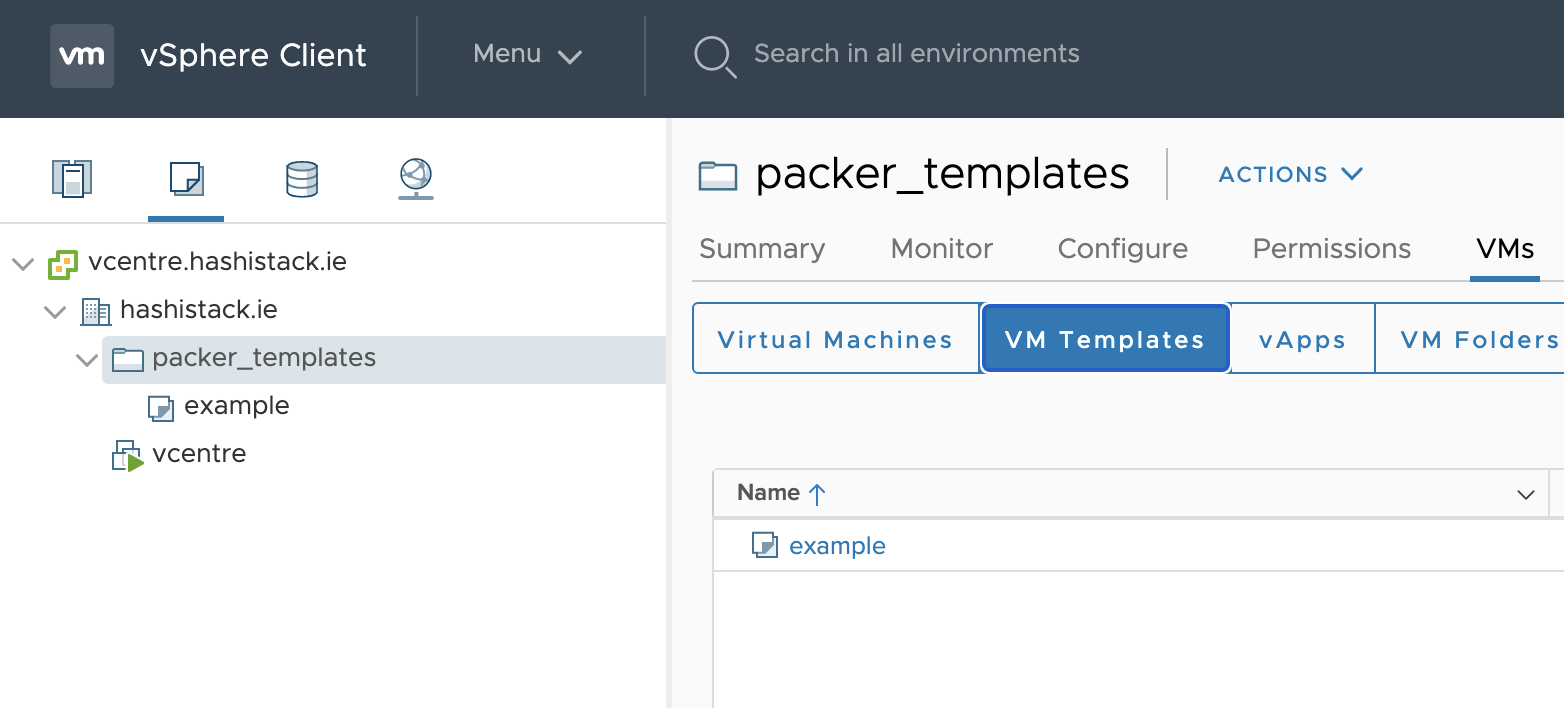
- Espero que este repositorio y el readme sean útiles para alguien más en esta cosa de internet.
Automatización feliz, Graz
Por Hacer
- Agregar más ejemplos de plataformas de imágenes
- Corregir el despliegue de binarios base de envoyproxy
- Posiblemente agregar pruebas de Travis también, ver qué puedo hacer solo en la nube sin necesidad de un Macbook local