

TL;DR
Use HashiCorp Packer v1.7.x with the new HCL2 templates to consistently and securely build, configure and test pipeline images for the VMware ecosystem, VMware ESXi 7.x & vCentre Server Appliance 7.x. The same principles used with VMware in this example can be tweaked for other cloud platforms such as AWS, GCP, Azure, AliCloud, Oracle Cloud and Vagrant, to name a few.
Key Take Aways
- Always disable username/password access over the network at the start of your pipeline by default and ensure to leverage ssh with secret key pairs as a minimium.
Inject a public ssh key for your image builder account at image creation time and disable network authentication via password access – from the preseed.cfg file in this repo the configuration looks like this
d-i preseed/late_command string \
    in-target sed -i 's/^%sudo.*$/%sudo ALL=(ALL:ALL) NOPASSWD: ALL/g' /etc/sudoers; \
    in-target /bin/sh -c "echo 'Defaults env_keep += \"SSH_AUTH_SOCK\"' >> /etc/sudoers"; \
    in-target mkdir -p /home/iac4me/.ssh; \
    in-target /bin/sh -c "echo 'ssh-rsa AAAAB3NzaC1yc2EAAAADAQABAAACAQDDVB4JUB5/wUI0Y5THvquV8suuyLhjHNc/mkyerCZNJi4ZHTDk41wmaNhVcJWAbPKowAVTCchdM19EBPUykFPjnoXxcZS6qFFylAsxP6U0W5b4S5lon7+7d+ZwltgpWuuCdTkcJlDblZRWA8IdReh8mlSR6f8m7ngzgjGtppsxNXPzl7e/s3+CWLPOurb+0ZQvhdNU5Hcaxo/Vd9mW+RRy0ncroQrQ8SPg3xdFuZ+tsYDigoqXh9Jyg3KxvkM91HigHHsl0F03gq7MbniasYRwntzVbdydNkCFsNg0eDyz3hzXW6gXZRoj9TYilgAKmuLPRpiyN0rs8fQBMTVDO9P9yizVP7kB2uzGNOsoE3KhBotAzWM3Ht7rGsQlc+bhmkCsiz1C/c4gkSgIhdwHIvMVBJqGRDQAmf2XWV8XptSpBkQB2Mz9EiBILSSJjNTwod9FTxwn84KEXEsPc8neWcce3P0WE5f0TGyRDTRvy956gXaJSgm7CtxqU/Pwzv6+U41UUMoB0np0prFey7AFovx/IoBTAGwT1j19DNg/LlFKt53UhUURpdlRDXxz6yxoPobo49gyLN/YIWu4LgIvB+b9EKu+5Nfv/2iAntbVWoa/vaocSrHqlw5CQvyHBLZ3VH6EopST2twcrLkpMTmKicHxwRf03LggiiHXu0pX7z5ZTw== iac4me-BASTIONUSER-USER-KEY' >> /home/iac4me/.ssh/authorized_keys"; \
    in-target chown -R iac4me:iac4me /home/iac4me/; \
    in-target chmod -R go-rwx /home/iac4me/.ssh/authorized_keys; \
    in-target sed -i 's/PermitRootLogin yes/PermitRootLogin no/g' /etc/ssh/sshd_config; \
    in-target sed -i 's/#PasswordAuthentication yes/PasswordAuthentication no/g' /etc/ssh/sshd_config;
This configuration information will vary depending on the Operating System (OS) being installed – it’s using the native OS installer, in this case it’s Ubuntu 18.x
Don’t forget to update the login details used by Packer during the build process in the HCL file – example.pkr.hcl
  ssh_private_key_file = "/Users/grazzer/.ssh/iac4me-id_rsa"
  ssh_username = "iac4me"
Note: If working at scale and you’d prefer to avoid the overhead of ssh key management consider switching to Certificate based authentication discussed previously in this blog post
- Test the base images for compliance as you create them – why wait until you’re in production to check for vulnerabilities and non compliance – don’t let them escape out there to begin with.
`Shift left` mindset for security and compliance – bring these teams in early by building compliance and governance into your pipeline from the outset.
Introduction
It’s almost a daily occurence to learn about another big data breach with many millions of user details accidentally leaked or stolen.
We are no longer surprised by these events, however it doesn’t mean that we should let complacency set in. Governments are starting to focus on these data breaches, providing recommendations and best practise guidance in some cases but in all cases fines and penalities are also increasing significantly.
Unfortunately it’s the latter that tends to drive good behaviour in business. I recall sitting in a C level meeting with a global corporation in the late 90’s in London, demonstrating some compliance software. When it came to the commercial discussion the customer used the size of the fine for non-compliance factored with the probability of actually being discovered in the first place as key decision criteria as to whether or not they would invest in the software.
The more recent SolarWinds supply chain hack exposed publically in October 2020, which at the time of writing this article in August 2021 is still impacting many businesses, is yet another example of why the classical `Castle and Moate` pattern, used by companies to protect their IT environments, has become seriously flawed. We are still relying predominantly on firewalls and VPNs to protect the perimiters of our data centres and then assuming everyone inside this circle of trust is a good citizen! Don’t get me wrong here, firewals, VPNs etc. all have a role to play but there’s a lot more that we can do today.
This article focuses on the beginning of a more modern application delivery workflow – the phoenix build process for an immutable pipeline. A lot of words which basically boils down to building, configuring and testing the base images at the start of your application delivery pipeline rather than reconfiguring and updating existing applications. If you’re still struggling to find a window of time to apply the latest round of patches to your production environment it’s time to start looking at these new patterns. It only takes minutes for a published zero day vulnerability to be weaponised and targeted towards these legacy server farms. Why are we still operating this way!
When an Operating System patch needs to be delivered, or an application release deployed these changes are implemented via a new base image, this image then goes through Development and User Acceptance Testing, and once successful, will finally being rolled out to Production. Modern schedulers like Kubernetes or Nomad provide advanced application delivery workflows that help maintaining application availability when switching out the old application and bringing the new application online. Rollback can be fast too, when required, as a result of the immutable approach of this delivery pipeline.
HashiCorp makes a very powerful and useful open source tool known as Packer, which is designed for use at the start of this modern application delivery workflow. It can be used to automatically and consistently build repeatable base images that can then be consumed by the next phase of the application workflow. Much of the cloud native industry has already embraced Packer as their defacto tool for this process. However, I often see pipelines where security has been omitted through convenience at the start of this process. The purpose of the rest of this article will be to provide a few tips and tricks on deploying new images using ssh keys rather than passwords and also adding testing to the base image to help drive compliance. It’s much cheaper to fix a bug at the start of this pipeline than when it’s in production. Everything mentioned here comes out of the box with Packer – it just not always implemented by teams.
I rebuilt the VMware test platform this weekend and will share a warts and all attempt at building an image I did have working in January. Everything that I show here on VMware can be easily adapted for AWS, Azure, GCP, etc. If time permits I’ll drop other examples in this repo at a later date.
I used Packer version 1.7.4 in this example.
The steps that I took
- Let’s quickly install HashiCorp Packer, I’m using MacOS (Intel based) for the demo
- First, I’ll ensure the HashiCorp Homebrew tap is installed, this tap includes all HashiCorp products not just Packer.
$ brew tap hashicorp/tap
- Install Packer on MacOS. Please see the HashiCorp Learn Website for more comprehensive details.
$ brew install hashicorp/tap/packer

==> Installing packer from hashicorp/tap
==> Downloading https://releases.hashicorp.com/packer/1.7.4/packer_1.7.4_darwin_amd64.zip
######################################################################## 100.0%
🍺  /usr/local/Cellar/packer/1.7.4: 3 files, 161.4MB, built in 6 seconds
- Verify Packer has been installed as follows
$ packer version
Packer v1.7.4
- Grab the repo here if you wish to follow along with this walk through
$ git clone git@github.com:allthingsclowd/packer-vsphere.git
Cloning into 'packer-vsphere'...
remote: Enumerating objects: 133, done.
remote: Counting objects: 100% (133/133), done.
remote: Compressing objects: 100% (64/64), done.
remote: Total 133 (delta 59), reused 116 (delta 44), pack-reused 0
Receiving objects: 100% (133/133), 22.56 KiB | 2.51 MiB/s, done.
Resolving deltas: 100% (59/59), done.

$ cd packer-vsphere/
- Let’s quickly check that I’ve created a valid packer HCL template file
$ packer validate example.pkr.hcl
Error: Unset variable "webpagecounter_frontend_version"

A used variable must be set or have a default value; see
https://packer.io/docs/templates/hcl_templates/syntax for details.

Error: Unset variable "vagrant_version"

A used variable must be set or have a default value; see
https://packer.io/docs/templates/hcl_templates/syntax for details.

Error: Unset variable "terraform_version"

A used variable must be set or have a default value; see
https://packer.io/docs/templates/hcl_templates/syntax for details.

Error: Unset variable "env_consul_version"

A used variable must be set or have a default value; see
https://packer.io/docs/templates/hcl_templates/syntax for details.

Error: Unset variable "secretid_service_version"

A used variable must be set or have a default value; see
https://packer.io/docs/templates/hcl_templates/syntax for details.

Error: Unset variable "waypoint_entrypoint_version"

A used variable must be set or have a default value; see
https://packer.io/docs/templates/hcl_templates/syntax for details.

Error: Unset variable "boundary_version"

A used variable must be set or have a default value; see
https://packer.io/docs/templates/hcl_templates/syntax for details.

Error: Unset variable "boundary_desktop_version"

A used variable must be set or have a default value; see
https://packer.io/docs/templates/hcl_templates/syntax for details.

Error: Unset variable "packer_version"

A used variable must be set or have a default value; see
https://packer.io/docs/templates/hcl_templates/syntax for details.

Error: Unset variable "vault_version"

A used variable must be set or have a default value; see
https://packer.io/docs/templates/hcl_templates/syntax for details.

Error: Unset variable "nomad_version"

A used variable must be set or have a default value; see
https://packer.io/docs/templates/hcl_templates/syntax for details.

Error: Unset variable "golang_version"

A used variable must be set or have a default value; see
https://packer.io/docs/templates/hcl_templates/syntax for details.

Error: Unset variable "vcentre_host"

A used variable must be set or have a default value; see
https://packer.io/docs/templates/hcl_templates/syntax for details.

Error: Unset variable "esx_host"

A used variable must be set or have a default value; see
https://packer.io/docs/templates/hcl_templates/syntax for details.

Error: Unset variable "vcentre_password"

A used variable must be set or have a default value; see
https://packer.io/docs/templates/hcl_templates/syntax for details.

Error: Unset variable "envoy_version"

A used variable must be set or have a default value; see
https://packer.io/docs/templates/hcl_templates/syntax for details.

Error: Unset variable "webpagecounter_version"

A used variable must be set or have a default value; see
https://packer.io/docs/templates/hcl_templates/syntax for details.

Error: Unset variable "consul_version"

A used variable must be set or have a default value; see
https://packer.io/docs/templates/hcl_templates/syntax for details.

Error: Unset variable "nomad_autoscaler_version"

A used variable must be set or have a default value; see
https://packer.io/docs/templates/hcl_templates/syntax for details.

Error: Unset variable "consul_template_version"

A used variable must be set or have a default value; see
https://packer.io/docs/templates/hcl_templates/syntax for details.

Error: Unset variable "waypoint_version"

A used variable must be set or have a default value; see
https://packer.io/docs/templates/hcl_templates/syntax for details.

Error: Unset variable "vcentre_user"

A used variable must be set or have a default value; see
https://packer.io/docs/templates/hcl_templates/syntax for details.
- Whoops, don’t forget to source your environment variables once you’ve correctly configured them to align with your environmental setup. Ensure to change the defaults in the
var.envfile. Off we go again..
$ source var.env
$ packer validate example.pkr.hcl
Error: Unset variable "vcentre_password"

A used variable must be set or have a default value; see
https://packer.io/docs/templates/hcl_templates/syntax for details.

Error: Unset variable "vcentre_host"

A used variable must be set or have a default value; see
https://packer.io/docs/templates/hcl_templates/syntax for details.

Error: Unset variable "esx_host"

A used variable must be set or have a default value; see
https://packer.io/docs/templates/hcl_templates/syntax for details.

Error: Unset variable "vcentre_user"

A used variable must be set or have a default value; see
https://packer.io/docs/templates/hcl_templates/syntax for details.
- You didn’t really think I’d have the passwords in the
var.envfile in my github repo – did you? I need to pull these in as environment variables too. You will also need to configure these secret environment variables to match your environment, please don’t put them in your repo it’s not a good practise. (We do offer HashiCorp Vault for managing such secret material but that post is for another day)
Outside of this repository I have the following secrets file that is also sourced to configure the required environment variables…
# vCenter Setup
export PKR_VAR_vcentre_user="@vsphere.local"
export PKR_VAR_vcentre_password=""
export PKR_VAR_vcentre_host="vCentre IP Address"
export PKR_VAR_esx_host="ESX IP Address"
- Once the
var.envfile and thesecretsfile have both been sourced (all prerequisited environment variables set in memory) the packer validation will succeed … boringly without any notification as follows
$ packer validate example.pkr.hcl
$
- So, let’s go for it!
- The configuration has passed it’s Packer validation so that’s it right?
- 1, 2, 3 and we’re off…
$ packer build example.pkr.hcl

- Wrong 😦
==> vsphere-iso.example: Provisioning with Inspec...
==> vsphere-iso.example: Executing Inspec: inspec exec test/ImageBuild-Packer-Test --backend ssh --host 127.0.0.1 --user grazzer --key-files /var/folders/qq/8hmjq2xj23qcgjj7c5dbnvzm0000gn/T/packer-provisioner-inspec.994691541.key --port 64111 --input-file /var/folders/qq/8hmjq2xj23qcgjj7c5dbnvzm0000gn/T/packer-provisioner-inspec.367916336.yml
==> vsphere-iso.example: read |0: file already closed
==> vsphere-iso.example: Provisioning step had errors: Running the cleanup provisioner, if present...
==> vsphere-iso.example: Clear boot order...
==> vsphere-iso.example: Power off VM...
==> vsphere-iso.example: Deleting Floppy image ...
==> vsphere-iso.example: Destroying VM...
Build 'vsphere-iso.example' errored after 20 minutes 26 seconds: Error executing Inspec: exec: "inspec": executable file not found in $PATH

==> Wait completed after 20 minutes 26 seconds

==> Some builds didn't complete successfully and had errors:
--> vsphere-iso.example: Error executing Inspec: exec: "inspec": executable file not found in $PATH

==> Builds finished but no artifacts were created.
- Packer has been configured to use Chef’s Inspec to test my packer build process but a recent Zoom challenge forced a laptop rebuild during a frustrated debug session and I have not automated my laptop rebuild process. I need to re-install Chef as the Inspec testing runs from the build server (my laptop)
$ curl https://omnitruck.chef.io/install.sh | sudo bash -s -- -P inspec
  % Total    % Received % Xferd  Average Speed   Time    Time     Time  Current
                                 Dload  Upload   Total   Spent    Left  Speed
100 23409  100 23409    0     0   198k      0 --:--:-- --:--:-- --:--:--  198k
Password:
mac_os_x 11.4 x86_64
Getting information for inspec stable  for mac_os_x...
downloading https://omnitruck.chef.io/stable/inspec/metadata?v=&p=mac_os_x&pv=11.4&m=x86_64
  to file /tmp/install.sh.10782/metadata.txt
trying curl...
sha1    11e08ab78ce2971b7f129a2306e0a1636039b7f0
sha256  bc5772b1db8e13f2766390e995dbda1651813d1b1737c88af47b8f217acb03b0
url https://packages.chef.io/files/stable/inspec/4.38.9/mac_os_x/11/inspec-4.38.9-1.x86_64.dmg
version 4.38.9
downloaded metadata file looks valid...
downloading https://packages.chef.io/files/stable/inspec/4.38.9/mac_os_x/11/inspec-4.38.9-1.x86_64.dmg
  to file /tmp/install.sh.10782/inspec-4.38.9-1.x86_64.dmg
trying curl...
Comparing checksum with shasum...

WARNING WARNING WARNING WARNING WARNING WARNING WARNING WARNING WARNING

You are installing a package without a version pin.  If you are installing
on production servers via an automated process this is DANGEROUS and you will
be upgraded without warning on new releases, even to new major releases.
Letting the version float is only appropriate in desktop, test, development or
CI/CD environments.

WARNING WARNING WARNING WARNING WARNING WARNING WARNING WARNING WARNING

Installing inspec
installing dmg file...
Checksumming Protective Master Boot Record (MBR : 0)…
Protective Master Boot Record (MBR :: verified CRC32 $A63E199D
Checksumming GPT Header (Primary GPT Header : 1)…
 GPT Header (Primary GPT Header : 1): verified CRC32 $554DB84C
Checksumming GPT Partition Data (Primary GPT Table : 2)…
GPT Partition Data (Primary GPT Tabl: verified CRC32 $9451B1CA
Checksumming  (Apple_Free : 3)…
                    (Apple_Free : 3): verified CRC32 $00000000
Checksumming disk image (Apple_HFS : 4)…
....................................................................................................................
          disk image (Apple_HFS : 4): verified CRC32 $CE3F8BAF
Checksumming  (Apple_Free : 5)…
                    (Apple_Free : 5): verified CRC32 $00000000
Checksumming GPT Partition Data (Backup GPT Table : 6)…
GPT Partition Data (Backup GPT Table: verified CRC32 $9451B1CA
Checksumming GPT Header (Backup GPT Header : 7)…
  GPT Header (Backup GPT Header : 7): verified CRC32 $CA80E7E2
verified CRC32 $9E68E33F
/dev/disk3              GUID_partition_scheme
/dev/disk3s1            Apple_HFS                       /Volumes/chef_software
installer: Package name is InSpec
installer: Installing at base path /
installer: The install was successful.
"disk3" ejected.
- And off we go again…
$ packer build example.pkr.hcl
vsphere-iso.example: output will be in this color.

==> vsphere-iso.example: File /Users/grazzer/repos/packer-vsphere/packer_cache/a37af95ab12e665ba168128cde2f3662740b21a2.iso already uploaded; continuing
==> vsphere-iso.example: File [IntelDS2] packer_cache//a37af95ab12e665ba168128cde2f3662740b21a2.iso already exists; skipping upload.
==> vsphere-iso.example: Creating VM...
==> vsphere-iso.example: Customizing hardware...
==> vsphere-iso.example: Mounting ISO images...
==> vsphere-iso.example: Adding configuration parameters...
==> vsphere-iso.example: Creating floppy disk...
    vsphere-iso.example: Copying files flatly from floppy_files
    vsphere-iso.example: Copying file: ./http/preseed.cfg
    vsphere-iso.example: Done copying files from floppy_files
    vsphere-iso.example: Collecting paths from floppy_dirs
    vsphere-iso.example: Resulting paths from floppy_dirs : []
    vsphere-iso.example: Done copying paths from floppy_dirs
==> vsphere-iso.example: Uploading created floppy image
==> vsphere-iso.example: Adding generated Floppy...
==> vsphere-iso.example: Set boot order temporary...
==> vsphere-iso.example: Power on VM...
==> vsphere-iso.example: Waiting 10s for boot...
==> vsphere-iso.example: Provisioning with Inspec...
==> vsphere-iso.example: Executing Inspec: inspec exec test/ImageBuild-Packer-Test --backend ssh --host 127.0.0.1 --user grazzer --key-files /var/folders/qq/8hmjq2xj23qcgjj7c5dbnvzm0000gn/T/packer-provisioner-inspec.131501239.key --port 55207 --input-file /var/folders/qq/8hmjq2xj23qcgjj7c5dbnvzm0000gn/T/packer-provisioner-inspec.069478570.yml
    vsphere-iso.example: [2021-07-31T20:53:28+01:00] ERROR: Chef InSpec cannot execute without accepting the license
==> vsphere-iso.example: Provisioning step had errors: Running the cleanup provisioner, if present...
==> vsphere-iso.example: Clear boot order...
==> vsphere-iso.example: Power off VM...
==> vsphere-iso.example: Deleting Floppy image ...
==> vsphere-iso.example: Destroying VM...
Build 'vsphere-iso.example' errored after 10 minutes 34 seconds: Error executing Inspec: Inspec exited with unexpected exit status: 172. Expected exit codes are: [0 101]

==> Wait completed after 10 minutes 34 seconds

==> Some builds didn't complete successfully and had errors:
--> vsphere-iso.example: Error executing Inspec: Inspec exited with unexpected exit status: 172. Expected exit codes are: [0 101]

==> Builds finished but no artifacts were created.
- Inspec forces you to accept their license before you can use their software, fair enough – not that I read any of the legal jargon
 $ inspec --chef-license=accept
+---------------------------------------------+
✔ 1 product license accepted.
+---------------------------------------------+
Commands:
  inspec archive PATH                # archive a profile to tar.gz (default) or zip
  inspec check PATH                  # verify all tests at the specified PATH
  inspec clear_cache                 # clears the InSpec cache. Useful for debugging.
  inspec detect                      # detect the target OS
  inspec env                         # Output shell-appropriate completion configuration
  inspec exec LOCATIONS              # Run all tests at LOCATIONS.
  inspec help [COMMAND]              # Describe available commands or one specific command
  inspec json PATH                   # read all tests in PATH and generate a JSON summary
  inspec shell                       # open an interactive debugging shell
  inspec supermarket SUBCOMMAND ...  # Supermarket commands
  inspec vendor PATH                 # Download all dependencies and generate a lockfile in a `vendor` directory
  inspec version                     # prints the version of this tool

Options:
  l, [--log-level=LOG_LEVEL]                         # Set the log level: info (default), debug, warn, error
      [--log-location=LOG_LOCATION]                  # Location to send diagnostic log messages to. (default: $stdout or Inspec::Log.error)
      [--diagnose], [--no-diagnose]                  # Show diagnostics (versions, configurations)
      [--color], [--no-color]                        # Use colors in output.
      [--interactive], [--no-interactive]            # Allow or disable user interaction
      [--disable-user-plugins]                       # Disable loading all plugins that the user installed.
      [--enable-telemetry], [--no-enable-telemetry]  # Allow or disable telemetry
      [--chef-license=CHEF_LICENSE]                  # Accept the license for this product and any contained products: accept, accept-no-persist, accept-silent

About Chef InSpec:
  Patents: chef.io/patents
- And here we go again, third time lucky…
- Okay, bare with me – this error is more on topic. Once the image was built Packer then kicked off the Inspec tests to ensure the image build is compliant. It’s not! It turns out that the Envoy Proxy team may have changed how their software can be deployed since I last ran their installation script.
    vsphere-iso.example:   ✔  golang-version-1.0: golang version check
    vsphere-iso.example:      ✔  Command: `/usr/local/go/bin/go version` stdout is expected to match "1.16"
    vsphere-iso.example:   ×  envoy-exists-1.0: envoy software exists
    vsphere-iso.example:      ×  File /usr/local/bin/envoy is expected to exist
    vsphere-iso.example:      expected File /usr/local/bin/envoy to exist
    vsphere-iso.example:   ×  envoy-version-1.0: envoy version check
    vsphere-iso.example:      ×  Command: `/usr/local/bin/envoy --version` stdout is expected to match "1.17.0"
    vsphere-iso.example:      expected "" to match "1.17.0"
    vsphere-iso.example:
    vsphere-iso.example:
    vsphere-iso.example: Profile Summary: 25 successful controls, 2 control failures, 0 controls skipped
    vsphere-iso.example: Test Summary: 32 successful, 2 failures, 0 skipped
==> vsphere-iso.example: Provisioning step had errors: Running the cleanup provisioner, if present...
==> vsphere-iso.example: Clear boot order...
==> vsphere-iso.example: Power off VM...
==> vsphere-iso.example: Deleting Floppy image ...
==> vsphere-iso.example: Destroying VM...
Build 'vsphere-iso.example' errored after 10 minutes 54 seconds: Error executing Inspec: Inspec exited with unexpected exit status: 100. Expected exit codes are: [0 101]

==> Wait completed after 10 minutes 54 seconds

==> Some builds didn't complete successfully and had errors:
- Basically what’s happening now is my post build testing, all part of the packer build process, has detected an error with one of the binaries that should be on this image, it’s missing!!! This is exactly why we use ephemeral builds and test before we ever get into production – it’s much cheaper for businesses to make these mistakes earlier in the delivery process.
- It looks like the envoyproxy installation process has changed since this build was last run successfully in January
==> vsphere-iso.example: /tmp/script_4250.sh: line 128: getenvoy: command not found
==> vsphere-iso.example: chmod: cannot access '/usr/local/bin/getenvoy': No such file or directory
==> vsphere-iso.example: /tmp/script_4250.sh: line 130: /usr/local/bin/getenvoy: No such file or directory
==> vsphere-iso.example: cp: cannot stat '/usr/local/bin/builds/standard/1.17.0/linux_glibc/bin/envoy': No such file or directory
==> vsphere-iso.example: chmod: cannot access '/usr/local/bin/envoy': No such file or directory
==> vsphere-iso.example: /tmp/script_4250.sh: line 133: /usr/local/bin/envoy: No such file or directory
- So, I cheated a little here in the interest of time and have removed the test for envoy proxy binary from the
vmware_example_image.rbfile until such a time as I have an opportunity to debug it’s installation script.
# control 'envoy-exists-1.0' do
#   impact 1.0
#   title 'envoy software exists'
#   desc 'verify that envoy is installed'
#   describe file('/usr/local/bin/envoy') do
#     it { should exist }
#   end
# end

# control 'envoy-version-1.0' do
#   impact 1.0
#   title 'envoy version check'
#   desc 'verify that envoy is the correct version'
#   describe command('/usr/local/bin/envoy --version') do
#    its('stdout') { should match envoy_version }
#   end
# end
- And off we go again…
- In the midst of my changes this happens…
$ git push
Enumerating objects: 35, done.
Counting objects: 100% (35/35), done.
Delta compression using up to 8 threads
Compressing objects: 100% (19/19), done.
Writing objects: 100% (26/26), 933.16 MiB | 1.92 MiB/s, done.
Total 26 (delta 8), reused 2 (delta 0), pack-reused 0
remote: Resolving deltas: 100% (8/8), completed with 3 local objects.
remote: error: GH001: Large files detected. You may want to try Git Large File Storage - https://git-lfs.github.com.
remote: error: Trace: 58ba6c71facaeb026b51d562c13d6bfd54da57cdd13ef128e97c5ee43c426bd8
remote: error: See http://git.io/iEPt8g for more information.
remote: error: File packer_cache/a37af95ab12e665ba168128cde2f3662740b21a2.iso is 951.00 MB; this exceeds GitHub's file size limit of 100.00 MB
To github.com:allthingsclowd/packer-vsphere.git
 ! [remote rejected] update -> update (pre-receive hook declined)
error: failed to push some refs to 'github.com:allthingsclowd/packer-vsphere.git'
- Basically another cautious tail when working with Packer and Git repositories…setup your
.gitignorefile before commiting anything. When Packer runs it caches the images that you call out for in your configuration file. We don’t want these in our git repository (usually). - To avoid this error remember to create and configure a
.gitignorefile at the start of your image building process and as a minimium place thepacker_cachedirectory in it. - To fix this issue I use a handy tool called BFG as follows
$ java -jar ~/Downloads/bfg-1.14.0.jar --strip-blobs-bigger-than 100M packer-vsphere/

Using repo : /Users/grazzer/repos/packer-vsphere/.git

Scanning packfile for large blobs: 134
Scanning packfile for large blobs completed in 23 ms.
Found 1 blob ids for large blobs - biggest=997195776 smallest=997195776
Total size (unpacked)=997195776
Found 11 objects to protect
Found 7 commit-pointing refs : HEAD, refs/heads/grazzer, refs/heads/update, ...

Protected commits
-----------------

These are your protected commits, and so their contents will NOT be altered:

 * commit 97d7665f (protected by 'HEAD')

Cleaning
--------

Found 26 commits
Cleaning commits:       100% (26/26)
Cleaning commits completed in 95 ms.

Updating 1 Ref
--------------

    Ref                 Before     After
    ---------------------------------------
    refs/heads/update | 97d7665f | cc8b9271

Updating references:    100% (1/1)
...Ref update completed in 21 ms.

Commit Tree-Dirt History
------------------------

    Earliest            Latest
    |                        |
    .....................DDDmm

    D = dirty commits (file tree fixed)
    m = modified commits (commit message or parents changed)
    . = clean commits (no changes to file tree)

                            Before     After
    -------------------------------------------
    First modified commit | cfcd2a9c | 6528e27
    Last dirty commit     | 23747e6c | 3f891d80

Deleted files
-------------

    Filename                                       Git id
    ------------------------------------------------------------------
    a37af95ab12e665ba168128cde2f3662740b21a2.iso | 1a5de3fe (951.0 MB)

In total, 9 object ids were changed. Full details are logged here:

    /Users/grazzer/repos/packer-vsphere.bfg-report/2021-08-01/09-35-21

BFG run is complete! When ready, run: git reflog expire --expire=now --all && git gc --prune=now --aggressive
$ cd packer-vsphere
$ git reflog expire --expire=now --all && git gc --prune=now --aggressive
Enumerating objects: 164, done.
Counting objects: 100% (164/164), done.
Delta compression using up to 8 threads
Compressing objects: 100% (131/131), done.
Writing objects: 100% (164/164), done.
Total 164 (delta 71), reused 61 (delta 0), pack-reused 0
grazzer@Grahams-MacBook-Pro ~/r/packer-vsphere (update)> git push
Enumerating objects: 41, done.
Counting objects: 100% (41/41), done.
Delta compression using up to 8 threads
Compressing objects: 100% (16/16), done.
Writing objects: 100% (32/32), 10.83 KiB | 10.83 MiB/s, done.
Total 32 (delta 10), reused 29 (delta 7), pack-reused 0
remote: Resolving deltas: 100% (10/10), completed with 3 local objects.
To github.com:allthingsclowd/packer-vsphere.git
   8acc2bb..cc8b927  update -> update
$
- So, I fixed the repository I broke, let’s go again…
$ packer build -on-error=abort example.pkr.hcl
vsphere-iso.example: output will be in this color.

==> vsphere-iso.example: File /Users/grazzer/repos/packer-vsphere/packer_cache/a37af95ab12e665ba168128cde2f3662740b21a2.iso already uploaded; continuing
==> vsphere-iso.example: File [IntelDS2] packer_cache//a37af95ab12e665ba168128cde2f3662740b21a2.iso already exists; skipping upload.
==> vsphere-iso.example: packer_templates/example already exists, you can use -force flag to destroy it: <nil>
==> vsphere-iso.example: Step "StepCreateVM" failed, aborting...
==> vsphere-iso.example: aborted: skipping cleanup of step "StepRemoteUpload"
==> vsphere-iso.example: aborted: skipping cleanup of step "StepCreateCD"
==> vsphere-iso.example: aborted: skipping cleanup of step "StepDownload"
==> vsphere-iso.example: aborted: skipping cleanup of step "StepConnect"
Build 'vsphere-iso.example' errored after 462 milliseconds 605 microseconds: packer_templates/example already exists, you can use -force flag to destroy it: <nil>

==> Wait completed after 462 milliseconds 786 microseconds

==> Some builds didn't complete successfully and had errors:
--> vsphere-iso.example: packer_templates/example already exists, you can use -force flag to destroy it: <nil>

==> Builds finished but no artifacts were created.
- By default Packer cleans up after itself when it throws an error. However, when debugging an installation script (envoy proxy above) it’s often helpful to prevent this cleanup operation so that we can login to the server and manually investigate.
- This mode of operation is invoked by using the
-on-errorflag as follows
$ packer build -on-error=abort example.pkr.hcl
- However, we got the previous error when restarting the build because Packer quickly detected the previous run was not cleaned up correctly.
- We can push past this by leveraging the
-forceflag - And now we’re back on track…
packer build -on-error=abort -force example.pkr.hcl
vsphere-iso.example: output will be in this color.

==> vsphere-iso.example: File /Users/grazzer/repos/packer-vsphere/packer_cache/a37af95ab12e665ba168128cde2f3662740b21a2.iso already uploaded; continuing
==> vsphere-iso.example: File [IntelDS2] packer_cache//a37af95ab12e665ba168128cde2f3662740b21a2.iso already exists; skipping upload.
==> vsphere-iso.example: the vm/template packer_templates/example already exists, but deleting it due to -force flag
==> vsphere-iso.example: Creating VM...
==> vsphere-iso.example: Customizing hardware...
==> vsphere-iso.example: Mounting ISO images...
==> vsphere-iso.example: Adding configuration parameters...
==> vsphere-iso.example: Creating floppy disk...
    vsphere-iso.example: Copying files flatly from floppy_files
    vsphere-iso.example: Copying file: ./http/preseed.cfg
    vsphere-iso.example: Done copying files from floppy_files
    vsphere-iso.example: Collecting paths from floppy_dirs
    vsphere-iso.example: Resulting paths from floppy_dirs : []
    vsphere-iso.example: Done copying paths from floppy_dirs
==> vsphere-iso.example: Uploading created floppy image
==> vsphere-iso.example: Adding generated Floppy...
==> vsphere-iso.example: Set boot order temporary...
==> vsphere-iso.example: Power on VM...
. . .
==> vsphere-iso.example: Shutting down VM...
==> vsphere-iso.example: Cannot shut down VM: ServerFaultCode: Cannot complete operation because VMware Tools is not running in this virtual machine.
==> vsphere-iso.example: Step "StepShutdown" failed, aborting...
==> vsphere-iso.example: aborted: skipping cleanup of step "StepProvision"
==> vsphere-iso.example: aborted: skipping cleanup of step "StepConnect"
==> vsphere-iso.example: aborted: skipping cleanup of step "StepWaitForIp"
==> vsphere-iso.example: aborted: skipping cleanup of step "StepBootCommand"
==> vsphere-iso.example: aborted: skipping cleanup of step "StepRun"
==> vsphere-iso.example: aborted: skipping cleanup of step "StepHTTPServer"
==> vsphere-iso.example: aborted: skipping cleanup of step "StepHTTPIPDiscover"
==> vsphere-iso.example: aborted: skipping cleanup of step "StepAddFloppy"
==> vsphere-iso.example: aborted: skipping cleanup of step "StepCreateFloppy"
==> vsphere-iso.example: aborted: skipping cleanup of step "StepConfigParams"
==> vsphere-iso.example: aborted: skipping cleanup of step "StepAddCDRom"
==> vsphere-iso.example: aborted: skipping cleanup of step "StepConfigureHardware"
==> vsphere-iso.example: aborted: skipping cleanup of step "StepCreateVM"
==> vsphere-iso.example: aborted: skipping cleanup of step "StepRemoteUpload"
==> vsphere-iso.example: aborted: skipping cleanup of step "StepCreateCD"
==> vsphere-iso.example: aborted: skipping cleanup of step "StepDownload"
==> vsphere-iso.example: aborted: skipping cleanup of step "StepConnect"
Build 'vsphere-iso.example' errored after 10 minutes 48 seconds: Cannot shut down VM: ServerFaultCode: Cannot complete operation because VMware Tools is not running in this virtual machine.

==> Wait completed after 10 minutes 48 seconds

==> Some builds didn't complete successfully and had errors:
--> vsphere-iso.example: Cannot shut down VM: ServerFaultCode: Cannot complete operation because VMware Tools is not running in this virtual machine.

==> Builds finished but no artifacts were created.
- What?
- No Waaaaaaaay!
- Waaaaay!
- Missing VMware Tools!!! This is a surprise, last time I looked I’m sure it was installed.
- Quick fix here is to simply ensure VMware Tools is added to the prerequisites in the installation script
packer_install_base_packages.sh
sudo apt-get install -y -q wget tmux unzip git redis-server nginx lynx jq curl net-tools open-vm-tools
- And don’t forget to test for it, of course, by adding the following to the Inspec test file
  describe package('open-vm-tools') do
    it {should be_installed}
  end
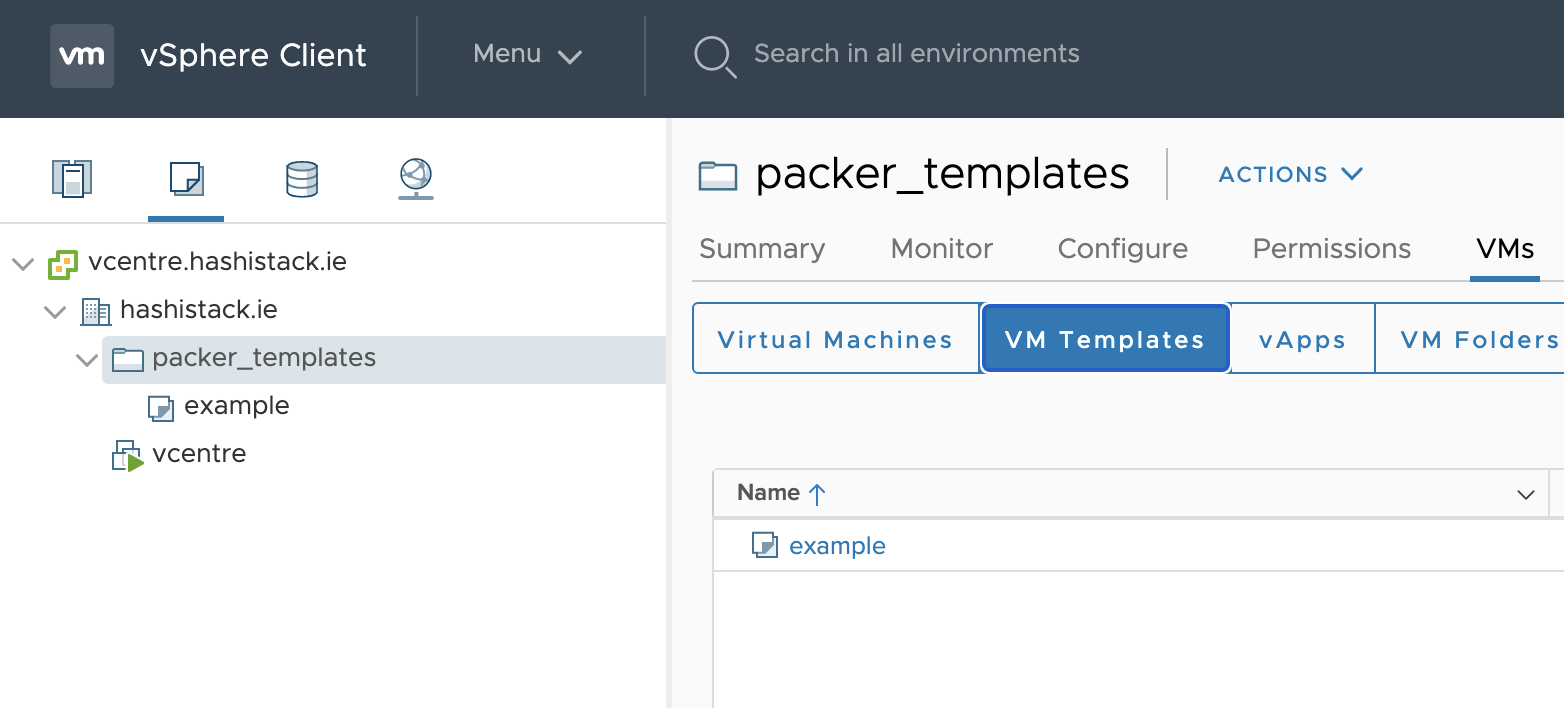
- And finally we get a new template deployed to my ESX host
    vsphere-iso.example:   ✔  golang-exists-1.0: golang exists
    vsphere-iso.example:      ✔  File /usr/local/go/bin/go is expected to exist
    vsphere-iso.example:   ✔  golang-version-1.0: golang version check
    vsphere-iso.example:      ✔  Command: `/usr/local/go/bin/go version` stdout is expected to match "1.16"
    vsphere-iso.example:
    vsphere-iso.example:
    vsphere-iso.example: Profile Summary: 22 successful controls, 0 control failures, 0 controls skipped
    vsphere-iso.example: Test Summary: 30 successful, 0 failures, 0 skipped
==> vsphere-iso.example: Shutting down VM...
==> vsphere-iso.example: Deleting Floppy drives...
==> vsphere-iso.example: Deleting Floppy image...
==> vsphere-iso.example: Eject CD-ROM drives...
==> vsphere-iso.example: Convert VM into template...
==> vsphere-iso.example: Clear boot order...
Build 'vsphere-iso.example' finished after 10 minutes 43 seconds.

==> Wait completed after 10 minutes 43 seconds

==> Builds finished. The artifacts of successful builds are:
--> vsphere-iso.example: example
- Hopefully this repository and readme is useful to someone else on this interweb thingy.
Happy Automating, Graz
To Do
- Add more image platform examples
- Fix base binary deployment of envoyproxy
- Possibly add Travis testing too, see what I can do just in the cloud with no local Macbook required