
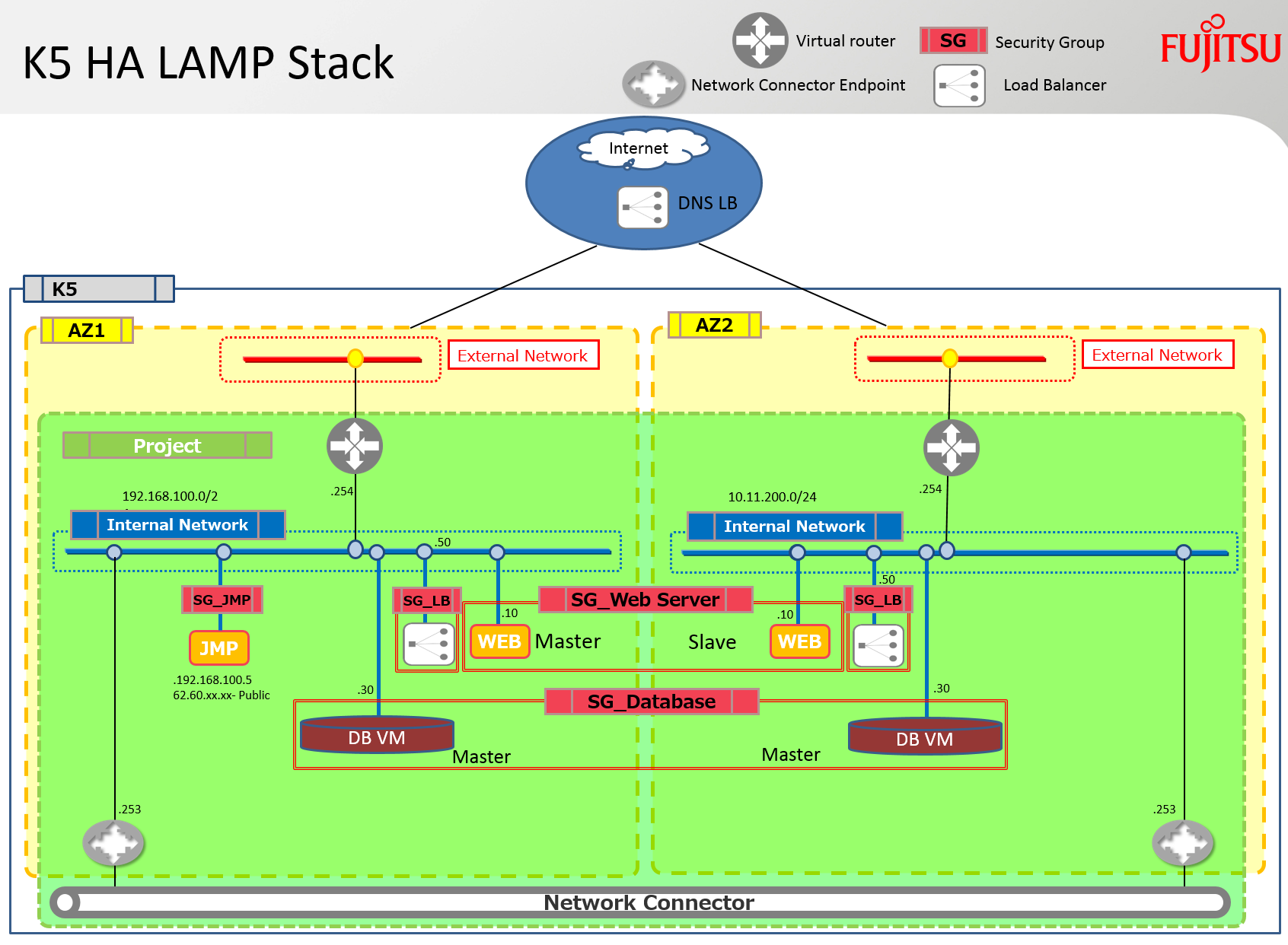
Sí, temo que es otra pila HEAT LAMP más. Sin embargo, esta pila incluye algunas de las mejoras que Fujitsu ha desarrollado para Neutron y Heat. Despliega un servidor apache y un servidor mysql en ambas zonas de disponibilidad. También enlaza ambas Zonas de Disponibilidad (AZ) para facilitar el tráfico de replicación y sincronización entre estos servidores mediante un conector de red. Además, se despliega un equilibrador de carga en cada subred y contiene ambos servidores apache en su grupo.
Nota: Lamentablemente, no he tenido tiempo de configurar y depurar los scripts de apache o mysql; solo está instalado el software, pero hay muchos artículos sobre estos temas en la blogosfera – ¡solo busca en Yahoo algunos ejemplos… jaja! También, los equilibradores de carga deberían finalmente equilibrarse ellos mismos utilizando un servicio de DNS HA externo para garantizar que no haya un único punto de fallo.
El diagrama a continuación describe la infraestructura que se construirá utilizando la pila discutida en este blog.
Requisitos previos
Se requieren los siguientes requisitos previos para un despliegue exitoso de esta pila.
Routers virtuales: Se debe crear un router virtual con conexión a internet en cada zona de disponibilidad y añadir los parámetros asociados con estos routers a la pila.
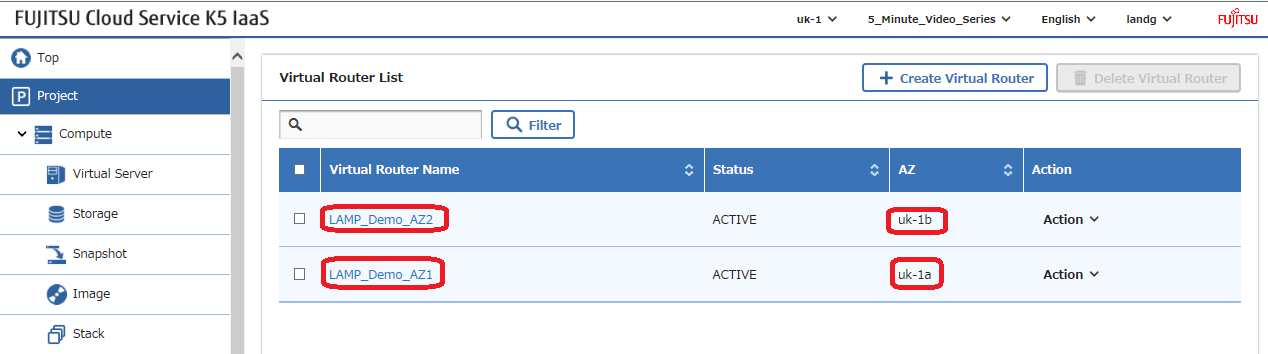
Obtén el identificador de cada router, que debe ser modificado en el ejemplo de la pila, y anota el nombre de su red externa que es utilizada por cada router –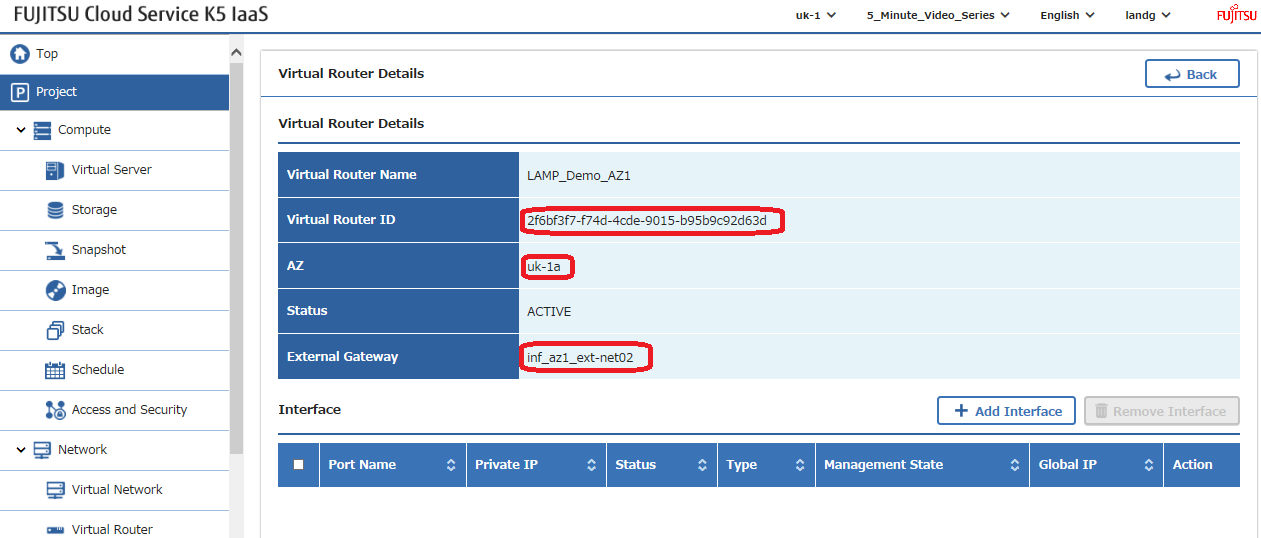
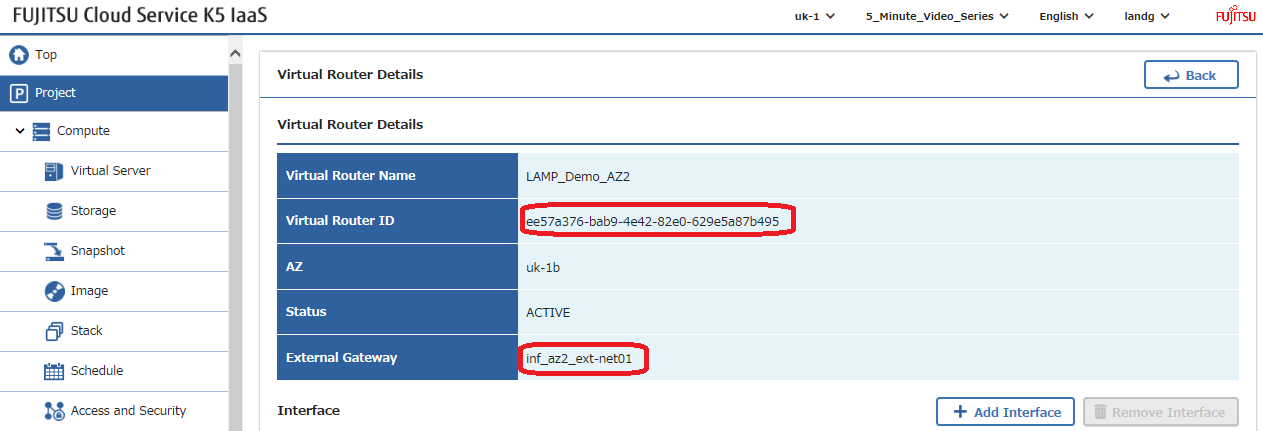
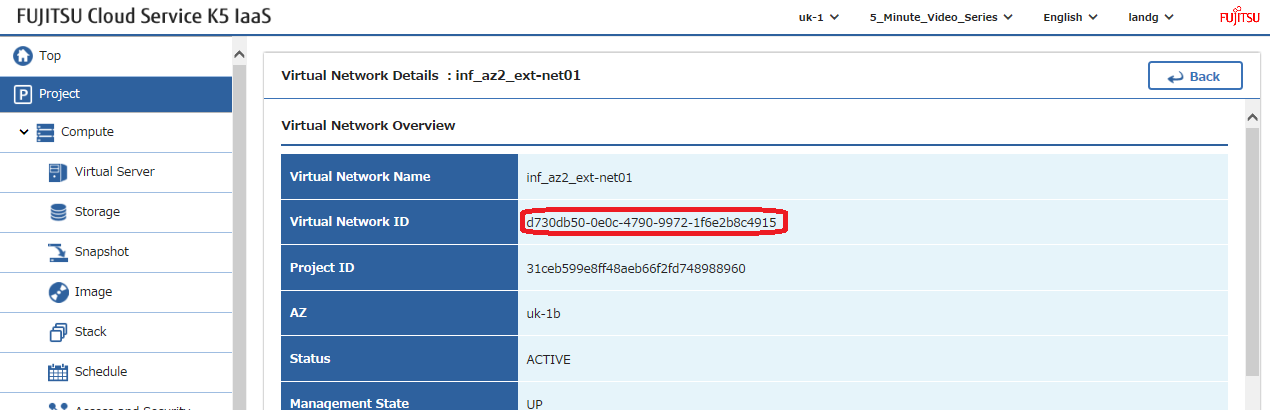
Redes externas: Utilizando los nombres de red externa identificados anteriormente en la configuración del gateway, localiza los identificadores de red de estas redes externas, también conocidas como públicas, y modifica estos valores en el ejemplo de la pila –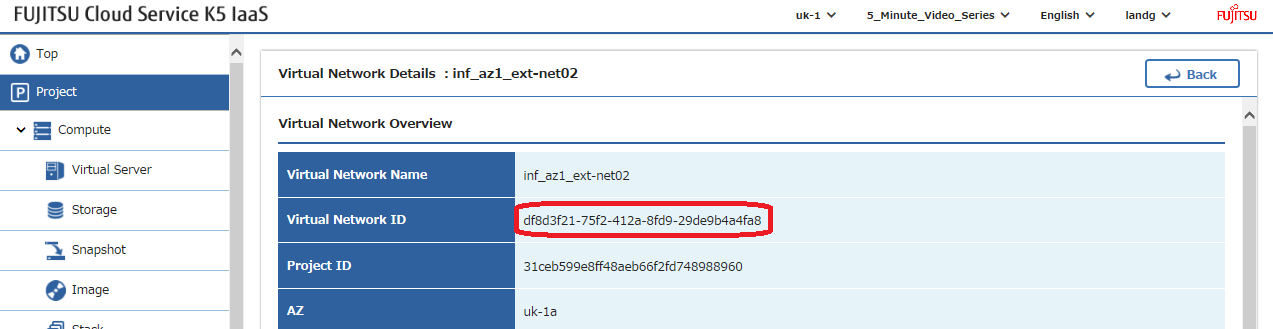
Claves SSH: Crea un par de claves ssh en cada zona de disponibilidad y modifica sus nombres en el ejemplo de la pila –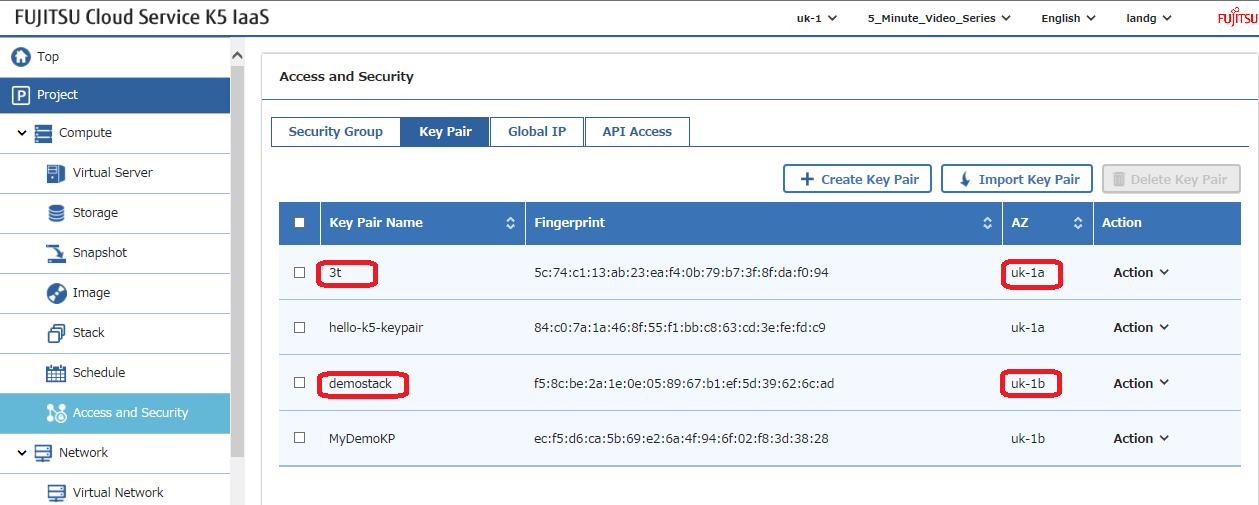
Imagen: Selecciona la imagen que deseas utilizar y modifica este parámetro en el ejemplo de la pila. Nota: Los scripts de despliegue ‘UserData’ dentro de la pila han sido probados en CentOS7.2. Si decides desplegar una versión diferente del sistema operativo, será necesario modificar estos scripts con los comandos requeridos por el sistema operativo elegido.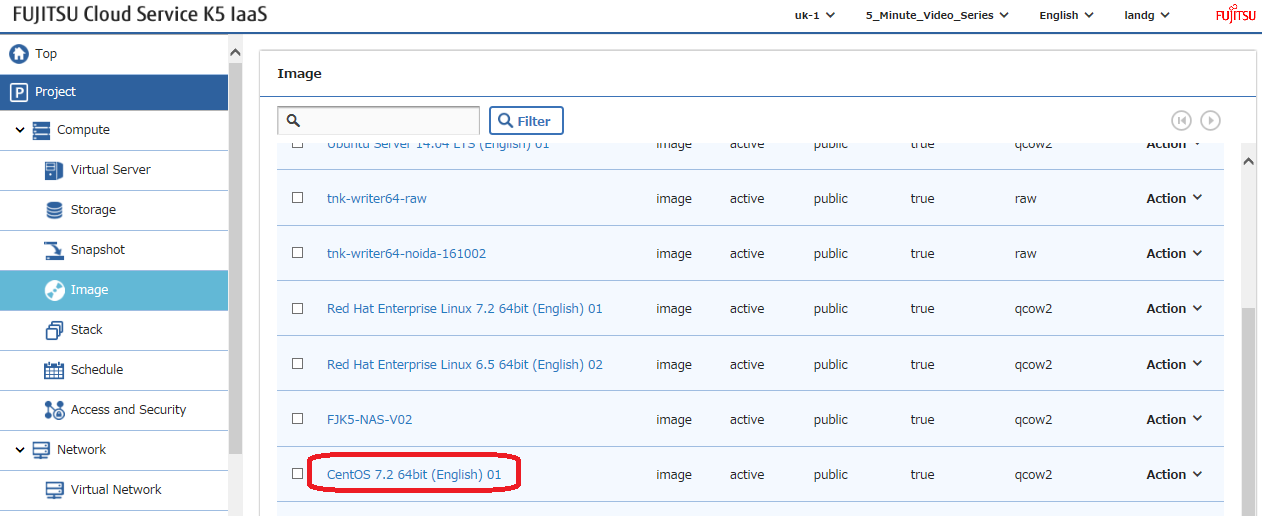
Despliegue
Una vez que todos estos parámetros hayan sido configurados, es momento de lanzar tu pila, pero primero déjame discutir brevemente las secciones principales –
Aquí están todos los parámetros de entrada que deben ser modificados para adaptarse a tu entorno –
Este archivo contiene texto Unicode oculto o bidireccional que puede ser interpretado o compilado de manera diferente a lo que aparece a continuación. Para revisarlo, abre el archivo en un editor que revele caracteres Unicode ocultos.
Más información sobre caracteres Unicode bidireccionales
| # Input parameters | |
| parameters: | |
| centos_image: | |
| type: string | |
| label: Image name or ID | |
| description: Image to be used for compute instance | |
| default: "CentOS 7.2 64bit (English) 01" | |
| flavor_S2: | |
| type: string | |
| label: Flavor | |
| description: Type of instance (flavor) to be used | |
| default: "S-2" | |
| key_az_1: | |
| type: string | |
| label: Key name | |
| description: Name of key-pair to be used for compute instance | |
| default: "3t" | |
| key_az_2: | |
| type: string | |
| label: Key name | |
| description: Name of key-pair to be used for compute instance | |
| default: "demostack" | |
| public_net_az1: | |
| type: string | |
| label: external network ID | |
| description: Public network | |
| default: "df8d3f21-75f2-412a-8fd9-29de9b4a4fa8" | |
| public_net_az2: | |
| type: string | |
| label: external network ID | |
| description: Public network | |
| default: "d730db50-0e0c-4790-9972-1f6e2b8c4915" | |
| az1: | |
| type: string | |
| label: Availability Zone | |
| description: Region AZ to use | |
| default: "uk-1a" | |
| az2: | |
| type: string | |
| label: Availability Zone | |
| description: Region AZ to use | |
| default: "uk-1b" | |
| ext_router_az1: | |
| type: string | |
| label: External Router | |
| description: Router with external access for global ip allocation | |
| default: "2f6bf3f7-f74d-4cde-9015-b95b9c92d63d" | |
| ext_router_az2: | |
| type: string | |
| label: External Router | |
| description: Router with external access for global ip allocation | |
| default: "ee57a376-bab9-4e42-82e0-629e5a87b495" |
ver raw
ExampleLampStack-Parameters.yml
alojado con ❤ por GitHub
A continuación, creamos las dos redes privadas, una en cada zona de disponibilidad, y las conectamos a sus respectivos routers existentes –
Este archivo contiene texto Unicode oculto o bidireccional que puede ser interpretado o compilado de manera diferente a lo que aparece a continuación. Para revisarlo, abre el archivo en un editor que revele caracteres Unicode ocultos.
Más información sobre caracteres Unicode bidireccionales
| # Create a private network in availability zone 1 | |
| private_net_az1: | |
| type: OS::Neutron::Net | |
| properties: | |
| availability_zone: { get_param: az1 } | |
| name: "private_net_az1" | |
| # Create a new subnet on the private network | |
| private_subnet_az1: | |
| type: OS::Neutron::Subnet | |
| depends_on: private_net_az1 | |
| properties: | |
| availability_zone: { get_param: az1 } | |
| name: "private_subnet_az1" | |
| network_id: { get_resource: private_net_az1 } | |
| cidr: "192.168.100.0/24" | |
| gateway_ip: "192.168.100.254" | |
| allocation_pools: | |
| – start: "192.168.100.100" | |
| end: "192.168.100.150" | |
| dns_nameservers: ["62.60.39.9", "62.60.39.10"] | |
| host_routes: [{"nexthop": "192.168.100.253", "destination": "10.11.200.0/24"}] | |
| # Connect an interface on the web tier network's subnet to the router | |
| az1_router_interface: | |
| type: OS::Neutron::RouterInterface | |
| depends_on: [private_subnet_az1] | |
| properties: | |
| router_id: { get_param: ext_router_az1 } | |
| subnet_id: { get_resource: private_subnet_az1 } | |
| # Create a private network in availability zone 2 | |
| private_net_az2: | |
| type: OS::Neutron::Net | |
| properties: | |
| availability_zone: { get_param: az2 } | |
| name: "private_net_az2" | |
| # Create a new subnet on the private network | |
| private_subnet_az2: | |
| type: OS::Neutron::Subnet | |
| depends_on: private_net_az2 | |
| properties: | |
| availability_zone: { get_param: az2 } | |
| name: "private_subnet_az2" | |
| network_id: { get_resource: private_net_az2 } | |
| cidr: "10.11.200.0/24" | |
| gateway_ip: "10.11.200.254" | |
| allocation_pools: | |
| – start: "10.11.200.100" | |
| end: "10.11.200.150" | |
| dns_nameservers: ["62.60.42.9", "62.60.42.10"] | |
| host_routes: [{"nexthop": "10.11.200.253", "destination": "192.168.100.0/24"}] | |
| # Connect an interface on the web tier network's subnet to the router | |
| az2_router_interface: | |
| type: OS::Neutron::RouterInterface | |
| depends_on: [private_subnet_az2] | |
| properties: | |
| router_id: { get_param: ext_router_az2 } | |
| subnet_id: { get_resource: private_subnet_az2 } |
ver raw
K5LAMPNetworkSection.yml
alojado con ❤ por GitHub
Ahora definimos todos los grupos de seguridad y reglas que deseamos utilizar en la pila. Nota: Los grupos de seguridad se han dejado “completamente abiertos” para facilitar las pruebas. Por favor, asegúrate de restringirlos en un entorno de producción para mejorar la seguridad –
Este archivo contiene texto Unicode oculto o bidireccional que puede ser interpretado o compilado de manera diferente a lo que aparece a continuación. Para revisarlo, abre el archivo en un editor que revele caracteres Unicode ocultos.
Más información sobre caracteres Unicode bidireccionales
| # Create a security group | |
| server_security_group1: | |
| type: OS::Neutron::SecurityGroup | |
| properties: | |
| description: Add security group rules for server | |
| name: Apache | |
| rules: | |
| – remote_ip_prefix: 0.0.0.0/0 | |
| protocol: tcp | |
| port_range_min: 1 | |
| port_range_max: 65535 | |
| – remote_ip_prefix: 0.0.0.0/0 | |
| protocol: udp | |
| port_range_min: 1 | |
| port_range_max: 65535 | |
| – remote_ip_prefix: 0.0.0.0/0 | |
| protocol: icmp | |
| # Create a security group | |
| server_security_group2: | |
| type: OS::Neutron::SecurityGroup | |
| properties: | |
| description: Add security group rules for server | |
| name: MySQL | |
| rules: | |
| – remote_ip_prefix: 0.0.0.0/0 | |
| protocol: tcp | |
| port_range_min: 1 | |
| port_range_max: 65535 | |
| – remote_ip_prefix: 0.0.0.0/0 | |
| protocol: udp | |
| port_range_min: 1 | |
| port_range_max: 65535 | |
| – remote_ip_prefix: 0.0.0.0/0 | |
| protocol: icmp | |
| # Create a security group | |
| server_security_group3: | |
| type: OS::Neutron::SecurityGroup | |
| properties: | |
| description: Add security group rules for server | |
| name: LBaaS_AZ1 | |
| rules: | |
| – remote_ip_prefix: 0.0.0.0/0 | |
| protocol: tcp | |
| port_range_min: 1 | |
| port_range_max: 65535 | |
| – remote_ip_prefix: 0.0.0.0/0 | |
| protocol: udp | |
| port_range_min: 1 | |
| port_range_max: 65535 | |
| – remote_ip_prefix: 0.0.0.0/0 | |
| protocol: icmp | |
| # Create a security group | |
| server_security_group4: | |
| type: OS::Neutron::SecurityGroup | |
| properties: | |
| description: Add security group rules for server | |
| name: LBaaS_AZ2 | |
| rules: | |
| – remote_ip_prefix: 0.0.0.0/0 | |
| protocol: tcp | |
| port_range_min: 1 | |
| port_range_max: 65535 | |
| – remote_ip_prefix: 0.0.0.0/0 | |
| protocol: udp | |
| port_range_min: 1 | |
| port_range_max: 65535 | |
| – remote_ip_prefix: 0.0.0.0/0 | |
| protocol: icmp | |
| # Create a security group | |
| server_security_group5: | |
| type: OS::Neutron::SecurityGroup | |
| properties: | |
| description: Add security group rules for server | |
| name: JumpBox | |
| rules: | |
| – remote_ip_prefix: 0.0.0.0/0 | |
| protocol: tcp | |
| port_range_min: 1 | |
| port_range_max: 65535 | |
| – remote_ip_prefix: 0.0.0.0/0 | |
| protocol: udp | |
| port_range_min: 1 | |
| port_range_max: 65535 | |
| – remote_ip_prefix: 0.0.0.0/0 | |
| protocol: icmp |
ver raw
K5SecurityGroupSection.yml
alojado con ❤ por GitHub
A continuación, definimos nuestros dos equilibradores de carga y observamos el uso de la declaración ‘depends_on’ aquí para asegurar que no se construyan hasta después de que se construyan los dos servidores apache, ya que sus detalles son un requisito previo para la creación del equilibrador de carga –
Este archivo contiene texto Unicode oculto o bidireccional que puede ser interpretado o compilado de manera diferente a lo que aparece a continuación. Para revisarlo, abre el archivo en un editor que revele caracteres Unicode ocultos.
Más información sobre caracteres Unicode bidireccionales
| # AZ 1 Load Balancer | |
| LAMP_Demo_AZ1_LBaaS: | |
| type: FCX::ExpandableLoadBalancer::LoadBalancer | |
| depends_on: [ server1,server2 ] | |
| properties: | |
| Subnets: [{get_resource: private_subnet_az1}] | |
| Instances: [{get_resource: server1},{get_resource: server2}] | |
| Listeners: | |
| – {LoadBalancerPort: '80', | |
| InstancePort: '80', | |
| Protocol: 'HTTP', | |
| InstanceProtocol: 'HTTP' } | |
| HealthCheck: {Target: 'HTTP:80/healthcheck', | |
| HealthyThreshold: '3', | |
| UnhealthyThreshold: '5', | |
| Interval: '30', | |
| Timeout: '5'} | |
| Version: 2014-09-30 | |
| Scheme: public | |
| LoadBalancerName: LBaaSAZ1 | |
| SecurityGroups: [ {get_resource: server_security_group3} ] | |
| # AZ 2 Load Balancer | |
| LAMP_Demo_AZ2_LBaaS: | |
| type: FCX::ExpandableLoadBalancer::LoadBalancer | |
| depends_on: [ server1,server2 ] | |
| properties: | |
| Subnets: [{get_resource: private_subnet_az2}] | |
| Instances: [{get_resource: server1},{get_resource: server2}] | |
| Listeners: | |
| – {LoadBalancerPort: '80', | |
| InstancePort: '80', | |
| Protocol: 'HTTP', | |
| InstanceProtocol: 'HTTP' } | |
| HealthCheck: {Target: 'HTTP:80/healthcheck', | |
| HealthyThreshold: '3', | |
| UnhealthyThreshold: '5', | |
| Interval: '30', | |
| Timeout: '5'} | |
| Version: 2014-09-30 | |
| Scheme: public | |
| LoadBalancerName: LBaaSAZ2 | |
| SecurityGroups: [ {get_resource: server_security_group4} ] |
ver raw
TwoLoadBalancersExample.yml
alojado con ❤ por GitHub
Ahora definimos todos nuestros servidores, que consisten en una caja de salto a la que le asignaremos una dirección ip global (flotante), 2 servidores con software web cargado y finalmente dos servidores con mysql cargado. Nota: He definido deliberadamente direcciones ip estáticas en todos lados, ya que este procedimiento no se publicó en muchos lugares en línea. Esto es excesivo y podrías simplemente aprovechar DHCP si lo deseas. Los entornos de producción tienden a preferir la consistencia y la repetibilidad por alguna extraña razón 😉 ¿Alguien ha oído hablar de los flujos CI/CD.
Este archivo contiene texto Unicode oculto o bidireccional que puede ser interpretado o compilado de manera diferente a lo que aparece a continuación. Para revisarlo, abre el archivo en un editor que revele caracteres Unicode ocultos.
Más información sobre caracteres Unicode bidireccionales
| ################### JumpBox – AZ 1 ############################################################################## | |
| # Create a new port for the server interface, assign an ip address and security group | |
| jump-server-port: | |
| type: OS::Neutron::Port | |
| depends_on: [ server_security_group5 ] | |
| properties: | |
| availability_zone: { get_param: az1 } | |
| network_id: { get_resource: private_net_az1 } | |
| security_groups: [{ get_resource: server_security_group5 }] | |
| fixed_ips: | |
| – subnet_id: { get_resource: private_subnet_az1 } | |
| ip_address: '192.168.100.5' | |
| # Allocate a floating/global ip address | |
| jump-server-floating-ip: | |
| type: OS::Neutron::FloatingIP | |
| properties: | |
| availability_zone: { get_param: az1 } | |
| floating_network_id: { get_param: public_net_az1 } | |
| # Assign a floating/global ip address to the fixed server ip address | |
| jump-server-floating-ip-association: | |
| type: OS::Neutron::FloatingIPAssociation | |
| depends_on: jump-server-floating-ip | |
| properties: | |
| floatingip_id: { get_resource: jump-server-floating-ip } | |
| port_id: { get_resource: jump-server-port } | |
| # Create a system volume for use with the server | |
| jump-sys-vol: | |
| type: OS::Cinder::Volume | |
| properties: | |
| availability_zone: { get_param: az1 } | |
| name: "LAMP-JumpBox-AZ1" | |
| size: 30 | |
| volume_type: "M1" | |
| image : { get_param: centos_image } | |
| # Build a server using the system volume defined above | |
| jump-server: | |
| type: OS::Nova::Server | |
| depends_on: [ jump-server-port ] | |
| properties: | |
| key_name: { get_param: key_az_1 } | |
| image: { get_param: centos_image } | |
| flavor: "S-1" | |
| admin_user: k5user | |
| block_device_mapping: [{"volume_size": "30", "volume_id": {get_resource: jump-sys-vol}, "delete_on_termination": True, "device_name": "/dev/vda"}] | |
| name: "LAMP-JumpBox-AZ1" | |
| networks: | |
| – port: { get_resource: jump-server-port } | |
| ########################################################################################################## | |
| ################### WebServers – AZ 1 ############################################################################## | |
| # Create a new port for the server interface, assign an ip address and security group | |
| server1_port: | |
| type: OS::Neutron::Port | |
| depends_on: [ server_security_group1 ] | |
| properties: | |
| availability_zone: { get_param: az1 } | |
| network_id: { get_resource: private_net_az1 } | |
| security_groups: [{ get_resource: server_security_group1 }] | |
| fixed_ips: | |
| – subnet_id: { get_resource: private_subnet_az1 } | |
| ip_address: '192.168.100.10' | |
| # Create a system volume for use with the server | |
| sys-vol1: | |
| type: OS::Cinder::Volume | |
| properties: | |
| availability_zone: { get_param: az1 } | |
| name: "web-az1-boot-vol" | |
| size: 30 | |
| volume_type: "M1" | |
| image : { get_param: centos_image } | |
| # Build a server using the system volume defined above | |
| server1: | |
| type: OS::Nova::Server | |
| depends_on: [ jump-server,server1_port,sys-vol1 ] | |
| properties: | |
| key_name: { get_param: key_az_1 } | |
| image: { get_param: centos_image } | |
| flavor: { get_param: flavor_S2 } | |
| admin_user: k5user | |
| block_device_mapping: [{"volume_size": "30", "volume_id": {get_resource: sys-vol1}, "delete_on_termination": True, "device_name": "/dev/vda"}] | |
| name: "Apache-AZ1" | |
| user_data_format: RAW | |
| user_data: | |
| str_replace: | |
| template: | |
| #!/bin/bash | |
| sudo yum update -y | |
| sudo yum install wget -y | |
| sudo yum install httpd -y | |
| sudo systemctl start httpd.service | |
| sudo systemctl enable httpd.service | |
| sudo wget http://repo.mysql.com/mysql-community-release-el7-5.noarch.rpm | |
| sudo rpm -ivh mysql-community-release-el7-5.noarch.rpm | |
| sudo yum update -y | |
| sudo yum install mysql -y | |
| sudo yum install php php-pear -y | |
| sudo yum install php-mysql -y | |
| sudo yum install lua lua-devel pkgconfig gcc asciidoc -y | |
| sudo wget http://dl.fedoraproject.org/pub/epel/7/x86_64/e/epel-release-7-8.noarch.rpm | |
| sudo rpm -iUvh epel-release-7-8.noarch.rpm | |
| sudo yum update -y | |
| sudo yum install lsyncd -y | |
| echo message | |
| params: | |
| message: "Installation Complete" | |
| networks: | |
| – port: { get_resource: server1_port } | |
| ########################################################################################################### | |
| ################### WebServers – AZ 2 ############################################################################## | |
| server2_port: | |
| type: OS::Neutron::Port | |
| depends_on: [ server_security_group1 ] | |
| properties: | |
| availability_zone: { get_param: az2 } | |
| network_id: { get_resource: private_net_az2 } | |
| security_groups: [{ get_resource: server_security_group1 }] | |
| fixed_ips: | |
| – subnet_id: { get_resource: private_subnet_az2 } | |
| ip_address: '10.11.200.10' | |
| # Create a system volume for use with the server | |
| sys-vol2: | |
| type: OS::Cinder::Volume | |
| properties: | |
| availability_zone: { get_param: az2 } | |
| name: "web-az2-boot-vol" | |
| size: 30 | |
| volume_type: "M1" | |
| image : { get_param: centos_image } | |
| # Build a server using the system volume defined above | |
| server2: | |
| type: OS::Nova::Server | |
| depends_on: [ jump-server,server2_port,sys-vol2 ] | |
| properties: | |
| key_name: { get_param: key_az_2 } | |
| image: { get_param: centos_image } | |
| flavor: { get_param: flavor_S2 } | |
| admin_user: k5user | |
| block_device_mapping: [{"volume_size": "30", "volume_id": {get_resource: sys-vol2}, "delete_on_termination": True, "device_name": "/dev/vda"}] | |
| name: "Apache-AZ2" | |
| user_data_format: RAW | |
| user_data: | |
| str_replace: | |
| template: | |
| #!/bin/bash | |
| sudo yum update -y | |
| sudo yum install wget -y | |
| sudo yum install httpd -y | |
| sudo systemctl start httpd.service | |
| sudo systemctl enable httpd.service | |
| sudo wget http://repo.mysql.com/mysql-community-release-el7-5.noarch.rpm | |
| sudo rpm -ivh mysql-community-release-el7-5.noarch.rpm | |
| sudo yum update -y | |
| sudo yum install mysql -y | |
| sudo yum install php php-pear -y | |
| sudo yum install php-mysql -y | |
| sudo yum install lua lua-devel pkgconfig gcc asciidoc -y | |
| sudo wget http://dl.fedoraproject.org/pub/epel/7/x86_64/e/epel-release-7-8.noarch.rpm | |
| sudo rpm -iUvh epel-release-7-8.noarch.rpm | |
| sudo yum update -y | |
| sudo yum install lsyncd -y | |
| echo message | |
| params: | |
| message: "Installation Complete" | |
| networks: | |
| – port: { get_resource: server2_port } | |
| ########################################################################################################### | |
| ################### DatabaseServers – AZ 1 ############################################################################## | |
| # Create a new port for the server interface, assign an ip address and security group | |
| server3_port: | |
| type: OS::Neutron::Port | |
| depends_on: [ server_security_group2 ] | |
| properties: | |
| availability_zone: { get_param: az1 } | |
| network_id: { get_resource: private_net_az1 } | |
| security_groups: [{ get_resource: server_security_group2 }] | |
| fixed_ips: | |
| – subnet_id: { get_resource: private_subnet_az1 } | |
| ip_address: '192.168.100.30' | |
| # Create a system volume for use with the server | |
| sys-vol3: | |
| type: OS::Cinder::Volume | |
| properties: | |
| availability_zone: { get_param: az1 } | |
| name: "db-az1-boot-vol" | |
| size: 30 | |
| volume_type: "M1" | |
| image : { get_param: centos_image } | |
| # Build a server using the system volume defined above | |
| server3: | |
| type: OS::Nova::Server | |
| depends_on: [ jump-server,server3_port,sys-vol3 ] | |
| properties: | |
| key_name: { get_param: key_az_1 } | |
| image: { get_param: centos_image } | |
| flavor: { get_param: flavor_S2 } | |
| admin_user: k5user | |
| block_device_mapping: [{"volume_size": "30", "volume_id": {get_resource: sys-vol3}, "delete_on_termination": True, "device_name": "/dev/vda"}] | |
| name: "Database-AZ1" | |
| user_data_format: RAW | |
| user_data: | |
| str_replace: | |
| template: | |
| #!/bin/bash | |
| sudo yum update -y | |
| sudo yum install wget -y | |
| sudo wget http://repo.mysql.com/mysql-community-release-el7-5.noarch.rpm | |
| sudo rpm -ivh mysql-community-release-el7-5.noarch.rpm | |
| sudo yum update -y | |
| sudo yum install mysql-server -y | |
| sudo systemctl start mysqld | |
| sudo systemctl enable mysqld | |
| echo message | |
| params: | |
| message: "Installation Complete" | |
| networks: | |
| – port: { get_resource: server3_port } | |
| ########################################################################################################### | |
| ################### DatabaseServers – AZ 2 ################################################################ | |
| # Create a new port for the server interface, assign an ip address and security group | |
| server4_port: | |
| type: OS::Neutron::Port | |
| depends_on: [ server_security_group2 ] | |
| properties: | |
| availability_zone: { get_param: az2 } | |
| network_id: { get_resource: private_net_az2 } | |
| security_groups: [{ get_resource: server_security_group2 }] | |
| fixed_ips: | |
| – subnet_id: { get_resource: private_subnet_az2 } | |
| ip_address: '10.11.200.30' | |
| # Create a system volume for use with the server | |
| sys-vol4: | |
| type: OS::Cinder::Volume | |
| properties: | |
| availability_zone: { get_param: az2 } | |
| name: "db-az2-boot-vol" | |
| size: 30 | |
| volume_type: "M1" | |
| image : { get_param: centos_image } | |
| # Build a server using the system volume defined above | |
| server4: | |
| type: OS::Nova::Server | |
| depends_on: [ jump-server,server4_port,sys-vol4 ] | |
| properties: | |
| key_name: { get_param: key_az_2 } | |
| image: { get_param: centos_image } | |
| flavor: { get_param: flavor_S2 } | |
| admin_user: k5user | |
| block_device_mapping: [{"volume_size": "30", "volume_id": {get_resource: sys-vol4}, "delete_on_termination": True, "device_name": "/dev/vda"}] | |
| name: "Database-AZ2" | |
| user_data_format: RAW | |
| user_data: | |
| str_replace: | |
| template: | |
| #!/bin/bash | |
| sudo yum update -y | |
| sudo yum install wget -y | |
| sudo wget http://repo.mysql.com/mysql-community-release-el7-5.noarch.rpm | |
| sudo rpm -ivh mysql-community-release-el7-5.noarch.rpm | |
| sudo yum update -y | |
| sudo yum install mysql-server -y | |
| sudo systemctl start mysqld | |
| sudo systemctl enable mysqld | |
| echo message | |
| params: | |
| message: "Installation Complete" | |
| networks: | |
| – port: { get_resource: server4_port } | |
| ########################################################################################################### |
ver raw
K5LAMPExampleServersSection.yml
alojado con ❤ por GitHub
Finalmente, tenemos la sección del conector de red. Esto forma el enlace de capa 3 entre las dos subredes en las diferentes zonas de disponibilidad. Este es el enlace que transportará todo el tráfico de replicación y sincronización entre los servidores. Lógicamente, probablemente habría sido mejor mover esto a la sección de redes de esta publicación, pero no me atrevo a cambiarlo ahora por miedo a introducir un error tipográfico y no tengo tiempo de volver a probar – lo que hay actualmente en github funciona 🙂
Este archivo contiene texto Unicode oculto o bidireccional que puede ser interpretado o compilado de manera diferente a lo que aparece a continuación. Para revisarlo, abre el archivo en un editor que revele caracteres Unicode ocultos.
Más información sobre caracteres Unicode bidireccionales
| ############################### AZ Interconnect ########################################################### | |
| az1_nc_port: | |
| type: OS::Neutron::Port | |
| depends_on: [ server_security_group2 ] | |
| properties: | |
| availability_zone: { get_param: az1 } | |
| network_id: { get_resource: private_net_az1 } | |
| security_groups: [{ get_resource: server_security_group2 }] | |
| fixed_ips: | |
| – subnet_id: { get_resource: private_subnet_az1 } | |
| ip_address: '192.168.100.253' | |
| az2_nc_port: | |
| type: OS::Neutron::Port | |
| depends_on: [ server_security_group2 ] | |
| properties: | |
| availability_zone: { get_param: az2 } | |
| network_id: { get_resource: private_net_az2 } | |
| security_groups: [{ get_resource: server_security_group2 }] | |
| fixed_ips: | |
| – subnet_id: { get_resource: private_subnet_az2 } | |
| ip_address: '10.11.200.253' | |
| az1_network_connector: | |
| type: FCX::Neutron::NetworkConnector | |
| depends_on: [ az1_nc_port,az2_nc_port ] | |
| properties: | |
| name: "LAMP-Demo-NC" | |
| az1_nc_endpoint: | |
| type: FCX::Neutron::NetworkConnectorEndpoint | |
| depends_on: [ az1_nc_port,az2_nc_port ] | |
| properties: | |
| endpoint_type: "availability_zone" | |
| name: "AZ1-NC-EP" | |
| network_connector_id: { get_resource: az1_network_connector } | |
| location: { get_param: az1 } | |
| az2_nc_endpoint: | |
| type: FCX::Neutron::NetworkConnectorEndpoint | |
| depends_on: [ az1_nc_port,az2_nc_port ] | |
| properties: | |
| endpoint_type: "availability_zone" | |
| name: "AZ2-NC-EP" | |
| network_connector_id: { get_resource: az1_network_connector } | |
| location: { get_param: az2 } | |
| az1_endpoint_connection: | |
| type: FCX::Neutron::NetworkConnectorEndpointConnection | |
| depends_on: [ az1_nc_port,az2_nc_port ] | |
| properties: | |
| port_id: { get_resource: az1_nc_port } | |
| network_connector_endpoint_id: { get_resource: az1_nc_endpoint } | |
| az2_endpoint_connection: | |
| type: FCX::Neutron::NetworkConnectorEndpointConnection | |
| depends_on: [ az1_nc_port,az2_nc_port ] | |
| properties: | |
| port_id: { get_resource: az2_nc_port } | |
| network_connector_endpoint_id: { get_resource: az2_nc_endpoint } |
ver raw
K5NetworkConnectorExample.yml
alojado con ❤ por GitHub
Si aún no has ido directamente a github, aquí está lo que querrás descargar y probar en un solo gist –
Este archivo contiene texto Unicode oculto o bidireccional que puede ser interpretado o compilado de manera diferente a lo que aparece a continuación. Para revisarlo, abre el archivo en un editor que revele caracteres Unicode ocultos.
Más información sobre caracteres Unicode bidireccionales
| heat_template_version: 2013-05-23 | |
| # Author: Graham Land | |
| # Date: 21/10/2016 | |
| # Purpose: Multi-Availability-Zone template to demonstrate the basic format/usage of HOT stacks on our Fujitsu K5 platform | |
| # It builds a webserver and database server in AZ1 and then the same infrastructure again in AZ2. | |
| # These two environmnets are then joined using a network connector to facilitate data replication between the applications. | |
| # Two public facing load balancers are also deployed – one in each AZ – and the webservers are added to each of these. | |
| # | |
| # The webservers have apache, php, mysql-client and lsyncd installed but NOT configured – didn't have time for this script sorry – loads of examples available online | |
| # The database servers have mysql installed but not configured – again lots of examples available online – can be easily setup in Master/Master mode | |
| # Once the web application is installed use Lsyncd to provide Master/Slave sync between the apache servers. | |
| # | |
| # I'm not a LAMP expert there are many different ways of implementing the above software components the goal of this stack is to illustrate | |
| # a highly available infrastructure solution – please adjust to taste e.g. GlusterFS instead of Lsync, Galera MySQL Cluster software etc… | |
| # Twitter: @allthingsclowd | |
| # Blog: https://allthingscloud.eu | |
| description: Yes I'm afraid it's yet another LAMP HEAT stack – this time though it's a multi-AZ deployment on Fujitsu K5 IaaS | |
| # Input parameters | |
| parameters: | |
| centos_image: | |
| type: string | |
| label: Image name or ID | |
| description: Image to be used for compute instance | |
| default: "CentOS 7.2 64bit (English) 01" | |
| flavor_S2: | |
| type: string | |
| label: Flavor | |
| description: Type of instance (flavor) to be used | |
| default: "S-2" | |
| key_az_1: | |
| type: string | |
| label: Key name | |
| description: Name of key-pair to be used for compute instance | |
| default: "3t" | |
| key_az_2: | |
| type: string | |
| label: Key name | |
| description: Name of key-pair to be used for compute instance | |
| default: "demostack" | |
| public_net_az1: | |
| type: string | |
| label: external network ID | |
| description: Public network | |
| default: "df8d3f21-75f2-412a-8fd9-29de9b4a4fa8" | |
| public_net_az2: | |
| type: string | |
| label: external network ID | |
| description: Public network | |
| default: "d730db50-0e0c-4790-9972-1f6e2b8c4915" | |
| az1: | |
| type: string | |
| label: Availability Zone | |
| description: Region AZ to use | |
| default: "uk-1a" | |
| az2: | |
| type: string | |
| label: Availability Zone | |
| description: Region AZ to use | |
| default: "uk-1b" | |
| ext_router_az1: | |
| type: string | |
| label: External Router | |
| description: Router with external access for global ip allocation | |
| default: "2f6bf3f7-f74d-4cde-9015-b95b9c92d63d" | |
| ext_router_az2: | |
| type: string | |
| label: External Router | |
| description: Router with external access for global ip allocation | |
| default: "ee57a376-bab9-4e42-82e0-629e5a87b495" | |
| # K5 Infrastructure resources to be built | |
| resources: | |
| # Create a private network in availability zone 1 | |
| private_net_az1: | |
| type: OS::Neutron::Net | |
| properties: | |
| availability_zone: { get_param: az1 } | |
| name: "private_net_az1" | |
| # Create a new subnet on the private network | |
| private_subnet_az1: | |
| type: OS::Neutron::Subnet | |
| depends_on: private_net_az1 | |
| properties: | |
| availability_zone: { get_param: az1 } | |
| name: "private_subnet_az1" | |
| network_id: { get_resource: private_net_az1 } | |
| cidr: "192.168.100.0/24" | |
| gateway_ip: "192.168.100.254" | |
| allocation_pools: | |
| – start: "192.168.100.100" | |
| end: "192.168.100.150" | |
| dns_nameservers: ["62.60.39.9", "62.60.39.10"] | |
| host_routes: [{"nexthop": "192.168.100.253", "destination": "10.11.200.0/24"}] | |
| # Connect an interface on the web tier network's subnet to the router | |
| az1_router_interface: | |
| type: OS::Neutron::RouterInterface | |
| depends_on: [private_subnet_az1] | |
| properties: | |
| router_id: { get_param: ext_router_az1 } | |
| subnet_id: { get_resource: private_subnet_az1 } | |
| # Create a private network in availability zone 2 | |
| private_net_az2: | |
| type: OS::Neutron::Net | |
| properties: | |
| availability_zone: { get_param: az2 } | |
| name: "private_net_az2" | |
| # Create a new subnet on the private network | |
| private_subnet_az2: | |
| type: OS::Neutron::Subnet | |
| depends_on: private_net_az2 | |
| properties: | |
| availability_zone: { get_param: az2 } | |
| name: "private_subnet_az2" | |
| network_id: { get_resource: private_net_az2 } | |
| cidr: "10.11.200.0/24" | |
| gateway_ip: "10.11.200.254" | |
| allocation_pools: | |
| – start: "10.11.200.100" | |
| end: "10.11.200.150" | |
| dns_nameservers: ["62.60.42.9", "62.60.42.10"] | |
| host_routes: [{"nexthop": "10.11.200.253", "destination": "192.168.100.0/24"}] | |
| # Connect an interface on the web tier network's subnet to the router | |
| az2_router_interface: | |
| type: OS::Neutron::RouterInterface | |
| depends_on: [private_subnet_az2] | |
| properties: | |
| router_id: { get_param: ext_router_az2 } | |
| subnet_id: { get_resource: private_subnet_az2 } | |
| # Create a security group | |
| server_security_group1: | |
| type: OS::Neutron::SecurityGroup | |
| properties: | |
| description: Add security group rules for server | |
| name: Apache | |
| rules: | |
| – remote_ip_prefix: 0.0.0.0/0 | |
| protocol: tcp | |
| port_range_min: 1 | |
| port_range_max: 65535 | |
| – remote_ip_prefix: 0.0.0.0/0 | |
| protocol: udp | |
| port_range_min: 1 | |
| port_range_max: 65535 | |
| – remote_ip_prefix: 0.0.0.0/0 | |
| protocol: icmp | |
| # Create a security group | |
| server_security_group2: | |
| type: OS::Neutron::SecurityGroup | |
| properties: | |
| description: Add security group rules for server | |
| name: MySQL | |
| rules: | |
| – remote_ip_prefix: 0.0.0.0/0 | |
| protocol: tcp | |
| port_range_min: 1 | |
| port_range_max: 65535 | |
| – remote_ip_prefix: 0.0.0.0/0 | |
| protocol: udp | |
| port_range_min: 1 | |
| port_range_max: 65535 | |
| – remote_ip_prefix: 0.0.0.0/0 | |
| protocol: icmp | |
| # Create a security group | |
| server_security_group3: | |
| type: OS::Neutron::SecurityGroup | |
| properties: | |
| description: Add security group rules for server | |
| name: LBaaS_AZ1 | |
| rules: | |
| – remote_ip_prefix: 0.0.0.0/0 | |
| protocol: tcp | |
| port_range_min: 1 | |
| port_range_max: 65535 | |
| – remote_ip_prefix: 0.0.0.0/0 | |
| protocol: udp | |
| port_range_min: 1 | |
| port_range_max: 65535 | |
| – remote_ip_prefix: 0.0.0.0/0 | |
| protocol: icmp | |
| # Create a security group | |
| server_security_group4: | |
| type: OS::Neutron::SecurityGroup | |
| properties: | |
| description: Add security group rules for server | |
| name: LBaaS_AZ2 | |
| rules: | |
| – remote_ip_prefix: 0.0.0.0/0 | |
| protocol: tcp | |
| port_range_min: 1 | |
| port_range_max: 65535 | |
| – remote_ip_prefix: 0.0.0.0/0 | |
| protocol: udp | |
| port_range_min: 1 | |
| port_range_max: 65535 | |
| – remote_ip_prefix: 0.0.0.0/0 | |
| protocol: icmp | |
| # Create a security group | |
| server_security_group5: | |
| type: OS::Neutron::SecurityGroup | |
| properties: | |
| description: Add security group rules for server | |
| name: JumpBox | |
| rules: | |
| – remote_ip_prefix: 0.0.0.0/0 | |
| protocol: tcp | |
| port_range_min: 1 | |
| port_range_max: 65535 | |
| – remote_ip_prefix: 0.0.0.0/0 | |
| protocol: udp | |
| port_range_min: 1 | |
| port_range_max: 65535 | |
| – remote_ip_prefix: 0.0.0.0/0 | |
| protocol: icmp | |
| # AZ 1 Load Balancer | |
| LAMP_Demo_AZ1_LBaaS: | |
| type: FCX::ExpandableLoadBalancer::LoadBalancer | |
| depends_on: [ server1,server2 ] | |
| properties: | |
| Subnets: [{get_resource: private_subnet_az1}] | |
| Instances: [{get_resource: server1},{get_resource: server2}] | |
| Listeners: | |
| – {LoadBalancerPort: '80', | |
| InstancePort: '80', | |
| Protocol: 'HTTP', | |
| InstanceProtocol: 'HTTP' } | |
| HealthCheck: {Target: 'HTTP:80/healthcheck', | |
| HealthyThreshold: '3', | |
| UnhealthyThreshold: '5', | |
| Interval: '30', | |
| Timeout: '5'} | |
| Version: 2014-09-30 | |
| Scheme: public | |
| LoadBalancerName: LBaaSAZ1 | |
| SecurityGroups: [ {get_resource: server_security_group3} ] | |
| # AZ 2 Load Balancer | |
| LAMP_Demo_AZ2_LBaaS: | |
| type: FCX::ExpandableLoadBalancer::LoadBalancer | |
| depends_on: [ server1,server2 ] | |
| properties: | |
| Subnets: [{get_resource: private_subnet_az2}] | |
| Instances: [{get_resource: server1},{get_resource: server2}] | |
| Listeners: | |
| – {LoadBalancerPort: '80', | |
| InstancePort: '80', | |
| Protocol: 'HTTP', | |
| InstanceProtocol: 'HTTP' } | |
| HealthCheck: {Target: 'HTTP:80/healthcheck', | |
| HealthyThreshold: '3', | |
| UnhealthyThreshold: '5', | |
| Interval: '30', | |
| Timeout: '5'} | |
| Version: 2014-09-30 | |
| Scheme: public | |
| LoadBalancerName: LBaaSAZ2 | |
| SecurityGroups: [ {get_resource: server_security_group4} ] | |
| ################### JumpBox – AZ 1 ############################################################################## | |
| # Create a new port for the server interface, assign an ip address and security group | |
| jump-server-port: | |
| type: OS::Neutron::Port | |
| depends_on: [ server_security_group5 ] | |
| properties: | |
| availability_zone: { get_param: az1 } | |
| network_id: { get_resource: private_net_az1 } | |
| security_groups: [{ get_resource: server_security_group5 }] | |
| fixed_ips: | |
| – subnet_id: { get_resource: private_subnet_az1 } | |
| ip_address: '192.168.100.5' | |
| # Allocate a floating/global ip address | |
| jump-server-floating-ip: | |
| type: OS::Neutron::FloatingIP | |
| properties: | |
| availability_zone: { get_param: az1 } | |
| floating_network_id: { get_param: public_net_az1 } | |
| # Assign a floating/global ip address to the fixed server ip address | |
| jump-server-floating-ip-association: | |
| type: OS::Neutron::FloatingIPAssociation | |
| depends_on: jump-server-floating-ip | |
| properties: | |
| floatingip_id: { get_resource: jump-server-floating-ip } | |
| port_id: { get_resource: jump-server-port } | |
| # Create a system volume for use with the server | |
| jump-sys-vol: | |
| type: OS::Cinder::Volume | |
| properties: | |
| availability_zone: { get_param: az1 } | |
| name: "LAMP-JumpBox-AZ1" | |
| size: 30 | |
| volume_type: "M1" | |
| image : { get_param: centos_image } | |
| # Build a server using the system volume defined above | |
| jump-server: | |
| type: OS::Nova::Server | |
| depends_on: [ jump-server-port ] | |
| properties: | |
| key_name: { get_param: key_az_1 } | |
| image: { get_param: centos_image } | |
| flavor: "S-1" | |
| admin_user: k5user | |
| block_device_mapping: [{"volume_size": "30", "volume_id": {get_resource: jump-sys-vol}, "delete_on_termination": True, "device_name": "/dev/vda"}] | |
| name: "LAMP-JumpBox-AZ1" | |
| networks: | |
| – port: { get_resource: jump-server-port } | |
| ########################################################################################################## | |
| ################### WebServers – AZ 1 ############################################################################## | |
| # Create a new port for the server interface, assign an ip address and security group | |
| server1_port: | |
| type: OS::Neutron::Port | |
| depends_on: [ server_security_group1 ] | |
| properties: | |
| availability_zone: { get_param: az1 } | |
| network_id: { get_resource: private_net_az1 } | |
| security_groups: [{ get_resource: server_security_group1 }] | |
| fixed_ips: | |
| – subnet_id: { get_resource: private_subnet_az1 } | |
| ip_address: '192.168.100.10' | |
| # Create a system volume for use with the server | |
| sys-vol1: | |
| type: OS::Cinder::Volume | |
| properties: | |
| availability_zone: { get_param: az1 } | |
| name: "web-az1-boot-vol" | |
| size: 30 | |
| volume_type: "M1" | |
| image : { get_param: centos_image } | |
| # Build a server using the system volume defined above | |
| server1: | |
| type: OS::Nova::Server | |
| depends_on: [ jump-server,server1_port,sys-vol1 ] | |
| properties: | |
| key_name: { get_param: key_az_1 } | |
| image: { get_param: centos_image } | |
| flavor: { get_param: flavor_S2 } | |
| admin_user: k5user | |
| block_device_mapping: [{"volume_size": "30", "volume_id": {get_resource: sys-vol1}, "delete_on_termination": True, "device_name": "/dev/vda"}] | |
| name: "Apache-AZ1" | |
| user_data_format: RAW | |
| user_data: | |
| str_replace: | |
| template: | |
| #!/bin/bash | |
| sudo yum update -y | |
| sudo yum install wget -y | |
| sudo yum install httpd -y | |
| sudo systemctl start httpd.service | |
| sudo systemctl enable httpd.service | |
| sudo wget http://repo.mysql.com/mysql-community-release-el7-5.noarch.rpm | |
| sudo rpm -ivh mysql-community-release-el7-5.noarch.rpm | |
| sudo yum update -y | |
| sudo yum install mysql -y | |
| sudo yum install php php-pear -y | |
| sudo yum install php-mysql -y | |
| sudo yum install lua lua-devel pkgconfig gcc asciidoc -y | |
| sudo wget http://dl.fedoraproject.org/pub/epel/7/x86_64/e/epel-release-7-8.noarch.rpm | |
| sudo rpm -iUvh epel-release-7-8.noarch.rpm | |
| sudo yum update -y | |
| sudo yum install lsyncd -y | |
| echo message | |
| params: | |
| message: "Installation Complete" | |
| networks: | |
| – port: { get_resource: server1_port } | |
| ########################################################################################################### | |
| ################### WebServers – AZ 2 ############################################################################## | |
| server2_port: | |
| type: OS::Neutron::Port | |
| depends_on: [ server_security_group1 ] | |
| properties: | |
| availability_zone: { get_param: az2 } | |
| network_id: { get_resource: private_net_az2 } | |
| security_groups: [{ get_resource: server_security_group1 }] | |
| fixed_ips: | |
| – subnet_id: { get_resource: private_subnet_az2 } | |
| ip_address: '10.11.200.10' | |
| # Create a system volume for use with the server | |
| sys-vol2: | |
| type: OS::Cinder::Volume | |
| properties: | |
| availability_zone: { get_param: az2 } | |
| name: "web-az2-boot-vol" | |
| size: 30 | |
| volume_type: "M1" | |
| image : { get_param: centos_image } | |
| # Build a server using the system volume defined above | |
| server2: | |
| type: OS::Nova::Server | |
| depends_on: [ jump-server,server2_port,sys-vol2 ] | |
| properties: | |
| key_name: { get_param: key_az_2 } | |
| image: { get_param: centos_image } | |
| flavor: { get_param: flavor_S2 } | |
| admin_user: k5user | |
| block_device_mapping: [{"volume_size": "30", "volume_id": {get_resource: sys-vol2}, "delete_on_termination": True, "device_name": "/dev/vda"}] | |
| name: "Apache-AZ2" | |
| user_data_format: RAW | |
| user_data: | |
| str_replace: | |
| template: | |
| #!/bin/bash | |
| sudo yum update -y | |
| sudo yum install wget -y | |
| sudo yum install httpd -y | |
| sudo systemctl start httpd.service | |
| sudo systemctl enable httpd.service | |
| sudo wget http://repo.mysql.com/mysql-community-release-el7-5.noarch.rpm | |
| sudo rpm -ivh mysql-community-release-el7-5.noarch.rpm | |
| sudo yum update -y | |
| sudo yum install mysql -y | |
| sudo yum install php php-pear -y | |
| sudo yum install php-mysql -y | |
| sudo yum install lua lua-devel pkgconfig gcc asciidoc -y | |
| sudo wget http://dl.fedoraproject.org/pub/epel/7/x86_64/e/epel-release-7-8.noarch.rpm | |
| sudo rpm -iUvh epel-release-7-8.noarch.rpm | |
| sudo yum update -y | |
| sudo yum install lsyncd -y | |
| echo message | |
| params: | |
| message: "Installation Complete" | |
| networks: | |
| – port: { get_resource: server2_port } | |
| ########################################################################################################### | |
| ################### DatabaseServers – AZ 1 ############################################################################## | |
| # Create a new port for the server interface, assign an ip address and security group | |
| server3_port: | |
| type: OS::Neutron::Port | |
| depends_on: [ server_security_group2 ] | |
| properties: | |
| availability_zone: { get_param: az1 } | |
| network_id: { get_resource: private_net_az1 } | |
| security_groups: [{ get_resource: server_security_group2 }] | |
| fixed_ips: | |
| – subnet_id: { get_resource: private_subnet_az1 } | |
| ip_address: '192.168.100.30' | |
| # Create a system volume for use with the server | |
| sys-vol3: | |
| type: OS::Cinder::Volume | |
| properties: | |
| availability_zone: { get_param: az1 } | |
| name: "db-az1-boot-vol" | |
| size: 30 | |
| volume_type: "M1" | |
| image : { get_param: centos_image } | |
| # Build a server using the system volume defined above | |
| server3: | |
| type: OS::Nova::Server | |
| depends_on: [ jump-server,server3_port,sys-vol3 ] | |
| properties: | |
| key_name: { get_param: key_az_1 } | |
| image: { get_param: centos_image } | |
| flavor: { get_param: flavor_S2 } | |
| admin_user: k5user | |
| block_device_mapping: [{"volume_size": "30", "volume_id": {get_resource: sys-vol3}, "delete_on_termination": True, "device_name": "/dev/vda"}] | |
| name: "Database-AZ1" | |
| user_data_format: RAW | |
| user_data: | |
| str_replace: | |
| template: | |
| #!/bin/bash | |
| sudo yum update -y | |
| sudo yum install wget -y | |
| sudo wget http://repo.mysql.com/mysql-community-release-el7-5.noarch.rpm | |
| sudo rpm -ivh mysql-community-release-el7-5.noarch.rpm | |
| sudo yum update -y | |
| sudo yum install mysql-server -y | |
| sudo systemctl start mysqld | |
| sudo systemctl enable mysqld | |
| echo message | |
| params: | |
| message: "Installation Complete" | |
| networks: | |
| – port: { get_resource: server3_port } | |
| ########################################################################################################### | |
| ################### DatabaseServers – AZ 2 ################################################################ | |
| # Create a new port for the server interface, assign an ip address and security group | |
| server4_port: | |
| type: OS::Neutron::Port | |
| depends_on: [ server_security_group2 ] | |
| properties: | |
| availability_zone: { get_param: az2 } | |
| network_id: { get_resource: private_net_az2 } | |
| security_groups: [{ get_resource: server_security_group2 }] | |
| fixed_ips: | |
| – subnet_id: { get_resource: private_subnet_az2 } | |
| ip_address: '10.11.200.30' | |
| # Create a system volume for use with the server | |
| sys-vol4: | |
| type: OS::Cinder::Volume | |
| properties: | |
| availability_zone: { get_param: az2 } | |
| name: "db-az2-boot-vol" | |
| size: 30 | |
| volume_type: "M1" | |
| image : { get_param: centos_image } | |
| # Build a server using the system volume defined above | |
| server4: | |
| type: OS::Nova::Server | |
| depends_on: [ jump-server,server4_port,sys-vol4 ] | |
| properties: | |
| key_name: { get_param: key_az_2 } | |
| image: { get_param: centos_image } | |
| flavor: { get_param: flavor_S2 } | |
| admin_user: k5user | |
| block_device_mapping: [{"volume_size": "30", "volume_id": {get_resource: sys-vol4}, "delete_on_termination": True, "device_name": "/dev/vda"}] | |
| name: "Database-AZ2" | |
| user_data_format: RAW | |
| user_data: | |
| str_replace: | |
| template: | |
| #!/bin/bash | |
| sudo yum update -y | |
| sudo yum install wget -y | |
| sudo wget http://repo.mysql.com/mysql-community-release-el7-5.noarch.rpm | |
| sudo rpm -ivh mysql-community-release-el7-5.noarch.rpm | |
| sudo yum update -y | |
| sudo yum install mysql-server -y | |
| sudo systemctl start mysqld | |
| sudo systemctl enable mysqld | |
| echo message | |
| params: | |
| message: "Installation Complete" | |
| networks: | |
| – port: { get_resource: server4_port } | |
| ########################################################################################################### | |
| ############################### AZ Interconnect ########################################################### | |
| az1_nc_port: | |
| type: OS::Neutron::Port | |
| depends_on: [ server_security_group2 ] | |
| properties: | |
| availability_zone: { get_param: az1 } | |
| network_id: { get_resource: private_net_az1 } | |
| security_groups: [{ get_resource: server_security_group2 }] | |
| fixed_ips: | |
| – subnet_id: { get_resource: private_subnet_az1 } | |
| ip_address: '192.168.100.253' | |
| az2_nc_port: | |
| type: OS::Neutron::Port | |
| depends_on: [ server_security_group2 ] | |
| properties: | |
| availability_zone: { get_param: az2 } | |
| network_id: { get_resource: private_net_az2 } | |
| security_groups: [{ get_resource: server_security_group2 }] | |
| fixed_ips: | |
| – subnet_id: { get_resource: private_subnet_az2 } | |
| ip_address: '10.11.200.253' | |
| az1_network_connector: | |
| type: FCX::Neutron::NetworkConnector | |
| depends_on: [ az1_nc_port,az2_nc_port ] | |
| properties: | |
| name: "LAMP-Demo-NC" | |
| az1_nc_endpoint: | |
| type: FCX::Neutron::NetworkConnectorEndpoint | |
| depends_on: [ az1_nc_port,az2_nc_port ] | |
| properties: | |
| endpoint_type: "availability_zone" | |
| name: "AZ1-NC-EP" | |
| network_connector_id: { get_resource: az1_network_connector } | |
| location: { get_param: az1 } | |
| az2_nc_endpoint: | |
| type: FCX::Neutron::NetworkConnectorEndpoint | |
| depends_on: [ az1_nc_port,az2_nc_port ] | |
| properties: | |
| endpoint_type: "availability_zone" | |
| name: "AZ2-NC-EP" | |
| network_connector_id: { get_resource: az1_network_connector } | |
| location: { get_param: az2 } | |
| az1_endpoint_connection: | |
| type: FCX::Neutron::NetworkConnectorEndpointConnection | |
| depends_on: [ az1_nc_port,az2_nc_port ] | |
| properties: | |
| port_id: { get_resource: az1_nc_port } | |
| network_connector_endpoint_id: { get_resource: az1_nc_endpoint } | |
| az2_endpoint_connection: | |
| type: FCX::Neutron::NetworkConnectorEndpointConnection | |
| depends_on: [ az1_nc_port,az2_nc_port ] | |
| properties: | |
| port_id: { get_resource: az2_nc_port } | |
| network_connector_endpoint_id: { get_resource: az2_nc_endpoint } |
ver raw
FujitsuK5HA_LAMP_Stack.yml
alojado con ❤ por GitHub
Guarda el archivo anterior en tu disco local y una vez que hayas modificado los parámetros descritos anteriormente, lanza la pila desde la interfaz gráfica de usuario de K5 seleccionando la opción de archivo. Después de varios minutos, deberías terminar con algo como esto –
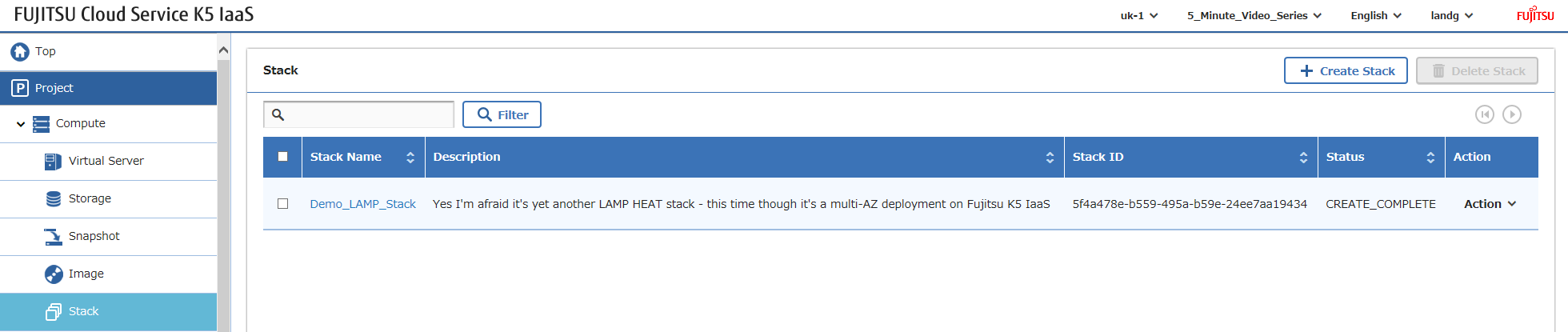
Ahora todo lo que necesitas hacer es iniciar sesión y configurar tu software – como se mencionó anteriormente, sí, puedes automatizar TODO lo anterior, pero mi enfoque aquí es demostrar los componentes de infraestructura de K5.
¡Feliz apilamiento!