
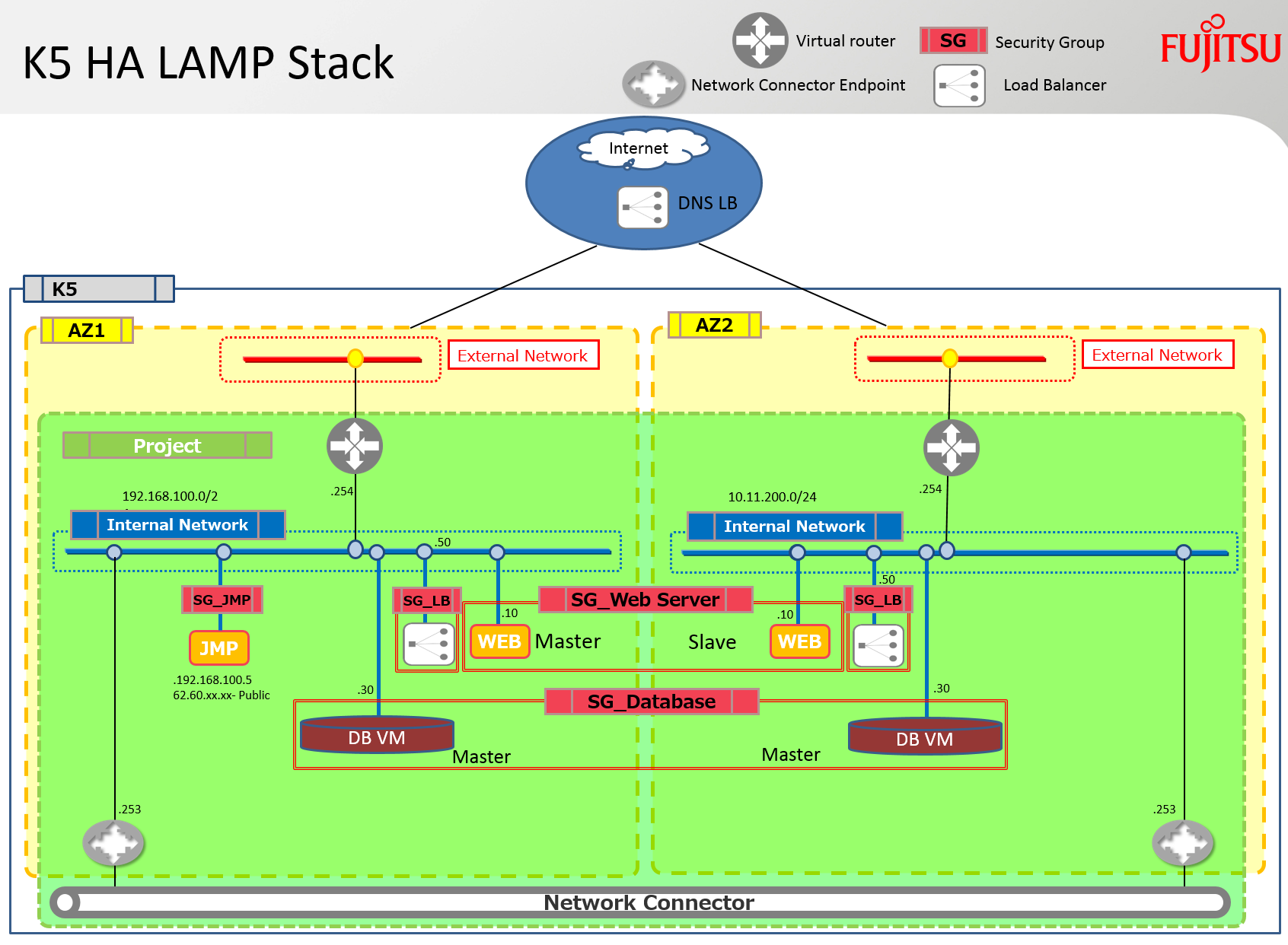
Yes, I’m afraid it’s yet another HEAT LAMP stack. This stack however includes some of the enhancements that Fujitsu have developed for Neutron and Heat. It deploys an apache server and a mysql server in both availability zones. It also links both of these AZs together to facilitate the replication and synchronisation traffic between these servers by using a network connector. A load balancer is also deployed on each subnet and contains both of the apache servers in its pool.
Note: Unfortunately I have not had the time to configure and debug apache or mysql scripts, only the software is installed but there are many articles on these topics in the blogosphere – just Yahoo for some examples… lol! Also the load balancers should finally be ‘balanced’ themselves using an external HA DNS service to ensure no single point of failure.
The diagram below outlines the infrastructure that will be built using the stack discussed in this blog.
Prerequisites
The following prerequisites are required for a successful deployment of this stack.
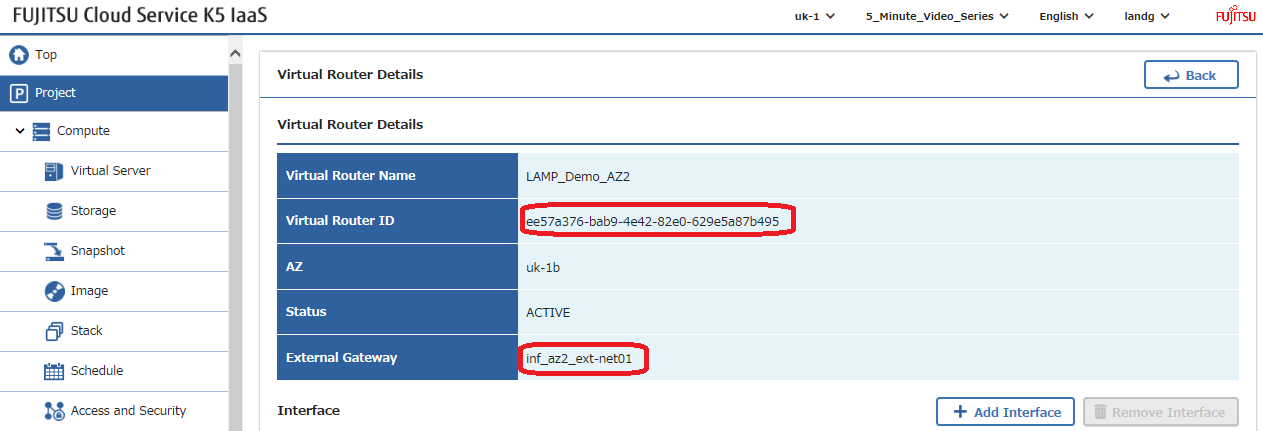
Virtual Routers: An internet connected virtual router should be created in each availability zone and the parameters associated with these routers added to the stack.
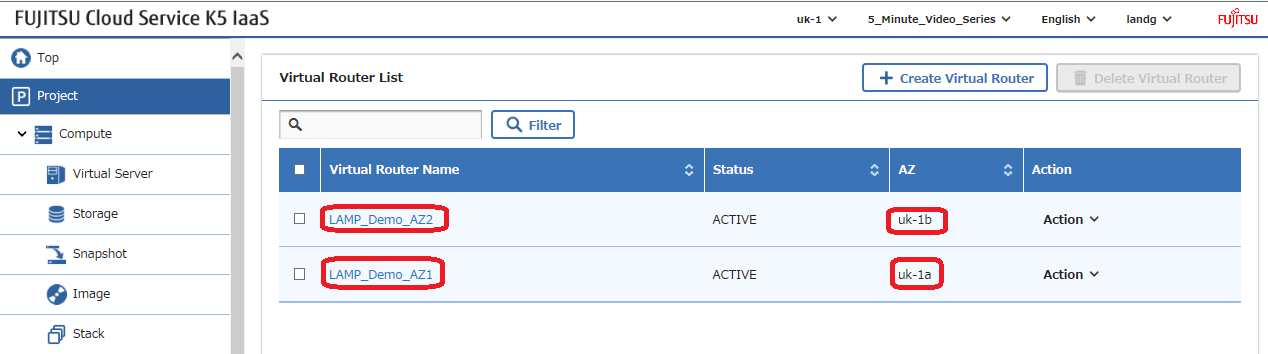
Get each router id, which needs to be amended in the example stack, and note the name of their external network that is used by each router –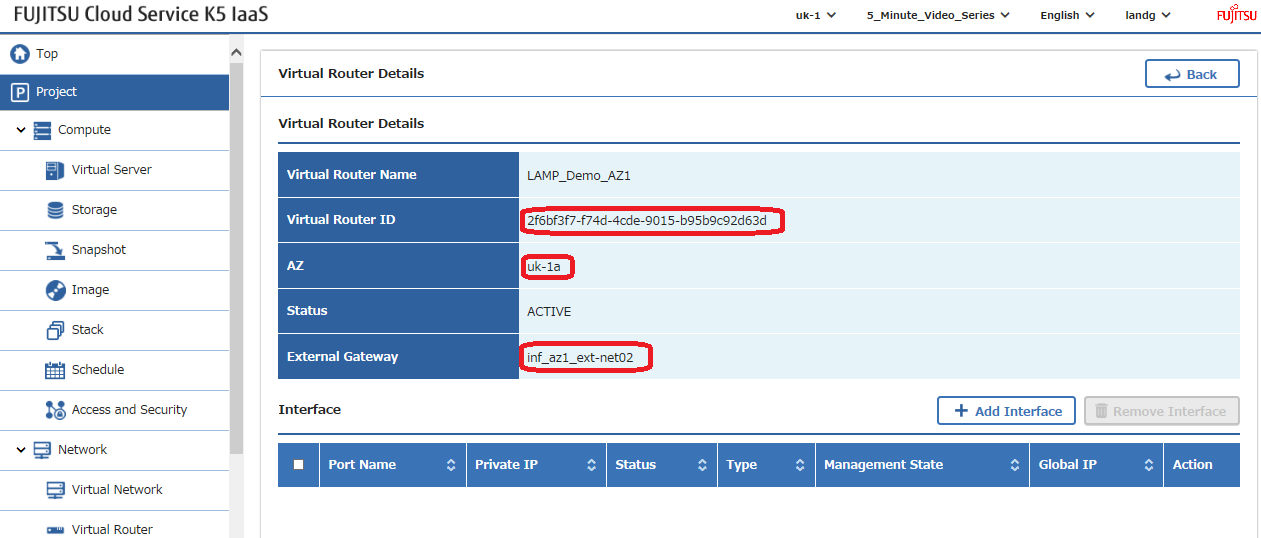
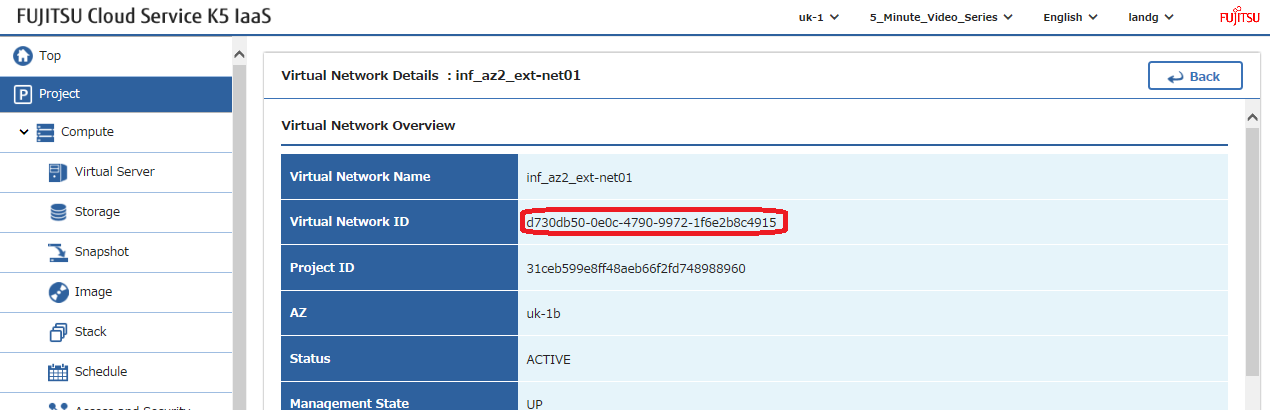
External Networks: Using the external network names identified above in the gateway settings locate the network ids of these external, also referred to as public, networks and amend these values in the example stack –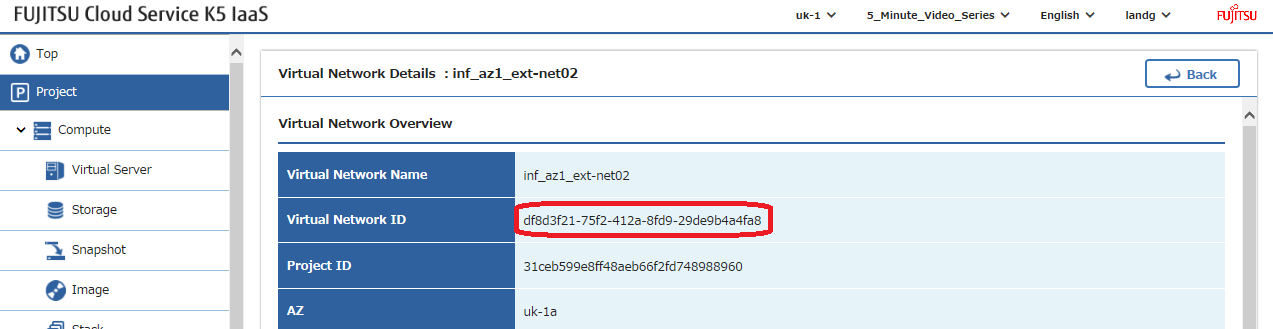
SSH Keys: Create an ssh key pair in each availability zone and amend their names in the example stack –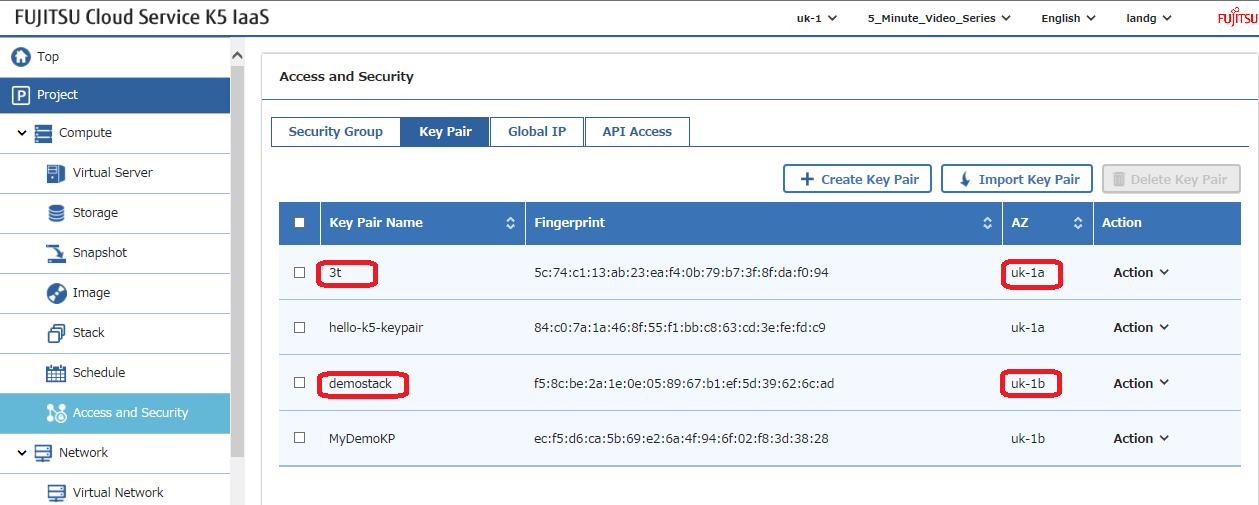
Image: Select the image that you wish to use and amend this parameter in the example stack. Note: The ‘UserData’ deployment scripts within the stack have been tested on CentOS7.2. If you decide to deploy a different version OS it will be necessary to modify these scripts with the commands required by the chosen OS.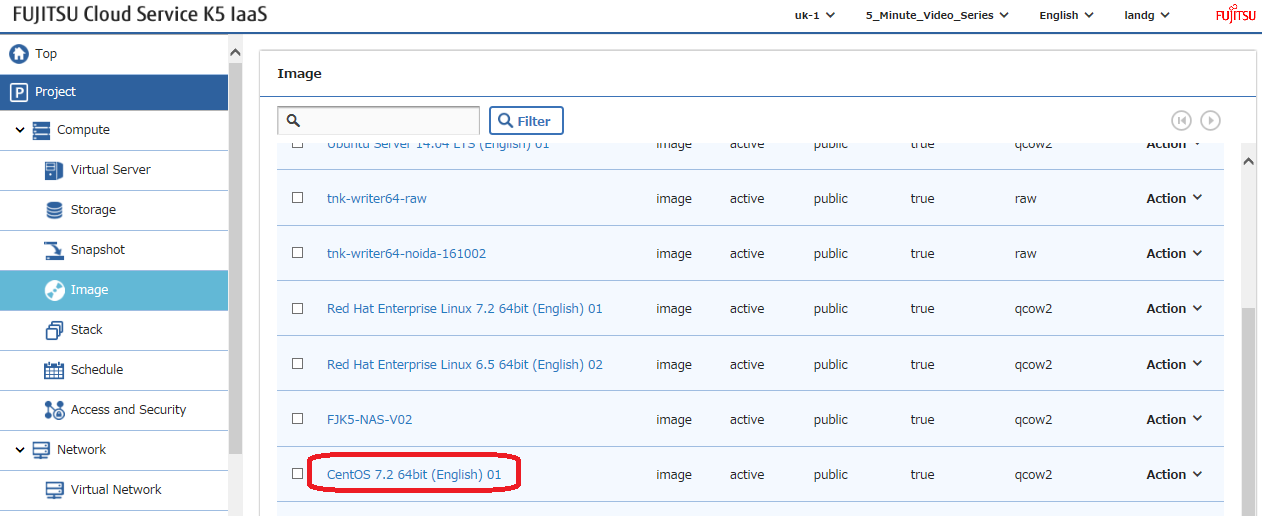
Deployment
Once all of these parameters have been configured it’s time to launch your stack, but first let me very briefly discuss the main sections –
Here are all the input parameters that need to be modified to suit your environment –
This file contains hidden or bidirectional Unicode text that may be interpreted or compiled differently than what appears below. To review, open the file in an editor that reveals hidden Unicode characters.
Learn more about bidirectional Unicode characters
| # Input parameters | |
| parameters: | |
| centos_image: | |
| type: string | |
| label: Image name or ID | |
| description: Image to be used for compute instance | |
| default: "CentOS 7.2 64bit (English) 01" | |
| flavor_S2: | |
| type: string | |
| label: Flavor | |
| description: Type of instance (flavor) to be used | |
| default: "S-2" | |
| key_az_1: | |
| type: string | |
| label: Key name | |
| description: Name of key-pair to be used for compute instance | |
| default: "3t" | |
| key_az_2: | |
| type: string | |
| label: Key name | |
| description: Name of key-pair to be used for compute instance | |
| default: "demostack" | |
| public_net_az1: | |
| type: string | |
| label: external network ID | |
| description: Public network | |
| default: "df8d3f21-75f2-412a-8fd9-29de9b4a4fa8" | |
| public_net_az2: | |
| type: string | |
| label: external network ID | |
| description: Public network | |
| default: "d730db50-0e0c-4790-9972-1f6e2b8c4915" | |
| az1: | |
| type: string | |
| label: Availability Zone | |
| description: Region AZ to use | |
| default: "uk-1a" | |
| az2: | |
| type: string | |
| label: Availability Zone | |
| description: Region AZ to use | |
| default: "uk-1b" | |
| ext_router_az1: | |
| type: string | |
| label: External Router | |
| description: Router with external access for global ip allocation | |
| default: "2f6bf3f7-f74d-4cde-9015-b95b9c92d63d" | |
| ext_router_az2: | |
| type: string | |
| label: External Router | |
| description: Router with external access for global ip allocation | |
| default: "ee57a376-bab9-4e42-82e0-629e5a87b495" |
view raw
ExampleLampStack-Parameters.yml
hosted with ❤ by GitHub
Next we create the two private networks, one in each availability zone and connect them to their respective existing routers –
This file contains hidden or bidirectional Unicode text that may be interpreted or compiled differently than what appears below. To review, open the file in an editor that reveals hidden Unicode characters.
Learn more about bidirectional Unicode characters
| # Create a private network in availability zone 1 | |
| private_net_az1: | |
| type: OS::Neutron::Net | |
| properties: | |
| availability_zone: { get_param: az1 } | |
| name: "private_net_az1" | |
| # Create a new subnet on the private network | |
| private_subnet_az1: | |
| type: OS::Neutron::Subnet | |
| depends_on: private_net_az1 | |
| properties: | |
| availability_zone: { get_param: az1 } | |
| name: "private_subnet_az1" | |
| network_id: { get_resource: private_net_az1 } | |
| cidr: "192.168.100.0/24" | |
| gateway_ip: "192.168.100.254" | |
| allocation_pools: | |
| – start: "192.168.100.100" | |
| end: "192.168.100.150" | |
| dns_nameservers: ["62.60.39.9", "62.60.39.10"] | |
| host_routes: [{"nexthop": "192.168.100.253", "destination": "10.11.200.0/24"}] | |
| # Connect an interface on the web tier network's subnet to the router | |
| az1_router_interface: | |
| type: OS::Neutron::RouterInterface | |
| depends_on: [private_subnet_az1] | |
| properties: | |
| router_id: { get_param: ext_router_az1 } | |
| subnet_id: { get_resource: private_subnet_az1 } | |
| # Create a private network in availability zone 2 | |
| private_net_az2: | |
| type: OS::Neutron::Net | |
| properties: | |
| availability_zone: { get_param: az2 } | |
| name: "private_net_az2" | |
| # Create a new subnet on the private network | |
| private_subnet_az2: | |
| type: OS::Neutron::Subnet | |
| depends_on: private_net_az2 | |
| properties: | |
| availability_zone: { get_param: az2 } | |
| name: "private_subnet_az2" | |
| network_id: { get_resource: private_net_az2 } | |
| cidr: "10.11.200.0/24" | |
| gateway_ip: "10.11.200.254" | |
| allocation_pools: | |
| – start: "10.11.200.100" | |
| end: "10.11.200.150" | |
| dns_nameservers: ["62.60.42.9", "62.60.42.10"] | |
| host_routes: [{"nexthop": "10.11.200.253", "destination": "192.168.100.0/24"}] | |
| # Connect an interface on the web tier network's subnet to the router | |
| az2_router_interface: | |
| type: OS::Neutron::RouterInterface | |
| depends_on: [private_subnet_az2] | |
| properties: | |
| router_id: { get_param: ext_router_az2 } | |
| subnet_id: { get_resource: private_subnet_az2 } |
view raw
K5LAMPNetworkSection.yml
hosted with ❤ by GitHub
Now we define all the security groups and rules that we wish to use in the stack. Note : The security groups have been left “wide open” for easy of testing. Please ensure to lock these down in a production scenario to improve security –
This file contains hidden or bidirectional Unicode text that may be interpreted or compiled differently than what appears below. To review, open the file in an editor that reveals hidden Unicode characters.
Learn more about bidirectional Unicode characters
| # Create a security group | |
| server_security_group1: | |
| type: OS::Neutron::SecurityGroup | |
| properties: | |
| description: Add security group rules for server | |
| name: Apache | |
| rules: | |
| – remote_ip_prefix: 0.0.0.0/0 | |
| protocol: tcp | |
| port_range_min: 1 | |
| port_range_max: 65535 | |
| – remote_ip_prefix: 0.0.0.0/0 | |
| protocol: udp | |
| port_range_min: 1 | |
| port_range_max: 65535 | |
| – remote_ip_prefix: 0.0.0.0/0 | |
| protocol: icmp | |
| # Create a security group | |
| server_security_group2: | |
| type: OS::Neutron::SecurityGroup | |
| properties: | |
| description: Add security group rules for server | |
| name: MySQL | |
| rules: | |
| – remote_ip_prefix: 0.0.0.0/0 | |
| protocol: tcp | |
| port_range_min: 1 | |
| port_range_max: 65535 | |
| – remote_ip_prefix: 0.0.0.0/0 | |
| protocol: udp | |
| port_range_min: 1 | |
| port_range_max: 65535 | |
| – remote_ip_prefix: 0.0.0.0/0 | |
| protocol: icmp | |
| # Create a security group | |
| server_security_group3: | |
| type: OS::Neutron::SecurityGroup | |
| properties: | |
| description: Add security group rules for server | |
| name: LBaaS_AZ1 | |
| rules: | |
| – remote_ip_prefix: 0.0.0.0/0 | |
| protocol: tcp | |
| port_range_min: 1 | |
| port_range_max: 65535 | |
| – remote_ip_prefix: 0.0.0.0/0 | |
| protocol: udp | |
| port_range_min: 1 | |
| port_range_max: 65535 | |
| – remote_ip_prefix: 0.0.0.0/0 | |
| protocol: icmp | |
| # Create a security group | |
| server_security_group4: | |
| type: OS::Neutron::SecurityGroup | |
| properties: | |
| description: Add security group rules for server | |
| name: LBaaS_AZ2 | |
| rules: | |
| – remote_ip_prefix: 0.0.0.0/0 | |
| protocol: tcp | |
| port_range_min: 1 | |
| port_range_max: 65535 | |
| – remote_ip_prefix: 0.0.0.0/0 | |
| protocol: udp | |
| port_range_min: 1 | |
| port_range_max: 65535 | |
| – remote_ip_prefix: 0.0.0.0/0 | |
| protocol: icmp | |
| # Create a security group | |
| server_security_group5: | |
| type: OS::Neutron::SecurityGroup | |
| properties: | |
| description: Add security group rules for server | |
| name: JumpBox | |
| rules: | |
| – remote_ip_prefix: 0.0.0.0/0 | |
| protocol: tcp | |
| port_range_min: 1 | |
| port_range_max: 65535 | |
| – remote_ip_prefix: 0.0.0.0/0 | |
| protocol: udp | |
| port_range_min: 1 | |
| port_range_max: 65535 | |
| – remote_ip_prefix: 0.0.0.0/0 | |
| protocol: icmp |
view raw
K5SecurityGroupSection.yml
hosted with ❤ by GitHub
Next we define our two load balancers and note the use of the ‘depends_on’ statement here to ensure that these are not built until after the two apache servers are built as their details are a prerequisite of the load balancer creation –
This file contains hidden or bidirectional Unicode text that may be interpreted or compiled differently than what appears below. To review, open the file in an editor that reveals hidden Unicode characters.
Learn more about bidirectional Unicode characters
| # AZ 1 Load Balancer | |
| LAMP_Demo_AZ1_LBaaS: | |
| type: FCX::ExpandableLoadBalancer::LoadBalancer | |
| depends_on: [ server1,server2 ] | |
| properties: | |
| Subnets: [{get_resource: private_subnet_az1}] | |
| Instances: [{get_resource: server1},{get_resource: server2}] | |
| Listeners: | |
| – {LoadBalancerPort: '80', | |
| InstancePort: '80', | |
| Protocol: 'HTTP', | |
| InstanceProtocol: 'HTTP' } | |
| HealthCheck: {Target: 'HTTP:80/healthcheck', | |
| HealthyThreshold: '3', | |
| UnhealthyThreshold: '5', | |
| Interval: '30', | |
| Timeout: '5'} | |
| Version: 2014-09-30 | |
| Scheme: public | |
| LoadBalancerName: LBaaSAZ1 | |
| SecurityGroups: [ {get_resource: server_security_group3} ] | |
| # AZ 2 Load Balancer | |
| LAMP_Demo_AZ2_LBaaS: | |
| type: FCX::ExpandableLoadBalancer::LoadBalancer | |
| depends_on: [ server1,server2 ] | |
| properties: | |
| Subnets: [{get_resource: private_subnet_az2}] | |
| Instances: [{get_resource: server1},{get_resource: server2}] | |
| Listeners: | |
| – {LoadBalancerPort: '80', | |
| InstancePort: '80', | |
| Protocol: 'HTTP', | |
| InstanceProtocol: 'HTTP' } | |
| HealthCheck: {Target: 'HTTP:80/healthcheck', | |
| HealthyThreshold: '3', | |
| UnhealthyThreshold: '5', | |
| Interval: '30', | |
| Timeout: '5'} | |
| Version: 2014-09-30 | |
| Scheme: public | |
| LoadBalancerName: LBaaSAZ2 | |
| SecurityGroups: [ {get_resource: server_security_group4} ] |
view raw
TwoLoadBalancersExample.yml
hosted with ❤ by GitHub
Now we define all of our servers which consists of a jump box that we’ll give a global (floating) ip address to, 2 servers with web software loaded and finally two servers with mysql loaded. Note that I’ve deliberately defined static ip addresses everywhere as this procedure was not published in many places online. This is over kill and you could just leverage DHCP if desired. Production environments tend to like consistency and repeat-ability for some strange reason 😉 Anyone ever heard of CI/CD flows.
This file contains hidden or bidirectional Unicode text that may be interpreted or compiled differently than what appears below. To review, open the file in an editor that reveals hidden Unicode characters.
Learn more about bidirectional Unicode characters
| ################### JumpBox – AZ 1 ############################################################################## | |
| # Create a new port for the server interface, assign an ip address and security group | |
| jump-server-port: | |
| type: OS::Neutron::Port | |
| depends_on: [ server_security_group5 ] | |
| properties: | |
| availability_zone: { get_param: az1 } | |
| network_id: { get_resource: private_net_az1 } | |
| security_groups: [{ get_resource: server_security_group5 }] | |
| fixed_ips: | |
| – subnet_id: { get_resource: private_subnet_az1 } | |
| ip_address: '192.168.100.5' | |
| # Allocate a floating/global ip address | |
| jump-server-floating-ip: | |
| type: OS::Neutron::FloatingIP | |
| properties: | |
| availability_zone: { get_param: az1 } | |
| floating_network_id: { get_param: public_net_az1 } | |
| # Assign a floating/global ip address to the fixed server ip address | |
| jump-server-floating-ip-association: | |
| type: OS::Neutron::FloatingIPAssociation | |
| depends_on: jump-server-floating-ip | |
| properties: | |
| floatingip_id: { get_resource: jump-server-floating-ip } | |
| port_id: { get_resource: jump-server-port } | |
| # Create a system volume for use with the server | |
| jump-sys-vol: | |
| type: OS::Cinder::Volume | |
| properties: | |
| availability_zone: { get_param: az1 } | |
| name: "LAMP-JumpBox-AZ1" | |
| size: 30 | |
| volume_type: "M1" | |
| image : { get_param: centos_image } | |
| # Build a server using the system volume defined above | |
| jump-server: | |
| type: OS::Nova::Server | |
| depends_on: [ jump-server-port ] | |
| properties: | |
| key_name: { get_param: key_az_1 } | |
| image: { get_param: centos_image } | |
| flavor: "S-1" | |
| admin_user: k5user | |
| block_device_mapping: [{"volume_size": "30", "volume_id": {get_resource: jump-sys-vol}, "delete_on_termination": True, "device_name": "/dev/vda"}] | |
| name: "LAMP-JumpBox-AZ1" | |
| networks: | |
| – port: { get_resource: jump-server-port } | |
| ########################################################################################################## | |
| ################### WebServers – AZ 1 ############################################################################## | |
| # Create a new port for the server interface, assign an ip address and security group | |
| server1_port: | |
| type: OS::Neutron::Port | |
| depends_on: [ server_security_group1 ] | |
| properties: | |
| availability_zone: { get_param: az1 } | |
| network_id: { get_resource: private_net_az1 } | |
| security_groups: [{ get_resource: server_security_group1 }] | |
| fixed_ips: | |
| – subnet_id: { get_resource: private_subnet_az1 } | |
| ip_address: '192.168.100.10' | |
| # Create a system volume for use with the server | |
| sys-vol1: | |
| type: OS::Cinder::Volume | |
| properties: | |
| availability_zone: { get_param: az1 } | |
| name: "web-az1-boot-vol" | |
| size: 30 | |
| volume_type: "M1" | |
| image : { get_param: centos_image } | |
| # Build a server using the system volume defined above | |
| server1: | |
| type: OS::Nova::Server | |
| depends_on: [ jump-server,server1_port,sys-vol1 ] | |
| properties: | |
| key_name: { get_param: key_az_1 } | |
| image: { get_param: centos_image } | |
| flavor: { get_param: flavor_S2 } | |
| admin_user: k5user | |
| block_device_mapping: [{"volume_size": "30", "volume_id": {get_resource: sys-vol1}, "delete_on_termination": True, "device_name": "/dev/vda"}] | |
| name: "Apache-AZ1" | |
| user_data_format: RAW | |
| user_data: | |
| str_replace: | |
| template: | |
| #!/bin/bash | |
| sudo yum update -y | |
| sudo yum install wget -y | |
| sudo yum install httpd -y | |
| sudo systemctl start httpd.service | |
| sudo systemctl enable httpd.service | |
| sudo wget http://repo.mysql.com/mysql-community-release-el7-5.noarch.rpm | |
| sudo rpm -ivh mysql-community-release-el7-5.noarch.rpm | |
| sudo yum update -y | |
| sudo yum install mysql -y | |
| sudo yum install php php-pear -y | |
| sudo yum install php-mysql -y | |
| sudo yum install lua lua-devel pkgconfig gcc asciidoc -y | |
| sudo wget http://dl.fedoraproject.org/pub/epel/7/x86_64/e/epel-release-7-8.noarch.rpm | |
| sudo rpm -iUvh epel-release-7-8.noarch.rpm | |
| sudo yum update -y | |
| sudo yum install lsyncd -y | |
| echo message | |
| params: | |
| message: "Installation Complete" | |
| networks: | |
| – port: { get_resource: server1_port } | |
| ########################################################################################################### | |
| ################### WebServers – AZ 2 ############################################################################## | |
| server2_port: | |
| type: OS::Neutron::Port | |
| depends_on: [ server_security_group1 ] | |
| properties: | |
| availability_zone: { get_param: az2 } | |
| network_id: { get_resource: private_net_az2 } | |
| security_groups: [{ get_resource: server_security_group1 }] | |
| fixed_ips: | |
| – subnet_id: { get_resource: private_subnet_az2 } | |
| ip_address: '10.11.200.10' | |
| # Create a system volume for use with the server | |
| sys-vol2: | |
| type: OS::Cinder::Volume | |
| properties: | |
| availability_zone: { get_param: az2 } | |
| name: "web-az2-boot-vol" | |
| size: 30 | |
| volume_type: "M1" | |
| image : { get_param: centos_image } | |
| # Build a server using the system volume defined above | |
| server2: | |
| type: OS::Nova::Server | |
| depends_on: [ jump-server,server2_port,sys-vol2 ] | |
| properties: | |
| key_name: { get_param: key_az_2 } | |
| image: { get_param: centos_image } | |
| flavor: { get_param: flavor_S2 } | |
| admin_user: k5user | |
| block_device_mapping: [{"volume_size": "30", "volume_id": {get_resource: sys-vol2}, "delete_on_termination": True, "device_name": "/dev/vda"}] | |
| name: "Apache-AZ2" | |
| user_data_format: RAW | |
| user_data: | |
| str_replace: | |
| template: | |
| #!/bin/bash | |
| sudo yum update -y | |
| sudo yum install wget -y | |
| sudo yum install httpd -y | |
| sudo systemctl start httpd.service | |
| sudo systemctl enable httpd.service | |
| sudo wget http://repo.mysql.com/mysql-community-release-el7-5.noarch.rpm | |
| sudo rpm -ivh mysql-community-release-el7-5.noarch.rpm | |
| sudo yum update -y | |
| sudo yum install mysql -y | |
| sudo yum install php php-pear -y | |
| sudo yum install php-mysql -y | |
| sudo yum install lua lua-devel pkgconfig gcc asciidoc -y | |
| sudo wget http://dl.fedoraproject.org/pub/epel/7/x86_64/e/epel-release-7-8.noarch.rpm | |
| sudo rpm -iUvh epel-release-7-8.noarch.rpm | |
| sudo yum update -y | |
| sudo yum install lsyncd -y | |
| echo message | |
| params: | |
| message: "Installation Complete" | |
| networks: | |
| – port: { get_resource: server2_port } | |
| ########################################################################################################### | |
| ################### DatabaseServers – AZ 1 ############################################################################## | |
| # Create a new port for the server interface, assign an ip address and security group | |
| server3_port: | |
| type: OS::Neutron::Port | |
| depends_on: [ server_security_group2 ] | |
| properties: | |
| availability_zone: { get_param: az1 } | |
| network_id: { get_resource: private_net_az1 } | |
| security_groups: [{ get_resource: server_security_group2 }] | |
| fixed_ips: | |
| – subnet_id: { get_resource: private_subnet_az1 } | |
| ip_address: '192.168.100.30' | |
| # Create a system volume for use with the server | |
| sys-vol3: | |
| type: OS::Cinder::Volume | |
| properties: | |
| availability_zone: { get_param: az1 } | |
| name: "db-az1-boot-vol" | |
| size: 30 | |
| volume_type: "M1" | |
| image : { get_param: centos_image } | |
| # Build a server using the system volume defined above | |
| server3: | |
| type: OS::Nova::Server | |
| depends_on: [ jump-server,server3_port,sys-vol3 ] | |
| properties: | |
| key_name: { get_param: key_az_1 } | |
| image: { get_param: centos_image } | |
| flavor: { get_param: flavor_S2 } | |
| admin_user: k5user | |
| block_device_mapping: [{"volume_size": "30", "volume_id": {get_resource: sys-vol3}, "delete_on_termination": True, "device_name": "/dev/vda"}] | |
| name: "Database-AZ1" | |
| user_data_format: RAW | |
| user_data: | |
| str_replace: | |
| template: | |
| #!/bin/bash | |
| sudo yum update -y | |
| sudo yum install wget -y | |
| sudo wget http://repo.mysql.com/mysql-community-release-el7-5.noarch.rpm | |
| sudo rpm -ivh mysql-community-release-el7-5.noarch.rpm | |
| sudo yum update -y | |
| sudo yum install mysql-server -y | |
| sudo systemctl start mysqld | |
| sudo systemctl enable mysqld | |
| echo message | |
| params: | |
| message: "Installation Complete" | |
| networks: | |
| – port: { get_resource: server3_port } | |
| ########################################################################################################### | |
| ################### DatabaseServers – AZ 2 ################################################################ | |
| # Create a new port for the server interface, assign an ip address and security group | |
| server4_port: | |
| type: OS::Neutron::Port | |
| depends_on: [ server_security_group2 ] | |
| properties: | |
| availability_zone: { get_param: az2 } | |
| network_id: { get_resource: private_net_az2 } | |
| security_groups: [{ get_resource: server_security_group2 }] | |
| fixed_ips: | |
| – subnet_id: { get_resource: private_subnet_az2 } | |
| ip_address: '10.11.200.30' | |
| # Create a system volume for use with the server | |
| sys-vol4: | |
| type: OS::Cinder::Volume | |
| properties: | |
| availability_zone: { get_param: az2 } | |
| name: "db-az2-boot-vol" | |
| size: 30 | |
| volume_type: "M1" | |
| image : { get_param: centos_image } | |
| # Build a server using the system volume defined above | |
| server4: | |
| type: OS::Nova::Server | |
| depends_on: [ jump-server,server4_port,sys-vol4 ] | |
| properties: | |
| key_name: { get_param: key_az_2 } | |
| image: { get_param: centos_image } | |
| flavor: { get_param: flavor_S2 } | |
| admin_user: k5user | |
| block_device_mapping: [{"volume_size": "30", "volume_id": {get_resource: sys-vol4}, "delete_on_termination": True, "device_name": "/dev/vda"}] | |
| name: "Database-AZ2" | |
| user_data_format: RAW | |
| user_data: | |
| str_replace: | |
| template: | |
| #!/bin/bash | |
| sudo yum update -y | |
| sudo yum install wget -y | |
| sudo wget http://repo.mysql.com/mysql-community-release-el7-5.noarch.rpm | |
| sudo rpm -ivh mysql-community-release-el7-5.noarch.rpm | |
| sudo yum update -y | |
| sudo yum install mysql-server -y | |
| sudo systemctl start mysqld | |
| sudo systemctl enable mysqld | |
| echo message | |
| params: | |
| message: "Installation Complete" | |
| networks: | |
| – port: { get_resource: server4_port } | |
| ########################################################################################################### |
view raw
K5LAMPExampleServersSection.yml
hosted with ❤ by GitHub
Finally we have the network connector section. This forms the layer 3 link between the two subnets in the different availability zones. This is the link that will carry all the replication and synchronization traffic between the servers. Logically it would probably have been better to move this to the networking section of this post but I dare not change it now for fear of introducing a typo and I’ve no time to retest – what’s currently on github works 🙂
This file contains hidden or bidirectional Unicode text that may be interpreted or compiled differently than what appears below. To review, open the file in an editor that reveals hidden Unicode characters.
Learn more about bidirectional Unicode characters
| ############################### AZ Interconnect ########################################################### | |
| az1_nc_port: | |
| type: OS::Neutron::Port | |
| depends_on: [ server_security_group2 ] | |
| properties: | |
| availability_zone: { get_param: az1 } | |
| network_id: { get_resource: private_net_az1 } | |
| security_groups: [{ get_resource: server_security_group2 }] | |
| fixed_ips: | |
| – subnet_id: { get_resource: private_subnet_az1 } | |
| ip_address: '192.168.100.253' | |
| az2_nc_port: | |
| type: OS::Neutron::Port | |
| depends_on: [ server_security_group2 ] | |
| properties: | |
| availability_zone: { get_param: az2 } | |
| network_id: { get_resource: private_net_az2 } | |
| security_groups: [{ get_resource: server_security_group2 }] | |
| fixed_ips: | |
| – subnet_id: { get_resource: private_subnet_az2 } | |
| ip_address: '10.11.200.253' | |
| az1_network_connector: | |
| type: FCX::Neutron::NetworkConnector | |
| depends_on: [ az1_nc_port,az2_nc_port ] | |
| properties: | |
| name: "LAMP-Demo-NC" | |
| az1_nc_endpoint: | |
| type: FCX::Neutron::NetworkConnectorEndpoint | |
| depends_on: [ az1_nc_port,az2_nc_port ] | |
| properties: | |
| endpoint_type: "availability_zone" | |
| name: "AZ1-NC-EP" | |
| network_connector_id: { get_resource: az1_network_connector } | |
| location: { get_param: az1 } | |
| az2_nc_endpoint: | |
| type: FCX::Neutron::NetworkConnectorEndpoint | |
| depends_on: [ az1_nc_port,az2_nc_port ] | |
| properties: | |
| endpoint_type: "availability_zone" | |
| name: "AZ2-NC-EP" | |
| network_connector_id: { get_resource: az1_network_connector } | |
| location: { get_param: az2 } | |
| az1_endpoint_connection: | |
| type: FCX::Neutron::NetworkConnectorEndpointConnection | |
| depends_on: [ az1_nc_port,az2_nc_port ] | |
| properties: | |
| port_id: { get_resource: az1_nc_port } | |
| network_connector_endpoint_id: { get_resource: az1_nc_endpoint } | |
| az2_endpoint_connection: | |
| type: FCX::Neutron::NetworkConnectorEndpointConnection | |
| depends_on: [ az1_nc_port,az2_nc_port ] | |
| properties: | |
| port_id: { get_resource: az2_nc_port } | |
| network_connector_endpoint_id: { get_resource: az2_nc_endpoint } |
view raw
K5NetworkConnectorExample.yml
hosted with ❤ by GitHub
If you haven’t already gone straight to github then here’s what you’ll want to download and play with in one easy gist –
This file contains hidden or bidirectional Unicode text that may be interpreted or compiled differently than what appears below. To review, open the file in an editor that reveals hidden Unicode characters.
Learn more about bidirectional Unicode characters
| heat_template_version: 2013-05-23 | |
| # Author: Graham Land | |
| # Date: 21/10/2016 | |
| # Purpose: Multi-Availability-Zone template to demonstrate the basic format/usage of HOT stacks on our Fujitsu K5 platform | |
| # It builds a webserver and database server in AZ1 and then the same infrastructure again in AZ2. | |
| # These two environmnets are then joined using a network connector to facilitate data replication between the applications. | |
| # Two public facing load balancers are also deployed – one in each AZ – and the webservers are added to each of these. | |
| # | |
| # The webservers have apache, php, mysql-client and lsyncd installed but NOT configured – didn't have time for this script sorry – loads of examples available online | |
| # The database servers have mysql installed but not configured – again lots of examples available online – can be easily setup in Master/Master mode | |
| # Once the web application is installed use Lsyncd to provide Master/Slave sync between the apache servers. | |
| # | |
| # I'm not a LAMP expert there are many different ways of implementing the above software components the goal of this stack is to illustrate | |
| # a highly available infrastructure solution – please adjust to taste e.g. GlusterFS instead of Lsync, Galera MySQL Cluster software etc… | |
| # Twitter: @allthingsclowd | |
| # Blog: https://allthingscloud.eu | |
| description: Yes I'm afraid it's yet another LAMP HEAT stack – this time though it's a multi-AZ deployment on Fujitsu K5 IaaS | |
| # Input parameters | |
| parameters: | |
| centos_image: | |
| type: string | |
| label: Image name or ID | |
| description: Image to be used for compute instance | |
| default: "CentOS 7.2 64bit (English) 01" | |
| flavor_S2: | |
| type: string | |
| label: Flavor | |
| description: Type of instance (flavor) to be used | |
| default: "S-2" | |
| key_az_1: | |
| type: string | |
| label: Key name | |
| description: Name of key-pair to be used for compute instance | |
| default: "3t" | |
| key_az_2: | |
| type: string | |
| label: Key name | |
| description: Name of key-pair to be used for compute instance | |
| default: "demostack" | |
| public_net_az1: | |
| type: string | |
| label: external network ID | |
| description: Public network | |
| default: "df8d3f21-75f2-412a-8fd9-29de9b4a4fa8" | |
| public_net_az2: | |
| type: string | |
| label: external network ID | |
| description: Public network | |
| default: "d730db50-0e0c-4790-9972-1f6e2b8c4915" | |
| az1: | |
| type: string | |
| label: Availability Zone | |
| description: Region AZ to use | |
| default: "uk-1a" | |
| az2: | |
| type: string | |
| label: Availability Zone | |
| description: Region AZ to use | |
| default: "uk-1b" | |
| ext_router_az1: | |
| type: string | |
| label: External Router | |
| description: Router with external access for global ip allocation | |
| default: "2f6bf3f7-f74d-4cde-9015-b95b9c92d63d" | |
| ext_router_az2: | |
| type: string | |
| label: External Router | |
| description: Router with external access for global ip allocation | |
| default: "ee57a376-bab9-4e42-82e0-629e5a87b495" | |
| # K5 Infrastructure resources to be built | |
| resources: | |
| # Create a private network in availability zone 1 | |
| private_net_az1: | |
| type: OS::Neutron::Net | |
| properties: | |
| availability_zone: { get_param: az1 } | |
| name: "private_net_az1" | |
| # Create a new subnet on the private network | |
| private_subnet_az1: | |
| type: OS::Neutron::Subnet | |
| depends_on: private_net_az1 | |
| properties: | |
| availability_zone: { get_param: az1 } | |
| name: "private_subnet_az1" | |
| network_id: { get_resource: private_net_az1 } | |
| cidr: "192.168.100.0/24" | |
| gateway_ip: "192.168.100.254" | |
| allocation_pools: | |
| – start: "192.168.100.100" | |
| end: "192.168.100.150" | |
| dns_nameservers: ["62.60.39.9", "62.60.39.10"] | |
| host_routes: [{"nexthop": "192.168.100.253", "destination": "10.11.200.0/24"}] | |
| # Connect an interface on the web tier network's subnet to the router | |
| az1_router_interface: | |
| type: OS::Neutron::RouterInterface | |
| depends_on: [private_subnet_az1] | |
| properties: | |
| router_id: { get_param: ext_router_az1 } | |
| subnet_id: { get_resource: private_subnet_az1 } | |
| # Create a private network in availability zone 2 | |
| private_net_az2: | |
| type: OS::Neutron::Net | |
| properties: | |
| availability_zone: { get_param: az2 } | |
| name: "private_net_az2" | |
| # Create a new subnet on the private network | |
| private_subnet_az2: | |
| type: OS::Neutron::Subnet | |
| depends_on: private_net_az2 | |
| properties: | |
| availability_zone: { get_param: az2 } | |
| name: "private_subnet_az2" | |
| network_id: { get_resource: private_net_az2 } | |
| cidr: "10.11.200.0/24" | |
| gateway_ip: "10.11.200.254" | |
| allocation_pools: | |
| – start: "10.11.200.100" | |
| end: "10.11.200.150" | |
| dns_nameservers: ["62.60.42.9", "62.60.42.10"] | |
| host_routes: [{"nexthop": "10.11.200.253", "destination": "192.168.100.0/24"}] | |
| # Connect an interface on the web tier network's subnet to the router | |
| az2_router_interface: | |
| type: OS::Neutron::RouterInterface | |
| depends_on: [private_subnet_az2] | |
| properties: | |
| router_id: { get_param: ext_router_az2 } | |
| subnet_id: { get_resource: private_subnet_az2 } | |
| # Create a security group | |
| server_security_group1: | |
| type: OS::Neutron::SecurityGroup | |
| properties: | |
| description: Add security group rules for server | |
| name: Apache | |
| rules: | |
| – remote_ip_prefix: 0.0.0.0/0 | |
| protocol: tcp | |
| port_range_min: 1 | |
| port_range_max: 65535 | |
| – remote_ip_prefix: 0.0.0.0/0 | |
| protocol: udp | |
| port_range_min: 1 | |
| port_range_max: 65535 | |
| – remote_ip_prefix: 0.0.0.0/0 | |
| protocol: icmp | |
| # Create a security group | |
| server_security_group2: | |
| type: OS::Neutron::SecurityGroup | |
| properties: | |
| description: Add security group rules for server | |
| name: MySQL | |
| rules: | |
| – remote_ip_prefix: 0.0.0.0/0 | |
| protocol: tcp | |
| port_range_min: 1 | |
| port_range_max: 65535 | |
| – remote_ip_prefix: 0.0.0.0/0 | |
| protocol: udp | |
| port_range_min: 1 | |
| port_range_max: 65535 | |
| – remote_ip_prefix: 0.0.0.0/0 | |
| protocol: icmp | |
| # Create a security group | |
| server_security_group3: | |
| type: OS::Neutron::SecurityGroup | |
| properties: | |
| description: Add security group rules for server | |
| name: LBaaS_AZ1 | |
| rules: | |
| – remote_ip_prefix: 0.0.0.0/0 | |
| protocol: tcp | |
| port_range_min: 1 | |
| port_range_max: 65535 | |
| – remote_ip_prefix: 0.0.0.0/0 | |
| protocol: udp | |
| port_range_min: 1 | |
| port_range_max: 65535 | |
| – remote_ip_prefix: 0.0.0.0/0 | |
| protocol: icmp | |
| # Create a security group | |
| server_security_group4: | |
| type: OS::Neutron::SecurityGroup | |
| properties: | |
| description: Add security group rules for server | |
| name: LBaaS_AZ2 | |
| rules: | |
| – remote_ip_prefix: 0.0.0.0/0 | |
| protocol: tcp | |
| port_range_min: 1 | |
| port_range_max: 65535 | |
| – remote_ip_prefix: 0.0.0.0/0 | |
| protocol: udp | |
| port_range_min: 1 | |
| port_range_max: 65535 | |
| – remote_ip_prefix: 0.0.0.0/0 | |
| protocol: icmp | |
| # Create a security group | |
| server_security_group5: | |
| type: OS::Neutron::SecurityGroup | |
| properties: | |
| description: Add security group rules for server | |
| name: JumpBox | |
| rules: | |
| – remote_ip_prefix: 0.0.0.0/0 | |
| protocol: tcp | |
| port_range_min: 1 | |
| port_range_max: 65535 | |
| – remote_ip_prefix: 0.0.0.0/0 | |
| protocol: udp | |
| port_range_min: 1 | |
| port_range_max: 65535 | |
| – remote_ip_prefix: 0.0.0.0/0 | |
| protocol: icmp | |
| # AZ 1 Load Balancer | |
| LAMP_Demo_AZ1_LBaaS: | |
| type: FCX::ExpandableLoadBalancer::LoadBalancer | |
| depends_on: [ server1,server2 ] | |
| properties: | |
| Subnets: [{get_resource: private_subnet_az1}] | |
| Instances: [{get_resource: server1},{get_resource: server2}] | |
| Listeners: | |
| – {LoadBalancerPort: '80', | |
| InstancePort: '80', | |
| Protocol: 'HTTP', | |
| InstanceProtocol: 'HTTP' } | |
| HealthCheck: {Target: 'HTTP:80/healthcheck', | |
| HealthyThreshold: '3', | |
| UnhealthyThreshold: '5', | |
| Interval: '30', | |
| Timeout: '5'} | |
| Version: 2014-09-30 | |
| Scheme: public | |
| LoadBalancerName: LBaaSAZ1 | |
| SecurityGroups: [ {get_resource: server_security_group3} ] | |
| # AZ 2 Load Balancer | |
| LAMP_Demo_AZ2_LBaaS: | |
| type: FCX::ExpandableLoadBalancer::LoadBalancer | |
| depends_on: [ server1,server2 ] | |
| properties: | |
| Subnets: [{get_resource: private_subnet_az2}] | |
| Instances: [{get_resource: server1},{get_resource: server2}] | |
| Listeners: | |
| – {LoadBalancerPort: '80', | |
| InstancePort: '80', | |
| Protocol: 'HTTP', | |
| InstanceProtocol: 'HTTP' } | |
| HealthCheck: {Target: 'HTTP:80/healthcheck', | |
| HealthyThreshold: '3', | |
| UnhealthyThreshold: '5', | |
| Interval: '30', | |
| Timeout: '5'} | |
| Version: 2014-09-30 | |
| Scheme: public | |
| LoadBalancerName: LBaaSAZ2 | |
| SecurityGroups: [ {get_resource: server_security_group4} ] | |
| ################### JumpBox – AZ 1 ############################################################################## | |
| # Create a new port for the server interface, assign an ip address and security group | |
| jump-server-port: | |
| type: OS::Neutron::Port | |
| depends_on: [ server_security_group5 ] | |
| properties: | |
| availability_zone: { get_param: az1 } | |
| network_id: { get_resource: private_net_az1 } | |
| security_groups: [{ get_resource: server_security_group5 }] | |
| fixed_ips: | |
| – subnet_id: { get_resource: private_subnet_az1 } | |
| ip_address: '192.168.100.5' | |
| # Allocate a floating/global ip address | |
| jump-server-floating-ip: | |
| type: OS::Neutron::FloatingIP | |
| properties: | |
| availability_zone: { get_param: az1 } | |
| floating_network_id: { get_param: public_net_az1 } | |
| # Assign a floating/global ip address to the fixed server ip address | |
| jump-server-floating-ip-association: | |
| type: OS::Neutron::FloatingIPAssociation | |
| depends_on: jump-server-floating-ip | |
| properties: | |
| floatingip_id: { get_resource: jump-server-floating-ip } | |
| port_id: { get_resource: jump-server-port } | |
| # Create a system volume for use with the server | |
| jump-sys-vol: | |
| type: OS::Cinder::Volume | |
| properties: | |
| availability_zone: { get_param: az1 } | |
| name: "LAMP-JumpBox-AZ1" | |
| size: 30 | |
| volume_type: "M1" | |
| image : { get_param: centos_image } | |
| # Build a server using the system volume defined above | |
| jump-server: | |
| type: OS::Nova::Server | |
| depends_on: [ jump-server-port ] | |
| properties: | |
| key_name: { get_param: key_az_1 } | |
| image: { get_param: centos_image } | |
| flavor: "S-1" | |
| admin_user: k5user | |
| block_device_mapping: [{"volume_size": "30", "volume_id": {get_resource: jump-sys-vol}, "delete_on_termination": True, "device_name": "/dev/vda"}] | |
| name: "LAMP-JumpBox-AZ1" | |
| networks: | |
| – port: { get_resource: jump-server-port } | |
| ########################################################################################################## | |
| ################### WebServers – AZ 1 ############################################################################## | |
| # Create a new port for the server interface, assign an ip address and security group | |
| server1_port: | |
| type: OS::Neutron::Port | |
| depends_on: [ server_security_group1 ] | |
| properties: | |
| availability_zone: { get_param: az1 } | |
| network_id: { get_resource: private_net_az1 } | |
| security_groups: [{ get_resource: server_security_group1 }] | |
| fixed_ips: | |
| – subnet_id: { get_resource: private_subnet_az1 } | |
| ip_address: '192.168.100.10' | |
| # Create a system volume for use with the server | |
| sys-vol1: | |
| type: OS::Cinder::Volume | |
| properties: | |
| availability_zone: { get_param: az1 } | |
| name: "web-az1-boot-vol" | |
| size: 30 | |
| volume_type: "M1" | |
| image : { get_param: centos_image } | |
| # Build a server using the system volume defined above | |
| server1: | |
| type: OS::Nova::Server | |
| depends_on: [ jump-server,server1_port,sys-vol1 ] | |
| properties: | |
| key_name: { get_param: key_az_1 } | |
| image: { get_param: centos_image } | |
| flavor: { get_param: flavor_S2 } | |
| admin_user: k5user | |
| block_device_mapping: [{"volume_size": "30", "volume_id": {get_resource: sys-vol1}, "delete_on_termination": True, "device_name": "/dev/vda"}] | |
| name: "Apache-AZ1" | |
| user_data_format: RAW | |
| user_data: | |
| str_replace: | |
| template: | |
| #!/bin/bash | |
| sudo yum update -y | |
| sudo yum install wget -y | |
| sudo yum install httpd -y | |
| sudo systemctl start httpd.service | |
| sudo systemctl enable httpd.service | |
| sudo wget http://repo.mysql.com/mysql-community-release-el7-5.noarch.rpm | |
| sudo rpm -ivh mysql-community-release-el7-5.noarch.rpm | |
| sudo yum update -y | |
| sudo yum install mysql -y | |
| sudo yum install php php-pear -y | |
| sudo yum install php-mysql -y | |
| sudo yum install lua lua-devel pkgconfig gcc asciidoc -y | |
| sudo wget http://dl.fedoraproject.org/pub/epel/7/x86_64/e/epel-release-7-8.noarch.rpm | |
| sudo rpm -iUvh epel-release-7-8.noarch.rpm | |
| sudo yum update -y | |
| sudo yum install lsyncd -y | |
| echo message | |
| params: | |
| message: "Installation Complete" | |
| networks: | |
| – port: { get_resource: server1_port } | |
| ########################################################################################################### | |
| ################### WebServers – AZ 2 ############################################################################## | |
| server2_port: | |
| type: OS::Neutron::Port | |
| depends_on: [ server_security_group1 ] | |
| properties: | |
| availability_zone: { get_param: az2 } | |
| network_id: { get_resource: private_net_az2 } | |
| security_groups: [{ get_resource: server_security_group1 }] | |
| fixed_ips: | |
| – subnet_id: { get_resource: private_subnet_az2 } | |
| ip_address: '10.11.200.10' | |
| # Create a system volume for use with the server | |
| sys-vol2: | |
| type: OS::Cinder::Volume | |
| properties: | |
| availability_zone: { get_param: az2 } | |
| name: "web-az2-boot-vol" | |
| size: 30 | |
| volume_type: "M1" | |
| image : { get_param: centos_image } | |
| # Build a server using the system volume defined above | |
| server2: | |
| type: OS::Nova::Server | |
| depends_on: [ jump-server,server2_port,sys-vol2 ] | |
| properties: | |
| key_name: { get_param: key_az_2 } | |
| image: { get_param: centos_image } | |
| flavor: { get_param: flavor_S2 } | |
| admin_user: k5user | |
| block_device_mapping: [{"volume_size": "30", "volume_id": {get_resource: sys-vol2}, "delete_on_termination": True, "device_name": "/dev/vda"}] | |
| name: "Apache-AZ2" | |
| user_data_format: RAW | |
| user_data: | |
| str_replace: | |
| template: | |
| #!/bin/bash | |
| sudo yum update -y | |
| sudo yum install wget -y | |
| sudo yum install httpd -y | |
| sudo systemctl start httpd.service | |
| sudo systemctl enable httpd.service | |
| sudo wget http://repo.mysql.com/mysql-community-release-el7-5.noarch.rpm | |
| sudo rpm -ivh mysql-community-release-el7-5.noarch.rpm | |
| sudo yum update -y | |
| sudo yum install mysql -y | |
| sudo yum install php php-pear -y | |
| sudo yum install php-mysql -y | |
| sudo yum install lua lua-devel pkgconfig gcc asciidoc -y | |
| sudo wget http://dl.fedoraproject.org/pub/epel/7/x86_64/e/epel-release-7-8.noarch.rpm | |
| sudo rpm -iUvh epel-release-7-8.noarch.rpm | |
| sudo yum update -y | |
| sudo yum install lsyncd -y | |
| echo message | |
| params: | |
| message: "Installation Complete" | |
| networks: | |
| – port: { get_resource: server2_port } | |
| ########################################################################################################### | |
| ################### DatabaseServers – AZ 1 ############################################################################## | |
| # Create a new port for the server interface, assign an ip address and security group | |
| server3_port: | |
| type: OS::Neutron::Port | |
| depends_on: [ server_security_group2 ] | |
| properties: | |
| availability_zone: { get_param: az1 } | |
| network_id: { get_resource: private_net_az1 } | |
| security_groups: [{ get_resource: server_security_group2 }] | |
| fixed_ips: | |
| – subnet_id: { get_resource: private_subnet_az1 } | |
| ip_address: '192.168.100.30' | |
| # Create a system volume for use with the server | |
| sys-vol3: | |
| type: OS::Cinder::Volume | |
| properties: | |
| availability_zone: { get_param: az1 } | |
| name: "db-az1-boot-vol" | |
| size: 30 | |
| volume_type: "M1" | |
| image : { get_param: centos_image } | |
| # Build a server using the system volume defined above | |
| server3: | |
| type: OS::Nova::Server | |
| depends_on: [ jump-server,server3_port,sys-vol3 ] | |
| properties: | |
| key_name: { get_param: key_az_1 } | |
| image: { get_param: centos_image } | |
| flavor: { get_param: flavor_S2 } | |
| admin_user: k5user | |
| block_device_mapping: [{"volume_size": "30", "volume_id": {get_resource: sys-vol3}, "delete_on_termination": True, "device_name": "/dev/vda"}] | |
| name: "Database-AZ1" | |
| user_data_format: RAW | |
| user_data: | |
| str_replace: | |
| template: | |
| #!/bin/bash | |
| sudo yum update -y | |
| sudo yum install wget -y | |
| sudo wget http://repo.mysql.com/mysql-community-release-el7-5.noarch.rpm | |
| sudo rpm -ivh mysql-community-release-el7-5.noarch.rpm | |
| sudo yum update -y | |
| sudo yum install mysql-server -y | |
| sudo systemctl start mysqld | |
| sudo systemctl enable mysqld | |
| echo message | |
| params: | |
| message: "Installation Complete" | |
| networks: | |
| – port: { get_resource: server3_port } | |
| ########################################################################################################### | |
| ################### DatabaseServers – AZ 2 ################################################################ | |
| # Create a new port for the server interface, assign an ip address and security group | |
| server4_port: | |
| type: OS::Neutron::Port | |
| depends_on: [ server_security_group2 ] | |
| properties: | |
| availability_zone: { get_param: az2 } | |
| network_id: { get_resource: private_net_az2 } | |
| security_groups: [{ get_resource: server_security_group2 }] | |
| fixed_ips: | |
| – subnet_id: { get_resource: private_subnet_az2 } | |
| ip_address: '10.11.200.30' | |
| # Create a system volume for use with the server | |
| sys-vol4: | |
| type: OS::Cinder::Volume | |
| properties: | |
| availability_zone: { get_param: az2 } | |
| name: "db-az2-boot-vol" | |
| size: 30 | |
| volume_type: "M1" | |
| image : { get_param: centos_image } | |
| # Build a server using the system volume defined above | |
| server4: | |
| type: OS::Nova::Server | |
| depends_on: [ jump-server,server4_port,sys-vol4 ] | |
| properties: | |
| key_name: { get_param: key_az_2 } | |
| image: { get_param: centos_image } | |
| flavor: { get_param: flavor_S2 } | |
| admin_user: k5user | |
| block_device_mapping: [{"volume_size": "30", "volume_id": {get_resource: sys-vol4}, "delete_on_termination": True, "device_name": "/dev/vda"}] | |
| name: "Database-AZ2" | |
| user_data_format: RAW | |
| user_data: | |
| str_replace: | |
| template: | |
| #!/bin/bash | |
| sudo yum update -y | |
| sudo yum install wget -y | |
| sudo wget http://repo.mysql.com/mysql-community-release-el7-5.noarch.rpm | |
| sudo rpm -ivh mysql-community-release-el7-5.noarch.rpm | |
| sudo yum update -y | |
| sudo yum install mysql-server -y | |
| sudo systemctl start mysqld | |
| sudo systemctl enable mysqld | |
| echo message | |
| params: | |
| message: "Installation Complete" | |
| networks: | |
| – port: { get_resource: server4_port } | |
| ########################################################################################################### | |
| ############################### AZ Interconnect ########################################################### | |
| az1_nc_port: | |
| type: OS::Neutron::Port | |
| depends_on: [ server_security_group2 ] | |
| properties: | |
| availability_zone: { get_param: az1 } | |
| network_id: { get_resource: private_net_az1 } | |
| security_groups: [{ get_resource: server_security_group2 }] | |
| fixed_ips: | |
| – subnet_id: { get_resource: private_subnet_az1 } | |
| ip_address: '192.168.100.253' | |
| az2_nc_port: | |
| type: OS::Neutron::Port | |
| depends_on: [ server_security_group2 ] | |
| properties: | |
| availability_zone: { get_param: az2 } | |
| network_id: { get_resource: private_net_az2 } | |
| security_groups: [{ get_resource: server_security_group2 }] | |
| fixed_ips: | |
| – subnet_id: { get_resource: private_subnet_az2 } | |
| ip_address: '10.11.200.253' | |
| az1_network_connector: | |
| type: FCX::Neutron::NetworkConnector | |
| depends_on: [ az1_nc_port,az2_nc_port ] | |
| properties: | |
| name: "LAMP-Demo-NC" | |
| az1_nc_endpoint: | |
| type: FCX::Neutron::NetworkConnectorEndpoint | |
| depends_on: [ az1_nc_port,az2_nc_port ] | |
| properties: | |
| endpoint_type: "availability_zone" | |
| name: "AZ1-NC-EP" | |
| network_connector_id: { get_resource: az1_network_connector } | |
| location: { get_param: az1 } | |
| az2_nc_endpoint: | |
| type: FCX::Neutron::NetworkConnectorEndpoint | |
| depends_on: [ az1_nc_port,az2_nc_port ] | |
| properties: | |
| endpoint_type: "availability_zone" | |
| name: "AZ2-NC-EP" | |
| network_connector_id: { get_resource: az1_network_connector } | |
| location: { get_param: az2 } | |
| az1_endpoint_connection: | |
| type: FCX::Neutron::NetworkConnectorEndpointConnection | |
| depends_on: [ az1_nc_port,az2_nc_port ] | |
| properties: | |
| port_id: { get_resource: az1_nc_port } | |
| network_connector_endpoint_id: { get_resource: az1_nc_endpoint } | |
| az2_endpoint_connection: | |
| type: FCX::Neutron::NetworkConnectorEndpointConnection | |
| depends_on: [ az1_nc_port,az2_nc_port ] | |
| properties: | |
| port_id: { get_resource: az2_nc_port } | |
| network_connector_endpoint_id: { get_resource: az2_nc_endpoint } |
view raw
FujitsuK5HA_LAMP_Stack.yml
hosted with ❤ by GitHub
Save the above file to you local disk and once you’ve amended the parameters outlined earlier then launch the stack from the K5 gui selecting the file option. After several minutes you should end up with something like this –
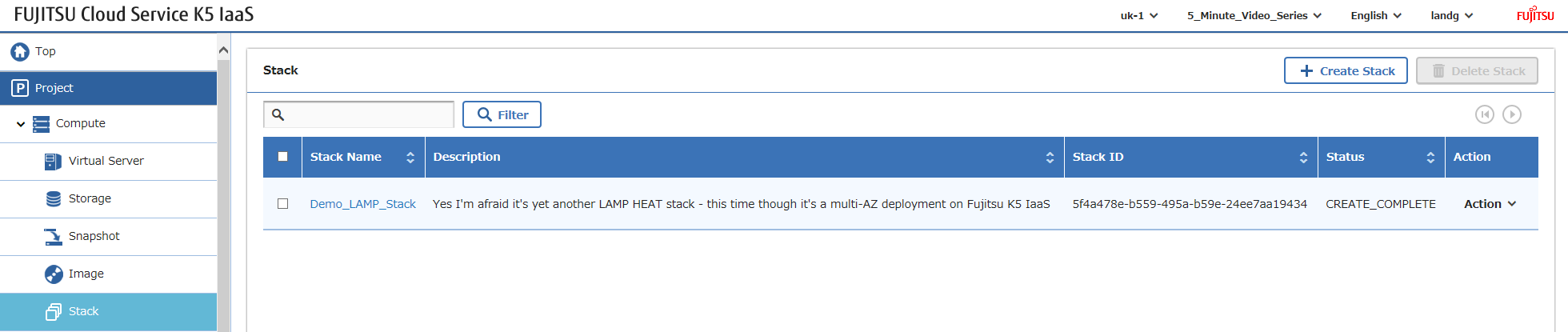
Now all you need to do is login and configure your software – as mentioned earlier yes you can automate ALL of the above but my focus here is to demonstrate the K5 infrastructure components.
Happy Stacking!