
TL;DR
HashiCorp Packer v1.7.xと新しいHCL2テンプレートを使用して、VMwareエコシステム、VMware ESXi 7.xおよびvCentre Server Appliance 7.xの配信パイプライン用イメージの一貫した構築、構成、テストを安全に行います。この例でVMwareに使用されているのと同じ原則は、AWS、GCP、Azure、AliCloud、Oracle Cloud、Vagrantなど、他のクラウドプラットフォーム向けに調整することができます。
主なポイント
- パイプラインの開始時に、デフォルトでネットワーク経由のユーザー名/パスワードアクセスを無効にし、最低限でも秘密鍵ペアを使用したSSHの利用を確保してください。
イメージ作成時にイメージビルダーアカウント用の公開SSHキーを注入し、パスワードアクセスによるネットワーク認証を無効にします。このリポジトリのpreseed.cfgファイルからの構成は以下のようになります。
d-i preseed/late_command string \
    in-target sed -i 's/^%sudo.*$/%sudo ALL=(ALL:ALL) NOPASSWD: ALL/g' /etc/sudoers; \
    in-target /bin/sh -c "echo 'Defaults env_keep += \"SSH_AUTH_SOCK\"' >> /etc/sudoers"; \
    in-target mkdir -p /home/iac4me/.ssh; \
    in-target /bin/sh -c "echo 'ssh-rsa AAAAB3NzaC1yc2EAAAADAQABAAACAQDDVB4JUB5/wUI0Y5THvquV8suuyLhjHNc/mkyerCZNJi4ZHTDk41wmaNhVcJWAbPKowAVTCchdM19EBPUykFPjnoXxcZS6qFFylAsxP6U0W5b4S5lon7+7d+ZwltgpWuuCdTkcJlDblZRWA8IdReh8mlSR6f8m7ngzgjGtppsxNXPzl7e/s3+CWLPOurb+0ZQvhdNU5Hcaxo/Vd9mW+RRy0ncroQrQ8SPg3xdFuZ+tsYDigoqXh9Jyg3KxvkM91HigHHsl0F03gq7MbniasYRwntzVbdydNkCFsNg0eDyz3hzXW6gXZRoj9TYilgAKmuLPRpiyN0rs8fQBMTVDO9P9yizVP7kB2uzGNOsoE3KhBotAzWM3Ht7rGsQlc+bhmkCsiz1C/c4gkSgIhdwHIvMVBJqGRDQAmf2XWV8XptSpBkQB2Mz9EiBILSSJjNTwod9FTxwn84KEXEsPc8neWcce3P0WE5f0TGyRDTRvy956gXaJSgm7CtxqU/Pwzv6+U41UUMoB0np0prFey7AFovx/IoBTAGwT1j19DNg/LlFKt53UhUURpdlRDXxz6yxoPobo49gyLN/YIWu4LgIvB+b9EKu+5Nfv/2iAntbVWoa/vaocSrHqlw5CQvyHBLZ3VH6EopST2twcrLkpMTmKicHxwRf03LggiiHXu0pX7z5ZTw== iac4me-BASTIONUSER-USER-KEY' >> /home/iac4me/.ssh/authorized_keys"; \
    in-target chown -R iac4me:iac4me /home/iac4me/; \
    in-target chmod -R go-rwx /home/iac4me/.ssh/authorized_keys; \
    in-target sed -i 's/PermitRootLogin yes/PermitRootLogin no/g' /etc/ssh/sshd_config; \
    in-target sed -i 's/#PasswordAuthentication yes/PasswordAuthentication no/g' /etc/ssh/sshd_config;
この構成情報は、インストールされるオペレーティングシステム(OS)によって異なります。ここではネイティブOSインストーラーを使用しており、今回はUbuntu 18.xです。
ビルドプロセス中にPackerが使用するログイン情報をHCLファイルexample.pkr.hclで更新することを忘れないでください。
  ssh_private_key_file = "/Users/grazzer/.ssh/iac4me-id_rsa"
  ssh_username = "iac4me"
注: スケーラブルな環境で作業しており、SSHキー管理のオーバーヘッドを避けたい場合は、このブログ記事で以前に議論された、証明書ベースの認証への切り替えを検討してください。
- ベースイメージを作成する際にコンプライアンスをテストしてください。脆弱性や非準拠を確認するために本番環境に入るまで待つ理由はありません。最初からそれらが漏れ出さないようにしてください。
セキュリティとコンプライアンスのための`Shift left`マインドセット – 初期の段階からパイプラインにコンプライアンスとガバナンスを組み込むことで、これらのチームを早期に参加させます。
はじめに
何百万人ものユーザー情報が偶然漏洩したり盗まれたりするという、新たな大規模データ侵害のニュースをほぼ毎日耳にします。
私たちはこれらの出来事にもはや驚いていませんが、それが油断を許す理由にはなりません。政府はこれらのデータ侵害に焦点を当て始め、場合によっては推奨事項やベストプラクティスのガイダンスを提供していますが、すべてのケースで罰金とペナルティが大幅に増加しています。
残念ながら、ビジネスにおいて良い行動を促すのは後者(罰金)の傾向があります。90年代後半、ロンドンでのグローバル企業のCレベル会議に出席し、あるコンプライアンスソフトウェアのデモンストレーションを行ったことを思い出します。商業的な議論の段階で、顧客はソフトウェアへの投資の有無を判断するための主要な意思決定基準として、非準拠による罰金の規模と、実際に発見される確率を掛け合わせた値を使用しました。
2020年10月に公にされたSolarWindsのサプライチェーン攻撃は、この記事を執筆している2021年8月現在でも多くのビジネスに影響を与え続けていますが、これは企業がIT環境を保護するために使用してきた古典的な`城と堀`パターンが深刻な欠陥を抱えていることのさらなる例です。私たちは依然として主にファイアウォールとVPNに依存してデータセンターの境界を保護し、その信頼の円内にいる全員が善人であると仮定しています!ファイアウォールやVPNなども役割を果たしますが、今日私たちにできることはもっとあります。
この記事は、より現代的なアプリケーション配信ワークフローの始まり、すなわち不変のパイプラインのためのフェニックスビルドプロセスに焦点を当てています。これは基本的に、既存のアプリケーションを再構成して更新するのではなく、アプリケーション配信パイプラインの開始時にベースイメージの構築、構成、テストを行うことを意味します。最新の修正プログラムを本番環境に適用する時間的余裕を見つけるのにまだ苦労している場合は、これらの新しいパターンを検討し始める時です。公開されたゼロデイ脆弱性を武器化してこれらのレガシーサーバーファームを狙うのに、わずか数分かかります。なぜ私たちはまだこのように運営しているのでしょうか!
オペレーティングシステムのパッチ適用やアプリケーションリリースのデプロイが必要な場合、これらの変更は新しいベースイメージを介して実装されます。このイメージは開発およびユーザー受入テストを経て、成功すれば最終的に本番環境にロールアウトされます。KubernetesやNomadなどの現代的なスケジューラーは、古いアプリケーションの切り替えと新しいアプリケーションのオンライン化の際にアプリケーションの可用性を維持するのに役立つ、高度なアプリケーション配信ワークフローを提供します。不変のアプローチにより、必要に応じてロールバックも高速に行えます。
HashiCorpは、この現代的なアプリケーション配信ワークフローの開始時に使用するように設計された、Packerという非常に強力かつ有用なオープンソースツールを提供しています。これは、アプリケーションワークフローの次のフェーズで消費される、繰り返し可能なベースイメージを自動的かつ一貫して構築するために使用できます。クラウドネイティブ業界の多くは、すでにこのプロセスのための事実上のツールとしてPackerを採用しています。しかし、私はこのプロセスの開始時に利便性のためにセキュリティが省略されているパイプラインをよく目にします。この記事の残りの部分では、パスワードではなくSSHキーを使用して新しいイメージをデプロイし、コンプライアンスを促進するためにベースイメージにテストを追加する方法についてのいくつかのヒントとトリックを提供することを目的としています。このパイプラインの開始時にバグを修正する方が、本番環境で修正するよりもはるかに安価です。ここで言及されていることはすべて、Packerの標準機能として提供されています – チームによって常に実装されているわけではありません。
私は今週末にVMwareのテストプラットフォームを再構築し、1月に動作していたイメージの構築に関するwarts and all(ありのままの)試みを共有します。VMwareで示すことはすべて、AWS、Azure、GCPなどに簡単に適応できます。時間が許せば、後日このリポジトリに他の例を追加する予定です。
この例ではPackerバージョン1.7.4を使用しました。
私が行った手順
- まず、HashiCorp Packerをインストールしましょう。デモにはMacOS(Intelベース)を使用しています。
- まず、HashiCorp Homebrew tapがインストールされていることを確認します。このtapにはPackerだけでなく、すべてのHashiCorp製品が含まれています。
$ brew tap hashicorp/tap
- MacOSにPackerをインストールします。より包括的な詳細については、HashiCorp Learn Websiteを参照してください。
$ brew install hashicorp/tap/packer

==> Installing packer from hashicorp/tap
==> Downloading https://releases.hashicorp.com/packer/1.7.4/packer_1.7.4_darwin_amd64.zip
######################################################################## 100.0%
🍺  /usr/local/Cellar/packer/1.7.4: 3 files, 161.4MB, built in 6 seconds
- Packerが以下のようにインストールされたことを確認します。
$ packer version
Packer v1.7.4
- このウォークスルーに従う場合は、ここからリポジトリを取得してください。
$ git clone git@github.com:allthingsclowd/packer-vsphere.git
Cloning into 'packer-vsphere'...
remote: Enumerating objects: 133, done.
remote: Counting objects: 100% (133/133), done.
remote: Compressing objects: 100% (64/64), done.
remote: Total 133 (delta 59), reused 116 (delta 44), pack-reused 0
Receiving objects: 100% (133/133), 22.56 KiB | 2.51 MiB/s, done.
Resolving deltas: 100% (59/59), done.

$ cd packer-vsphere/
- 有効なpacker HCLテンプレートファイルが作成されていることを簡単に確認しましょう。
$ packer validate example.pkr.hcl
Error: Unset variable "webpagecounter_frontend_version"

A used variable must be set or have a default value; see
https://packer.io/docs/templates/hcl_templates/syntax for details.

Error: Unset variable "vagrant_version"

A used variable must be set or have a default value; see
https://packer.io/docs/templates/hcl_templates/syntax for details.

Error: Unset variable "terraform_version"

A used variable must be set or have a default value; see
https://packer.io/docs/templates/hcl_templates/syntax for details.

Error: Unset variable "env_consul_version"

A used variable must be set or have a default value; see
https://packer.io/docs/templates/hcl_templates/syntax for details.

Error: Unset variable "secretid_service_version"

A used variable must be set or have a default value; see
https://packer.io/docs/templates/hcl_templates/syntax for details.

Error: Unset variable "waypoint_entrypoint_version"

A used variable must be set or have a default value; see
https://packer.io/docs/templates/hcl_templates/syntax for details.

Error: Unset variable "boundary_version"

A used variable must be set or have a default value; see
https://packer.io/docs/templates/hcl_templates/syntax for details.

Error: Unset variable "boundary_desktop_version"

A used variable must be set or have a default value; see
https://packer.io/docs/templates/hcl_templates/syntax for details.

Error: Unset variable "packer_version"

A used variable must be set or have a default value; see
https://packer.io/docs/templates/hcl_templates/syntax for details.

Error: Unset variable "vault_version"

A used variable must be set or have a default value; see
https://packer.io/docs/templates/hcl_templates/syntax for details.

Error: Unset variable "nomad_version"

A used variable must be set or have a default value; see
https://packer.io/docs/templates/hcl_templates/syntax for details.

Error: Unset variable "golang_version"

A used variable must be set or have a default value; see
https://packer.io/docs/templates/hcl_templates/syntax for details.

Error: Unset variable "vcentre_host"

A used variable must be set or have a default value; see
https://packer.io/docs/templates/hcl_templates/syntax for details.

Error: Unset variable "esx_host"

A used variable must be set or have a default value; see
https://packer.io/docs/templates/hcl_templates/syntax for details.

Error: Unset variable "vcentre_password"

A used variable must be set or have a default value; see
https://packer.io/docs/templates/hcl_templates/syntax for details.

Error: Unset variable "envoy_version"

A used variable must be set or have a default value; see
https://packer.io/docs/templates/hcl_templates/syntax for details.

Error: Unset variable "webpagecounter_version"

A used variable must be set or have a default value; see
https://packer.io/docs/templates/hcl_templates/syntax for details.

Error: Unset variable "consul_version"

A used variable must be set or have a default value; see
https://packer.io/docs/templates/hcl_templates/syntax for details.

Error: Unset variable "nomad_autoscaler_version"

A used variable must be set or have a default value; see
https://packer.io/docs/templates/hcl_templates/syntax for details.

Error: Unset variable "consul_template_version"

A used variable must be set or have a default value; see
https://packer.io/docs/templates/hcl_templates/syntax for details.

Error: Unset variable "waypoint_version"

A used variable must be set or have a default value; see
https://packer.io/docs/templates/hcl_templates/syntax for details.

Error: Unset variable "vcentre_user"

A used variable must be set or have a default value; see
https://packer.io/docs/templates/hcl_templates/syntax for details.
- おっと、環境変数を正しく設定して環境設定と一致させた後は、それらをソースすることを忘れないでください。
var.envファイルのデフォルト値を変更してください。では、再び始めましょう。
$ source var.env
$ packer validate example.pkr.hcl
Error: Unset variable "vcentre_password"

A used variable must be set or have a default value; see
https://packer.io/docs/templates/hcl_templates/syntax for details.

Error: Unset variable "vcentre_host"

A used variable must be set or have a default value; see
https://packer.io/docs/templates/hcl_templates/syntax for details.

Error: Unset variable "esx_host"

A used variable must be set or have a default value; see
https://packer.io/docs/templates/hcl_templates/syntax for details.

Error: Unset variable "vcentre_user"

A used variable must be set or have a default value; see
https://packer.io/docs/templates/hcl_templates/syntax for details.
- githubリポジトリの
var.envファイルにパスワードを格納していると思うようなことは本当にしませんでしたよね? これらも環境変数として取得する必要があります。また、これらの秘密環境変数を環境に合わせて構成する必要があります。リポジトリに配置しないでください。それは良い慣行ではありません。(HashiCorp Vaultを提供していますが、そのような秘密資料の管理については、また別の機会に)
このリポジトリの外側には、必要な環境変数を構成するためにsourcedされる以下の秘密ファイルがあります…
# vCenter Setup
export PKR_VAR_vcentre_user="@vsphere.local"
export PKR_VAR_vcentre_password=""
export PKR_VAR_vcentre_host="vCentre IP Address"
export PKR_VAR_esx_host="ESX IP Address"
var.envファイルとsecretsファイルの両方がソースされ(メモリ内にすべての前提条件の環境変数が設定され)、packer検証が成功します…以下のように通知なしで退屈なほどに。
$ packer validate example.pkr.hcl
$
- では、挑戦してみましょう!
- 構成はPacker検証をパスしたので、それで終わりでしょうか?
- 1, 2, 3、そして出発…
$ packer build example.pkr.hcl

- 間違い 😦
==> vsphere-iso.example: Provisioning with Inspec...
==> vsphere-iso.example: Executing Inspec: inspec exec test/ImageBuild-Packer-Test --backend ssh --host 127.0.0.1 --user grazzer --key-files /var/folders/qq/8hmjq2xj23qcgjj7c5dbnvzm0000gn/T/packer-provisioner-inspec.994691541.key --port 64111 --input-file /var/folders/qq/8hmjq2xj23qcgjj7c5dbnvzm0000gn/T/packer-provisioner-inspec.367916336.yml
==> vsphere-iso.example: read |0: file already closed
==> vsphere-iso.example: Provisioning step had errors: Running the cleanup provisioner, if present...
==> vsphere-iso.example: Clear boot order...
==> vsphere-iso.example: Power off VM...
==> vsphere-iso.example: Deleting Floppy image ...
==> vsphere-iso.example: Destroying VM...
Build 'vsphere-iso.example' errored after 20 minutes 26 seconds: Error executing Inspec: exec: "inspec": executable file not found in $PATH

==> Wait completed after 20 minutes 26 seconds

==> Some builds didn't complete successfully and had errors:
--> vsphere-iso.example: Error executing Inspec: exec: "inspec": executable file not found in $PATH

==> Builds finished but no artifacts were created.
- PackerはChefのInspecを使用してpackerビルドプロセスをテストするように構成されていますが、最近のZoomのトラブルにより、イライラしたデバッグセッション中にラップトップの再構築を余儀なくされ、ラップトップの再構築プロセスを自動化していませんでした。ビルドサーバー(私のラップトップ)からInspecテストが実行されるため、Chefを再インストールする必要があります。
$ curl https://omnitruck.chef.io/install.sh | sudo bash -s -- -P inspec
  % Total    % Received % Xferd   Average Speed   Time    Time     Time  Current
                                 Dload  Upload   Total   Spent    Left  Speed
100 23409  100 23409    0     0   198k      0 --:--:-- --:--:-- --:--:--  198k
Password:
mac_os_x 11.4 x86_64
Getting information for inspec stable  for mac_os_x...
downloading https://omnitruck.chef.io/stable/inspec/metadata?v=&p=mac_os_x&pv=11.4&m=x86_64
  to file /tmp/install.sh.10782/metadata.txt
trying curl...
sha1    11e08ab78ce2971b7f129a2306e0a1636039b7f0
sha256  bc5772b1db8e13f2766390e995dbda1651813d1b1737c88af47b8f217acb03b0
url https://packages.chef.io/files/stable/inspec/4.38.9/mac_os_x/11/inspec-4.38.9-1.x86_64.dmg
version 4.38.9
downloaded metadata file looks valid...
downloading https://packages.chef.io/files/stable/inspec/4.38.9/mac_os_x/11/inspec-4.38.9-1.x86_64.dmg
  to file /tmp/install.sh.10782/inspec-4.38.9-1.x86_64.dmg
trying curl...
Comparing checksum with shasum...

WARNING WARNING WARNING WARNING WARNING WARNING WARNING WARNING WARNING

You are installing a package without a version pin.  If you are installing
on production servers via an automated process this is DANGEROUS and you will
be upgraded without warning on new releases, even to new major releases.
Letting the version float is only appropriate in desktop, test, development or
CI/CD environments.

WARNING WARNING WARNING WARNING WARNING WARNING WARNING WARNING WARNING

Installing inspec
installing dmg file...
Checksumming Protective Master Boot Record (MBR : 0)…
Protective Master Boot Record (MBR :: verified CRC32 $A63E199D
Checksumming GPT Header (Primary GPT Header : 1)…
 GPT Header (Primary GPT Header : 1): verified CRC32 $554DB84C
Checksumming GPT Partition Data (Primary GPT Table : 2)…
GPT Partition Data (Primary GPT Tabl: verified CRC32 $9451B1CA
Checksumming  (Apple_Free : 3)…
                    (Apple_Free : 3): verified CRC32 $00000000
Checksumming disk image (Apple_HFS : 4)…
....................................................................................................................
          disk image (Apple_HFS : 4): verified CRC32 $CE3F8BAF
Checksumming  (Apple_Free : 5)…
                    (Apple_Free : 5): verified CRC32 $00000000
Checksumming GPT Partition Data (Backup GPT Table : 6)…
GPT Partition Data (Backup GPT Table: verified CRC32 $9451B1CA
Checksumming GPT Header (Backup GPT Header : 7)…
  GPT Header (Backup GPT Header : 7): verified CRC32 $CA80E7E2
verified CRC32 $9E68E33F
/dev/disk3              GUID_partition_scheme
/dev/disk3s1            Apple_HFS                       /Volumes/chef_software
installer: Package name is InSpec
installer: Installing at base path /
installer: The install was successful.
"disk3" ejected.
- そして再び出発…
$ packer build example.pkr.hcl
vsphere-iso.example: output will be in this color.

==> vsphere-iso.example: File /Users/grazzer/repos/packer-vsphere/packer_cache/a37af95ab12e665ba168128cde2f3662740b21a2.iso already uploaded; continuing
==> vsphere-iso.example: File [IntelDS2] packer_cache//a37af95ab12e665ba168128cde2f3662740b21a2.iso already exists; skipping upload.
==> vsphere-iso.example: Creating VM...
==> vsphere-iso.example: Customizing hardware...
==> vsphere-iso.example: Mounting ISO images...
==> vsphere-iso.example: Adding configuration parameters...
==> vsphere-iso.example: Creating floppy disk...
    vsphere-iso.example: Copying files flatly from floppy_files
    vsphere-iso.example: Copying file: ./http/preseed.cfg
    vsphere-iso.example: Done copying files from floppy_files
    vsphere-iso.example: Collecting paths from floppy_dirs
    vsphere-iso.example: Resulting paths from floppy_dirs : []
    vsphere-iso.example: Done copying paths from floppy_dirs
==> vsphere-iso.example: Uploading created floppy image
==> vsphere-iso.example: Adding generated Floppy...
==> vsphere-iso.example: Set boot order temporary...
==> vsphere-iso.example: Power on VM...
==> vsphere-iso.example: Waiting 10s for boot...
==> vsphere-iso.example: Provisioning with Inspec...
==> vsphere-iso.example: Executing Inspec: inspec exec test/ImageBuild-Packer-Test --backend ssh --host 127.0.0.1 --user grazzer --key-files /var/folders/qq/8hmjq2xj23qcgjj7c5dbnvzm0000gn/T/packer-provisioner-inspec.131501239.key --port 55207 --input-file /var/folders/qq/8hmjq2xj23qcgjj7c5dbnvzm0000gn/T/packer-provisioner-inspec.069478570.yml
    vsphere-iso.example: [2021-07-31T20:53:28+01:00] ERROR: Chef InSpec cannot execute without accepting the license
==> vsphere-iso.example: Provisioning step had errors: Running the cleanup provisioner, if present...
==> vsphere-iso.example: Clear boot order...
==> vsphere-iso.example: Power off VM...
==> vsphere-iso.example: Deleting Floppy image ...
==> vsphere-iso.example: Destroying VM...
Build 'vsphere-iso.example' errored after 10 minutes 34 seconds: Error executing Inspec: Inspec exited with unexpected exit status: 172. Expected exit codes are: [0 101]

==> Wait completed after 10 minutes 34 seconds

==> Some builds didn't complete successfully and had errors:
--> vsphere-iso.example: Error executing Inspec: Inspec exited with unexpected exit status: 172. Expected exit codes are: [0 101]

==> Builds finished but no artifacts were created.
- Inspecは、ソフトウェアを使用する前にライセンスの受け入れを強制します。公平な話です – 法的な用語を一切読んでいませんが。
 $ inspec --chef-license=accept
+---------------------------------------------+
✔ 1 product license accepted.
+---------------------------------------------+
Commands:
  inspec archive PATH                # archive a profile to tar.gz (default) or zip
  inspec check PATH                  # verify all tests at the specified PATH
  inspec clear_cache                 # clears the InSpec cache. Useful for debugging.
  inspec detect                      # detect the target OS
  inspec env                         # Output shell-appropriate completion configuration
  inspec exec LOCATIONS              # Run all tests at LOCATIONS.
  inspec help [COMMAND]              # Describe available commands or one specific command
  inspec json PATH                   # read all tests in PATH and generate a JSON summary
  inspec shell                       # open an interactive debugging shell
  inspec supermarket SUBCOMMAND ...  # Supermarket commands
  inspec vendor PATH                 # Download all dependencies and generate a lockfile in a `vendor` directory
  inspec version                     # prints the version of this tool

Options:
  l, [--log-level=LOG_LEVEL]                         # Set the log level: info (default), debug, warn, error
      [--log-location=LOG_LOCATION]                  # Location to send diagnostic log messages to. (default: $stdout or Inspec::Log.error)
      [--diagnose], [--no-diagnose]                  # Show diagnostics (versions, configurations)
      [--color], [--no-color]                        # Use colors in output.
      [--interactive], [--no-interactive]            # Allow or disable user interaction
      [--disable-user-plugins]                       # Disable loading all plugins that the user installed.
      [--enable-telemetry], [--no-enable-telemetry]  # Allow or disable telemetry
      [--chef-license=CHEF_LICENSE]                  # Accept the license for this product and any contained products: accept, accept-no-persist, accept-silent

About Chef InSpec:
  Patents: chef.io/patents
- そして再び、3度目の正直…
- はい、我慢してください – このエラーはより本題に関連しています。イメージの構築後、PackerはInspecテストを実行してイメージビルドが準拠していることを確認しました。しかし、準拠していません!Envoy Proxyチームが、私が最後にインストールスクリプトを実行して以来、ソフトウェアのデプロイ方法を変更した可能性があります。
    vsphere-iso.example:   ✔  golang-version-1.0: golang version check
    vsphere-iso.example:      ✔  Command: `/usr/local/go/bin/go version` stdout is expected to match "1.16"
    vsphere-iso.example:   ×  envoy-exists-1.0: envoy software exists
    vsphere-iso.example:      ×  File /usr/local/bin/envoy is expected to exist
    vsphere-iso.example:      expected File /usr/local/bin/envoy to exist
    vsphere-iso.example:   ×  envoy-version-1.0: envoy version check
    vsphere-iso.example:      ×  Command: `/usr/local/bin/envoy --version` stdout is expected to match "1.17.0"
    vsphere-iso.example:      expected "" to match "1.17.0"
    vsphere-iso.example:
    vsphere-iso.example:
    vsphere-iso.example: Profile Summary: 25 successful controls, 2 control failures, 0 controls skipped
    vsphere-iso.example: Test Summary: 32 successful, 2 failures, 0 skipped
==> vsphere-iso.example: Provisioning step had errors: Running the cleanup provisioner, if present...
==> vsphere-iso.example: Clear boot order...
==> vsphere-iso.example: Power off VM...
==> vsphere-iso.example: Deleting Floppy image ...
==> vsphere-iso.example: Destroying VM...
Build 'vsphere-iso.example' errored after 10 minutes 54 seconds: Error executing Inspec: Inspec exited with unexpected exit status: 100. Expected exit codes are: [0 101]

==> Wait completed after 10 minutes 54 seconds

==> Some builds didn't complete successfully and had errors:
- 現在起こっていることは、packerビルドプロセスの一部であるビルド後のテストが、このイメージにあるべきバイナリの1つでエラーを検出したことです。それが存在しません!!!これがまさに、本番環境に入る前にエフェメラルビルドを使用してテストする理由です – ビジネスにとって、これらのミスを配信プロセスの早い段階で犯す方がはるかに安価です。
- envoyproxyのインストールプロセスは、1月にこのビルドが最後に正常に実行されて以来、変更されたようです。
==> vsphere-iso.example: /tmp/script_4250.sh: line 128: getenvoy: command not found
==> vsphere-iso.example: chmod: cannot access '/usr/local/bin/getenvoy': No such file or directory
==> vsphere-iso.example: /tmp/script_4250.sh: line 130: /usr/local/bin/getenvoy: No such file or directory
==> vsphere-iso.example: cp: cannot stat '/usr/local/bin/builds/standard/1.17.0/linux_glibc/bin/envoy': No such file or directory
==> vsphere-iso.example: chmod: cannot access '/usr/local/bin/envoy': No such file or directory
==> vsphere-iso.example: /tmp/script_4250.sh: line 133: /usr/local/bin/envoy: No such file or directory
- そこで、時間の節約のために少しずるをして、インストールスクリプトのデバッグの機会があるまで、
vmware_example_image.rbファイルからenvoyプロキシバイナリのテストを削除しました。
# control 'envoy-exists-1.0' do
#   impact 1.0
#   title 'envoy software exists'
#   desc 'verify that envoy is installed'
#   describe file('/usr/local/bin/envoy') do
#     it { should exist }
#   end
# end

# control 'envoy-version-1.0' do
#   impact 1.0
#   title 'envoy version check'
#   desc 'verify that envoy is the correct version'
#   describe command('/usr/local/bin/envoy --version') do
#    its('stdout') { should match envoy_version }
#   end
# end
- そして再び出発…
- 変更の最中にこれが発生しました…
$ git push
Enumerating objects: 35, done.
Counting objects: 100% (35/35), done.
Delta compression using up to 8 threads
Compressing objects: 100% (19/19), done.
Writing objects: 100% (26/26), 933.16 MiB | 1.92 MiB/s, done.
Total 26 (delta 8), reused 2 (delta 0), pack-reused 0
remote: Resolving deltas: 100% (8/8), completed with 3 local objects.
remote: error: GH001: Large files detected. You may want to try Git Large File Storage - https://git-lfs.github.com.
remote: error: Trace: 58ba6c71facaeb026b51d562c13d6bfd54da57cdd13ef128e97c5ee43c426bd8
remote: error: See http://git.io/iEPt8g for more information.
remote: error: File packer_cache/a37af95ab12e665ba168128cde2f3662740b21a2.iso is 951.00 MB; this exceeds GitHub's file size limit of 100.00 MB
To github.com:allthingsclowd/packer-vsphere.git
 ! [remote rejected] update -> update (pre-receive hook declined)
error: failed to push some refs to 'github.com:allthingsclowd/packer-vsphere.git'
- 基本的に、PackerとGitリポジトリを扱う際の別の注意深い教訓です…何かをコミットする前に
.gitignoreファイルをセットアップしてください。Packerが実行されると、構成ファイルで指定したイメージがキャッシュされます。これらをgitリポジトリに含めたくありません(通常は)。 - このエラーを回避するには、イメージ構築プロセスの開始時に
.gitignoreファイルを作成して構成し、最低限でもpacker_cacheディレクトリをそこに配置してください。 - この問題を修正するために、私はBFGという便利なツールを以下のように使用します。
$ java -jar ~/Downloads/bfg-1.14.0.jar --strip-blobs-bigger-than 100M packer-vsphere/

Using repo : /Users/grazzer/repos/packer-vsphere/.git

Scanning packfile for large blobs: 134
Scanning packfile for large blobs completed in 23 ms.
Found 1 blob ids for large blobs - biggest=997195776 smallest=997195776
Total size (unpacked)=997195776
Found 11 objects to protect
Found 7 commit-pointing refs : HEAD, refs/heads/grazzer, refs/heads/update, ...

Protected commits
-----------------

These are your protected commits, and so their contents will NOT be altered:

 * commit 97d7665f (protected by 'HEAD')

Cleaning
--------

Found 26 commits
Cleaning commits:       100% (26/26)
Cleaning commits completed in 95 ms.

Updating 1 Ref
--------------

    Ref                 Before     After
    ---------------------------------------
    refs/heads/update | 97d7665f | cc8b9271

Updating references:    100% (1/1)
...Ref update completed in 21 ms.

Commit Tree-Dirt History
------------------------

    Earliest            Latest
    |                        |
    .....................DDDmm

    D = dirty commits (file tree fixed)
    m = modified commits (commit message or parents changed)
    . = clean commits (no changes to file tree)

                            Before     After
    -------------------------------------------
    First modified commit | cfcd2a9c | 6528e27
    Last dirty commit     | 23747e6c | 3f891d80

Deleted files
-------------

    Filename                                       Git id
    ------------------------------------------------------------------
    a37af95ab12e665ba168128cde2f3662740b21a2.iso | 1a5de3fe (951.0 MB)

In total, 9 object ids were changed. Full details are logged here:

    /Users/grazzer/repos/packer-vsphere.bfg-report/2021-08-01/09-35-21

BFG run is complete! When ready, run: git reflog expire --expire=now --all && git gc --prune=now --aggressive
$ cd packer-vsphere
$ git reflog expire --expire=now --all && git gc --prune=now --aggressive
Enumerating objects: 164, done.
Counting objects: 100% (164/164), done.
Delta compression using up to 8 threads
Compressing objects: 131/131), done.
Writing objects: 164/164), done.
Total 164 (delta 71), reused 61 (delta 0), pack-reused 0
grazzer@Grahams-MacBook-Pro ~/r/packer-vsphere (update)> git push
Enumerating objects: 41, done.
Counting objects: 100% (41/41), done.
Delta compression using up to 8 threads
Compressing objects: 16/16), done.
Writing objects: 32/32), 10.83 KiB | 10.83 MiB/s, done.
Total 32 (delta 10), reused 29 (delta 7), pack-reused 0
remote: Resolving deltas: 100% (10/10), completed with 3 local objects.
To github.com:allthingsclowd/packer-vsphere.git
   8acc2bb..cc8b927  update -> update
$
- 壊したリポジトリを修正したので、もう一度始めましょう…
$ packer build -on-error=abort example.pkr.hcl
vsphere-iso.example: output will be in this color.

==> vsphere-iso.example: File /Users/grazzer/repos/packer-vsphere/packer_cache/a37af95ab12e665ba168128cde2f3662740b21a2.iso already uploaded; continuing
==> vsphere-iso.example: File [IntelDS2] packer_cache//a37af95ab12e665ba168128cde2f3662740b21a2.iso already exists; skipping upload.
==> vsphere-iso.example: packer_templates/example already exists, you can use -force flag to destroy it: <nil>
==> vsphere-iso.example: Step "StepCreateVM" failed, aborting...
==> vsphere-iso.example: aborted: skipping cleanup of step "StepRemoteUpload"
==> vsphere-iso.example: aborted: skipping cleanup of step "StepCreateCD"
==> vsphere-iso.example: aborted: skipping cleanup of step "StepDownload"
==> vsphere-iso.example: aborted: skipping cleanup of step "StepConnect"
Build 'vsphere-iso.example' errored after 462 milliseconds 605 microseconds: packer_templates/example already exists, you can use -force flag to destroy it: <nil>

==> Wait completed after 462 milliseconds 786 microseconds

==> Some builds didn't complete successfully and had errors:
--> vsphere-iso.example: packer_templates/example already exists, you can use -force flag to destroy it: <nil>

==> Builds finished but no artifacts were created.
- デフォルトでは、Packerはエラーをスローすると自身をクリーンアップします。しかし、インストールスクリプト(上記のenvoyプロキシ)をデバッグしている場合、このクリーンアップ操作を防止することが、サーバーにログインして手動で調査できるようにするために役立つことがよくあります。
- この動作モードは、以下のように
-on-errorフラグを使用して呼び出されます。
$ packer build -on-error=abort example.pkr.hcl
- しかし、前のビルドが正しくクリーンアップされなかったことをPackerがすぐに検出したため、ビルドを再開する際に前のエラーが発生しました。
-forceフラグを活用することで、これを乗り越えることができます。- そして、再び軌道に乗りました…
packer build -on-error=abort -force example.pkr.hcl
vsphere-iso.example: output will be in this color.

==> vsphere-iso.example: File /Users/grazzer/repos/packer-vsphere/packer_cache/a37af95ab12e665ba168128cde2f3662740b21a2.iso already uploaded; continuing
==> vsphere-iso.example: File [IntelDS2] packer_cache//a37af95ab12e665ba168128cde2f3662740b21a2.iso already exists; skipping upload.
==> vsphere-iso.example: the vm/template packer_templates/example already exists, but deleting it due to -force flag
==> vsphere-iso.example: Creating VM...
==> vsphere-iso.example: Customizing hardware...
==> vsphere-iso.example: Mounting ISO images...
==> vsphere-iso.example: Adding configuration parameters...
==> vsphere-iso.example: Creating floppy disk...
    vsphere-iso.example: Copying files flatly from floppy_files
    vsphere-iso.example: Copying file: ./http/preseed.cfg
    vsphere-iso.example: Done copying files from floppy_files
    vsphere-iso.example: Collecting paths from floppy_dirs
    vsphere-iso.example: Resulting paths from floppy_dirs : []
    vsphere-iso.example: Done copying paths from floppy_dirs
==> vsphere-iso.example: Uploading created floppy image
==> vsphere-iso.example: Adding generated Floppy...
==> vsphere-iso.example: Set boot order temporary...
==> vsphere-iso.example: Power on VM...
.
.
.
==> vsphere-iso.example: Shutting down VM...
==> vsphere-iso.example: Cannot shut down VM: ServerFaultCode: Cannot complete operation because VMware Tools is not running in this virtual machine.
==> vsphere-iso.example: Step "StepShutdown" failed, aborting...
==> vsphere-iso.example: aborted: skipping cleanup of step "StepProvision"
==> vsphere-iso.example: aborted: skipping cleanup of step "StepConnect"
==> vsphere-iso.example: aborted: skipping cleanup of step "StepWaitForIp"
==> vsphere-iso.example: aborted: skipping cleanup of step "StepBootCommand"
==> vsphere-iso.example: aborted: skipping cleanup of step "StepRun"
==> vsphere-iso.example: aborted: skipping cleanup of step "StepHTTPServer"
==> vsphere-iso.example: aborted: skipping cleanup of step "StepHTTPIPDiscover"
==> vsphere-iso.example: aborted: skipping cleanup of step "StepAddFloppy"
==> vsphere-iso.example: aborted: skipping cleanup of step "StepCreateFloppy"
==> vsphere-iso.example: aborted: skipping cleanup of step "StepConfigParams"
==> vsphere-iso.example: aborted: skipping cleanup of step "StepAddCDRom"
==> vsphere-iso.example: aborted: skipping cleanup of step "StepConfigureHardware"
==> vsphere-iso.example: aborted: skipping cleanup of step "StepCreateVM"
==> vsphere-iso.example: aborted: skipping cleanup of step "StepRemoteUpload"
==> vsphere-iso.example: aborted: skipping cleanup of step "StepCreateCD"
==> vsphere-iso.example: aborted: skipping cleanup of step "StepDownload"
==> vsphere-iso.example: aborted: skipping cleanup of step "StepConnect"
Build 'vsphere-iso.example' errored after 10 minutes 48 seconds: Cannot shut down VM: ServerFaultCode: Cannot complete operation because VMware Tools is not running in this virtual machine.

==> Wait completed after 10 minutes 48 seconds

==> Some builds didn't complete successfully and had errors:
--> vsphere-iso.example: Cannot shut down VM: ServerFaultCode: Cannot complete operation because VMware Tools is not running in this virtual machine.

==> Builds finished but no artifacts were created.
- 何?
- ありえない!
- 本当にありえない!
- VMware Toolsが欠落しています!!!これは驚きです。前回見たときは、確実にインストールされていたはずです。
- ここでは、インストールスクリプト
packer_install_base_packages.shの前提条件にVMware Toolsを追加することを確実にするだけの簡単な修正があります。
sudo apt-get install -y -q wget tmux unzip git redis-server nginx lynx jq curl net-tools open-vm-tools
- もちろん、Inspecテストファイルに以下を追加してテストすることを忘れないでください。
  describe package('open-vm-tools') do
    it {should be_installed}
  end
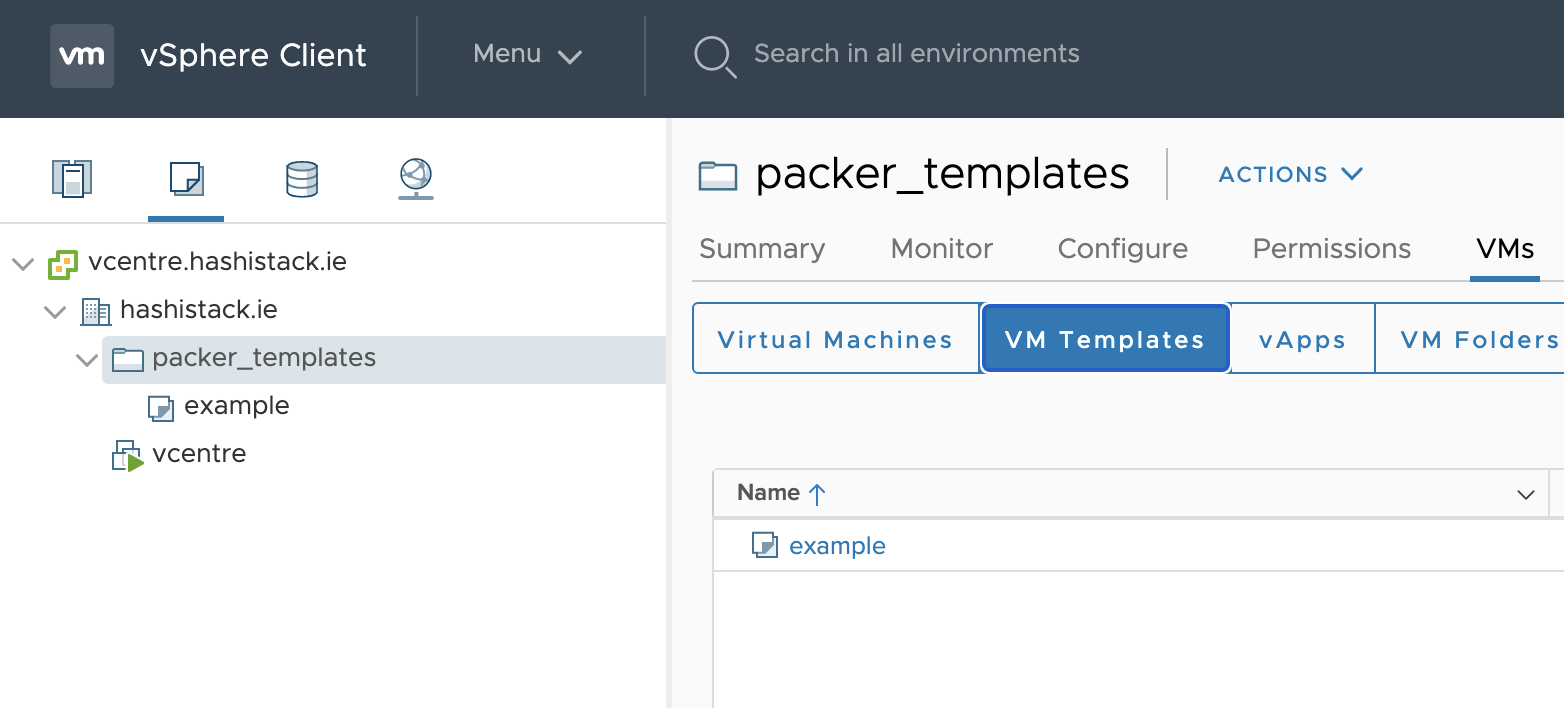
- そしてついに、新しいテンプレートがESXホストにデプロイされました。
    vsphere-iso.example:   ✔  golang-exists-1.0: golang exists
    vsphere-iso.example:      ✔  File /usr/local/go/bin/go is expected to exist
    vsphere-iso.example:   ✔  golang-version-1.0: golang version check
    vsphere-iso.example:      ✔  Command: `/usr/local/go/bin/go version` stdout is expected to match "1.16"
    vsphere-iso.example:
    vsphere-iso.example:
    vsphere-iso.example: Profile Summary: 22 successful controls, 0 control failures, 0 controls skipped
    vsphere-iso.example: Test Summary: 30 successful, 0 failures, 0 skipped
==> vsphere-iso.example: Shutting down VM...
==> vsphere-iso.example: Deleting Floppy drives...
==> vsphere-iso.example: Deleting Floppy image...
==> vsphere-iso.example: Eject CD-ROM drives...
==> vsphere-iso.example: Convert VM into template...
==> vsphere-iso.example: Clear boot order...
Build 'vsphere-iso.example' finished after 10 minutes 43 seconds.

==> Wait completed after 10 minutes 43 seconds

==> Builds finished. The artifacts of successful builds are:
--> vsphere-iso.example: example
- このリポジトリとREADMEが、このインターネット上の誰かにとって有用であることを願っています。
Happy Automating, Graz
To Do
- より多くのイメージプラットフォームの例を追加する
- envoyproxyのベースバイナリデプロイメントを修正する
- Travisテストも追加する可能性あり。ローカルのMacbookを必要とせずにクラウドだけで何ができるか見てみる