
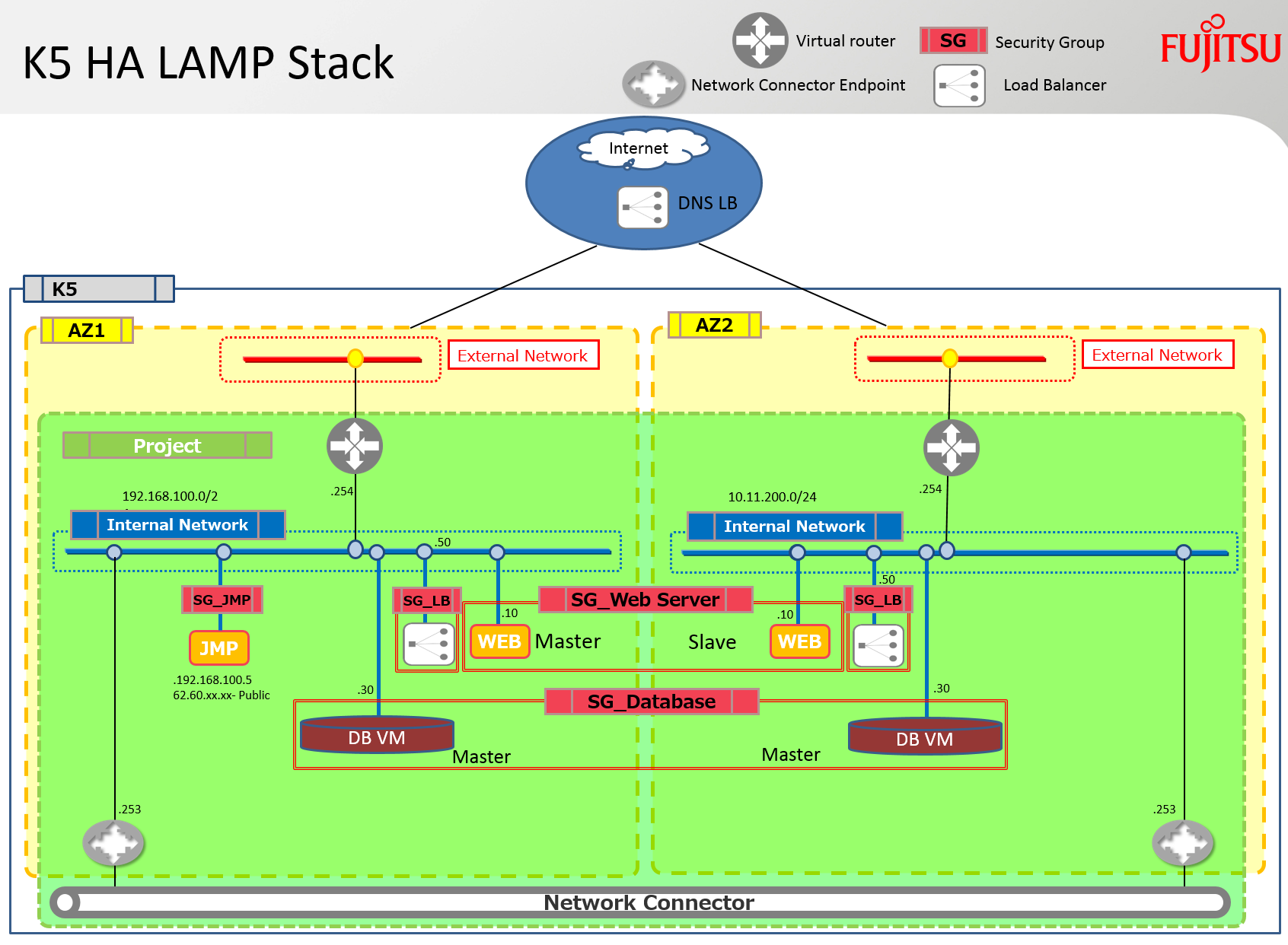
はい、残念ながらまたまたHEAT LAMPスタックの話です。ただし、このスタックにはFujitsuがNeutronおよびHeat向けに開発したいくつかの強化機能が含まれています。このスタックは、両方のアベイラビリティゾーンにApacheサーバーとMySQLサーバーを展開します。また、ネットワークコネクタを使用して、これらのサーバー間のレプリケーションおよび同期トラフィックを可能にするために、両方のAZ(アベイラビリティゾーン)を接続します。さらに、各サブネットにはロードバランサーが展開され、そのプールには両方のApacheサーバーが含まれています。
注: 残念ながら、ApacheやMySQLのスクリプトを設定およびデバッグする時間がありませんでした。インストールされているのはソフトウェアのみですが、ブログosphereにはこれらのトピックに関する多くの記事があります – 例を見つけるためにYahooで検索してみてください… lol! また、ロードバランサー自体は、単一障害点を排除するために外部のHA DNSサービスを使用して最終的に「バランス」されるべきです。
以下の図は、このブログで議論されているスタックを使用して構築されるインフラストラクチャを示しています。
前提条件
このスタックの正常な展開には、以下の前提条件が必要です。
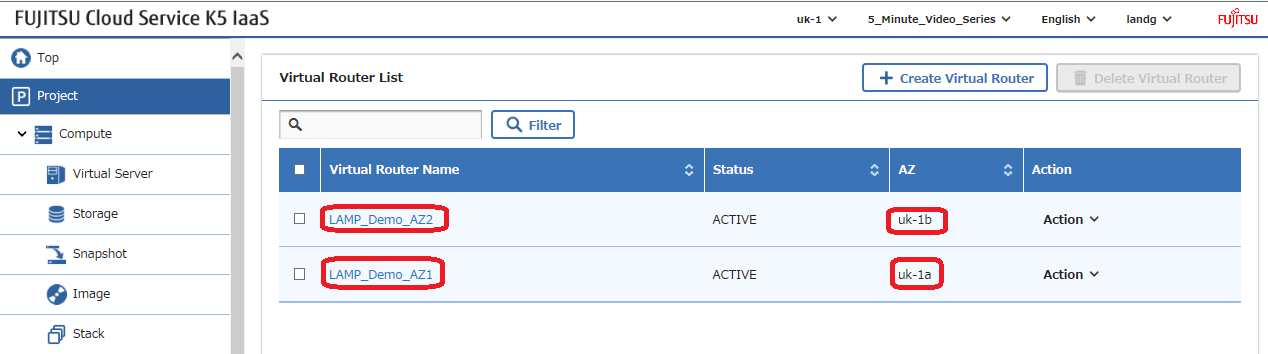
仮想ルーター: 各アベイラビリティゾーンにインターネット接続された仮想ルーターを作成し、これらのルーターに関連付けられたパラメータをスタックに追加する必要があります。
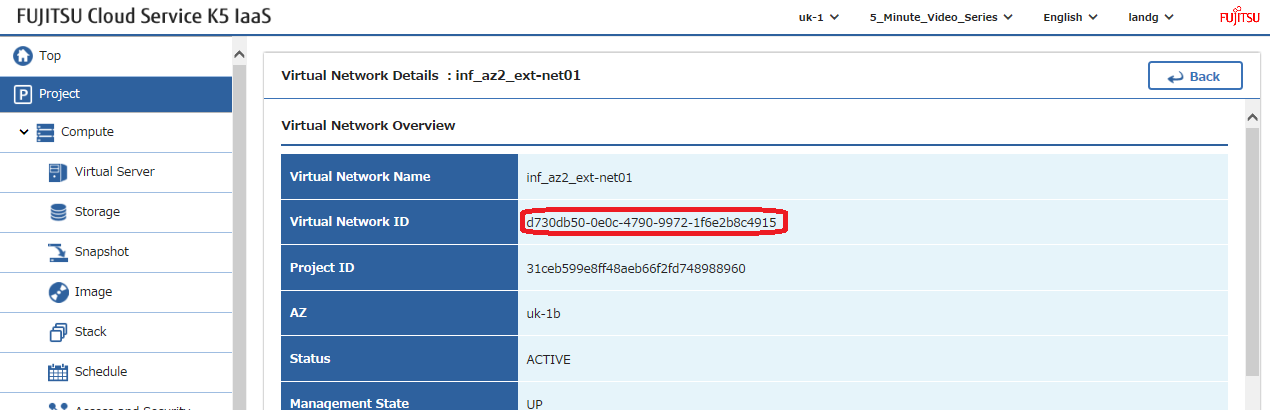
各ルーターのIDを取得し、これは例のスタックで修正する必要があります。また、各ルーターが使用する外部ネットワークの名前をメモしてください –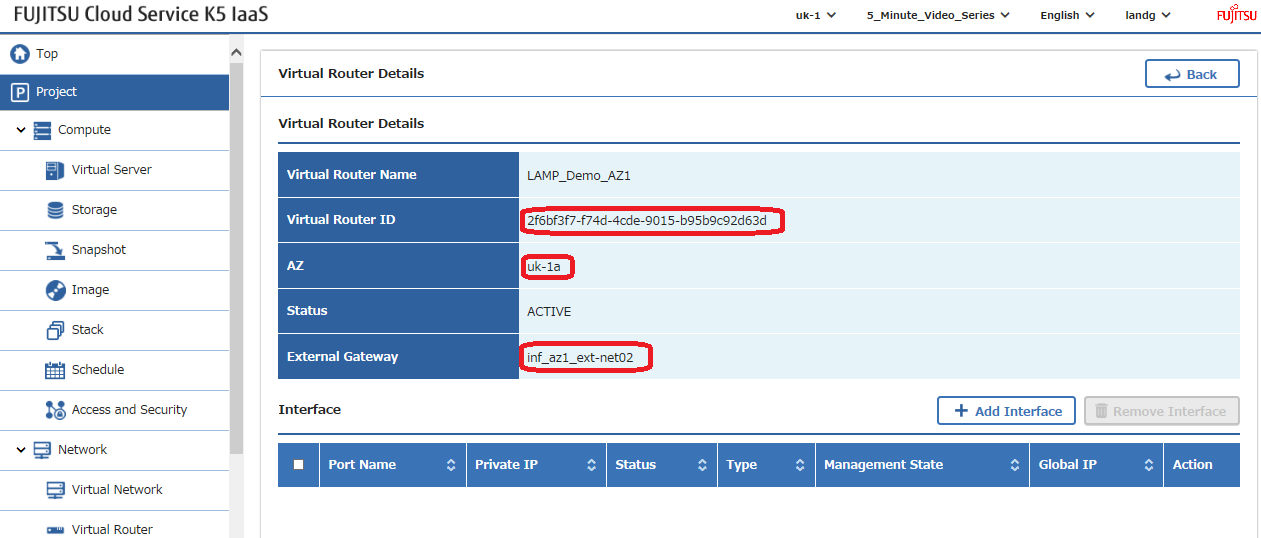
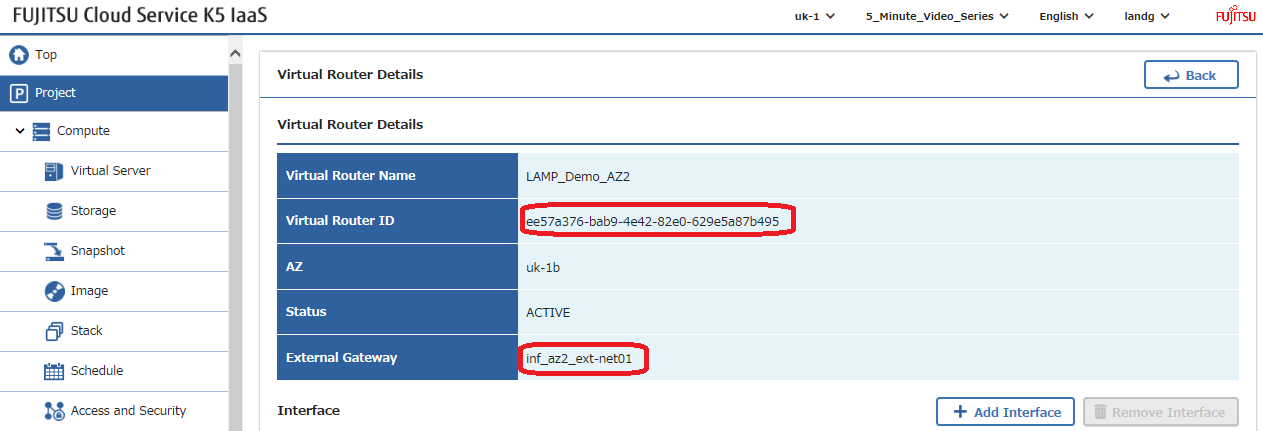
外部ネットワーク: 上記のゲートウェイ設定で特定された外部ネットワーク名を使用して、これらの外部(パブリックとも呼ばれる)ネットワークのネットワークIDを見つけ、例のスタックでこれらの値を修正します –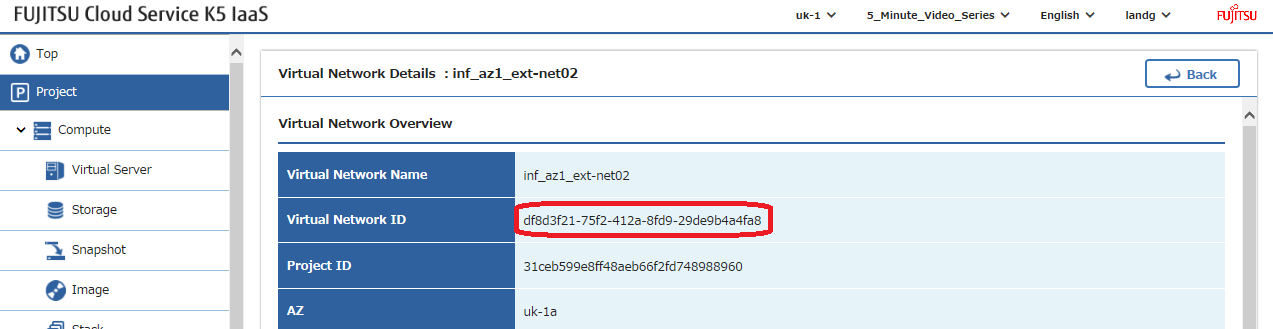
SSHキー: 各アベイラビリティゾーンにSSHキーペアを作成し、例のスタックでそれらの名前を修正します –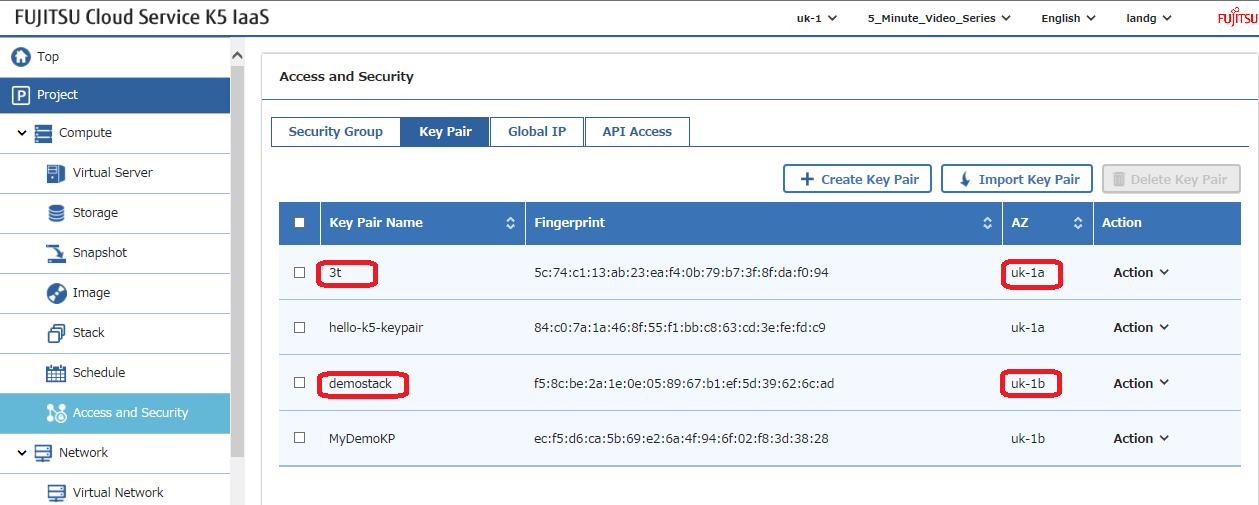
イメージ: 使用したいイメージを選択し、例のスタックでこのパラメータを修正します。注: スタック内の「UserData」デプロイメントスクリプトはCentOS7.2でテストされています。異なるバージョンのOSをデプロイすることにした場合、選択したOSに必要なコマンドを使用してこれらのスクリプトを変更する必要があります。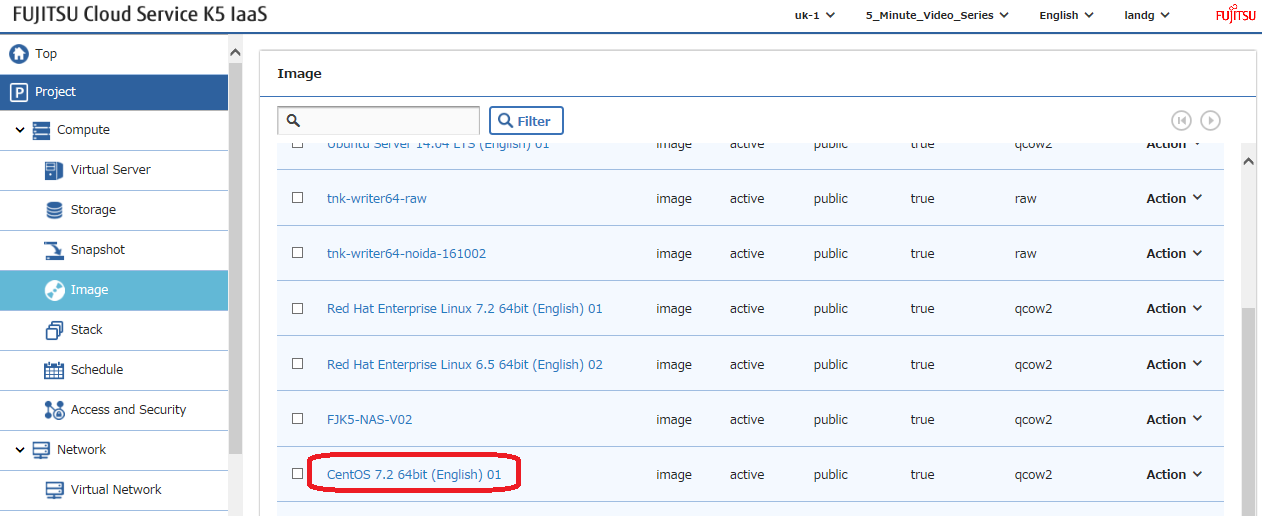
デプロイメント
これらのパラメータすべてが設定されたら、スタックを起動する時ですが、まず主なセクションについて非常に簡単に説明させてください –
環境に合わせて修正する必要があるすべての入力パラメータは以下の通りです –
このファイルには、以下に表示されるものとは異なる方法で解釈またはコンパイルされる可能性がある、隠されたまたは双方向のUnicode文字が含まれています。確認するには、隠されたUnicode文字を表示するエディタでファイルを開いてください。
双方向のUnicode文字について詳しく見る
| # Input parameters | |
| parameters: | |
| centos_image: | |
| type: string | |
| label: Image name or ID | |
| description: Image to be used for compute instance | |
| default: "CentOS 7.2 64bit (English) 01" | |
| flavor_S2: | |
| type: string | |
| label: Flavor | |
| description: Type of instance (flavor) to be used | |
| default: "S-2" | |
| key_az_1: | |
| type: string | |
| label: Key name | |
| description: Name of key-pair to be used for compute instance | |
| default: "3t" | |
| key_az_2: | |
| type: string | |
| label: Key name | |
| description: Name of key-pair to be used for compute instance | |
| default: "demostack" | |
| public_net_az1: | |
| type: string | |
| label: external network ID | |
| description: Public network | |
| default: "df8d3f21-75f2-412a-8fd9-29de9b4a4fa8" | |
| public_net_az2: | |
| type: string | |
| label: external network ID | |
| description: Public network | |
| default: "d730db50-0e0c-4790-9972-1f6e2b8c4915" | |
| az1: | |
| type: string | |
| label: Availability Zone | |
| description: Region AZ to use | |
| default: "uk-1a" | |
| az2: | |
| type: string | |
| label: Availability Zone | |
| description: Region AZ to use | |
| default: "uk-1b" | |
| ext_router_az1: | |
| type: string | |
| label: External Router | |
| description: Router with external access for global ip allocation | |
| default: "2f6bf3f7-f74d-4cde-9015-b95b9c92d63d" | |
| ext_router_az2: | |
| type: string | |
| label: External Router | |
| description: Router with external access for global ip allocation | |
| default: "ee57a376-bab9-4e42-82e0-629e5a87b495" |
rawを表示
ExampleLampStack-Parameters.yml
❤️ GitHub でホスト
次に、各アベイラビリティゾーンに1つずつ、2つのプライベートネットワークを作成し、それぞれを既存のルーターに接続します –
このファイルには、以下に表示されるものとは異なる方法で解釈またはコンパイルされる可能性がある、隠されたまたは双方向のUnicode文字が含まれています。確認するには、隠されたUnicode文字を表示するエディタでファイルを開いてください。
双方向のUnicode文字について詳しく見る
| # Create a private network in availability zone 1 | |
| private_net_az1: | |
| type: OS::Neutron::Net | |
| properties: | |
| availability_zone: { get_param: az1 } | |
| name: "private_net_az1" | |
| # Create a new subnet on the private network | |
| private_subnet_az1: | |
| type: OS::Neutron::Subnet | |
| depends_on: private_net_az1 | |
| properties: | |
| availability_zone: { get_param: az1 } | |
| name: "private_subnet_az1" | |
| network_id: { get_resource: private_net_az1 } | |
| cidr: "192.168.100.0/24" | |
| gateway_ip: "192.168.100.254" | |
| allocation_pools: | |
| – start: "192.168.100.100" | |
| end: "192.168.100.150" | |
| dns_nameservers: ["62.60.39.9", "62.60.39.10"] | |
| host_routes: [{"nexthop": "192.168.100.253", "destination": "10.11.200.0/24"}] | |
| # Connect an interface on the web tier network's subnet to the router | |
| az1_router_interface: | |
| type: OS::Neutron::RouterInterface | |
| depends_on: [private_subnet_az1] | |
| properties: | |
| router_id: { get_param: ext_router_az1 } | |
| subnet_id: { get_resource: private_subnet_az1 } | |
| # Create a private network in availability zone 2 | |
| private_net_az2: | |
| type: OS::Neutron::Net | |
| properties: | |
| availability_zone: { get_param: az2 } | |
| name: "private_net_az2" | |
| # Create a new subnet on the private network | |
| private_subnet_az2: | |
| type: OS::Neutron::Subnet | |
| depends_on: private_net_az2 | |
| properties: | |
| availability_zone: { get_param: az2 } | |
| name: "private_subnet_az2" | |
| network_id: { get_resource: private_net_az2 } | |
| cidr: "10.11.200.0/24" | |
| gateway_ip: "10.11.200.254" | |
| allocation_pools: | |
| – start: "10.11.200.100" | |
| end: "10.11.200.150" | |
| dns_nameservers: ["62.60.42.9", "62.60.42.10"] | |
| host_routes: [{"nexthop": "10.11.200.253", "destination": "192.168.100.0/24"}] | |
| # Connect an interface on the web tier network's subnet to the router | |
| az2_router_interface: | |
| type: OS::Neutron::RouterInterface | |
| depends_on: [private_subnet_az2] | |
| properties: | |
| router_id: { get_param: ext_router_az2 } | |
| subnet_id: { get_resource: private_subnet_az2 } |
rawを表示
K5LAMPNetworkSection.yml
❤️ GitHub でホスト
次に、スタックで使用したいすべてのセキュリティグループとルールを定義します。注: セキュリティグループはテストの容易さのために「完全に開放」されたままにされています。セキュリティを向上させるために、本番環境ではこれらをロックダウンしてください –
このファイルには、以下に表示されるものとは異なる方法で解釈またはコンパイルされる可能性がある、隠されたまたは双方向のUnicode文字が含まれています。確認するには、隠されたUnicode文字を表示するエディタでファイルを開いてください。
双方向のUnicode文字について詳しく見る
| # Create a security group | |
| server_security_group1: | |
| type: OS::Neutron::SecurityGroup | |
| properties: | |
| description: Add security group rules for server | |
| name: Apache | |
| rules: | |
| – remote_ip_prefix: 0.0.0.0/0 | |
| protocol: tcp | |
| port_range_min: 1 | |
| port_range_max: 65535 | |
| – remote_ip_prefix: 0.0.0.0/0 | |
| protocol: udp | |
| port_range_min: 1 | |
| port_range_max: 65535 | |
| – remote_ip_prefix: 0.0.0.0/0 | |
| protocol: icmp | |
| # Create a security group | |
| server_security_group2: | |
| type: OS::Neutron::SecurityGroup | |
| properties: | |
| description: Add security group rules for server | |
| name: MySQL | |
| rules: | |
| – remote_ip_prefix: 0.0.0.0/0 | |
| protocol: tcp | |
| port_range_min: 1 | |
| port_range_max: 65535 | |
| – remote_ip_prefix: 0.0.0.0/0 | |
| protocol: udp | |
| port_range_min: 1 | |
| port_range_max: 65535 | |
| – remote_ip_prefix: 0.0.0.0/0 | |
| protocol: icmp | |
| # Create a security group | |
| server_security_group3: | |
| type: OS::Neutron::SecurityGroup | |
| properties: | |
| description: Add security group rules for server | |
| name: LBaaS_AZ1 | |
| rules: | |
| – remote_ip_prefix: 0.0.0.0/0 | |
| protocol: tcp | |
| port_range_min: 1 | |
| port_range_max: 65535 | |
| – remote_ip_prefix: 0.0.0.0/0 | |
| protocol: udp | |
| port_range_min: 1 | |
| port_range_max: 65535 | |
| – remote_ip_prefix: 0.0.0.0/0 | |
| protocol: icmp | |
| # Create a security group | |
| server_security_group4: | |
| type: OS::Neutron::SecurityGroup | |
| properties: | |
| description: Add security group rules for server | |
| name: LBaaS_AZ2 | |
| rules: | |
| – remote_ip_prefix: 0.0.0.0/0 | |
| protocol: tcp | |
| port_range_min: 1 | |
| port_range_max: 65535 | |
| – remote_ip_prefix: 0.0.0.0/0 | |
| protocol: udp | |
| port_range_min: 1 | |
| port_range_max: 65535 | |
| – remote_ip_prefix: 0.0.0.0/0 | |
| protocol: icmp | |
| # Create a security group | |
| server_security_group5: | |
| type: OS::Neutron::SecurityGroup | |
| properties: | |
| description: Add security group rules for server | |
| name: JumpBox | |
| rules: | |
| – remote_ip_prefix: 0.0.0.0/0 | |
| protocol: tcp | |
| port_range_min: 1 | |
| port_range_max: 65535 | |
| – remote_ip_prefix: 0.0.0.0/0 | |
| protocol: udp | |
| port_range_min: 1 | |
| port_range_max: 65535 | |
| – remote_ip_prefix: 0.0.0.0/0 | |
| protocol: icmp |
rawを表示
K5SecurityGroupSection.yml
❤️ GitHub でホスト
次に、2つのロードバランサーを定義し、ここでは「depends_on」ステートメントの使用に注意してください。これにより、ロードバランサーの作成には前提条件となる詳細情報を持つ2つのApacheサーバーが構築された後にのみ、これらが構築されることが保証されます –
このファイルには、以下に表示されるものとは異なる方法で解釈またはコンパイルされる可能性がある、隠されたまたは双方向のUnicode文字が含まれています。確認するには、隠されたUnicode文字を表示するエディタでファイルを開いてください。
双方向のUnicode文字について詳しく見る
| # AZ 1 Load Balancer | |
| LAMP_Demo_AZ1_LBaaS: | |
| type: FCX::ExpandableLoadBalancer::LoadBalancer | |
| depends_on: [ server1,server2 ] | |
| properties: | |
| Subnets: [{get_resource: private_subnet_az1}] | |
| Instances: [{get_resource: server1},{get_resource: server2}] | |
| Listeners: | |
| – {LoadBalancerPort: '80', | |
| InstancePort: '80', | |
| Protocol: 'HTTP', | |
| InstanceProtocol: 'HTTP' } | |
| HealthCheck: {Target: 'HTTP:80/healthcheck', | |
| HealthyThreshold: '3', | |
| UnhealthyThreshold: '5', | |
| Interval: '30', | |
| Timeout: '5'} | |
| Version: 2014-09-30 | |
| Scheme: public | |
| LoadBalancerName: LBaaSAZ1 | |
| SecurityGroups: [ {get_resource: server_security_group3} ] | |
| # AZ 2 Load Balancer | |
| LAMP_Demo_AZ2_LBaaS: | |
| type: FCX::ExpandableLoadBalancer::LoadBalancer | |
| depends_on: [ server1,server2 ] | |
| properties: | |
| Subnets: [{get_resource: private_subnet_az2}] | |
| Instances: [{get_resource: server1},{get_resource: server2}] | |
| Listeners: | |
| – {LoadBalancerPort: '80', | |
| InstancePort: '80', | |
| Protocol: 'HTTP', | |
| InstanceProtocol: 'HTTP' } | |
| HealthCheck: {Target: 'HTTP:80/healthcheck', | |
| HealthyThreshold: '3', | |
| UnhealthyThreshold: '5', | |
| Interval: '30', | |
| Timeout: '5'} | |
| Version: 2014-09-30 | |
| Scheme: public | |
| LoadBalancerName: LBaaSAZ2 | |
| SecurityGroups: [ {get_resource: server_security_group4} ] |
rawを表示
TwoLoadBalancersExample.yml
❤️ GitHub でホスト
次に、すべてのサーバーを定義します。これには、グローバル(フローティング)IPアドレスを割り当てるジャンプボックス、Webソフトウェアがロードされた2つのサーバー、そしてMySQLがロードされた2つのサーバーが含まれます。ここでは、この手順がオンラインで多くの場所で公開されていなかったため、あえてすべての場所に静的IPアドレスを定義しました。これはやりすぎであり、必要に応じてDHCPを活用することもできます。本番環境は、奇妙な理由で、一貫性と再現性を好む傾向があります 😉 CI/CDフローを聞いたことがありますか。
このファイルには、以下に表示されるものとは異なる方法で解釈またはコンパイルされる可能性がある、隠されたまたは双方向のUnicode文字が含まれています。確認するには、隠されたUnicode文字を表示するエディタでファイルを開いてください。
双方向のUnicode文字について詳しく見る
| ################### JumpBox – AZ 1 ############################################################################## | |
| # Create a new port for the server interface, assign an ip address and security group | |
| jump-server-port: | |
| type: OS::Neutron::Port | |
| depends_on: [ server_security_group5 ] | |
| properties: | |
| availability_zone: { get_param: az1 } | |
| network_id: { get_resource: private_net_az1 } | |
| security_groups: [{ get_resource: server_security_group5 }] | |
| fixed_ips: | |
| – subnet_id: { get_resource: private_subnet_az1 } | |
| ip_address: '192.168.100.5' | |
| # Allocate a floating/global ip address | |
| jump-server-floating-ip: | |
| type: OS::Neutron::FloatingIP | |
| properties: | |
| availability_zone: { get_param: az1 } | |
| floating_network_id: { get_param: public_net_az1 } | |
| # Assign a floating/global ip address to the fixed server ip address | |
| jump-server-floating-ip-association: | |
| type: OS::Neutron::FloatingIPAssociation | |
| depends_on: jump-server-floating-ip | |
| properties: | |
| floatingip_id: { get_resource: jump-server-floating-ip } | |
| port_id: { get_resource: jump-server-port } | |
| # Create a system volume for use with the server | |
| jump-sys-vol: | |
| type: OS::Cinder::Volume | |
| properties: | |
| availability_zone: { get_param: az1 } | |
| name: "LAMP-JumpBox-AZ1" | |
| size: 30 | |
| volume_type: "M1" | |
| image : { get_param: centos_image } | |
| # Build a server using the system volume defined above | |
| jump-server: | |
| type: OS::Nova::Server | |
| depends_on: [ jump-server-port ] | |
| properties: | |
| key_name: { get_param: key_az_1 } | |
| image: { get_param: centos_image } | |
| flavor: "S-1" | |
| admin_user: k5user | |
| block_device_mapping: [{"volume_size": "30", "volume_id": {get_resource: jump-sys-vol}, "delete_on_termination": True, "device_name": "/dev/vda"}] | |
| name: "LAMP-JumpBox-AZ1" | |
| networks: | |
| – port: { get_resource: jump-server-port } | |
| ########################################################################################################## | |
| ################### WebServers – AZ 1 ############################################################################## | |
| # Create a new port for the server interface, assign an ip address and security group | |
| server1_port: | |
| type: OS::Neutron::Port | |
| depends_on: [ server_security_group1 ] | |
| properties: | |
| availability_zone: { get_param: az1 } | |
| network_id: { get_resource: private_net_az1 } | |
| security_groups: [{ get_resource: server_security_group1 }] | |
| fixed_ips: | |
| – subnet_id: { get_resource: private_subnet_az1 } | |
| ip_address: '192.168.100.10' | |
| # Create a system volume for use with the server | |
| sys-vol1: | |
| type: OS::Cinder::Volume | |
| properties: | |
| availability_zone: { get_param: az1 } | |
| name: "web-az1-boot-vol" | |
| size: 30 | |
| volume_type: "M1" | |
| image : { get_param: centos_image } | |
| # Build a server using the system volume defined above | |
| server1: | |
| type: OS::Nova::Server | |
| depends_on: [ jump-server,server1_port,sys-vol1 ] | |
| properties: | |
| key_name: { get_param: key_az_1 } | |
| image: { get_param: centos_image } | |
| flavor: { get_param: flavor_S2 } | |
| admin_user: k5user | |
| block_device_mapping: [{"volume_size": "30", "volume_id": {get_resource: sys-vol1}, "delete_on_termination": True, "device_name": "/dev/vda"}] | |
| name: "Apache-AZ1" | |
| user_data_format: RAW | |
| user_data: | |
| str_replace: | |
| template: | |
| #!/bin/bash | |
| sudo yum update -y | |
| sudo yum install wget -y | |
| sudo yum install httpd -y | |
| sudo systemctl start httpd.service | |
| sudo systemctl enable httpd.service | |
| sudo wget http://repo.mysql.com/mysql-community-release-el7-5.noarch.rpm | |
| sudo rpm -ivh mysql-community-release-el7-5.noarch.rpm | |
| sudo yum update -y | |
| sudo yum install mysql -y | |
| sudo yum install php php-pear -y | |
| sudo yum install php-mysql -y | |
| sudo yum install lua lua-devel pkgconfig gcc asciidoc -y | |
| sudo wget http://dl.fedoraproject.org/pub/epel/7/x86_64/e/epel-release-7-8.noarch.rpm | |
| sudo rpm -iUvh epel-release-7-8.noarch.rpm | |
| sudo yum update -y | |
| sudo yum install lsyncd -y | |
| echo message | |
| params: | |
| message: "Installation Complete" | |
| networks: | |
| – port: { get_resource: server1_port } | |
| ########################################################################################################### | |
| ################### WebServers – AZ 2 ############################################################################## | |
| server2_port: | |
| type: OS::Neutron::Port | |
| depends_on: [ server_security_group1 ] | |
| properties: | |
| availability_zone: { get_param: az2 } | |
| network_id: { get_resource: private_net_az2 } | |
| security_groups: [{ get_resource: server_security_group1 }] | |
| fixed_ips: | |
| – subnet_id: { get_resource: private_subnet_az2 } | |
| ip_address: '10.11.200.10' | |
| # Create a system volume for use with the server | |
| sys-vol2: | |
| type: OS::Cinder::Volume | |
| properties: | |
| availability_zone: { get_param: az2 } | |
| name: "web-az2-boot-vol" | |
| size: 30 | |
| volume_type: "M1" | |
| image : { get_param: centos_image } | |
| # Build a server using the system volume defined above | |
| server2: | |
| type: OS::Nova::Server | |
| depends_on: [ jump-server,server2_port,sys-vol2 ] | |
| properties: | |
| key_name: { get_param: key_az_2 } | |
| image: { get_param: centos_image } | |
| flavor: { get_param: flavor_S2 } | |
| admin_user: k5user | |
| block_device_mapping: [{"volume_size": "30", "volume_id": {get_resource: sys-vol2}, "delete_on_termination": True, "device_name": "/dev/vda"}] | |
| name: "Apache-AZ2" | |
| user_data_format: RAW | |
| user_data: | |
| str_replace: | |
| template: | |
| #!/bin/bash | |
| sudo yum update -y | |
| sudo yum install wget -y | |
| sudo yum install httpd -y | |
| sudo systemctl start httpd.service | |
| sudo systemctl enable httpd.service | |
| sudo wget http://repo.mysql.com/mysql-community-release-el7-5.noarch.rpm | |
| sudo rpm -ivh mysql-community-release-el7-5.noarch.rpm | |
| sudo yum update -y | |
| sudo yum install mysql -y | |
| sudo yum install php php-pear -y | |
| sudo yum install php-mysql -y | |
| sudo yum install lua lua-devel pkgconfig gcc asciidoc -y | |
| sudo wget http://dl.fedoraproject.org/pub/epel/7/x86_64/e/epel-release-7-8.noarch.rpm | |
| sudo rpm -iUvh epel-release-7-8.noarch.rpm | |
| sudo yum update -y | |
| sudo yum install lsyncd -y | |
| echo message | |
| params: | |
| message: "Installation Complete" | |
| networks: | |
| – port: { get_resource: server2_port } | |
| ########################################################################################################### | |
| ################### DatabaseServers – AZ 1 ############################################################################## | |
| # Create a new port for the server interface, assign an ip address and security group | |
| server3_port: | |
| type: OS::Neutron::Port | |
| depends_on: [ server_security_group2 ] | |
| properties: | |
| availability_zone: { get_param: az1 } | |
| network_id: { get_resource: private_net_az1 } | |
| security_groups: [{ get_resource: server_security_group2 }] | |
| fixed_ips: | |
| – subnet_id: { get_resource: private_subnet_az1 } | |
| ip_address: '192.168.100.30' | |
| # Create a system volume for use with the server | |
| sys-vol3: | |
| type: OS::Cinder::Volume | |
| properties: | |
| availability_zone: { get_param: az1 } | |
| name: "db-az1-boot-vol" | |
| size: 30 | |
| volume_type: "M1" | |
| image : { get_param: centos_image } | |
| # Build a server using the system volume defined above | |
| server3: | |
| type: OS::Nova::Server | |
| depends_on: [ jump-server,server3_port,sys-vol3 ] | |
| properties: | |
| key_name: { get_param: key_az_1 } | |
| image: { get_param: centos_image } | |
| flavor: { get_param: flavor_S2 } | |
| admin_user: k5user | |
| block_device_mapping: [{"volume_size": "30", "volume_id": {get_resource: sys-vol3}, "delete_on_termination": True, "device_name": "/dev/vda"}] | |
| name: "Database-AZ1" | |
| user_data_format: RAW | |
| user_data: | |
| str_replace: | |
| template: | |
| #!/bin/bash | |
| sudo yum update -y | |
| sudo yum install wget -y | |
| sudo wget http://repo.mysql.com/mysql-community-release-el7-5.noarch.rpm | |
| sudo rpm -ivh mysql-community-release-el7-5.noarch.rpm | |
| sudo yum update -y | |
| sudo yum install mysql-server -y | |
| sudo systemctl start mysqld | |
| sudo systemctl enable mysqld | |
| echo message | |
| params: | |
| message: "Installation Complete" | |
| networks: | |
| – port: { get_resource: server3_port } | |
| ########################################################################################################### | |
| ################### DatabaseServers – AZ 2 ################################################################ | |
| # Create a new port for the server interface, assign an ip address and security group | |
| server4_port: | |
| type: OS::Neutron::Port | |
| depends_on: [ server_security_group2 ] | |
| properties: | |
| availability_zone: { get_param: az2 } | |
| network_id: { get_resource: private_net_az2 } | |
| security_groups: [{ get_resource: server_security_group2 }] | |
| fixed_ips: | |
| – subnet_id: { get_resource: private_subnet_az2 } | |
| ip_address: '10.11.200.30' | |
| # Create a system volume for use with the server | |
| sys-vol4: | |
| type: OS::Cinder::Volume | |
| properties: | |
| availability_zone: { get_param: az2 } | |
| name: "db-az2-boot-vol" | |
| size: 30 | |
| volume_type: "M1" | |
| image : { get_param: centos_image } | |
| # Build a server using the system volume defined above | |
| server4: | |
| type: OS::Nova::Server | |
| depends_on: [ jump-server,server4_port,sys-vol4 ] | |
| properties: | |
| key_name: { get_param: key_az_2 } | |
| image: { get_param: centos_image } | |
| flavor: { get_param: flavor_S2 } | |
| admin_user: k5user | |
| block_device_mapping: [{"volume_size": "30", "volume_id": {get_resource: sys-vol4}, "delete_on_termination": True, "device_name": "/dev/vda"}] | |
| name: "Database-AZ2" | |
| user_data_format: RAW | |
| user_data: | |
| str_replace: | |
| template: | |
| #!/bin/bash | |
| sudo yum update -y | |
| sudo yum install wget -y | |
| sudo wget http://repo.mysql.com/mysql-community-release-el7-5.noarch.rpm | |
| sudo rpm -ivh mysql-community-release-el7-5.noarch.rpm | |
| sudo yum update -y | |
| sudo yum install mysql-server -y | |
| sudo systemctl start mysqld | |
| sudo systemctl enable mysqld | |
| echo message | |
| params: | |
| message: "Installation Complete" | |
| networks: | |
| – port: { get_resource: server4_port } | |
| ########################################################################################################### |
rawを表示
K5LAMPExampleServersSection.yml
❤️ GitHub でホスト
最後に、ネットワークコネクタセクションがあります。これは、異なるアベイラビリティゾーンの2つのサブネット間のレイヤー3リンクを形成します。これは、サーバー間のすべてのレプリケーションおよび同期トラフィックを伝送するリンクです。論理的には、おそらくこれをこの投稿のネットワークセクションに移動する方が良かったかもしれませんが、今変更するとタイプミスが入るのを恐れており、再テストする時間がないため、手をつけることができません – GitHubにある現在のものは機能しています 🙂
このファイルには、以下に表示されるものとは異なる方法で解釈またはコンパイルされる可能性がある、隠されたまたは双方向のUnicode文字が含まれています。確認するには、隠されたUnicode文字を表示するエディタでファイルを開いてください。
双方向のUnicode文字について詳しく見る
| ############################### AZ Interconnect ########################################################### | |
| az1_nc_port: | |
| type: OS::Neutron::Port | |
| depends_on: [ server_security_group2 ] | |
| properties: | |
| availability_zone: { get_param: az1 } | |
| network_id: { get_resource: private_net_az1 } | |
| security_groups: [{ get_resource: server_security_group2 }] | |
| fixed_ips: | |
| – subnet_id: { get_resource: private_subnet_az1 } | |
| ip_address: '192.168.100.253' | |
| az2_nc_port: | |
| type: OS::Neutron::Port | |
| depends_on: [ server_security_group2 ] | |
| properties: | |
| availability_zone: { get_param: az2 } | |
| network_id: { get_resource: private_net_az2 } | |
| security_groups: [{ get_resource: server_security_group2 }] | |
| fixed_ips: | |
| – subnet_id: { get_resource: private_subnet_az2 } | |
| ip_address: '10.11.200.253' | |
| az1_network_connector: | |
| type: FCX::Neutron::NetworkConnector | |
| depends_on: [ az1_nc_port,az2_nc_port ] | |
| properties: | |
| name: "LAMP-Demo-NC" | |
| az1_nc_endpoint: | |
| type: FCX::Neutron::NetworkConnectorEndpoint | |
| depends_on: [ az1_nc_port,az2_nc_port ] | |
| properties: | |
| endpoint_type: "availability_zone" | |
| name: "AZ1-NC-EP" | |
| network_connector_id: { get_resource: az1_network_connector } | |
| location: { get_param: az1 } | |
| az2_nc_endpoint: | |
| type: FCX::Neutron::NetworkConnectorEndpoint | |
| depends_on: [ az1_nc_port,az2_nc_port ] | |
| properties: | |
| endpoint_type: "availability_zone" | |
| name: "AZ2-NC-EP" | |
| network_connector_id: { get_resource: az1_network_connector } | |
| location: { get_param: az2 } | |
| az1_endpoint_connection: | |
| type: FCX::Neutron::NetworkConnectorEndpointConnection | |
| depends_on: [ az1_nc_port,az2_nc_port ] | |
| properties: | |
| port_id: { get_resource: az1_nc_port } | |
| network_connector_endpoint_id: { get_resource: az1_nc_endpoint } | |
| az2_endpoint_connection: | |
| type: FCX::Neutron::NetworkConnectorEndpointConnection | |
| depends_on: [ az1_nc_port,az2_nc_port ] | |
| properties: | |
| port_id: { get_resource: az2_nc_port } | |
| network_connector_endpoint_id: { get_resource: az2_nc_endpoint } |
rawを表示
K5NetworkConnectorExample.yml
❤️ GitHub でホスト
すでにGitHub に直接移動していない場合は、ここでダウンロードして遊びたいものが、1つの簡単なgistにあります –
このファイルには、以下に表示されるものとは異なる方法で解釈またはコンパイルされる可能性がある、隠されたまたは双方向のUnicode文字が含まれています。確認するには、隠されたUnicode文字を表示するエディタでファイルを開いてください。
双方向のUnicode文字について詳しく見る
| heat_template_version: 2013-05-23 | |
| # Author: Graham Land | |
| # Date: 21/10/2016 | |
| # Purpose: Multi-Availability-Zone template to demonstrate the basic format/usage of HOT stacks on our Fujitsu K5 platform | |
| # It builds a webserver and database server in AZ1 and then the same infrastructure again in AZ2. | |
| # These two environmnets are then joined using a network connector to facilitate data replication between the applications. | |
| # Two public facing load balancers are also deployed – one in each AZ – and the webservers are added to each of these. | |
| # | |
| # The webservers have apache, php, mysql-client and lsyncd installed but NOT configured – didn't have time for this script sorry – loads of examples available online | |
| # The database servers have mysql installed but not configured – again lots of examples available online – can be easily setup in Master/Master mode | |
| # Once the web application is installed use Lsyncd to provide Master/Slave sync between the apache servers. | |
| # | |
| # I'm not a LAMP expert there are many different ways of implementing the above software components the goal of this stack is to illustrate | |
| # a highly available infrastructure solution – please adjust to taste e.g. GlusterFS instead of Lsync, Galera MySQL Cluster software etc… | |
| # Twitter: @allthingsclowd | |
| # Blog: https://allthingscloud.eu | |
| description: Yes I'm afraid it's yet another LAMP HEAT stack – this time though it's a multi-AZ deployment on Fujitsu K5 IaaS | |
| # Input parameters | |
| parameters: | |
| centos_image: | |
| type: string | |
| label: Image name or ID | |
| description: Image to be used for compute instance | |
| default: "CentOS 7.2 64bit (English) 01" | |
| flavor_S2: | |
| type: string | |
| label: Flavor | |
| description: Type of instance (flavor) to be used | |
| default: "S-2" | |
| key_az_1: | |
| type: string | |
| label: Key name | |
| description: Name of key-pair to be used for compute instance | |
| default: "3t" | |
| key_az_2: | |
| type: string | |
| label: Key name | |
| description: Name of key-pair to be used for compute instance | |
| default: "demostack" | |
| public_net_az1: | |
| type: string | |
| label: external network ID | |
| description: Public network | |
| default: "df8d3f21-75f2-412a-8fd9-29de9b4a4fa8" | |
| public_net_az2: | |
| type: string | |
| label: external network ID | |
| description: Public network | |
| default: "d730db50-0e0c-4790-9972-1f6e2b8c4915" | |
| az1: | |
| type: string | |
| label: Availability Zone | |
| description: Region AZ to use | |
| default: "uk-1a" | |
| az2: | |
| type: string | |
| label: Availability Zone | |
| description: Region AZ to use | |
| default: "uk-1b" | |
| ext_router_az1: | |
| type: string | |
| label: External Router | |
| description: Router with external access for global ip allocation | |
| default: "2f6bf3f7-f74d-4cde-9015-b95b9c92d63d" | |
| ext_router_az2: | |
| type: string | |
| label: External Router | |
| description: Router with external access for global ip allocation | |
| default: "ee57a376-bab9-4e42-82e0-629e5a87b495" | |
| # K5 Infrastructure resources to be built | |
| resources: | |
| # Create a private network in availability zone 1 | |
| private_net_az1: | |
| type: OS::Neutron::Net | |
| properties: | |
| availability_zone: { get_param: az1 } | |
| name: "private_net_az1" | |
| # Create a new subnet on the private network | |
| private_subnet_az1: | |
| type: OS::Neutron::Subnet | |
| depends_on: private_net_az1 | |
| properties: | |
| availability_zone: { get_param: az1 } | |
| name: "private_subnet_az1" | |
| network_id: { get_resource: private_net_az1 } | |
| cidr: "192.168.100.0/24" | |
| gateway_ip: "192.168.100.254" | |
| allocation_pools: | |
| – start: "192.168.100.100" | |
| end: "192.168.100.150" | |
| dns_nameservers: ["62.60.39.9", "62.60.39.10"] | |
| host_routes: [{"nexthop": "192.168.100.253", "destination": "10.11.200.0/24"}] | |
| # Connect an interface on the web tier network's subnet to the router | |
| az1_router_interface: | |
| type: OS::Neutron::RouterInterface | |
| depends_on: [private_subnet_az1] | |
| properties: | |
| router_id: { get_param: ext_router_az1 } | |
| subnet_id: { get_resource: private_subnet_az1 } | |
| # Create a private network in availability zone 2 | |
| private_net_az2: | |
| type: OS::Neutron::Net | |
| properties: | |
| availability_zone: { get_param: az2 } | |
| name: "private_net_az2" | |
| # Create a new subnet on the private network | |
| private_subnet_az2: | |
| type: OS::Neutron::Subnet | |
| depends_on: private_net_az2 | |
| properties: | |
| availability_zone: { get_param: az2 } | |
| name: "private_subnet_az2" | |
| network_id: { get_resource: private_net_az2 } | |
| cidr: "10.11.200.0/24" | |
| gateway_ip: "10.11.200.254" | |
| allocation_pools: | |
| – start: "10.11.200.100" | |
| end: "10.11.200.150" | |
| dns_nameservers: ["62.60.42.9", "62.60.42.10"] | |
| host_routes: [{"nexthop": "10.11.200.253", "destination": "192.168.100.0/24"}] | |
| # Connect an interface on the web tier network's subnet to the router | |
| az2_router_interface: | |
| type: OS::Neutron::RouterInterface | |
| depends_on: [private_subnet_az2] | |
| properties: | |
| router_id: { get_param: ext_router_az2 } | |
| subnet_id: { get_resource: private_subnet_az2 } | |
| # Create a security group | |
| server_security_group1: | |
| type: OS::Neutron::SecurityGroup | |
| properties: | |
| description: Add security group rules for server | |
| name: Apache | |
| rules: | |
| – remote_ip_prefix: 0.0.0.0/0 | |
| protocol: tcp | |
| port_range_min: 1 | |
| port_range_max: 65535 | |
| – remote_ip_prefix: 0.0.0.0/0 | |
| protocol: udp | |
| port_range_min: 1 | |
| port_range_max: 65535 | |
| – remote_ip_prefix: 0.0.0.0/0 | |
| protocol: icmp | |
| # Create a security group | |
| server_security_group2: | |
| type: OS::Neutron::SecurityGroup | |
| properties: | |
| description: Add security group rules for server | |
| name: MySQL | |
| rules: | |
| – remote_ip_prefix: 0.0.0.0/0 | |
| protocol: tcp | |
| port_range_min: 1 | |
| port_range_max: 65535 | |
| – remote_ip_prefix: 0.0.0.0/0 | |
| protocol: udp | |
| port_range_min: 1 | |
| port_range_max: 65535 | |
| – remote_ip_prefix: 0.0.0.0/0 | |
| protocol: icmp | |
| # Create a security group | |
| server_security_group3: | |
| type: OS::Neutron::SecurityGroup | |
| properties: | |
| description: Add security group rules for server | |
| name: LBaaS_AZ1 | |
| rules: | |
| – remote_ip_prefix: 0.0.0.0/0 | |
| protocol: tcp | |
| port_range_min: 1 | |
| port_range_max: 65535 | |
| – remote_ip_prefix: 0.0.0.0/0 | |
| protocol: udp | |
| port_range_min: 1 | |
| port_range_max: 65535 | |
| – remote_ip_prefix: 0.0.0.0/0 | |
| protocol: icmp | |
| # Create a security group | |
| server_security_group4: | |
| type: OS::Neutron::SecurityGroup | |
| properties: | |
| description: Add security group rules for server | |
| name: LBaaS_AZ2 | |
| rules: | |
| – remote_ip_prefix: 0.0.0.0/0 | |
| protocol: tcp | |
| port_range_min: 1 | |
| port_range_max: 65535 | |
| – remote_ip_prefix: 0.0.0.0/0 | |
| protocol: udp | |
| port_range_min: 1 | |
| port_range_max: 65535 | |
| – remote_ip_prefix: 0.0.0.0/0 | |
| protocol: icmp | |
| # Create a security group | |
| server_security_group5: | |
| type: OS::Neutron::SecurityGroup | |
| properties: | |
| description: Add security group rules for server | |
| name: JumpBox | |
| rules: | |
| – remote_ip_prefix: 0.0.0.0/0 | |
| protocol: tcp | |
| port_range_min: 1 | |
| port_range_max: 65535 | |
| – remote_ip_prefix: 0.0.0.0/0 | |
| protocol: udp | |
| port_range_min: 1 | |
| port_range_max: 65535 | |
| – remote_ip_prefix: 0.0.0.0/0 | |
| protocol: icmp | |
| # AZ 1 Load Balancer | |
| LAMP_Demo_AZ1_LBaaS: | |
| type: FCX::ExpandableLoadBalancer::LoadBalancer | |
| depends_on: [ server1,server2 ] | |
| properties: | |
| Subnets: [{get_resource: private_subnet_az1}] | |
| Instances: [{get_resource: server1},{get_resource: server2}] | |
| Listeners: | |
| – {LoadBalancerPort: '80', | |
| InstancePort: '80', | |
| Protocol: 'HTTP', | |
| InstanceProtocol: 'HTTP' } | |
| HealthCheck: {Target: 'HTTP:80/healthcheck', | |
| HealthyThreshold: '3', | |
| UnhealthyThreshold: '5', | |
| Interval: '30', | |
| Timeout: '5'} | |
| Version: 2014-09-30 | |
| Scheme: public | |
| LoadBalancerName: LBaaSAZ1 | |
| SecurityGroups: [ {get_resource: server_security_group3} ] | |
| # AZ 2 Load Balancer | |
| LAMP_Demo_AZ2_LBaaS: | |
| type: FCX::ExpandableLoadBalancer::LoadBalancer | |
| depends_on: [ server1,server2 ] | |
| properties: | |
| Subnets: [{get_resource: private_subnet_az2}] | |
| Instances: [{get_resource: server1},{get_resource: server2}] | |
| Listeners: | |
| – {LoadBalancerPort: '80', | |
| InstancePort: '80', | |
| Protocol: 'HTTP', | |
| InstanceProtocol: 'HTTP' } | |
| HealthCheck: {Target: 'HTTP:80/healthcheck', | |
| HealthyThreshold: '3', | |
| UnhealthyThreshold: '5', | |
| Interval: '30', | |
| Timeout: '5'} | |
| Version: 2014-09-30 | |
| Scheme: public | |
| LoadBalancerName: LBaaSAZ2 | |
| SecurityGroups: [ {get_resource: server_security_group4} ] | |
| ################### JumpBox – AZ 1 ############################################################################## | |
| # Create a new port for the server interface, assign an ip address and security group | |
| jump-server-port: | |
| type: OS::Neutron::Port | |
| depends_on: [ server_security_group5 ] | |
| properties: | |
| availability_zone: { get_param: az1 } | |
| network_id: { get_resource: private_net_az1 } | |
| security_groups: [{ get_resource: server_security_group5 }] | |
| fixed_ips: | |
| – subnet_id: { get_resource: private_subnet_az1 } | |
| ip_address: '192.168.100.5' | |
| # Allocate a floating/global ip address | |
| jump-server-floating-ip: | |
| type: OS::Neutron::FloatingIP | |
| properties: | |
| availability_zone: { get_param: az1 } | |
| floating_network_id: { get_param: public_net_az1 } | |
| # Assign a floating/global ip address to the fixed server ip address | |
| jump-server-floating-ip-association: | |
| type: OS::Neutron::FloatingIPAssociation | |
| depends_on: jump-server-floating-ip | |
| properties: | |
| floatingip_id: { get_resource: jump-server-floating-ip } | |
| port_id: { get_resource: jump-server-port } | |
| # Create a system volume for use with the server | |
| jump-sys-vol: | |
| type: OS::Cinder::Volume | |
| properties: | |
| availability_zone: { get_param: az1 } | |
| name: "LAMP-JumpBox-AZ1" | |
| size: 30 | |
| volume_type: "M1" | |
| image : { get_param: centos_image } | |
| # Build a server using the system volume defined above | |
| jump-server: | |
| type: OS::Nova::Server | |
| depends_on: [ jump-server-port ] | |
| properties: | |
| key_name: { get_param: key_az_1 } | |
| image: { get_param: centos_image } | |
| flavor: "S-1" | |
| admin_user: k5user | |
| block_device_mapping: [{"volume_size": "30", "volume_id": {get_resource: jump-sys-vol}, "delete_on_termination": True, "device_name": "/dev/vda"}] | |
| name: "LAMP-JumpBox-AZ1" | |
| networks: | |
| – port: { get_resource: jump-server-port } | |
| ########################################################################################################## | |
| ################### WebServers – AZ 1 ############################################################################## | |
| # Create a new port for the server interface, assign an ip address and security group | |
| server1_port: | |
| type: OS::Neutron::Port | |
| depends_on: [ server_security_group1 ] | |
| properties: | |
| availability_zone: { get_param: az1 } | |
| network_id: { get_resource: private_net_az1 } | |
| security_groups: [{ get_resource: server_security_group1 }] | |
| fixed_ips: | |
| – subnet_id: { get_resource: private_subnet_az1 } | |
| ip_address: '192.168.100.10' | |
| # Create a system volume for use with the server | |
| sys-vol1: | |
| type: OS::Cinder::Volume | |
| properties: | |
| availability_zone: { get_param: az1 } | |
| name: "web-az1-boot-vol" | |
| size: 30 | |
| volume_type: "M1" | |
| image : { get_param: centos_image } | |
| # Build a server using the system volume defined above | |
| server1: | |
| type: OS::Nova::Server | |
| depends_on: [ jump-server,server1_port,sys-vol1 ] | |
| properties: | |
| key_name: { get_param: key_az_1 } | |
| image: { get_param: centos_image } | |
| flavor: { get_param: flavor_S2 } | |
| admin_user: k5user | |
| block_device_mapping: [{"volume_size": "30", "volume_id": {get_resource: sys-vol1}, "delete_on_termination": True, "device_name": "/dev/vda"}] | |
| name: "Apache-AZ1" | |
| user_data_format: RAW | |
| user_data: | |
| str_replace: | |
| template: | |
| #!/bin/bash | |
| sudo yum update -y | |
| sudo yum install wget -y | |
| sudo yum install httpd -y | |
| sudo systemctl start httpd.service | |
| sudo systemctl enable httpd.service | |
| sudo wget http://repo.mysql.com/mysql-community-release-el7-5.noarch.rpm | |
| sudo rpm -ivh mysql-community-release-el7-5.noarch.rpm | |
| sudo yum update -y | |
| sudo yum install mysql -y | |
| sudo yum install php php-pear -y | |
| sudo yum install php-mysql -y | |
| sudo yum install lua lua-devel pkgconfig gcc asciidoc -y | |
| sudo wget http://dl.fedoraproject.org/pub/epel/7/x86_64/e/epel-release-7-8.noarch.rpm | |
| sudo rpm -iUvh epel-release-7-8.noarch.rpm | |
| sudo yum update -y | |
| sudo yum install lsyncd -y | |
| echo message | |
| params: | |
| message: "Installation Complete" | |
| networks: | |
| – port: { get_resource: server1_port } | |
| ########################################################################################################### | |
| ################### WebServers – AZ 2 ############################################################################## | |
| server2_port: | |
| type: OS::Neutron::Port | |
| depends_on: [ server_security_group1 ] | |
| properties: | |
| availability_zone: { get_param: az2 } | |
| network_id: { get_resource: private_net_az2 } | |
| security_groups: [{ get_resource: server_security_group1 }] | |
| fixed_ips: | |
| – subnet_id: { get_resource: private_subnet_az2 } | |
| ip_address: '10.11.200.10' | |
| # Create a system volume for use with the server | |
| sys-vol2: | |
| type: OS::Cinder::Volume | |
| properties: | |
| availability_zone: { get_param: az2 } | |
| name: "web-az2-boot-vol" | |
| size: 30 | |
| volume_type: "M1" | |
| image : { get_param: centos_image } | |
| # Build a server using the system volume defined above | |
| server2: | |
| type: OS::Nova::Server | |
| depends_on: [ jump-server,server2_port,sys-vol2 ] | |
| properties: | |
| key_name: { get_param: key_az_2 } | |
| image: { get_param: centos_image } | |
| flavor: { get_param: flavor_S2 } | |
| admin_user: k5user | |
| block_device_mapping: [{"volume_size": "30", "volume_id": {get_resource: sys-vol2}, "delete_on_termination": True, "device_name": "/dev/vda"}] | |
| name: "Apache-AZ2" | |
| user_data_format: RAW | |
| user_data: | |
| str_replace: | |
| template: | |
| #!/bin/bash | |
| sudo yum update -y | |
| sudo yum install wget -y | |
| sudo yum install httpd -y | |
| sudo systemctl start httpd.service | |
| sudo systemctl enable httpd.service | |
| sudo wget http://repo.mysql.com/mysql-community-release-el7-5.noarch.rpm | |
| sudo rpm -ivh mysql-community-release-el7-5.noarch.rpm | |
| sudo yum update -y | |
| sudo yum install mysql -y | |
| sudo yum install php php-pear -y | |
| sudo yum install php-mysql -y | |
| sudo yum install lua lua-devel pkgconfig gcc asciidoc -y | |
| sudo wget http://dl.fedoraproject.org/pub/epel/7/x86_64/e/epel-release-7-8.noarch.rpm | |
| sudo rpm -iUvh epel-release-7-8.noarch.rpm | |
| sudo yum update -y | |
| sudo yum install lsyncd -y | |
| echo message | |
| params: | |
| message: "Installation Complete" | |
| networks: | |
| – port: { get_resource: server2_port } | |
| ########################################################################################################### | |
| ################### DatabaseServers – AZ 1 ############################################################################## | |
| # Create a new port for the server interface, assign an ip address and security group | |
| server3_port: | |
| type: OS::Neutron::Port | |
| depends_on: [ server_security_group2 ] | |
| properties: | |
| availability_zone: { get_param: az1 } | |
| network_id: { get_resource: private_net_az1 } | |
| security_groups: [{ get_resource: server_security_group2 }] | |
| fixed_ips: | |
| – subnet_id: { get_resource: private_subnet_az1 } | |
| ip_address: '192.168.100.30' | |
| # Create a system volume for use with the server | |
| sys-vol3: | |
| type: OS::Cinder::Volume | |
| properties: | |
| availability_zone: { get_param: az1 } | |
| name: "db-az1-boot-vol" | |
| size: 30 | |
| volume_type: "M1" | |
| image : { get_param: centos_image } | |
| # Build a server using the system volume defined above | |
| server3: | |
| type: OS::Nova::Server | |
| depends_on: [ jump-server,server3_port,sys-vol3 ] | |
| properties: | |
| key_name: { get_param: key_az_1 } | |
| image: { get_param: centos_image } | |
| flavor: { get_param: flavor_S2 } | |
| admin_user: k5user | |
| block_device_mapping: [{"volume_size": "30", "volume_id": {get_resource: sys-vol3}, "delete_on_termination": True, "device_name": "/dev/vda"}] | |
| name: "Database-AZ1" | |
| user_data_format: RAW | |
| user_data: | |
| str_replace: | |
| template: | |
| #!/bin/bash | |
| sudo yum update -y | |
| sudo yum install wget -y | |
| sudo wget http://repo.mysql.com/mysql-community-release-el7-5.noarch.rpm | |
| sudo rpm -ivh mysql-community-release-el7-5.noarch.rpm | |
| sudo yum update -y | |
| sudo yum install mysql-server -y | |
| sudo systemctl start mysqld | |
| sudo systemctl enable mysqld | |
| echo message | |
| params: | |
| message: "Installation Complete" | |
| networks: | |
| – port: { get_resource: server3_port } | |
| ########################################################################################################### | |
| ################### DatabaseServers – AZ 2 ################################################################ | |
| # Create a new port for the server interface, assign an ip address and security group | |
| server4_port: | |
| type: OS::Neutron::Port | |
| depends_on: [ server_security_group2 ] | |
| properties: | |
| availability_zone: { get_param: az2 } | |
| network_id: { get_resource: private_net_az2 } | |
| security_groups: [{ get_resource: server_security_group2 }] | |
| fixed_ips: | |
| – subnet_id: { get_resource: private_subnet_az2 } | |
| ip_address: '10.11.200.30' | |
| # Create a system volume for use with the server | |
| sys-vol4: | |
| type: OS::Cinder::Volume | |
| properties: | |
| availability_zone: { get_param: az2 } | |
| name: "db-az2-boot-vol" | |
| size: 30 | |
| volume_type: "M1" | |
| image : { get_param: centos_image } | |
| # Build a server using the system volume defined above | |
| server4: | |
| type: OS::Nova::Server | |
| depends_on: [ jump-server,server4_port,sys-vol4 ] | |
| properties: | |
| key_name: { get_param: key_az_2 } | |
| image: { get_param: centos_image } | |
| flavor: { get_param: flavor_S2 } | |
| admin_user: k5user | |
| block_device_mapping: [{"volume_size": "30", "volume_id": {get_resource: sys-vol4}, "delete_on_termination": True, "device_name": "/dev/vda"}] | |
| name: "Database-AZ2" | |
| user_data_format: RAW | |
| user_data: | |
| str_replace: | |
| template: | |
| #!/bin/bash | |
| sudo yum update -y | |
| sudo yum install wget -y | |
| sudo wget http://repo.mysql.com/mysql-community-release-el7-5.noarch.rpm | |
| sudo rpm -ivh mysql-community-release-el7-5.noarch.rpm | |
| sudo yum update -y | |
| sudo yum install mysql-server -y | |
| sudo systemctl start mysqld | |
| sudo systemctl enable mysqld | |
| echo message | |
| params: | |
| message: "Installation Complete" | |
| networks: | |
| – port: { get_resource: server4_port } | |
| ########################################################################################################### | |
| ############################### AZ Interconnect ########################################################### | |
| az1_nc_port: | |
| type: OS::Neutron::Port | |
| depends_on: [ server_security_group2 ] | |
| properties: | |
| availability_zone: { get_param: az1 } | |
| network_id: { get_resource: private_net_az1 } | |
| security_groups: [{ get_resource: server_security_group2 }] | |
| fixed_ips: | |
| – subnet_id: { get_resource: private_subnet_az1 } | |
| ip_address: '192.168.100.253' | |
| az2_nc_port: | |
| type: OS::Neutron::Port | |
| depends_on: [ server_security_group2 ] | |
| properties: | |
| availability_zone: { get_param: az2 } | |
| network_id: { get_resource: private_net_az2 } | |
| security_groups: [{ get_resource: server_security_group2 }] | |
| fixed_ips: | |
| – subnet_id: { get_resource: private_subnet_az2 } | |
| ip_address: '10.11.200.253' | |
| az1_network_connector: | |
| type: FCX::Neutron::NetworkConnector | |
| depends_on: [ az1_nc_port,az2_nc_port ] | |
| properties: | |
| name: "LAMP-Demo-NC" | |
| az1_nc_endpoint: | |
| type: FCX::Neutron::NetworkConnectorEndpoint | |
| depends_on: [ az1_nc_port,az2_nc_port ] | |
| properties: | |
| endpoint_type: "availability_zone" | |
| name: "AZ1-NC-EP" | |
| network_connector_id: { get_resource: az1_network_connector } | |
| location: { get_param: az1 } | |
| az2_nc_endpoint: | |
| type: FCX::Neutron::NetworkConnectorEndpoint | |
| depends_on: [ az1_nc_port,az2_nc_port ] | |
| properties: | |
| endpoint_type: "availability_zone" | |
| name: "AZ2-NC-EP" | |
| network_connector_id: { get_resource: az1_network_connector } | |
| location: { get_param: az2 } | |
| az1_endpoint_connection: | |
| type: FCX::Neutron::NetworkConnectorEndpointConnection | |
| depends_on: [ az1_nc_port,az2_nc_port ] | |
| properties: | |
| port_id: { get_resource: az1_nc_port } | |
| network_connector_endpoint_id: { get_resource: az1_nc_endpoint } | |
| az2_endpoint_connection: | |
| type: FCX::Neutron::NetworkConnectorEndpointConnection | |
| depends_on: [ az1_nc_port,az2_nc_port ] | |
| properties: | |
| port_id: { get_resource: az2_nc_port } | |
| network_connector_endpoint_id: { get_resource: az2_nc_endpoint } |
rawを表示
FujitsuK5HA_LAMP_Stack.yml
❤️ GitHub でホスト
上記のファイルをローカルディスクに保存し、前述のパラメータを修正した後、K5 GUIからファイルオプションを選択してスタックを起動します。数分後には、以下のようなものが完成しているはずです –
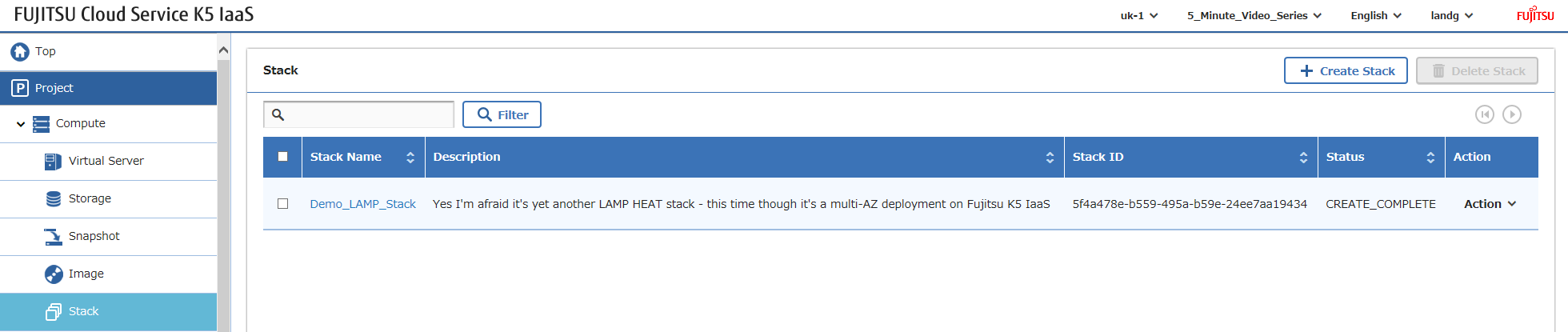
次に必要なのは、ログインしてソフトウェアを設定することだけです – 前述したように、上記のすべてを自動化することはできますが、私の焦点はここではK5インフラストラクチャコンポーネントを示すことにあります。
Happy Stacking!