

ここでは、APIを通じてK5 IaaSプラットフォームを利用する方法の非常に簡単な例を示します。
これは、Python 2.7を使用してAPI呼び出しでセキュリティグループを作成する方法を詳しく説明したシンプルなデモです。
ステップ1: プロジェクトスコープのトークンを取得する
まず、以下の関数を使用して、ユーザーを認証するためのプロジェクトスコープトークンを取得する必要があります。
# get a project scoped auth token
def get_scoped_token(uname, upassword, uproject, udomain):
    identityURL = 'https://identity.uk-1.cloud.global.fujitsu.com/v3/auth/tokens'
    response = requests.post(identityURL,
                             headers={'Content-Type': 'application/json', 'Accept': 'application/json'},
                             json={"auth":
                                    {"identity":
                                      {"methods": ["password"], "password":
                                        {"user":
                                           {"domain":
                                              {"name": udomain}, "name": uname, "password": upassword}}},
                                              "scope": { "project": {"id": uproject}}}})
    return response.headers['X-Subject-Token']
前のAPI呼び出しのヘッダーで返されるトークンは、その後のすべてのAPI呼び出しで使われます – k5token。
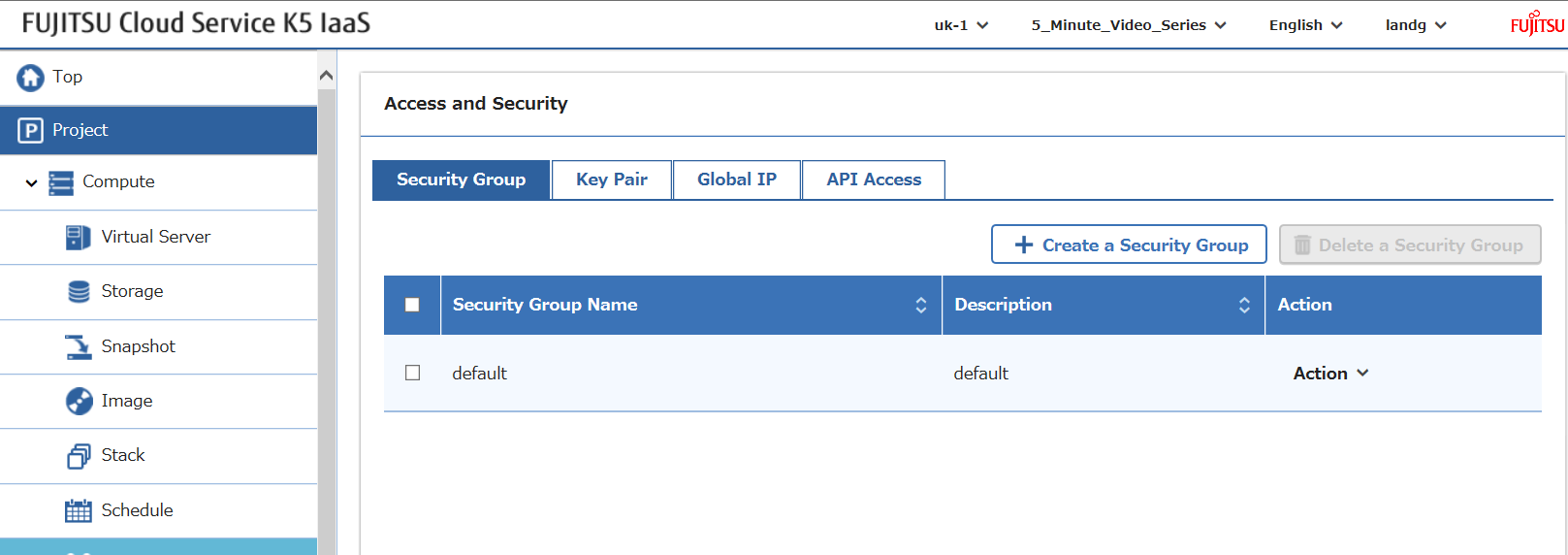
以下に示すように、現在このプロジェクトにはデフォルトのセキュリティグループしかありません。
ステップ2: セキュリティグループを作成する
次の関数は、セキュリティグループ作成のAPI呼び出しを呼び出します。
# create security group
def create_security_group(k5token, sgname, sgdescription):
    sgURL = 'https://networking.uk-1.cloud.global.fujitsu.com/v2.0/security-groups'
    response = requests.post(sgURL,
                            headers={'X-Auth-Token': k5token, 'Content-Type': 'application/json', 'Accept': 'application/json'},
                            json={"security_group":
                                   {"name": sgname,
                                    "description": sgdescription
                                   }
                                 })
    return response.json()
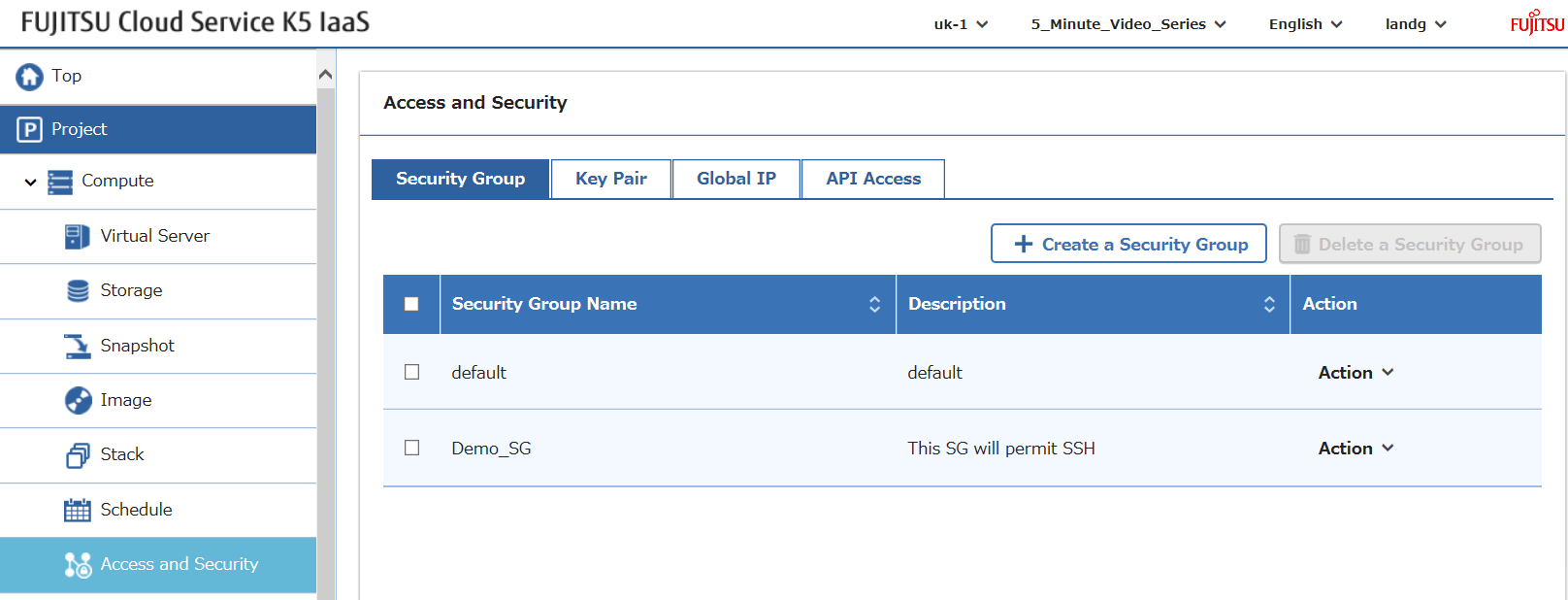
適切なパラメータで呼び出すと、セキュリティグループが作成されます… 驚きですね…
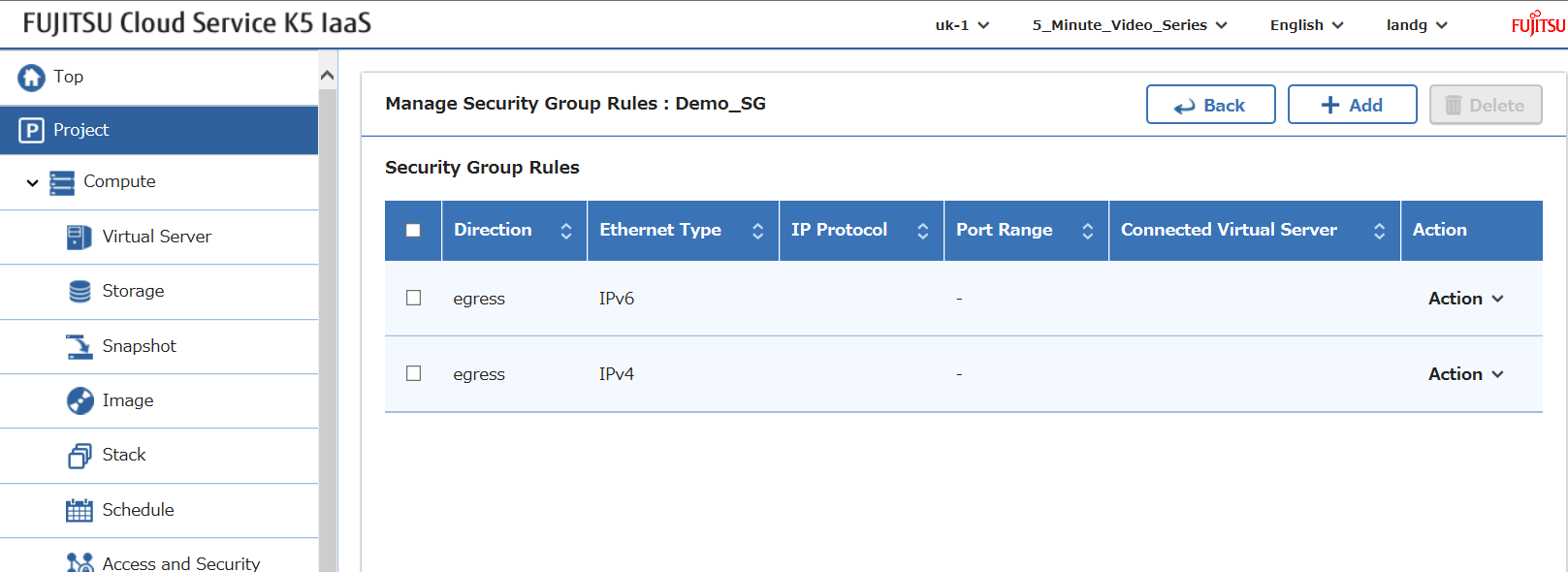
しかし、インバウンド(イングレス)ルールはありません…
ステップ3: イングレスルールを追加する
次に必要なのは、セキュリティグループに適用されるルールです。この例では、以下の関数でSSHアクセスをインバウンドで許可しています。
def create_security_group_rule(k5token, direction, pmin, pmax, protocol, sgid):
    sgURL = 'https://networking.uk-1.cloud.global.fujitsu.com/v2.0/security-group-rules'
    response = requests.post(sgURL,
                            headers={'X-Auth-Token': k5token, 'Content-Type': 'application/json', 'Accept': 'application/json'},
                            json={"security_group_rule":
                                   {"direction": direction,
                                    "port_range_min": pmin,
                                    "ethertype": "IPv4",
                                    "port_range_max": pmax,
                                    "protocol": protocol,
                                    "security_group_id": sgid
                                    }
                                  })
    return response.json()
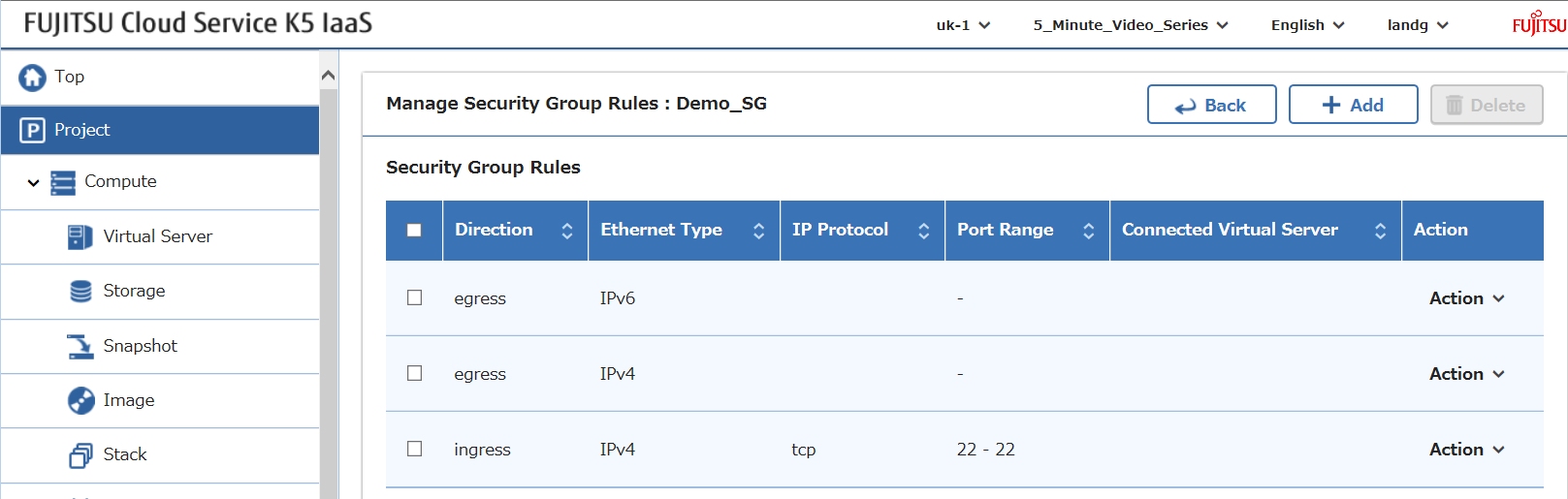
正しいパラメータで呼び出すと、以下の結果になります。
ステップ4: セキュリティグループを一覧表示する
最後に、この関数ですべてのセキュリティグループの詳細を一覧表示できます。
def list_security_groups(k5token):
    sgURL = 'https://networking.uk-1.cloud.global.fujitsu.com/v2.0/security-groups'
    response = requests.get(sgURL,
                            headers={'X-Auth-Token': k5token, 'Content-Type': 'application/json', 'Accept': 'application/json'})
    return response.json()
完全なスクリプト
これらをすべて組み合わせると、以下のスクリプトになります。
このファイルには、以下に表示されるものとは異なって解釈またはコンパイルされる可能性がある、隠された双方向のUnicode文字が含まれています。確認するには、隠されたUnicode文字を表示するエディタでファイルを開いてください。
双方向のUnicode文字について詳しく見る
| # Author : Graham Land | |
| # Date: 03/10/2016 | |
| # | |
| # Purpose: Simple python 2.7 script to demonstrate how to use the Fujitsu K5 IaaS API | |
| # The script creates a security group in a project | |
| # | |
| # blog: https://allthingscloud.eu | |
| # twitter: @allthingsclowd | |
| import requests | |
| # get a project scoped auth token | |
| def get_scoped_token(uname, upassword, uproject, udomain): | |
| identityURL = 'https://identity.uk-1.cloud.global.fujitsu.com/v3/auth/tokens' | |
| response = requests.post(identityURL, | |
| headers={'Content-Type': 'application/json','Accept':'application/json'}, | |
| json={"auth": | |
| {"identity": | |
| {"methods":["password"],"password": | |
| {"user": | |
| {"domain": | |
| {"name":udomain}, "name":uname, "password": upassword}}}, | |
| "scope": { "project": {"id":uproject}}}}) | |
| return response.headers['X-Subject-Token'] | |
| # create security group | |
| def create_security_group(k5token, sgname, sgdescription): | |
| sgURL = 'https://networking.uk-1.cloud.global.fujitsu.com/v2.0/security-groups' | |
| response = requests.post(sgURL, | |
| headers={'X-Auth-Token':k5token,'Content-Type': 'application/json','Accept':'application/json'}, | |
| json={"security_group": | |
| {"name": sgname, | |
| "description": sgdescription | |
| } | |
| }) | |
| return response.json() | |
| def list_security_groups(k5token): | |
| sgURL = 'https://networking.uk-1.cloud.global.fujitsu.com/v2.0/security-groups' | |
| response = requests.get(sgURL, | |
| headers={'X-Auth-Token':k5token,'Content-Type': 'application/json','Accept':'application/json'}) | |
| return response.json() | |
| def create_security_group_rule(k5token, direction, pmin, pmax, protocol, sgid): | |
| sgURL = 'https://networking.uk-1.cloud.global.fujitsu.com/v2.0/security-group-rules' | |
| response = requests.post(sgURL, | |
| headers={'X-Auth-Token':k5token,'Content-Type': 'application/json','Accept':'application/json'}, | |
| json={"security_group_rule": | |
| {"direction": direction, | |
| "port_range_min": pmin, | |
| "ethertype": "IPv4", | |
| "port_range_max": pmax, | |
| "protocol": protocol, | |
| "security_group_id": sgid | |
| } | |
| }) | |
| return response.json() | |
| # Define contract parameters | |
| adminUser = 'username' | |
| adminPassword = 'password' | |
| contract = 'contractname' | |
| contractid = 'contractid' | |
| myproject = 'myprojectid' | |
| # Get a project scoped token | |
| k5token = get_scoped_token(adminUser, adminPassword, myproject, contract) | |
| # Display scoped token | |
| print "\n\nToken : " + k5token | |
| # Create a security group | |
| result = create_security_group(k5token, "Demo_SG", "This SG will permit SSH") | |
| # Display the result | |
| print "\n\nResponse from Security Group Creation : \n" + str(result) + "\n" | |
| # Capture security id from above result | |
| security_group_id = result['security_group'].get('id') | |
| # Create a security group rule and assign to security group | |
| result = create_security_group_rule(k5token, 'ingress', '22', '22', 'tcp', security_group_id) | |
| # Display the result | |
| print "\n\nResponse from Security Group Rule Creation : \n" + str(result) + "\n" | |
| # Get all security group details | |
| result = list_security_groups(k5token) | |
| # Display the result | |
| print "\n\nList of All Security Group Details : \n" + str(result) + "\n\n" |
rawを表示
K5_Security_Group_API_Demo.py
hosted with ❤ by GitHub
スクリプトの出力
このスクリプトは以下の出力を生成します。
Token : 623310d961db4a30a8b8b3410277a951

Response from Security Group Creation :
{u'security_group': {u'id': u'5dca0da5-e474-40fd-bc96-c084c52fad94', u'tenant_id': u'6e970849a2504abb921702b9ff973e83', u'description': u'This SG will permit SSH', u'security_group_rules': [{u'remote_group_id': None, u'direction': u'egress', u'protocol': None, u'ethertype': u'IPv6', u'port_range_max': None, u'security_group_id': u'5dca0da5-e474-40fd-bc96-c084c52fad94', u'tenant_id': u'6e970849a2504abb921702b9ff973e83', u'port_range_min': None, u'remote_ip_prefix': None, u'id': u'951c64fb-3e91-4695-ad9c-8fa7d0159f83'}, {u'remote_group_id': None, u'direction': u'egress', u'protocol': None, u'ethertype': u'IPv4', u'port_range_max': None, u'security_group_id': u'5dca0da5-e474-40fd-bc96-c084c52fad94', u'tenant_id': u'6e970849a2504abb921702b9ff973e83', u'port_range_min': None, u'remote_ip_prefix': None, u'id': u'da060f8e-9e75-457b-aa17-06ce76e4336f'}], u'name': u'Demo_SG'}}

Response from Security Group Rule Creation :
{u'security_group_rule': {u'remote_group_id': None, u'direction': u'ingress', u'remote_ip_prefix': None, u'protocol': u'tcp', u'ethertype': u'IPv4', u'port_range_max': 22, u'security_group_id': u'5dca0da5-e474-40fd-bc96-c084c52fad94', u'port_range_min': 22, u'tenant_id': u'6e970849a2504abb921702b9ff973e83', u'id': u'a95a05ab-95e5-4e20-acc5-56b7b6a96915'}}

List of All Security Group Details :
{u'security_groups': [{u'id': u'7c885fa2-5221-4cb7-93e9-d137f51a730d', u'tenant_id': u'6e970849a2504abb921702b9ff973e83', u'description': u'default', u'security_group_rules': [{u'remote_group_id': u'7c885fa2-5221-4cb7-93e9-d137f51a730d', u'direction': u'ingress', u'protocol': None, u'ethertype': u'IPv6', u'port_range_max': None, u'security_group_id': u'7c885fa2-5221-4cb7-93e9-d137f51a730d', u'tenant_id': u'6e970849a2504abb921702b9ff973e83', u'port_range_min': None, u'remote_ip_prefix': None, u'id': u'd09fac54-2110-46c1-8340-36f25d47ed53'}, {u'remote_group_id': u'7c885fa2-5221-4cb7-93e9-d137f51a730d', u'direction': u'ingress', u'protocol': None, u'ethertype': u'IPv4', u'port_range_max': None, u'security_group_id': u'7c885fa2-5221-4cb7-93e9-d137f51a730d', u'tenant_id': u'6e970849a2504abb921702b9ff973e83', u'port_range_min': None, u'remote_ip_prefix': None, u'id': u'be4a06d0-5163-40a1-bb14-3db6ae317d8c'}, {u'remote_group_id': None, u'direction': u'egress', u'protocol': None, u'ethertype': u'IPv6', u'port_range_max': None, u'security_group_id': u'7c885fa2-5221-4cb7-93e9-d137f51a730d', u'tenant_id': u'6e970849a2504abb921702b9ff973e83', u'port_range_min': None, u'remote_ip_prefix': None, u'id': u'86b52434-d129-4237-a5ef-bf8f58cc8e47'}, {u'remote_group_id': None, u'direction': u'egress', u'protocol': None, u'ethertype': u'IPv4', u'port_range_max': None, u'security_group_id': u'7c885fa2-5221-4cb7-93e9-d137f51a730d', u'tenant_id': u'6e970849a2504abb921702b9ff973e83', u'port_range_min': None, u'remote_ip_prefix': None, u'id': u'97e7890d-03f8-4b3f-8d77-e3b105ecc3e0'}], u'name': u'default'}, {u'id': u'5dca0da5-e474-40fd-bc96-c084c52fad94', u'tenant_id': u'6e970849a2504abb921702b9ff973e83', u'description': u'This SG will permit SSH', u'security_group_rules': [{u'remote_group_id': None, u'direction': u'egress', u'protocol': None, u'ethertype': u'IPv6', u'port_range_max': None, u'security_group_id': u'5dca0da5-e474-40fd-bc96-c084c52fad94', u'tenant_id': u'6e970849a2504abb921702b9ff973e83', u'port_range_min': None, u'remote_ip_prefix': None, u'id': u'951c64fb-3e91-4695-ad9c-8fa7d0159f83'}, {u'remote_group_id': None, u'direction': u'egress', u'protocol': None, u'ethertype': u'IPv4', u'port_range_max': None, u'security_group_id': u'5dca0da5-e474-40fd-bc96-c084c52fad94', u'tenant_id': u'6e970849a2504abb921702b9ff973e83', u'port_range_min': None, u'remote_ip_prefix': None, u'id': u'da060f8e-9e75-457b-aa17-06ce76e4336f'}, {u'remote_group_id': None, u'direction': u'ingress', u'protocol': u'tcp', u'ethertype': u'IPv4', u'port_range_max': 22, u'security_group_id': u'5dca0da5-e474-40fd-bc96-c084c52fad94', u'tenant_id': u'6e970849a2504abb921702b9ff973e83', u'port_range_min': 22, u'remote_ip_prefix': None, u'id': u'a95a05ab-95e5-4e20-acc5-56b7b6a96915'}], u'name': u'Demo_SG'}]}
Happy Stacking!