

This is a simple demo that details how to create a security group using API calls with Python 2.7.
Step 1: Get a Project-Scoped Token
First of all we need to get a project scoped token to authenticate the user which is achieved with the following function:
# get a project scoped auth token
def get_scoped_token(uname, upassword, uproject, udomain):
    identityURL = 'https://identity.uk-1.cloud.global.fujitsu.com/v3/auth/tokens'
    response = requests.post(identityURL,
                             headers={'Content-Type': 'application/json', 'Accept': 'application/json'},
                             json={"auth":
                                    {"identity":
                                      {"methods": ["password"], "password":
                                        {"user":
                                           {"domain":
                                              {"name": udomain}, "name": uname, "password": upassword}}},
                                              "scope": { "project": {"id": uproject}}}})
    return response.headers['X-Subject-Token']
The token returned in the header of the previous API call is used in all subsequent API calls – k5token.
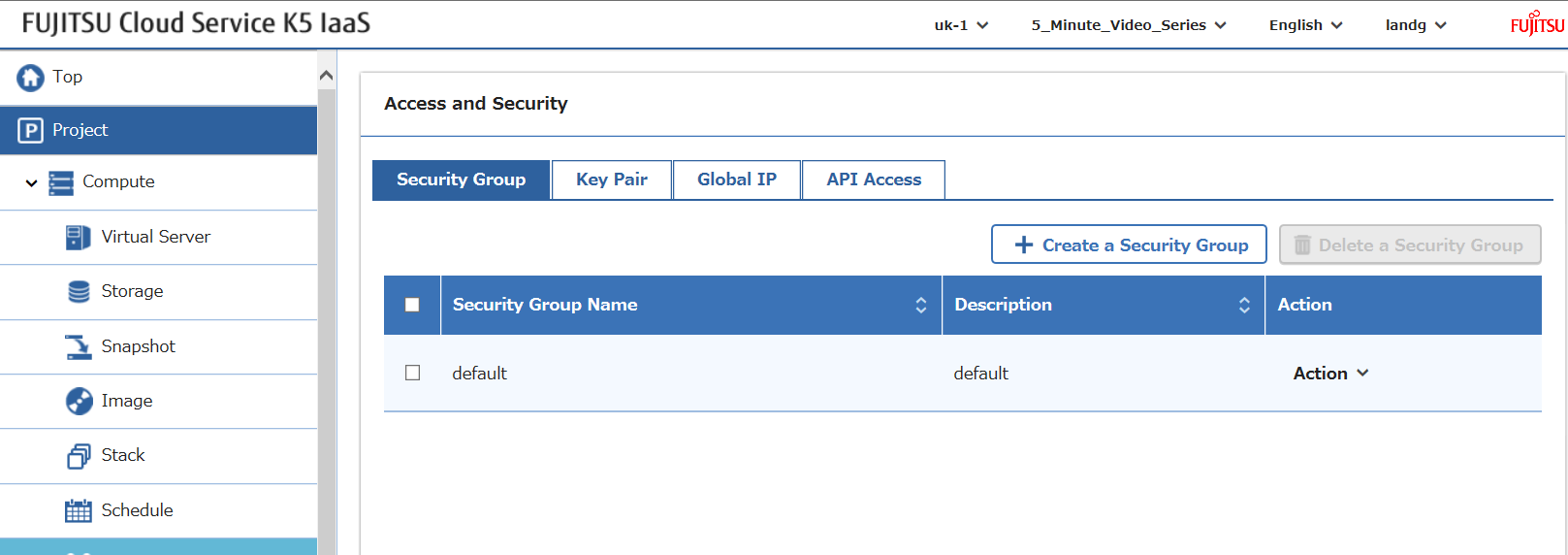
We can see below that currently we only have the default security group in this project:
Step 2: Create a Security Group
The next function invokes the security group creation API call:
# create security group
def create_security_group(k5token, sgname, sgdescription):
    sgURL = 'https://networking.uk-1.cloud.global.fujitsu.com/v2.0/security-groups'
    response = requests.post(sgURL,
                            headers={'X-Auth-Token': k5token, 'Content-Type': 'application/json', 'Accept': 'application/json'},
                            json={"security_group":
                                   {"name": sgname,
                                    "description": sgdescription
                                   }
                                 })
    return response.json()
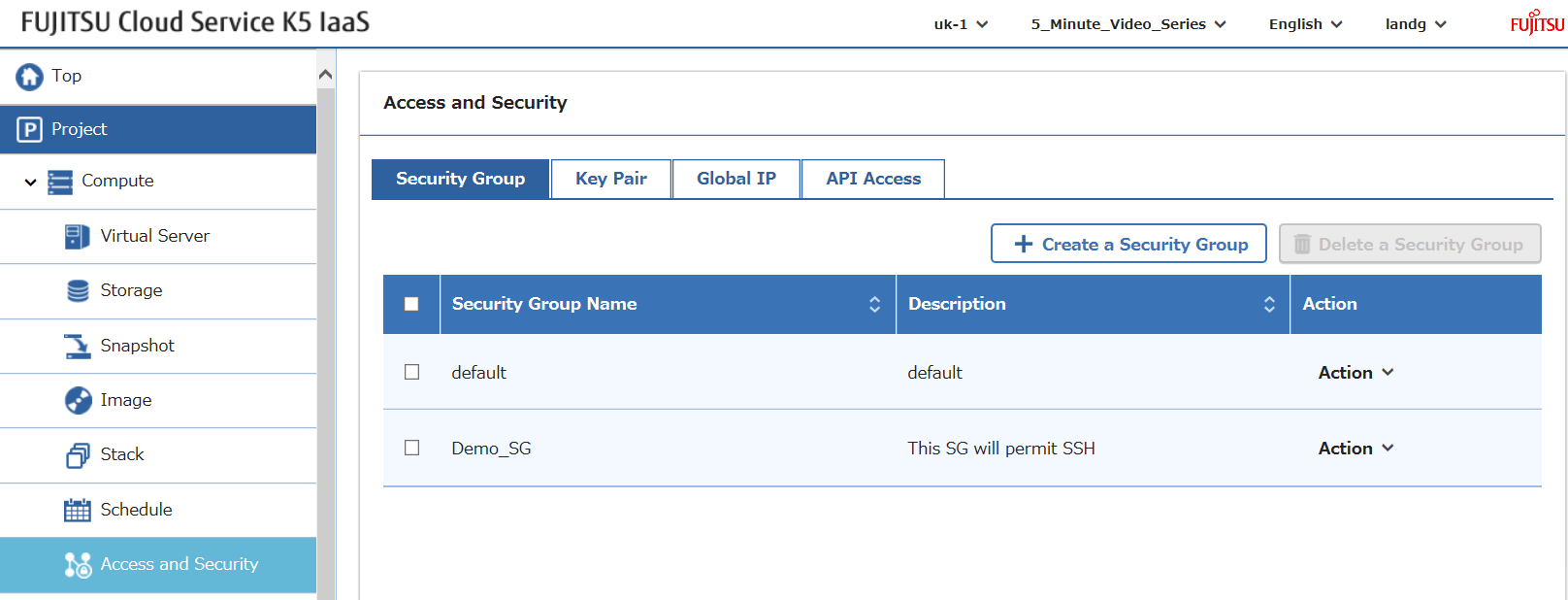
Which when called with the appropriate parameters results in the creation of a security group… surprise, surprise…
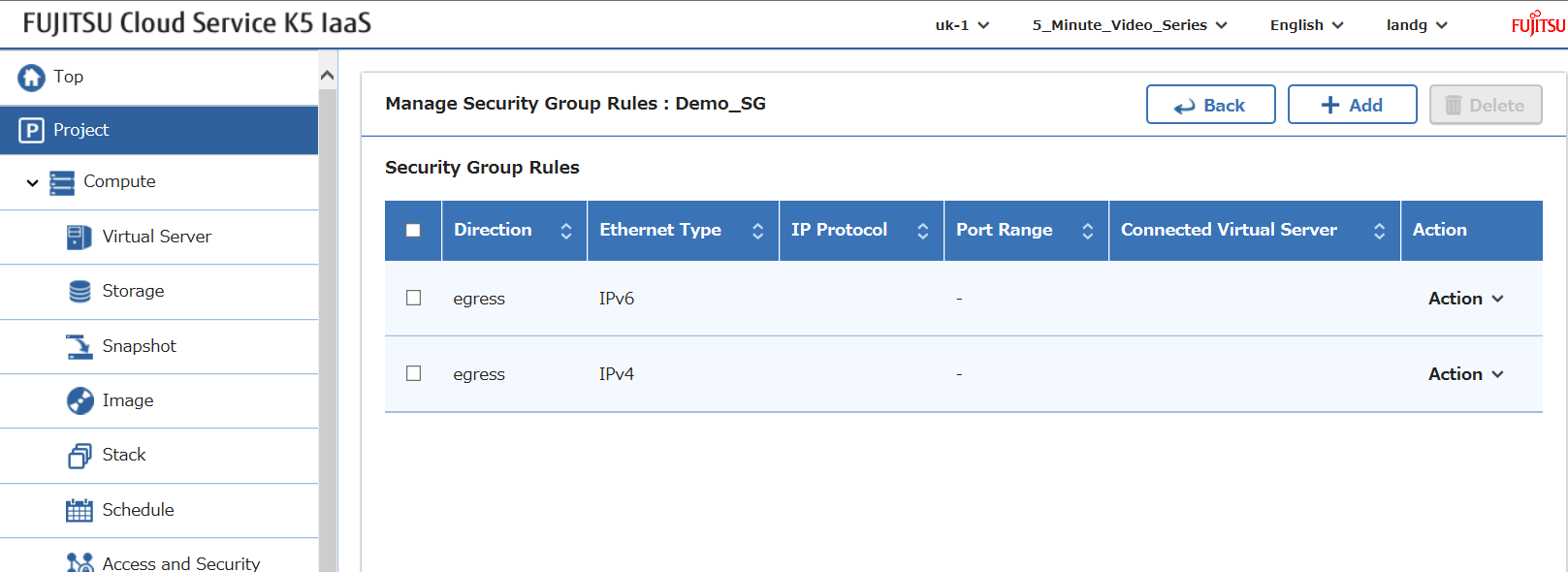
But there’s no inbound (ingress) rules…
Step 3: Add Ingress Rules
Now all that’s needed is the rules that are to be applied to the security group. In this example I allow ssh access inbound with the following function:
def create_security_group_rule(k5token, direction, pmin, pmax, protocol, sgid):
    sgURL = 'https://networking.uk-1.cloud.global.fujitsu.com/v2.0/security-group-rules'
    response = requests.post(sgURL,
                            headers={'X-Auth-Token': k5token, 'Content-Type': 'application/json', 'Accept': 'application/json'},
                            json={"security_group_rule":
                                   {"direction": direction,
                                    "port_range_min": pmin,
                                    "ethertype": "IPv4",
                                    "port_range_max": pmax,
                                    "protocol": protocol,
                                    "security_group_id": sgid
                                    }
                                  })
    return response.json()
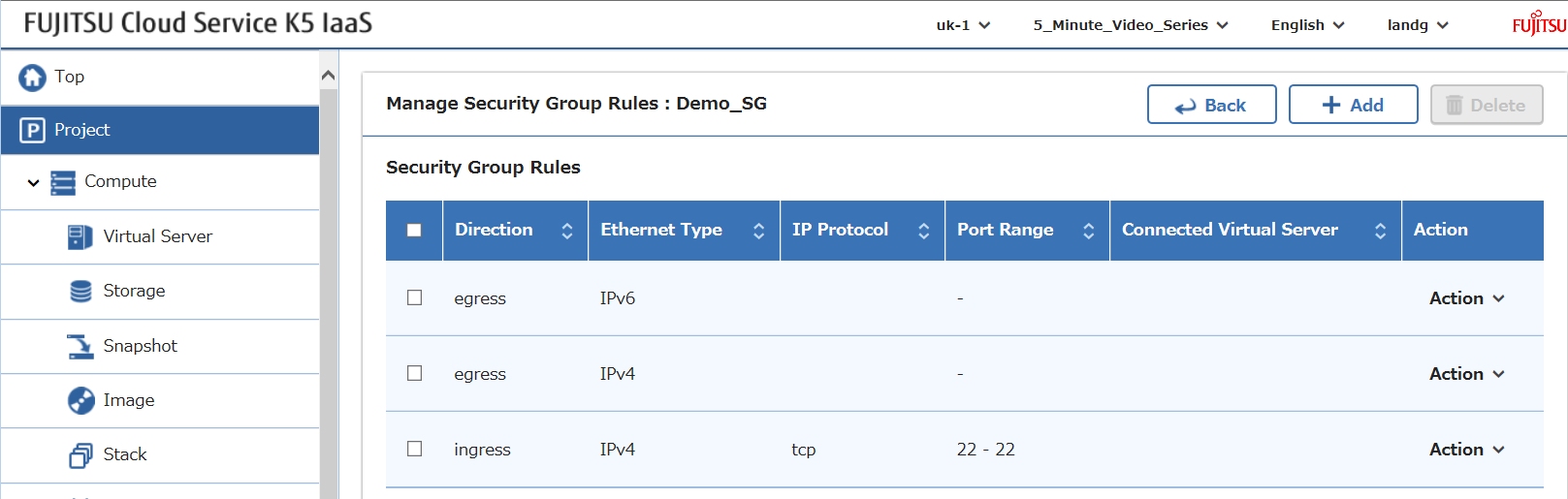
Which when called with the correct parameters will result in:
Step 4: List Security Groups
Finally we can list all the security group details with this function:
def list_security_groups(k5token):
    sgURL = 'https://networking.uk-1.cloud.global.fujitsu.com/v2.0/security-groups'
    response = requests.get(sgURL,
                            headers={'X-Auth-Token': k5token, 'Content-Type': 'application/json', 'Accept': 'application/json'})
    return response.json()
Full Script
Putting it all together we get this script:
This file contains hidden or bidirectional Unicode text that may be interpreted or compiled differently than what appears below. To review, open the file in an editor that reveals hidden Unicode characters.
Learn more about bidirectional Unicode characters
| # Author : Graham Land | |
| # Date: 03/10/2016 | |
| # | |
| # Purpose: Simple python 2.7 script to demonstrate how to use the Fujitsu K5 IaaS API | |
| # The script creates a security group in a project | |
| # | |
| # blog: https://allthingscloud.eu | |
| # twitter: @allthingsclowd | |
| import requests | |
| # get a project scoped auth token | |
| def get_scoped_token(uname, upassword, uproject, udomain): | |
| identityURL = 'https://identity.uk-1.cloud.global.fujitsu.com/v3/auth/tokens' | |
| response = requests.post(identityURL, | |
| headers={'Content-Type': 'application/json','Accept':'application/json'}, | |
| json={"auth": | |
| {"identity": | |
| {"methods":["password"],"password": | |
| {"user": | |
| {"domain": | |
| {"name":udomain}, "name":uname, "password": upassword}}}, | |
| "scope": { "project": {"id":uproject}}}}) | |
| return response.headers['X-Subject-Token'] | |
| # create security group | |
| def create_security_group(k5token, sgname, sgdescription): | |
| sgURL = 'https://networking.uk-1.cloud.global.fujitsu.com/v2.0/security-groups' | |
| response = requests.post(sgURL, | |
| headers={'X-Auth-Token':k5token,'Content-Type': 'application/json','Accept':'application/json'}, | |
| json={"security_group": | |
| {"name": sgname, | |
| "description": sgdescription | |
| } | |
| }) | |
| return response.json() | |
| def list_security_groups(k5token): | |
| sgURL = 'https://networking.uk-1.cloud.global.fujitsu.com/v2.0/security-groups' | |
| response = requests.get(sgURL, | |
| headers={'X-Auth-Token':k5token,'Content-Type': 'application/json','Accept':'application/json'}) | |
| return response.json() | |
| def create_security_group_rule(k5token, direction, pmin, pmax, protocol, sgid): | |
| sgURL = 'https://networking.uk-1.cloud.global.fujitsu.com/v2.0/security-group-rules' | |
| response = requests.post(sgURL, | |
| headers={'X-Auth-Token':k5token,'Content-Type': 'application/json','Accept':'application/json'}, | |
| json={"security_group_rule": | |
| {"direction": direction, | |
| "port_range_min": pmin, | |
| "ethertype": "IPv4", | |
| "port_range_max": pmax, | |
| "protocol": protocol, | |
| "security_group_id": sgid | |
| } | |
| }) | |
| return response.json() | |
| # Define contract parameters | |
| adminUser = 'username' | |
| adminPassword = 'password' | |
| contract = 'contractname' | |
| contractid = 'contractid' | |
| myproject = 'myprojectid' | |
| # Get a project scoped token | |
| k5token = get_scoped_token(adminUser, adminPassword, myproject, contract) | |
| # Display scoped token | |
| print "\n\nToken : " + k5token | |
| # Create a security group | |
| result = create_security_group(k5token, "Demo_SG", "This SG will permit SSH") | |
| # Display the result | |
| print "\n\nResponse from Security Group Creation : \n" + str(result) + "\n" | |
| # Capture security id from above result | |
| security_group_id = result['security_group'].get('id') | |
| # Create a security group rule and assign to security group | |
| result = create_security_group_rule(k5token, 'ingress', '22', '22', 'tcp', security_group_id) | |
| # Display the result | |
| print "\n\nResponse from Security Group Rule Creation : \n" + str(result) + "\n" | |
| # Get all security group details | |
| result = list_security_groups(k5token) | |
| # Display the result | |
| print "\n\nList of All Security Group Details : \n" + str(result) + "\n\n" |
view raw
K5_Security_Group_API_Demo.py
hosted with ❤ by GitHub
Script Output
This script produces the following output:
Token : 623310d961db4a30a8b8b3410277a951

Response from Security Group Creation :
{u'security_group': {u'id': u'5dca0da5-e474-40fd-bc96-c084c52fad94', u'tenant_id': u'6e970849a2504abb921702b9ff973e83', u'description': u'This SG will permit SSH', u'security_group_rules': [{u'remote_group_id': None, u'direction': u'egress', u'protocol': None, u'ethertype': u'IPv6', u'port_range_max': None, u'security_group_id': u'5dca0da5-e474-40fd-bc96-c084c52fad94', u'tenant_id': u'6e970849a2504abb921702b9ff973e83', u'port_range_min': None, u'remote_ip_prefix': None, u'id': u'951c64fb-3e91-4695-ad9c-8fa7d0159f83'}, {u'remote_group_id': None, u'direction': u'egress', u'protocol': None, u'ethertype': u'IPv4', u'port_range_max': None, u'security_group_id': u'5dca0da5-e474-40fd-bc96-c084c52fad94', u'tenant_id': u'6e970849a2504abb921702b9ff973e83', u'port_range_min': None, u'remote_ip_prefix': None, u'id': u'da060f8e-9e75-457b-aa17-06ce76e4336f'}], u'name': u'Demo_SG'}}

Response from Security Group Rule Creation :
{u'security_group_rule': {u'remote_group_id': None, u'direction': u'ingress', u'remote_ip_prefix': None, u'protocol': u'tcp', u'ethertype': u'IPv4', u'port_range_max': 22, u'security_group_id': u'5dca0da5-e474-40fd-bc96-c084c52fad94', u'port_range_min': 22, u'tenant_id': u'6e970849a2504abb921702b9ff973e83', u'id': u'a95a05ab-95e5-4e20-acc5-56b7b6a96915'}}

List of All Security Group Details :
{u'security_groups': [{u'id': u'7c885fa2-5221-4cb7-93e9-d137f51a730d', u'tenant_id': u'6e970849a2504abb921702b9ff973e83', u'description': u'default', u'security_group_rules': [{u'remote_group_id': u'7c885fa2-5221-4cb7-93e9-d137f51a730d', u'direction': u'ingress', u'protocol': None, u'ethertype': u'IPv6', u'port_range_max': None, u'security_group_id': u'7c885fa2-5221-4cb7-93e9-d137f51a730d', u'tenant_id': u'6e970849a2504abb921702b9ff973e83', u'port_range_min': None, u'remote_ip_prefix': None, u'id': u'd09fac54-2110-46c1-8340-36f25d47ed53'}, {u'remote_group_id': u'7c885fa2-5221-4cb7-93e9-d137f51a730d', u'direction': u'ingress', u'protocol': None, u'ethertype': u'IPv4', u'port_range_max': None, u'security_group_id': u'7c885fa2-5221-4cb7-93e9-d137f51a730d', u'tenant_id': u'6e970849a2504abb921702b9ff973e83', u'port_range_min': None, u'remote_ip_prefix': None, u'id': u'be4a06d0-5163-40a1-bb14-3db6ae317d8c'}, {u'remote_group_id': None, u'direction': u'egress', u'protocol': None, u'ethertype': u'IPv6', u'port_range_max': None, u'security_group_id': u'7c885fa2-5221-4cb7-93e9-d137f51a730d', u'tenant_id': u'6e970849a2504abb921702b9ff973e83', u'port_range_min': None, u'remote_ip_prefix': None, u'id': u'86b52434-d129-4237-a5ef-bf8f58cc8e47'}, {u'remote_group_id': None, u'direction': u'egress', u'protocol': None, u'ethertype': u'IPv4', u'port_range_max': None, u'security_group_id': u'7c885fa2-5221-4cb7-93e9-d137f51a730d', u'tenant_id': u'6e970849a2504abb921702b9ff973e83', u'port_range_min': None, u'remote_ip_prefix': None, u'id': u'97e7890d-03f8-4b3f-8d77-e3b105ecc3e0'}], u'name': u'default'}, {u'id': u'5dca0da5-e474-40fd-bc96-c084c52fad94', u'tenant_id': u'6e970849a2504abb921702b9ff973e83', u'description': u'This SG will permit SSH', u'security_group_rules': [{u'remote_group_id': None, u'direction': u'egress', u'protocol': None, u'ethertype': u'IPv6', u'port_range_max': None, u'security_group_id': u'5dca0da5-e474-40fd-bc96-c084c52fad94', u'tenant_id': u'6e970849a2504abb921702b9ff973e83', u'port_range_min': None, u'remote_ip_prefix': None, u'id': u'951c64fb-3e91-4695-ad9c-8fa7d0159f83'}, {u'remote_group_id': None, u'direction': u'egress', u'protocol': None, u'ethertype': u'IPv4', u'port_range_max': None, u'security_group_id': u'5dca0da5-e474-40fd-bc96-c084c52fad94', u'tenant_id': u'6e970849a2504abb921702b9ff973e83', u'port_range_min': None, u'remote_ip_prefix': None, u'id': u'da060f8e-9e75-457b-aa17-06ce76e4336f'}, {u'remote_group_id': None, u'direction': u'ingress', u'protocol': u'tcp', u'ethertype': u'IPv4', u'port_range_max': 22, u'security_group_id': u'5dca0da5-e474-40fd-bc96-c084c52fad94', u'tenant_id': u'6e970849a2504abb921702b9ff973e83', u'port_range_min': 22, u'remote_ip_prefix': None, u'id': u'a95a05ab-95e5-4e20-acc5-56b7b6a96915'}], u'name': u'Demo_SG'}]}
Happy Stacking!