

TL;DR
Utilizzare HashiCorp Packer v1.7.x con i nuovi template HCL2 per costruire, configurare e testare in modo coerente e sicuro le immagini delle pipeline per l'ecosistema VMware, VMware ESXi 7.x e VMware vCentre Server Appliance 7.x. Gli stessi principi utilizzati con VMware in questo esempio possono essere adattati per altre piattaforme cloud come AWS, GCP, Azure, AliCloud, Oracle Cloud e Vagrant, per citarne alcune.
Concetti Chiave
- Disabilitare sempre l'accesso tramite nome utente/password sulla rete all'inizio della propria pipeline per impostazione predefinita e assicurarsi di utilizzare ssh con coppie di chiavi segrete come minimo.
Iniettare una chiave ssh pubblica per l'account del costruttore di immagini al momento della creazione dell'immagine e disabilitare l'autenticazione di rete tramite accesso password – dal file preseed.cfg in questo repository la configurazione appare così
d-i preseed/late_command string \
    in-target sed -i 's/^%sudo.*$/%sudo ALL=(ALL:ALL) NOPASSWD: ALL/g' /etc/sudoers; \
    in-target /bin/sh -c "echo 'Defaults env_keep += \"SSH_AUTH_SOCK\"' >> /etc/sudoers"; \
    in-target mkdir -p /home/iac4me/.ssh; \
    in-target /bin/sh -c "echo 'ssh-rsa AAAAB3NzaC1yc2EAAAADAQABAAACAQDDVB4JUB5/wUI0Y5THvquV8suuyLhjHNc/mkyerCZNJi4ZHTDk41wmaNhVcJWAbPKowAVTCchdM19EBPUykFPjnoXxcZS6qFFylAsxP6U0W5b4S5lon7+7d+ZwltgpWuuCdTkcJlDblZRWA8IdReh8mlSR6f8m7ngzgjGtppsxNXPzl7e/s3+CWLPOurb+0ZQvhdNU5Hcaxo/Vd9mW+RRy0ncroQrQ8SPg3xdFuZ+tsYDigoqXh9Jyg3KxvkM91HigHHsl0F03gq7MbniasYRwntzVbdydNkCFsNg0eDyz3hzXW6gXZRoj9TYilgAKmuLPRpiyN0rs8fQBMTVDO9P9yizVP7kB2uzGNOsoE3KhBotAzWM3Ht7rGsQlc+bhmkCsiz1C/c4gkSgIhdwHIvMVBJqGRDQAmf2XWV8XptSpBkQB2Mz9EiBILSSJjNTwod9FTxwn84KEXEsPc8neWcce3P0WE5f0TGyRDTRvy956gXaJSgm7CtxqU/Pwzv6+U41UUMoB0np0prFey7AFovx/IoBTAGwT1j19DNg/LlFKt53UhUURpdlRDXxz6yxoPobo49gyLN/YIWu4LgIvB+b9EKu+5Nfv/2iAntbVWoa/vaocSrHqlw5CQvyHBLZ3VH6EopST2twcrLkpMTmKicHxwRf03LggiiHXu0pX7z5ZTw== iac4me-BASTIONUSER-USER-KEY' >> /home/iac4me/.ssh/authorized_keys"; \
    in-target chown -R iac4me:iac4me /home/iac4me/; \
    in-target chmod -R go-rwx /home/iac4me/.ssh/authorized_keys; \
    in-target sed -i 's/PermitRootLogin yes/PermitRootLogin no/g' /etc/ssh/sshd_config; \
    in-target sed -i 's/#PasswordAuthentication yes/PasswordAuthentication no/g' /etc/ssh/sshd_config;
Queste informazioni di configurazione varieranno a seconda del Sistema Operativo (OS) installato – viene utilizzato l'installer nativo del SO, in questo caso Ubuntu 18.x
Non dimenticare di aggiornare i dettagli di accesso utilizzati da Packer durante il processo di build nel file HCL – example.pkr.hcl
  ssh_private_key_file = "/Users/grazzer/.ssh/iac4me-id_rsa"
  ssh_username = "iac4me"
Nota: Se si lavora su larga scala e si preferisce evitare l'overhead della gestione delle chiavi ssh, considerare il passaggio all'autenticazione basata su certificati discussa in precedenza in questo post del blog
- Testare le immagini di base per la conformità mentre le si crea – perché aspettare di essere in produzione per verificare la presenza di vulnerabilità e non conformità – non lasciarle fuggire fin dall'inizio.
Mentalità `Shift left` per sicurezza e conformità – coinvolgere questi team precocemente integrando conformità e governance nella propria pipeline fin dall'inizio.
Introduzione
Quasi quotidianamente si viene a conoscenza di un altro grande data breach con milioni di dettagli degli utenti accidentalmente trapelati o rubati.
Non siamo più sorpresi da questi eventi, tuttavia questo non significa che dovremmo lasciare che la complacenza si insinui. I governi stanno iniziando a concentrarsi su questi data breach, fornendo raccomandazioni e linee guida sulle migliori pratiche in alcuni casi, ma in tutti i casi le multe e le penalità stanno anche aumentando significativamente.
Purtroppo è quest'ultimo aspetto a tendere a guidare un buon comportamento nelle aziende. Ricordo di essere seduto in una riunione di livello C con una corporation globale alla fine degli anni '90 a Londra, mentre dimostravo un software di conformità. Quando è arrivato il momento della discussione commerciale, il cliente ha utilizzato l'entità della multa per la non conformità, ponderata con la probabilità di essere effettivamente scoperti in primo luogo, come criterio decisionale chiave per decidere se investire o meno nel software.
Il recente attacco alla catena di approvvigionamento di SolarWinds, reso pubblico nell'ottobre 2020, che al momento della scrittura di questo articolo ad agosto 2021 sta ancora impattando molte aziende, è un altro esempio del perché il classico pattern `Castle and Moate` (Castello e Fossato), utilizzato dalle aziende per proteggere i propri ambienti IT, è diventato seriamente difettoso. Continuiamo a fare affidamento prevalentemente su firewall e VPN per proteggere i perimetri dei nostri data center e poi assumiamo che tutti all'interno di questo cerchio di fiducia siano cittadini virtuosi! Non fraintendetemi, firewall, VPN, ecc. hanno tutti un ruolo da svolgere, ma oggi possiamo fare molto di più.
Questo articolo si concentra sull'inizio di un flusso di lavoro di consegna delle applicazioni più moderno – il processo di build fiammifero (phoenix) per una pipeline immutabile. Molte parole che in sostanza si riducono a costruire, configurare e testare le immagini di base all'inizio della pipeline di consegna delle applicazioni piuttosto che riconfigurare e aggiornare le applicazioni esistenti. Se stai ancora faticando a trovare una finestra di tempo per applicare l'ultimo round di patch al tuo ambiente di produzione, è ora di iniziare a guardare questi nuovi pattern. Ci vogliono solo minuti perché una vulnerabilità zero-day pubblicata venga armata e presa di mira verso queste vecchie fattorie di server. Perché operiamo ancora in questo modo!
Quando è necessario distribuire una patch del Sistema Operativo o rilasciare un'applicazione, queste modifiche vengono implementate tramite una nuova immagine di base; questa immagine poi passa attraverso lo Sviluppo e il Test di Accettazione Utente, e una volta superati con successo, verrà infine distribuita in Produzione. Scheduler moderni come Kubernetes o Nomad forniscono flussi di lavoro avanzati di consegna delle applicazioni che aiutano a mantenere la disponibilità delle applicazioni durante il passaggio dalla vecchia alla nuova applicazione. Il rollback può essere veloce anche, quando necessario, a causa dell'approccio immutabile di questa pipeline di consegna.
HashiCorp rende disponibile uno strumento open source molto potente e utile chiamato Packer, progettato per essere utilizzato all'inizio di questo moderno flusso di lavoro di consegna delle applicazioni. Può essere utilizzato per costruire automaticamente e in modo coerente immagini di base ripetibili che possono poi essere consumate dalla fase successiva del flusso di lavoro dell'applicazione. Gran parte dell'industria cloud-native ha già abbracciato Packer come il loro strumento de facto per questo processo. Tuttavia, vedo spesso pipeline in cui la sicurezza è stata omessa per comodità all'inizio di questo processo. Lo scopo del resto di questo articolo sarà fornire alcuni suggerimenti e trucchi per distribuire nuove immagini utilizzando chiavi ssh piuttosto che password e anche aggiungere test all'immagine di base per aiutare a guidare la conformità. È molto più economico correggere un bug all'inizio di questa pipeline che quando è in produzione. Tutto quanto menzionato qui è integrato in Packer – non è sempre implementato dai team.
Ho ricostruito la piattaforma di test VMware questo fine settimana e condividerò un tentativo warts and all (con tutti i difetti) di costruire un'immagine che avevo funzionante a gennaio. Tutto ciò che mostro qui su VMware può essere facilmente adattato per AWS, Azure, GCP, ecc. Se il tempo lo permette, inserirò altri esempi in questo repo in una data successiva.
In questo esempio ho utilizzato la versione 1.7.4 di Packer.
I passaggi che ho eseguito
- Installiamo rapidamente HashiCorp Packer, sto utilizzando MacOS (basato su Intel) per la demo
- Innanzitutto, mi assicuro che il tap Homebrew di HashiCorp sia installato, questo tap include tutti i prodotti HashiCorp, non solo Packer.
$ brew tap hashicorp/tap
- Installa Packer su MacOS. Si prega di vedere il Sito Web HashiCorp Learn per dettagli più completi.
$ brew install hashicorp/tap/packer

==> Installing packer from hashicorp/tap
==> Downloading https://releases.hashicorp.com/packer/1.7.4/packer_1.7.4_darwin_amd64.zip
######################################################################## 100.0%
🍺  /usr/local/Cellar/packer/1.7.4: 3 files, 161.4MB, built in 6 seconds
- Verifica che Packer sia stato installato come segue
$ packer version
Packer v1.7.4
- Scarica il repo qui se desideri seguire questa guida passo passo
$ git clone git@github.com:allthingsclowd/packer-vsphere.git
Cloning into 'packer-vsphere'...
remote: Enumerating objects: 133, done.
remote: Counting objects: 100% (133/133), done.
remote: Compressing objects: 100% (64/64), done.
remote: Total 133 (delta 59), reused 116 (delta 44), pack-reused 0
Receiving objects: 100% (133/133), 22.56 KiB | 2.51 MiB/s, done.
Resolving deltas: 100% (59/59), done.

$ cd packer-vsphere/
- Controlliamo rapidamente se ho creato un file template HCL packer valido
$ packer validate example.pkr.hcl
Error: Unset variable "webpagecounter_frontend_version"

A used variable must be set or have a default value; see
https://packer.io/docs/templates/hcl_templates/syntax for details.

Error: Unset variable "vagrant_version"

A used variable must be set or have a default value; see
https://packer.io/docs/templates/hcl_templates/syntax for details.

Error: Unset variable "terraform_version"

A used variable must be set or have a default value; see
https://packer.io/docs/templates/hcl_templates/syntax for details.

Error: Unset variable "env_consul_version"

A used variable must be set or have a default value; see
https://packer.io/docs/templates/hcl_templates/syntax for details.

Error: Unset variable "secretid_service_version"

A used variable must be set or have a default value; see
https://packer.io/docs/templates/hcl_templates/syntax for details.

Error: Unset variable "waypoint_entrypoint_version"

A used variable must be set or have a default value; see
https://packer.io/docs/templates/hcl_templates/syntax for details.

Error: Unset variable "boundary_version"

A used variable must be set or have a default value; see
https://packer.io/docs/templates/hcl_templates/syntax for details.

Error: Unset variable "boundary_desktop_version"

A used variable must be set or have a default value; see
https://packer.io/docs/templates/hcl_templates/syntax for details.

Error: Unset variable "packer_version"

A used variable must be set or have a default value; see
https://packer.io/docs/templates/hcl_templates/syntax for details.

Error: Unset variable "vault_version"

A used variable must be set or have a default value; see
https://packer.io/docs/templates/hcl_templates/syntax for details.

Error: Unset variable "nomad_version"

A used variable must be set or have a default value; see
https://packer.io/docs/templates/hcl_templates/syntax for details.

Error: Unset variable "golang_version"

A used variable must be set or have a default value; see
https://packer.io/docs/templates/hcl_templates/syntax for details.

Error: Unset variable "vcentre_host"

A used variable must be set or have a default value; see
https://packer.io/docs/templates/hcl_templates/syntax for details.

Error: Unset variable "esx_host"

A used variable must be set or have a default value; see
https://packer.io/docs/templates/hcl_templates/syntax for details.

Error: Unset variable "vcentre_password"

A used variable must be set or have a default value; see
https://packer.io/docs/templates/hcl_templates/syntax for details.

Error: Unset variable "envoy_version"

A used variable must be set or have a default value; see
https://packer.io/docs/templates/hcl_templates/syntax for details.

Error: Unset variable "webpagecounter_version"

A used variable must be set or have a default value; see
https://packer.io/docs/templates/hcl_templates/syntax for details.

Error: Unset variable "consul_version"

A used variable must be set or have a default value; see
https://packer.io/docs/templates/hcl_templates/syntax for details.

Error: Unset variable "nomad_autoscaler_version"

A used variable must be set or have a default value; see
https://packer.io/docs/templates/hcl_templates/syntax for details.

Error: Unset variable "consul_template_version"

A used variable must be set or have a default value; see
https://packer.io/docs/templates/hcl_templates/syntax for details.

Error: Unset variable "waypoint_version"

A used variable must be set or have a default value; see
https://packer.io/docs/templates/hcl_templates/syntax for details.

Error: Unset variable "vcentre_user"

A used variable must be set or have a default value; see
https://packer.io/docs/templates/hcl_templates/syntax for details.
- Ops, non dimenticare di caricare le variabili di ambiente una volta configurate correttamente per allinearsi alla configurazione del tuo ambiente. Assicurati di modificare i valori predefiniti nel file
var.env. Ripartiamo...
$ source var.env
$ packer validate example.pkr.hcl
Error: Unset variable "vcentre_password"

A used variable must be set or have a default value; see
https://packer.io/docs/templates/hcl_templates/syntax for details.

Error: Unset variable "vcentre_host"

A used variable must be set or have a default value; see
https://packer.io/docs/templates/hcl_templates/syntax for details.

Error: Unset variable "esx_host"

A used variable must be set or have a default value; see
https://packer.io/docs/templates/hcl_templates/syntax for details.

Error: Unset variable "vcentre_user"

A used variable must be set or have a default value; see
https://packer.io/docs/templates/hcl_templates/syntax for details.
- Non pensavi davvero che avessi le password nel file
var.envnel mio repo github, vero? Devo recuperarle come variabili di ambiente. Dovrai anche configurare queste variabili di ambiente segrete per corrispondere al tuo ambiente, per favore non inserirle nel tuo repo, non è una buona pratica. (Offriamo HashiCorp Vault per la gestione di tali materiali segreti, ma quel post è per un altro giorno)
Oltre a questo repository, ho il seguente file dei segreti che viene anche sourced per configurare le variabili di ambiente richieste...
# vCenter Setup
export PKR_VAR_vcentre_user="@vsphere.local"
export PKR_VAR_vcentre_password=""
export PKR_VAR_vcentre_host="vCentre IP Address"
export PKR_VAR_esx_host="ESX IP Address"
- Una volta che sia il file
var.envche il filesecretssono stati caricati (tutte le variabili di ambiente prerequisito impostate in memoria), la convalida di packer avrà successo ... noiosamente senza alcuna notifica come segue
$ packer validate example.pkr.hcl
$
- Quindi, andiamo!
- La configurazione ha superato la sua convalida Packer, quindi è tutto a posto, giusto?
- 1, 2, 3 e si parte...
$ packer build example.pkr.hcl

- Sbagliato 😦
==> vsphere-iso.example: Provisioning with Inspec...
==> vsphere-iso.example: Executing Inspec: inspec exec test/ImageBuild-Packer-Test --backend ssh --host 127.0.0.1 --user grazzer --key-files /var/folders/qq/8hmjq2xj23qcgjj7c5dbnvzm0000gn/T/packer-provisioner-inspec.994691541.key --port 64111 --input-file /var/folders/qq/8hmjq2xj23qcgjj7c5dbnvzm0000gn/T/packer-provisioner-inspec.367916336.yml
==> vsphere-iso.example: read |0: file already closed
==> vsphere-iso.example: Provisioning step had errors: Running the cleanup provisioner, if present...
==> vsphere-iso.example: Clear boot order...
==> vsphere-iso.example: Power off VM...
==> vsphere-iso.example: Deleting Floppy image ...
==> vsphere-iso.example: Destroying VM...
Build 'vsphere-iso.example' errored after 20 minutes 26 seconds: Error executing Inspec: exec: "inspec": executable file not found in $PATH

==> Wait completed after 20 minutes 26 seconds

==> Some builds didn't complete successfully and had errors:
--> vsphere-iso.example: Error executing Inspec: exec: "inspec": executable file not found in $PATH

==> Builds finished but no artifacts were created.
- Packer è stato configurato per utilizzare Chef Inspec per testare il mio processo di build packer, ma una recente sfida Zoom ha costretto a una ricostruzione del laptop durante una sessione di debug frustrata e non ho automatizzato il mio processo di ricostruzione del laptop. Devo reinstallare Chef poiché i test Inspec vengono eseguiti dal server di build (il mio laptop)
$ curl https://omnitruck.chef.io/install.sh | sudo bash -s -- -P inspec
  % Total    % Received % Xferd   Average Speed   Time    Time     Time  Current
                                 Dload  Upload   Total   Spent    Left  Speed
100 23409  100 23409    0     0   198k      0 --:--:-- --:--:-- --:--:--  198k
Password:
mac_os_x 11.4 x86_64
Getting information for inspec stable  for mac_os_x...
downloading https://omnitruck.chef.io/stable/inspec/metadata?v=&p=mac_os_x&pv=11.4&m=x86_64
  to file /tmp/install.sh.10782/metadata.txt
trying curl...
sha1    11e08ab78ce2971b7f129a2306e0a1636039b7f0
sha256  bc5772b1db8e13f2766390e995dbda1651813d1b1737c88af47b8f217acb03b0
url https://packages.chef.io/files/stable/inspec/4.38.9/mac_os_x/11/inspec-4.38.9-1.x86_64.dmg
version 4.38.9
downloaded metadata file looks valid...
downloading https://packages.chef.io/files/stable/inspec/4.38.9/mac_os_x/11/inspec-4.38.9-1.x86_64.dmg
  to file /tmp/install.sh.10782/inspec-4.38.9-1.x86_64.dmg
trying curl...
Comparing checksum with shasum...

WARNING WARNING WARNING WARNING WARNING WARNING WARNING WARNING WARNING

You are installing a package without a version pin.  If you are installing
on production servers via an automated process this is DANGEROUS and you will
be upgraded without warning on new releases, even to new major releases.
Letting the version float is only appropriate in desktop, test, development or
CI/CD environments.

WARNING WARNING WARNING WARNING WARNING WARNING WARNING WARNING WARNING

Installing inspec
installing dmg file...
Checksumming Protective Master Boot Record (MBR : 0)…
Protective Master Boot Record (MBR :: verified CRC32 $A63E199D
Checksumming GPT Header (Primary GPT Header : 1)…
 GPT Header (Primary GPT Header : 1): verified CRC32 $554DB84C
Checksumming GPT Partition Data (Primary GPT Table : 2)…
GPT Partition Data (Primary GPT Tabl: verified CRC32 $9451B1CA
Checksumming  (Apple_Free : 3)…
                    (Apple_Free : 3): verified CRC32 $00000000
Checksumming disk image (Apple_HFS : 4)…
....................................................................................................................
          disk image (Apple_HFS : 4): verified CRC32 $CE3F8BAF
Checksumming  (Apple_Free : 5)…
                    (Apple_Free : 5): verified CRC32 $00000000
Checksumming GPT Partition Data (Backup GPT Table : 6)…
GPT Partition Data (Backup GPT Table: verified CRC32 $9451B1CA
Checksumming GPT Header (Backup GPT Header : 7)…
  GPT Header (Backup GPT Header : 7): verified CRC32 $CA80E7E2
verified CRC32 $9E68E33F
/dev/disk3              GUID_partition_scheme
/dev/disk3s1            Apple_HFS                       /Volumes/chef_software
installer: Package name is InSpec
installer: Installing at base path /
installer: The install was successful.
"disk3" ejected.
- E ripartiamo...
$ packer build example.pkr.hcl
vsphere-iso.example: output will be in this color.

==> vsphere-iso.example: File /Users/grazzer/repos/packer-vsphere/packer_cache/a37af95ab12e665ba168128cde2f3662740b21a2.iso already uploaded; continuing
==> vsphere-iso.example: File [IntelDS2] packer_cache//a37af95ab12e665ba168128cde2f3662740b21a2.iso already exists; skipping upload.
==> vsphere-iso.example: Creating VM...
==> vsphere-iso.example: Customizing hardware...
==> vsphere-iso.example: Mounting ISO images...
==> vsphere-iso.example: Adding configuration parameters...
==> vsphere-iso.example: Creating floppy disk...
    vsphere-iso.example: Copying files flatly from floppy_files
    vsphere-iso.example: Copying file: ./http/preseed.cfg
    vsphere-iso.example: Done copying files from floppy_files
    vsphere-iso.example: Collecting paths from floppy_dirs
    vsphere-iso.example: Resulting paths from floppy_dirs : []
    vsphere-iso.example: Done copying paths from floppy_dirs
==> vsphere-iso.example: Uploading created floppy image
==> vsphere-iso.example: Adding generated Floppy...
==> vsphere-iso.example: Set boot order temporary...
==> vsphere-iso.example: Power on VM...
==> vsphere-iso.example: Waiting 10s for boot...
==> vsphere-iso.example: Provisioning with Inspec...
==> vsphere-iso.example: Executing Inspec: inspec exec test/ImageBuild-Packer-Test --backend ssh --host 127.0.0.1 --user grazzer --key-files /var/folders/qq/8hmjq2xj23qcgjj7c5dbnvzm0000gn/T/packer-provisioner-inspec.131501239.key --port 55207 --input-file /var/folders/qq/8hmjq2xj23qcgjj7c5dbnvzm0000gn/T/packer-provisioner-inspec.069478570.yml
    vsphere-iso.example: [2021-07-31T20:53:28+01:00] ERROR: Chef InSpec cannot execute without accepting the license
==> vsphere-iso.example: Provisioning step had errors: Running the cleanup provisioner, if present...
==> vsphere-iso.example: Clear boot order...
==> vsphere-iso.example: Power off VM...
==> vsphere-iso.example: Deleting Floppy image ...
==> vsphere-iso.example: Destroying VM...
Build 'vsphere-iso.example' errored after 10 minutes 34 seconds: Error executing Inspec: Inspec exited with unexpected exit status: 172. Expected exit codes are: [0 101]

==> Wait completed after 10 minutes 34 seconds

==> Some builds didn't complete successfully and had errors:
--> vsphere-iso.example: Error executing Inspec: Inspec exited with unexpected exit status: 172. Expected exit codes are: [0 101]

==> Builds finished but no artifacts were created.
- Inspec ti costringe ad accettare la loro licenza prima di poter utilizzare il loro software, tutto sommato giusto – non che io abbia letto tutto quel gergo legale
 $ inspec --chef-license=accept
+---------------------------------------------+
✔ 1 product license accepted.
+---------------------------------------------+
Commands:
  inspec archive PATH                # archive a profile to tar.gz (default) or zip
  inspec check PATH                  # verify all tests at the specified PATH
  inspec clear_cache                 # clears the InSpec cache. Useful for debugging.
  inspec detect                      # detect the target OS
  inspec env                         # Output shell-appropriate completion configuration
  inspec exec LOCATIONS              # Run all tests at LOCATIONS.
  inspec help [COMMAND]              # Describe available commands or one specific command
  inspec json PATH                   # read all tests in PATH and generate a JSON summary
  inspec shell                       # open an interactive debugging shell
  inspec supermarket SUBCOMMAND ...  # Supermarket commands
  inspec vendor PATH                 # Download all dependencies and generate a lockfile in a `vendor` directory
  inspec version                     # prints the version of this tool

Options:
  l, [--log-level=LOG_LEVEL]                         # Set the log level: info (default), debug, warn, error
      [--log-location=LOG_LOCATION]                  # Location to send diagnostic log messages to. (default: $stdout or Inspec::Log.error)
      [--diagnose], [--no-diagnose]                  # Show diagnostics (versions, configurations)
      [--color], [--no-color]                        # Use colors in output.
      [--interactive], [--no-interactive]            # Allow or disable user interaction
      [--disable-user-plugins]                       # Disable loading all plugins that the user installed.
      [--enable-telemetry], [--no-enable-telemetry]  # Allow or disable telemetry
      [--chef-license=CHEF_LICENSE]                  # Accept the license for this product and any contained products: accept, accept-no-persist, accept-silent

About Chef InSpec:
  Patents: chef.io/patents
- E ripartiamo, la terza volta è la buona...
- Ok, abbiate pazienza con me – questo errore è più pertinente. Una volta costruita l'immagine, Packer ha avviato i test Inspec per assicurarsi che la build dell'immagine fosse conforme. Non lo è! Si scopre che il team di Envoy Proxy potrebbe aver modificato il modo in cui il loro software può essere distribuito dall'ultima volta che ho eseguito il loro script di installazione.
    vsphere-iso.example:   ✔  golang-version-1.0: golang version check
    vsphere-iso.example:      ✔  Command: `/usr/local/go/bin/go version` stdout is expected to match "1.16"
    vsphere-iso.example:   ×  envoy-exists-1.0: envoy software exists
    vsphere-iso.example:      ×  File /usr/local/bin/envoy is expected to exist
    vsphere-iso.example:      expected File /usr/local/bin/envoy to exist
    vsphere-iso.example:   ×  envoy-version-1.0: envoy version check
    vsphere-iso.example:      ×  Command: `/usr/local/bin/envoy --version` stdout is expected to match "1.17.0"
    vsphere-iso.example:      expected "" to match "1.17.0"
    vsphere-iso.example:
    vsphere-iso.example:
    vsphere-iso.example: Profile Summary: 25 successful controls, 2 control failures, 0 controls skipped
    vsphere-iso.example: Test Summary: 32 successful, 2 failures, 0 skipped
==> vsphere-iso.example: Provisioning step had errors: Running the cleanup provisioner, if present...
==> vsphere-iso.example: Clear boot order...
==> vsphere-iso.example: Power off VM...
==> vsphere-iso.example: Deleting Floppy image ...
==> vsphere-iso.example: Destroying VM...
Build 'vsphere-iso.example' errored after 10 minutes 54 seconds: Error executing Inspec: Inspec exited with unexpected exit status: 100. Expected exit codes are: [0 101]

==> Wait completed after 10 minutes 54 seconds

==> Some builds didn't complete successfully and had errors:
- In pratica, ciò che sta accadendo ora è che i miei test post-build, parte integrante del processo di build di packer, hanno rilevato un errore con uno dei binari che dovrebbero essere su questa immagine, manca!!! Questo è esattamente il motivo per cui utilizziamo build effimere e testiamo prima di arrivare in produzione – è molto più economico per le aziende commettere questi errori prima nel processo di consegna.
- Sembra che il processo di installazione di envoyproxy sia cambiato dall'ultima volta che questa build è stata eseguita con successo a gennaio
==> vsphere-iso.example: /tmp/script_4250.sh: line 128: getenvoy: command not found
==> vsphere-iso.example: chmod: cannot access '/usr/local/bin/getenvoy': No such file or directory
==> vsphere-iso.example: /tmp/script_4250.sh: line 130: /usr/local/bin/getenvoy: No such file or directory
==> vsphere-iso.example: cp: cannot stat '/usr/local/bin/builds/standard/1.17.0/linux_glibc/bin/envoy': No such file or directory
==> vsphere-iso.example: chmod: cannot access '/usr/local/bin/envoy': No such file or directory
==> vsphere-iso.example: /tmp/script_4250.sh: line 133: /usr/local/bin/envoy: No such file or directory
- Quindi, ho barato un po' qui per interesse di tempo e ho rimosso il test per il binario envoy proxy dal file
vmware_example_image.rbfino a quando non avrò l'opportunità di eseguire il debug del suo script di installazione.
# control 'envoy-exists-1.0' do
#   impact 1.0
#   title 'envoy software exists'
#   desc 'verify that envoy is installed'
#   describe file('/usr/local/bin/envoy') do
#     it { should exist }
#   end
# end

# control 'envoy-version-1.0' do
#   impact 1.0
#   title 'envoy version check'
#   desc 'verify that envoy is the correct version'
#   describe command('/usr/local/bin/envoy --version') do
#    its('stdout') { should match envoy_version }
#   end
# end
- E ripartiamo...
- Nel mezzo dei miei cambiamenti succede questo...
$ git push
Enumerating objects: 35, done.
Counting objects: 100% (35/35), done.
Delta compression using up to 8 threads
Compressing objects: 100% (19/19), done.
Writing objects: 100% (26/26), 933.16 MiB | 1.92 MiB/s, done.
Total 26 (delta 8), reused 2 (delta 0), pack-reused 0
remote: Resolving deltas: 100% (8/8), completed with 3 local objects.
remote: error: GH001: Large files detected. You may want to try Git Large File Storage - https://git-lfs.github.com.
remote: error: Trace: 58ba6c71facaeb026b51d562c13d6bfd54da57cdd13ef128e97c5ee43c426bd8
remote: error: See http://git.io/iEPt8g for more information.
remote: error: File packer_cache/a37af95ab12e665ba168128cde2f3662740b21a2.iso is 951.00 MB; this exceeds GitHub's file size limit of 100.00 MB
To github.com:allthingsclowd/packer-vsphere.git
 ! [remote rejected] update -> update (pre-receive hook declined)
error: failed to push some refs to 'github.com:allthingsclowd/packer-vsphere.git'
- In pratica, un'altra coda cauta quando si lavora con Packer e i repository Git... configura il tuo file
.gitignoreprima di fare commit di qualsiasi cosa. Quando Packer viene eseguito, memorizza nella cache le immagini che richiami nel tuo file di configurazione. Non vogliamo queste nel nostro repository git (di solito). - Per evitare questo errore ricorda di creare e configurare un file
.gitignoreall'inizio del processo di costruzione delle immagini e come minimo inserisci la directorypacker_cacheal suo interno. - Per risolvere questo problema utilizzo un utile strumento chiamato BFG come segue
$ java -jar ~/Downloads/bfg-1.14.0.jar --strip-blobs-bigger-than 100M packer-vsphere/

Using repo : /Users/grazzer/repos/packer-vsphere/.git

Scanning packfile for large blobs: 134
Scanning packfile for large blobs completed in 23 ms.
Found 1 blob ids for large blobs - biggest=997195776 smallest=997195776
Total size (unpacked)=997195776
Found 11 objects to protect
Found 7 commit-pointing refs : HEAD, refs/heads/grazzer, refs/heads/update, ...

Protected commits
-----------------

These are your protected commits, and so their contents will NOT be altered:

 * commit 97d7665f (protected by 'HEAD')

Cleaning
--------

Found 26 commits
Cleaning commits:       100% (26/26)
Cleaning commits completed in 95 ms.

Updating 1 Ref
--------------

    Ref                 Before     After
    ---------------------------------------
    refs/heads/update | 97d7665f | cc8b9271

Updating references:    100% (1/1)
...Ref update completed in 21 ms.

Commit Tree-Dirt History
------------------------

    Earliest            Latest
    |                        |
    .....................DDDmm

    D = dirty commits (file tree fixed)
    m = modified commits (commit message or parents changed)
    . = clean commits (no changes to file tree)

                            Before     After
    -------------------------------------------
    First modified commit | cfcd2a9c | 6528e27
    Last dirty commit     | 23747e6c | 3f891d80

Deleted files
-------------

    Filename                                       Git id
    ------------------------------------------------------------------
    a37af95ab12e665ba168128cde2f3662740b21a2.iso | 1a5de3fe (951.0 MB)

In total, 9 object ids were changed. Full details are logged here:

    /Users/grazzer/repos/packer-vsphere.bfg-report/2021-08-01/09-35-21

BFG run is complete! When ready, run: git reflog expire --expire=now --all && git gc --prune=now --aggressive
$ cd packer-vsphere
$ git reflog expire --expire=now --all && git gc --prune=now --aggressive
Enumerating objects: 164, done.
Counting objects: 100% (164/164), done.
Delta compression using up to 8 threads
Compressing objects: 131/131), done.
Writing objects: 164/164), done.
Total 164 (delta 71), reused 61 (delta 0), pack-reused 0
grazzer@Grahams-MacBook-Pro ~/r/packer-vsphere (update)> git push
Enumerating objects: 41, done.
Counting objects: 100% (41/41), done.
Delta compression using up to 8 threads
Compressing objects: 16/16), done.
Writing objects: 32/32), 10.83 KiB | 10.83 MiB/s, done.
Total 32 (delta 10), reused 29 (delta 7), pack-reused 0
remote: Resolving deltas: 100% (10/10), completed with 3 local objects.
To github.com:allthingsclowd/packer-vsphere.git
   8acc2bb..cc8b927  update -> update
$
- Quindi, ho riparato il repository che ho rotto, riproviamo...
$ packer build -on-error=abort example.pkr.hcl
vsphere-iso.example: output will be in this color.

==> vsphere-iso.example: File /Users/grazzer/repos/packer-vsphere/packer_cache/a37af95ab12e665ba168128cde2f3662740b21a2.iso already uploaded; continuing
==> vsphere-iso.example: File [IntelDS2] packer_cache//a37af95ab12e665ba168128cde2f3662740b21a2.iso already exists; skipping upload.
==> vsphere-iso.example: packer_templates/example already exists, you can use -force flag to destroy it: <nil>
==> vsphere-iso.example: Step "StepCreateVM" failed, aborting...
==> vsphere-iso.example: aborted: skipping cleanup of step "StepRemoteUpload"
==> vsphere-iso.example: aborted: skipping cleanup of step "StepCreateCD"
==> vsphere-iso.example: aborted: skipping cleanup of step "StepDownload"
==> vsphere-iso.example: aborted: skipping cleanup of step "StepConnect"
Build 'vsphere-iso.example' errored after 462 milliseconds 605 microseconds: packer_templates/example already exists, you can use -force flag to destroy it: <nil>

==> Wait completed after 462 milliseconds 786 microseconds

==> Some builds didn't complete successfully and had errors:
--> vsphere-iso.example: packer_templates/example already exists, you can use -force flag to destroy it: <nil>

==> Builds finished but no artifacts were created.
- Per impostazione predefinita, Packer si pulisce da solo quando genera un errore. Tuttavia, quando si esegue il debug di uno script di installazione (envoy proxy sopra) è spesso utile impedire questa operazione di pulizia in modo da poter accedere al server e indagare manualmente.
- Questa modalità di operazione viene invocata utilizzando il flag
-on-errorcome segue
$ packer build -on-error=abort example.pkr.hcl
- Tuttavia, abbiamo ottenuto l'errore precedente al riavvio della build perché Packer ha rilevato rapidamente che l'esecuzione precedente non era stata pulita correttamente.
- Possiamo superare questo problema sfruttando il flag
-force - E ora siamo di nuovo sulla buona strada...
packer build -on-error=abort -force example.pkr.hcl
vsphere-iso.example: output will be in this color.

==> vsphere-iso.example: File /Users/grazzer/repos/packer-vsphere/packer_cache/a37af95ab12e665ba168128cde2f3662740b21a2.iso already uploaded; continuing
==> vsphere-iso.example: File [IntelDS2] packer_cache//a37af95ab12e665ba168128cde2f3662740b21a2.iso already exists; skipping upload.
==> vsphere-iso.example: the vm/template packer_templates/example already exists, but deleting it due to -force flag
==> vsphere-iso.example: Creating VM...
==> vsphere-iso.example: Customizing hardware...
==> vsphere-iso.example: Mounting ISO images...
==> vsphere-iso.example: Adding configuration parameters...
==> vsphere-iso.example: Creating floppy disk...
    vsphere-iso.example: Copying files flatly from floppy_files
    vsphere-iso.example: Copying file: ./http/preseed.cfg
    vsphere-iso.example: Done copying files from floppy_files
    vsphere-iso.example: Collecting paths from floppy_dirs
    vsphere-iso.example: Resulting paths from floppy_dirs : []
    vsphere-iso.example: Done copying paths from floppy_dirs
==> vsphere-iso.example: Uploading created floppy image
==> vsphere-iso.example: Adding generated Floppy...
==> vsphere-iso.example: Set boot order temporary...
==> vsphere-iso.example: Power on VM...
. . .
==> vsphere-iso.example: Shutting down VM...
==> vsphere-iso.example: Cannot shut down VM: ServerFaultCode: Cannot complete operation because VMware Tools is not running in this virtual machine.
==> vsphere-iso.example: Step "StepShutdown" failed, aborting...
==> vsphere-iso.example: aborted: skipping cleanup of step "StepProvision"
==> vsphere-iso.example: aborted: skipping cleanup of step "StepConnect"
==> vsphere-iso.example: aborted: skipping cleanup of step "StepWaitForIp"
==> vsphere-iso.example: aborted: skipping cleanup of step "StepBootCommand"
==> vsphere-iso.example: aborted: skipping cleanup of step "StepRun"
==> vsphere-iso.example: aborted: skipping cleanup of step "StepHTTPServer"
==> vsphere-iso.example: aborted: skipping cleanup of step "StepHTTPIPDiscover"
==> vsphere-iso.example: aborted: skipping cleanup of step "StepAddFloppy"
==> vsphere-iso.example: aborted: skipping cleanup of step "StepCreateFloppy"
==> vsphere-iso.example: aborted: skipping cleanup of step "StepConfigParams"
==> vsphere-iso.example: aborted: skipping cleanup of step "StepAddCDRom"
==> vsphere-iso.example: aborted: skipping cleanup of step "StepConfigureHardware"
==> vsphere-iso.example: aborted: skipping cleanup of step "StepCreateVM"
==> vsphere-iso.example: aborted: skipping cleanup of step "StepRemoteUpload"
==> vsphere-iso.example: aborted: skipping cleanup of step "StepCreateCD"
==> vsphere-iso.example: aborted: skipping cleanup of step "StepDownload"
==> vsphere-iso.example: aborted: skipping cleanup of step "StepConnect"
Build 'vsphere-iso.example' errored after 10 minutes 48 seconds: Cannot shut down VM: ServerFaultCode: Cannot complete operation because VMware Tools is not running in this virtual machine.

==> Wait completed after 10 minutes 48 seconds

==> Some builds didn't complete successfully and had errors:
--> vsphere-iso.example: Cannot shut down VM: ServerFaultCode: Cannot complete operation because VMware Tools is not running in this virtual machine.

==> Builds finished but no artifacts were created.
- Cosa?
- No, no, no!
- Sì, sì, sì!
- Mancano VMware Tools!!! Questa è una sorpresa, l'ultima volta che ho controllato ero sicuro che fossero installati.
- La soluzione rapida qui è semplicemente assicurarsi che VMware Tools sia aggiunto ai prerequisiti nello script di installazione
packer_install_base_packages.sh
sudo apt-get install -y -q wget tmux unzip git redis-server nginx lynx jq curl net-tools open-vm-tools
- E non dimenticare di testarlo, naturalmente, aggiungendo quanto segue al file di test Inspec
  describe package('open-vm-tools') do
    it {should be_installed}
  end
- E finalmente otteniamo un nuovo template distribuito sul mio host ESX
    vsphere-iso.example:   ✔  golang-exists-1.0: golang exists
    vsphere-iso.example:      ✔  File /usr/local/go/bin/go is expected to exist
    vsphere-iso.example:   ✔  golang-version-1.0: golang version check
    vsphere-iso.example:      ✔  Command: `/usr/local/go/bin/go version` stdout is expected to match "1.16"
    vsphere-iso.example:
    vsphere-iso.example:
    vsphere-iso.example: Profile Summary: 22 successful controls, 0 control failures, 0 controls skipped
    vsphere-iso.example: Test Summary: 30 successful, 0 failures, 0 skipped
==> vsphere-iso.example: Shutting down VM...
==> vsphere-iso.example: Deleting Floppy drives...
==> vsphere-iso.example: Deleting Floppy image...
==> vsphere-iso.example: Eject CD-ROM drives...
==> vsphere-iso.example: Convert VM into template...
==> vsphere-iso.example: Clear boot order...
Build 'vsphere-iso.example' finished after 10 minutes 43 seconds.

==> Wait completed after 10 minutes 43 seconds

==> Builds finished. The artifacts of successful builds are:
--> vsphere-iso.example: example
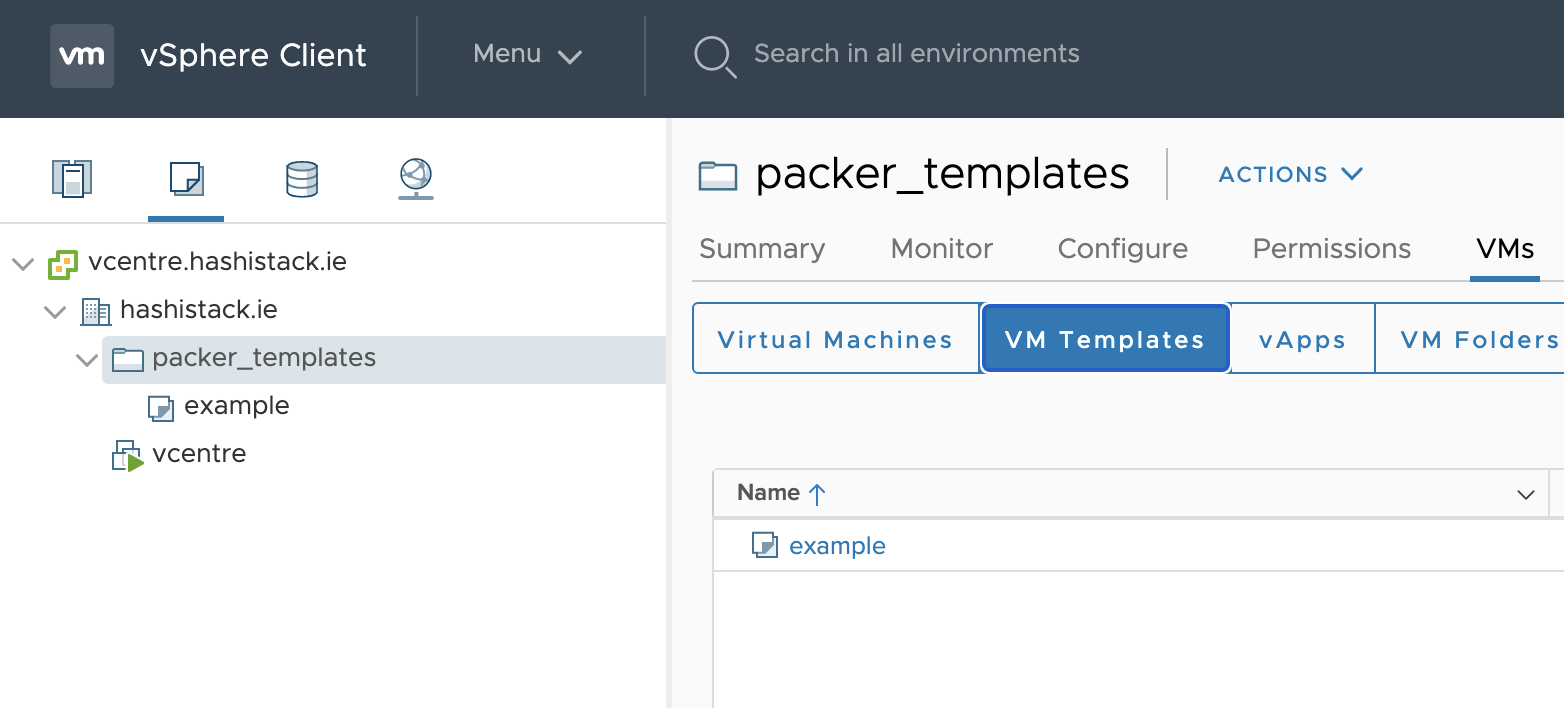
- Speriamo che questo repository e il readme siano utili a qualcun'altro su questa interweb thingy.
Happy Automating, Graz
To Do
- Aggiungere più esempi di piattaforme di immagini
- Riparare la distribuzione del binario base di envoyproxy
- Aggiungere eventualmente anche i test di Travis, vedere cosa posso fare solo nel cloud senza bisogno di un MacBook locale