
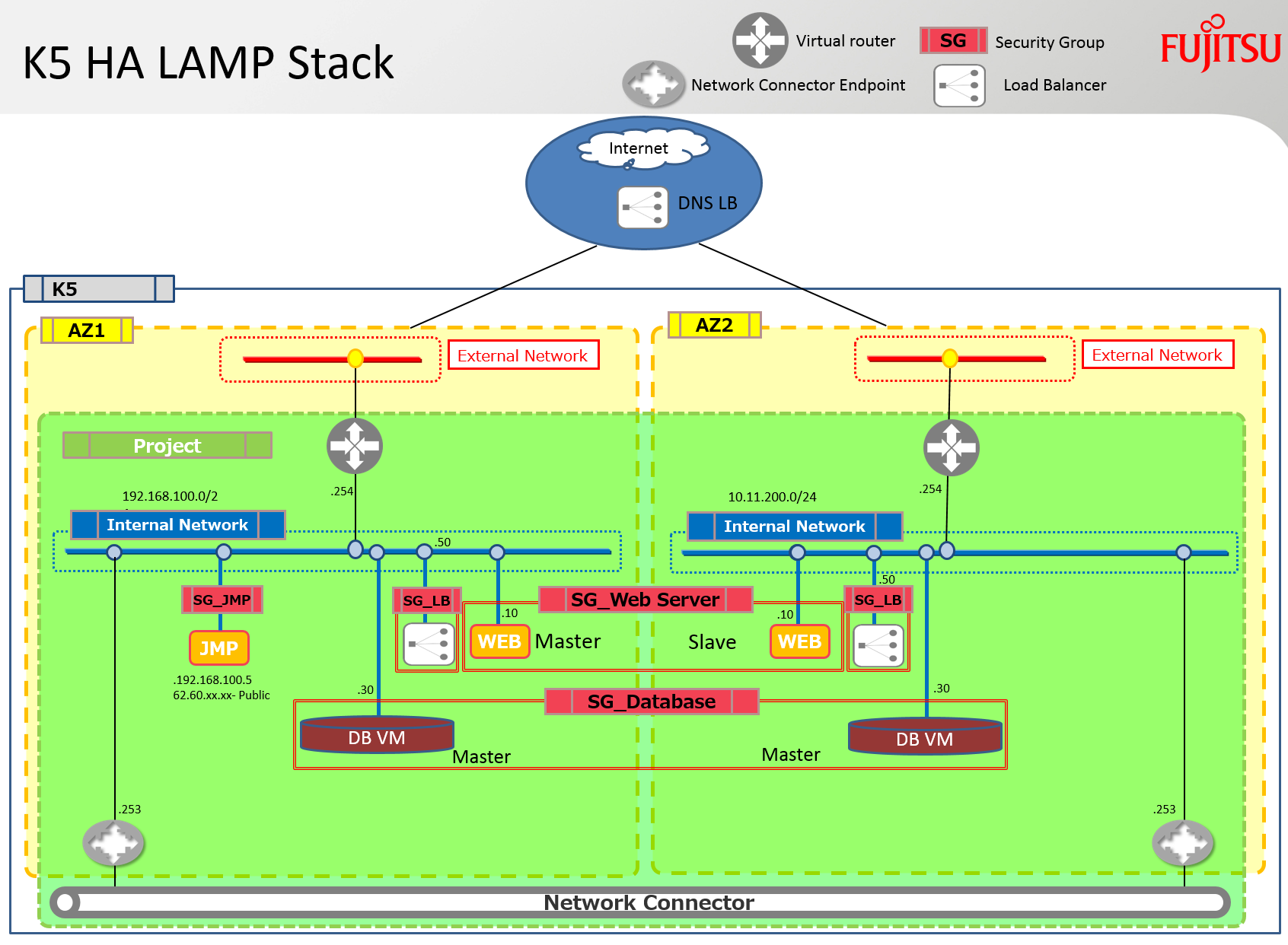
Sì, temo che sia ancora un altro stack HEAT LAMP. Questo stack, tuttavia, include alcuni dei miglioramenti che Fujitsu ha sviluppato per Neutron e Heat. Distribuisce un server apache e un server mysql in entrambe le zone di disponibilità. Collega inoltre queste due AZ insieme per facilitare il traffico di replicazione e sincronizzazione tra questi server utilizzando un connettore di rete. Viene inoltre distribuito un bilanciatore del carico su ogni subnet e contiene entrambi i server apache nel suo pool.
Nota: Sfortunatamente non ho avuto il tempo di configurare e debuggare gli script di apache o mysql, il software è solo installato ma ci sono molti articoli su questi argomenti nel blogosphere – basta cercare su Yahoo per alcuni esempi… lol! Inoltre i bilanciatori del carico dovrebbero infine essere 'bilanciati' tra loro utilizzando un servizio DNS HA esterno per garantire l'assenza di single point of failure.
Il diagramma sottostante illustra l'infrastruttura che verrà creata utilizzando lo stack discusso in questo blog.
Prerequisiti
Sono richiesti i seguenti prerequisiti per una distribuzione riuscita di questo stack.
Router Virtuali: dovrebbe essere creato un router virtuale connesso a internet in ciascuna zona di disponibilità e i parametri associati a questi router devono essere aggiunti allo stack.
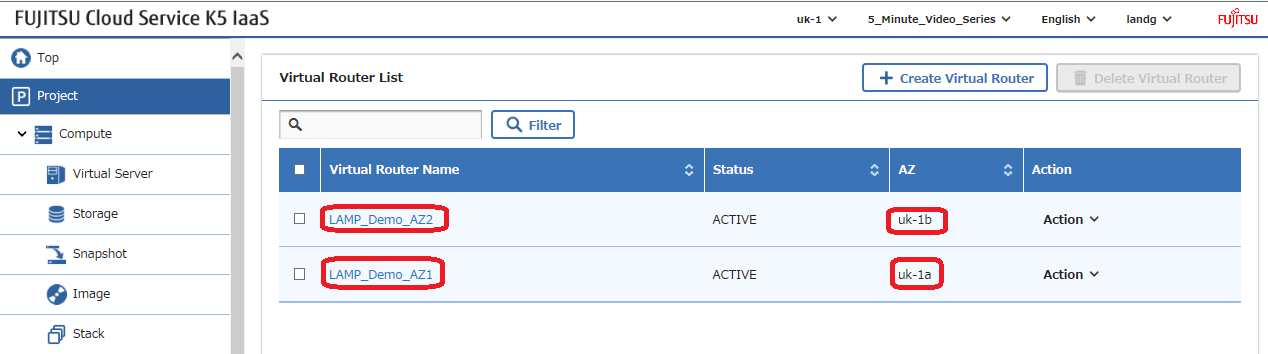
Ottenere l'ID di ogni router, che deve essere modificato nello stack di esempio, e annotare il nome della loro rete esterna utilizzata da ogni router –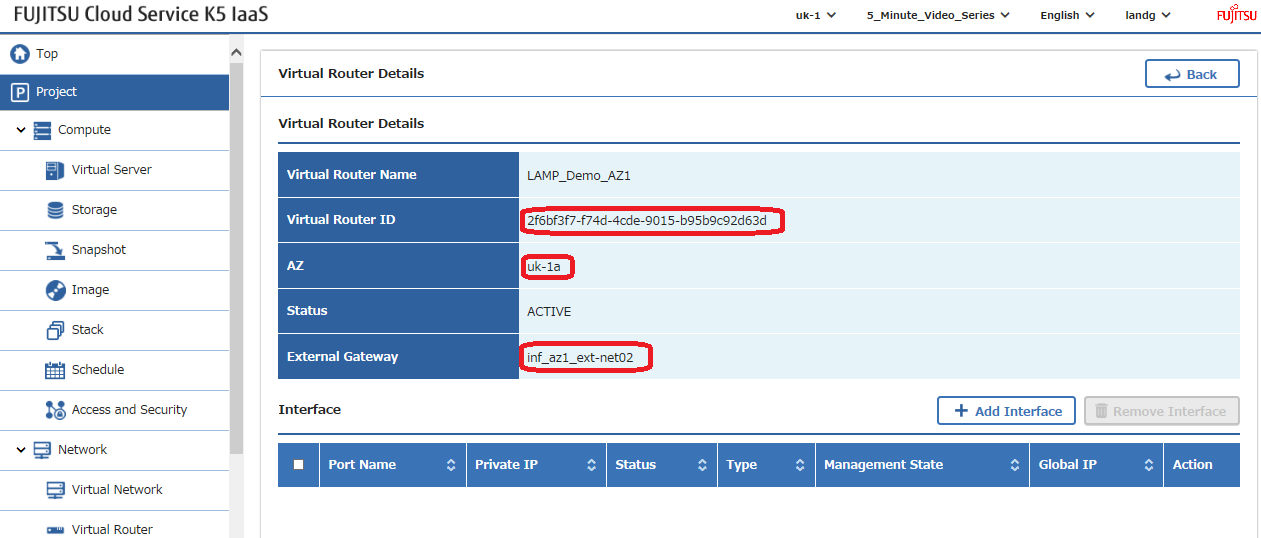
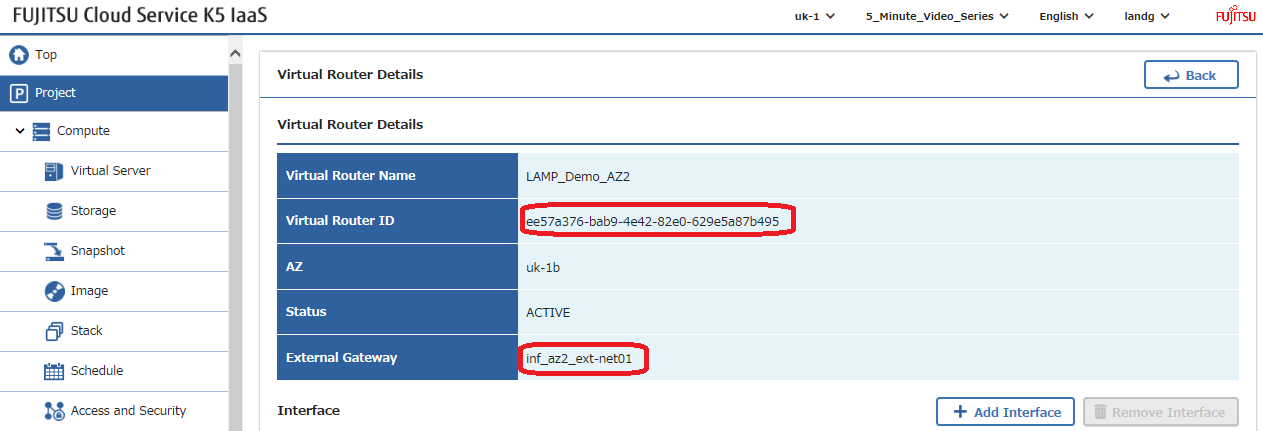
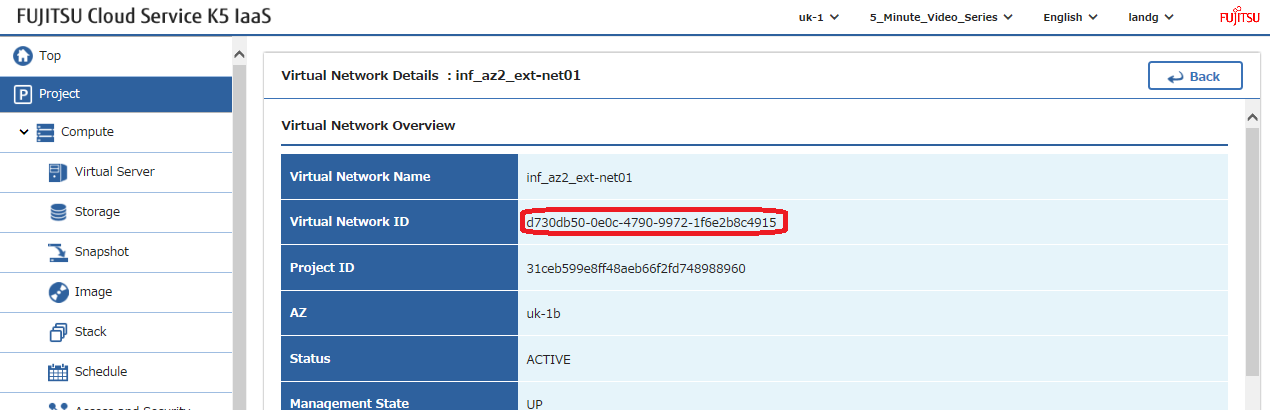
Reti Esterni: Utilizzando i nomi delle reti esterne identificati sopra nelle impostazioni del gateway, individuare gli ID di rete di queste reti esterne, anche dette pubbliche, e modificare questi valori nello stack di esempio –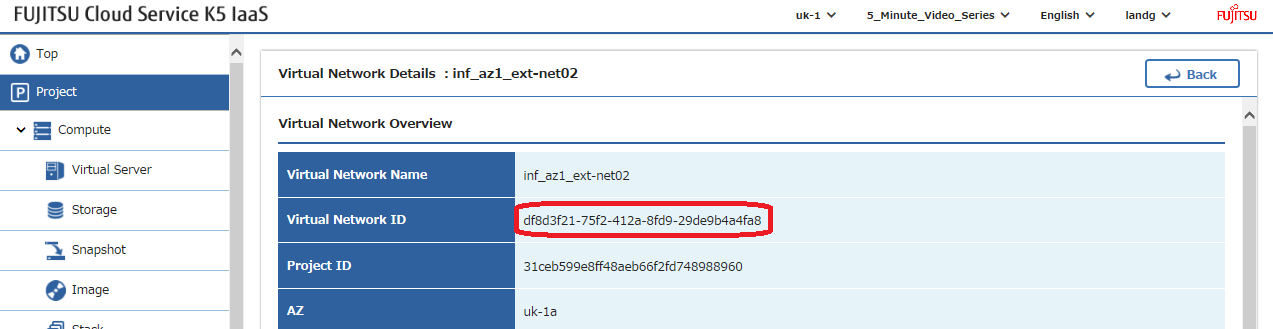
Chiavi SSH: Creare una coppia di chiavi ssh in ciascuna zona di disponibilità e modificare i loro nomi nello stack di esempio –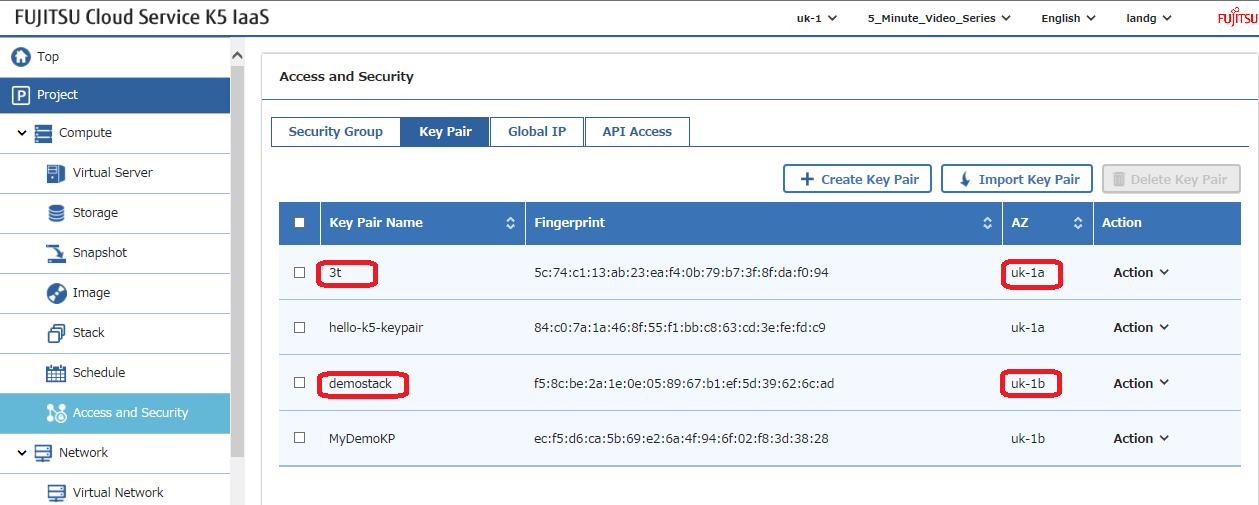
Immagine: Selezionare l'immagine che si desidera utilizzare e modificare questo parametro nello stack di esempio. Nota: Gli script di distribuzione 'UserData' all'interno dello stack sono stati testati su CentOS7.2. Se si decide di distribuire una versione OS diversa, sarà necessario modificare questi script con i comandi richiesti dal sistema operativo scelto.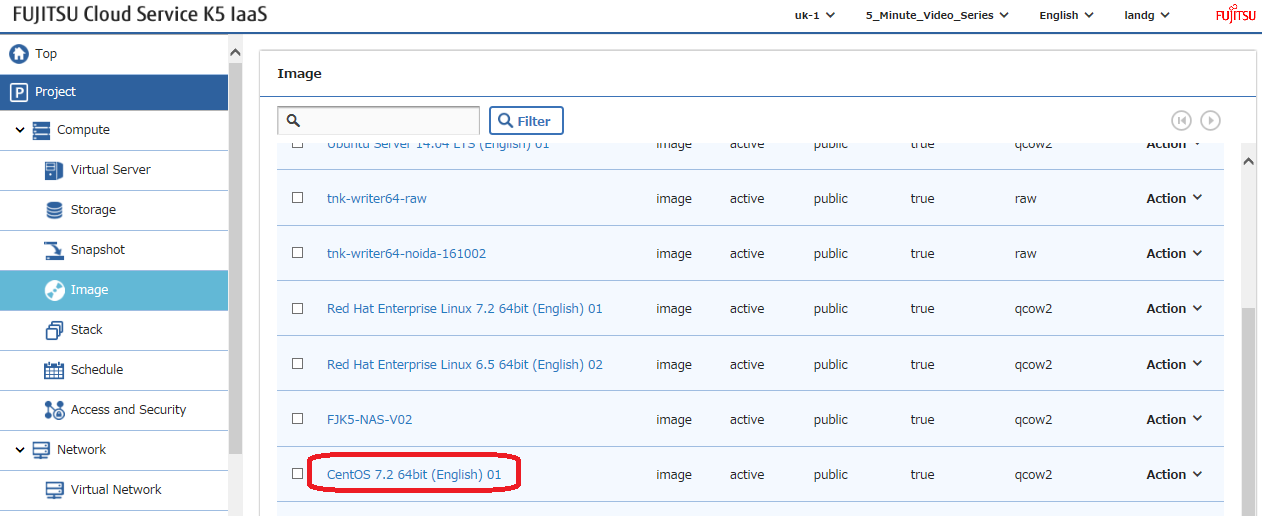
Distribuzione
Una volta configurati tutti questi parametri, è il momento di lanciare il proprio stack, ma prima lasciatemi discutere brevemente le sezioni principali –
Ecco tutti i parametri di input che devono essere modificati per adattarsi al proprio ambiente –
Questo file contiene testo Unicode nascosto o bidirezionale che potrebbe essere interpretato o compilato in modo diverso da quanto appare di seguito. Per rivederlo, aprire il file in un editor che riveli i caratteri Unicode nascosti.
Maggiori informazioni sui caratteri Unicode bidirezionali
| # Input parameters | |
| parameters: | |
| centos_image: | |
| type: string | |
| label: Image name or ID | |
| description: Image to be used for compute instance | |
| default: "CentOS 7.2 64bit (English) 01" | |
| flavor_S2: | |
| type: string | |
| label: Flavor | |
| description: Type of instance (flavor) to be used | |
| default: "S-2" | |
| key_az_1: | |
| type: string | |
| label: Key name | |
| description: Name of key-pair to be used for compute instance | |
| default: "3t" | |
| key_az_2: | |
| type: string | |
| label: Key name | |
| description: Name of key-pair to be used for compute instance | |
| default: "demostack" | |
| public_net_az1: | |
| type: string | |
| label: external network ID | |
| description: Public network | |
| default: "df8d3f21-75f2-412a-8fd9-29de9b4a4fa8" | |
| public_net_az2: | |
| type: string | |
| label: external network ID | |
| description: Public network | |
| default: "d730db50-0e0c-4790-9972-1f6e2b8c4915" | |
| az1: | |
| type: string | |
| label: Availability Zone | |
| description: Region AZ to use | |
| default: "uk-1a" | |
| az2: | |
| type: string | |
| label: Availability Zone | |
| description: Region AZ to use | |
| default: "uk-1b" | |
| ext_router_az1: | |
| type: string | |
| label: External Router | |
| description: Router with external access for global ip allocation | |
| default: "2f6bf3f7-f74d-4cde-9015-b95b9c92d63d" | |
| ext_router_az2: | |
| type: string | |
| label: External Router | |
| description: Router with external access for global ip allocation | |
| default: "ee57a376-bab9-4e42-82e0-629e5a87b495" |
visualizza raw
ExampleLampStack-Parameters.yml
ospitato con ❤ da GitHub
Successivamente creiamo le due reti private, una in ciascuna zona di disponibilità e le colleghiamo ai rispettivi router esistenti –
Questo file contiene testo Unicode nascosto o bidirezionale che potrebbe essere interpretato o compilato in modo diverso da quanto appare di seguito. Per rivederlo, aprire il file in un editor che riveli i caratteri Unicode nascosti.
Maggiori informazioni sui caratteri Unicode bidirezionali
| # Create a private network in availability zone 1 | |
| private_net_az1: | |
| type: OS::Neutron::Net | |
| properties: | |
| availability_zone: { get_param: az1 } | |
| name: "private_net_az1" | |
| # Create a new subnet on the private network | |
| private_subnet_az1: | |
| type: OS::Neutron::Subnet | |
| depends_on: private_net_az1 | |
| properties: | |
| availability_zone: { get_param: az1 } | |
| name: "private_subnet_az1" | |
| network_id: { get_resource: private_net_az1 } | |
| cidr: "192.168.100.0/24" | |
| gateway_ip: "192.168.100.254" | |
| allocation_pools: | |
| – start: "192.168.100.100" | |
| end: "192.168.100.150" | |
| dns_nameservers: ["62.60.39.9", "62.60.39.10"] | |
| host_routes: [{"nexthop": "192.168.100.253", "destination": "10.11.200.0/24"}] | |
| # Connect an interface on the web tier network's subnet to the router | |
| az1_router_interface: | |
| type: OS::Neutron::RouterInterface | |
| depends_on: [private_subnet_az1] | |
| properties: | |
| router_id: { get_param: ext_router_az1 } | |
| subnet_id: { get_resource: private_subnet_az1 } | |
| # Create a private network in availability zone 2 | |
| private_net_az2: | |
| type: OS::Neutron::Net | |
| properties: | |
| availability_zone: { get_param: az2 } | |
| name: "private_net_az2" | |
| # Create a new subnet on the private network | |
| private_subnet_az2: | |
| type: OS::Neutron::Subnet | |
| depends_on: private_net_az2 | |
| properties: | |
| availability_zone: { get_param: az2 } | |
| name: "private_subnet_az2" | |
| network_id: { get_resource: private_net_az2 } | |
| cidr: "10.11.200.0/24" | |
| gateway_ip: "10.11.200.254" | |
| allocation_pools: | |
| – start: "10.11.200.100" | |
| end: "10.11.200.150" | |
| dns_nameservers: ["62.60.42.9", "62.60.42.10"] | |
| host_routes: [{"nexthop": "10.11.200.253", "destination": "192.168.100.0/24"}] | |
| # Connect an interface on the web tier network's subnet to the router | |
| az2_router_interface: | |
| type: OS::Neutron::RouterInterface | |
| depends_on: [private_subnet_az2] | |
| properties: | |
| router_id: { get_param: ext_router_az2 } | |
| subnet_id: { get_resource: private_subnet_az2 } |
visualizza raw
K5LAMPNetworkSection.yml
ospitato con ❤ da GitHub
Ora definiamo tutti i gruppi di sicurezza e le regole che desideriamo utilizzare nello stack. Nota: I gruppi di sicurezza sono stati lasciati "completamente aperti" per facilitare i test. Assicurarsi di bloccarli in uno scenario di produzione per migliorare la sicurezza –
Questo file contiene testo Unicode nascosto o bidirezionale che potrebbe essere interpretato o compilato in modo diverso da quanto appare di seguito. Per rivederlo, aprire il file in un editor che riveli i caratteri Unicode nascosti.
Maggiori informazioni sui caratteri Unicode bidirezionali
| # Create a security group | |
| server_security_group1: | |
| type: OS::Neutron::SecurityGroup | |
| properties: | |
| description: Add security group rules for server | |
| name: Apache | |
| rules: | |
| – remote_ip_prefix: 0.0.0.0/0 | |
| protocol: tcp | |
| port_range_min: 1 | |
| port_range_max: 65535 | |
| – remote_ip_prefix: 0.0.0.0/0 | |
| protocol: udp | |
| port_range_min: 1 | |
| port_range_max: 65535 | |
| – remote_ip_prefix: 0.0.0.0/0 | |
| protocol: icmp | |
| # Create a security group | |
| server_security_group2: | |
| type: OS::Neutron::SecurityGroup | |
| properties: | |
| description: Add security group rules for server | |
| name: MySQL | |
| rules: | |
| – remote_ip_prefix: 0.0.0.0/0 | |
| protocol: tcp | |
| port_range_min: 1 | |
| port_range_max: 65535 | |
| – remote_ip_prefix: 0.0.0.0/0 | |
| protocol: udp | |
| port_range_min: 1 | |
| port_range_max: 65535 | |
| – remote_ip_prefix: 0.0.0.0/0 | |
| protocol: icmp | |
| # Create a security group | |
| server_security_group3: | |
| type: OS::Neutron::SecurityGroup | |
| properties: | |
| description: Add security group rules for server | |
| name: LBaaS_AZ1 | |
| rules: | |
| – remote_ip_prefix: 0.0.0.0/0 | |
| protocol: tcp | |
| port_range_min: 1 | |
| port_range_max: 65535 | |
| – remote_ip_prefix: 0.0.0.0/0 | |
| protocol: udp | |
| port_range_min: 1 | |
| port_range_max: 65535 | |
| – remote_ip_prefix: 0.0.0.0/0 | |
| protocol: icmp | |
| # Create a security group | |
| server_security_group4: | |
| type: OS::Neutron::SecurityGroup | |
| properties: | |
| description: Add security group rules for server | |
| name: LBaaS_AZ2 | |
| rules: | |
| – remote_ip_prefix: 0.0.0.0/0 | |
| protocol: tcp | |
| port_range_min: 1 | |
| port_range_max: 65535 | |
| – remote_ip_prefix: 0.0.0.0/0 | |
| protocol: udp | |
| port_range_min: 1 | |
| port_range_max: 65535 | |
| – remote_ip_prefix: 0.0.0.0/0 | |
| protocol: icmp | |
| # Create a security group | |
| server_security_group5: | |
| type: OS::Neutron::SecurityGroup | |
| properties: | |
| description: Add security group rules for server | |
| name: JumpBox | |
| rules: | |
| – remote_ip_prefix: 0.0.0.0/0 | |
| protocol: tcp | |
| port_range_min: 1 | |
| port_range_max: 65535 | |
| – remote_ip_prefix: 0.0.0.0/0 | |
| protocol: udp | |
| port_range_min: 1 | |
| port_range_max: 65535 | |
| – remote_ip_prefix: 0.0.0.0/0 | |
| protocol: icmp |
visualizza raw
K5SecurityGroupSection.yml
ospitato con ❤ da GitHub
Successivamente definiamo i nostri due bilanciatori del carico e notiamo l'uso dell'istruzione 'depends_on' qui per garantire che non vengano costruiti finché non sono stati costruiti i due server apache, poiché i loro dettagli sono un prerequisito per la creazione del bilanciatore del carico –
Questo file contiene testo Unicode nascosto o bidirezionale che potrebbe essere interpretato o compilato in modo diverso da quanto appare di seguito. Per rivederlo, aprire il file in un editor che riveli i caratteri Unicode nascosti.
Maggiori informazioni sui caratteri Unicode bidirezionali
| # AZ 1 Load Balancer | |
| LAMP_Demo_AZ1_LBaaS: | |
| type: FCX::ExpandableLoadBalancer::LoadBalancer | |
| depends_on: [ server1,server2 ] | |
| properties: | |
| Subnets: [{get_resource: private_subnet_az1}] | |
| Instances: [{get_resource: server1},{get_resource: server2}] | |
| Listeners: | |
| – {LoadBalancerPort: '80', | |
| InstancePort: '80', | |
| Protocol: 'HTTP', | |
| InstanceProtocol: 'HTTP' } | |
| HealthCheck: {Target: 'HTTP:80/healthcheck', | |
| HealthyThreshold: '3', | |
| UnhealthyThreshold: '5', | |
| Interval: '30', | |
| Timeout: '5'} | |
| Version: 2014-09-30 | |
| Scheme: public | |
| LoadBalancerName: LBaaSAZ1 | |
| SecurityGroups: [ {get_resource: server_security_group3} ] | |
| # AZ 2 Load Balancer | |
| LAMP_Demo_AZ2_LBaaS: | |
| type: FCX::ExpandableLoadBalancer::LoadBalancer | |
| depends_on: [ server1,server2 ] | |
| properties: | |
| Subnets: [{get_resource: private_subnet_az2}] | |
| Instances: [{get_resource: server1},{get_resource: server2}] | |
| Listeners: | |
| – {LoadBalancerPort: '80', | |
| InstancePort: '80', | |
| Protocol: 'HTTP', | |
| InstanceProtocol: 'HTTP' } | |
| HealthCheck: {Target: 'HTTP:80/healthcheck', | |
| HealthyThreshold: '3', | |
| UnhealthyThreshold: '5', | |
| Interval: '30', | |
| Timeout: '5'} | |
| Version: 2014-09-30 | |
| Scheme: public | |
| LoadBalancerName: LBaaSAZ2 | |
| SecurityGroups: [ {get_resource: server_security_group4} ] |
visualizza raw
TwoLoadBalancersExample.yml
ospitato con ❤ da GitHub
Ora definiamo tutti i nostri server che consistono in un jump box a cui assegneremo un indirizzo IP globale (floating), 2 server con software web caricato e infine due server con mysql caricato. Nota che ho deliberatamente definito indirizzi IP statici ovunque poiché questa procedura non è stata pubblicata in molti posti online. Questo è eccessivo e si potrebbe semplicemente sfruttare DHCP se desiderato. Gli ambienti di produzione tendono ad apprezzare la coerenza e la ripetibilità per qualche strana ragione 😉 Qualcuno ha mai sentito parlare di flussi CI/CD.
Questo file contiene testo Unicode nascosto o bidirezionale che potrebbe essere interpretato o compilato in modo diverso da quanto appare di seguito. Per rivederlo, aprire il file in un editor che riveli i caratteri Unicode nascosti.
Maggiori informazioni sui caratteri Unicode bidirezionali
| ################### JumpBox – AZ 1 ############################################################################## | |
| # Create a new port for the server interface, assign an ip address and security group | |
| jump-server-port: | |
| type: OS::Neutron::Port | |
| depends_on: [ server_security_group5 ] | |
| properties: | |
| availability_zone: { get_param: az1 } | |
| network_id: { get_resource: private_net_az1 } | |
| security_groups: [{ get_resource: server_security_group5 }] | |
| fixed_ips: | |
| – subnet_id: { get_resource: private_subnet_az1 } | |
| ip_address: '192.168.100.5' | |
| # Allocate a floating/global ip address | |
| jump-server-floating-ip: | |
| type: OS::Neutron::FloatingIP | |
| properties: | |
| availability_zone: { get_param: az1 } | |
| floating_network_id: { get_param: public_net_az1 } | |
| # Assign a floating/global ip address to the fixed server ip address | |
| jump-server-floating-ip-association: | |
| type: OS::Neutron::FloatingIPAssociation | |
| depends_on: jump-server-floating-ip | |
| properties: | |
| floatingip_id: { get_resource: jump-server-floating-ip } | |
| port_id: { get_resource: jump-server-port } | |
| # Create a system volume for use with the server | |
| jump-sys-vol: | |
| type: OS::Cinder::Volume | |
| properties: | |
| availability_zone: { get_param: az1 } | |
| name: "LAMP-JumpBox-AZ1" | |
| size: 30 | |
| volume_type: "M1" | |
| image : { get_param: centos_image } | |
| # Build a server using the system volume defined above | |
| jump-server: | |
| type: OS::Nova::Server | |
| depends_on: [ jump-server-port ] | |
| properties: | |
| key_name: { get_param: key_az_1 } | |
| image: { get_param: centos_image } | |
| flavor: "S-1" | |
| admin_user: k5user | |
| block_device_mapping: [{"volume_size": "30", "volume_id": {get_resource: jump-sys-vol}, "delete_on_termination": True, "device_name": "/dev/vda"}] | |
| name: "LAMP-JumpBox-AZ1" | |
| networks: | |
| – port: { get_resource: jump-server-port } | |
| ########################################################################################################## | |
| ################### WebServers – AZ 1 ############################################################################## | |
| # Create a new port for the server interface, assign an ip address and security group | |
| server1_port: | |
| type: OS::Neutron::Port | |
| depends_on: [ server_security_group1 ] | |
| properties: | |
| availability_zone: { get_param: az1 } | |
| network_id: { get_resource: private_net_az1 } | |
| security_groups: [{ get_resource: server_security_group1 }] | |
| fixed_ips: | |
| – subnet_id: { get_resource: private_subnet_az1 } | |
| ip_address: '192.168.100.10' | |
| # Create a system volume for use with the server | |
| sys-vol1: | |
| type: OS::Cinder::Volume | |
| properties: | |
| availability_zone: { get_param: az1 } | |
| name: "web-az1-boot-vol" | |
| size: 30 | |
| volume_type: "M1" | |
| image : { get_param: centos_image } | |
| # Build a server using the system volume defined above | |
| server1: | |
| type: OS::Nova::Server | |
| depends_on: [ jump-server,server1_port,sys-vol1 ] | |
| properties: | |
| key_name: { get_param: key_az_1 } | |
| image: { get_param: centos_image } | |
| flavor: { get_param: flavor_S2 } | |
| admin_user: k5user | |
| block_device_mapping: [{"volume_size": "30", "volume_id": {get_resource: sys-vol1}, "delete_on_termination": True, "device_name": "/dev/vda"}] | |
| name: "Apache-AZ1" | |
| user_data_format: RAW | |
| user_data: | |
| str_replace: | |
| template: | |
| #!/bin/bash | |
| sudo yum update -y | |
| sudo yum install wget -y | |
| sudo yum install httpd -y | |
| sudo systemctl start httpd.service | |
| sudo systemctl enable httpd.service | |
| sudo wget http://repo.mysql.com/mysql-community-release-el7-5.noarch.rpm | |
| sudo rpm -ivh mysql-community-release-el7-5.noarch.rpm | |
| sudo yum update -y | |
| sudo yum install mysql -y | |
| sudo yum install php php-pear -y | |
| sudo yum install php-mysql -y | |
| sudo yum install lua lua-devel pkgconfig gcc asciidoc -y | |
| sudo wget http://dl.fedoraproject.org/pub/epel/7/x86_64/e/epel-release-7-8.noarch.rpm | |
| sudo rpm -iUvh epel-release-7-8.noarch.rpm | |
| sudo yum update -y | |
| sudo yum install lsyncd -y | |
| echo message | |
| params: | |
| message: "Installation Complete" | |
| networks: | |
| – port: { get_resource: server1_port } | |
| ########################################################################################################### | |
| ################### WebServers – AZ 2 ############################################################################## | |
| server2_port: | |
| type: OS::Neutron::Port | |
| depends_on: [ server_security_group1 ] | |
| properties: | |
| availability_zone: { get_param: az2 } | |
| network_id: { get_resource: private_net_az2 } | |
| security_groups: [{ get_resource: server_security_group1 }] | |
| fixed_ips: | |
| – subnet_id: { get_resource: private_subnet_az2 } | |
| ip_address: '10.11.200.10' | |
| # Create a system volume for use with the server | |
| sys-vol2: | |
| type: OS::Cinder::Volume | |
| properties: | |
| availability_zone: { get_param: az2 } | |
| name: "web-az2-boot-vol" | |
| size: 30 | |
| volume_type: "M1" | |
| image : { get_param: centos_image } | |
| # Build a server using the system volume defined above | |
| server2: | |
| type: OS::Nova::Server | |
| depends_on: [ jump-server,server2_port,sys-vol2 ] | |
| properties: | |
| key_name: { get_param: key_az_2 } | |
| image: { get_param: centos_image } | |
| flavor: { get_param: flavor_S2 } | |
| admin_user: k5user | |
| block_device_mapping: [{"volume_size": "30", "volume_id": {get_resource: sys-vol2}, "delete_on_termination": True, "device_name": "/dev/vda"}] | |
| name: "Apache-AZ2" | |
| user_data_format: RAW | |
| user_data: | |
| str_replace: | |
| template: | |
| #!/bin/bash | |
| sudo yum update -y | |
| sudo yum install wget -y | |
| sudo yum install httpd -y | |
| sudo systemctl start httpd.service | |
| sudo systemctl enable httpd.service | |
| sudo wget http://repo.mysql.com/mysql-community-release-el7-5.noarch.rpm | |
| sudo rpm -ivh mysql-community-release-el7-5.noarch.rpm | |
| sudo yum update -y | |
| sudo yum install mysql -y | |
| sudo yum install php php-pear -y | |
| sudo yum install php-mysql -y | |
| sudo yum install lua lua-devel pkgconfig gcc asciidoc -y | |
| sudo wget http://dl.fedoraproject.org/pub/epel/7/x86_64/e/epel-release-7-8.noarch.rpm | |
| sudo rpm -iUvh epel-release-7-8.noarch.rpm | |
| sudo yum update -y | |
| sudo yum install lsyncd -y | |
| echo message | |
| params: | |
| message: "Installation Complete" | |
| networks: | |
| – port: { get_resource: server2_port } | |
| ########################################################################################################### | |
| ################### DatabaseServers – AZ 1 ############################################################################## | |
| # Create a new port for the server interface, assign an ip address and security group | |
| server3_port: | |
| type: OS::Neutron::Port | |
| depends_on: [ server_security_group2 ] | |
| properties: | |
| availability_zone: { get_param: az1 } | |
| network_id: { get_resource: private_net_az1 } | |
| security_groups: [{ get_resource: server_security_group2 }] | |
| fixed_ips: | |
| – subnet_id: { get_resource: private_subnet_az1 } | |
| ip_address: '192.168.100.30' | |
| # Create a system volume for use with the server | |
| sys-vol3: | |
| type: OS::Cinder::Volume | |
| properties: | |
| availability_zone: { get_param: az1 } | |
| name: "db-az1-boot-vol" | |
| size: 30 | |
| volume_type: "M1" | |
| image : { get_param: centos_image } | |
| # Build a server using the system volume defined above | |
| server3: | |
| type: OS::Nova::Server | |
| depends_on: [ jump-server,server3_port,sys-vol3 ] | |
| properties: | |
| key_name: { get_param: key_az_1 } | |
| image: { get_param: centos_image } | |
| flavor: { get_param: flavor_S2 } | |
| admin_user: k5user | |
| block_device_mapping: [{"volume_size": "30", "volume_id": {get_resource: sys-vol3}, "delete_on_termination": True, "device_name": "/dev/vda"}] | |
| name: "Database-AZ1" | |
| user_data_format: RAW | |
| user_data: | |
| str_replace: | |
| template: | |
| #!/bin/bash | |
| sudo yum update -y | |
| sudo yum install wget -y | |
| sudo wget http://repo.mysql.com/mysql-community-release-el7-5.noarch.rpm | |
| sudo rpm -ivh mysql-community-release-el7-5.noarch.rpm | |
| sudo yum update -y | |
| sudo yum install mysql-server -y | |
| sudo systemctl start mysqld | |
| sudo systemctl enable mysqld | |
| echo message | |
| params: | |
| message: "Installation Complete" | |
| networks: | |
| – port: { get_resource: server3_port } | |
| ########################################################################################################### | |
| ################### DatabaseServers – AZ 2 ################################################################ | |
| # Create a new port for the server interface, assign an ip address and security group | |
| server4_port: | |
| type: OS::Neutron::Port | |
| depends_on: [ server_security_group2 ] | |
| properties: | |
| availability_zone: { get_param: az2 } | |
| network_id: { get_resource: private_net_az2 } | |
| security_groups: [{ get_resource: server_security_group2 }] | |
| fixed_ips: | |
| – subnet_id: { get_resource: private_subnet_az2 } | |
| ip_address: '10.11.200.30' | |
| # Create a system volume for use with the server | |
| sys-vol4: | |
| type: OS::Cinder::Volume | |
| properties: | |
| availability_zone: { get_param: az2 } | |
| name: "db-az2-boot-vol" | |
| size: 30 | |
| volume_type: "M1" | |
| image : { get_param: centos_image } | |
| # Build a server using the system volume defined above | |
| server4: | |
| type: OS::Nova::Server | |
| depends_on: [ jump-server,server4_port,sys-vol4 ] | |
| properties: | |
| key_name: { get_param: key_az_2 } | |
| image: { get_param: centos_image } | |
| flavor: { get_param: flavor_S2 } | |
| admin_user: k5user | |
| block_device_mapping: [{"volume_size": "30", "volume_id": {get_resource: sys-vol4}, "delete_on_termination": True, "device_name": "/dev/vda"}] | |
| name: "Database-AZ2" | |
| user_data_format: RAW | |
| user_data: | |
| str_replace: | |
| template: | |
| #!/bin/bash | |
| sudo yum update -y | |
| sudo yum install wget -y | |
| sudo wget http://repo.mysql.com/mysql-community-release-el7-5.noarch.rpm | |
| sudo rpm -ivh mysql-community-release-el7-5.noarch.rpm | |
| sudo yum update -y | |
| sudo yum install mysql-server -y | |
| sudo systemctl start mysqld | |
| sudo systemctl enable mysqld | |
| echo message | |
| params: | |
| message: "Installation Complete" | |
| networks: | |
| – port: { get_resource: server4_port } | |
| ########################################################################################################### |
visualizza raw
K5LAMPExampleServersSection.yml
ospitato con ❤ da GitHub
Infine abbiamo la sezione del connettore di rete. Questa forma il collegamento di livello 3 tra le due subnet nelle diverse zone di disponibilità. Questo è il collegamento che trasporterà tutto il traffico di replicazione e sincronizzazione tra i server. Logicamente sarebbe stato probabilmente meglio spostarlo nella sezione di networking di questo post, ma non oserei cambiarlo ora per paura di introdurre un errore di battitura e non ho tempo di ritestare – ciò che è attualmente su github funziona 🙂
Questo file contiene testo Unicode nascosto o bidirezionale che potrebbe essere interpretato o compilato in modo diverso da quanto appare di seguito. Per rivederlo, aprire il file in un editor che riveli i caratteri Unicode nascosti.
Maggiori informazioni sui caratteri Unicode bidirezionali
| ############################### AZ Interconnect ########################################################### | |
| az1_nc_port: | |
| type: OS::Neutron::Port | |
| depends_on: [ server_security_group2 ] | |
| properties: | |
| availability_zone: { get_param: az1 } | |
| network_id: { get_resource: private_net_az1 } | |
| security_groups: [{ get_resource: server_security_group2 }] | |
| fixed_ips: | |
| – subnet_id: { get_resource: private_subnet_az1 } | |
| ip_address: '192.168.100.253' | |
| az2_nc_port: | |
| type: OS::Neutron::Port | |
| depends_on: [ server_security_group2 ] | |
| properties: | |
| availability_zone: { get_param: az2 } | |
| network_id: { get_resource: private_net_az2 } | |
| security_groups: [{ get_resource: server_security_group2 }] | |
| fixed_ips: | |
| – subnet_id: { get_resource: private_subnet_az2 } | |
| ip_address: '10.11.200.253' | |
| az1_network_connector: | |
| type: FCX::Neutron::NetworkConnector | |
| depends_on: [ az1_nc_port,az2_nc_port ] | |
| properties: | |
| name: "LAMP-Demo-NC" | |
| az1_nc_endpoint: | |
| type: FCX::Neutron::NetworkConnectorEndpoint | |
| depends_on: [ az1_nc_port,az2_nc_port ] | |
| properties: | |
| endpoint_type: "availability_zone" | |
| name: "AZ1-NC-EP" | |
| network_connector_id: { get_resource: az1_network_connector } | |
| location: { get_param: az1 } | |
| az2_nc_endpoint: | |
| type: FCX::Neutron::NetworkConnectorEndpoint | |
| depends_on: [ az1_nc_port,az2_nc_port ] | |
| properties: | |
| endpoint_type: "availability_zone" | |
| name: "AZ2-NC-EP" | |
| network_connector_id: { get_resource: az1_network_connector } | |
| location: { get_param: az2 } | |
| az1_endpoint_connection: | |
| type: FCX::Neutron::NetworkConnectorEndpointConnection | |
| depends_on: [ az1_nc_port,az2_nc_port ] | |
| properties: | |
| port_id: { get_resource: az1_nc_port } | |
| network_connector_endpoint_id: { get_resource: az1_nc_endpoint } | |
| az2_endpoint_connection: | |
| type: FCX::Neutron::NetworkConnectorEndpointConnection | |
| depends_on: [ az1_nc_port,az2_nc_port ] | |
| properties: | |
| port_id: { get_resource: az2_nc_port } | |
| network_connector_endpoint_id: { get_resource: az2_nc_endpoint } |
visualizza raw
K5NetworkConnectorExample.yml
ospitato con ❤ da GitHub
Se non sei già andato direttamente su github, ecco cosa vorrai scaricare e provare in un unico gist –
Questo file contiene testo Unicode nascosto o bidirezionale che potrebbe essere interpretato o compilato in modo diverso da quanto appare di seguito. Per rivederlo, aprire il file in un editor che riveli i caratteri Unicode nascosti.
Maggiori informazioni sui caratteri Unicode bidirezionali
| heat_template_version: 2013-05-23 | |
| # Author: Graham Land | |
| # Date: 21/10/2016 | |
| # Purpose: Multi-Availability-Zone template to demonstrate the basic format/usage of HOT stacks on our Fujitsu K5 platform | |
| # It builds a webserver and database server in AZ1 and then the same infrastructure again in AZ2. | |
| # These two environmnets are then joined using a network connector to facilitate data replication between the applications. | |
| # Two public facing load balancers are also deployed – one in each AZ – and the webservers are added to each of these. | |
| # | |
| # The webservers have apache, php, mysql-client and lsyncd installed but NOT configured – didn't have time for this script sorry – loads of examples available online | |
| # The database servers have mysql installed but not configured – again lots of examples available online – can be easily setup in Master/Master mode | |
| # Once the web application is installed use Lsyncd to provide Master/Slave sync between the apache servers. | |
| # | |
| # I'm not a LAMP expert there are many different ways of implementing the above software components the goal of this stack is to illustrate | |
| # a highly available infrastructure solution – please adjust to taste e.g. GlusterFS instead of Lsync, Galera MySQL Cluster software etc… | |
| # Twitter: @allthingsclowd | |
| # Blog: https://allthingscloud.eu | |
| description: Yes I'm afraid it's yet another LAMP HEAT stack – this time though it's a multi-AZ deployment on Fujitsu K5 IaaS | |
| # Input parameters | |
| parameters: | |
| centos_image: | |
| type: string | |
| label: Image name or ID | |
| description: Image to be used for compute instance | |
| default: "CentOS 7.2 64bit (English) 01" | |
| flavor_S2: | |
| type: string | |
| label: Flavor | |
| description: Type of instance (flavor) to be used | |
| default: "S-2" | |
| key_az_1: | |
| type: string | |
| label: Key name | |
| description: Name of key-pair to be used for compute instance | |
| default: "3t" | |
| key_az_2: | |
| type: string | |
| label: Key name | |
| description: Name of key-pair to be used for compute instance | |
| default: "demostack" | |
| public_net_az1: | |
| type: string | |
| label: external network ID | |
| description: Public network | |
| default: "df8d3f21-75f2-412a-8fd9-29de9b4a4fa8" | |
| public_net_az2: | |
| type: string | |
| label: external network ID | |
| description: Public network | |
| default: "d730db50-0e0c-4790-9972-1f6e2b8c4915" | |
| az1: | |
| type: string | |
| label: Availability Zone | |
| description: Region AZ to use | |
| default: "uk-1a" | |
| az2: | |
| type: string | |
| label: Availability Zone | |
| description: Region AZ to use | |
| default: "uk-1b" | |
| ext_router_az1: | |
| type: string | |
| label: External Router | |
| description: Router with external access for global ip allocation | |
| default: "2f6bf3f7-f74d-4cde-9015-b95b9c92d63d" | |
| ext_router_az2: | |
| type: string | |
| label: External Router | |
| description: Router with external access for global ip allocation | |
| default: "ee57a376-bab9-4e42-82e0-629e5a87b495" | |
| # K5 Infrastructure resources to be built | |
| resources: | |
| # Create a private network in availability zone 1 | |
| private_net_az1: | |
| type: OS::Neutron::Net | |
| properties: | |
| availability_zone: { get_param: az1 } | |
| name: "private_net_az1" | |
| # Create a new subnet on the private network | |
| private_subnet_az1: | |
| type: OS::Neutron::Subnet | |
| depends_on: private_net_az1 | |
| properties: | |
| availability_zone: { get_param: az1 } | |
| name: "private_subnet_az1" | |
| network_id: { get_resource: private_net_az1 } | |
| cidr: "192.168.100.0/24" | |
| gateway_ip: "192.168.100.254" | |
| allocation_pools: | |
| – start: "192.168.100.100" | |
| end: "192.168.100.150" | |
| dns_nameservers: ["62.60.39.9", "62.60.39.10"] | |
| host_routes: [{"nexthop": "192.168.100.253", "destination": "10.11.200.0/24"}] | |
| # Connect an interface on the web tier network's subnet to the router | |
| az1_router_interface: | |
| type: OS::Neutron::RouterInterface | |
| depends_on: [private_subnet_az1] | |
| properties: | |
| router_id: { get_param: ext_router_az1 } | |
| subnet_id: { get_resource: private_subnet_az1 } | |
| # Create a private network in availability zone 2 | |
| private_net_az2: | |
| type: OS::Neutron::Net | |
| properties: | |
| availability_zone: { get_param: az2 } | |
| name: "private_net_az2" | |
| # Create a new subnet on the private network | |
| private_subnet_az2: | |
| type: OS::Neutron::Subnet | |
| depends_on: private_net_az2 | |
| properties: | |
| availability_zone: { get_param: az2 } | |
| name: "private_subnet_az2" | |
| network_id: { get_resource: private_net_az2 } | |
| cidr: "10.11.200.0/24" | |
| gateway_ip: "10.11.200.254" | |
| allocation_pools: | |
| – start: "10.11.200.100" | |
| end: "10.11.200.150" | |
| dns_nameservers: ["62.60.42.9", "62.60.42.10"] | |
| host_routes: [{"nexthop": "10.11.200.253", "destination": "192.168.100.0/24"}] | |
| # Connect an interface on the web tier network's subnet to the router | |
| az2_router_interface: | |
| type: OS::Neutron::RouterInterface | |
| depends_on: [private_subnet_az2] | |
| properties: | |
| router_id: { get_param: ext_router_az2 } | |
| subnet_id: { get_resource: private_subnet_az2 } | |
| # Create a security group | |
| server_security_group1: | |
| type: OS::Neutron::SecurityGroup | |
| properties: | |
| description: Add security group rules for server | |
| name: Apache | |
| rules: | |
| – remote_ip_prefix: 0.0.0.0/0 | |
| protocol: tcp | |
| port_range_min: 1 | |
| port_range_max: 65535 | |
| – remote_ip_prefix: 0.0.0.0/0 | |
| protocol: udp | |
| port_range_min: 1 | |
| port_range_max: 65535 | |
| – remote_ip_prefix: 0.0.0.0/0 | |
| protocol: icmp | |
| # Create a security group | |
| server_security_group2: | |
| type: OS::Neutron::SecurityGroup | |
| properties: | |
| description: Add security group rules for server | |
| name: MySQL | |
| rules: | |
| – remote_ip_prefix: 0.0.0.0/0 | |
| protocol: tcp | |
| port_range_min: 1 | |
| port_range_max: 65535 | |
| – remote_ip_prefix: 0.0.0.0/0 | |
| protocol: udp | |
| port_range_min: 1 | |
| port_range_max: 65535 | |
| – remote_ip_prefix: 0.0.0.0/0 | |
| protocol: icmp | |
| # Create a security group | |
| server_security_group3: | |
| type: OS::Neutron::SecurityGroup | |
| properties: | |
| description: Add security group rules for server | |
| name: LBaaS_AZ1 | |
| rules: | |
| – remote_ip_prefix: 0.0.0.0/0 | |
| protocol: tcp | |
| port_range_min: 1 | |
| port_range_max: 65535 | |
| – remote_ip_prefix: 0.0.0.0/0 | |
| protocol: udp | |
| port_range_min: 1 | |
| port_range_max: 65535 | |
| – remote_ip_prefix: 0.0.0.0/0 | |
| protocol: icmp | |
| # Create a security group | |
| server_security_group4: | |
| type: OS::Neutron::SecurityGroup | |
| properties: | |
| description: Add security group rules for server | |
| name: LBaaS_AZ2 | |
| rules: | |
| – remote_ip_prefix: 0.0.0.0/0 | |
| protocol: tcp | |
| port_range_min: 1 | |
| port_range_max: 65535 | |
| – remote_ip_prefix: 0.0.0.0/0 | |
| protocol: udp | |
| port_range_min: 1 | |
| port_range_max: 65535 | |
| – remote_ip_prefix: 0.0.0.0/0 | |
| protocol: icmp | |
| # Create a security group | |
| server_security_group5: | |
| type: OS::Neutron::SecurityGroup | |
| properties: | |
| description: Add security group rules for server | |
| name: JumpBox | |
| rules: | |
| – remote_ip_prefix: 0.0.0.0/0 | |
| protocol: tcp | |
| port_range_min: 1 | |
| port_range_max: 65535 | |
| – remote_ip_prefix: 0.0.0.0/0 | |
| protocol: udp | |
| port_range_min: 1 | |
| port_range_max: 65535 | |
| – remote_ip_prefix: 0.0.0.0/0 | |
| protocol: icmp | |
| # AZ 1 Load Balancer | |
| LAMP_Demo_AZ1_LBaaS: | |
| type: FCX::ExpandableLoadBalancer::LoadBalancer | |
| depends_on: [ server1,server2 ] | |
| properties: | |
| Subnets: [{get_resource: private_subnet_az1}] | |
| Instances: [{get_resource: server1},{get_resource: server2}] | |
| Listeners: | |
| – {LoadBalancerPort: '80', | |
| InstancePort: '80', | |
| Protocol: 'HTTP', | |
| InstanceProtocol: 'HTTP' } | |
| HealthCheck: {Target: 'HTTP:80/healthcheck', | |
| HealthyThreshold: '3', | |
| UnhealthyThreshold: '5', | |
| Interval: '30', | |
| Timeout: '5'} | |
| Version: 2014-09-30 | |
| Scheme: public | |
| LoadBalancerName: LBaaSAZ1 | |
| SecurityGroups: [ {get_resource: server_security_group3} ] | |
| # AZ 2 Load Balancer | |
| LAMP_Demo_AZ2_LBaaS: | |
| type: FCX::ExpandableLoadBalancer::LoadBalancer | |
| depends_on: [ server1,server2 ] | |
| properties: | |
| Subnets: [{get_resource: private_subnet_az2}] | |
| Instances: [{get_resource: server1},{get_resource: server2}] | |
| Listeners: | |
| – {LoadBalancerPort: '80', | |
| InstancePort: '80', | |
| Protocol: 'HTTP', | |
| InstanceProtocol: 'HTTP' } | |
| HealthCheck: {Target: 'HTTP:80/healthcheck', | |
| HealthyThreshold: '3', | |
| UnhealthyThreshold: '5', | |
| Interval: '30', | |
| Timeout: '5'} | |
| Version: 2014-09-30 | |
| Scheme: public | |
| LoadBalancerName: LBaaSAZ2 | |
| SecurityGroups: [ {get_resource: server_security_group4} ] | |
| ################### JumpBox – AZ 1 ############################################################################## | |
| # Create a new port for the server interface, assign an ip address and security group | |
| jump-server-port: | |
| type: OS::Neutron::Port | |
| depends_on: [ server_security_group5 ] | |
| properties: | |
| availability_zone: { get_param: az1 } | |
| network_id: { get_resource: private_net_az1 } | |
| security_groups: [{ get_resource: server_security_group5 }] | |
| fixed_ips: | |
| – subnet_id: { get_resource: private_subnet_az1 } | |
| ip_address: '192.168.100.5' | |
| # Allocate a floating/global ip address | |
| jump-server-floating-ip: | |
| type: OS::Neutron::FloatingIP | |
| properties: | |
| availability_zone: { get_param: az1 } | |
| floating_network_id: { get_param: public_net_az1 } | |
| # Assign a floating/global ip address to the fixed server ip address | |
| jump-server-floating-ip-association: | |
| type: OS::Neutron::FloatingIPAssociation | |
| depends_on: jump-server-floating-ip | |
| properties: | |
| floatingip_id: { get_resource: jump-server-floating-ip } | |
| port_id: { get_resource: jump-server-port } | |
| # Create a system volume for use with the server | |
| jump-sys-vol: | |
| type: OS::Cinder::Volume | |
| properties: | |
| availability_zone: { get_param: az1 } | |
| name: "LAMP-JumpBox-AZ1" | |
| size: 30 | |
| volume_type: "M1" | |
| image : { get_param: centos_image } | |
| # Build a server using the system volume defined above | |
| jump-server: | |
| type: OS::Nova::Server | |
| depends_on: [ jump-server-port ] | |
| properties: | |
| key_name: { get_param: key_az_1 } | |
| image: { get_param: centos_image } | |
| flavor: "S-1" | |
| admin_user: k5user | |
| block_device_mapping: [{"volume_size": "30", "volume_id": {get_resource: jump-sys-vol}, "delete_on_termination": True, "device_name": "/dev/vda"}] | |
| name: "LAMP-JumpBox-AZ1" | |
| networks: | |
| – port: { get_resource: jump-server-port } | |
| ########################################################################################################## | |
| ################### WebServers – AZ 1 ############################################################################## | |
| # Create a new port for the server interface, assign an ip address and security group | |
| server1_port: | |
| type: OS::Neutron::Port | |
| depends_on: [ server_security_group1 ] | |
| properties: | |
| availability_zone: { get_param: az1 } | |
| network_id: { get_resource: private_net_az1 } | |
| security_groups: [{ get_resource: server_security_group1 }] | |
| fixed_ips: | |
| – subnet_id: { get_resource: private_subnet_az1 } | |
| ip_address: '192.168.100.10' | |
| # Create a system volume for use with the server | |
| sys-vol1: | |
| type: OS::Cinder::Volume | |
| properties: | |
| availability_zone: { get_param: az1 } | |
| name: "web-az1-boot-vol" | |
| size: 30 | |
| volume_type: "M1" | |
| image : { get_param: centos_image } | |
| # Build a server using the system volume defined above | |
| server1: | |
| type: OS::Nova::Server | |
| depends_on: [ jump-server,server1_port,sys-vol1 ] | |
| properties: | |
| key_name: { get_param: key_az_1 } | |
| image: { get_param: centos_image } | |
| flavor: { get_param: flavor_S2 } | |
| admin_user: k5user | |
| block_device_mapping: [{"volume_size": "30", "volume_id": {get_resource: sys-vol1}, "delete_on_termination": True, "device_name": "/dev/vda"}] | |
| name: "Apache-AZ1" | |
| user_data_format: RAW | |
| user_data: | |
| str_replace: | |
| template: | |
| #!/bin/bash | |
| sudo yum update -y | |
| sudo yum install wget -y | |
| sudo yum install httpd -y | |
| sudo systemctl start httpd.service | |
| sudo systemctl enable httpd.service | |
| sudo wget http://repo.mysql.com/mysql-community-release-el7-5.noarch.rpm | |
| sudo rpm -ivh mysql-community-release-el7-5.noarch.rpm | |
| sudo yum update -y | |
| sudo yum install mysql -y | |
| sudo yum install php php-pear -y | |
| sudo yum install php-mysql -y | |
| sudo yum install lua lua-devel pkgconfig gcc asciidoc -y | |
| sudo wget http://dl.fedoraproject.org/pub/epel/7/x86_64/e/epel-release-7-8.noarch.rpm | |
| sudo rpm -iUvh epel-release-7-8.noarch.rpm | |
| sudo yum update -y | |
| sudo yum install lsyncd -y | |
| echo message | |
| params: | |
| message: "Installation Complete" | |
| networks: | |
| – port: { get_resource: server1_port } | |
| ########################################################################################################### | |
| ################### WebServers – AZ 2 ############################################################################## | |
| server2_port: | |
| type: OS::Neutron::Port | |
| depends_on: [ server_security_group1 ] | |
| properties: | |
| availability_zone: { get_param: az2 } | |
| network_id: { get_resource: private_net_az2 } | |
| security_groups: [{ get_resource: server_security_group1 }] | |
| fixed_ips: | |
| – subnet_id: { get_resource: private_subnet_az2 } | |
| ip_address: '10.11.200.10' | |
| # Create a system volume for use with the server | |
| sys-vol2: | |
| type: OS::Cinder::Volume | |
| properties: | |
| availability_zone: { get_param: az2 } | |
| name: "web-az2-boot-vol" | |
| size: 30 | |
| volume_type: "M1" | |
| image : { get_param: centos_image } | |
| # Build a server using the system volume defined above | |
| server2: | |
| type: OS::Nova::Server | |
| depends_on: [ jump-server,server2_port,sys-vol2 ] | |
| properties: | |
| key_name: { get_param: key_az_2 } | |
| image: { get_param: centos_image } | |
| flavor: { get_param: flavor_S2 } | |
| admin_user: k5user | |
| block_device_mapping: [{"volume_size": "30", "volume_id": {get_resource: sys-vol2}, "delete_on_termination": True, "device_name": "/dev/vda"}] | |
| name: "Apache-AZ2" | |
| user_data_format: RAW | |
| user_data: | |
| str_replace: | |
| template: | |
| #!/bin/bash | |
| sudo yum update -y | |
| sudo yum install wget -y | |
| sudo yum install httpd -y | |
| sudo systemctl start httpd.service | |
| sudo systemctl enable httpd.service | |
| sudo wget http://repo.mysql.com/mysql-community-release-el7-5.noarch.rpm | |
| sudo rpm -ivh mysql-community-release-el7-5.noarch.rpm | |
| sudo yum update -y | |
| sudo yum install mysql -y | |
| sudo yum install php php-pear -y | |
| sudo yum install php-mysql -y | |
| sudo yum install lua lua-devel pkgconfig gcc asciidoc -y | |
| sudo wget http://dl.fedoraproject.org/pub/epel/7/x86_64/e/epel-release-7-8.noarch.rpm | |
| sudo rpm -iUvh epel-release-7-8.noarch.rpm | |
| sudo yum update -y | |
| sudo yum install lsyncd -y | |
| echo message | |
| params: | |
| message: "Installation Complete" | |
| networks: | |
| – port: { get_resource: server2_port } | |
| ########################################################################################################### | |
| ################### DatabaseServers – AZ 1 ############################################################################## | |
| # Create a new port for the server interface, assign an ip address and security group | |
| server3_port: | |
| type: OS::Neutron::Port | |
| depends_on: [ server_security_group2 ] | |
| properties: | |
| availability_zone: { get_param: az1 } | |
| network_id: { get_resource: private_net_az1 } | |
| security_groups: [{ get_resource: server_security_group2 }] | |
| fixed_ips: | |
| – subnet_id: { get_resource: private_subnet_az1 } | |
| ip_address: '192.168.100.30' | |
| # Create a system volume for use with the server | |
| sys-vol3: | |
| type: OS::Cinder::Volume | |
| properties: | |
| availability_zone: { get_param: az1 } | |
| name: "db-az1-boot-vol" | |
| size: 30 | |
| volume_type: "M1" | |
| image : { get_param: centos_image } | |
| # Build a server using the system volume defined above | |
| server3: | |
| type: OS::Nova::Server | |
| depends_on: [ jump-server,server3_port,sys-vol3 ] | |
| properties: | |
| key_name: { get_param: key_az_1 } | |
| image: { get_param: centos_image } | |
| flavor: { get_param: flavor_S2 } | |
| admin_user: k5user | |
| block_device_mapping: [{"volume_size": "30", "volume_id": {get_resource: sys-vol3}, "delete_on_termination": True, "device_name": "/dev/vda"}] | |
| name: "Database-AZ1" | |
| user_data_format: RAW | |
| user_data: | |
| str_replace: | |
| template: | |
| #!/bin/bash | |
| sudo yum update -y | |
| sudo yum install wget -y | |
| sudo wget http://repo.mysql.com/mysql-community-release-el7-5.noarch.rpm | |
| sudo rpm -ivh mysql-community-release-el7-5.noarch.rpm | |
| sudo yum update -y | |
| sudo yum install mysql-server -y | |
| sudo systemctl start mysqld | |
| sudo systemctl enable mysqld | |
| echo message | |
| params: | |
| message: "Installation Complete" | |
| networks: | |
| – port: { get_resource: server3_port } | |
| ########################################################################################################### | |
| ################### DatabaseServers – AZ 2 ################################################################ | |
| # Create a new port for the server interface, assign an ip address and security group | |
| server4_port: | |
| type: OS::Neutron::Port | |
| depends_on: [ server_security_group2 ] | |
| properties: | |
| availability_zone: { get_param: az2 } | |
| network_id: { get_resource: private_net_az2 } | |
| security_groups: [{ get_resource: server_security_group2 }] | |
| fixed_ips: | |
| – subnet_id: { get_resource: private_subnet_az2 } | |
| ip_address: '10.11.200.30' | |
| # Create a system volume for use with the server | |
| sys-vol4: | |
| type: OS::Cinder::Volume | |
| properties: | |
| availability_zone: { get_param: az2 } | |
| name: "db-az2-boot-vol" | |
| size: 30 | |
| volume_type: "M1" | |
| image : { get_param: centos_image } | |
| # Build a server using the system volume defined above | |
| server4: | |
| type: OS::Nova::Server | |
| depends_on: [ jump-server,server4_port,sys-vol4 ] | |
| properties: | |
| key_name: { get_param: key_az_2 } | |
| image: { get_param: centos_image } | |
| flavor: { get_param: flavor_S2 } | |
| admin_user: k5user | |
| block_device_mapping: [{"volume_size": "30", "volume_id": {get_resource: sys-vol4}, "delete_on_termination": True, "device_name": "/dev/vda"}] | |
| name: "Database-AZ2" | |
| user_data_format: RAW | |
| user_data: | |
| str_replace: | |
| template: | |
| #!/bin/bash | |
| sudo yum update -y | |
| sudo yum install wget -y | |
| sudo wget http://repo.mysql.com/mysql-community-release-el7-5.noarch.rpm | |
| sudo rpm -ivh mysql-community-release-el7-5.noarch.rpm | |
| sudo yum update -y | |
| sudo yum install mysql-server -y | |
| sudo systemctl start mysqld | |
| sudo systemctl enable mysqld | |
| echo message | |
| params: | |
| message: "Installation Complete" | |
| networks: | |
| – port: { get_resource: server4_port } | |
| ########################################################################################################### | |
| ############################### AZ Interconnect ########################################################### | |
| az1_nc_port: | |
| type: OS::Neutron::Port | |
| depends_on: [ server_security_group2 ] | |
| properties: | |
| availability_zone: { get_param: az1 } | |
| network_id: { get_resource: private_net_az1 } | |
| security_groups: [{ get_resource: server_security_group2 }] | |
| fixed_ips: | |
| – subnet_id: { get_resource: private_subnet_az1 } | |
| ip_address: '192.168.100.253' | |
| az2_nc_port: | |
| type: OS::Neutron::Port | |
| depends_on: [ server_security_group2 ] | |
| properties: | |
| availability_zone: { get_param: az2 } | |
| network_id: { get_resource: private_net_az2 } | |
| security_groups: [{ get_resource: server_security_group2 }] | |
| fixed_ips: | |
| – subnet_id: { get_resource: private_subnet_az2 } | |
| ip_address: '10.11.200.253' | |
| az1_network_connector: | |
| type: FCX::Neutron::NetworkConnector | |
| depends_on: [ az1_nc_port,az2_nc_port ] | |
| properties: | |
| name: "LAMP-Demo-NC" | |
| az1_nc_endpoint: | |
| type: FCX::Neutron::NetworkConnectorEndpoint | |
| depends_on: [ az1_nc_port,az2_nc_port ] | |
| properties: | |
| endpoint_type: "availability_zone" | |
| name: "AZ1-NC-EP" | |
| network_connector_id: { get_resource: az1_network_connector } | |
| location: { get_param: az1 } | |
| az2_nc_endpoint: | |
| type: FCX::Neutron::NetworkConnectorEndpoint | |
| depends_on: [ az1_nc_port,az2_nc_port ] | |
| properties: | |
| endpoint_type: "availability_zone" | |
| name: "AZ2-NC-EP" | |
| network_connector_id: { get_resource: az1_network_connector } | |
| location: { get_param: az2 } | |
| az1_endpoint_connection: | |
| type: FCX::Neutron::NetworkConnectorEndpointConnection | |
| depends_on: [ az1_nc_port,az2_nc_port ] | |
| properties: | |
| port_id: { get_resource: az1_nc_port } | |
| network_connector_endpoint_id: { get_resource: az1_nc_endpoint } | |
| az2_endpoint_connection: | |
| type: FCX::Neutron::NetworkConnectorEndpointConnection | |
| depends_on: [ az1_nc_port,az2_nc_port ] | |
| properties: | |
| port_id: { get_resource: az2_nc_port } | |
| network_connector_endpoint_id: { get_resource: az2_nc_endpoint } |
visualizza raw
FujitsuK5HA_LAMP_Stack.yml
ospitato con ❤ da GitHub
Salvare il file sopra sul disco locale e una volta modificati i parametri delineati in precedenza, lanciare lo stack dalla GUI di K5 selezionando l'opzione file. Dopo alcuni minuti si dovrebbe finire con qualcosa del genere –
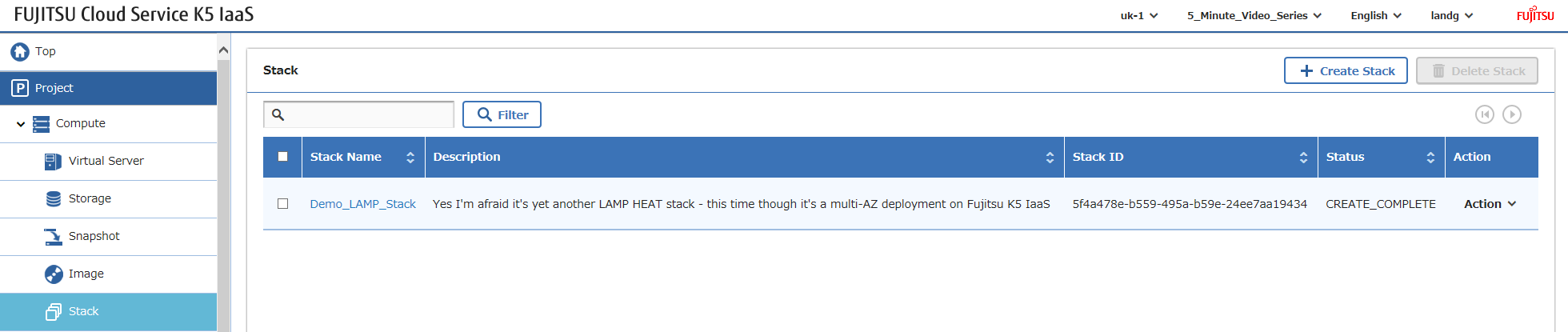
Ora tutto ciò che devi fare è accedere e configurare il tuo software – come menzionato in precedenza, sì, puoi automatizzare TUTTO quanto sopra, ma il mio focus qui è dimostrare i componenti dell'infrastruttura K5.
Happy Stacking!