
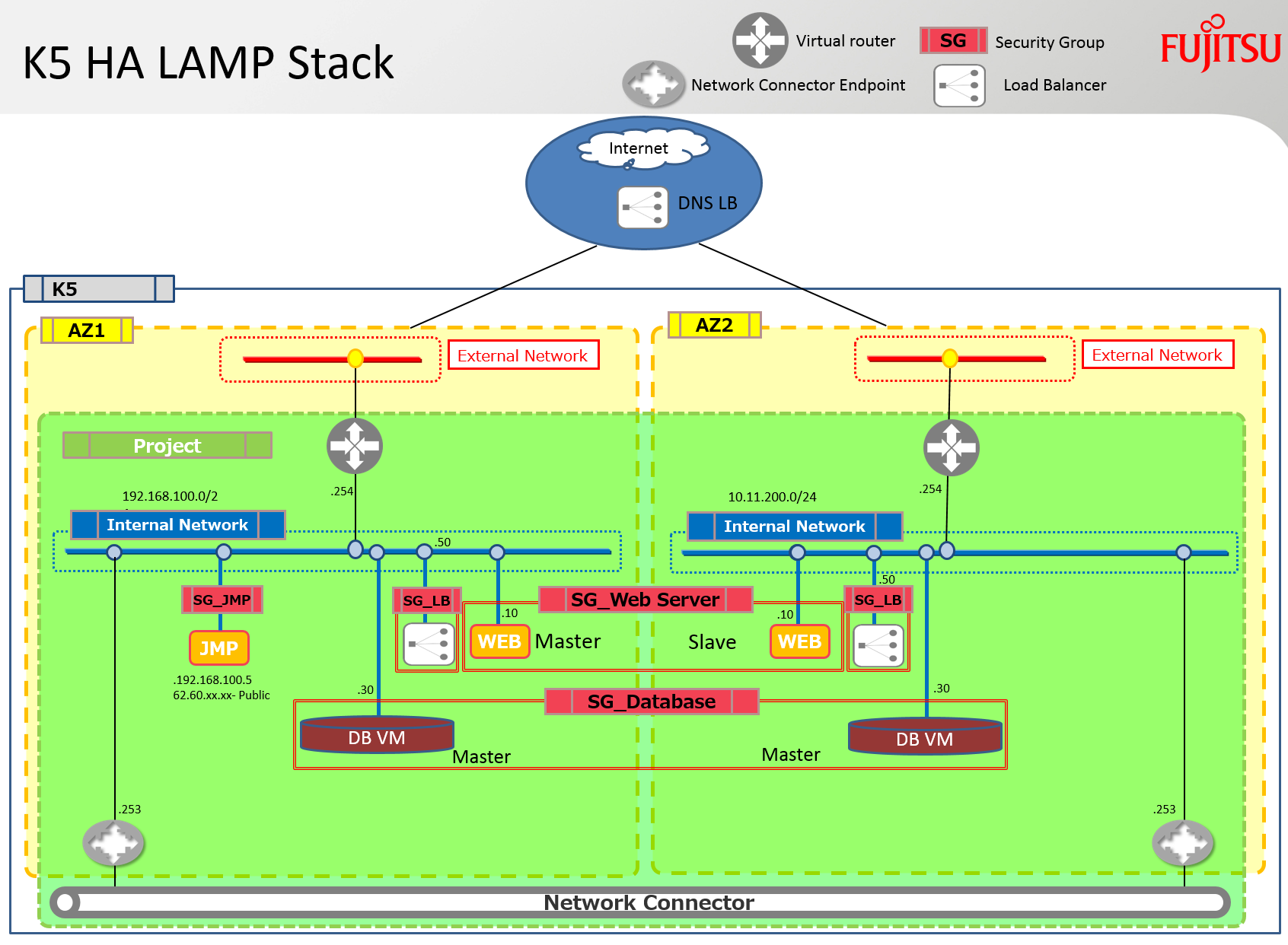
Oui, je crains qu’il ne s’agisse encore d’une pile HEAT LAMP. Cette pile comprend toutefois certaines des améliorations développées par Fujitsu pour Neutron et Heat. Elle déploie un serveur Apache et un serveur MySQL dans chacune des zones de disponibilité. Elle relie également ces deux zones de disponibilité (AZ) pour faciliter le trafic de réplication et de synchronisation entre ces serveurs en utilisant un connecteur réseau. Un équilibreur de charge est également déployé sur chaque sous-réseau et contient les deux serveurs Apache dans son pool.
Note : Malheureusement, je n’ai pas eu le temps de configurer et de déboguer les scripts Apache ou MySQL ; seul le logiciel est installé, mais il existe de nombreux articles sur ces sujets dans la blogosphère – cherchez simplement sur Yahoo pour quelques exemples… lol ! De plus, les équilibreurs de charge devraient eux-mêmes être « équilibrés » en utilisant un service DNS HA externe pour garantir l’absence de point de défaillance unique.
Le diagramme ci-dessous présente l’infrastructure qui sera construite à l’aide de la pile discutée dans ce blog.
Prérequis
Les prérequis suivants sont nécessaires pour un déploiement réussi de cette pile.
Routeurs virtuels : Un routeur virtuel connecté à Internet doit être créé dans chaque zone de disponibilité, et les paramètres associés à ces routeurs doivent être ajoutés à la pile.
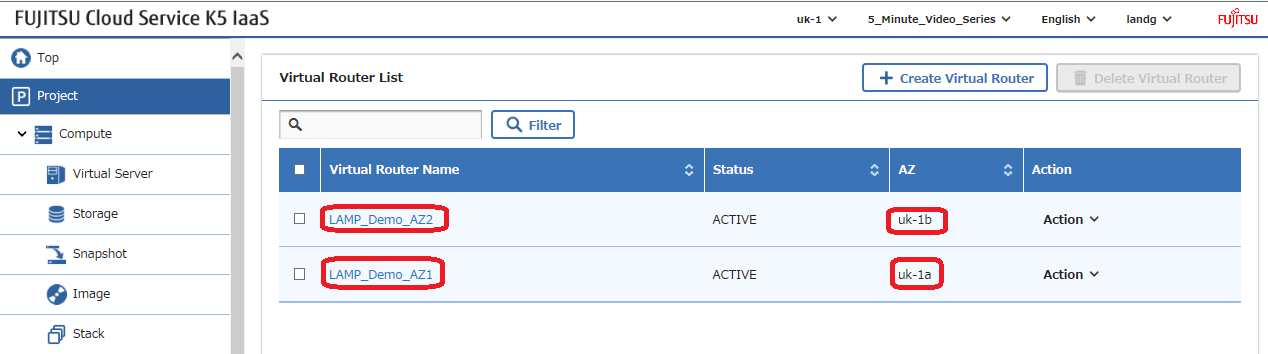
Obtenez l’identifiant de chaque routeur, qui doit être modifié dans l’exemple de pile, et notez le nom de leur réseau externe utilisé par chaque routeur –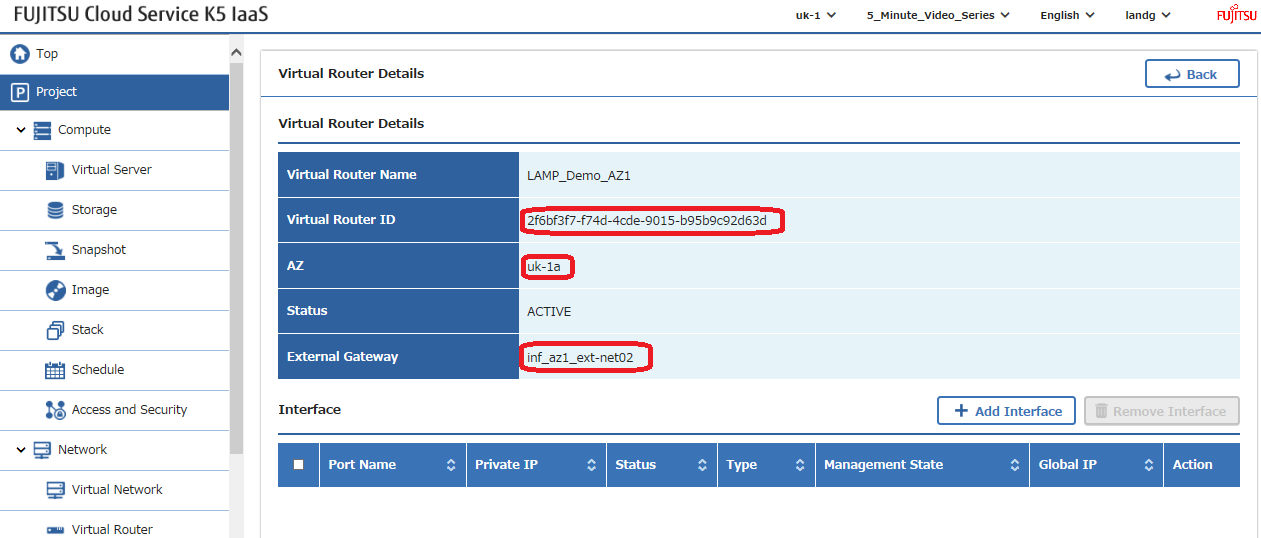
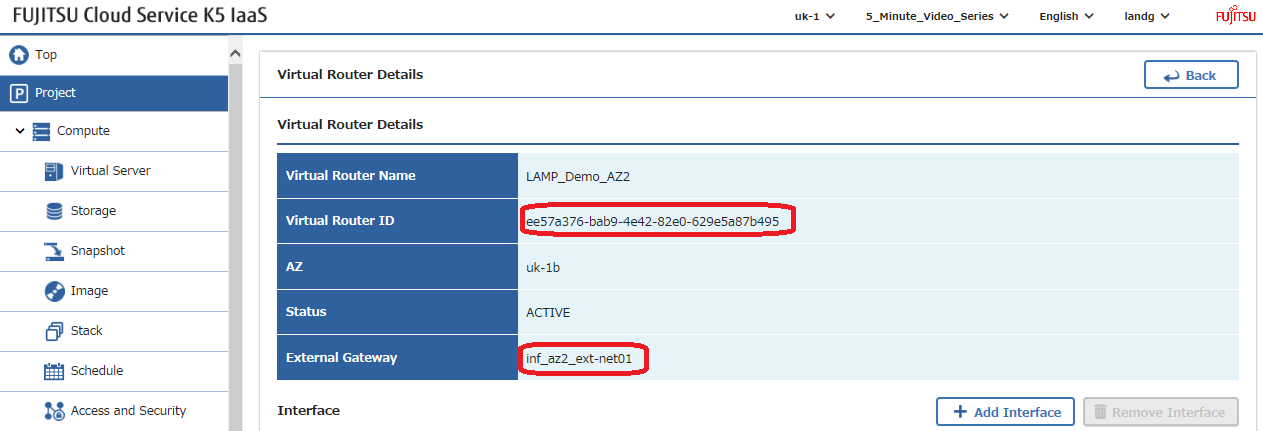
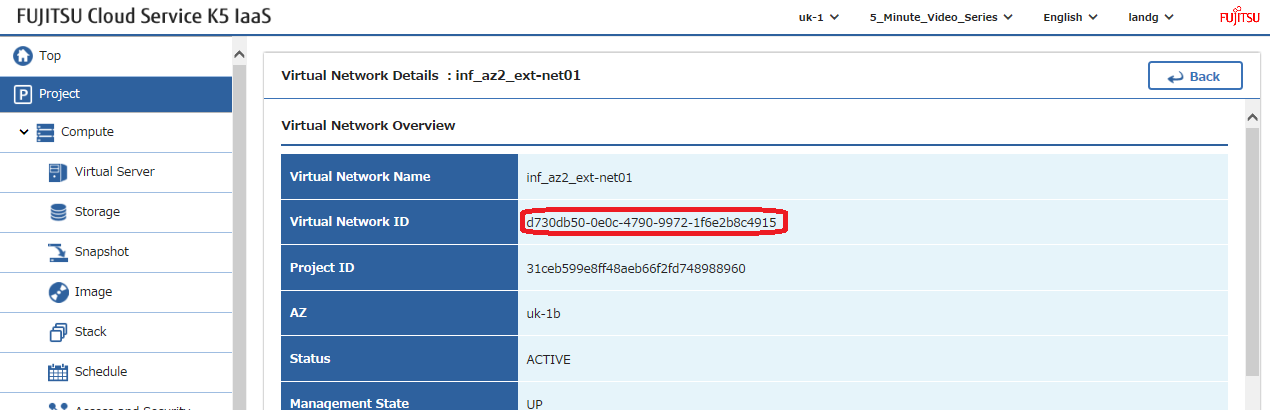
Réseaux externes : En utilisant les noms de réseau externe identifiés ci-dessus dans les paramètres de passerelle, localisez les identifiants de ces réseaux externes, également appelés réseaux publics, et modifiez ces valeurs dans l’exemple de pile –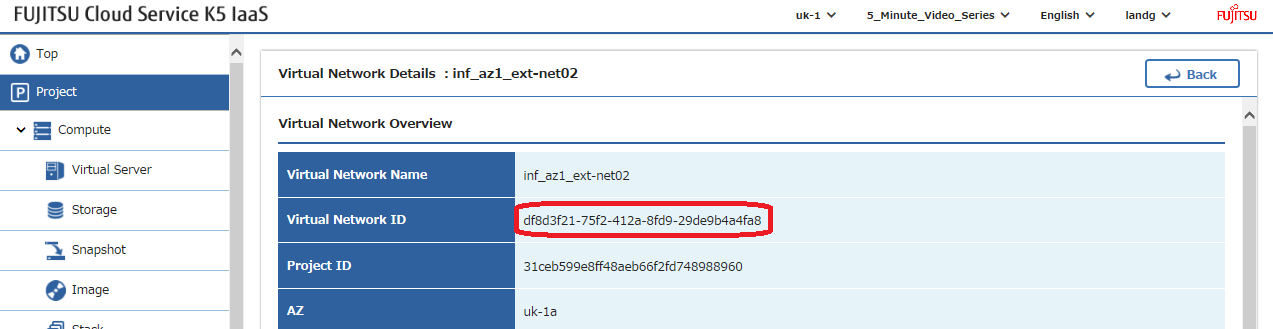
Claés SSH : Créez une paire de clés SSH dans chaque zone de disponibilité et modifiez leurs noms dans l’exemple de pile –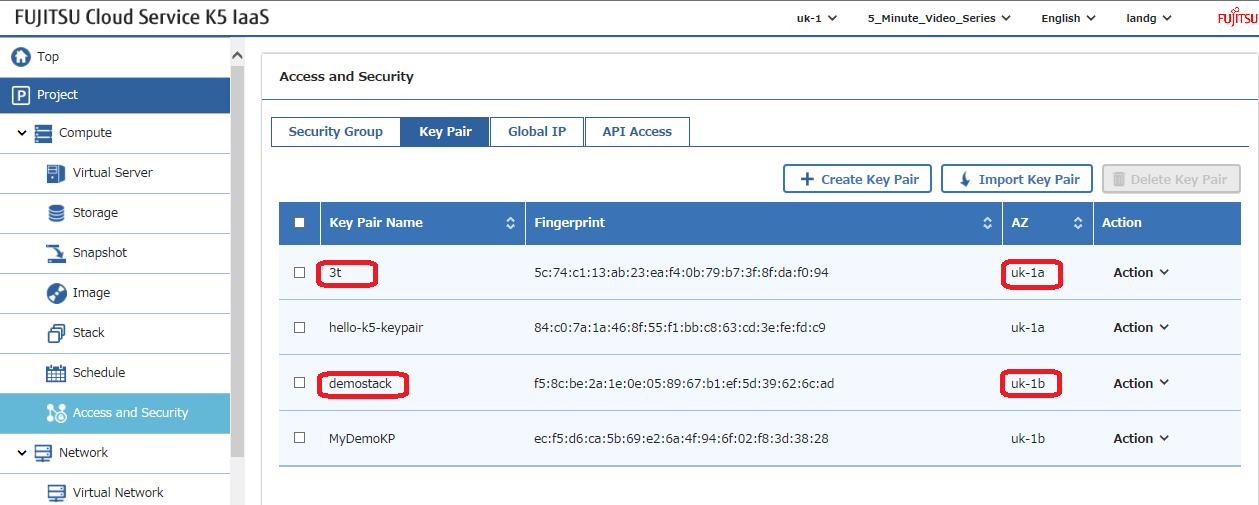
Image : Sélectionnez l’image que vous souhaitez utiliser et modifiez ce paramètre dans l’exemple de pile. Note : Les scripts de déploiement ‘UserData’ au sein de la pile ont été testés sur CentOS 7.2. Si vous décidez de déployer une version d’OS différente, il sera nécessaire de modifier ces scripts avec les commandes requises par l’OS choisi.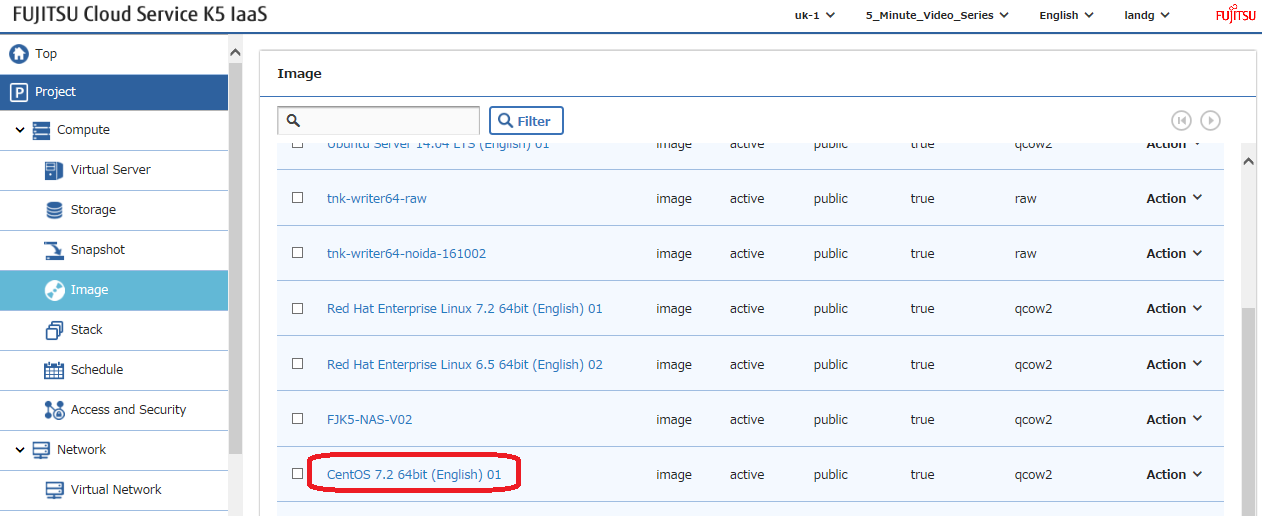
Déploiement
Une fois que tous ces paramètres ont été configurés, il est temps de lancer votre pile, mais laissez-moi d’abord discuter brièvement des sections principales –
Voici tous les paramètres d’entrée qui doivent être modifiés pour convenir à votre environnement –
Ce fichier contient du texte Unicode caché ou bidirectionnel qui peut être interprété ou compilé différemment de ce qui est affiché ci-dessous. Pour l’examiner, ouvrez le fichier dans un éditeur qui révèle les caractères Unicode cachés.
En savoir plus sur les caractères Unicode bidirectionnels
Afficher les caractères cachés
| # Input parameters | |
| parameters: | |
| centos_image: | |
| type: string | |
| label: Image name or ID | |
| description: Image to be used for compute instance | |
| default: "CentOS 7.2 64bit (English) 01" | |
| flavor_S2: | |
| type: string | |
| label: Flavor | |
| description: Type of instance (flavor) to be used | |
| default: "S-2" | |
| key_az_1: | |
| type: string | |
| label: Key name | |
| description: Name of key-pair to be used for compute instance | |
| default: "3t" | |
| key_az_2: | |
| type: string | |
| label: Key name | |
| description: Name of key-pair to be used for compute instance | |
| default: "demostack" | |
| public_net_az1: | |
| type: string | |
| label: external network ID | |
| description: Public network | |
| default: "df8d3f21-75f2-412a-8fd9-29de9b4a4fa8" | |
| public_net_az2: | |
| type: string | |
| label: external network ID | |
| description: Public network | |
| default: "d730db50-0e0c-4790-9972-1f6e2b8c4915" | |
| az1: | |
| type: string | |
| label: Availability Zone | |
| description: Region AZ to use | |
| default: "uk-1a" | |
| az2: | |
| type: string | |
| label: Availability Zone | |
| description: Region AZ to use | |
| default: "uk-1b" | |
| ext_router_az1: | |
| type: string | |
| label: External Router | |
| description: Router with external access for global ip allocation | |
| default: "2f6bf3f7-f74d-4cde-9015-b95b9c92d63d" | |
| ext_router_az2: | |
| type: string | |
| label: External Router | |
| description: Router with external access for global ip allocation | |
| default: "ee57a376-bab9-4e42-82e0-629e5a87b495" |
voir le code brut
ExampleLampStack-Parameters.yml
hébergé avec ❤ par GitHub
Ensuite, nous créons les deux réseaux privés, un dans chaque zone de disponibilité, et les connectons à leurs routeurs existants respectifs –
Ce fichier contient du texte Unicode caché ou bidirectionnel qui peut être interprété ou compilé différemment de ce qui est affiché ci-dessous. Pour l’examiner, ouvrez le fichier dans un éditeur qui révèle les caractères Unicode cachés.
En savoir plus sur les caractères Unicode bidirectionnels
Afficher les caractères cachés
| # Create a private network in availability zone 1 | |
| private_net_az1: | |
| type: OS::Neutron::Net | |
| properties: | |
| availability_zone: { get_param: az1 } | |
| name: "private_net_az1" | |
| # Create a new subnet on the private network | |
| private_subnet_az1: | |
| type: OS::Neutron::Subnet | |
| depends_on: private_net_az1 | |
| properties: | |
| availability_zone: { get_param: az1 } | |
| name: "private_subnet_az1" | |
| network_id: { get_resource: private_net_az1 } | |
| cidr: "192.168.100.0/24" | |
| gateway_ip: "192.168.100.254" | |
| allocation_pools: | |
| – start: "192.168.100.100" | |
| end: "192.168.100.150" | |
| dns_nameservers: ["62.60.39.9", "62.60.39.10"] | |
| host_routes: [{"nexthop": "192.168.100.253", "destination": "10.11.200.0/24"}] | |
| # Connect an interface on the web tier network's subnet to the router | |
| az1_router_interface: | |
| type: OS::Neutron::RouterInterface | |
| depends_on: [private_subnet_az1] | |
| properties: | |
| router_id: { get_param: ext_router_az1 } | |
| subnet_id: { get_resource: private_subnet_az1 } | |
| # Create a private network in availability zone 2 | |
| private_net_az2: | |
| type: OS::Neutron::Net | |
| properties: | |
| availability_zone: { get_param: az2 } | |
| name: "private_net_az2" | |
| # Create a new subnet on the private network | |
| private_subnet_az2: | |
| type: OS::Neutron::Subnet | |
| depends_on: private_net_az2 | |
| properties: | |
| availability_zone: { get_param: az2 } | |
| name: "private_subnet_az2" | |
| network_id: { get_resource: private_net_az2 } | |
| cidr: "10.11.200.0/24" | |
| gateway_ip: "10.11.200.254" | |
| allocation_pools: | |
| – start: "10.11.200.100" | |
| end: "10.11.200.150" | |
| dns_nameservers: ["62.60.42.9", "62.60.42.10"] | |
| host_routes: [{"nexthop": "10.11.200.253", "destination": "192.168.100.0/24"}] | |
| # Connect an interface on the web tier network's subnet to the router | |
| az2_router_interface: | |
| type: OS::Neutron::RouterInterface | |
| depends_on: [private_subnet_az2] | |
| properties: | |
| router_id: { get_param: ext_router_az2 } | |
| subnet_id: { get_resource: private_subnet_az2 } |
voir le code brut
K5LAMPNetworkSection.yml
hébergé avec ❤ par GitHub
Maintenant, nous définissons tous les groupes de sécurité et les règles que nous souhaitons utiliser dans la pile. Note : Les groupes de sécurité ont été laissés « grand ouverts » pour faciliter les tests. Veuillez vous assurer de les restreindre dans un scénario de production pour améliorer la sécurité –
Ce fichier contient du texte Unicode caché ou bidirectionnel qui peut être interprété ou compilé différemment de ce qui est affiché ci-dessous. Pour l’examiner, ouvrez le fichier dans un éditeur qui révèle les caractères Unicode cachés.
En savoir plus sur les caractères Unicode bidirectionnels
Afficher les caractères cachés
| # Create a security group | |
| server_security_group1: | |
| type: OS::Neutron::SecurityGroup | |
| properties: | |
| description: Add security group rules for server | |
| name: Apache | |
| rules: | |
| – remote_ip_prefix: 0.0.0.0/0 | |
| protocol: tcp | |
| port_range_min: 1 | |
| port_range_max: 65535 | |
| – remote_ip_prefix: 0.0.0.0/0 | |
| protocol: udp | |
| port_range_min: 1 | |
| port_range_max: 65535 | |
| – remote_ip_prefix: 0.0.0.0/0 | |
| protocol: icmp | |
| # Create a security group | |
| server_security_group2: | |
| type: OS::Neutron::SecurityGroup | |
| properties: | |
| description: Add security group rules for server | |
| name: MySQL | |
| rules: | |
| – remote_ip_prefix: 0.0.0.0/0 | |
| protocol: tcp | |
| port_range_min: 1 | |
| port_range_max: 65535 | |
| – remote_ip_prefix: 0.0.0.0/0 | |
| protocol: udp | |
| port_range_min: 1 | |
| port_range_max: 65535 | |
| – remote_ip_prefix: 0.0.0.0/0 | |
| protocol: icmp | |
| # Create a security group | |
| server_security_group3: | |
| type: OS::Neutron::SecurityGroup | |
| properties: | |
| description: Add security group rules for server | |
| name: LBaaS_AZ1 | |
| rules: | |
| – remote_ip_prefix: 0.0.0.0/0 | |
| protocol: tcp | |
| port_range_min: 1 | |
| port_range_max: 65535 | |
| – remote_ip_prefix: 0.0.0.0/0 | |
| protocol: udp | |
| port_range_min: 1 | |
| port_range_max: 65535 | |
| – remote_ip_prefix: 0.0.0.0/0 | |
| protocol: icmp | |
| # Create a security group | |
| server_security_group4: | |
| type: OS::Neutron::SecurityGroup | |
| properties: | |
| description: Add security group rules for server | |
| name: LBaaS_AZ2 | |
| rules: | |
| – remote_ip_prefix: 0.0.0.0/0 | |
| protocol: tcp | |
| port_range_min: 1 | |
| port_range_max: 65535 | |
| – remote_ip_prefix: 0.0.0.0/0 | |
| protocol: udp | |
| port_range_min: 1 | |
| port_range_max: 65535 | |
| – remote_ip_prefix: 0.0.0.0/0 | |
| protocol: icmp | |
| # Create a security group | |
| server_security_group5: | |
| type: OS::Neutron::SecurityGroup | |
| properties: | |
| description: Add security group rules for server | |
| name: JumpBox | |
| rules: | |
| – remote_ip_prefix: 0.0.0.0/0 | |
| protocol: tcp | |
| port_range_min: 1 | |
| port_range_max: 65535 | |
| – remote_ip_prefix: 0.0.0.0/0 | |
| protocol: udp | |
| port_range_min: 1 | |
| port_range_max: 65535 | |
| – remote_ip_prefix: 0.0.0.0/0 | |
| protocol: icmp |
voir le code brut
K5SecurityGroupSection.yml
hébergé avec ❤ par GitHub
Ensuite, nous définissons nos deux équilibreurs de charge et notons l’utilisation de l’instruction ‘depends_on’ ici pour s’assurer qu’ils ne sont pas construits avant que les deux serveurs Apache ne soient créés, car leurs détails sont un prérequis pour la création de l’équilibreur de charge –
Ce fichier contient du texte Unicode caché ou bidirectionnel qui peut être interprété ou compilé différemment de ce qui est affiché ci-dessous. Pour l’examiner, ouvrez le fichier dans un éditeur qui révèle les caractères Unicode cachés.
En savoir plus sur les caractères Unicode bidirectionnels
Afficher les caractères cachés
| # AZ 1 Load Balancer | |
| LAMP_Demo_AZ1_LBaaS: | |
| type: FCX::ExpandableLoadBalancer::LoadBalancer | |
| depends_on: [ server1,server2 ] | |
| properties: | |
| Subnets: [{get_resource: private_subnet_az1}] | |
| Instances: [{get_resource: server1},{get_resource: server2}] | |
| Listeners: | |
| – {LoadBalancerPort: '80', | |
| InstancePort: '80', | |
| Protocol: 'HTTP', | |
| InstanceProtocol: 'HTTP' } | |
| HealthCheck: {Target: 'HTTP:80/healthcheck', | |
| HealthyThreshold: '3', | |
| UnhealthyThreshold: '5', | |
| Interval: '30', | |
| Timeout: '5'} | |
| Version: 2014-09-30 | |
| Scheme: public | |
| LoadBalancerName: LBaaSAZ1 | |
| SecurityGroups: [ {get_resource: server_security_group3} ] | |
| # AZ 2 Load Balancer | |
| LAMP_Demo_AZ2_LBaaS: | |
| type: FCX::ExpandableLoadBalancer::LoadBalancer | |
| depends_on: [ server1,server2 ] | |
| properties: | |
| Subnets: [{get_resource: private_subnet_az2}] | |
| Instances: [{get_resource: server1},{get_resource: server2}] | |
| Listeners: | |
| – {LoadBalancerPort: '80', | |
| InstancePort: '80', | |
| Protocol: 'HTTP', | |
| InstanceProtocol: 'HTTP' } | |
| HealthCheck: {Target: 'HTTP:80/healthcheck', | |
| HealthyThreshold: '3', | |
| UnhealthyThreshold: '5', | |
| Interval: '30', | |
| Timeout: '5'} | |
| Version: 2014-09-30 | |
| Scheme: public | |
| LoadBalancerName: LBaaSAZ2 | |
| SecurityGroups: [ {get_resource: server_security_group4} ] |
voir le code brut
TwoLoadBalancersExample.yml
hébergé avec ❤ par GitHub
Maintenant, nous définissons tous nos serveurs, ce qui comprend une passerelle (jump box) à laquelle nous attribuerons une adresse IP globale (flottante), 2 serveurs avec des logiciels Web chargés et enfin deux serveurs avec MySQL chargé. Notez que j’ai délibérément défini des adresses IP statiques partout car cette procédure n’a pas été publiée à de nombreux endroits en ligne. C’est excessif et vous pourriez simplement utiliser le DHCP si vous le souhaitez. Les environnements de production ont tendance à apprécier la cohérence et la répétabilité pour une raison étrange 😉 Avez-vous déjà entendu parler des flux CI/CD.
Ce fichier contient du texte Unicode caché ou bidirectionnel qui peut être interprété ou compilé différemment de ce qui est affiché ci-dessous. Pour l’examiner, ouvrez le fichier dans un éditeur qui révèle les caractères Unicode cachés.
En savoir plus sur les caractères Unicode bidirectionnels
Afficher les caractères cachés
| ################### JumpBox – AZ 1 ############################################################################## | |
| # Create a new port for the server interface, assign an ip address and security group | |
| jump-server-port: | |
| type: OS::Neutron::Port | |
| depends_on: [ server_security_group5 ] | |
| properties: | |
| availability_zone: { get_param: az1 } | |
| network_id: { get_resource: private_net_az1 } | |
| security_groups: [{ get_resource: server_security_group5 }] | |
| fixed_ips: | |
| – subnet_id: { get_resource: private_subnet_az1 } | |
| ip_address: '192.168.100.5' | |
| # Allocate a floating/global ip address | |
| jump-server-floating-ip: | |
| type: OS::Neutron::FloatingIP | |
| properties: | |
| availability_zone: { get_param: az1 } | |
| floating_network_id: { get_param: public_net_az1 } | |
| # Assign a floating/global ip address to the fixed server ip address | |
| jump-server-floating-ip-association: | |
| type: OS::Neutron::FloatingIPAssociation | |
| depends_on: jump-server-floating-ip | |
| properties: | |
| floatingip_id: { get_resource: jump-server-floating-ip } | |
| port_id: { get_resource: jump-server-port } | |
| # Create a system volume for use with the server | |
| jump-sys-vol: | |
| type: OS::Cinder::Volume | |
| properties: | |
| availability_zone: { get_param: az1 } | |
| name: "LAMP-JumpBox-AZ1" | |
| size: 30 | |
| volume_type: "M1" | |
| image : { get_param: centos_image } | |
| # Build a server using the system volume defined above | |
| jump-server: | |
| type: OS::Nova::Server | |
| depends_on: [ jump-server-port ] | |
| properties: | |
| key_name: { get_param: key_az_1 } | |
| image: { get_param: centos_image } | |
| flavor: "S-1" | |
| admin_user: k5user | |
| block_device_mapping: [{"volume_size": "30", "volume_id": {get_resource: jump-sys-vol}, "delete_on_termination": True, "device_name": "/dev/vda"}] | |
| name: "LAMP-JumpBox-AZ1" | |
| networks: | |
| – port: { get_resource: jump-server-port } | |
| ########################################################################################################## | |
| ################### WebServers – AZ 1 ############################################################################## | |
| # Create a new port for the server interface, assign an ip address and security group | |
| server1_port: | |
| type: OS::Neutron::Port | |
| depends_on: [ server_security_group1 ] | |
| properties: | |
| availability_zone: { get_param: az1 } | |
| network_id: { get_resource: private_net_az1 } | |
| security_groups: [{ get_resource: server_security_group1 }] | |
| fixed_ips: | |
| – subnet_id: { get_resource: private_subnet_az1 } | |
| ip_address: '192.168.100.10' | |
| # Create a system volume for use with the server | |
| sys-vol1: | |
| type: OS::Cinder::Volume | |
| properties: | |
| availability_zone: { get_param: az1 } | |
| name: "web-az1-boot-vol" | |
| size: 30 | |
| volume_type: "M1" | |
| image : { get_param: centos_image } | |
| # Build a server using the system volume defined above | |
| server1: | |
| type: OS::Nova::Server | |
| depends_on: [ jump-server,server1_port,sys-vol1 ] | |
| properties: | |
| key_name: { get_param: key_az_1 } | |
| image: { get_param: centos_image } | |
| flavor: { get_param: flavor_S2 } | |
| admin_user: k5user | |
| block_device_mapping: [{"volume_size": "30", "volume_id": {get_resource: sys-vol1}, "delete_on_termination": True, "device_name": "/dev/vda"}] | |
| name: "Apache-AZ1" | |
| user_data_format: RAW | |
| user_data: | |
| str_replace: | |
| template: | |
| #!/bin/bash | |
| sudo yum update -y | |
| sudo yum install wget -y | |
| sudo yum install httpd -y | |
| sudo systemctl start httpd.service | |
| sudo systemctl enable httpd.service | |
| sudo wget http://repo.mysql.com/mysql-community-release-el7-5.noarch.rpm | |
| sudo rpm -ivh mysql-community-release-el7-5.noarch.rpm | |
| sudo yum update -y | |
| sudo yum install mysql -y | |
| sudo yum install php php-pear -y | |
| sudo yum install php-mysql -y | |
| sudo yum install lua lua-devel pkgconfig gcc asciidoc -y | |
| sudo wget http://dl.fedoraproject.org/pub/epel/7/x86_64/e/epel-release-7-8.noarch.rpm | |
| sudo rpm -iUvh epel-release-7-8.noarch.rpm | |
| sudo yum update -y | |
| sudo yum install lsyncd -y | |
| echo message | |
| params: | |
| message: "Installation Complete" | |
| networks: | |
| – port: { get_resource: server1_port } | |
| ########################################################################################################### | |
| ################### WebServers – AZ 2 ############################################################################## | |
| server2_port: | |
| type: OS::Neutron::Port | |
| depends_on: [ server_security_group1 ] | |
| properties: | |
| availability_zone: { get_param: az2 } | |
| network_id: { get_resource: private_net_az2 } | |
| security_groups: [{ get_resource: server_security_group1 }] | |
| fixed_ips: | |
| – subnet_id: { get_resource: private_subnet_az2 } | |
| ip_address: '10.11.200.10' | |
| # Create a system volume for use with the server | |
| sys-vol2: | |
| type: OS::Cinder::Volume | |
| properties: | |
| availability_zone: { get_param: az2 } | |
| name: "web-az2-boot-vol" | |
| size: 30 | |
| volume_type: "M1" | |
| image : { get_param: centos_image } | |
| # Build a server using the system volume defined above | |
| server2: | |
| type: OS::Nova::Server | |
| depends_on: [ jump-server,server2_port,sys-vol2 ] | |
| properties: | |
| key_name: { get_param: key_az_2 } | |
| image: { get_param: centos_image } | |
| flavor: { get_param: flavor_S2 } | |
| admin_user: k5user | |
| block_device_mapping: [{"volume_size": "30", "volume_id": {get_resource: sys-vol2}, "delete_on_termination": True, "device_name": "/dev/vda"}] | |
| name: "Apache-AZ2" | |
| user_data_format: RAW | |
| user_data: | |
| str_replace: | |
| template: | |
| #!/bin/bash | |
| sudo yum update -y | |
| sudo yum install wget -y | |
| sudo yum install httpd -y | |
| sudo systemctl start httpd.service | |
| sudo systemctl enable httpd.service | |
| sudo wget http://repo.mysql.com/mysql-community-release-el7-5.noarch.rpm | |
| sudo rpm -ivh mysql-community-release-el7-5.noarch.rpm | |
| sudo yum update -y | |
| sudo yum install mysql -y | |
| sudo yum install php php-pear -y | |
| sudo yum install php-mysql -y | |
| sudo yum install lua lua-devel pkgconfig gcc asciidoc -y | |
| sudo wget http://dl.fedoraproject.org/pub/epel/7/x86_64/e/epel-release-7-8.noarch.rpm | |
| sudo rpm -iUvh epel-release-7-8.noarch.rpm | |
| sudo yum update -y | |
| sudo yum install lsyncd -y | |
| echo message | |
| params: | |
| message: "Installation Complete" | |
| networks: | |
| – port: { get_resource: server2_port } | |
| ########################################################################################################### | |
| ################### DatabaseServers – AZ 1 ############################################################################## | |
| # Create a new port for the server interface, assign an ip address and security group | |
| server3_port: | |
| type: OS::Neutron::Port | |
| depends_on: [ server_security_group2 ] | |
| properties: | |
| availability_zone: { get_param: az1 } | |
| network_id: { get_resource: private_net_az1 } | |
| security_groups: [{ get_resource: server_security_group2 }] | |
| fixed_ips: | |
| – subnet_id: { get_resource: private_subnet_az1 } | |
| ip_address: '192.168.100.30' | |
| # Create a system volume for use with the server | |
| sys-vol3: | |
| type: OS::Cinder::Volume | |
| properties: | |
| availability_zone: { get_param: az1 } | |
| name: "db-az1-boot-vol" | |
| size: 30 | |
| volume_type: "M1" | |
| image : { get_param: centos_image } | |
| # Build a server using the system volume defined above | |
| server3: | |
| type: OS::Nova::Server | |
| depends_on: [ jump-server,server3_port,sys-vol3 ] | |
| properties: | |
| key_name: { get_param: key_az_1 } | |
| image: { get_param: centos_image } | |
| flavor: { get_param: flavor_S2 } | |
| admin_user: k5user | |
| block_device_mapping: [{"volume_size": "30", "volume_id": {get_resource: sys-vol3}, "delete_on_termination": True, "device_name": "/dev/vda"}] | |
| name: "Database-AZ1" | |
| user_data_format: RAW | |
| user_data: | |
| str_replace: | |
| template: | |
| #!/bin/bash | |
| sudo yum update -y | |
| sudo yum install wget -y | |
| sudo wget http://repo.mysql.com/mysql-community-release-el7-5.noarch.rpm | |
| sudo rpm -ivh mysql-community-release-el7-5.noarch.rpm | |
| sudo yum update -y | |
| sudo yum install mysql-server -y | |
| sudo systemctl start mysqld | |
| sudo systemctl enable mysqld | |
| echo message | |
| params: | |
| message: "Installation Complete" | |
| networks: | |
| – port: { get_resource: server3_port } | |
| ########################################################################################################### | |
| ################### DatabaseServers – AZ 2 ################################################################ | |
| # Create a new port for the server interface, assign an ip address and security group | |
| server4_port: | |
| type: OS::Neutron::Port | |
| depends_on: [ server_security_group2 ] | |
| properties: | |
| availability_zone: { get_param: az2 } | |
| network_id: { get_resource: private_net_az2 } | |
| security_groups: [{ get_resource: server_security_group2 }] | |
| fixed_ips: | |
| – subnet_id: { get_resource: private_subnet_az2 } | |
| ip_address: '10.11.200.30' | |
| # Create a system volume for use with the server | |
| sys-vol4: | |
| type: OS::Cinder::Volume | |
| properties: | |
| availability_zone: { get_param: az2 } | |
| name: "db-az2-boot-vol" | |
| size: 30 | |
| volume_type: "M1" | |
| image : { get_param: centos_image } | |
| # Build a server using the system volume defined above | |
| server4: | |
| type: OS::Nova::Server | |
| depends_on: [ jump-server,server4_port,sys-vol4 ] | |
| properties: | |
| key_name: { get_param: key_az_2 } | |
| image: { get_param: centos_image } | |
| flavor: { get_param: flavor_S2 } | |
| admin_user: k5user | |
| block_device_mapping: [{"volume_size": "30", "volume_id": {get_resource: sys-vol4}, "delete_on_termination": True, "device_name": "/dev/vda"}] | |
| name: "Database-AZ2" | |
| user_data_format: RAW | |
| user_data: | |
| str_replace: | |
| template: | |
| #!/bin/bash | |
| sudo yum update -y | |
| sudo yum install wget -y | |
| sudo wget http://repo.mysql.com/mysql-community-release-el7-5.noarch.rpm | |
| sudo rpm -ivh mysql-community-release-el7-5.noarch.rpm | |
| sudo yum update -y | |
| sudo yum install mysql-server -y | |
| sudo systemctl start mysqld | |
| sudo systemctl enable mysqld | |
| echo message | |
| params: | |
| message: "Installation Complete" | |
| networks: | |
| – port: { get_resource: server4_port } | |
| ########################################################################################################### |
voir le code brut
K5LAMPExampleServersSection.yml
hébergé avec ❤ par GitHub
Enfin, nous avons la section du connecteur réseau. Cela forme le lien de couche 3 entre les deux sous-réseaux dans les différentes zones de disponibilité. C’est le lien qui transportera tout le trafic de réplication et de synchronisation entre les serveurs. Logiquement, il aurait probablement été préférable de déplacer cela vers la section réseau de cet article, mais j’ose ne pas le changer maintenant de peur d’introduire une faute de frappe et je n’ai pas le temps de retester – ce qui est actuellement sur github fonctionne 🙂
Ce fichier contient du texte Unicode caché ou bidirectionnel qui peut être interprété ou compilé différemment de ce qui est affiché ci-dessous. Pour l’examiner, ouvrez le fichier dans un éditeur qui révèle les caractères Unicode cachés.
En savoir plus sur les caractères Unicode bidirectionnels
Afficher les caractères cachés
| ############################### AZ Interconnect ########################################################### | |
| az1_nc_port: | |
| type: OS::Neutron::Port | |
| depends_on: [ server_security_group2 ] | |
| properties: | |
| availability_zone: { get_param: az1 } | |
| network_id: { get_resource: private_net_az1 } | |
| security_groups: [{ get_resource: server_security_group2 }] | |
| fixed_ips: | |
| – subnet_id: { get_resource: private_subnet_az1 } | |
| ip_address: '192.168.100.253' | |
| az2_nc_port: | |
| type: OS::Neutron::Port | |
| depends_on: [ server_security_group2 ] | |
| properties: | |
| availability_zone: { get_param: az2 } | |
| network_id: { get_resource: private_net_az2 } | |
| security_groups: [{ get_resource: server_security_group2 }] | |
| fixed_ips: | |
| – subnet_id: { get_resource: private_subnet_az2 } | |
| ip_address: '10.11.200.253' | |
| az1_network_connector: | |
| type: FCX::Neutron::NetworkConnector | |
| depends_on: [ az1_nc_port,az2_nc_port ] | |
| properties: | |
| name: "LAMP-Demo-NC" | |
| az1_nc_endpoint: | |
| type: FCX::Neutron::NetworkConnectorEndpoint | |
| depends_on: [ az1_nc_port,az2_nc_port ] | |
| properties: | |
| endpoint_type: "availability_zone" | |
| name: "AZ1-NC-EP" | |
| network_connector_id: { get_resource: az1_network_connector } | |
| location: { get_param: az1 } | |
| az2_nc_endpoint: | |
| type: FCX::Neutron::NetworkConnectorEndpoint | |
| depends_on: [ az1_nc_port,az2_nc_port ] | |
| properties: | |
| endpoint_type: "availability_zone" | |
| name: "AZ2-NC-EP" | |
| network_connector_id: { get_resource: az1_network_connector } | |
| location: { get_param: az2 } | |
| az1_endpoint_connection: | |
| type: FCX::Neutron::NetworkConnectorEndpointConnection | |
| depends_on: [ az1_nc_port,az2_nc_port ] | |
| properties: | |
| port_id: { get_resource: az1_nc_port } | |
| network_connector_endpoint_id: { get_resource: az1_nc_endpoint } | |
| az2_endpoint_connection: | |
| type: FCX::Neutron::NetworkConnectorEndpointConnection | |
| depends_on: [ az1_nc_port,az2_nc_port ] | |
| properties: | |
| port_id: { get_resource: az2_nc_port } | |
| network_connector_endpoint_id: { get_resource: az2_nc_endpoint } |
voir le code brut
K5NetworkConnectorExample.yml
hébergé avec ❤ par GitHub
Si vous n’êtes pas déjà allé directement sur github, voici ce que vous voudrez télécharger et tester dans un seul gist facile –
Ce fichier contient du texte Unicode caché ou bidirectionnel qui peut être interprété ou compilé différemment de ce qui est affiché ci-dessous. Pour l’examiner, ouvrez le fichier dans un éditeur qui révèle les caractères Unicode cachés.
En savoir plus sur les caractères Unicode bidirectionnels
Afficher les caractères cachés
| heat_template_version: 2013-05-23 | |
| # Author: Graham Land | |
| # Date: 21/10/2016 | |
| # Purpose: Multi-Availability-Zone template to demonstrate the basic format/usage of HOT stacks on our Fujitsu K5 platform | |
| # It builds a webserver and database server in AZ1 and then the same infrastructure again in AZ2. | |
| # These two environmnets are then joined using a network connector to facilitate data replication between the applications. | |
| # Two public facing load balancers are also deployed – one in each AZ – and the webservers are added to each of these. | |
| # | |
| # The webservers have apache, php, mysql-client and lsyncd installed but NOT configured – didn't have time for this script sorry – loads of examples available online | |
| # The database servers have mysql installed but not configured – again lots of examples available online – can be easily setup in Master/Master mode | |
| # Once the web application is installed use Lsyncd to provide Master/Slave sync between the apache servers. | |
| # | |
| # I'm not a LAMP expert there are many different ways of implementing the above software components the goal of this stack is to illustrate | |
| # a highly available infrastructure solution – please adjust to taste e.g. GlusterFS instead of Lsync, Galera MySQL Cluster software etc… | |
| # Twitter: @allthingsclowd | |
| # Blog: https://allthingscloud.eu | |
| description: Yes I'm afraid it's yet another LAMP HEAT stack – this time though it's a multi-AZ deployment on Fujitsu K5 IaaS | |
| # Input parameters | |
| parameters: | |
| centos_image: | |
| type: string | |
| label: Image name or ID | |
| description: Image to be used for compute instance | |
| default: "CentOS 7.2 64bit (English) 01" | |
| flavor_S2: | |
| type: string | |
| label: Flavor | |
| description: Type of instance (flavor) to be used | |
| default: "S-2" | |
| key_az_1: | |
| type: string | |
| label: Key name | |
| description: Name of key-pair to be used for compute instance | |
| default: "3t" | |
| key_az_2: | |
| type: string | |
| label: Key name | |
| description: Name of key-pair to be used for compute instance | |
| default: "demostack" | |
| public_net_az1: | |
| type: string | |
| label: external network ID | |
| description: Public network | |
| default: "df8d3f21-75f2-412a-8fd9-29de9b4a4fa8" | |
| public_net_az2: | |
| type: string | |
| label: external network ID | |
| description: Public network | |
| default: "d730db50-0e0c-4790-9972-1f6e2b8c4915" | |
| az1: | |
| type: string | |
| label: Availability Zone | |
| description: Region AZ to use | |
| default: "uk-1a" | |
| az2: | |
| type: string | |
| label: Availability Zone | |
| description: Region AZ to use | |
| default: "uk-1b" | |
| ext_router_az1: | |
| type: string | |
| label: External Router | |
| description: Router with external access for global ip allocation | |
| default: "2f6bf3f7-f74d-4cde-9015-b95b9c92d63d" | |
| ext_router_az2: | |
| type: string | |
| label: External Router | |
| description: Router with external access for global ip allocation | |
| default: "ee57a376-bab9-4e42-82e0-629e5a87b495" | |
| # K5 Infrastructure resources to be built | |
| resources: | |
| # Create a private network in availability zone 1 | |
| private_net_az1: | |
| type: OS::Neutron::Net | |
| properties: | |
| availability_zone: { get_param: az1 } | |
| name: "private_net_az1" | |
| # Create a new subnet on the private network | |
| private_subnet_az1: | |
| type: OS::Neutron::Subnet | |
| depends_on: private_net_az1 | |
| properties: | |
| availability_zone: { get_param: az1 } | |
| name: "private_subnet_az1" | |
| network_id: { get_resource: private_net_az1 } | |
| cidr: "192.168.100.0/24" | |
| gateway_ip: "192.168.100.254" | |
| allocation_pools: | |
| – start: "192.168.100.100" | |
| end: "192.168.100.150" | |
| dns_nameservers: ["62.60.39.9", "62.60.39.10"] | |
| host_routes: [{"nexthop": "192.168.100.253", "destination": "10.11.200.0/24"}] | |
| # Connect an interface on the web tier network's subnet to the router | |
| az1_router_interface: | |
| type: OS::Neutron::RouterInterface | |
| depends_on: [private_subnet_az1] | |
| properties: | |
| router_id: { get_param: ext_router_az1 } | |
| subnet_id: { get_resource: private_subnet_az1 } | |
| # Create a private network in availability zone 2 | |
| private_net_az2: | |
| type: OS::Neutron::Net | |
| properties: | |
| availability_zone: { get_param: az2 } | |
| name: "private_net_az2" | |
| # Create a new subnet on the private network | |
| private_subnet_az2: | |
| type: OS::Neutron::Subnet | |
| depends_on: private_net_az2 | |
| properties: | |
| availability_zone: { get_param: az2 } | |
| name: "private_subnet_az2" | |
| network_id: { get_resource: private_net_az2 } | |
| cidr: "10.11.200.0/24" | |
| gateway_ip: "10.11.200.254" | |
| allocation_pools: | |
| – start: "10.11.200.100" | |
| end: "10.11.200.150" | |
| dns_nameservers: ["62.60.42.9", "62.60.42.10"] | |
| host_routes: [{"nexthop": "10.11.200.253", "destination": "192.168.100.0/24"}] | |
| # Connect an interface on the web tier network's subnet to the router | |
| az2_router_interface: | |
| type: OS::Neutron::RouterInterface | |
| depends_on: [private_subnet_az2] | |
| properties: | |
| router_id: { get_param: ext_router_az2 } | |
| subnet_id: { get_resource: private_subnet_az2 } | |
| # Create a security group | |
| server_security_group1: | |
| type: OS::Neutron::SecurityGroup | |
| properties: | |
| description: Add security group rules for server | |
| name: Apache | |
| rules: | |
| – remote_ip_prefix: 0.0.0.0/0 | |
| protocol: tcp | |
| port_range_min: 1 | |
| port_range_max: 65535 | |
| – remote_ip_prefix: 0.0.0.0/0 | |
| protocol: udp | |
| port_range_min: 1 | |
| port_range_max: 65535 | |
| – remote_ip_prefix: 0.0.0.0/0 | |
| protocol: icmp | |
| # Create a security group | |
| server_security_group2: | |
| type: OS::Neutron::SecurityGroup | |
| properties: | |
| description: Add security group rules for server | |
| name: MySQL | |
| rules: | |
| – remote_ip_prefix: 0.0.0.0/0 | |
| protocol: tcp | |
| port_range_min: 1 | |
| port_range_max: 65535 | |
| – remote_ip_prefix: 0.0.0.0/0 | |
| protocol: udp | |
| port_range_min: 1 | |
| port_range_max: 65535 | |
| – remote_ip_prefix: 0.0.0.0/0 | |
| protocol: icmp | |
| # Create a security group | |
| server_security_group3: | |
| type: OS::Neutron::SecurityGroup | |
| properties: | |
| description: Add security group rules for server | |
| name: LBaaS_AZ1 | |
| rules: | |
| – remote_ip_prefix: 0.0.0.0/0 | |
| protocol: tcp | |
| port_range_min: 1 | |
| port_range_max: 65535 | |
| – remote_ip_prefix: 0.0.0.0/0 | |
| protocol: udp | |
| port_range_min: 1 | |
| port_range_max: 65535 | |
| – remote_ip_prefix: 0.0.0.0/0 | |
| protocol: icmp | |
| # Create a security group | |
| server_security_group4: | |
| type: OS::Neutron::SecurityGroup | |
| properties: | |
| description: Add security group rules for server | |
| name: LBaaS_AZ2 | |
| rules: | |
| – remote_ip_prefix: 0.0.0.0/0 | |
| protocol: tcp | |
| port_range_min: 1 | |
| port_range_max: 65535 | |
| – remote_ip_prefix: 0.0.0.0/0 | |
| protocol: udp | |
| port_range_min: 1 | |
| port_range_max: 65535 | |
| – remote_ip_prefix: 0.0.0.0/0 | |
| protocol: icmp | |
| # Create a security group | |
| server_security_group5: | |
| type: OS::Neutron::SecurityGroup | |
| properties: | |
| description: Add security group rules for server | |
| name: JumpBox | |
| rules: | |
| – remote_ip_prefix: 0.0.0.0/0 | |
| protocol: tcp | |
| port_range_min: 1 | |
| port_range_max: 65535 | |
| – remote_ip_prefix: 0.0.0.0/0 | |
| protocol: udp | |
| port_range_min: 1 | |
| port_range_max: 65535 | |
| – remote_ip_prefix: 0.0.0.0/0 | |
| protocol: icmp | |
| # AZ 1 Load Balancer | |
| LAMP_Demo_AZ1_LBaaS: | |
| type: FCX::ExpandableLoadBalancer::LoadBalancer | |
| depends_on: [ server1,server2 ] | |
| properties: | |
| Subnets: [{get_resource: private_subnet_az1}] | |
| Instances: [{get_resource: server1},{get_resource: server2}] | |
| Listeners: | |
| – {LoadBalancerPort: '80', | |
| InstancePort: '80', | |
| Protocol: 'HTTP', | |
| InstanceProtocol: 'HTTP' } | |
| HealthCheck: {Target: 'HTTP:80/healthcheck', | |
| HealthyThreshold: '3', | |
| UnhealthyThreshold: '5', | |
| Interval: '30', | |
| Timeout: '5'} | |
| Version: 2014-09-30 | |
| Scheme: public | |
| LoadBalancerName: LBaaSAZ1 | |
| SecurityGroups: [ {get_resource: server_security_group3} ] | |
| # AZ 2 Load Balancer | |
| LAMP_Demo_AZ2_LBaaS: | |
| type: FCX::ExpandableLoadBalancer::LoadBalancer | |
| depends_on: [ server1,server2 ] | |
| properties: | |
| Subnets: [{get_resource: private_subnet_az2}] | |
| Instances: [{get_resource: server1},{get_resource: server2}] | |
| Listeners: | |
| – {LoadBalancerPort: '80', | |
| InstancePort: '80', | |
| Protocol: 'HTTP', | |
| InstanceProtocol: 'HTTP' } | |
| HealthCheck: {Target: 'HTTP:80/healthcheck', | |
| HealthyThreshold: '3', | |
| UnhealthyThreshold: '5', | |
| Interval: '30', | |
| Timeout: '5'} | |
| Version: 2014-09-30 | |
| Scheme: public | |
| LoadBalancerName: LBaaSAZ2 | |
| SecurityGroups: [ {get_resource: server_security_group4} ] | |
| ################### JumpBox – AZ 1 ############################################################################## | |
| # Create a new port for the server interface, assign an ip address and security group | |
| jump-server-port: | |
| type: OS::Neutron::Port | |
| depends_on: [ server_security_group5 ] | |
| properties: | |
| availability_zone: { get_param: az1 } | |
| network_id: { get_resource: private_net_az1 } | |
| security_groups: [{ get_resource: server_security_group5 }] | |
| fixed_ips: | |
| – subnet_id: { get_resource: private_subnet_az1 } | |
| ip_address: '192.168.100.5' | |
| # Allocate a floating/global ip address | |
| jump-server-floating-ip: | |
| type: OS::Neutron::FloatingIP | |
| properties: | |
| availability_zone: { get_param: az1 } | |
| floating_network_id: { get_param: public_net_az1 } | |
| # Assign a floating/global ip address to the fixed server ip address | |
| jump-server-floating-ip-association: | |
| type: OS::Neutron::FloatingIPAssociation | |
| depends_on: jump-server-floating-ip | |
| properties: | |
| floatingip_id: { get_resource: jump-server-floating-ip } | |
| port_id: { get_resource: jump-server-port } | |
| # Create a system volume for use with the server | |
| jump-sys-vol: | |
| type: OS::Cinder::Volume | |
| properties: | |
| availability_zone: { get_param: az1 } | |
| name: "LAMP-JumpBox-AZ1" | |
| size: 30 | |
| volume_type: "M1" | |
| image : { get_param: centos_image } | |
| # Build a server using the system volume defined above | |
| jump-server: | |
| type: OS::Nova::Server | |
| depends_on: [ jump-server-port ] | |
| properties: | |
| key_name: { get_param: key_az_1 } | |
| image: { get_param: centos_image } | |
| flavor: "S-1" | |
| admin_user: k5user | |
| block_device_mapping: [{"volume_size": "30", "volume_id": {get_resource: jump-sys-vol}, "delete_on_termination": True, "device_name": "/dev/vda"}] | |
| name: "LAMP-JumpBox-AZ1" | |
| networks: | |
| – port: { get_resource: jump-server-port } | |
| ########################################################################################################## | |
| ################### WebServers – AZ 1 ############################################################################## | |
| # Create a new port for the server interface, assign an ip address and security group | |
| server1_port: | |
| type: OS::Neutron::Port | |
| depends_on: [ server_security_group1 ] | |
| properties: | |
| availability_zone: { get_param: az1 } | |
| network_id: { get_resource: private_net_az1 } | |
| security_groups: [{ get_resource: server_security_group1 }] | |
| fixed_ips: | |
| – subnet_id: { get_resource: private_subnet_az1 } | |
| ip_address: '192.168.100.10' | |
| # Create a system volume for use with the server | |
| sys-vol1: | |
| type: OS::Cinder::Volume | |
| properties: | |
| availability_zone: { get_param: az1 } | |
| name: "web-az1-boot-vol" | |
| size: 30 | |
| volume_type: "M1" | |
| image : { get_param: centos_image } | |
| # Build a server using the system volume defined above | |
| server1: | |
| type: OS::Nova::Server | |
| depends_on: [ jump-server,server1_port,sys-vol1 ] | |
| properties: | |
| key_name: { get_param: key_az_1 } | |
| image: { get_param: centos_image } | |
| flavor: { get_param: flavor_S2 } | |
| admin_user: k5user | |
| block_device_mapping: [{"volume_size": "30", "volume_id": {get_resource: sys-vol1}, "delete_on_termination": True, "device_name": "/dev/vda"}] | |
| name: "Apache-AZ1" | |
| user_data_format: RAW | |
| user_data: | |
| str_replace: | |
| template: | |
| #!/bin/bash | |
| sudo yum update -y | |
| sudo yum install wget -y | |
| sudo yum install httpd -y | |
| sudo systemctl start httpd.service | |
| sudo systemctl enable httpd.service | |
| sudo wget http://repo.mysql.com/mysql-community-release-el7-5.noarch.rpm | |
| sudo rpm -ivh mysql-community-release-el7-5.noarch.rpm | |
| sudo yum update -y | |
| sudo yum install mysql -y | |
| sudo yum install php php-pear -y | |
| sudo yum install php-mysql -y | |
| sudo yum install lua lua-devel pkgconfig gcc asciidoc -y | |
| sudo wget http://dl.fedoraproject.org/pub/epel/7/x86_64/e/epel-release-7-8.noarch.rpm | |
| sudo rpm -iUvh epel-release-7-8.noarch.rpm | |
| sudo yum update -y | |
| sudo yum install lsyncd -y | |
| echo message | |
| params: | |
| message: "Installation Complete" | |
| networks: | |
| – port: { get_resource: server1_port } | |
| ########################################################################################################### | |
| ################### WebServers – AZ 2 ############################################################################## | |
| server2_port: | |
| type: OS::Neutron::Port | |
| depends_on: [ server_security_group1 ] | |
| properties: | |
| availability_zone: { get_param: az2 } | |
| network_id: { get_resource: private_net_az2 } | |
| security_groups: [{ get_resource: server_security_group1 }] | |
| fixed_ips: | |
| – subnet_id: { get_resource: private_subnet_az2 } | |
| ip_address: '10.11.200.10' | |
| # Create a system volume for use with the server | |
| sys-vol2: | |
| type: OS::Cinder::Volume | |
| properties: | |
| availability_zone: { get_param: az2 } | |
| name: "web-az2-boot-vol" | |
| size: 30 | |
| volume_type: "M1" | |
| image : { get_param: centos_image } | |
| # Build a server using the system volume defined above | |
| server2: | |
| type: OS::Nova::Server | |
| depends_on: [ jump-server,server2_port,sys-vol2 ] | |
| properties: | |
| key_name: { get_param: key_az_2 } | |
| image: { get_param: centos_image } | |
| flavor: { get_param: flavor_S2 } | |
| admin_user: k5user | |
| block_device_mapping: [{"volume_size": "30", "volume_id": {get_resource: sys-vol2}, "delete_on_termination": True, "device_name": "/dev/vda"}] | |
| name: "Apache-AZ2" | |
| user_data_format: RAW | |
| user_data: | |
| str_replace: | |
| template: | |
| #!/bin/bash | |
| sudo yum update -y | |
| sudo yum install wget -y | |
| sudo yum install httpd -y | |
| sudo systemctl start httpd.service | |
| sudo systemctl enable httpd.service | |
| sudo wget http://repo.mysql.com/mysql-community-release-el7-5.noarch.rpm | |
| sudo rpm -ivh mysql-community-release-el7-5.noarch.rpm | |
| sudo yum update -y | |
| sudo yum install mysql -y | |
| sudo yum install php php-pear -y | |
| sudo yum install php-mysql -y | |
| sudo yum install lua lua-devel pkgconfig gcc asciidoc -y | |
| sudo wget http://dl.fedoraproject.org/pub/epel/7/x86_64/e/epel-release-7-8.noarch.rpm | |
| sudo rpm -iUvh epel-release-7-8.noarch.rpm | |
| sudo yum update -y | |
| sudo yum install lsyncd -y | |
| echo message | |
| params: | |
| message: "Installation Complete" | |
| networks: | |
| – port: { get_resource: server2_port } | |
| ########################################################################################################### | |
| ################### DatabaseServers – AZ 1 ############################################################################## | |
| # Create a new port for the server interface, assign an ip address and security group | |
| server3_port: | |
| type: OS::Neutron::Port | |
| depends_on: [ server_security_group2 ] | |
| properties: | |
| availability_zone: { get_param: az1 } | |
| network_id: { get_resource: private_net_az1 } | |
| security_groups: [{ get_resource: server_security_group2 }] | |
| fixed_ips: | |
| – subnet_id: { get_resource: private_subnet_az1 } | |
| ip_address: '192.168.100.30' | |
| # Create a system volume for use with the server | |
| sys-vol3: | |
| type: OS::Cinder::Volume | |
| properties: | |
| availability_zone: { get_param: az1 } | |
| name: "db-az1-boot-vol" | |
| size: 30 | |
| volume_type: "M1" | |
| image : { get_param: centos_image } | |
| # Build a server using the system volume defined above | |
| server3: | |
| type: OS::Nova::Server | |
| depends_on: [ jump-server,server3_port,sys-vol3 ] | |
| properties: | |
| key_name: { get_param: key_az_1 } | |
| image: { get_param: centos_image } | |
| flavor: { get_param: flavor_S2 } | |
| admin_user: k5user | |
| block_device_mapping: [{"volume_size": "30", "volume_id": {get_resource: sys-vol3}, "delete_on_termination": True, "device_name": "/dev/vda"}] | |
| name: "Database-AZ1" | |
| user_data_format: RAW | |
| user_data: | |
| str_replace: | |
| template: | |
| #!/bin/bash | |
| sudo yum update -y | |
| sudo yum install wget -y | |
| sudo wget http://repo.mysql.com/mysql-community-release-el7-5.noarch.rpm | |
| sudo rpm -ivh mysql-community-release-el7-5.noarch.rpm | |
| sudo yum update -y | |
| sudo yum install mysql-server -y | |
| sudo systemctl start mysqld | |
| sudo systemctl enable mysqld | |
| echo message | |
| params: | |
| message: "Installation Complete" | |
| networks: | |
| – port: { get_resource: server3_port } | |
| ########################################################################################################### | |
| ################### DatabaseServers – AZ 2 ################################################################ | |
| # Create a new port for the server interface, assign an ip address and security group | |
| server4_port: | |
| type: OS::Neutron::Port | |
| depends_on: [ server_security_group2 ] | |
| properties: | |
| availability_zone: { get_param: az2 } | |
| network_id: { get_resource: private_net_az2 } | |
| security_groups: [{ get_resource: server_security_group2 }] | |
| fixed_ips: | |
| – subnet_id: { get_resource: private_subnet_az2 } | |
| ip_address: '10.11.200.30' | |
| # Create a system volume for use with the server | |
| sys-vol4: | |
| type: OS::Cinder::Volume | |
| properties: | |
| availability_zone: { get_param: az2 } | |
| name: "db-az2-boot-vol" | |
| size: 30 | |
| volume_type: "M1" | |
| image : { get_param: centos_image } | |
| # Build a server using the system volume defined above | |
| server4: | |
| type: OS::Nova::Server | |
| depends_on: [ jump-server,server4_port,sys-vol4 ] | |
| properties: | |
| key_name: { get_param: key_az_2 } | |
| image: { get_param: centos_image } | |
| flavor: { get_param: flavor_S2 } | |
| admin_user: k5user | |
| block_device_mapping: [{"volume_size": "30", "volume_id": {get_resource: sys-vol4}, "delete_on_termination": True, "device_name": "/dev/vda"}] | |
| name: "Database-AZ2" | |
| user_data_format: RAW | |
| user_data: | |
| str_replace: | |
| template: | |
| #!/bin/bash | |
| sudo yum update -y | |
| sudo yum install wget -y | |
| sudo wget http://repo.mysql.com/mysql-community-release-el7-5.noarch.rpm | |
| sudo rpm -ivh mysql-community-release-el7-5.noarch.rpm | |
| sudo yum update -y | |
| sudo yum install mysql-server -y | |
| sudo systemctl start mysqld | |
| sudo systemctl enable mysqld | |
| echo message | |
| params: | |
| message: "Installation Complete" | |
| networks: | |
| – port: { get_resource: server4_port } | |
| ########################################################################################################### | |
| ############################### AZ Interconnect ########################################################### | |
| az1_nc_port: | |
| type: OS::Neutron::Port | |
| depends_on: [ server_security_group2 ] | |
| properties: | |
| availability_zone: { get_param: az1 } | |
| network_id: { get_resource: private_net_az1 } | |
| security_groups: [{ get_resource: server_security_group2 }] | |
| fixed_ips: | |
| – subnet_id: { get_resource: private_subnet_az1 } | |
| ip_address: '192.168.100.253' | |
| az2_nc_port: | |
| type: OS::Neutron::Port | |
| depends_on: [ server_security_group2 ] | |
| properties: | |
| availability_zone: { get_param: az2 } | |
| network_id: { get_resource: private_net_az2 } | |
| security_groups: [{ get_resource: server_security_group2 }] | |
| fixed_ips: | |
| – subnet_id: { get_resource: private_subnet_az2 } | |
| ip_address: '10.11.200.253' | |
| az1_network_connector: | |
| type: FCX::Neutron::NetworkConnector | |
| depends_on: [ az1_nc_port,az2_nc_port ] | |
| properties: | |
| name: "LAMP-Demo-NC" | |
| az1_nc_endpoint: | |
| type: FCX::Neutron::NetworkConnectorEndpoint | |
| depends_on: [ az1_nc_port,az2_nc_port ] | |
| properties: | |
| endpoint_type: "availability_zone" | |
| name: "AZ1-NC-EP" | |
| network_connector_id: { get_resource: az1_network_connector } | |
| location: { get_param: az1 } | |
| az2_nc_endpoint: | |
| type: FCX::Neutron::NetworkConnectorEndpoint | |
| depends_on: [ az1_nc_port,az2_nc_port ] | |
| properties: | |
| endpoint_type: "availability_zone" | |
| name: "AZ2-NC-EP" | |
| network_connector_id: { get_resource: az1_network_connector } | |
| location: { get_param: az2 } | |
| az1_endpoint_connection: | |
| type: FCX::Neutron::NetworkConnectorEndpointConnection | |
| depends_on: [ az1_nc_port,az2_nc_port ] | |
| properties: | |
| port_id: { get_resource: az1_nc_port } | |
| network_connector_endpoint_id: { get_resource: az1_nc_endpoint } | |
| az2_endpoint_connection: | |
| type: FCX::Neutron::NetworkConnectorEndpointConnection | |
| depends_on: [ az1_nc_port,az2_nc_port ] | |
| properties: | |
| port_id: { get_resource: az2_nc_port } | |
| network_connector_endpoint_id: { get_resource: az2_nc_endpoint } |
voir le code brut
FujitsuK5HA_LAMP_Stack.yml
hébergé avec ❤ par GitHub
Enregistrez le fichier ci-dessus sur votre disque local et une fois que vous aurez modifié les paramètres décrits plus haut, lancez la pile depuis l’interface graphique K5 en sélectionnant l’option de fichier. Après plusieurs minutes, vous devriez obtenir quelque chose comme ceci –
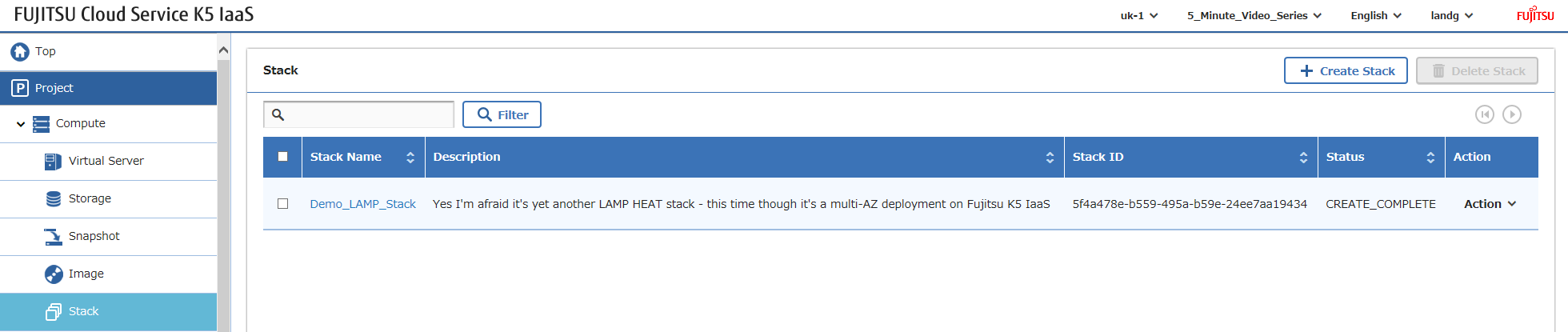
Maintenant, tout ce que vous avez à faire est de vous connecter et de configurer votre logiciel – comme mentionné plus tôt, oui, vous pouvez automatiser TOUT ce qui précède, mais mon objectif ici est de démontrer les composants d’infrastructure K5.
Bonne création de piles !