

A menudo, en nuestras llamadas de cirugía en la nube, recibiré solicitudes sobre cómo proceder con la configuración de Redes Privadas Virtuales (IPSec VPNs) entre las diversas nubes públicas y los sitios de los clientes.
El propósito de este blog es demostrar el proceso de establecimiento de un túnel seguro utilizando la función VPNaaS disponible en el Servicio de Nube K5 de Fujitsu.
Requisitos previos
La clave más importante para el éxito aquí es la preparación: la mayoría de los problemas se encuentran cuando la configuración VPN del cliente y las configuraciones VPN de K5 no están programadas con los mismos requisitos previos. Con el fin de intentar simplificar este proceso para usted, en CNETS hemos preparado una plantilla VPNaaS simple que se puede descargar haciendo clic en la imagen a continuación y compartir con el cliente. Por favor, asegúrese de que este documento sea comprendido, acordado y completado antes de intentar construir su servicio: suena sensato, espero, se sorprendería de la frecuencia con la que la gente salta este paso.
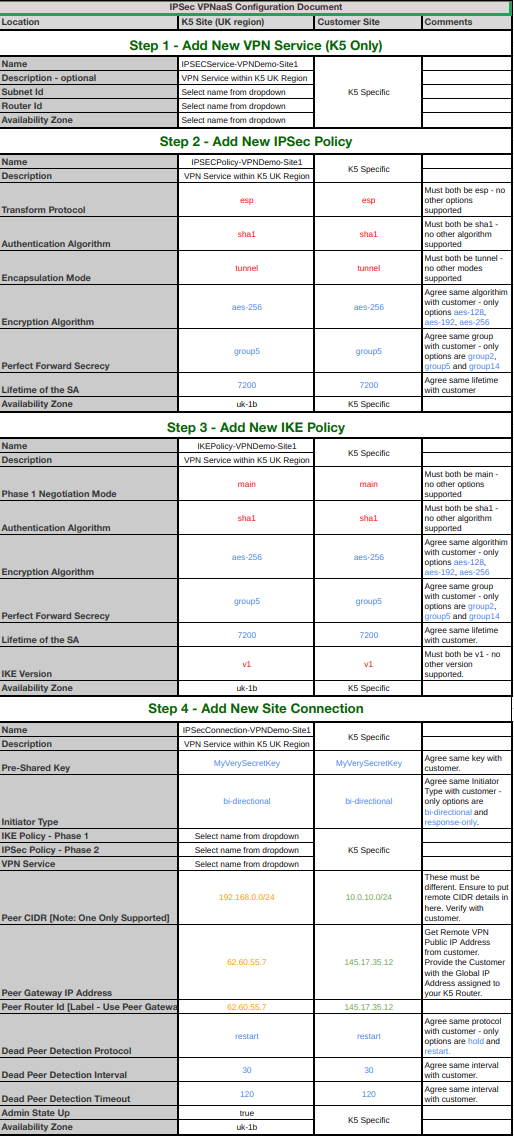
Otro requisito previo en su entorno de nube es que ya ha creado la red virtual, la subred, el enrutador y ha añadido una IP Global (dirección IP pública) al enrutador virtual.
Una vez que haya completado estos requisitos previos, es hora de comenzar a construir su VPN.
Herramienta OpenStack IPSec VPNaaS
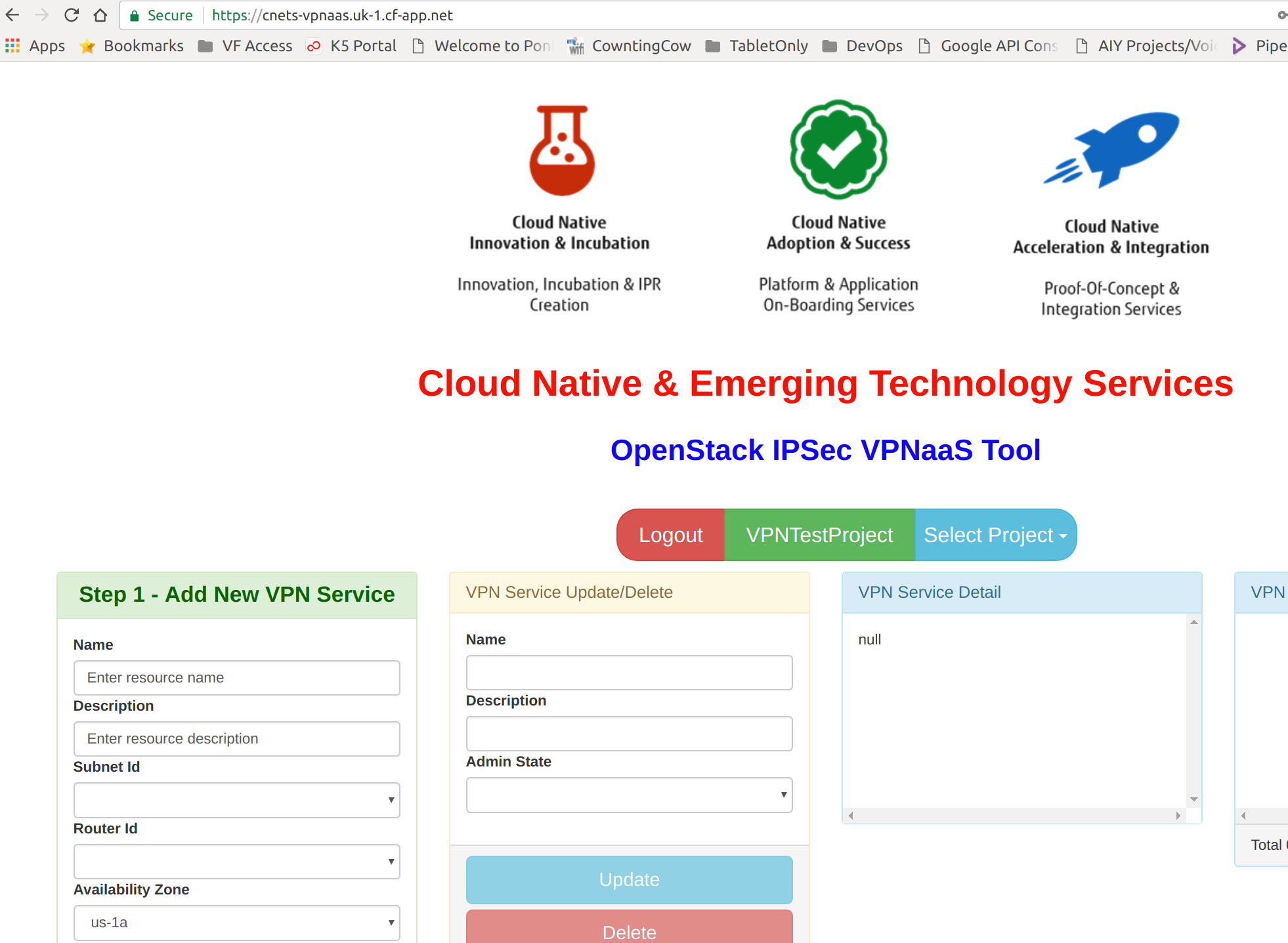
Nuevamente CNETS viene al rescate, a menos que disfrute construyendo manualmente todas las llamadas API necesarias, hemos construido una Interfaz de Usuario basada en Angular para simplificar todas las llamadas API necesarias para construir y configurar su VPNaaS. La herramienta se encuentra aquí – https://cnets-vpnaas.uk-1.cf-app.net/ y necesita una cuenta de contrato administrativo válida de Fujitsu Cloud Service K5 para iniciar sesión.
También he creado el siguiente diagrama para ilustrar lo que se configurará en un video que se publicará pronto... tan pronto como pueda hacer que mi software de grabación OBS vuelva a funcionar correctamente. Voy a unir dos subredes a través de dos regiones K5: una subred está ubicada en nuestra región de EE. UU. y la otra subred está en nuestra región del Reino Unido. El mismo proceso exacto se utiliza si se configura VPNaaS de K5 al conectarse a ofertas de VPNaaS en otras nubes públicas/privadas o appliances VPN del cliente.
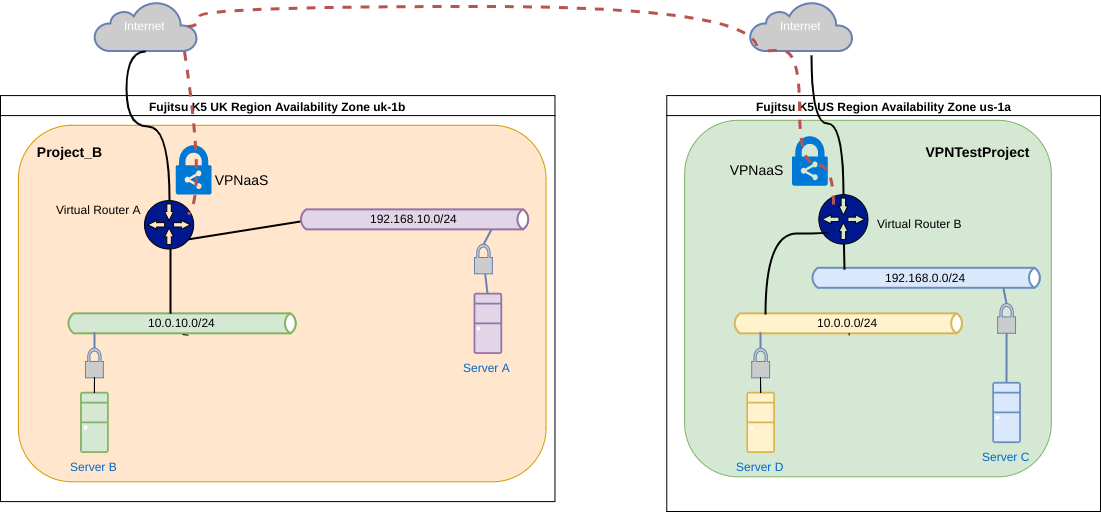
Nota: Un concepto fundamental que debe entenderse es que está vinculando una subred de capa 3 a otra subred de capa 3 únicamente. Lo que quiero decir con esto es que en el siguiente ejemplo añadiré la subred 192.168.10.0/24 en la región del Reino Unido y la subred 192.168.0.0/24 en la región de EE. UU. a la VPN IPSec (estas CIDR de subred no deben superponerse). Una vez que el túnel VPN esté establecido y se apliquen los grupos de seguridad correctos, el Servidor A podrá comunicarse con el Servidor C y viceversa. Sin embargo, el Servidor B y el Servidor D NO podrán comunicarse. Se necesitaría un servicio proxy adicional en cada una de las subredes pares de VPN para facilitar el enrutamiento del tráfico desde el Servidor B y el Servidor D a través del túnel VPN.
Como estamos cerca de Navidad y estamos llenos de espíritu festivo aquí en CNETS esta semana (al menos yo lo estoy), tengo un último regalo: para aquellos de ustedes que les gusta seguir el paso, a continuación también he incluido las dos plantillas heat que he utilizado para la demostración para construir la infraestructura en el diagrama anterior. No olvide cambiar los parámetros de entrada y la configuración de DNS para que coincidan con su AZ de destino si los utiliza en el Servicio de Nube K5 de Fujitsu. Estas plantillas también deberían funcionar con otras nubes OpenStack.
Plantilla Heat Proyecto A
Este archivo contiene texto Unicode oculto o bidireccional que puede ser interpretado o compilado de manera diferente a lo que aparece a continuación. Para revisarlo, abra el archivo en un editor que revele caracteres Unicode ocultos.
Más información sobre caracteres Unicode bidireccionales
| heat_template_version: 2013-05-23 | |
| # Author: Graham Land | |
| # Date: 15/11/2017 | |
| # Purpose: Demo IPSec VPNaaS – Base for Project A | |
| # | |
| # Twitter: @allthingsclowd | |
| # Blog: https://allthingscloud.eu | |
| # | |
| # | |
| description: Template for VPNaaS (IPSec) Demo Project A – Two Networks and a Router with two Servers A & B | |
| # Input parameters | |
| parameters: | |
| k5_image: | |
| type: string | |
| label: Image name or ID | |
| description: Image to be used for compute instance | |
| default: "Ubuntu Server 16.04 LTS (English) 01" | |
| flavor: | |
| type: string | |
| label: Flavor | |
| description: Type of instance (flavor) to be used | |
| default: "P-1" | |
| ssh_key_pair: | |
| type: string | |
| label: Key name | |
| description: Name of key-pair to be used for compute instance | |
| default: "LEMP-KP-AZ1" | |
| availability_zone: | |
| type: string | |
| label: Availability Zone | |
| description: Region AZ to use | |
| default: "uk-1a" | |
| my_ip: | |
| type: string | |
| label: The IP Address (CIDR format) of My PC on the Internet | |
| description: PC Internet IP Address (CIDR format) | |
| default: "31.53.253.24/32" | |
| # K5 Infrastructure resources to be built | |
| resources: | |
| # Create a private network | |
| private_network_a: | |
| type: OS::Neutron::Net | |
| properties: | |
| availability_zone: { get_param: availability_zone } | |
| name: "Network-A" | |
| # Create a new subnet on the private network | |
| private_subnet_a: | |
| type: OS::Neutron::Subnet | |
| depends_on: private_network_a | |
| properties: | |
| availability_zone: { get_param: availability_zone } | |
| name: "Subnetwork-A" | |
| network_id: { get_resource: private_network_a } | |
| cidr: "192.168.0.0/24" | |
| gateway_ip: "192.168.0.254" | |
| allocation_pools: | |
| – start: "192.168.0.100" | |
| end: "192.168.0.150" | |
| dns_nameservers: ["62.60.39.9", "62.60.42.9"] | |
| # Create a second private network | |
| private_network_b: | |
| type: OS::Neutron::Net | |
| properties: | |
| availability_zone: { get_param: availability_zone } | |
| name: "Network-B" | |
| # Create a new subnet on the second private network | |
| private_subnet_b: | |
| type: OS::Neutron::Subnet | |
| depends_on: private_network_b | |
| properties: | |
| availability_zone: { get_param: availability_zone } | |
| name: "Subnetwork-B" | |
| network_id: { get_resource: private_network_b } | |
| cidr: "10.0.0.0/24" | |
| gateway_ip: "10.0.0.254" | |
| allocation_pools: | |
| – start: "10.0.0.100" | |
| end: "10.0.0.150" | |
| dns_nameservers: ["62.60.39.9", "62.60.42.9"] | |
| # Create a virtual router | |
| virtual_router: | |
| type: OS::Neutron::Router | |
| properties: | |
| availability_zone: { get_param: availability_zone } | |
| name: "Simple-Virtual-Router" | |
| # Connect an interface on the private network's subnet to the router | |
| virtual_router_interface_1: | |
| type: OS::Neutron::RouterInterface | |
| depends_on: virtual_router | |
| properties: | |
| router_id: { get_resource: virtual_router } | |
| subnet_id: { get_resource: private_subnet_a } | |
| # Connect an interface on the private network's subnet to the router | |
| virtual_router_interface_2: | |
| type: OS::Neutron::RouterInterface | |
| depends_on: virtual_router | |
| properties: | |
| router_id: { get_resource: virtual_router } | |
| subnet_id: { get_resource: private_subnet_b } | |
| # Create security group | |
| security_group: | |
| type: OS::Neutron::SecurityGroup | |
| properties: | |
| description: VPN Security Group | |
| name: VPN-SG | |
| rules: | |
| # allow inbound traffic from remote VPN subnet | |
| – remote_ip_prefix: 192.168.10.0/24 | |
| protocol: tcp | |
| – remote_ip_prefix: 192.168.10.0/24 | |
| protocol: icmp | |
| # allow inbound traffic from my remote PC | |
| – remote_ip_prefix: { get_param: my_ip } | |
| protocol: icmp | |
| – remote_ip_prefix: { get_param: my_ip } | |
| protocol: tcp | |
| port_range_min: 22 | |
| port_range_max: 22 | |
| ################### Server A ################################################################ | |
| # Create a system volume for use with the server | |
| server-A-sys-vol: | |
| type: OS::Cinder::Volume | |
| properties: | |
| availability_zone: { get_param: availability_zone } | |
| name: "Server-A-boot-vol" | |
| size: 3 | |
| volume_type: "M1" | |
| image : { get_param: k5_image } | |
| server-A-port: | |
| type: OS::Neutron::Port | |
| depends_on: private_network_a | |
| properties: | |
| availability_zone: { get_param: availability_zone } | |
| network_id: { get_resource: private_network_a } | |
| name: "Server-A-Port" | |
| fixed_ips: | |
| – subnet_id: { get_resource: private_subnet_a } | |
| security_groups: [{ get_resource: security_group }] | |
| # Build a server using the system volume defined above | |
| server-A: | |
| type: OS::Nova::Server | |
| depends_on: server-A-port | |
| properties: | |
| availability_zone: { get_param: availability_zone } | |
| key_name: { get_param: ssh_key_pair } | |
| image: { get_param: k5_image } | |
| flavor: { get_param: flavor } | |
| admin_user: ubuntu | |
| metadata: { "fcx.autofailover": True } | |
| block_device_mapping: [{"volume_size": "3", "volume_id": {get_resource: server-A-sys-vol}, "delete_on_termination": True, "device_name": "/dev/vda"}] | |
| name: "Server-A" | |
| networks: | |
| – port: { get_resource: server-A-port } | |
| ########################################################################################################### | |
| ################### Server B ################################################################ | |
| # Create a system volume for use with the server | |
| server-B-sys-vol: | |
| type: OS::Cinder::Volume | |
| depends_on: private_network_b | |
| properties: | |
| availability_zone: { get_param: availability_zone } | |
| name: "Server-B-boot-vol" | |
| size: 3 | |
| volume_type: "M1" | |
| image : { get_param: k5_image } | |
| # Build a server using the system volume defined above | |
| server-B: | |
| type: OS::Nova::Server | |
| properties: | |
| availability_zone: { get_param: availability_zone } | |
| key_name: { get_param: ssh_key_pair } | |
| image: { get_param: k5_image } | |
| flavor: { get_param: flavor } | |
| admin_user: ubuntu | |
| metadata: { "fcx.autofailover": True } | |
| block_device_mapping: [{"volume_size": "3", "volume_id": {get_resource: server-B-sys-vol}, "delete_on_termination": True, "device_name": "/dev/vda"}] | |
| name: "Server-B" | |
| networks: | |
| – network: { get_resource: private_network_b } | |
| ########################################################################################################### |
view raw
VPNDemoProjectA.YML
hosted with ❤ by GitHub
Plantilla Heat Proyecto B
Este archivo contiene texto Unicode oculto o bidireccional que puede ser interpretado o compilado de manera diferente a lo que aparece a continuación. Para revisarlo, abra el archivo en un editor que revele caracteres Unicode ocultos.
Más información sobre caracteres Unicode bidireccionales
| heat_template_version: 2013-05-23 | |
| # Author: Graham Land | |
| # Date: 15/11/2017 | |
| # Purpose: Demo IPSec VPNaaS – Base for Project B – Two Networks and a Router with two Servers C & D | |
| # | |
| # Twitter: @allthingsclowd | |
| # Blog: https://allthingscloud.eu | |
| # | |
| # | |
| description: Template for VPNaaS (IPSec) Demo Project B – Two Networks and a Router with two Servers C & D | |
| # Input parameters | |
| parameters: | |
| k5_image: | |
| type: string | |
| label: Image name or ID | |
| description: Image to be used for compute instance | |
| default: "Ubuntu Server 16.04 LTS (English) 01" | |
| flavor: | |
| type: string | |
| label: Flavor | |
| description: Type of instance (flavor) to be used | |
| default: "P-1" | |
| ssh_key_pair: | |
| type: string | |
| label: Key name | |
| description: Name of key-pair to be used for compute instance | |
| default: "LEMP-KP-AZ2" | |
| availability_zone: | |
| type: string | |
| label: Availability Zone | |
| description: Region AZ to use | |
| default: "uk-1b" | |
| my_ip: | |
| type: string | |
| label: The IP Address (CIDR format) of My PC on the Internet | |
| description: PC Internet IP Address (CIDR format) | |
| default: "31.53.253.24/32" | |
| # K5 Infrastructure resources to be built | |
| resources: | |
| # Create a private network | |
| private_network_a: | |
| type: OS::Neutron::Net | |
| properties: | |
| availability_zone: { get_param: availability_zone } | |
| name: "Network-C" | |
| # Create a new subnet on the private network | |
| private_subnet_a: | |
| type: OS::Neutron::Subnet | |
| depends_on: private_network_a | |
| properties: | |
| availability_zone: { get_param: availability_zone } | |
| name: "Subnetwork-C" | |
| network_id: { get_resource: private_network_a } | |
| cidr: "192.168.10.0/24" | |
| gateway_ip: "192.168.10.254" | |
| allocation_pools: | |
| – start: "192.168.10.100" | |
| end: "192.168.10.150" | |
| dns_nameservers: ["62.60.39.9", "62.60.42.9"] | |
| # Create a second private network | |
| private_network_b: | |
| type: OS::Neutron::Net | |
| properties: | |
| availability_zone: { get_param: availability_zone } | |
| name: "Network-D" | |
| # Create a new subnet on the second private network | |
| private_subnet_b: | |
| type: OS::Neutron::Subnet | |
| depends_on: private_network_b | |
| properties: | |
| availability_zone: { get_param: availability_zone } | |
| name: "Subnetwork-D" | |
| network_id: { get_resource: private_network_b } | |
| cidr: "10.0.10.0/24" | |
| gateway_ip: "10.0.10.254" | |
| allocation_pools: | |
| – start: "10.0.10.100" | |
| end: "10.0.10.150" | |
| dns_nameservers: ["62.60.39.9", "62.60.42.9"] | |
| # Create a virtual router | |
| virtual_router: | |
| type: OS::Neutron::Router | |
| properties: | |
| availability_zone: { get_param: availability_zone } | |
| name: "Simple-Virtual-Router" | |
| # Connect an interface on the private network's subnet to the router | |
| virtual_router_interface_1: | |
| type: OS::Neutron::RouterInterface | |
| depends_on: virtual_router | |
| properties: | |
| router_id: { get_resource: virtual_router } | |
| subnet_id: { get_resource: private_subnet_a } | |
| # Connect an interface on the private network's subnet to the router | |
| virtual_router_interface_2: | |
| type: OS::Neutron::RouterInterface | |
| depends_on: virtual_router | |
| properties: | |
| router_id: { get_resource: virtual_router } | |
| subnet_id: { get_resource: private_subnet_b } | |
| # Create security group | |
| security_group: | |
| type: OS::Neutron::SecurityGroup | |
| properties: | |
| description: VPN Security Group | |
| name: VPN-SG | |
| rules: | |
| # allow inbound traffic from remote VPN subnet | |
| – remote_ip_prefix: 192.168.0.0/24 | |
| protocol: tcp | |
| – remote_ip_prefix: 192.168.0.0/24 | |
| protocol: icmp | |
| # allow inbound traffic from my remote PC | |
| – remote_ip_prefix: { get_param: my_ip } | |
| protocol: icmp | |
| – remote_ip_prefix: { get_param: my_ip } | |
| protocol: tcp | |
| port_range_min: 22 | |
| port_range_max: 22 | |
| ################### Server A ################################################################ | |
| # Create a system volume for use with the server | |
| server-A-sys-vol: | |
| type: OS::Cinder::Volume | |
| properties: | |
| availability_zone: { get_param: availability_zone } | |
| name: "Server-C-boot-vol" | |
| size: 3 | |
| volume_type: "M1" | |
| image : { get_param: k5_image } | |
| server-A-port: | |
| type: OS::Neutron::Port | |
| properties: | |
| availability_zone: { get_param: availability_zone } | |
| network_id: { get_resource: private_network_a } | |
| name: "Server-C-Port" | |
| fixed_ips: | |
| – subnet_id: { get_resource: private_subnet_a } | |
| security_groups: [{ get_resource: security_group }] | |
| # Build a server using the system volume defined above | |
| server-A: | |
| type: OS::Nova::Server | |
| depends_on: private_network_a | |
| properties: | |
| availability_zone: { get_param: availability_zone } | |
| key_name: { get_param: ssh_key_pair } | |
| image: { get_param: k5_image } | |
| flavor: { get_param: flavor } | |
| admin_user: ubuntu | |
| metadata: { "fcx.autofailover": True } | |
| block_device_mapping: [{"volume_size": "3", "volume_id": {get_resource: server-A-sys-vol}, "delete_on_termination": True, "device_name": "/dev/vda"}] | |
| name: "Server-C" | |
| networks: | |
| – port: { get_resource: server-A-port } | |
| ########################################################################################################### | |
| ################### Server B ################################################################ | |
| # Create a system volume for use with the server | |
| server-B-sys-vol: | |
| type: OS::Cinder::Volume | |
| depends_on: private_network_b | |
| properties: | |
| availability_zone: { get_param: availability_zone } | |
| name: "Server-D-boot-vol" | |
| size: 3 | |
| volume_type: "M1" | |
| image : { get_param: k5_image } | |
| # Build a server using the system volume defined above | |
| server-B: | |
| type: OS::Nova::Server | |
| properties: | |
| availability_zone: { get_param: availability_zone } | |
| key_name: { get_param: ssh_key_pair } | |
| image: { get_param: k5_image } | |
| flavor: { get_param: flavor } | |
| admin_user: ubuntu | |
| metadata: { "fcx.autofailover": True } | |
| block_device_mapping: [{"volume_size": "3", "volume_id": {get_resource: server-B-sys-vol}, "delete_on_termination": True, "device_name": "/dev/vda"}] | |
| name: "Server-D" | |
| networks: | |
| – network: { get_resource: private_network_b } | |
| ########################################################################################################### |
view raw
VPNDemoProjectB.YML
hosted with ❤ by GitHub
La demostración en video seguirá pronto.
¡Feliz túnel!
Graham