

Recientemente tuve una instalación de Helion OpenStack 2.X donde el cliente solicitó que las contraseñas de iLO fueran cifradas. Esta fue la primera vez que trabajé con el script de cifrado de HOS suministrado con Helion OpenStack, hosencrypt.py.
Esto resultó ser un proceso laborioso de obtener manualmente cada contraseña y suministrarla al script de cifrado. Cada resultado se copió de nuevo en el archivo servers.yml.
Con los tamaños de instalación que solo aumentan, más de 60 servidores, no me apetece tener que repetir este proceso manual de nuevo – no me pagan horas extra 😉
El siguiente script, hosencryptfile.py, tomará el archivo servers.yml como entrada y producirá una versión cifrada o descifrada. Por favor, lea los comentarios dentro del script para más detalles.
#!/usr/bin/env python
#
# A utility to encrypt passwords for auxiliary HOS systems like IPMI.
#
# (c) Copyright 2015 Hewlett Packard Enterprise Development Company LP
#
# Licensed under the Apache License, Version 2.0 (the "License"); you may
# not use this file except in compliance with the License. You may obtain
# a copy of the License at
#
# http://www.apache.org/licenses/LICENSE-2.0
#
# Unless required by applicable law or agreed to in writing, software
# distributed under the License is distributed on an "AS IS" BASIS, WITHOUT
# WARRANTIES OR CONDITIONS OF ANY KIND, either express or implied. See the
# License for the specific language governing permissions and limitations
# under the License.
#
# Author: Graham J Land
# Date: 16/01/2016
# Modification: Hacked this file by adding a new function file_decrypt_encrypt(switch,infile,outfile="temp")
#               to automagically encrypt or decrypt the ilo-passwords in a servers.yml file
# Name: hosencryptfile.py
#
# PREREQUISITES
# This script expects an environment variable HOS_USER_PASSWORD_ENCRYPT_KEY which should hold the encryption key
# For example enter the following command before running the script:
#
# export HOS_USER_PASSWORD_ENCRYPT_KEY=EnterASecretKeyHere
#
# COMMANDLINE PARAMETERS
# switch:   2nd commandline parameter [optional]
#           "" no comandline parameters then you'll be prompted to enter a password to encrypt
#           "-d" you'll be prompted for a password to decrypt
#           "-fe" will cause the following servers.yml file to have it's ilo-passwords encrypted
#           "-fd" (or anything else for that matter) will cause the supplied servers.yml file to have it's passwords decrypted
#
# infile:   3rd commandline parameter [optional]
#           the input servers.yml file that is to be processed
#
# outfile:  4th commandline parameter [optional]
#           the new servers.yml file with the encrypted/decrypted passwords
#           if this file is left blank then the input file will be overwritten
#
# EXAMPLE
#  ~/helion/hos/ansible/hosencryptfile.py -fe ~/helion/hos/ansible/myfile.yml ~/helion/hos/ansible/my_file9.yml
#
# WARNING
# I'm not a programmer, this is the first time I've looked at python - please backup all files before use and test in labs
# No error checking included - if you enter an invalid file name IT WILL CRASH - as I get more familiar with python I'll stick in the try/catch error controls

from subprocess import PIPE, Popen

encryption_env = 'HOS_USER_PASSWORD_ENCRYPT_KEY'

class aes256:
    prefix = '@hos_aes256@'
    def __init__(self, key):
        pass

    def encrypt(self, raw):
        return ""

    def decrypt(self, cooked):
        return ""

class openssl:
    prefix = '@hos@'

    def __init__(self, key=None):
        pass

    def delegate(self, cmd, value):
        # Note that I'm passing the environment variable's name to the subprocess, not its value.
        argv = ('/usr/bin/openssl', 'aes-256-cbc', '-a', cmd, '-pass', 'env:%s' % encryption_env)
        p = Popen(argv, close_fds=True, stdin=PIPE, stdout=PIPE, stderr=PIPE)
        result = p.communicate(input=value)
        if p.returncode != 0:
            errmsg = result[1].strip()
            if errmsg.startswith('bad decrypt'):
                errmsg = 'incorrect encryption key'
            elif errmsg.startswith('error reading input file') or errmsg.startswith('bad magic number'):
                errmsg = 'bad input data'
            raise OSError('openssl: %s' % errmsg)
        return result[0].strip()

    def encrypt(self, raw):
        return self.delegate('-salt', raw)

    def decrypt(self, cooked):
        # openssl expects a newline at the end of the string.
        if cooked[-1] != '\n':
            cooked += '\n'
        return self.delegate('-d', cooked)

def main():
    import getpass
    import sys
    import yaml

    def file_decrypt_encrypt(switch,infile,outfile="temp"):
        if outfile == "temp":
            outfile = infile

        with open(infile) as f:
            list_doc = yaml.load(f)

        for servers in list_doc['servers']:
            value = servers["ilo-password"]
            if switch == '-fe':
                x = obj.prefix + obj.encrypt(value)
            else:
                if value.startswith(obj.prefix):
                    value = value[len(obj.prefix):]
                x = obj.decrypt(value)

            servers["ilo-password"] = x
               #print x
        f.close

        with open(outfile, "w") as f:
            yaml.dump(list_doc, f, default_flow_style=False)
        f.close

        return


    obj = openssl()

    # encrypt or decrypt one file to a new file
    if len(sys.argv) == 4:
        file_decrypt_encrypt(sys.argv[1],sys.argv[2],sys.argv[3])
    # encrypt  or decrypt the file inplace
    elif len(sys.argv) == 3 and sys.argv[1] != '-d':
        file_decrypt_encrypt(sys.argv[1],sys.argv[2])
    # prompt user for value to decrypt
    elif len(sys.argv) > 1 and sys.argv[1] == '-d':
        value = getpass.getpass('encrypted value? ')
        if value.startswith(obj.prefix):
            value = value[len(obj.prefix):]
        x = obj.decrypt(value)
        print x
    # prompt user for value to encrypt
    else:
        value = getpass.getpass('unencrypted value? ')
        x = obj.encrypt(value)
        print obj.prefix + x

if __name__ == '__main__':
    main()
A continuación se muestra un ejemplo de cómo usar el archivo.
Nota: La salida cambia el formato del archivo yaml y elimina los comentarios, pero debería seguir siendo un archivo válido para su procesamiento – aún no lo he probado.
ARCHIVO DE ENTRADA exampleServers.yml
#
# (c) Copyright 2015 Hewlett Packard Enterprise Development Company LP
#
# Licensed under the Apache License, Version 2.0 (the "License"); you may
# not use this file except in compliance with the License. You may obtain
# a copy of the License at
#
# http://www.apache.org/licenses/LICENSE-2.0
#
# Unless required by applicable law or agreed to in writing, software
# distributed under the License is distributed on an "AS IS" BASIS, WITHOUT
# WARRANTIES OR CONDITIONS OF ANY KIND, either express or implied. See the
# License for the specific language governing permissions and limitations
# under the License.
#
---
  product:
    version: 2

  baremetal:
    # NOTE: These values need to be changed to match your environment.
    # Define the network range that contains the ip-addr values for
    # the individual servers listed below.
    subnet: 172.16.60.0
    netmask: 255.255.255.0

  servers:
    # NOTE: Addresses of servers need to be changed to match your environment.
    #
    #       Add additional servers as required
    #

    # Controllers
    - id: controller1
      ip-addr: 172.16.60.3
      role: CONTROLLER-ROLE
      server-group: RACK1
      nic-mapping: HP-SL230-4PORT
      ilo-ip: 172.30.0.45
      ilo-password: "Guinness";
      ilo-user: Administrator
      mac-addr: 8c:dc:d4:b5:cc:d0

    - id: controller2
      ip-addr: 172.16.60.4
      role: CONTROLLER-ROLE
      server-group: RACK2
      nic-mapping: HP-SL230-4PORT
      ilo-ip: 172.30.0.46
      ilo-password: "Smithwicks";
      ilo-user: Administrator
      mac-addr: 8c:dc:d4:b5:c6:40

    - id: controller3
      ip-addr: 172.16.60.5
      role: CONTROLLER-ROLE
      server-group: RACK3
      nic-mapping: HP-SL230-4PORT
      ilo-ip: 172.30.0.47
      ilo-password: "Blackthorn";
      ilo-user: Administrator
      mac-addr: 8c:dc:d4:b5:c9:74

    # Compute Nodes
    - id: compute1
      ip-addr: 172.16.60.6
      role: COMPUTE-ROLE
      server-group: RACK1
      nic-mapping: HP-SL230-4PORT
      ilo-ip: 172.30.0.48
      ilo-password: "Budweiser";
      ilo-user: Administrator
      mac-addr: 8c:dc:d4:b5:c9:00

    - id: compute2
      ip-addr: 172.16.60.7
      role: COMPUTE-ROLE
      server-group: RACK2
      nic-mapping: HP-SL230-4PORT
      ilo-ip: 172.30.0.49
      ilo-password: "Magners"
      ilo-user: Administrator
      mac-addr: 8c:dc:d4:b5:ce:80

    - id: compute3
      ip-addr: 172.16.60.8
      role: COMPUTE-ROLE
      server-group: RACK1
      nic-mapping: HP-SL230-4PORT
      ilo-ip: 172.30.0.50
      ilo-password: "Bulmers"
      ilo-user: Administrator
      mac-addr: 8c:dc:d4:b5:cd:3c

    - id: compute4
      ip-addr: 172.16.60.12
      role: COMPUTE-ROLE
      server-group: RACK2
      nic-mapping: HP-SL230-4PORT
      ilo-ip: 172.30.0.51
      ilo-password: "Heineken"
      ilo-user: Administrator
      mac-addr: 8c:dc:d4:b5:c4:e8

    # Ceph OSD Nodes
    - id: osd1
      ip-addr: 172.16.60.9
      role: OSD-ROLE
      server-group: RACK1
      nic-mapping: HP-DL360-8PORT
      ilo-ip: 172.30.0.86
      ilo-password: "Harp"
      ilo-user: Administrator
      mac-addr: 5c:b9:01:8d:6b:68

    - id: osd2
      ip-addr: 172.16.60.10
      role: OSD-ROLE
      server-group: RACK2
      nic-mapping: HP-DL360-8PORT
      ilo-ip: 172.30.0.87
      ilo-password: "Kronenburg"
      ilo-user: Administrator
      mac-addr: 5c:b9:01:8d:70:0c

    - id: osd3
      ip-addr: 172.16.60.11
      role: OSD-ROLE
      server-group: RACK3
      nic-mapping: HP-DL360-8PORT
      ilo-ip: 172.30.0.88
      ilo-password: "Carlsberg"
      ilo-user: Administrator
      mac-addr: 5c:b9:01:8d:73:dc
Ejecute el siguiente comando para cifrar la contraseña en el archivo anterior.
export HOS_USER_PASSWORD_ENCRYPT_KEY=EnterASecretKeyHere
hosencryptfile.py -fe exampleServers.yml encryptedServers.yml
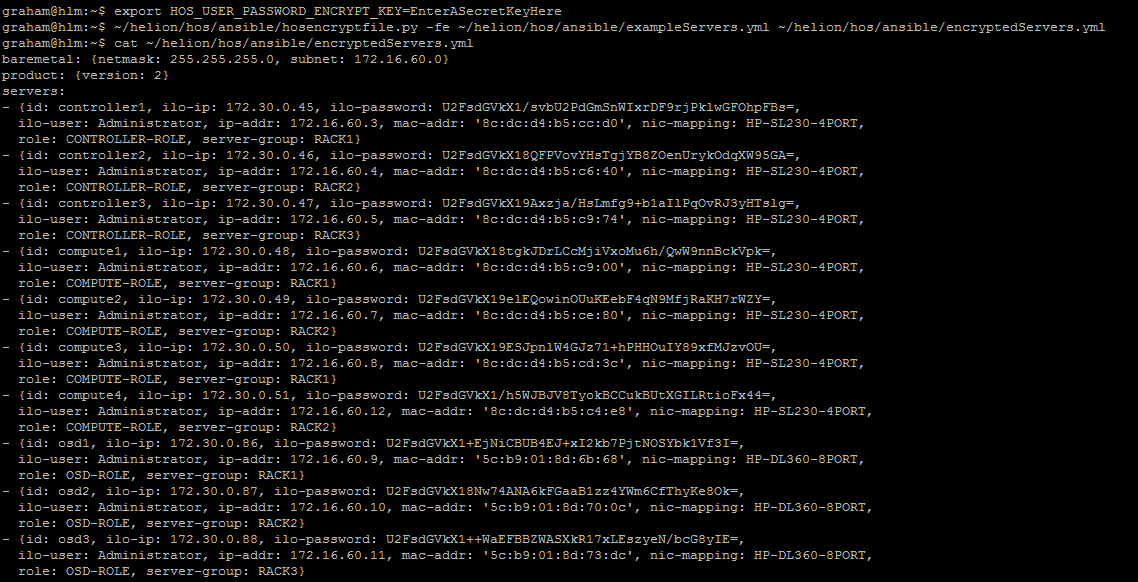
ARCHIVO DE SALIDA encryptedServers.yml
baremetal: {netmask: 255.255.255.0, subnet: 172.16.60.0}
product: {version: 2}
servers:
- {id: controller1, ilo-ip: 172.30.0.45, ilo-password: U2FsdGVkX1/svbU2PdGmSnWIxrDF9rjPklwGFOhpFBs=,
  ilo-user: Administrator, ip-addr: 172.16.60.3, mac-addr: '8c:dc:d4:b5:cc:d0', nic-mapping: HP-SL230-4PORT,
  role: CONTROLLER-ROLE, server-group: RACK1}
- {id: controller2, ilo-ip: 172.30.0.46, ilo-password: U2FsdGVkX18QFPVovYHsTgjYB8ZOenUrykOdqXW95GA=,
  ilo-user: Administrator, ip-addr: 172.16.60.4, mac-addr: '8c:dc:d4:b5:c6:40', nic-mapping: HP-SL230-4PORT,
  role: CONTROLLER-ROLE, server-group: RACK2}
- {id: controller3, ilo-ip: 172.30.0.47, ilo-password: U2FsdGVkX19Axzja/HsLmfg9+b1aIlPqOvRJ3yHTslg=,
  ilo-user: Administrator, ip-addr: 172.16.60.5, mac-addr: '8c:dc:d4:b5:c9:74', nic-mapping: HP-SL230-4PORT,
  role: CONTROLLER-ROLE, server-group: RACK3}
- {id: compute1, ilo-ip: 172.30.0.48, ilo-password: U2FsdGVkX18tgkJDrLCcMjiVxoMu6h/QwW9nnBckVpk=,
  ilo-user: Administrator, ip-addr: 172.16.60.6, mac-addr: '8c:dc:d4:b5:c9:00', nic-mapping: HP-SL230-4PORT,
  role: COMPUTE-ROLE, server-group: RACK1}
- {id: compute2, ilo-ip: 172.30.0.49, ilo-password: U2FsdGVkX19elEQowinOUuKEebF4qN9MfjRaKH7rWZY=,
  ilo-user: Administrator, ip-addr: 172.16.60.7, mac-addr: '8c:dc:d4:b5:ce:80', nic-mapping: HP-SL230-4PORT,
  role: COMPUTE-ROLE, server-group: RACK2}
- {id: compute3, ilo-ip: 172.30.0.50, ilo-password: U2FsdGVkX19ESJpnlW4GJz71+hPHHOuIY89xfMJzvOU=,
  ilo-user: Administrator, ip-addr: 172.16.60.8, mac-addr: '8c:dc:d4:b5:cd:3c', nic-mapping: HP-SL230-4PORT,
  role: COMPUTE-ROLE, server-group: RACK1}
- {id: compute4, ilo-ip: 172.30.0.51, ilo-password: U2FsdGVkX1/h5WJBJV8TyokBCCukBUtXGILRtioFx44=,
  ilo-user: Administrator, ip-addr: 172.16.60.12, mac-addr: '8c:dc:d4:b5:c4:e8', nic-mapping: HP-SL230-4PORT,
  role: COMPUTE-ROLE, server-group: RACK2}
- {id: osd1, ilo-ip: 172.30.0.86, ilo-password: U2FsdGVkX1+EjNiCBUB4EJ+xI2kb7PjtNOSYbk1Vf3I=,
  ilo-user: Administrator, ip-addr: 172.16.60.9, mac-addr: '5c:b9:01:8d:6b:68', nic-mapping: HP-DL360-8PORT,
  role: OSD-ROLE, server-group: RACK1}
- {id: osd2, ilo-ip: 172.30.0.87, ilo-password: U2FsdGVkX18Nw74ANA6kFGaaB1zz4YWm6CfThyKe8Ok=,
  ilo-user: Administrator, ip-addr: 172.16.60.10, mac-addr: '5c:b9:01:8d:70:0c', nic-mapping: HP-DL360-8PORT,
  role: OSD-ROLE, server-group: RACK2}
- {id: osd3, ilo-ip: 172.30.0.88, ilo-password: U2FsdGVkX1++WaEFBBZWASXkR17xLEszyeN/bcG8yIE=,
  ilo-user: Administrator, ip-addr: 172.16.60.11, mac-addr: '5c:b9:01:8d:73:dc', nic-mapping: HP-DL360-8PORT,
  role: OSD-ROLE, server-group: RACK3}
Ahora, para revertir el proceso, simplemente haga lo siguiente (o restaure desde una copia de seguridad)
export HOS_USER_PASSWORD_ENCRYPT_KEY=EnterASecretKeyHere
hosencryptfile.py -fd encryptedServers.yml decryptedServers.yml
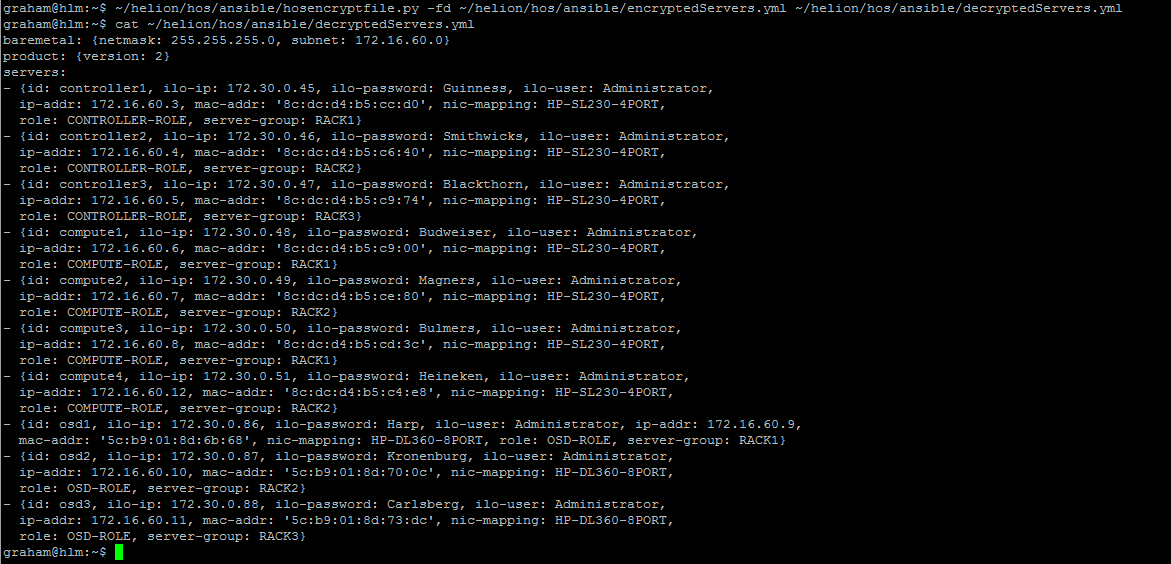
ARCHIVO DE SALIDA decryptedServers.yml
baremetal: {netmask: 255.255.255.0, subnet: 172.16.60.0}
product: {version: 2}
servers:
- {id: controller1, ilo-ip: 172.30.0.45, ilo-password: Guinness, ilo-user: Administrator,
  ip-addr: 172.16.60.3, mac-addr: '8c:dc:d4:b5:cc:d0', nic-mapping: HP-SL230-4PORT,
  role: CONTROLLER-ROLE, server-group: RACK1}
- {id: controller2, ilo-ip: 172.30.0.46, ilo-password: Smithwicks, ilo-user: Administrator,
  ip-addr: 172.16.60.4, mac-addr: '8c:dc:d4:b5:c6:40', nic-mapping: HP-SL230-4PORT,
  role: CONTROLLER-ROLE, server-group: RACK2}
- {id: controller3, ilo-ip: 172.30.0.47, ilo-password: Blackthorn, ilo-user: Administrator,
  ip-addr: 172.16.60.5, mac-addr: '8c:dc:d4:b5:c9:74', nic-mapping: HP-SL230-4PORT,
  role: CONTROLLER-ROLE, server-group: RACK3}
- {id: compute1, ilo-ip: 172.30.0.48, ilo-password: Budweiser, ilo-user: Administrator,
  ip-addr: 172.16.60.6, mac-addr: '8c:dc:d4:b5:c9:00', nic-mapping: HP-SL230-4PORT,
  role: COMPUTE-ROLE, server-group: RACK1}
- {id: compute2, ilo-ip: 172.30.0.49, ilo-password: Magners, ilo-user: Administrator,
  ip-addr: 172.16.60.7, mac-addr: '8c:dc:d4:b5:ce:80', nic-mapping: HP-SL230-4PORT,
  role: COMPUTE-ROLE, server-group: RACK2}
- {id: compute3, ilo-ip: 172.30.0.50, ilo-password: Bulmers, ilo-user: Administrator,
  ip-addr: 172.16.60.8, mac-addr: '8c:dc:d4:b5:cd:3c', nic-mapping: HP-SL230-4PORT,
  role: COMPUTE-ROLE, server-group: RACK1}
- {id: compute4, ilo-ip: 172.30.0.51, ilo-password: Heineken, ilo-user: Administrator,
  ip-addr: 172.16.60.12, mac-addr: '8c:dc:d4:b5:c4:e8', nic-mapping: HP-SL230-4PORT,
  role: COMPUTE-ROLE, server-group: RACK2}
- {id: osd1, ilo-ip: 172.30.0.86, ilo-password: Harp, ilo-user: Administrator, ip-addr: 172.16.60.9,
  mac-addr: '5c:b9:01:8d:6b:68', nic-mapping: HP-DL360-8PORT, role: OSD-ROLE, server-group: RACK1}
- {id: osd2, ilo-ip: 172.30.0.87, ilo-password: Kronenburg, ilo-user: Administrator,
  ip-addr: 172.16.60.10, mac-addr: '5c:b9:01:8d:70:0c', nic-mapping: HP-DL360-8PORT,
  role: OSD-ROLE, server-group: RACK2}
- {id: osd3, ilo-ip: 172.30.0.88, ilo-password: Carlsberg, ilo-user: Administrator,
  ip-addr: 172.16.60.11, mac-addr: '5c:b9:01:8d:73:dc', nic-mapping: HP-DL360-8PORT,
  role: OSD-ROLE, server-group: RACK3}
ADVERTENCIA
No soy programador, esta es la primera vez que miro Python: por favor, haga una copia de seguridad de todos los archivos antes de usarlos y pruébelos en un laboratorio. No se incluye comprobación de errores: si introduce un nombre de archivo no válido, EL SCRIPT SE CERRARÁ BRUSCAMENTE; a medida que me familiarice más con Python, incluiré los controles de error try/catch, si tengo tiempo.
ACTUALIZACIÓN: Modifiqué el código para incluir el prefijo requerido al principio de la clave cifrada. También reformateé el archivo de salida para que sea más consistente con el archivo de entrada.