

Instalación y configuración del modelo de nube
Lo primero que debemos hacer es copiar una de las plantillas de nube de ejemplo para usarla como punto de partida. Si su modelo de implementación se alinea exactamente con el ejemplo, solo tendrá unos pocos archivos que modificar antes de construir su nube.
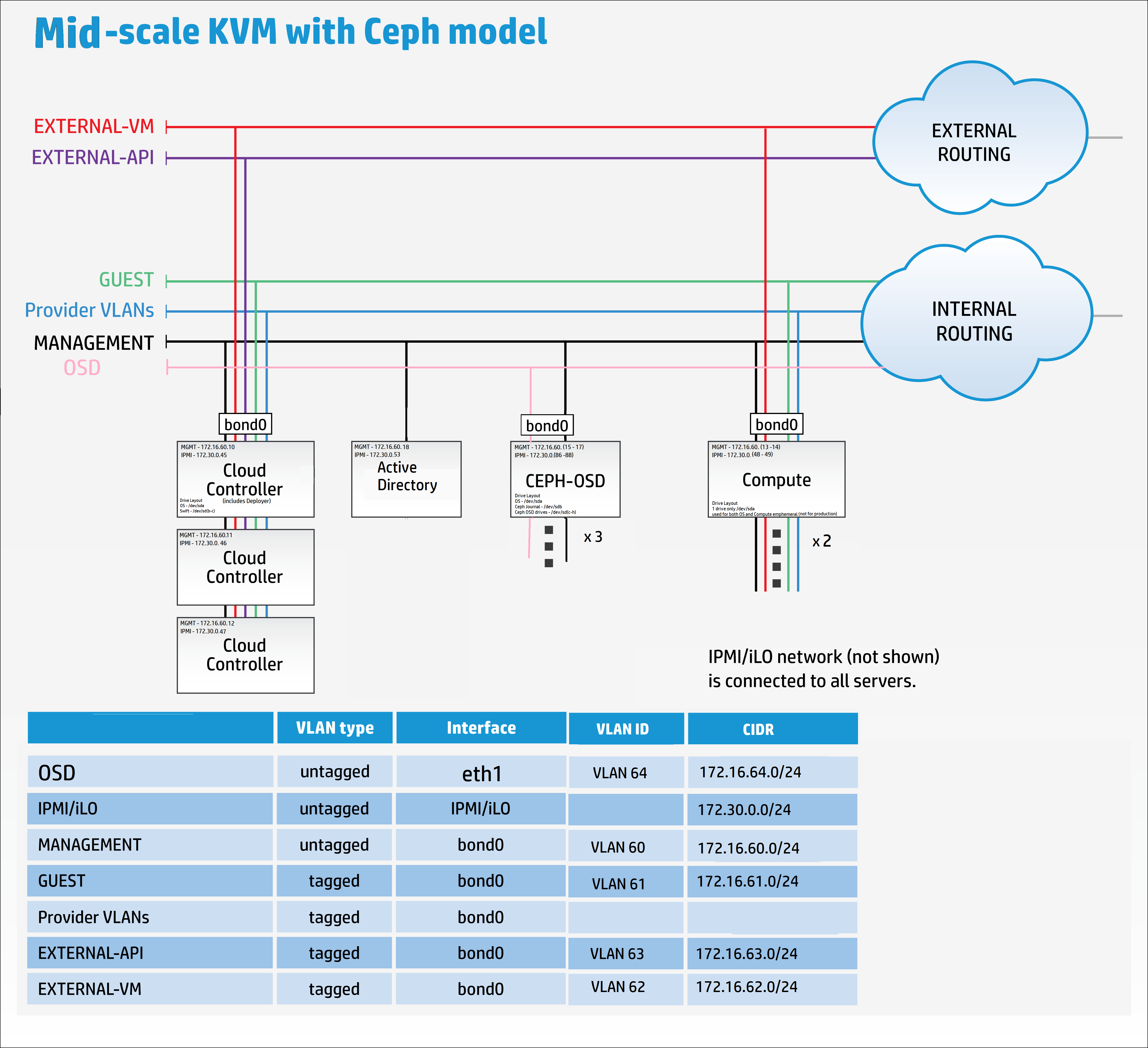
Sin embargo, con el interés de mostrar cómo se podría modificar significativamente el modelo, he decidido añadir otra red y la utilizaremos para proporcionar separación para el tráfico de replicación de Ceph OSD.
Copie los archivos de configuración de ejemplo de Ceph en el directorio my_cloud para editarlos.
cp -r ~/helion/examples/entry-scale-kvm-ceph/* ~/helion/my_cloud/definition/
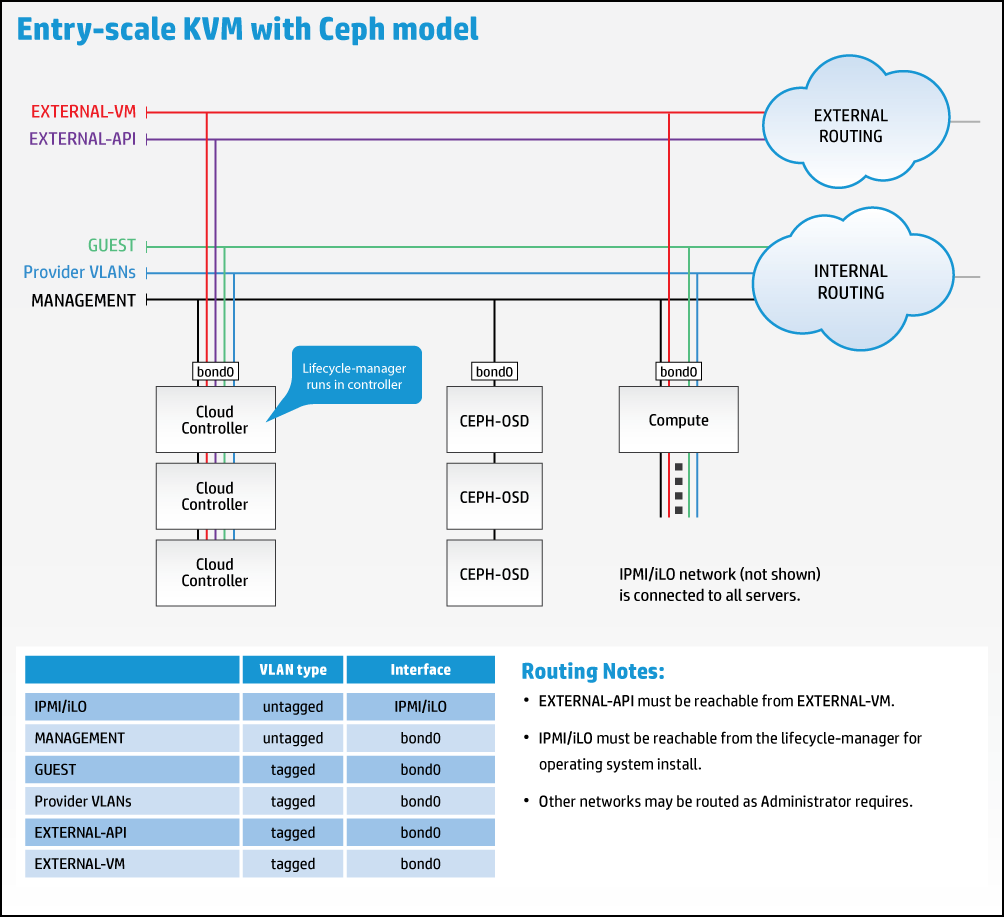
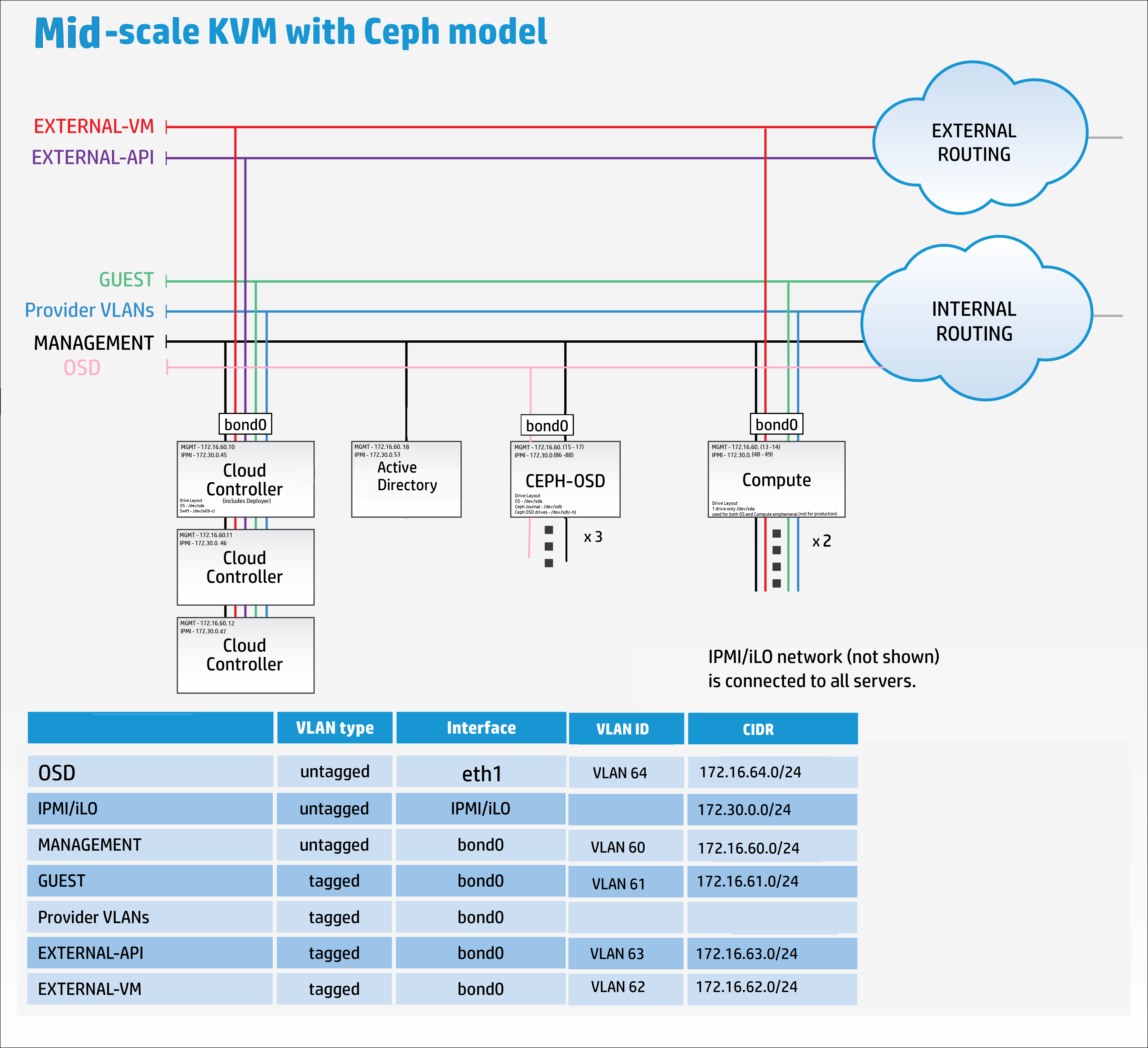
Estos archivos de configuración representan el siguiente modelo:
No obstante, necesitamos modificar el modelo para acomodar la nueva red de replicación, como se muestra a continuación:
Es hora de saltar a su editor de elección, Komodo en mi caso, para comenzar a remodelar los archivos de plantilla de ejemplo para que coincidan con mis requisitos.
Añada una conexión remota en el editor al Helion Lifecycle Manager (controller0).
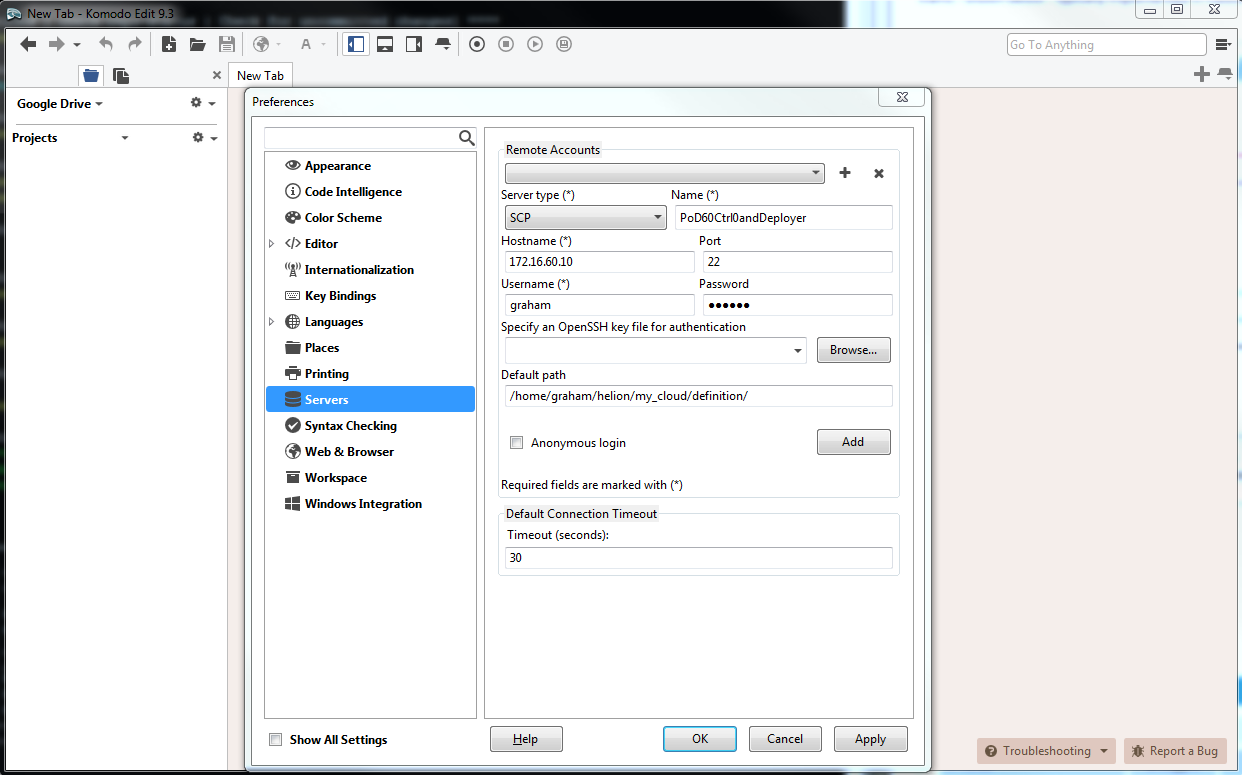
Puede editar los archivos en cualquier secuencia que le resulte conveniente.
Por favor, lea la extensa documentación en línea que proporciona una explicación detallada de todos los archivos yaml utilizados para configurar la plataforma de nube aquí.
cloudConfig.yml
Me gusta empezar con el más sencillo, cloudConfig.yml
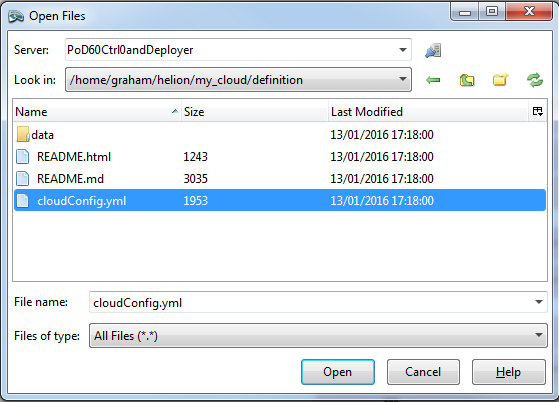
En este archivo encontramos la configuración del nombre de la nube, prefijos de nombre de host, detalles del servidor NTP, detalles del servidor DNS, configuraciones de SMTP y algunas configuraciones generales del firewall.
Los siguientes valores se cambiaron desde los valores predeterminados:
nombre de la nube : allthingscloud
ntp : 172.16.1.5
dns : 172.16.1.5
Nota: Asegúrese de poner entre comillas tanto las direcciones IP de NTP como de DNS. El archivo de ejemplo no tiene comillas en los servidores de nombres DNS.
#
# (c) Copyright 2015 Hewlett Packard Enterprise Development Company LP
#
# Licensed under the Apache License, Version 2.0 (the "License"); you may
# not use this file except in compliance with the License. You may obtain
# a copy of the License at
#
# http://www.apache.org/licenses/LICENSE-2.0
#
# Unless required by applicable law or agreed to in writing, software
# distributed under the License is distributed on an "AS IS" BASIS, WITHOUT
# WARRANTIES OR CONDITIONS OF ANY KIND, either express or implied. See the
# License for the specific language governing permissions and limitations
# under the License.
#
---
product:
version: 2

cloud:
name: allthingscloud

# The following values are used when
# building hostnames
hostname-data:
host-prefix: helion
member-prefix: -m

# List of ntp servers for your site
ntp-servers:
- "172.16.1.5"
# - "ntp-server2"

# dns resolving configuration for your site
# refer to resolv.conf for details on each option
dns-settings:
nameservers:
- "172.16.1.5"
# - name-server2
# - name-server3
#
# domain: sub1.example.net
#
# search:
# - sub1.example.net
# - sub2.example.net
#
# sortlist:
# - 192.168.160.0/255.255.240.0
# - 192.168.0.0
#
# # option flags are ':' to enable, remove to unset
# # options with values are ':' to set
#
# options:
# debug:
# ndots: 2
# timeout: 30
# attempts: 5
# rotate:
# no-check-names:
# inet6:
smtp-settings:
# server: mailserver.examplecloud.com
# port: 25
# timeout: 15
# These are only needed if your server requires authentication
# user:
# password:

# Generate firewall rules
firewall-settings:
enable: true
# log dropped packets
logging: true
Control_plane.yml
Este archivo define todas las zonas de fallo, clústeres, componentes de servicio y recursos. Una rápida inspección de este archivo revela que el componente de servicio 'lifecycle-manager' está bajo el ROL-CONTROLADOR – en otras palabras, hemos combinado el modelo Controlador/Desplegador.
El único parámetro que cambié en este archivo yaml es el min-count para los recursos de cómputo, de 0 a 2. Voy a desplegar 2 nodos de cómputo en el momento de la construcción.
#
# (c) Copyright 2015 Hewlett Packard Enterprise Development Company LP
#
# Licensed under the Apache License, Version 2.0 (the "License"); you may
# not use this file except in compliance with the License. You may obtain
# a copy of the License at
#
# http://www.apache.org/licenses/LICENSE-2.0
#
# Unless required by applicable law or agreed to in writing, software
# distributed under the License is distributed on an "AS IS" BASIS, WITHOUT
# WARRANTIES OR CONDITIONS OF ANY KIND, either express or implied. See the
# License for the specific language governing permissions and limitations
# under the License.
#
---
product:
version: 2

control-planes:
- name: control-plane-1
control-plane-prefix: cp1
region-name: region1
failure-zones:
- AZ1
- AZ2
- AZ3
common-service-components:
- logging-producer
- monasca-agent
- freezer-agent
- stunnel
- lifecycle-manager-target
clusters:
- name: cluster1
cluster-prefix: c1
server-role: CONTROLLER-ROLE
member-count: 3
allocation-policy: strict
service-components:
- lifecycle-manager
- ntp-server
- swift-ring-builder
- mysql
- ip-cluster
- apache2
- keystone-api
- keystone-client
- rabbitmq
- glance-api
- glance-registry
- glance-client
- cinder-api
- cinder-scheduler
- cinder-volume
- cinder-backup
- cinder-client
- nova-api
- nova-scheduler
- nova-conductor
- nova-console-auth
- nova-novncproxy
- nova-client
- neutron-server
- neutron-ml2-plugin
- neutron-vpn-agent
- neutron-dhcp-agent
- neutron-metadata-agent
- neutron-openvswitch-agent
- neutron-client
- horizon
- sherpa-api
- swift-proxy
- memcached
- swift-account
- swift-container
- swift-object
- swift-client
- heat-api
- heat-api-cfn
- heat-api-cloudwatch
- heat-engine
- heat-client
- openstack-client
- ceilometer-api
- ceilometer-collector
- ceilometer-agent-central
- ceilometer-agent-notification
- ceilometer-expirer
- ceilometer-common
- ceilometer-client
- zookeeper
- kafka
- vertica
- storm
- monasca-api
- monasca-persister
- monasca-notifier
- monasca-threshold
- monasca-client
- logging-server
- ops-console-web
- ops-console-monitor
- cmc-service
- freezer-api
- ceph-monitor

resources:
- name: compute
resource-prefix: comp
server-role: COMPUTE-ROLE
allocation-policy: any
min-count: 2
service-components:
- ntp-client
- nova-compute
- nova-compute-kvm
- neutron-l3-agent
- neutron-metadata-agent
- neutron-openvswitch-agent
- neutron-lbaasv2-agent

- name: osd
resource-prefix: ceph
server-role: OSD-ROLE
allocation-policy: strict
min-count: 3
service-components:
- ntp-client
- ceph-osd
servers.yml
Este archivo necesita todos los detalles de los servidores físicos que se utilizarán durante la implementación.
- La subred baremetal en esta implementación también es la red de gestión : 172.16.60.10/24
- id debe ser único para cada servidor
- role se refiere al rol del servidor y determina qué componentes y servicios se desplegarán en el servidor –> vinculado al archivo server_roles.yml
- ip-addr es la dirección que desea que tenga el servidor en la red de GESTIÓN. Controller1 ya tenía esta dirección IP asignada ya que también es el nodo desplegador (Helion Lifecycle Manager) en este escenario
- server-group se puede utilizar para mapear la disposición física de los servidores para definir dominios de fallo de hardware –> vinculado al archivo server_groups.yml
- nic-mappings define el mapeo de direcciones de hardware de las nics físicas -> vinculado al archivo nic_mappings.yml. Cualquier persona que haya trabajado con redes Linux durante la última década apreciará el propósito de este archivo. Linux tiene una "característica" que puede hacer que las nics físicas se mapeen a diferentes interfaces de software aleatorias (por ejemplo, eth0, eth1, em59, etc.) al reiniciar. Este archivo 'hardwires' los mapeos de físico a interfaz de software para una experiencia de reinicio de SO consistente
- ilo-ip es la dirección de la interfaz IPMI en el servidor físico
- ilo-password – DETÉNGASE ahora y vuelva a AZURE si necesita una explicación para este parámetro
- ilo-user – ver arriba
- mac-address es la dirección mac de la interfaz PXE. En esta implementación arrancaremos por PXE a través de la red de GESTIÓN. NOTA: ESTA NO ES LA DIRECCIÓN MAC DE LA INTERFAZ iLO
#
# (c) Copyright 2015 Hewlett Packard Enterprise Development Company LP
#
# Licensed under the Apache License, Version 2.0 (the "License"); you may
# not use this file except in compliance with the License. You may obtain
# a copy of the License at
#
# http://www.apache.org/licenses/LICENSE-2.0
#
# Unless required by applicable law or agreed to in writing, software
# distributed under the License is distributed on an "AS IS" BASIS, WITHOUT
# WARRANTIES OR CONDITIONS OF ANY KIND, either express or implied. See the
# License for the specific language governing permissions and limitations
# under the License.
#
---
product:
version: 2

baremetal:
# NOTE: These values need to be changed to match your environment.
# Define the network range that contains the ip-addr values for
# the individual servers listed below.
subnet: 172.16.60.0
netmask: 255.255.255.0

servers:
# NOTE: Addresses of servers need to be changed to match your environment.
#
# Add additional servers as required
#

# Controllers
- id: controller1
ip-addr: 172.16.60.10
role: CONTROLLER-ROLE
server-group: RACK1
nic-mapping: HP-SL230-4PORT
ilo-ip: 172.30.0.45
ilo-password: "bananas"
ilo-user: Administrator
mac-addr: 8c:dc:d4:b5:cc:d0

- id: controller2
ip-addr: 172.16.60.11
role: CONTROLLER-ROLE
server-group: RACK2
nic-mapping: HP-SL230-4PORT
ilo-ip: 172.30.0.46
ilo-password: "bananas"
ilo-user: Administrator
mac-addr: 8c:dc:d4:b5:c6:40

- id: controller3
ip-addr: 172.16.60.12
role: CONTROLLER-ROLE
server-group: RACK3
nic-mapping: HP-SL230-4PORT
ilo-ip: 172.30.0.47
ilo-password: "bananas"
ilo-user: Administrator
mac-addr: 8c:dc:d4:b5:c9:74

# Compute Nodes
- id: compute1
ip-addr: 172.16.60.13
role: COMPUTE-ROLE
server-group: RACK1
nic-mapping: HP-SL230-4PORT
ilo-ip: 172.30.0.48
ilo-password: "bananas"
ilo-user: Administrator
mac-addr: 8c:dc:d4:b5:c9:00

- id: compute2
ip-addr: 172.16.60.14
role: COMPUTE-ROLE
server-group: RACK2
nic-mapping: HP-SL230-4PORT
ilo-ip: 172.30.0.49
ilo-password: "bananas"
ilo-user: Administrator
mac-addr: 8c:dc:d4:b5:ce:80

# Ceph OSD Nodes
- id: osd1
ip-addr: 172.16.60.15
role: OSD-ROLE
server-group: RACK1
nic-mapping: HP-DL360-8PORT
ilo-ip: 172.30.0.86
ilo-password: "bananas"
ilo-user: Administrator
mac-addr: 5c:b9:01:8d:6b:68

- id: osd2
ip-addr: 172.16.60.16
role: OSD-ROLE
server-group: RACK2
nic-mapping: HP-DL360-8PORT
ilo-ip: 172.30.0.87
ilo-password: "bananas"
ilo-user: Administrator
mac-addr: 5c:b9:01:8d:70:0c

- id: osd3
ip-addr: 172.16.60.17
role: OSD-ROLE
server-group: RACK3
nic-mapping: HP-DL360-8PORT
ilo-ip: 172.30.0.88
ilo-password: "bananas"
ilo-user: Administrator
mac-addr: 5c:b9:01:8d:73:dc
server_roles.yml
Este archivo vincula los servidores en el archivo servers.yml con los archivos de disposición de interfaz de red y disco. Al utilizar un nodo desplegador separado, su rol se definiría aquí.
#
# (c) Copyright 2015 Hewlett Packard Enterprise Development Company LP
#
# Licensed under the Apache License, Version 2.0 (the "License"); you may
# not use this file except in compliance with the License. You may obtain
# a copy of the License at
#
# http://www.apache.org/licenses/LICENSE-2.0
#
# Unless required by applicable law or agreed to in writing, software
# distributed under the License is distributed on an "AS IS" BASIS, WITHOUT
# WARRANTIES OR CONDITIONS OF ANY KIND, either express or implied. See the
# License for the specific language governing permissions and limitations
# under the License.
#
---
product:
version: 2

server-roles:

- name: CONTROLLER-ROLE
interface-model: CONTROLLER-INTERFACES
disk-model: CONTROLLER-DISKS

- name: COMPUTE-ROLE
interface-model: COMPUTE-INTERFACES
disk-model: COMPUTE-DISKS

- name: OSD-ROLE
interface-model: OSD-INTERFACES
disk-model: OSD-DISKS
server_groups.yml
Mapea la disposición física de los servidores a zonas de disponibilidad. Incluye una referencia a todas las redes.
NOTA: Aquí es donde he realizado el primer cambio significativo al modelo de ejemplo – he añadido una referencia a la nueva red que estamos añadiendo llamada OSD-NET.
#
# (c) Copyright 2015 Hewlett Packard Enterprise Development Company LP
#
# Licensed under the Apache License, Version 2.0 (the "License"); you may
# not use this file except in compliance with the License. You may obtain
# a copy of the License at
#
# http://www.apache.org/licenses/LICENSE-2.0
#
# Unless required by applicable law or agreed to in writing, software
# distributed under the License is distributed on an "AS IS" BASIS, WITHOUT
# WARRANTIES OR CONDITIONS OF ANY KIND, either express or implied. See the
# License for the specific language governing permissions and limitations
# under the License.
#
---
product:
version: 2

server-groups:

#
# Server Groups provide a mechanism for organizing servers
# into a hierarchy that reflected the physical topology.
#
# When allocating a server the configuration processor
# will search down the hierarchy from the list of server
# groups identified as the failure-zones for the control
# plane until it finds an available server of the requested
# role. If the allocation policy is "strict" servers are
# allocated from different failure-zones.
#
# When determining which network from a network group to
# associate with a server the configuration processor will
# search up the hierarchy from the server group containing the
# server until it finds a network in the required network
# group.
#

#
# In this example there is only one network in each network
# group and so we put all networks in the top level server
# group. Below this we create server groups for three
# failure zones, within which servers are grouped by racks.
#
# Note: the association of servers to server groups is part
# of the server definition (servers.yml)
#

#
# At the top of the tree we have a server groups for
# networks that can reach all servers
#
- name: CLOUD
server-groups:
- AZ1
- AZ2
- AZ3
networks:
- EXTERNAL-API-NET
- EXTERNAL-VM-NET
- GUEST-NET
- MANAGEMENT-NET
- OSD-NET

#
# Create a group for each failure zone
#
- name: AZ1
server-groups:
- RACK1

- name: AZ2
server-groups:
- RACK2

- name: AZ3
server-groups:
- RACK3

#
# Create a group for each rack
#
- name: RACK1

- name: RACK2

- name: RACK3
nic_mappings.yml
Como se destacó anteriormente, este archivo contiene todos los mapeos de interfaz de red de hardware "lspci" en los varios modelos de servidor de hardware utilizados. En esta implementación estoy utilizando HP SL230s para los nodos de controlador y cómputo, y HP DL360s para los nodos OSD.
Desafortunadamente, hay un pequeño escenario de huevo y gallina aquí – para obtener los detalles para este archivo y completar la nube, los servidores necesitan un sistema operativo (SO) en ellos, para obtener un SO en los servidores necesitamos este archivo completado. La solución es volver a los medios de instalación y temporalmente instalar (drop) hLinux en CADA MODELO de servidor que se esté utilizando. Luego simplemente inicie sesión y emita el siguiente comando capturando la salida para su archivo:
sudo dmidecode | grep -A3 '^System Information'
lspci | grep -i eth
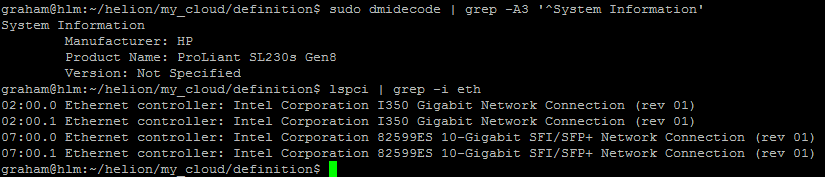
[Nota: No he incluido un ejemplo para el DL360 pero esto debe repetirse para todos los diferentes modelos y configuraciones utilizados. Por ejemplo, si tiene DL360s con diferentes tipos o números de interfaces, cada servidor necesitará un perfil dedicado.]
#
# (c) Copyright 2015 Hewlett Packard Enterprise Development Company LP
#
# Licensed under the Apache License, Version 2.0 (the "License"); you may
# not use this file except in compliance with the License. You may obtain
# a copy of the License at
#
# http://www.apache.org/licenses/LICENSE-2.0
#
# Unless required by applicable law or agreed to in writing, software
# distributed under the License is distributed on an "AS IS" BASIS, WITHOUT
# WARRANTIES OR CONDITIONS OF ANY KIND, either express or implied. See the
# License for the specific language governing permissions and limitations
# under the License.
#
---
product:
version: 2

# nic-mappings are used to ensure that the device name used by the
# operating system always maps to the same physical device.
# A nic-mapping is associated to a server in the server definition.
# The logical-name specified here can be used as a device name in
# the network interface-models definitions.
#
# - name user-defined name for each mapping
# physical-ports list of ports for this mapping
# - logical-name device name to be used by the operating system
# type physical port type
# bus-address bus address of the physical device
#
# Notes:
# - The PCI bus addresses are examples. You will need to determine
# the values pertinent to your servers. These can be found with the
# the `lspci` command or from the server BIOS
# - enclose the bus address in quotation marks so yaml does not
# misinterpret the embedded colon (:) characters
# - simple-port is the only currently supported port type
# - choosing a new device name prefix (e.g. 'eth' -> 'hed') will
# help prevent remapping errors

nic-mappings:

- name: HP-SL230-4PORT
physical-ports:
- logical-name: hed0
type: simple-port
bus-address: "0000:07:00.0"

- logical-name: hed1
type: simple-port
bus-address: "0000:07:00.1"

- logical-name: hed2
type: simple-port
bus-address: "0000:02:00.0"

- logical-name: hed3
type: simple-port
bus-address: "0000:02:00.1"

- name: HP-DL360-2PORT
physical-ports:
- logical-name: hed0
type: simple-port
bus-address: "0000:04:00.0"

- logical-name: hed1
type: simple-port
bus-address: "0000:04:00.1"
Disposiciones de disco del servidor
Los siguientes archivos tienen sus disk-models->name referenciados al archivo server_roles.yml. El enlace no es a los nombres de archivo en sí, sino al contenido dentro de los archivos. En teoría, podrías dar a estos archivos cualquier nombre de archivo yml válido una vez que se coloquen en el directorio correcto. Ansible simplemente lee todos los archivos en el directorio y genera un conjunto de pares clave-valor. Acabo de escribir eso y estoy adivinando que los nombres de disk-model deben ser únicos en todos los archivos utilizados de lo contrario la depuración se volverá muy interesante.
disks_controller.yml
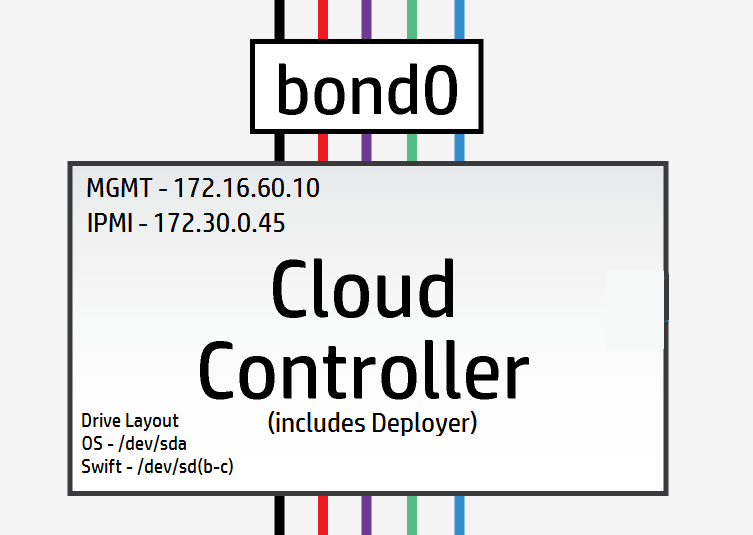
Los nodos controlador tienen 3 unidades lógicas, 1 se utiliza para el SO /dev/sda y las restantes 2 se utilizan para los anillos de Swift /dev/sdb & /dev/sdc.
[Nota: En escenarios de laboratorio y prueba es posible utilizar una única unidad física y usar puntos de montaje lvm para proporcionar las unidades lógicas – el rendimiento puede ser desafiante.]
Mis controladores tienen 3 unidades físicas que se presentarán como 3 unidades lógicas – así que puedo usar la configuración predeterminada aquí.
#
# (c) Copyright 2015 Hewlett Packard Enterprise Development Company LP
#
# Licensed under the Apache License, Version 2.0 (the "License"); you may
# not use this file except in compliance with the License. You may obtain
# a copy of the License at
#
# http://www.apache.org/licenses/LICENSE-2.0
#
# Unless required by applicable law or agreed to in writing, software
# distributed under the License is distributed on an "AS IS" BASIS, WITHOUT
# WARRANTIES OR CONDITIONS OF ANY KIND, either express or implied. See the
# License for the specific language governing permissions and limitations
# under the License.
#
---
product:
version: 2

disk-models:
- name: CONTROLLER-DISKS

# This example is based on using a single 500GB disk for a volume
# group that contains all file systems on a controller with 64GB
# of memory.
#
# Additional disks can be added to the 'physical-volumes' section.
#
# If the available capacity of your servers is more that 500GB you
# should consider using the "CONTROLLER-1TB-DISKS" disk-model
# in disks_controller_1TB.yml instead. To use this alternative model
# you need to edit the CONTROLLER-ROLE sections of server_roles.yml
#

volume-groups:
- name: hlm-vg
physical-volumes:

# NOTE: 'sda_root' is a templated value. This value is checked in
# os-config and replaced by the partition actually used on sda
#e.g. sda1 or sda5
- /dev/sda_root

# Add any additional disks for the volume group here
# -/dev/sdx
# -/dev/sdy

logical-volumes:
# The policy is not to consume 100% of the space of each volume group.
# 5% should be left free for snapshots and to allow for some flexibility.

- name: root
size: 10%
fstype: ext4
mount: /

# Reserved space for kernel crash dumps
# Should evaluate to a value that is slightly larger that
# the memory size of your server
- name: crash
size: 13%
mount: /var/crash
fstype: ext4
mkfs-opts: -O large_file

# Local Log files.
- name: log
size: 13%
mount: /var/log
fstype: ext4
mkfs-opts: -O large_file

# Mysql Database. All persistent state from OpenStack services
# is saved here. Although the individual objects are small the
# accumulated data can grow over time
- name: mysql
size: 10%
mount: /var/lib/mysql
fstype: ext4
mkfs-opts: -O large_file
consumer:
name: mysql

# Rabbitmq works mostly in memory, but needs to be able to persist
# messages to disc under high load. This area should evaluate to a value
# that is slightly larger than the memory size of your server
- name: rabbitmq
size: 13%
mount: /var/lib/rabbitmq
fstype: ext4
mkfs-opts: -O large_file
consumer:
name: rabbitmq
rabbitmq_env: home

# Database storage for event monitoring (Monasca). Events are generally
# small data objects.
- name: vertica
size: 3%
mount: /var/vertica
fstype: ext4
mkfs-opts: -O large_file
consumer:
name: vertica

# Messaging system for monitoring.
- name: kafka
size: 2%
mount: /var/kafka
fstype: ext4
mkfs-opts: -O large_file
consumer:
name: kafka

# Data storage for centralized logging. This holds log entries from all
# servers in the cloud and hence can require a lot of disk space.
- name: elasticsearch
size: 30%
mount: /var/lib/elasticsearch
fstype: ext4

# Zookeeper is used to provide cluster co-ordination in the monitoring
# system. Although not a high user of disc space we have seen issues
# with zookeeper snapshots filling up filesystems so we keep it in its
# own space for stability.
- name: zookeeper
size: 1%
mount: /var/lib/zookeeper
fstype: ext4

consumer:
name: os

# Additional disk group defined for Swift
device-groups:
- name: swiftobj
devices:
- name: /dev/sdb
- name: /dev/sdc
# Add any additional disks for swift here
# -name: /dev/sdd
# -name: /dev/sde
consumer:
name: swift
attrs:
rings:
- account
- container
- object-0
[Material adicional : El siguiente archivo de controlador es solo para comparar cómo se vería la disposición cuando comprimes todo en un controlador de unidad única]
Ejemplo de disposición de disco de controlador de unidad única [No para producción]
Observe cómo las unidades de Swift ahora están en un volumen lógico.
#
# (c) Copyright 2015 Hewlett Packard Enterprise Development Company LP
#
# Licensed under the Apache License, Version 2.0 (the "License"); you may
# not use this file except in compliance with the License. You may obtain
# a copy of the License at
#
# http://www.apache.org/licenses/LICENSE-2.0
#
# Unless required by applicable law or agreed to in writing, software
# distributed under the License is distributed on an "AS IS" BASIS, WITHOUT
# WARRANTIES OR CONDITIONS OF ANY KIND, either express or implied. See the
# License for the specific language governing permissions and limitations
# under the License.
#
---
product:
version: 2

disk-models:
- name: CONTROLLER-1TB-DISKS

# This example is based on using a single 1TB disk for a volume
# group that contains all file systems on a controller with 64GB
# of memory.
#
# Additional disks can be added to the 'physical-volumes' section.
#
#

volume-groups:
- name: hlm-vg
physical-volumes:

# NOTE: 'sda_root' is a templated value. This value is checked in
# os-config and replaced by the partition actually used on sda
#e.g. sda1 or sda5
- /dev/sda_root

# Add any additional disks for the volume group here
# -/dev/sdx
# -/dev/sdy

logical-volumes:
# The policy is not to consume 100% of the space of each volume group.
# 5% should be left free for snapshots and to allow for some flexibility.

- name: root
size: 5%
fstype: ext4
mount: /

# Reserved space for kernel crash dumps
# Should evaluate to a value that is slightly larger that
# the memory size of your server
- name: crash
size: 8%
mount: /var/crash
fstype: ext4
mkfs-opts: -O large_file

# Local Log files.
- name: log
size: 10%
mount: /var/log
fstype: ext4
mkfs-opts: -O large_file

# Mysql Database. All persistent state from OpenStack services
# is saved here. Although the individual objects are small the
# accumulated data can grow over time
- name: mysql
size: 8%
mount: /var/lib/mysql
fstype: ext4
mkfs-opts: -O large_file
consumer:
name: mysql

# Rabbitmq works mostly in memory, but needs to be able to persist
# messages to disc under high load. This area should evaluate to a value
# that is slightly larger than the memory size of your server
- name: rabbitmq
size: 8%
mount: /var/lib/rabbitmq
fstype: ext4
mkfs-opts: -O large_file
consumer:
name: rabbitmq
rabbitmq_env: home

# Database storage for event monitoring (Monasca). Events are generally
# small data objects.
- name: vertica
size: 5%
mount: /var/vertica
fstype: ext4
mkfs-opts: -O large_file
consumer:
name: vertica

# Messaging system for monitoring.
- name: kafka
size: 2%
mount: /var/kafka
fstype: ext4
mkfs-opts: -O large_file
consumer:
name: kafka

# Data storage for centralized logging. This holds log entries from all
# servers in the cloud and hence can require a lot of disk space.
- name: elasticsearch
size: 20%
mount: /var/lib/elasticsearch
fstype: ext4

# Zookeeper is used to provide cluster co-ordination in the monitoring
# system. Although not a high user of disc space we have seen issues
# with zookeeper snapshots filling up filesystems so we keep it in its
# own space for stability.
- name: zookeeper
size: 1%
mount: /var/lib/zookeeper
fstype: ext4

- name: LV_SWFPAC
size: 25%
fstype: xfs
consumer:
name: swift
attrs:
rings:
- name: account
- name: container
- name: object-0

consumer:
name: os
disks_compute.yml
El archivo de configuración de ejemplo espera dos unidades físicas /dev/sda y /dev/sdb que se muestran a continuación
#
# (c) Copyright 2015 Hewlett Packard Enterprise Development Company LP
#
# Licensed under the Apache License, Version 2.0 (the "License"); you may
# not use this file except in compliance with the License. You may obtain
# a copy of the License at
#
# http://www.apache.org/licenses/LICENSE-2.0
#
# Unless required by applicable law or agreed to in writing, software
# distributed under the License is distributed on an "AS IS" BASIS, WITHOUT
# WARRANTIES OR CONDITIONS OF ANY KIND, either express or implied. See the
# License for the specific language governing permissions and limitations
# under the License.
#
---
product:
version: 2

disk-models:
- name: COMPUTE-DISKS
# Disk model to be used for compute nodes
# /dev/sda_root is used as a volume group for /, /var/log and /var/crash
# sda_root is a templated value to align with whatever partition is really used
# This value is checked in os config and replaced by the partition actually used
# on sda e.g. sda1 or sda5
# /dev/sdb is used as a volume group for /var/lib (for VM storage)
# Additional discs can be added to either volume group

volume-groups:
- name: hlm-vg
physical-volumes:
- /dev/sda_root

logical-volumes:
# The policy is not to consume 100% of the space of each volume group.
# 5% should be left free for snapshots and to allow for some flexibility.
- name: root
size: 35%
fstype: ext4
mount: /
- name: log
size: 50%
mount: /var/log
fstype: ext4
mkfs-opts: -O large_file
- name: crash
size: 10%
mount: /var/crash
fstype: ext4
mkfs-opts: -O large_file

- name: vg-comp
# this VG is dedicated to Nova Compute to keep VM IOPS off the OS disk
physical-volumes:
- /dev/sdb
logical-volumes:
- name: compute
size: 95%
mount: /var/lib/nova
fstype: ext4
mkfs-opts: -O large_file
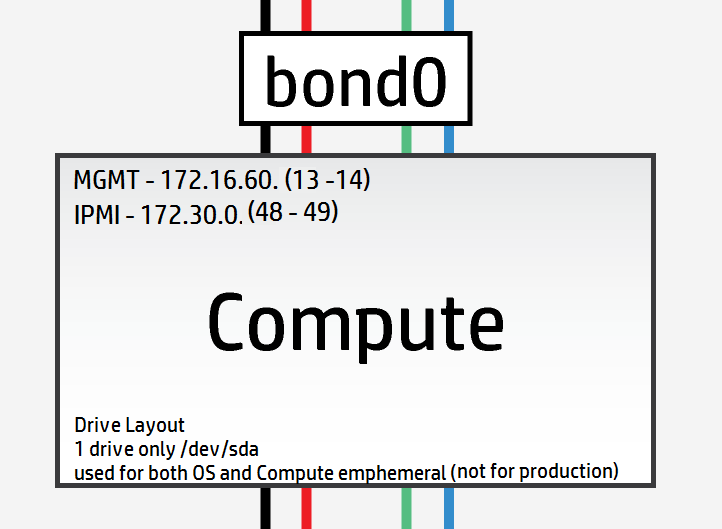
Sin embargo, mi laboratorio solo tiene nodos de cómputo de disco único, así que he tenido que cambiar la disposición para que coincida como sigue
#
# (c) Copyright 2015 Hewlett Packard Enterprise Development Company LP
#
# Licensed under the Apache License, Version 2.0 (the "License"); you may
# not use this file except in compliance with the License. You may obtain
# a copy of the License at
#
# http://www.apache.org/licenses/LICENSE-2.0
#
# Unless required by applicable law or agreed to in writing, software
# distributed under the License is distributed on an "AS IS" BASIS, WITHOUT
# WARRANTIES OR CONDITIONS OF ANY KIND, either express or implied. See the
# License for the specific language governing permissions and limitations
# under the License.
#
---
product:
version: 2

disk-models:
- name: COMPUTE-DISKS
# Disk model to be used for compute nodes
# /dev/sda_root is used as a volume group for /, /var/log and /var/crash
# sda_root is a templated value to align with whatever partition is really used
# This value is checked in os config and replaced by the partition actually used
# on sda e.g. sda1 or sda5
# /dev/sdb is used as a volume group for /var/lib (for VM storage)
# Additional discs can be added to either volume group

volume-groups:
- name: hlm-vg
physical-volumes:
- /dev/sda_root

logical-volumes:
# The policy is not to consume 100% of the space of each volume group.
# 5% should be left free for snapshots and to allow for some flexibility.
- name: root
size: 35%
fstype: ext4
mount: /
- name: log
size: 20%
mount: /var/log
fstype: ext4
mkfs-opts: -O large_file
- name: crash
size: 10%
mount: /var/crash
fstype: ext4
mkfs-opts: -O large_file
- name: compute
size: 30%
mount: /var/lib/nova
fstype: ext4
mkfs-opts: -O large_file
disks_osd.yml
Hay 8 unidades físicas disponibles en los servidores OSD. Ninguna de estas unidades son SSDs, por lo que hay muy poco punto en hacer journaling como lo entiendo. La configuración más óptima sería la siguiente utilizando solo una unidad para el SO y las unidades restantes como OSDs:
#
# (c) Copyright 2015 Hewlett Packard Enterprise Development Company LP
#
# Licensed under the Apache License, Version 2.0 (the "License"); you may
# not use this file except in compliance with the License. You may obtain
# a copy of the License at
#
# http://www.apache.org/licenses/LICENSE-2.0
#
# Unless required by applicable law or agreed to in writing, software
# distributed under the License is distributed on an "AS IS" BASIS, WITHOUT
# WARRANTIES OR CONDITIONS OF ANY KIND, either express or implied. See the
# License for the specific language governing permissions and limitations
# under the License.
#
---
product:
version: 2

disk-models:
- name: OSD-DISKS
# Disk model to be used for Ceph OSD nodes
# /dev/sda_root is used as a volume group for /, /var/log and /var/crash
# sda_root is a templated value to align with whatever partition is really used
# This value is checked in os config and replaced by the partition actually used
# on sda e.g. sda1 or sda5

volume-groups:
- name: hlm-vg
physical-volumes:
- /dev/sda_root

logical-volumes:
# The policy is not to consume 100% of the space of each volume group.
# 5% should be left free for snapshots and to allow for some flexibility.
- name: root
size: 30%
fstype: ext4
mount: /
- name: log
size: 45%
mount: /var/log
fstype: ext4
mkfs-opts: -O large_file
- name: crash
size: 20%
mount: /var/crash
fstype: ext4
mkfs-opts: -O large_file
consumer:
name: os

# Disks to be used by Ceph
# Additional disks can be added if available
device-groups:
- name: ceph-osd-data0
devices:
- name: /dev/sdb
consumer:
name: ceph
attrs:
usage: data
- name: ceph-osd-data1
devices:
- name: /dev/sdc
consumer:
name: ceph
attrs:
usage: data
- name: ceph-osd-data2
devices:
- name: /dev/sdd
consumer:
name: ceph
attrs:
usage: data
- name: ceph-osd-data3
devices:
- name: /dev/sde
consumer:
name: ceph
attrs:
usage: data
- name: ceph-osd-data4
devices:
- name: /dev/sdf
consumer:
name: ceph
attrs:
usage: data
- name: ceph-osd-data5
devices:
- name: /dev/sdg
consumer:
name: ceph
attrs:
usage: data
- name: ceph-osd-data6
devices:
- name: /dev/sdh
consumer:
name: ceph
attrs:
usage: data
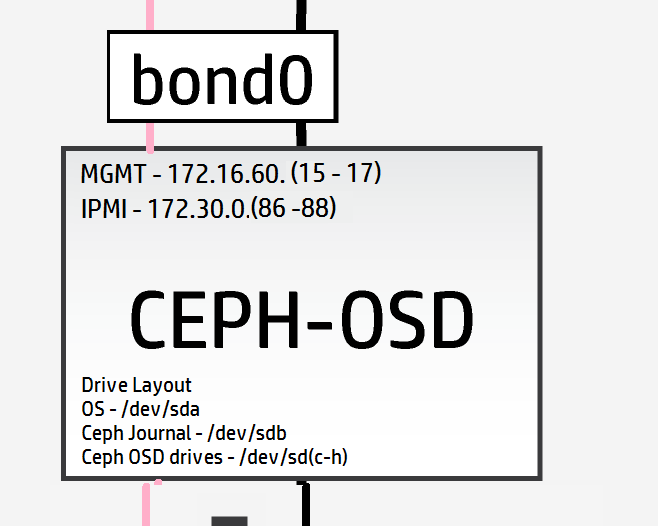
Nuevamente, a pesar de la falta de SSDs de alto rendimiento, me gustaría probar la mecánica de la capacidad de journaling de Ceph, así que usaré una unidad estándar como journal. Esto da una proporción de journal a osd de 1:6 (esta proporción es bastante insignificante). La configuración ahora se convierte en
#
# (c) Copyright 2015 Hewlett Packard Enterprise Development Company LP
#
# Licensed under the Apache License, Version 2.0 (the "License"); you may
# not use this file except in compliance with the License. You may obtain
# a copy of the License at
#
# http://www.apache.org/licenses/LICENSE-2.0
#
# Unless required by applicable law or agreed to in writing, software
# distributed under the License is distributed on an "AS IS" BASIS, WITHOUT
# WARRANTIES OR CONDITIONS OF ANY KIND, either express or implied. See the
# License for the specific language governing permissions and limitations
# under the License.
#
---
product:
version: 2

disk-models:
- name: OSD-DISKS
# Disk model to be used for Ceph OSD nodes
# /dev/sda_root is used as a volume group for /, /var/log and /var/crash
# sda_root is a templated value to align with whatever partition is really used
# This value is checked in os config and replaced by the partition actually used
# on sda e.g. sda1 or sda5

volume-groups:
- name: hlm-vg
physical-volumes:
- /dev/sda_root

logical-volumes:
# The policy is not to consume 100% of the space of each volume group.
# 5% should be left free for snapshots and to allow for some flexibility.
- name: root
size: 30%
fstype: ext4
mount: /
- name: log
size: 45%
mount: /var/log
fstype: ext4
mkfs-opts: -O large_file
- name: crash
size: 20%
mount: /var/crash
fstype: ext4
mkfs-opts: -O large_file
consumer:
name: os

# Disks to be used by Ceph
# Additional disks can be added if available
device-groups:
- name: ceph-osd-data-and-shared-journal-set-1
devices:
- name: /dev/sdc
consumer:
name: ceph
attrs:
usage: data
journal_disk: /dev/sdb
- name: ceph-osd-data-and-shared-journal-set-2
devices:
- name: /dev/sdd
consumer:
name: ceph
attrs:
usage: data
journal_disk: /dev/sdb
- name: ceph-osd-data-and-shared-journal-set-3
devices:
- name: /dev/sde
consumer:
name: ceph
attrs:
usage: data
journal_disk: /dev/sdb
- name: ceph-osd-data-and-shared-journal-set-4
devices:
- name: /dev/sdf
consumer:
name: ceph
attrs:
usage: data
journal_disk: /dev/sdb
- name: ceph-osd-data-and-shared-journal-set-5
devices:
- name: /dev/sdg
consumer:
name: ceph
attrs:
usage: data
journal_disk: /dev/sdb
- name: ceph-osd-data-and-shared-journal-set-6
devices:
- name: /dev/sdh
consumer:
name: ceph
attrs:
usage: data
journal_disk: /dev/sdb
Con las disposiciones de disco del servidor completadas, solo nos quedan los archivos de configuración de red entre nosotros y el inicio real de la implementación.
Aquí está la disposición de red nuevamente para ahorrar ir y venir (haga zoom para ver más detalles en los servidores)
net_interfaces.yml
Aquí debemos recordar añadir los detalles de la nueva red de replicación OSD. Nuevamente para mayor claridad, en una implementación de producción de Ceph mediana a grande, la red de replicación OSD estaría en sus propias tarjetas de interfaz de red físicas.
No tengo suficiente cableado y hardware para hacer esto, así que lo troncalizaré en bond0 solo con fines de demostración.
Modifique todos los nombres de dispositivo para que coincidan con los mapeos de nic capturados anteriormente.
#
# (c) Copyright 2015 Hewlett Packard Enterprise Development Company LP
#
# Licensed under the Apache License, Version 2.0 (the "License"); you may
# not use this file except in compliance with the License. You may obtain
# a copy of the License at
#
# http://www.apache.org/licenses/LICENSE-2.0
#
# Unless required by applicable law or agreed to in writing, software
# distributed under the License is distributed on an "AS IS" BASIS, WITHOUT
# WARRANTIES OR CONDITIONS OF ANY KIND, either express or implied. See the
# License for the specific language governing permissions and limitations
# under the License.
#
---
product:
version: 2

interface-models:
# These examples uses hed3 and hed4 as a bonded
# pair for all networks on all three server roles
#
# Edit the device names and bond options
# to match your environment
#
- name: CONTROLLER-INTERFACES
network-interfaces:
- name: BOND0
device:
name: bond0
bond-data:
options:
mode: active-backup
miimon: 200
primary: hed0
provider: linux
devices:
- name: hed0
- name: hed1
network-groups:
- EXTERNAL-API
- EXTERNAL-VM
- GUEST
- MANAGEMENT

- name: COMPUTE-INTERFACES
network-interfaces:
- name: BOND0
device:
name: bond0
bond-data:
options:
mode: active-backup
miimon: 200
primary: hed0
provider: linux
devices:
- name: hed0
- name: hed1
network-groups:
- EXTERNAL-VM
- GUEST
- MANAGEMENT

- name: OSD-INTERFACES
network-interfaces:
- name: BOND0
device:
name: bond0
bond-data:
options:
mode: active-backup
miimon: 200
primary: hed0
provider: linux
devices:
- name: hed0
- name: hed1
network-groups:
- MANAGEMENT
- OSD
Referencia de modos de enlace para los curiosos
networks.yml
Configure este archivo para que coincida con la configuración de red en sus parámetros.
#
# (c) Copyright 2015 Hewlett Packard Enterprise Development Company LP
#
# Licensed under the Apache License, Version 2.0 (the "License"); you may
# not use this file except in compliance with the License. You may obtain
# a copy of the License at
#
# http://www.apache.org/licenses/LICENSE-2.0
#
# Unless required by applicable law or agreed to in writing, software
# distributed under the License is distributed on an "AS IS" BASIS, WITHOUT
# WARRANTIES OR CONDITIONS OF ANY KIND, either express or implied. See the
# License for the specific language governing permissions and limitations
# under the License.
#
---
product:
version: 2

networks:
#
# This example uses the following networks
#
# Network CIDR VLAN
# ------- ---- ----
# External API 10.0.1.0/24 101 (tagged)
# External VM see note 1 102 (tagged)
# Guest 10.1.1.0/24 103 (tagged)
# Management 192.168.10.0/24 100 (untagged)
#
# Notes:
# 1. Defined as part of Neutron configuration
#
# Modify these values to match your environment
#
- name: EXTERNAL-API-NET
vlanid: 61
tagged-vlan: true
cidr: 172.16.61.0/24
gateway-ip: 172.16.61.1
network-group: EXTERNAL-API

- name: EXTERNAL-VM-NET
vlanid: 62
tagged-vlan: true
network-group: EXTERNAL-VM

- name: GUEST-NET
vlanid: 63
tagged-vlan: true
cidr: 172.16.63.0/24
gateway-ip: 172.16.63.1
network-group: GUEST

- name: MANAGEMENT-NET
vlanid: 60
tagged-vlan: false
cidr: 172.16.60.0/24
gateway-ip: 172.16.60.1
network-group: MANAGEMENT

- name: OSD-NET
vlanid: 64
tagged-vlan: true
cidr: 172.16.64.0/24
gateway-ip: 172.16.64.1
network-group: OSD
Ahora necesitamos modificar el archivo de grupos de red para incluir la nueva red OSD
network_groups.yml
#
# (c) Copyright 2015 Hewlett Packard Enterprise Development Company LP
#
# Licensed under the Apache License, Version 2.0 (the "License"); you may
# not use this file except in compliance with the License. You may obtain
# a copy of the License at
#
# http://www.apache.org/licenses/LICENSE-2.0
#
# Unless required by applicable law or agreed to in writing, software
# distributed under the License is distributed on an "AS IS" BASIS, WITHOUT
# WARRANTIES OR CONDITIONS OF ANY KIND, either express or implied. See the
# License for the specific language governing permissions and limitations
# under the License.
#
---
product:
version: 2

network-groups:

#
# External API
#
# This is the network group that users will use to
# access the public API endpoints of your cloud
#
- name: EXTERNAL-API
hostname-suffix: extapi

load-balancers:
- provider: ip-cluster
name: extlb
# If external-name is set then public urls in keystone
# will use this name instead of the IP address
#You must either set this to a name that can be resolved in your network
# or comment out this line to use IP addresses
external-name:

roles:
- public
tls-components:
- default
cert-file: my-public-cert
# This is the name of the certificate that will be used on load balancer.
# Replace this with name of file in "~helion/my_cloud/config/tls/certs/".
# This is the certificate that matches your setting for external-name
#
# Note that it is also possible to have per service certificates:
#
# cert-file:
# default: my-public-cert
# horizon: my-horizon-cert
# nova-api: my-nova-cert
#
#

# External VM
#
# This is the network group that will be used to provide
# external access to VMs (via floating IP Addresses)
#
- name: EXTERNAL-VM
tags:
- neutron.l3_agent.external_network_bridge

#
# GUEST
#
# This is the network group that will be used to provide
# private networks to VMs
#
- name: GUEST
hostname-suffix: guest
tags:
- neutron.networks.vxlan

#
# Management
#
# This is the network group that will be used to for
# management traffic within the cloud.
#
# The interface used by this group will be presented
# to Neutron as physnet1, and used by provider VLANS
#
- name: MANAGEMENT
hostname-suffix: mgmt
hostname: true

component-endpoints:
- default

routes:
- default

load-balancers:
- provider: ip-cluster
name: lb
components:
- default
roles:
- internal
- admin

tags:
- neutron.networks.vlan:
provider-physical-network: physnet1

#
# OSD
#
#
# This network group will be used to carry the to carry the internal Ceph
# cluster replication traffic
#
- name: OSD
hostanme-suffix: osd

component-endpoints:
- ceph-osd-internal
Vaya, lo siento, ¿dije que estábamos casi terminados? Olvidé mencionar las configuraciones básicas de Ceph.
Como mínimo para la configuración de Ceph, se recomienda añadir un id de clúster único al parámetro FSID en ~/helion/my_cloud/config/ceph/settings.yml
Los valores predeterminados funcionarán sin embargo para una implementación de laboratorio.
Nota: La documentación en línea recomienda usar "uuidgen" para crear un nuevo id único pero esta aplicación necesita ser instalada primero.
sudo apt-get install uuid-runtime
uuidgen
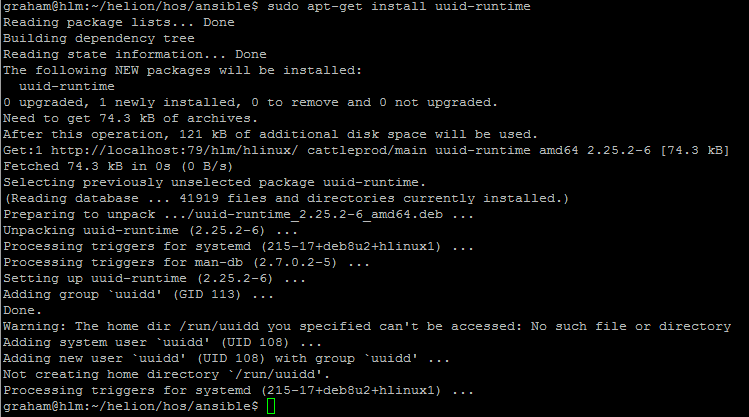
He usado 5e23fd0c-b449-43e3-a34e-fa0952c30e81 para el FSID del clúster

#
# (c) Copyright 2015 Hewlett Packard Enterprise Development Company LP
#
# Licensed under the Apache License, Version 2.0 (the "License"); you may
# not use this file except in compliance with the License. You may obtain
# a copy of the License at
#
# http://www.apache.org/licenses/LICENSE-2.0
#
# Unless required by applicable law or agreed to in writing, software
# distributed under the License is distributed on an "AS IS" BASIS, WITHOUT
# WARRANTIES OR CONDITIONS OF ANY KIND, either express or implied. See the
# License for the specific language governing permissions and limitations
# under the License.
#
---

# Variables specific to all ceph services
fsid: 5e23fd0c-b449-43e3-a34e-fa0952c30e81
ceph_user: root
ceph_group: root
ceph_cluster: ceph
ceph_release: firefly
osd_pool_default_size: 3
osd_pool_default_pg_num: 128

# Variables specific to OSD
fstype: xfs
zap_data_disk: True
persist_mountpoint: fstab
osd_settle_time: 10
osd_journal_size: 5120
data_disk_poll_attempts: 5
data_disk_poll_interval: 12

# Variables specific to MON
mon_default_dir: /var/lib/ceph/mon/{{ ceph_cluster }}

# Additional parameters of ceph configuration can be injected via below section
# extra:
# section1:
# key1: value
# key2: value
# section2:
# key1: value
# key2: value
También para el cliente de Ceph proporcione un secret_id único en ~/helion/my_cloud/config/ceph/user_model.yml
En mi caso usaré 7d4304a4-a4d2-4cea-ba3c-bbbdc8d11bd4 para el secret_id

#
# (c) Copyright 2015 Hewlett Packard Enterprise Development Company LP
#
# Licensed under the Apache License, Version 2.0 (the "License"); you may
# not use this file except in compliance with the License. You may obtain
# a copy of the License at
#
# http://www.apache.org/licenses/LICENSE-2.0
#
# Unless required by applicable law or agreed to in writing, software
# distributed under the License is distributed on an "AS IS" BASIS, WITHOUT
# WARRANTIES OR CONDITIONS OF ANY KIND, either express or implied. See the
# License for the specific language governing permissions and limitations
# under the License.
#
---

product:
version: 2

ceph_user_models:
- user:
name: cinder
type: openstack
secret_id: 7d4304a4-a4d2-4cea-ba3c-bbbdc8d11bd4
pools:
- name: volumes
attrs:
creation_policy: eager
type: replicated
replica_size: 3
permission: rwx
pg: 100
usage:
consumer: cinder-volume
- name: vms
attrs:
creation_policy: eager
type: replicated
replica_size: 3
permission: rwx
pg: 100
usage:
consumer: nova
- name: images
attrs:
creation_policy: lazy
permission: rx
- user:
name: glance
type: openstack
pools:
- name: images
attrs:
creation_policy: eager
type: replicated
replica_size: 3
permission: rwx
pg: 128
usage:
consumer: glance-datastore
- user:
name: cinder-backup
type: openstack
pools:
- name: backups
attrs:
creation_policy: eager
type: replicated
replica_size: 3
permission: rwx
pg: 128
usage:
consumer: cinder-backup
Por último, pero no menos importante, tenemos que añadir la nueva red OSD al firewall
#
# (c) Copyright 2015 Hewlett Packard Enterprise Development Company LP
#
# Licensed under the Apache License, Version 2.0 (the "License"); you may
# not use this file except in compliance with the License. You may obtain
# a copy of the License at
#
# http://www.apache.org/licenses/LICENSE-2.0
#
# Unless required by applicable law or agreed to in writing, software
# distributed under the License is distributed on an "AS IS" BASIS, WITHOUT
# WARRANTIES OR CONDITIONS OF ANY KIND, either express or implied. See the
# License for the specific language governing permissions and limitations
# under the License.
#
---
product:
version: 2

#
# HOS will create firewall rules to enable the required access for
# all of the deployed services. Use this section to define any
# additional access.
#
# Each group of rules can be applied to one or more network groups
# Examples are given for ping and ssh
#
# Names of rules, (e.g. "PING") are arbitrary and have no special significance
#

firewall-rules:

# - name: SSH
# # network-groups is a list of all the network group names
# # that the rules apply to
# network-groups:
# - MANAGEMENT
# rules:
# - type: allow
# # range of remote addresses in CIDR format that this
# # rule applies to
# remote-ip-prefix: 0.0.0.0/0
# port-range-min: 22
# port-range-max: 22
# # protocol must be one of: null, tcp, udp or icmp
# protocol: tcp

- name: PING
network-groups:
- MANAGEMENT
- GUEST
- EXTERNAL-API
- OSD
rules:
# open ICMP echo request (ping)
- type: allow
remote-ip-prefix: 0.0.0.0/0
# icmp type
port-range-min: 8
# icmp code
port-range-max: 0
protocol: icmp
Bien, entonces hay un archivo más que actualizar y dentro de 3 semanas estarás agradecido de haberlo hecho…¿alguna conjetura, sí, así es, el archivo ReadMe.MD. A todos nos encanta la documentación, ¿verdad? [Sí, veo la ironía aquí]
README.MD
README.MD

##Helion Entry Scale Cloud with Ceph and Separate OSD Replication Network##

## Updated - 15/01/16
## Author - Grazzer
## Site - http://allthingscloud.eu
## Twitter - @allthingsclowd

The input files in this example deploy a cloud that has the following characteristics:

### Control Planes ###

- A single control plane consisting of three servers that co-host all of the required services. In addition, each hosts Ceph monitor service as well.

###Resource Pools###

- Two compute Node

- Three Ceph OSD Nodes

*Additional resource nodes can be added to the configuration.*

*Minimal Swift Resources are provided by the control plane*

###Deployer Node###

This configuration runs the lifecycle-manager (formerly referred to as the deployer) on a control plane node.
You need to include this node address in your servers.yml definition. This function does not need a dedicated network.

*The minimum server count for this example is therefore 7 servers (Control Plane (x3) + Compute (x1) + OSD (x3))*

An example set of servers are defined in ***data/servers.yml***. You will need to modify this file to reflect your specific environment.

###Networking###

The example requires the following networks:

IPMI/iLO network, connected to the deployer and the IPMI/iLO ports of all servers

A pair of bonded NICs which are used by the following networks:

- External API - This is the network that users will use to make requests to the cloud
- External VM - This is the network that will be used to provide access to VMs (via floating IP addresses)
- Guest - This is the network that will carry traffic between VMs on private networks within the cloud
- Cloud Management - This is the network that will be used for all internal traffic between the cloud services, This network is also
used to install and configure the nodes. This network needs to be on an untagged VLAN
- OSD - This is the network that is used to carry all the Ceph OSD replication traffic

Note that the EXTERNAL\_API network must be reachable from the EXTERNAL\_VM network if you want VMs to be able to make API calls to the cloud.

An example set of networks are defined in ***data/networks.yml***. You will need to modify this file to reflect your environment.

The example uses the devices hed3 & hed4 as a bonded network for all services. If you need to modify these
for your environment they are defined in ***data/net_interfaces.yml*** The network devices eth3 & eth4 are renamed to devices hed4 & hed5 using the PCI bus mappings secified in ***data/nic_mappings.yml***. You may need to modify the PCI bus addresses to match your system.

###Local Storage###

All servers should present a single OS disk, protected by a RAID controller. This disk needs to be at least 512GB in capacity. In addition the example configures one additional disk depending on the role of the server:

- Controllers: /dev/sdb & /dev/sdc is configured to be used by Swift
- Compute Severs: /dev/sda is configured as both OS and VM storage (not production grade)
- OSD Servers: /dev/sdc, /dev/sdd, /dev/sde, /dev/sdf, /dev/sdg and /dev/sdh are configured for OSD data and /dev/sdb for journal storage

Additional discs can be configured for any of these roles by editing the corresponding ***data/disks_*.yml*** file
Ahora hemos completado la configuración de nuestro modelo de nube.
Nota: SI VA A USAR HELION DEVELOPMENT PLATFORM ENTONCES TAMBIÉN SE DEBERÍA AÑADIR UNA RED DE SERVICIO AHORA ver aquí.