

Por fin puedo publicar algunos heat stacks para la plataforma de nube pública Fujitsu K5 OpenStack. Las últimas semanas han sido frenéticas y he tenido muy poco tiempo para escribir en el blog.
Heat es el proyecto de orquestación de OpenStack y es lo que generalmente se debe utilizar cuando se tiene la necesidad de construir un patrón de infraestructura (plantilla) de forma rápida y consistente en tu nube IaaS OpenStack K5, o en cualquier otra nube OpenStack, por cierto. La ventaja de esto es que, como puedes ver a continuación, la plantilla está codificada en un archivo YAML que he almacenado en Github. Ahora tengo la capacidad de controlar la versión de mi infraestructura así como de mi código de aplicación, lo que debería resultar en menos sorpresas durante los despliegues de versiones probadas de IaC (Infrastructure as Code). Este es un requisito si esperas pasar a un modelo operativo de Integración Continua y Despliegue Continuo.
El primer ejemplo a continuación, y también disponible aquí, construye la siguiente infraestructura 'automágicamente':
- 2 x redes L2
- 2 x Subredes
- Nota: Se han añadido rutas adicionales a las subredes – estas no son necesarias para este post
- 1 x Servidor Windows
- con un disco de bloque adicional
- script de inicialización para configurar y montar el nuevo disco como 'D:\'
- Dirección IP asignada por DHCP
- usuario administrador establecido como k5user
- conectado a la red de gestión
- 1 x Servidor Linux
- con un disco de bloque adicional
- script de inicialización para configurar y montar el nuevo disco en el momento del despliegue
- asignación de dirección IP fija
- usuario administrador establecido como K5user
- conectado a la red de servicios compartidos
- 2 x Grupos de Seguridad (SGs)
- Advertencia: Estos SGs están ABIERTOS – Por favor, asegúrate de configurar estos SGs apropiadamente para tu entorno.
Ejemplo – Project 1 Stack
Este archivo contiene texto Unicode oculto o bidireccional que puede ser interpretado o compilado de manera diferente a lo que aparece a continuación. Para revisarlo, abre el archivo en un editor que revele caracteres Unicode ocultos.
Más información sobre caracteres Unicode bidireccionales
| heat_template_version: 2013-05-23 | |
| # Author: Graham Land | |
| # Date: 25/09/2016 | |
| # Purpose: Project 1 Demo HOT Infrastructure Template | |
| # Twitter: @allthingsclowd | |
| # Blog : https://allthingscloud.eu | |
| description: K5 template to build an environment within a Project | |
| # Input parameters | |
| parameters: | |
| red_image: | |
| type: string | |
| label: Image name or ID | |
| description: Redhat 7.2 image to be used for compute instance | |
| default: "Red Hat Enterprise Linux 7.2 64bit (English) 01" | |
| win_image: | |
| type: string | |
| label: Image name or ID | |
| description: Windows Server 2012 R2 SE image to be used for compute instance | |
| default: "Windows Server 2012 R2 SE 64bit (English) 01" | |
| az: | |
| type: string | |
| label: Availability Zone | |
| description: Region AZ to use | |
| default: "uk-1b" | |
| default-sshkey: | |
| type: string | |
| label: ssh key injected into linux systems | |
| description: ssh key for linux builds | |
| default: "demostack" | |
| # K5 Infrastructure resources to be built | |
| resources: | |
| # Create a new private network | |
| management_net: | |
| type: OS::Neutron::Net | |
| properties: | |
| availability_zone: { get_param: az } | |
| name: "Management" | |
| # Create a new subnet on the private network | |
| management_subnet: | |
| type: OS::Neutron::Subnet | |
| depends_on: management_net | |
| properties: | |
| availability_zone: { get_param: az } | |
| name: "Management_Subnet" | |
| network_id: { get_resource: management_net } | |
| cidr: "172.24.201.0/26" | |
| allocation_pools: | |
| – start: "172.24.201.1" | |
| end: "172.24.201.15" | |
| gateway_ip: "172.24.201.62" | |
| host_routes: [{"nexthop": "172.24.200.81", "destination": "172.24.202.0/23"}] | |
| # Create a new private network | |
| shared_services_net: | |
| type: OS::Neutron::Net | |
| properties: | |
| availability_zone: { get_param: az } | |
| name: "Shared_Services" | |
| # Create a new subnet on the private network | |
| shared_services_subnet: | |
| type: OS::Neutron::Subnet | |
| depends_on: shared_services_net | |
| properties: | |
| availability_zone: { get_param: az } | |
| name: "Shared_Services_Subnet" | |
| network_id: { get_resource: shared_services_net } | |
| cidr: "172.24.201.64/26" | |
| gateway_ip: "172.24.201.126" | |
| allocation_pools: | |
| – start: "172.24.201.90" | |
| end: "172.24.201.105" | |
| host_routes: [{"nexthop": "172.24.200.81", "destination": "172.24.202.0/23"}] | |
| # Create a new router | |
| project1_router: | |
| type: OS::Neutron::Router | |
| properties: | |
| availability_zone: { get_param: az } | |
| name: "Project2_Router" | |
| # Connect an interface on the private network's subnet to the router | |
| project1_router_interface1: | |
| type: OS::Neutron::RouterInterface | |
| depends_on: project1_router | |
| properties: | |
| router_id: { get_resource: project1_router } | |
| subnet_id: { get_resource: management_subnet } | |
| # Connect an interface on the private network's subnet to the router | |
| project1_router_interface2: | |
| type: OS::Neutron::RouterInterface | |
| depends_on: project1_router | |
| properties: | |
| router_id: { get_resource: project1_router } | |
| subnet_id: { get_resource: shared_services_subnet } | |
| # Create a security group | |
| server_security_group1: | |
| type: OS::Neutron::SecurityGroup | |
| properties: | |
| description: Add security group rules for server | |
| name: "Windows_SG" | |
| rules: | |
| – remote_ip_prefix: 0.0.0.0/0 | |
| protocol: udp | |
| – remote_ip_prefix: 0.0.0.0/0 | |
| protocol: tcp | |
| – remote_ip_prefix: 0.0.0.0/0 | |
| protocol: icmp | |
| # Create a security group | |
| server_security_group2: | |
| type: OS::Neutron::SecurityGroup | |
| properties: | |
| description: Add security group rules for server | |
| name: "Linux_SG" | |
| rules: | |
| – remote_ip_prefix: 0.0.0.0/0 | |
| protocol: udp | |
| – remote_ip_prefix: 0.0.0.0/0 | |
| protocol: tcp | |
| – remote_ip_prefix: 0.0.0.0/0 | |
| protocol: icmp | |
| ################################ Adding a Server Start ############################## | |
| # Create a data volume for use with the server | |
| data_vol_server1: | |
| type: OS::Cinder::Volume | |
| properties: | |
| availability_zone: { get_param: az } | |
| description: Data volume | |
| name: "data-vol" | |
| size: 50 | |
| volume_type: "M1" | |
| # Create a system volume for use with the server | |
| sys-vol_server1: | |
| type: OS::Cinder::Volume | |
| properties: | |
| availability_zone: { get_param: az } | |
| name: "boot-vol" | |
| size: 80 | |
| volume_type: "M1" | |
| image : { get_param: win_image } | |
| # Build a server using the system volume defined above | |
| server1: | |
| type: OS::Nova::Server | |
| properties: | |
| key_name: { get_param: default-sshkey } | |
| image: { get_param: win_image } | |
| flavor: "S-4" | |
| admin_user: "k5user" | |
| metadata: { "admin_pass": Password12345 } | |
| block_device_mapping: [{"volume_size": "80", "volume_id": {get_resource: sys-vol_server1}, "delete_on_termination": True, "device_name": "/dev/vda"}] | |
| name: "Hello_Windows_P1" | |
| user_data: | |
| #ps1 | |
| $d = Get-Disk | |
| $d | |
| $d | |
| $p = $d | |
| $p | |
| user_data_format: RAW | |
| networks: ["uuid": {get_resource: management_net} ] | |
| # Attach previously defined data-vol to the server | |
| attach_vol1: | |
| type: OS::Cinder::VolumeAttachment | |
| depends_on: [ data_vol_server1, server1 ] | |
| properties: | |
| instance_uuid: {get_resource: server1} | |
| mountpoint: "/dev/vdb" | |
| volume_id: {get_resource: data_vol_server1} | |
| ################################ Adding a Server End ################################ | |
| ################################ Adding a Server Start ############################## | |
| # Create a new port for the server interface, assign an ip address and security group | |
| server2_port: | |
| type: OS::Neutron::Port | |
| depends_on: [ project1_router_interface2,server_security_group2 ] | |
| properties: | |
| availability_zone: { get_param: az } | |
| network_id: { get_resource: shared_services_net } | |
| security_groups: [{ get_resource: server_security_group2 }] | |
| fixed_ips: | |
| – subnet_id: { get_resource: shared_services_subnet } | |
| ip_address: '172.24.201.66' | |
| # Create a data volume for use with the server | |
| data_vol_server2: | |
| type: OS::Cinder::Volume | |
| properties: | |
| availability_zone: { get_param: az } | |
| description: Data volume | |
| name: "data-vol" | |
| size: 40 | |
| volume_type: "M1" | |
| # Create a system volume for use with the server | |
| sys-vol_server2: | |
| type: OS::Cinder::Volume | |
| properties: | |
| availability_zone: { get_param: az } | |
| name: "boot-vol" | |
| size: 40 | |
| volume_type: "M1" | |
| image : { get_param: red_image } | |
| # Build a server using the system volume defined above | |
| server2: | |
| type: OS::Nova::Server | |
| depends_on: [ server2_port ] | |
| properties: | |
| key_name: { get_param: default-sshkey } | |
| image: { get_param: red_image } | |
| flavor: "S-2" | |
| block_device_mapping: [{"volume_size": "40", "volume_id": {get_resource: sys-vol_server2}, "delete_on_termination": True, "device_name": "/dev/vda"}] | |
| name: "Hello_Linux_P1" | |
| admin_user: "k5user" | |
| user_data: | |
| str_replace: | |
| template: | |
| #cloud-config | |
| write_files: | |
| – content: | |
| #!/bin/bash | |
| voldata_id=%voldata_id% | |
| voldata_dev="/dev/disk/by-id/virtio-$(echo ${voldata_id} | |
| mkfs.ext4 ${voldata_dev} | |
| mkdir -pv /mnt/appdata | |
| echo "${voldata_dev} /mnt/appdata ext4 defaults 1 2" >> /etc/fstab | |
| mount /mnt/appdata | |
| chmod 0777 /mnt/appdata | |
| path: /tmp/format-disks | |
| permissions: '0700' | |
| runcmd: | |
| – /tmp/format-disks | |
| params: | |
| "%voldata_id%": { get_resource: data_vol_server2 } | |
| user_data_format: RAW | |
| networks: ["uuid": {get_resource: shared_services_net} ] | |
| # Attach previously defined data-vol to the server | |
| attach_vol2: | |
| type: OS::Cinder::VolumeAttachment | |
| depends_on: [ data_vol_server2, server2 ] | |
| properties: | |
| instance_uuid: {get_resource: server2} | |
| mountpoint: "/dev/vdb" | |
| volume_id: {get_resource: data_vol_server2} | |
| ################################ Adding a Server End ################################ | |
view raw
Fujitsu-K5-Example-Heat-Stack-Project1.YAML
hosted with ❤ by GitHub
Carga la plantilla de heat a través de la opción Stack en la interfaz gráfica de K5 IaaS de la siguiente manera:
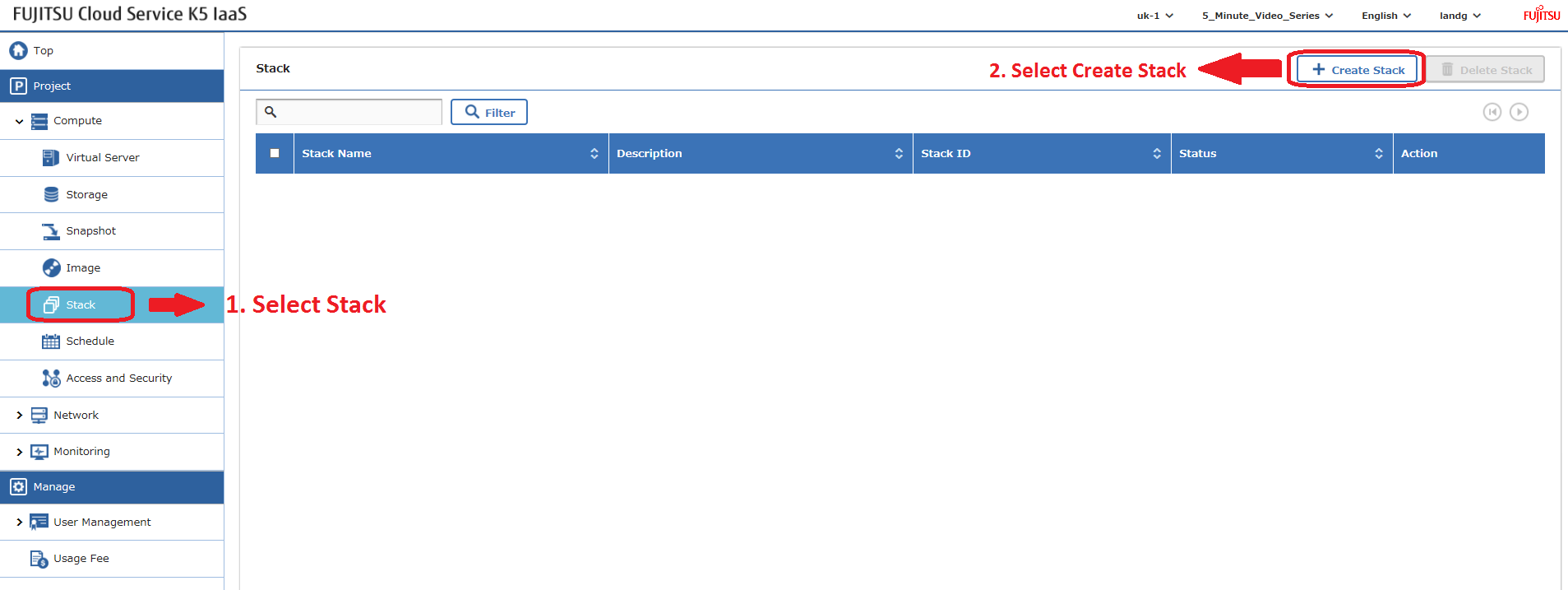
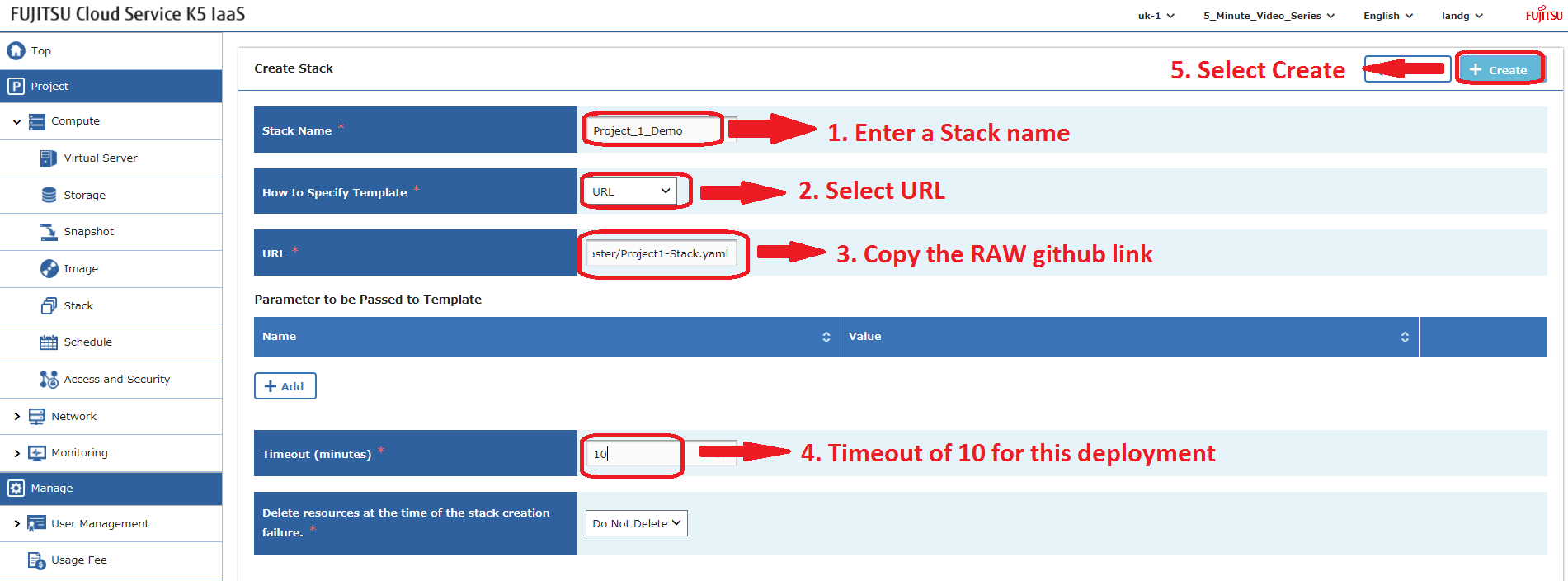
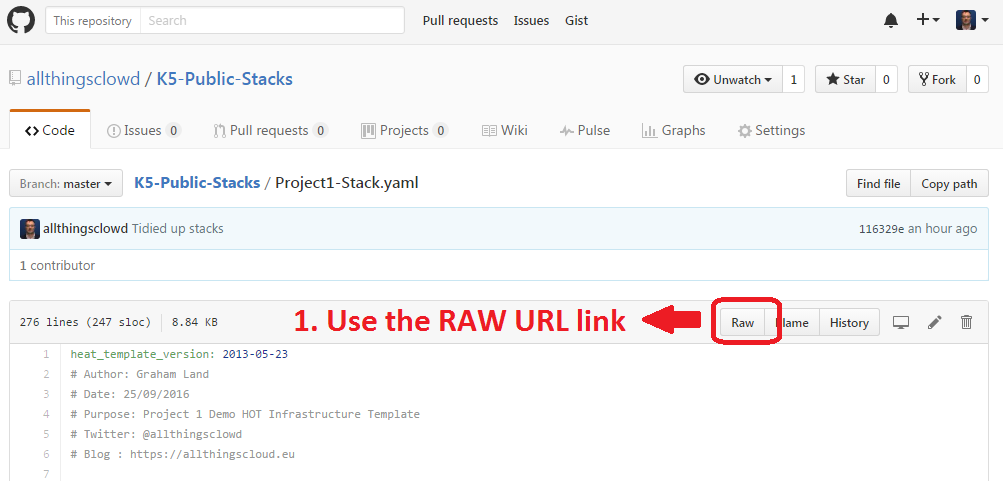
Los heat stacks también se pueden implementar usando la API – próximo blog.
Ejemplo – Project 2 Stack
Este archivo contiene texto Unicode oculto o bidireccional que puede ser interpretado o compilado de manera diferente a lo que aparece a continuación. Para revisarlo, abre el archivo en un editor que revele caracteres Unicode ocultos.
Más información sobre caracteres Unicode bidireccionales
| heat_template_version: 2013-05-23 | |
| # Author: Graham Land | |
| # Purpose: Demo Project 2 with Inter-Project-Routing | |
| # Date: 25/09/2016 | |
| # Twitter: @allthingsclowd | |
| # Blog : https://allthingscloud.eu | |
| description: Fujitsu K5 demo heat template to build an environment within a Project | |
| # Input parameters | |
| parameters: | |
| red_image: | |
| type: string | |
| label: Image name or ID | |
| description: Redhat 7.2 image to be used for compute instance | |
| default: "Red Hat Enterprise Linux 7.2 64bit (English) 01" | |
| win_image: | |
| type: string | |
| label: Image name or ID | |
| description: Windows Server 2012 R2 SE image to be used for compute instance | |
| default: "Windows Server 2012 R2 SE 64bit (English) 01" | |
| az: | |
| type: string | |
| label: Availability Zone | |
| description: Region AZ to use | |
| default: "uk-1b" | |
| default-sshkey: | |
| type: string | |
| label: ssh key injected into linux systems | |
| description: ssh key for linux builds | |
| default: "demostack" | |
| # K5 Infrastructure resources to be built | |
| resources: | |
| # Create a new private network | |
| Application_Network_net: | |
| type: OS::Neutron::Net | |
| properties: | |
| availability_zone: { get_param: az } | |
| name: "Application_Network" | |
| # Create a new subnet on the private network | |
| Application_Network_subnet: | |
| type: OS::Neutron::Subnet | |
| depends_on: Application_Network_net | |
| properties: | |
| availability_zone: { get_param: az } | |
| name: "Application_Subnet" | |
| network_id: { get_resource: Application_Network_net } | |
| cidr: "172.24.202.0/23" | |
| gateway_ip: "172.24.203.254" | |
| allocation_pools: | |
| – start: "172.24.203.200" | |
| end: "172.24.203.220" | |
| host_routes: [{"nexthop": "172.24.200.81", "destination": "172.24.201.0/26"}, {"nexthop": "172.24.200.81", "destination": "172.24.201.64/26"}] | |
| # Create a new private network | |
| inter_project_transit_net: | |
| type: OS::Neutron::Net | |
| properties: | |
| availability_zone: { get_param: az } | |
| name: "Inter_Project_Transit" | |
| # Create a new subnet on the private network | |
| inter_project_transit_subnet: | |
| type: OS::Neutron::Subnet | |
| depends_on: inter_project_transit_net | |
| properties: | |
| availability_zone: { get_param: az } | |
| name: "P2_Inter_Project_Transit_Subnet" | |
| network_id: { get_resource: inter_project_transit_net } | |
| cidr: "172.24.200.80/28" | |
| gateway_ip: "172.24.200.82" | |
| allocation_pools: | |
| – start: "172.24.200.85" | |
| end: "172.24.200.90" | |
| # Create a new router | |
| project2_router: | |
| type: OS::Neutron::Router | |
| properties: | |
| availability_zone: { get_param: az } | |
| name: "Project2_Router" | |
| # Create a new port for the interproject router interface links, assign an ip address | |
| project2_inter_project_transit_port: | |
| type: OS::Neutron::Port | |
| depends_on: [ project2_router ] | |
| properties: | |
| availability_zone: { get_param: az } | |
| network_id: { get_resource: inter_project_transit_net } | |
| fixed_ips: | |
| – subnet_id: { get_resource: inter_project_transit_subnet } | |
| ip_address: '172.24.200.81' | |
| # Connect an interface on the private network's subnet to the router | |
| project2_router_interface1: | |
| type: OS::Neutron::RouterInterface | |
| depends_on: [project2_router,inter_project_transit_subnet] | |
| properties: | |
| router_id: { get_resource: project2_router } | |
| subnet_id: { get_resource: inter_project_transit_subnet } | |
| # Connect an interface on the private network's subnet to the router | |
| project2_router_interface2: | |
| type: OS::Neutron::RouterInterface | |
| depends_on: project2_router | |
| properties: | |
| router_id: { get_resource: project2_router } | |
| subnet_id: { get_resource: Application_Network_subnet } | |
| # Create a security group | |
| server_security_group1: | |
| type: OS::Neutron::SecurityGroup | |
| properties: | |
| description: Add security group rules for server | |
| name: "Windows_SG" | |
| rules: | |
| – remote_ip_prefix: 0.0.0.0/0 | |
| protocol: udp | |
| – remote_ip_prefix: 0.0.0.0/0 | |
| protocol: tcp | |
| – remote_ip_prefix: 0.0.0.0/0 | |
| protocol: icmp | |
| # Create a security group | |
| server_security_group2: | |
| type: OS::Neutron::SecurityGroup | |
| properties: | |
| description: Add security group rules for server | |
| name: "Linux_SG" | |
| rules: | |
| – remote_ip_prefix: 0.0.0.0/0 | |
| protocol: udp | |
| – remote_ip_prefix: 0.0.0.0/0 | |
| protocol: tcp | |
| – remote_ip_prefix: 0.0.0.0/0 | |
| protocol: icmp | |
| # Create a security group | |
| server_security_group3: | |
| type: OS::Neutron::SecurityGroup | |
| properties: | |
| description: Add security group rules for server | |
| name: "InterProject_SG" | |
| rules: | |
| – remote_ip_prefix: 0.0.0.0/0 | |
| protocol: udp | |
| – remote_ip_prefix: 0.0.0.0/0 | |
| protocol: tcp | |
| – remote_ip_prefix: 0.0.0.0/0 | |
| protocol: icmp | |
| ################################ Adding a Server Start ############################## | |
| # Create a new port for the server interface, assign an ip address and security group | |
| server1_port: | |
| type: OS::Neutron::Port | |
| depends_on: [ project2_router,server_security_group1 ] | |
| properties: | |
| availability_zone: { get_param: az } | |
| network_id: { get_resource: Application_Network_net } | |
| security_groups: [{ get_resource: server_security_group1 }] | |
| fixed_ips: | |
| – subnet_id: { get_resource: Application_Network_subnet } | |
| ip_address: '172.24.203.2' | |
| # Create a data volume for use with the server | |
| data_vol_server1: | |
| type: OS::Cinder::Volume | |
| properties: | |
| availability_zone: { get_param: az } | |
| description: Data volume | |
| name: "data-vol" | |
| size: 50 | |
| volume_type: "M1" | |
| # Create a system volume for use with the server | |
| sys-vol_server1: | |
| type: OS::Cinder::Volume | |
| properties: | |
| availability_zone: { get_param: az } | |
| name: "boot-vol" | |
| size: 40 | |
| volume_type: "M1" | |
| image : { get_param: red_image } | |
| # Build a server using the system volume defined above | |
| server1: | |
| type: OS::Nova::Server | |
| depends_on: [ server1_port ] | |
| properties: | |
| key_name: { get_param: default-sshkey } | |
| image: { get_param: red_image } | |
| flavor: "S-2" | |
| block_device_mapping: [{"volume_size": "40", "volume_id": {get_resource: sys-vol_server1}, "delete_on_termination": True, "device_name": "/dev/vda"}] | |
| name: "Hello_Linux_P2" | |
| admin_user: "k5user" | |
| user_data: | |
| str_replace: | |
| template: | |
| #cloud-config | |
| write_files: | |
| – content: | |
| #!/bin/bash | |
| voldata_id=%voldata_id% | |
| voldata_dev="/dev/disk/by-id/virtio-$(echo ${voldata_id} | |
| mkfs.ext4 ${voldata_dev} | |
| mkdir -pv /mnt/appdata | |
| echo "${voldata_dev} /mnt/appdata ext4 defaults 1 2" >> /etc/fstab | |
| mount /mnt/appdata | |
| chmod 0777 /mnt/appdata | |
| path: /tmp/format-disks | |
| permissions: '0700' | |
| runcmd: | |
| – /tmp/format-disks | |
| params: | |
| "%voldata_id%": { get_resource: data_vol_server1 } | |
| user_data_format: RAW | |
| networks: | |
| – port: { get_resource: server1_port } | |
| # Attach previously defined data-vol to the server | |
| attach_vol1: | |
| type: OS::Cinder::VolumeAttachment | |
| depends_on: [ data_vol_server1, server1 ] | |
| properties: | |
| instance_uuid: {get_resource: server1} | |
| mountpoint: "/dev/vdb" | |
| volume_id: {get_resource: data_vol_server1} | |
| ################################ Adding a Server End ################################ | |
| ################################ Adding a Server Start ############################## | |
| # Create a new port for the server interface, assign an ip address and security group | |
| server2_port: | |
| type: OS::Neutron::Port | |
| depends_on: [ project2_router,server_security_group1 ] | |
| properties: | |
| availability_zone: { get_param: az } | |
| network_id: { get_resource: Application_Network_net } | |
| security_groups: [{ get_resource: server_security_group1 }] | |
| fixed_ips: | |
| – subnet_id: { get_resource: Application_Network_subnet } | |
| ip_address: '172.24.203.3' | |
| # Create a data volume for use with the server | |
| data_vol_server2: | |
| type: OS::Cinder::Volume | |
| properties: | |
| availability_zone: { get_param: az } | |
| description: Data volume | |
| name: "data-vol" | |
| size: 50 | |
| volume_type: "M1" | |
| # Create a system volume for use with the server | |
| sys-vol_server2: | |
| type: OS::Cinder::Volume | |
| properties: | |
| availability_zone: { get_param: az } | |
| name: "boot-vol" | |
| size: 80 | |
| volume_type: "M1" | |
| image : { get_param: win_image } | |
| # Build a server using the system volume defined above | |
| server2: | |
| type: OS::Nova::Server | |
| depends_on: [ server1,server2_port ] | |
| properties: | |
| key_name: { get_param: default-sshkey } | |
| image: { get_param: win_image } | |
| flavor: "S-4" | |
| admin_user: "k5user" | |
| metadata: { "admin_pass": Password12345 } | |
| block_device_mapping: [{"volume_size": "80", "volume_id": {get_resource: sys-vol_server2}, "delete_on_termination": True, "device_name": "/dev/vda"}] | |
| name: "Hello_Windows_P2" | |
| user_data: | |
| #ps1 | |
| $d = Get-Disk | |
| $d | |
| $d | |
| $p = $d | |
| $p | |
| user_data_format: RAW | |
| networks: | |
| – port: { get_resource: server2_port } | |
| # Attach previously defined data-vol to the server | |
| attach_vol2: | |
| type: OS::Cinder::VolumeAttachment | |
| depends_on: [ data_vol_server2, server2 ] | |
| properties: | |
| instance_uuid: {get_resource: server2} | |
| mountpoint: "/dev/vdb" | |
| volume_id: {get_resource: data_vol_server2} | |
| ################################ Adding a Server End ################################ |
view raw
K5_Project2.yml
hosted with ❤ by GitHub
¡Feliz apilamiento!