

TL;DR
Verwenden Sie HashiCorp Packer v1.7.x mit den neuen HCL2-Templates, um konsistent und sicher Pipeline-Images für das VMware-Ökosystem, VMware ESXi 7.x & vCentre Server Appliance 7.x, zu erstellen, zu konfigurieren und zu testen. Die im Beispiel mit VMware verwendeten Prinzipien können für andere Cloud-Plattformen wie AWS, GCP, Azure, AliCloud, Oracle Cloud und Vagrant angepasst werden, um nur einige zu nennen.
Wichtige Erkenntnisse
- Deaktivieren Sie den Benutzernamen-/Passwortzugriff über das Netzwerk zu Beginn Ihrer Pipeline standardmäßig und stellen Sie sicher, dass Sie ssh mit geheimen Schlüsselpaaren als Minimum nutzen.
Injectieren Sie einen öffentlichen ssh-Schlüssel für Ihr Image-Erstellungskonto zum Zeitpunkt der Image-Erstellung und deaktivieren Sie die Netzwerkauthentifizierung über den Passwortzugriff – aus der preseed.cfg-Datei in diesem Repository sieht die Konfiguration wie folgt aus
d-i preseed/late_command string \
    in-target sed -i 's/^%sudo.*$/%sudo ALL=(ALL:ALL) NOPASSWD: ALL/g' /etc/sudoers; \
    in-target /bin/sh -c "echo 'Defaults env_keep += \"SSH_AUTH_SOCK\"' >> /etc/sudoers"; \
    in-target mkdir -p /home/iac4me/.ssh; \
    in-target /bin/sh -c "echo 'ssh-rsa AAAAB3NzaC1yc2EAAAADAQABAAACAQDDVB4JUB5/wUI0Y5THvquV8suuyLhjHNc/mkyerCZNJi4ZHTDk41wmaNhVcJWAbPKowAVTCchdM19EBPUykFPjnoXxcZS6qFFylAsxP6U0W5b4S5lon7+7d+ZwltgpWuuCdTkcJlDblZRWA8IdReh8mlSR6f8m7ngzgjGtppsxNXPzl7e/s3+CWLPOurb+0ZQvhdNU5Hcaxo/Vd9mW+RRy0ncroQrQ8SPg3xdFuZ+tsYDigoqXh9Jyg3KxvkM91HigHHsl0F03gq7MbniasYRwntzVbdydNkCFsNg0eDyz3hzXW6gXZRoj9TYilgAKmuLPRpiyN0rs8fQBMTVDO9P9yizVP7kB2uzGNOsoE3KhBotAzWM3Ht7rGsQlc+bhmkCsiz1C/c4gkSgIhdwHIvMVBJqGRDQAmf2XWV8XptSpBkQB2Mz9EiBILSSJjNTwod9FTxwn84KEXEsPc8neWcce3P0WE5f0TGyRDTRvy956gXaJSgm7CtxqU/Pwzv6+U41UUMoB0np0prFey7AFovx/IoBTAGwT1j19DNg/LlFKt53UhUURpdlRDXxz6yxoPobo49gyLN/YIWu4LgIvB+b9EKu+5Nfv/2iAntbVWoa/vaocSrHqlw5CQvyHBLZ3VH6EopST2twcrLkpMTmKicHxwRf03LggiiHXu0pX7z5ZTw== iac4me-BASTIONUSER-USER-KEY' >> /home/iac4me/.ssh/authorized_keys"; \
    in-target chown -R iac4me:iac4me /home/iac4me/; \
    in-target chmod -R go-rwx /home/iac4me/.ssh/authorized_keys; \
    in-target sed -i 's/PermitRootLogin yes/PermitRootLogin no/g' /etc/ssh/sshd_config; \
    in-target sed -i 's/#PasswordAuthentication yes/PasswordAuthentication no/g' /etc/ssh/sshd_config;
Diese Konfigurationsinformationen variieren je nach installiertem Betriebssystem (OS) – hier wird der native OS-Installer verwendet, in diesem Fall Ubuntu 18.x
Vergessen Sie nicht, die Anmeldeinformationen, die Packer während des Build-Prozesses verwendet, in der HCL-Datei zu aktualisieren – example.pkr.hcl
  ssh_private_key_file = "/Users/grazzer/.ssh/iac4me-id_rsa"
  ssh_username = "iac4me"
Hinweis: Wenn Sie im großen Maßstab arbeiten und die Overhead-Verwaltung von ssh-Schlüsseln vermeiden möchten, erwägen Sie den Wechsel zur Zertifikatsbasierten Authentifizierung, die zuvor in diesem Blogbeitrag diskutiert wurde.
- Testen Sie die Basis-Images auf Konformität, während Sie sie erstellen – warum warten, bis Sie in der Produktion sind, um nach Schwachstellen und Nichtkonformität zu suchen – lassen Sie sie nicht erst einmal entweichen.
`Shift left`-Denkweise für Sicherheit und Konformität – bringen Sie diese Teams frühzeitig ins Boot, indem Sie Konformität und Governance von Anfang an in Ihre Pipeline integrieren.
Einführung
Es ist fast täglich vorkommend, von einem weiteren großen Datenleck zu erfahren, bei dem Millionen von Benutzerdaten versehentlich geleakt oder gestohlen wurden.
Wir sind von solchen Ereignissen nicht mehr überrascht, doch das bedeutet nicht, dass wir Nachlässigkeit zulassen sollten. Regierungen beginnen sich auf diese Datenlecks zu konzentrieren, stellen in einigen Fällen Empfehlungen und Best-Practice-Ratgeber bereit, aber in allen Fällen steigen die Geldstrafen und Strafen ebenfalls erheblich.
Leider ist es oft Letzteres, das gutes Verhalten in Unternehmen vorantreibt. Ich erinnere mich, wie ich Ende der 90er Jahre in London in einem C-Level-Meeting mit einem globalen Konzern saß und einige Compliance-Software vorführte. Als es zur kommerziellen Diskussion kam, nutzte der Kunde die Höhe der Geldstrafe für Nichtkonformität, multipliziert mit der Wahrscheinlichkeit, überhaupt entdeckt zu werden, als entscheidendes Kriterium für die Investition in die Software.
Der kürzlich im Oktober 2020 öffentlich gemachte SolarWinds-Lieferkettenangriff, der zum Zeitpunkt der Abfassung dieses Artikels im August 2021 immer noch viele Unternehmen betrifft, ist ein weiteres Beispiel dafür, warum das klassische `Castle and Moate`-Muster, das von Unternehmen zum Schutz ihrer IT-Umgebungen verwendet wird, ernsthaft fehlerhaft geworden ist. Wir verlassen uns immer noch hauptsächlich auf Firewalls und VPNs, um die Perimeter unserer Rechenzentren zu schützen, und gehen dann davon aus, dass jeder innerhalb dieses Vertrauenskreises ein guter Bürger ist! Lassen Sie mich hier nicht missverstehen, Firewalls, VPNs usw. haben alle ihre Berechtigung, aber wir können heute viel mehr tun.
Dieser Artikel konzentriert sich auf den Beginn eines moderneren Workflows für die Anwendungslieferung – den Phoenix-Build-Prozess für eine unveränderliche Pipeline. Viele Wörter, die im Grunde darauf hinauslaufen, die Basis-Images zu Beginn Ihrer Anwendungslieferungs-Pipeline zu erstellen, zu konfigurieren und zu testen, anstatt bestehende Anwendungen neu zu konfigurieren und zu aktualisieren. Wenn Sie immer noch Schwierigkeiten haben, ein Zeitfenster zu finden, um die neueste Runde von Patches auf Ihre Produktionsumgebung anzuwenden, ist es an der Zeit, sich diese neuen Muster anzusehen. Es dauert nur Minuten, bis eine veröffentlichte Zero-Day-Schwachstelle weaponisiert und auf diese Legacy-Server-Farmen gerichtet wird. Warum arbeiten wir immer noch so!
Wenn ein Betriebssystem-Patch bereitgestellt oder eine Anwendungsversion bereitgestellt werden muss, werden diese Änderungen über ein neues Basis-Image implementiert. Dieses Image durchläuft dann die Entwicklung und den User Acceptance Testing (UAT), und sobald dies erfolgreich war, wird es schließlich in die Produktion ausgerollt. Moderne Scheduler wie Kubernetes oder Nomad bieten erweiterte Workflows für die Anwendungslieferung, die dabei helfen, die Verfügbarkeit der Anwendung aufrechtzuerhalten, wenn die alte Anwendung ausgetauscht und die neue Anwendung online gestellt wird. Rollbacks können bei Bedarf ebenfalls schnell erfolgen, als Ergebnis des unveränderlichen Ansatzes dieser Lieferungs-Pipeline.
HashiCorp stellt ein sehr leistungsfähiges und nützliches Open-Source-Tool namens Packer zur Verfügung, das für die Verwendung zu Beginn dieses modernen Workflows für die Anwendungslieferung konzipiert ist. Es kann verwendet werden, um automatisch und konsistent wiederholbare Basis-Images zu erstellen, die dann von der nächsten Phase des Anwendungs-Workflows konsumiert werden können. Ein Großteil der Cloud-Native-Industrie hat Packer bereits als ihr De-facto-Tool für diesen Prozess übernommen. Oft sehe ich jedoch Pipelines, bei denen die Sicherheit aus Bequemlichkeitsgründen zu Beginn dieses Prozesses weggelassen wurde. Der Zweck des Restes dieses Artikels besteht darin, einige Tipps und Tricks zur Bereitstellung neuer Images unter Verwendung von ssh-Schlüsseln anstelle von Passwörtern sowie zur Integration von Tests in das Basis-Image zur Förderung der Konformität bereitzustellen. Es ist viel günstiger, einen Fehler zu Beginn dieser Pipeline zu beheben, als wenn er in der Produktion ist. Alles, was hier erwähnt wird, ist standardmäßig in Packer enthalten – es wird nur nicht immer von Teams implementiert.
Ich habe die VMware-Testplattform dieses Wochenende neu aufgebaut und werde einen warts and all-Versuch teilen, ein Image zu erstellen, das ich im Januar noch zum Laufen hatte. Alles, was ich hier für VMware zeige, kann leicht für AWS, Azure, GCP usw. angepasst werden. Wenn die Zeit es zulässt, werde ich zu einem späteren Zeitpunkt weitere Beispiele in diesem Repository hinzufügen.
In diesem Beispiel habe ich Packer Version 1.7.4 verwendet.
Die Schritte, die ich unternommen habe
- Lassen Sie uns HashiCorp Packer schnell installieren, ich verwende MacOS (Intel-basiert) für die Demo
- Zuerst stelle ich sicher, dass der HashiCorp Homebrew-Tap installiert ist. Dieser Tap enthält alle HashiCorp-Produkte, nicht nur Packer.
$ brew tap hashicorp/tap
- Installieren Sie Packer auf MacOS. Bitte sehen Sie sich die HashiCorp Learn Website für umfassendere Details an.
$ brew install hashicorp/tap/packer

==> Installing packer from hashicorp/tap
==> Downloading https://releases.hashicorp.com/packer/1.7.4/packer_1.7.4_darwin_amd64.zip
######################################################################## 100.0%
🍺  /usr/local/Cellar/packer/1.7.4: 3 files, 161.4MB, built in 6 seconds
- Überprüfen Sie, ob Packer wie folgt installiert wurde
$ packer version
Packer v1.7.4
- Holen Sie sich das Repository hier, wenn Sie diesem Walkthrough folgen möchten
$ git clone git@github.com:allthingsclowd/packer-vsphere.git
Cloning into 'packer-vsphere'...
remote: Enumerating objects: 133, done.
remote: Counting objects: 100% (133/133), done.
remote: Compressing objects: 100% (64/64), done.
remote: Total 133 (delta 59), reused 116 (delta 44), pack-reused 0
Receiving objects: 100% (133/133), 22.56 KiB | 2.51 MiB/s, done.
Resolving deltas: 100% (59/59), done.

$ cd packer-vsphere/
- Lassen Sie uns schnell überprüfen, ob ich eine gültige Packer HCL-Templatedatei erstellt habe
$ packer validate example.pkr.hcl
Error: Unset variable "webpagecounter_frontend_version"

A used variable must be set or have a default value; see
https://packer.io/docs/templates/hcl_templates/syntax for details.

Error: Unset variable "vagrant_version"

A used variable must be set or have a default value; see
https://packer.io/docs/templates/hcl_templates/syntax for details.

Error: Unset variable "terraform_version"

A used variable must be set or have a default value; see
https://packer.io/docs/templates/hcl_templates/syntax for details.

Error: Unset variable "env_consul_version"

A used variable must be set or have a default value; see
https://packer.io/docs/templates/hcl_templates/syntax for details.

Error: Unset variable "secretid_service_version"

A used variable must be set or have a default value; see
https://packer.io/docs/templates/hcl_templates/syntax for details.

Error: Unset variable "waypoint_entrypoint_version"

A used variable must be set or have a default value; see
https://packer.io/docs/templates/hcl_templates/syntax for details.

Error: Unset variable "boundary_version"

A used variable must be set or have a default value; see
https://packer.io/docs/templates/hcl_templates/syntax for details.

Error: Unset variable "boundary_desktop_version"

A used variable must be set or have a default value; see
https://packer.io/docs/templates/hcl_templates/syntax for details.

Error: Unset variable "packer_version"

A used variable must be set or have a default value; see
https://packer.io/docs/templates/hcl_templates/syntax for details.

Error: Unset variable "vault_version"

A used variable must be set or have a default value; see
https://packer.io/docs/templates/hcl_templates/syntax for details.

Error: Unset variable "nomad_version"

A used variable must be set or have a default value; see
https://packer.io/docs/templates/hcl_templates/syntax for details.

Error: Unset variable "golang_version"

A used variable must be set or have a default value; see
https://packer.io/docs/templates/hcl_templates/syntax for details.

Error: Unset variable "vcentre_host"

A used variable must be set or have a default value; see
https://packer.io/docs/templates/hcl_templates/syntax for details.

Error: Unset variable "esx_host"

A used variable must be set or have a default value; see
https://packer.io/docs/templates/hcl_templates/syntax for details.

Error: Unset variable "vcentre_password"

A used variable must be set or have a default value; see
https://packer.io/docs/templates/hcl_templates/syntax for details.

Error: Unset variable "envoy_version"

A used variable must be set or have a default value; see
https://packer.io/docs/templates/hcl_templates/syntax for details.

Error: Unset variable "webpagecounter_version"

A used variable must be set or have a default value; see
https://packer.io/docs/templates/hcl_templates/syntax for details.

Error: Unset variable "consul_version"

A used variable must be set or have a default value; see
https://packer.io/docs/templates/hcl_templates/syntax for details.

Error: Unset variable "nomad_autoscaler_version"

A used variable must be set or have a default value; see
https://packer.io/docs/templates/hcl_templates/syntax for details.

Error: Unset variable "consul_template_version"

A used variable must be set or have a default value; see
https://packer.io/docs/templates/hcl_templates/syntax for details.

Error: Unset variable "waypoint_version"

A used variable must be set or have a default value; see
https://packer.io/docs/templates/hcl_templates/syntax for details.

Error: Unset variable "vcentre_user"

A used variable must be set or have a default value; see
https://packer.io/docs/templates/hcl_templates/syntax for details.
- Ups, vergessen Sie nicht, Ihre Umgebungsvariablen zu quellen, nachdem Sie sie korrekt konfiguriert haben, um sie an Ihre Umgebung anzupassen. Stellen Sie sicher, dass Sie die Standards in der
var.env-Datei ändern. Los geht's wieder..
$ source var.env
$ packer validate example.pkr.hcl
Error: Unset variable "vcentre_password"

A used variable must be set or have a default value; see
https://packer.io/docs/templates/hcl_templates/syntax for details.

Error: Unset variable "vcentre_host"

A used variable must be set or have a default value; see
https://packer.io/docs/templates/hcl_templates/syntax for details.

Error: Unset variable "esx_host"

A used variable must be set or have a default value; see
https://packer.io/docs/templates/hcl_templates/syntax for details.

Error: Unset variable "vcentre_user"

A used variable must be set or have a default value; see
https://packer.io/docs/templates/hcl_templates/syntax for details.
- Du hast doch nicht wirklich gedacht, ich hätte die Passwörter in der
var.env-Datei in meinem Github-Repository – oder? Ich muss diese auch als Umgebungsvariablen einziehen. Sie müssen diese geheimen Umgebungsvariablen auch so konfigurieren, dass sie zu Ihrer Umgebung passen, bitte legen Sie sie nicht in Ihr Repository, das ist keine gute Praxis. (Wir bieten HashiCorp Vault zur Verwaltung solcher geheimen Materialien an, aber dieser Beitrag ist für einen anderen Tag)
Außerhalb dieses Repositorys habe ich die folgende Geheimnisdatei, die ebenfalls sourceed wird, um die erforderlichen Umgebungsvariablen zu konfigurieren…
# vCenter Setup
export PKR_VAR_vcentre_user="@vsphere.local"
export PKR_VAR_vcentre_password=""
export PKR_VAR_vcentre_host="vCentre IP Address"
export PKR_VAR_esx_host="ESX IP Address"
- Sobald die
var.env-Datei und diesecrets-Datei beide gequellt wurden (alle prerequisite-Umgebungsvariablen im Speicher gesetzt), wird die Packer-Validierung erfolgreich sein … langweiligerweise ohne jede Benachrichtigung wie folgt
$ packer validate example.pkr.hcl
$
- Also, los geht's!
- Die Konfiguration hat die Packer-Validierung bestanden, also ist das es, richtig?
- 1, 2, 3 und wir sind los…
$ packer build example.pkr.hcl

- Falsch 😦
==> vsphere-iso.example: Provisioning with Inspec...
==> vsphere-iso.example: Executing Inspec: inspec exec test/ImageBuild-Packer-Test --backend ssh --host 127.0.0.1 --user grazzer --key-files /var/folders/qq/8hmjq2xj23qcgjj7c5dbnvzm0000gn/T/packer-provisioner-inspec.994691541.key --port 64111 --input-file /var/folders/qq/8hmjq2xj23qcgjj7c5dbnvzm0000gn/T/packer-provisioner-inspec.367916336.yml
==> vsphere-iso.example: read |0: file already closed
==> vsphere-iso.example: Provisioning step had errors: Running the cleanup provisioner, if present...
==> vsphere-iso.example: Clear boot order...
==> vsphere-iso.example: Power off VM...
==> vsphere-iso.example: Deleting Floppy image ...
==> vsphere-iso.example: Destroying VM...
Build 'vsphere-iso.example' errored after 20 minutes 26 seconds: Error executing Inspec: exec: "inspec": executable file not found in $PATH

==> Wait completed after 20 minutes 26 seconds

==> Some builds didn't complete successfully and had errors:
--> vsphere-iso.example: Error executing Inspec: exec: "inspec": executable file not found in $PATH

==> Builds finished but no artifacts were created.
- Packer ist so konfiguriert, dass es Chef's Inspec verwendet, um meinen Packer-Build-Prozess zu testen, aber eine kürzliche Zoom-Herausforderung zwang mich zu einem Laptop-Neuaufbau während einer frustrierten Debug-Sitzung, und ich habe meinen Laptop-Neuaufbau-Prozess nicht automatisiert. Ich muss Chef neu installieren, da die Inspec-Tests vom Build-Server (meinem Laptop) ausgeführt werden
$ curl https://omnitruck.chef.io/install.sh | sudo bash -s -- -P inspec
  % Total    % Received % Xferd  Average Speed   Time    Time     Time  Current
                                 Dload  Upload   Total   Spent    Left  Speed
100 23409  100 23409    0     0   198k      0 --:--:-- --:--:-- --:--:--  198k
Password:
mac_os_x 11.4 x86_64
Getting information for inspec stable  for mac_os_x...
downloading https://omnitruck.chef.io/stable/inspec/metadata?v=&p=mac_os_x&pv=11.4&m=x86_64
  to file /tmp/install.sh.10782/metadata.txt
trying curl...
sha1    11e08ab78ce2971b7f129a2306e0a1636039b7f0
sha256  bc5772b1db8e13f2766390e995dbda1651813d1b1737c88af47b8f217acb03b0
url https://packages.chef.io/files/stable/inspec/4.38.9/mac_os_x/11/inspec-4.38.9-1.x86_64.dmg
version 4.38.9
downloaded metadata file looks valid...
downloading https://packages.chef.io/files/stable/inspec/4.38.9/mac_os_x/11/inspec-4.38.9-1.x86_64.dmg
  to file /tmp/install.sh.10782/inspec-4.38.9-1.x86_64.dmg
trying curl...
Comparing checksum with shasum...

WARNING WARNING WARNING WARNING WARNING WARNING WARNING WARNING WARNING

You are installing a package without a version pin.  If you are installing
on production servers via an automated process this is DANGEROUS and you will
be upgraded without warning on new releases, even to new major releases.
Letting the version float is only appropriate in desktop, test, development or
CI/CD environments.

WARNING WARNING WARNING WARNING WARNING WARNING WARNING WARNING WARNING

Installing inspec
installing dmg file...
Checksumming Protective Master Boot Record (MBR : 0)…
Protective Master Boot Record (MBR :: verified CRC32 $A63E199D
Checksumming GPT Header (Primary GPT Header : 1)…
 GPT Header (Primary GPT Header : 1): verified CRC32 $554DB84C
Checksumming GPT Partition Data (Primary GPT Table : 2)…
GPT Partition Data (Primary GPT Tabl: verified CRC32 $9451B1CA
Checksumming  (Apple_Free : 3)…
                    (Apple_Free : 3): verified CRC32 $00000000
Checksumming disk image (Apple_HFS : 4)…
....................................................................................................................
          disk image (Apple_HFS : 4): verified CRC32 $CE3F8BAF
Checksumming  (Apple_Free : 5)…
                    (Apple_Free : 5): verified CRC32 $00000000
Checksumming GPT Partition Data (Backup GPT Table : 6)…
GPT Partition Data (Backup GPT Table: verified CRC32 $9451B1CA
Checksumming GPT Header (Backup GPT Header : 7)…
  GPT Header (Backup GPT Header : 7): verified CRC32 $CA80E7E2
verified CRC32 $9E68E33F
/dev/disk3              GUID_partition_scheme
/dev/disk3s1            Apple_HFS                       /Volumes/chef_software
installer: Package name is InSpec
installer: Installing at base path /
installer: The install was successful.
"disk3" ejected.
- Und los geht's wieder…
$ packer build example.pkr.hcl
vsphere-iso.example: output will be in this color.

==> vsphere-iso.example: File /Users/grazzer/repos/packer-vsphere/packer_cache/a37af95ab12e665ba168128cde2f3662740b21a2.iso already uploaded; continuing
==> vsphere-iso.example: File [IntelDS2] packer_cache//a37af95ab12e665ba168128cde2f3662740b21a2.iso already exists; skipping upload.
==> vsphere-iso.example: Creating VM...
==> vsphere-iso.example: Customizing hardware...
==> vsphere-iso.example: Mounting ISO images...
==> vsphere-iso.example: Adding configuration parameters...
==> vsphere-iso.example: Creating floppy disk...
    vsphere-iso.example: Copying files flatly from floppy_files
    vsphere-iso.example: Copying file: ./http/preseed.cfg
    vsphere-iso.example: Done copying files from floppy_files
    vsphere-iso.example: Collecting paths from floppy_dirs
    vsphere-iso.example: Resulting paths from floppy_dirs : []
    vsphere-iso.example: Done copying paths from floppy_dirs
==> vsphere-iso.example: Uploading created floppy image
==> vsphere-iso.example: Adding generated Floppy...
==> vsphere-iso.example: Set boot order temporary...
==> vsphere-iso.example: Power on VM...
==> vsphere-iso.example: Waiting 10s for boot...
==> vsphere-iso.example: Provisioning with Inspec...
==> vsphere-iso.example: Executing Inspec: inspec exec test/ImageBuild-Packer-Test --backend ssh --host 127.0.0.1 --user grazzer --key-files /var/folders/qq/8hmjq2xj23qcgjj7c5dbnvzm0000gn/T/packer-provisioner-inspec.131501239.key --port 55207 --input-file /var/folders/qq/8hmjq2xj23qcgjj7c5dbnvzm0000gn/T/packer-provisioner-inspec.069478570.yml
    vsphere-iso.example: [2021-07-31T20:53:28+01:00] ERROR: Chef InSpec cannot execute without accepting the license
==> vsphere-iso.example: Provisioning step had errors: Running the cleanup provisioner, if present...
==> vsphere-iso.example: Clear boot order...
==> vsphere-iso.example: Power off VM...
==> vsphere-iso.example: Deleting Floppy image ...
==> vsphere-iso.example: Destroying VM...
Build 'vsphere-iso.example' errored after 10 minutes 34 seconds: Error executing Inspec: Inspec exited with unexpected exit status: 172. Expected exit codes are: [0 101]

==> Wait completed after 10 minutes 34 seconds

==> Some builds didn't complete successfully and had errors:
--> vsphere-iso.example: Error executing Inspec: Inspec exited with unexpected exit status: 172. Expected exit codes are: [0 101]

==> Builds finished but no artifacts were created.
- Inspec zwingt Sie, deren Lizenz zu akzeptieren, bevor Sie deren Software verwenden können, das ist in Ordnung – nicht, dass ich irgendeinen juristischen Kauderwelsch gelesen hätte
 $ inspec --chef-license=accept
+---------------------------------------------+
✔ 1 product license accepted.
+---------------------------------------------+
Commands:
  inspec archive PATH                # archive a profile to tar.gz (default) or zip
  inspec check PATH                  # verify all tests at the specified PATH
  inspec clear_cache                 # clears the InSpec cache. Useful for debugging.
  inspec detect                      # detect the target OS
  inspec env                         # Output shell-appropriate completion configuration
  inspec exec LOCATIONS              # Run all tests at LOCATIONS.
  inspec help [COMMAND]              # Describe available commands or one specific command
  inspec json PATH                   # read all tests in PATH and generate a JSON summary
  inspec shell                       # open an interactive debugging shell
  inspec supermarket SUBCOMMAND ...  # Supermarket commands
  inspec vendor PATH                 # Download all dependencies and generate a lockfile in a `vendor` directory
  inspec version                     # prints the version of this tool

Options:
  l, [--log-level=LOG_LEVEL]                         # Set the log level: info (default), debug, warn, error
      [--log-location=LOG_LOCATION]                  # Location to send diagnostic log messages to. (default: $stdout or Inspec::Log.error)
      [--diagnose], [--no-diagnose]                  # Show diagnostics (versions, configurations)
      [--color], [--no-color]                        # Use colors in output.
      [--interactive], [--no-interactive]            # Allow or disable user interaction
      [--disable-user-plugins]                       # Disable loading all plugins that the user installed.
      [--enable-telemetry], [--no-enable-telemetry]  # Allow or disable telemetry
      [--chef-license=CHEF_LICENSE]                  # Accept the license for this product and any contained products: accept, accept-no-persist, accept-silent

About Chef InSpec:
  Patents: chef.io/patents
- Und hier geht's wieder, drittes Mal ist das Glück dabei…
- Okay, haben Sie Geduld mit mir – dieser Fehler ist eher thematisch passend. Sobald das Image erstellt war, startete Packer die Inspec-Tests, um sicherzustellen, dass der Image-Build konform ist. Es ist es nicht! Es stellt sich heraus, dass das Envoy Proxy-Team möglicherweise geändert hat, wie ihre Software bereitgestellt werden kann, seit ich ihr Installationsskript das letzte Mal ausgeführt habe.
    vsphere-iso.example:   ✔  golang-version-1.0: golang version check
    vsphere-iso.example:      ✔  Command: `/usr/local/go/bin/go version` stdout is expected to match "1.16"
    vsphere-iso.example:   ×  envoy-exists-1.0: envoy software exists
    vsphere-iso.example:      ×  File /usr/local/bin/envoy is expected to exist
    vsphere-iso.example:      expected File /usr/local/bin/envoy to exist
    vsphere-iso.example:   ×  envoy-version-1.0: envoy version check
    vsphere-iso.example:      ×  Command: `/usr/local/bin/envoy --version` stdout is expected to match "1.17.0"
    vsphere-iso.example:      expected "" to match "1.17.0"
    vsphere-iso.example:
    vsphere-iso.example:
    vsphere-iso.example: Profile Summary: 25 successful controls, 2 control failures, 0 controls skipped
    vsphere-iso.example: Test Summary: 32 successful, 2 failures, 0 skipped
==> vsphere-iso.example: Provisioning step had errors: Running the cleanup provisioner, if present...
==> vsphere-iso.example: Clear boot order...
==> vsphere-iso.example: Power off VM...
==> vsphere-iso.example: Deleting Floppy image ...
==> vsphere-iso.example: Destroying VM...
Build 'vsphere-iso.example' errored after 10 minutes 54 seconds: Error executing Inspec: Inspec exited with unexpected exit status: 100. Expected exit codes are: [0 101]

==> Wait completed after 10 minutes 54 seconds

==> Some builds didn't complete successfully and had errors:
- Im Grunde genommen passiert jetzt Folgendes: Mein Post-Build-Testing, alles Teil des Packer-Build-Prozesses, hat einen Fehler mit einer der Binärdateien erkannt, die auf diesem Image sein sollten, es fehlt!!! Genau das ist der Grund, warum wir ephemere Builds verwenden und testen, bevor wir überhaupt in die Produktion kommen – es ist viel günstiger für Unternehmen, diese Fehler früher im Lieferprozess zu machen.
- Es sieht so aus, als hätte sich der Envoyproxy-Installationsprozess geändert, seit dieser Build im Januar erfolgreich ausgeführt wurde
==> vsphere-iso.example: /tmp/script_4250.sh: line 128: getenvoy: command not found
==> vsphere-iso.example: chmod: cannot access '/usr/local/bin/getenvoy': No such file or directory
==> vsphere-iso.example: /tmp/script_4250.sh: line 130: /usr/local/bin/getenvoy: No such file or directory
==> vsphere-iso.example: cp: cannot stat '/usr/local/bin/builds/standard/1.17.0/linux_glibc/bin/envoy': No such file or directory
==> vsphere-iso.example: chmod: cannot access '/usr/local/bin/envoy': No such file or directory
==> vsphere-iso.example: /tmp/script_4250.sh: line 133: /usr/local/bin/envoy: No such file or directory
- Also, ich habe hier im Interesse der Zeit ein wenig geschummelt und den Test auf die Envoy-Proxy-Binärdatei aus der
vmware_example_image.rb-Datei entfernt, bis ich die Gelegenheit habe, ihr Installationsskript zu debuggen.
# control 'envoy-exists-1.0' do
#   impact 1.0
#   title 'envoy software exists'
#   desc 'verify that envoy is installed'
#   describe file('/usr/local/bin/envoy') do
#     it { should exist }
#   end
# end

# control 'envoy-version-1.0' do
#   impact 1.0
#   title 'envoy version check'
#   desc 'verify that envoy is the correct version'
#   describe command('/usr/local/bin/envoy --version') do
#    its('stdout') { should match envoy_version }
#   end
# end
- Und los geht's wieder…
- Inmitten meiner Änderungen passiert Folgendes…
$ git push
Enumerating objects: 35, done.
Counting objects: 100% (35/35), done.
Delta compression using up to 8 threads
Compressing objects: 100% (19/19), done.
Writing objects: 100% (26/26), 933.16 MiB | 1.92 MiB/s, done.
Total 26 (delta 8), reused 2 (delta 0), pack-reused 0
remote: Resolving deltas: 100% (8/8), completed with 3 local objects.
remote: error: GH001: Large files detected. You may want to try Git Large File Storage - https://git-lfs.github.com.
remote: error: Trace: 58ba6c71facaeb026b51d562c13d6bfd54da57cdd13ef128e97c5ee43c426bd8
remote: error: See http://git.io/iEPt8g for more information.
remote: error: File packer_cache/a37af95ab12e665ba168128cde2f3662740b21a2.iso is 951.00 MB; this exceeds GitHub's file size limit of 100.00 MB
To github.com:allthingsclowd/packer-vsphere.git
 ! [remote rejected] update -> update (pre-receive hook declined)
error: failed to push some refs to 'github.com:allthingsclowd/packer-vsphere.git'
- Im Grunde genommen eine weitere vorsichtige Warnung bei der Arbeit mit Packer und Git-Repositories… richten Sie Ihre
.gitignore-Datei ein, bevor Sie etwas committen. Wenn Packer läuft, zwischenspeichert es die Images, die Sie in Ihrer Konfigurationsdatei aufrufen. Wir wollen diese normalerweise nicht in unserem Git-Repository haben. - Um diesen Fehler zu vermeiden, denken Sie daran, eine
.gitignore-Datei zu erstellen und zu konfigurieren, zu Beginn Ihres Image-Erstellungsprozesses, und legen Sie mindestens das Verzeichnispacker_cachedort hinein. - Um dieses Problem zu beheben, verwende ich ein praktisches Tool namens BFG wie folgt
$ java -jar ~/Downloads/bfg-1.14.0.jar --strip-blobs-bigger-than 100M packer-vsphere/

Using repo : /Users/grazzer/repos/packer-vsphere/.git

Scanning packfile for large blobs: 134
Scanning packfile for large blobs completed in 23 ms.
Found 1 blob ids for large blobs - biggest=997195776 smallest=997195776
Total size (unpacked)=997195776
Found 11 objects to protect
Found 7 commit-pointing refs : HEAD, refs/heads/grazzer, refs/heads/update, ...

Protected commits
-----------------

These are your protected commits, and so their contents will NOT be altered:

 * commit 97d7665f (protected by 'HEAD')

Cleaning
--------

Found 26 commits
Cleaning commits:       100% (26/26)
Cleaning commits completed in 95 ms.

Updating 1 Ref
--------------

    Ref                 Before     After
    ---------------------------------------
    refs/heads/update | 97d7665f | cc8b9271

Updating references:    100% (1/1)
...Ref update completed in 21 ms.

Commit Tree-Dirt History
------------------------

    Earliest            Latest
    |                        |
    .....................DDDmm

    D = dirty commits (file tree fixed)
    m = modified commits (commit message or parents changed)
    . = clean commits (no changes to file tree)

                            Before     After
    -------------------------------------------
    First modified commit | cfcd2a9c | 6528e27
    Last dirty commit     | 23747e6c | 3f891d80

Deleted files
-------------

    Filename                                       Git id
    ------------------------------------------------------------------
    a37af95ab12e665ba168128cde2f3662740b21a2.iso | 1a5de3fe (951.0 MB)

In total, 9 object ids were changed. Full details are logged here:

    /Users/grazzer/repos/packer-vsphere.bfg-report/2021-08-01/09-35-21

BFG run is complete! When ready, run: git reflog expire --expire=now --all && git gc --prune=now --aggressive
$ cd packer-vsphere
$ git reflog expire --expire=now --all && git gc --prune=now --aggressive
Enumerating objects: 164, done.
Counting objects: 100% (164/164), done.
Delta compression using up to 8 threads
Compressing objects: 131/131, done.
Writing objects: 164/164, done.
Total 164 (delta 71), reused 61 (delta 0), pack-reused 0
grazzer@Grahams-MacBook-Pro ~/r/packer-vsphere (update)> git push
Enumerating objects: 41, done.
Counting objects: 100% (41/41), done.
Delta compression using up to 8 threads
Compressing objects: 16/16, done.
Writing objects: 32/32, 10.83 KiB | 10.83 MiB/s, done.
Total 32 (delta 10), reused 29 (delta 7), pack-reused 0
remote: Resolving deltas: 100% (10/10), completed with 3 local objects.
To github.com:allthingsclowd/packer-vsphere.git
   8acc2bb..cc8b927  update -> update
$
- Also, ich habe das Repository, das ich kaputt gemacht habe, behoben, los geht's wieder…
$ packer build -on-error=abort example.pkr.hcl
vsphere-iso.example: output will be in this color.

==> vsphere-iso.example: File /Users/grazzer/repos/packer-vsphere/packer_cache/a37af95ab12e665ba168128cde2f3662740b21a2.iso already uploaded; continuing
==> vsphere-iso.example: File [IntelDS2] packer_cache//a37af95ab12e665ba168128cde2f3662740b21a2.iso already exists; skipping upload.
==> vsphere-iso.example: packer_templates/example already exists, you can use -force flag to destroy it: <nil>
==> vsphere-iso.example: Step "StepCreateVM" failed, aborting...
==> vsphere-iso.example: aborted: skipping cleanup of step "StepRemoteUpload"
==> vsphere-iso.example: aborted: skipping cleanup of step "StepCreateCD"
==> vsphere-iso.example: aborted: skipping cleanup of step "StepDownload"
==> vsphere-iso.example: aborted: skipping cleanup of step "StepConnect"
Build 'vsphere-iso.example' errored after 462 milliseconds 605 microseconds: packer_templates/example already exists, you can use -force flag to destroy it: <nil>

==> Wait completed after 462 milliseconds 786 microseconds

==> Some builds didn't complete successfully and had errors:
--> vsphere-iso.example: packer_templates/example already exists, you can use -force flag to destroy it: <nil>

==> Builds finished but no artifacts were created.
- Standardmäßig räumt Packer nach sich auf, wenn es einen Fehler wirft. Wenn Sie jedoch ein Installationsskript (Envoy Proxy oben) debuggen, ist es oft hilfreich, diese Aufräumoperation zu verhindern, damit wir uns auf dem Server anmelden und manuell untersuchen können.
- Dieser Betriebsmodus wird durch die Verwendung der
-on-error-Flagge wie folgt aufgerufen
$ packer build -on-error=abort example.pkr.hcl
- Wir haben jedoch den vorherigen Fehler erhalten, als wir den Build neu gestartet haben, weil Packer schnell festgestellt hat, dass der vorherige Lauf nicht ordnungsgemäß aufgeräumt wurde.
- Wir können dies umgehen, indem wir die
-force-Flagge nutzen - Und jetzt sind wir wieder auf Kurs…
packer build -on-error=abort -force example.pkr.hcl
vsphere-iso.example: output will be in this color.

==> vsphere-iso.example: File /Users/grazzer/repos/packer-vsphere/packer_cache/a37af95ab12e665ba168128cde2f3662740b21a2.iso already uploaded; continuing
==> vsphere-iso.example: File [IntelDS2] packer_cache//a37af95ab12e665ba168128cde2f3662740b21a2.iso already exists; skipping upload.
==> vsphere-iso.example: the vm/template packer_templates/example already exists, but deleting it due to -force flag
==> vsphere-iso.example: Creating VM...
==> vsphere-iso.example: Customizing hardware...
==> vsphere-iso.example: Mounting ISO images...
==> vsphere-iso.example: Adding configuration parameters...
==> vsphere-iso.example: Creating floppy disk...
    vsphere-iso.example: Copying files flatly from floppy_files
    vsphere-iso.example: Copying file: ./http/preseed.cfg
    vsphere-iso.example: Done copying files from floppy_files
    vsphere-iso.example: Collecting paths from floppy_dirs
    vsphere-iso.example: Resulting paths from floppy_dirs : []
    vsphere-iso.example: Done copying paths from floppy_dirs
==> vsphere-iso.example: Uploading created floppy image
==> vsphere-iso.example: Adding generated Floppy...
==> vsphere-iso.example: Set boot order temporary...
==> vsphere-iso.example: Power on VM...
. . .
==> vsphere-iso.example: Shutting down VM...
==> vsphere-iso.example: Cannot shut down VM: ServerFaultCode: Cannot complete operation because VMware Tools is not running in this virtual machine.
==> vsphere-iso.example: Step "StepShutdown" failed, aborting...
==> vsphere-iso.example: aborted: skipping cleanup of step "StepProvision"
==> vsphere-iso.example: aborted: skipping cleanup of step "StepConnect"
==> vsphere-iso.example: aborted: skipping cleanup of step "StepWaitForIp"
==> vsphere-iso.example: aborted: skipping cleanup of step "StepBootCommand"
==> vsphere-iso.example: aborted: skipping cleanup of step "StepRun"
==> vsphere-iso.example: aborted: skipping cleanup of step "StepHTTPServer"
==> vsphere-iso.example: aborted: skipping cleanup of step "StepHTTPIPDiscover"
==> vsphere-iso.example: aborted: skipping cleanup of step "StepAddFloppy"
==> vsphere-iso.example: aborted: skipping cleanup of step "StepCreateFloppy"
==> vsphere-iso.example: aborted: skipping cleanup of step "StepConfigParams"
==> vsphere-iso.example: aborted: skipping cleanup of step "StepAddCDRom"
==> vsphere-iso.example: aborted: skipping cleanup of step "StepConfigureHardware"
==> vsphere-iso.example: aborted: skipping cleanup of step "StepCreateVM"
==> vsphere-iso.example: aborted: skipping cleanup of step "StepRemoteUpload"
==> vsphere-iso.example: aborted: skipping cleanup of step "StepCreateCD"
==> vsphere-iso.example: aborted: skipping cleanup of step "StepDownload"
==> vsphere-iso.example: aborted: skipping cleanup of step "StepConnect"
Build 'vsphere-iso.example' errored after 10 minutes 48 seconds: Cannot shut down VM: ServerFaultCode: Cannot complete operation because VMware Tools is not running in this virtual machine.

==> Wait completed after 10 minutes 48 seconds

==> Some builds didn't complete successfully and had errors:
--> vsphere-iso.example: Cannot shut down VM: ServerFaultCode: Cannot complete operation because VMware Tools is not running in this virtual machine.

==> Builds finished but no artifacts were created.
- Was?
- Kein Waaaaaaaay!
- Waaaaay!
- Fehlende VMware Tools!!! Das ist eine Überraschung, beim letzten Mal war es sicher installiert.
- Schnelle Lösung hier ist, einfach sicherzustellen, dass VMware Tools zu den Voraussetzungen im Installationsskript
packer_install_base_packages.shhinzugefügt wird
sudo apt-get install -y -q wget tmux unzip git redis-server nginx lynx jq curl net-tools open-vm-tools
- Und vergessen Sie nicht, darauf zu testen, natürlich, indem Sie Folgendes zur Inspec-Testdatei hinzufügen
  describe package('open-vm-tools') do
    it {should be_installed}
  end
- Und schließlich erhalten wir eine neue Vorlage, die auf meinem ESX-Host bereitgestellt wird
    vsphere-iso.example:   ✔  golang-exists-1.0: golang exists
    vsphere-iso.example:      ✔  File /usr/local/go/bin/go is expected to exist
    vsphere-iso.example:   ✔  golang-version-1.0: golang version check
    vsphere-iso.example:      ✔  Command: `/usr/local/go/bin/go version` stdout is expected to match "1.16"
    vsphere-iso.example:
    vsphere-iso.example:
    vsphere-iso.example: Profile Summary: 22 successful controls, 0 control failures, 0 controls skipped
    vsphere-iso.example: Test Summary: 30 successful, 0 failures, 0 skipped
==> vsphere-iso.example: Shutting down VM...
==> vsphere-iso.example: Deleting Floppy drives...
==> vsphere-iso.example: Deleting Floppy image...
==> vsphere-iso.example: Eject CD-ROM drives...
==> vsphere-iso.example: Convert VM into template...
==> vsphere-iso.example: Clear boot order...
Build 'vsphere-iso.example' finished after 10 minutes 43 seconds.

==> Wait completed after 10 minutes 43 seconds

==> Builds finished. The artifacts of successful builds are:
--> vsphere-iso.example: example
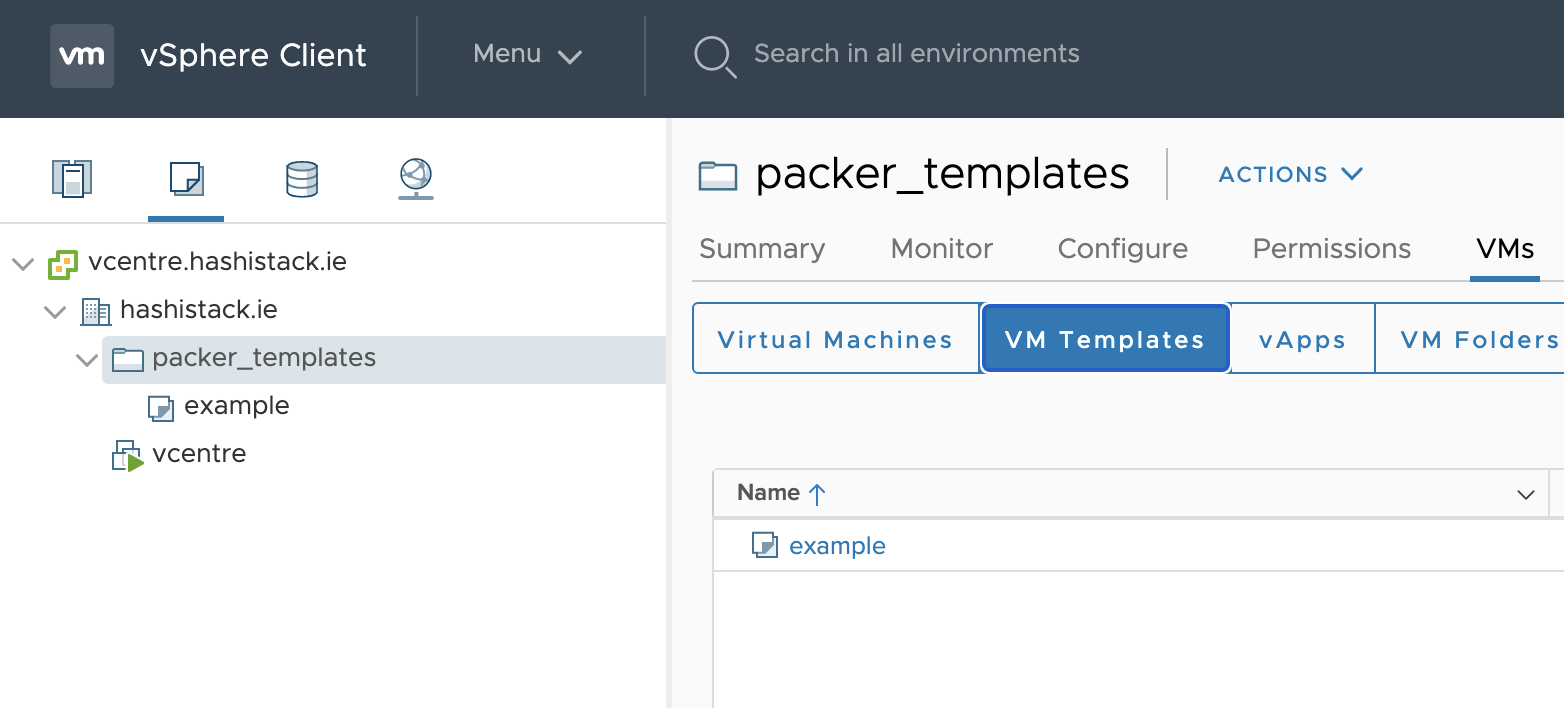
- Hoffentlich ist dieses Repository und die README-Datei für jemanden anderes auf diesem Internet-Ding nützlich.
Happy Automating, Graz
To Do
- Weitere Image-Plattform-Beispiele hinzufügen
- Die Basis-Binärdatei-Bereitstellung von Envoyproxy beheben
- Möglicherweise auch Travis-Tests hinzufügen, sehen, was ich nur in der Cloud ohne erforderlichen lokalen Macbook tun kann