

In previous posts I have mentioned a K5 specific network feature called Inter-Project routing. As K5 is a public OpenStack based cloud rather than traditional private OpenStack cloud, Contract Owners (a.k.a. OpenStack domain admins) do not have permission to create shared networks by design. However many contract owners often find the need to share resources between projects and this is where K5 Inter-Project Routing comes in to play. Take the previous blog posts about Shared Services – these are all possible thanks to this feature.
Note: We are talking about routing between project subnets within the same availability zone and contract, cross availability zone links are also possible and have been discussed in previous posts.
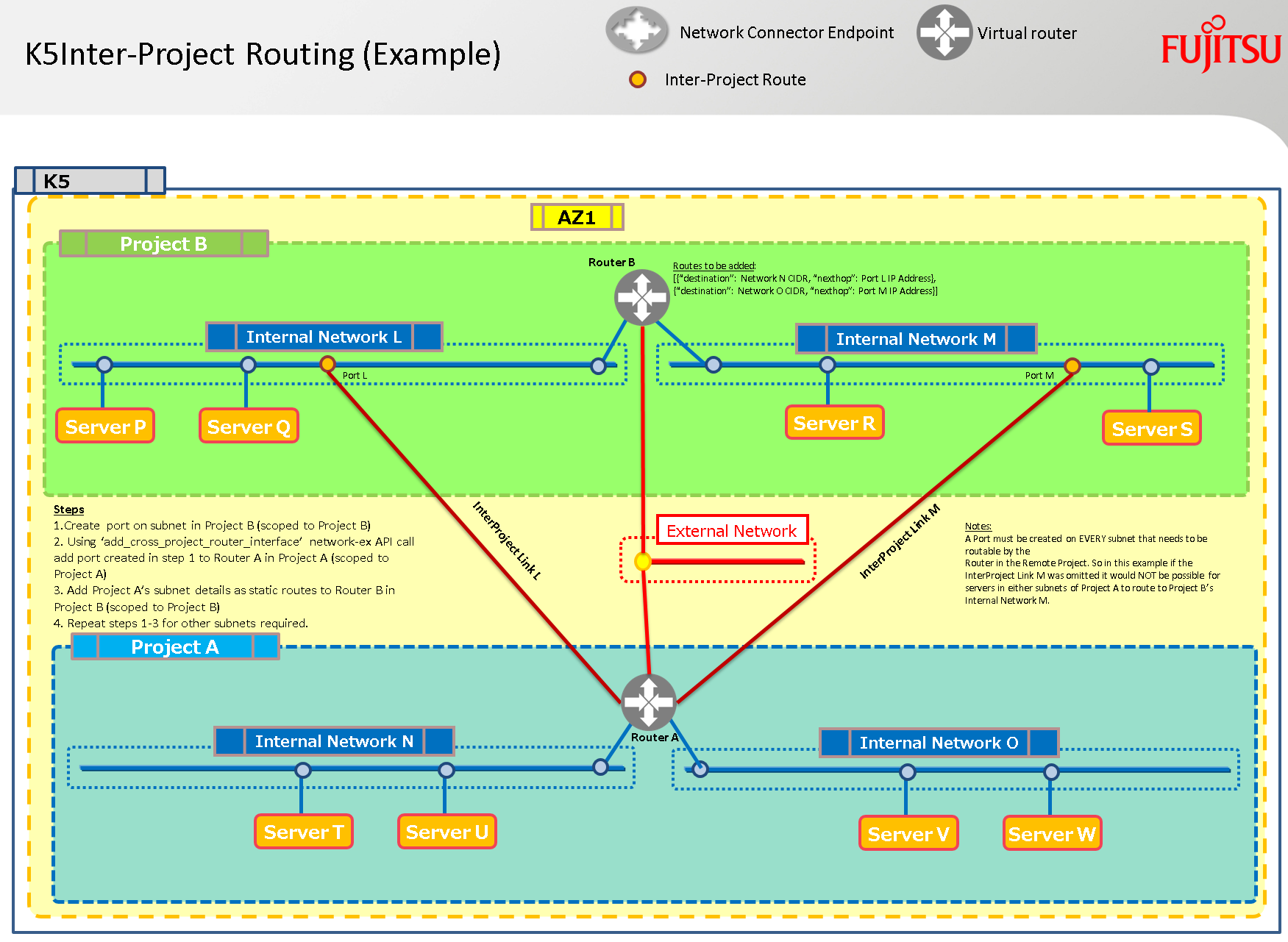
In order for the virtual machines (VMs) on the subnets in Project A above to be able to reach VMs on BOTH the subnets in Project B it is necessary to create an Inter-Project link to EACH of the subnets in Project B. That’s two inter-project links for the above scenario!
Steps required per Subnet
- Get a k5 regional token scoped to Project B
This file contains hidden or bidirectional Unicode text that may be interpreted or compiled differently than what appears below. To review, open the file in an editor that reveals hidden Unicode characters.
Learn more about bidirectional Unicode characters
| def get_scoped_token(adminUser, adminPassword, contract, projectid, region): | |
| """Summary – Get a regional project scoped token using a username and password | |
| Returns: | |
| Object: Regionally Scoped Project Token Object | |
| Args: | |
| adminUser (TYPE): username | |
| adminPassword (TYPE): password | |
| contract (TYPE): contract name | |
| projectid (TYPE): project id | |
| region (TYPE): region | |
| """ | |
| identityURL = 'https://identity.' + region + \ | |
| '.cloud.global.fujitsu.com/v3/auth/tokens' | |
| try: | |
| response = requests.post(identityURL, | |
| headers={'Content-Type': 'application/json', | |
| 'Accept': 'application/json'}, | |
| json={"auth": | |
| {"identity": | |
| {"methods": ["password"], "password": | |
| {"user": | |
| {"domain": | |
| {"name": contract}, | |
| "name": adminUser, | |
| "password": adminPassword | |
| }}}, | |
| "scope": | |
| {"project": | |
| {"id": projectid | |
| }}}}) | |
| return response | |
| except: | |
| return 'Regional Project Token Scoping Failure' |
view raw
Get_Scoped_Token.py
hosted with ❤ by GitHub
- Create a port on the subnet in Project B
This file contains hidden or bidirectional Unicode text that may be interpreted or compiled differently than what appears below. To review, open the file in an editor that reveals hidden Unicode characters.
Learn more about bidirectional Unicode characters
| def create_port(k5token, name, netid, sg_id, az, region): | |
| portURL = 'https://networking.' + region + \ | |
| '.cloud.global.fujitsu.com/v2.0/ports' | |
| try: | |
| response = requests.post(portURL, | |
| headers={ | |
| 'X-Auth-Token': k5token, 'Content-Type': 'application/json', 'Accept': 'application/json'}, | |
| json={"port": | |
| {"network_id": netid, | |
| "name": name, | |
| "admin_state_up": True, | |
| "availability_zone": az, | |
| "security_groups": | |
| [sg_id]}}) | |
| return response | |
| except: | |
| return ("\nUnexpected error:", sys.exc_info()) |
view raw
CreatePortonK5Subnet.py
hosted with ❤ by GitHub
- Capture the port_id of the newly created port
- ReScope your K5 token to Project A
This file contains hidden or bidirectional Unicode text that may be interpreted or compiled differently than what appears below. To review, open the file in an editor that reveals hidden Unicode characters.
Learn more about bidirectional Unicode characters
| def get_rescoped_token(k5token, projectid, region): | |
| """Get a regional project token – rescoped | |
| Returns: | |
| STRING: Regionally Scoped Project Token | |
| Args: | |
| k5token (TYPE): valid regional token | |
| projectid (TYPE): project id to scope to | |
| region (TYPE): k5 region | |
| """ | |
| identityURL = 'https://identity.' + region + \ | |
| '.cloud.global.fujitsu.com/v3/auth/tokens' | |
| try: | |
| response = requests.post(identityURL, | |
| headers={'Content-Type': 'application/json', | |
| 'Accept': 'application/json'}, | |
| json={ | |
| "auth": { | |
| "identity": { | |
| "methods": [ | |
| "token" | |
| ], | |
| "token": { | |
| "id": k5token | |
| } | |
| }, | |
| "scope": { | |
| "project": { | |
| "id": projectid | |
| } | |
| } | |
| } | |
| }) | |
| return response | |
| except: | |
| return 'Regional Project Rescoping Failure' |
view raw
ReScope_K5_Token.py
hosted with ❤ by GitHub
- Use the Fujitsu K5 Neutron enhanced API call, not available in upstream OpenStack, to make the inter-project connection. This API call allows the project administrator to add an interface from a subnet in a different project to the router in the admins project.
This file contains hidden or bidirectional Unicode text that may be interpreted or compiled differently than what appears below. To review, open the file in an editor that reveals hidden Unicode characters.
Learn more about bidirectional Unicode characters
| def inter_project_connection_create(k5token, router, port, region): | |
| routerURL = 'https://networking-ex.' + region + \ | |
| '.cloud.global.fujitsu.com/v2.0/routers/' + \ | |
| router + '/add_cross_project_router_interface' | |
| try: | |
| response = requests.put(routerURL, | |
| headers={'X-Auth-Token': k5token, | |
| 'Content-Type': 'application/json'}, | |
| json={"port_id": port}) | |
| return response | |
| except: | |
| return ("\nUnexpected error:", sys.exc_info()) |
view raw
AddInterPojectRoute.py
hosted with ❤ by GitHub
- Rescope the K5 token to Project B (token rescope api call detailed earlier in the post)
- Add the static return routes for the networks in Project A to the router in Project B (Note: if your design does not have a router in Project B you can add these routes to the subnets in Project B and reboot your servers to receive the new routing information)
- Routes of the format [{“destination”: CIDR-1, “nexthop”: interProject-Port-IP},{“destination”: CIDR-2, “nexthop”: interProject-Port-IP} ]
Router Update
This file contains hidden or bidirectional Unicode text that may be interpreted or compiled differently than what appears below. To review, open the file in an editor that reveals hidden Unicode characters.
Learn more about bidirectional Unicode characters
| def update_router_routes(k5token, routerid, routes, region): | |
| # e.g. routes = [{'destination': '192.168.10.0/24', 'nexthop': u'192.168.100.2'}, {'destination': '192.168.11.0/24', 'nexthop': u'192.168.100.2'}] | |
| try: | |
| routerURL = 'https://networking-ex.' + region + \ | |
| '.cloud.global.fujitsu.com/v2.0/routers/' + routerid | |
| response = requests.put(routerURL, | |
| headers={'X-Auth-Token': k5token, | |
| 'Content-Type': 'application/json'}, | |
| json={"router": {"routes": routes}}) | |
| return response | |
| except: | |
| return ("\nUnexpected error:", sys.exc_info()) |
view raw
K5-Update-Router-Routes.py
hosted with ❤ by GitHub
Alternative Subnet Update
This file contains hidden or bidirectional Unicode text that may be interpreted or compiled differently than what appears below. To review, open the file in an editor that reveals hidden Unicode characters.
Learn more about bidirectional Unicode characters
| def add_static_route_to_subnet(k5token, subnetid, routes, region): | |
| # e.g. routes = = [{'destination': '192.168.101.0/24', 'nexthop': u'192.168.100.2'},{'destination': '192.168.100.0/24', 'nexthop': u'192.168.100.2'}] | |
| subnetURL = 'https://networking.' + region + \ | |
| '.cloud.global.fujitsu.com/v2.0/subnets/' + subnetid | |
| try: | |
| response = requests.put(subnetURL, | |
| headers={'X-Auth-Token': k5token, | |
| 'Content-Type': 'application/json'}, | |
| json={"subnet": {"host_routes": routes}}) | |
| return response | |
| except: | |
| return ("\nUnexpected error:", sys.exc_info()) |
view raw
K5-Subnet-Route-Update.py
hosted with ❤ by GitHub
And that’s all there is to it! You should now be able to route between your projects.
So where’s the automation I hear you think…
Well, I quickly ‘hacked’ together the following two python scripts for a customer demo. The python code is by no means efficient (a.k.a. DRY) but it is fit for the purpose of this tutorial:
Repo : https://github.com/allthingsclowd/K5-InterProject-Demo
K5-InterProject-Demo
Fully Automated Shared Service API Deployment on Fujitsu K5
Target – Fujitsu K5 IaaS Cloud Platform
Author: Graham Land
Date: 18/1/17
Twitter: @allthingsclowd
Github: https://github.com/allthingscloud
Blog: https://allthingscloud.eu
The python scripts in this repository can be used to create the shared services model below auto-magically 🙂
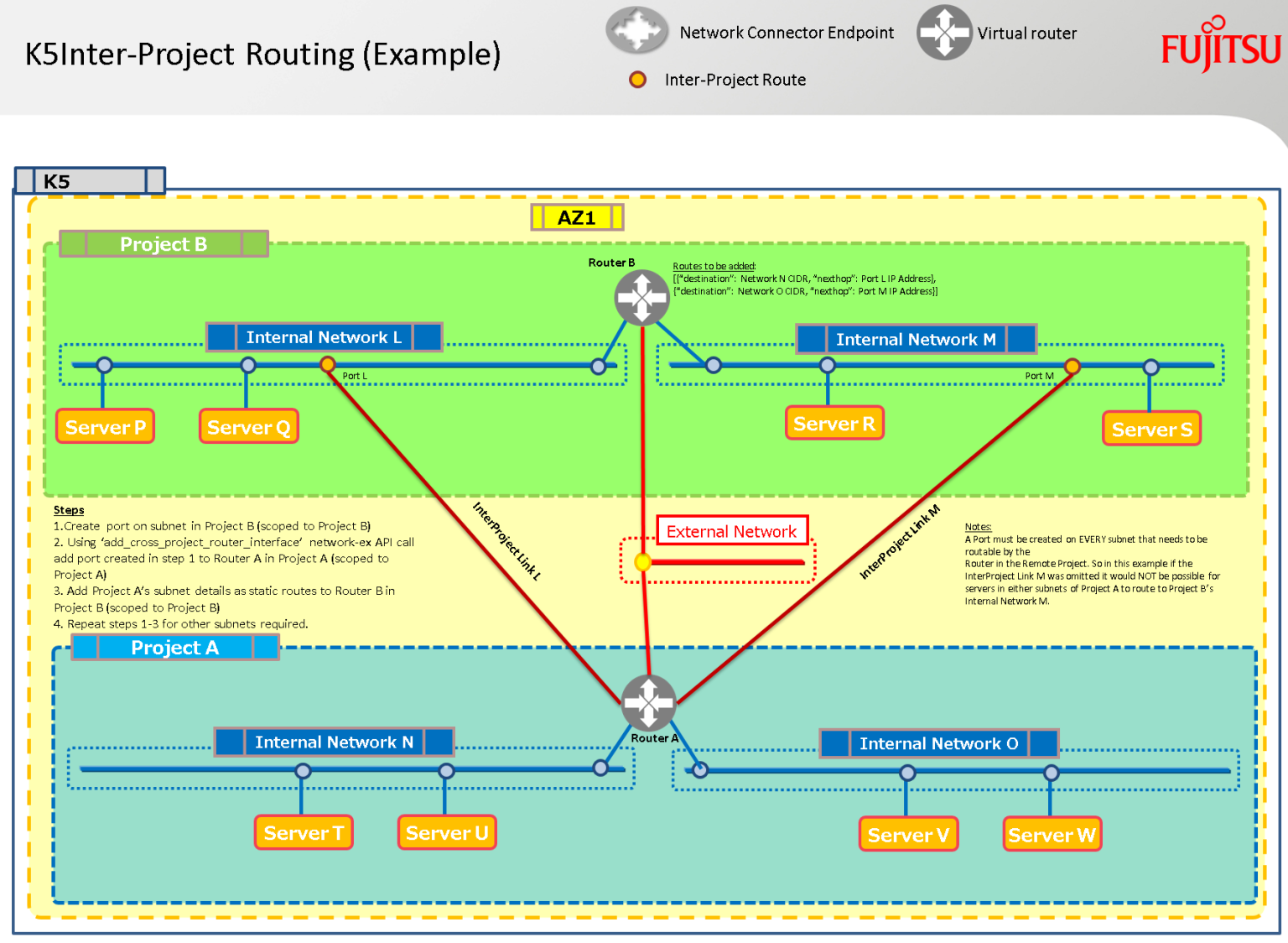
Steps:
- Copy all these files to the same directory
- Edit the k5contractsettingsv10.py to include your K5 contract details
Warning: Ensure to use two ‘disposable’ projects within your contract and add their names and ids to the above file.
Every resource in these projects will get purged so ensure you’re not sharing it with other users. - Launch the build_multi_project_demo.py script and relax! All the SSH keys, public ips, etc are returned to the console.
- When finished playing with the routing you can use the purge_project.py to reset everything.
Happy Stacking!
view raw
MultiProjectAPIDemo.md
hosted with ❤ by GitHub
Happy Stacking!