

しばしばCloud surgeryのコールにおいて、各種パブリッククラウドと顧客サイト間でVirtual Private Networks(IPSec VPN)を設定する方法に関するリクエストを受けます。
このブログの目的は、FujitsuのCloud Service K5で利用可能なVPNaaS機能を使用して、このような安全なトンネルを確立するプロセスを実演することです。
前提条件
ここで成功への最大の鍵は準備です。ほとんどの問題は、顧客のVPN設定とK5のVPN設定が同じ前提条件でプログラムされていない場合に発生します。このプロセスを簡素化するために、CNETSでは以下の画像をクリックしてダウンロードし、顧客と共有できるシンプルなVPNaaSテンプレートを作成しました。サービス構築を試みる前に、この文書が理解され、合意され、完了していることを確認してください。常識的なことと思いますが、このステップをスキップする人がどれほど多いか驚かれるでしょう。
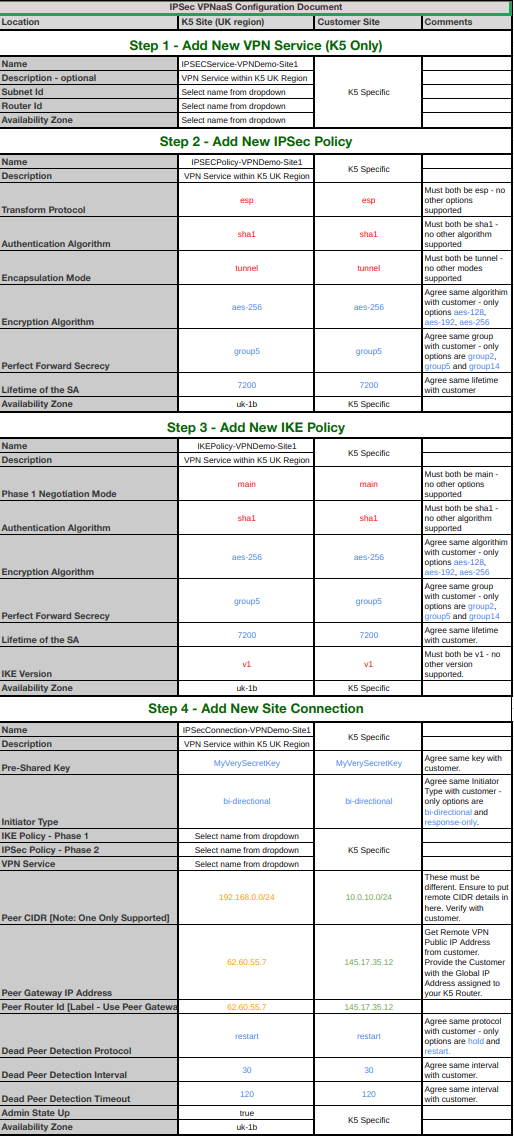
クラウド環境のもう一つの前提条件として、仮想ネットワーク、サブネット、ルーターがすでに作成されており、グローバルIP(パブリックIPアドレス)が仮想ルーターに追加されている必要があります。
これらの前提条件を完了したら、VPNの構築を開始する時です。
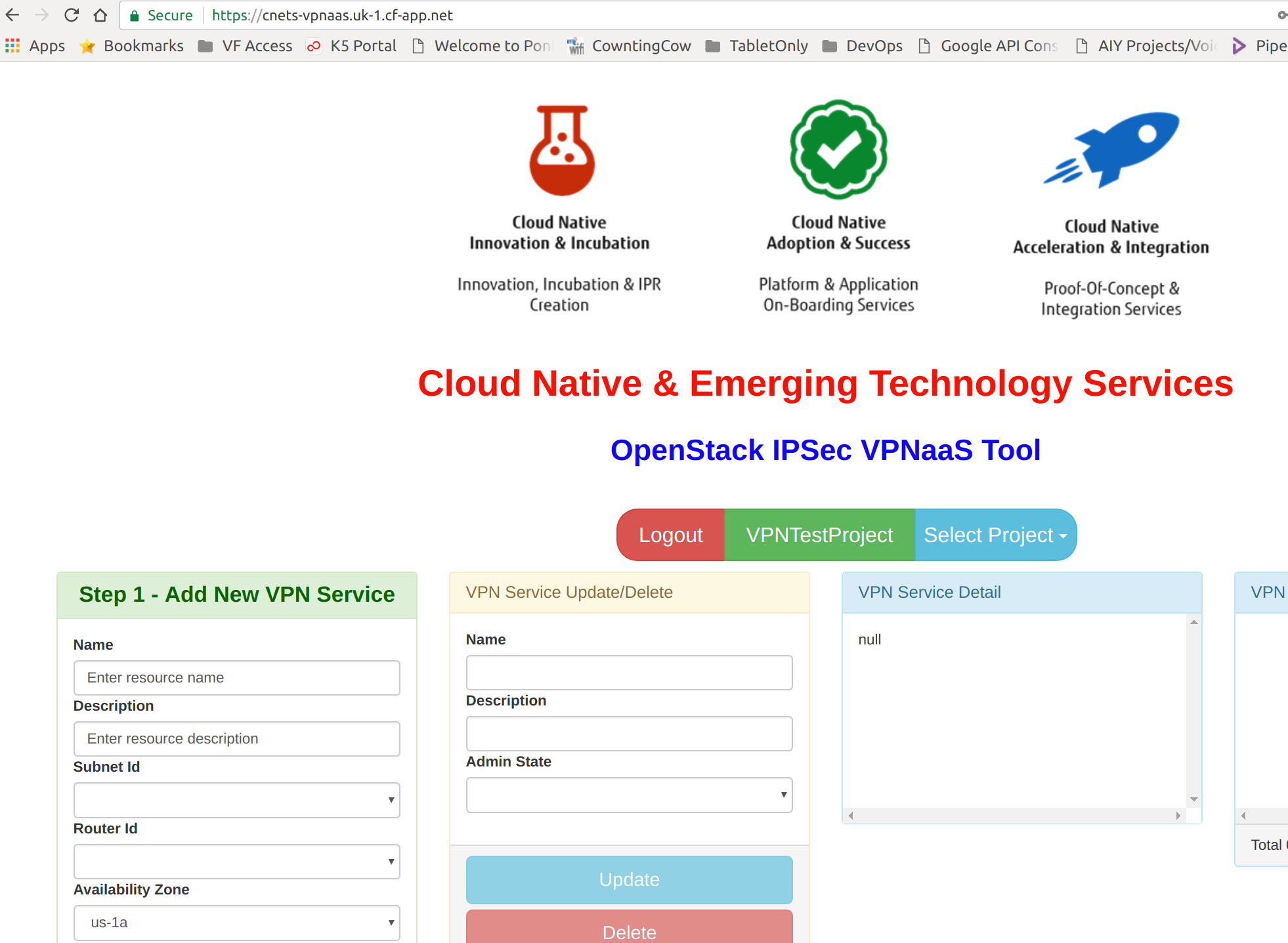
OpenStack IPSec VPNaaSツール
再びCNETSが救済に訪れます。必要なすべてのAPI呼び出しを手動で構築するのが好きでない限り、VPNaaSを構築および設定するために必要なすべてのAPI呼び出しを簡素化するAngularベースのユーザーインターフェースを構築しました。ツールはここにあります – https://cnets-vpnaas.uk-1.cf-app.net/ であり、ログインには有効なFujitsu Cloud Service K5の管理契約アカウントが必要です。
また、まもなく公開されるビデオで設定される内容を説明するために、以下のダイアグラムを作成しました… OBS録画ソフトウェアが再び正常に再生されるようになったらすぐに。2つのK5リージョンにまたがる2つのサブネットを接続します。1つのサブネットは米国リージョンに、もう1つのサブネットは英国リージョンにあります。他のパブリック/プライベートクラウドのVPNaaSオファリングや顧客のVPNアプライアンスに接続する際にK5のVPNaaSを設定する場合も、まったく同じプロセスが使用されます。
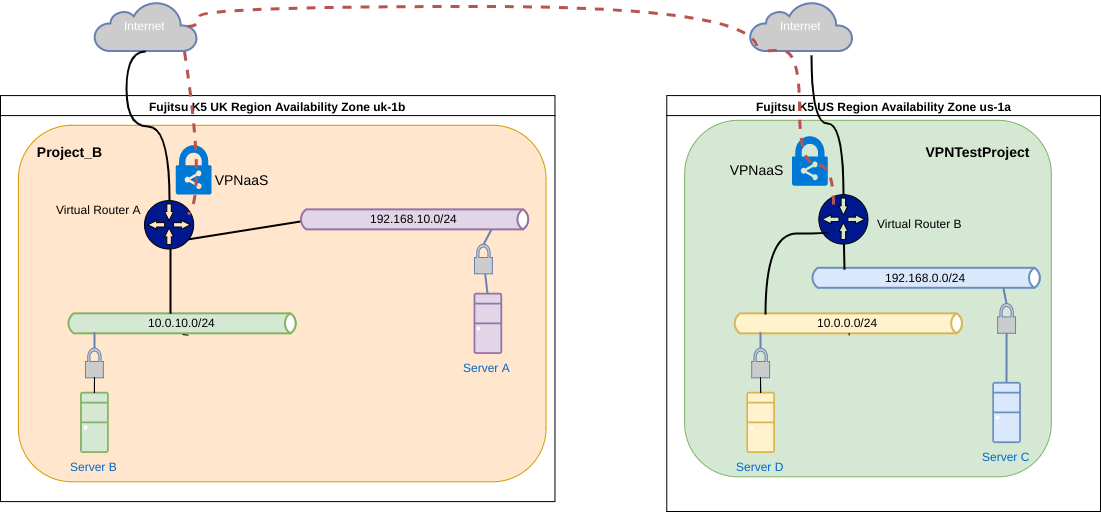
注: 理解する必要がある基本的な概念は、1つのレイヤー3サブネットを別のレイヤー3サブネットのみリンクしていることです。これが何を意味するかというと、以下の例では、英国リージョンの192.168.10.0/24サブネットと米国リージョンの192.168.0.0/24サブネットをIPSec VPNに追加します(これらのサブネットCIDRは重複してはいけません)。VPNトンネルが確立され、正しいセキュリティグループが適用されると、サーバーAはサーバーCと通信でき、その逆も可能です。しかし、サーバーBとサーバーDは通信できません。サーバーBとサーバーDからのトラフィックをVPNトンネル経由でルーティングするために、各VPNピアサブネットに追加のプロキシサービスが必要です。
クリスマスが近づき、今週CNETSでは祝祭の精神で満ちているので(少なくとも私はです)、最後のサプライズがあります。追従したい方のために、以下のダイアグラムでインフラストラクチャを構築するために使用した2つのheatテンプレートも記載します。FujitsuのCloud Service K5で使用する場合は、入力パラメータとDNS設定をターゲットAZに合わせて変更することを忘れないでください。これらのテンプレートは他のOpenStackクラウドでも機能するはずです。
Heatテンプレート プロジェクトA
このファイルには、以下に表示されるものとは異なって解釈またはコンパイルされる可能性のある、隠されたまたは双方向のUnicode文字が含まれています。確認するには、隠されたUnicode文字を表示するエディタでファイルを開いてください。
双方向のUnicode文字について詳しく見る
| heat_template_version: 2013-05-23 | |
| # Author: Graham Land | |
| # Date: 15/11/2017 | |
| # Purpose: Demo IPSec VPNaaS – Base for Project A | |
| # | |
| # Twitter: @allthingsclowd | |
| # Blog: https://allthingscloud.eu | |
| # | |
| # | |
| description: Template for VPNaaS (IPSec) Demo Project A – Two Networks and a Router with two Servers A & B | |
| # Input parameters | |
| parameters: | |
| k5_image: | |
| type: string | |
| label: Image name or ID | |
| description: Image to be used for compute instance | |
| default: "Ubuntu Server 16.04 LTS (English) 01" | |
| flavor: | |
| type: string | |
| label: Flavor | |
| description: Type of instance (flavor) to be used | |
| default: "P-1" | |
| ssh_key_pair: | |
| type: string | |
| label: Key name | |
| description: Name of key-pair to be used for compute instance | |
| default: "LEMP-KP-AZ1" | |
| availability_zone: | |
| type: string | |
| label: Availability Zone | |
| description: Region AZ to use | |
| default: "uk-1a" | |
| my_ip: | |
| type: string | |
| label: The IP Address (CIDR format) of My PC on the Internet | |
| description: PC Internet IP Address (CIDR format) | |
| default: "31.53.253.24/32" | |
| # K5 Infrastructure resources to be built | |
| resources: | |
| # Create a private network | |
| private_network_a: | |
| type: OS::Neutron::Net | |
| properties: | |
| availability_zone: { get_param: availability_zone } | |
| name: "Network-A" | |
| # Create a new subnet on the private network | |
| private_subnet_a: | |
| type: OS::Neutron::Subnet | |
| depends_on: private_network_a | |
| properties: | |
| availability_zone: { get_param: availability_zone } | |
| name: "Subnetwork-A" | |
| network_id: { get_resource: private_network_a } | |
| cidr: "192.168.0.0/24" | |
| gateway_ip: "192.168.0.254" | |
| allocation_pools: | |
| – start: "192.168.0.100" | |
| end: "192.168.0.150" | |
| dns_nameservers: ["62.60.39.9", "62.60.42.9"] | |
| # Create a second private network | |
| private_network_b: | |
| type: OS::Neutron::Net | |
| properties: | |
| availability_zone: { get_param: availability_zone } | |
| name: "Network-B" | |
| # Create a new subnet on the second private network | |
| private_subnet_b: | |
| type: OS::Neutron::Subnet | |
| depends_on: private_network_b | |
| properties: | |
| availability_zone: { get_param: availability_zone } | |
| name: "Subnetwork-B" | |
| network_id: { get_resource: private_network_b } | |
| cidr: "10.0.0.0/24" | |
| gateway_ip: "10.0.0.254" | |
| allocation_pools: | |
| – start: "10.0.0.100" | |
| end: "10.0.0.150" | |
| dns_nameservers: ["62.60.39.9", "62.60.42.9"] | |
| # Create a virtual router | |
| virtual_router: | |
| type: OS::Neutron::Router | |
| properties: | |
| availability_zone: { get_param: availability_zone } | |
| name: "Simple-Virtual-Router" | |
| # Connect an interface on the private network's subnet to the router | |
| virtual_router_interface_1: | |
| type: OS::Neutron::RouterInterface | |
| depends_on: virtual_router | |
| properties: | |
| router_id: { get_resource: virtual_router } | |
| subnet_id: { get_resource: private_subnet_a } | |
| # Connect an interface on the private network's subnet to the router | |
| virtual_router_interface_2: | |
| type: OS::Neutron::RouterInterface | |
| depends_on: virtual_router | |
| properties: | |
| router_id: { get_resource: virtual_router } | |
| subnet_id: { get_resource: private_subnet_b } | |
| # Create security group | |
| security_group: | |
| type: OS::Neutron::SecurityGroup | |
| properties: | |
| description: VPN Security Group | |
| name: VPN-SG | |
| rules: | |
| # allow inbound traffic from remote VPN subnet | |
| – remote_ip_prefix: 192.168.10.0/24 | |
| protocol: tcp | |
| – remote_ip_prefix: 192.168.10.0/24 | |
| protocol: icmp | |
| # allow inbound traffic from my remote PC | |
| – remote_ip_prefix: { get_param: my_ip } | |
| protocol: icmp | |
| – remote_ip_prefix: { get_param: my_ip } | |
| protocol: tcp | |
| port_range_min: 22 | |
| port_range_max: 22 | |
| ################### Server A ################################################################ | |
| # Create a system volume for use with the server | |
| server-A-sys-vol: | |
| type: OS::Cinder::Volume | |
| properties: | |
| availability_zone: { get_param: availability_zone } | |
| name: "Server-A-boot-vol" | |
| size: 3 | |
| volume_type: "M1" | |
| image : { get_param: k5_image } | |
| server-A-port: | |
| type: OS::Neutron::Port | |
| depends_on: private_network_a | |
| properties: | |
| availability_zone: { get_param: availability_zone } | |
| network_id: { get_resource: private_network_a } | |
| name: "Server-A-Port" | |
| fixed_ips: | |
| – subnet_id: { get_resource: private_subnet_a } | |
| security_groups: [{ get_resource: security_group }] | |
| # Build a server using the system volume defined above | |
| server-A: | |
| type: OS::Nova::Server | |
| depends_on: server-A-port | |
| properties: | |
| availability_zone: { get_param: availability_zone } | |
| key_name: { get_param: ssh_key_pair } | |
| image: { get_param: k5_image } | |
| flavor: { get_param: flavor } | |
| admin_user: ubuntu | |
| metadata: { "fcx.autofailover": True } | |
| block_device_mapping: [{"volume_size": "3", "volume_id": {get_resource: server-A-sys-vol}, "delete_on_termination": True, "device_name": "/dev/vda"}] | |
| name: "Server-A" | |
| networks: | |
| – port: { get_resource: server-A-port } | |
| ########################################################################################################### | |
| ################### Server B ################################################################ | |
| # Create a system volume for use with the server | |
| server-B-sys-vol: | |
| type: OS::Cinder::Volume | |
| depends_on: private_network_b | |
| properties: | |
| availability_zone: { get_param: availability_zone } | |
| name: "Server-B-boot-vol" | |
| size: 3 | |
| volume_type: "M1" | |
| image : { get_param: k5_image } | |
| # Build a server using the system volume defined above | |
| server-B: | |
| type: OS::Nova::Server | |
| properties: | |
| availability_zone: { get_param: availability_zone } | |
| key_name: { get_param: ssh_key_pair } | |
| image: { get_param: k5_image } | |
| flavor: { get_param: flavor } | |
| admin_user: ubuntu | |
| metadata: { "fcx.autofailover": True } | |
| block_device_mapping: [{"volume_size": "3", "volume_id": {get_resource: server-B-sys-vol}, "delete_on_termination": True, "device_name": "/dev/vda"}] | |
| name: "Server-B" | |
| networks: | |
| – network: { get_resource: private_network_b } | |
| ########################################################################################################### |
view raw
VPNDemoProjectA.YML
hosted with ❤ by GitHub
Heatテンプレート プロジェクトB
このファイルには、以下に表示されるものとは異なって解釈またはコンパイルされる可能性のある、隠されたまたは双方向のUnicode文字が含まれています。確認するには、隠されたUnicode文字を表示するエディタでファイルを開いてください。
双方向のUnicode文字について詳しく見る
| heat_template_version: 2013-05-23 | |
| # Author: Graham Land | |
| # Date: 15/11/2017 | |
| # Purpose: Demo IPSec VPNaaS – Base for Project B – Two Networks and a Router with two Servers C & D | |
| # | |
| # Twitter: @allthingsclowd | |
| # Blog: https://allthingscloud.eu | |
| # | |
| # | |
| description: Template for VPNaaS (IPSec) Demo Project B – Two Networks and a Router with two Servers C & D | |
| # Input parameters | |
| parameters: | |
| k5_image: | |
| type: string | |
| label: Image name or ID | |
| description: Image to be used for compute instance | |
| default: "Ubuntu Server 16.04 LTS (English) 01" | |
| flavor: | |
| type: string | |
| label: Flavor | |
| description: Type of instance (flavor) to be used | |
| default: "P-1" | |
| ssh_key_pair: | |
| type: string | |
| label: Key name | |
| description: Name of key-pair to be used for compute instance | |
| default: "LEMP-KP-AZ2" | |
| availability_zone: | |
| type: string | |
| label: Availability Zone | |
| description: Region AZ to use | |
| default: "uk-1b" | |
| my_ip: | |
| type: string | |
| label: The IP Address (CIDR format) of My PC on the Internet | |
| description: PC Internet IP Address (CIDR format) | |
| default: "31.53.253.24/32" | |
| # K5 Infrastructure resources to be built | |
| resources: | |
| # Create a private network | |
| private_network_a: | |
| type: OS::Neutron::Net | |
| properties: | |
| availability_zone: { get_param: availability_zone } | |
| name: "Network-C" | |
| # Create a new subnet on the private network | |
| private_subnet_a: | |
| type: OS::Neutron::Subnet | |
| depends_on: private_network_a | |
| properties: | |
| availability_zone: { get_param: availability_zone } | |
| name: "Subnetwork-C" | |
| network_id: { get_resource: private_network_a } | |
| cidr: "192.168.10.0/24" | |
| gateway_ip: "192.168.10.254" | |
| allocation_pools: | |
| – start: "192.168.10.100" | |
| end: "192.168.10.150" | |
| dns_nameservers: ["62.60.39.9", "62.60.42.9"] | |
| # Create a second private network | |
| private_network_b: | |
| type: OS::Neutron::Net | |
| properties: | |
| availability_zone: { get_param: availability_zone } | |
| name: "Network-D" | |
| # Create a new subnet on the second private network | |
| private_subnet_b: | |
| type: OS::Neutron::Subnet | |
| depends_on: private_network_b | |
| properties: | |
| availability_zone: { get_param: availability_zone } | |
| name: "Subnetwork-D" | |
| network_id: { get_resource: private_network_b } | |
| cidr: "10.0.10.0/24" | |
| gateway_ip: "10.0.10.254" | |
| allocation_pools: | |
| – start: "10.0.10.100" | |
| end: "10.0.10.150" | |
| dns_nameservers: ["62.60.39.9", "62.60.42.9"] | |
| # Create a virtual router | |
| virtual_router: | |
| type: OS::Neutron::Router | |
| properties: | |
| availability_zone: { get_param: availability_zone } | |
| name: "Simple-Virtual-Router" | |
| # Connect an interface on the private network's subnet to the router | |
| virtual_router_interface_1: | |
| type: OS::Neutron::RouterInterface | |
| depends_on: virtual_router | |
| properties: | |
| router_id: { get_resource: virtual_router } | |
| subnet_id: { get_resource: private_subnet_a } | |
| # Connect an interface on the private network's subnet to the router | |
| virtual_router_interface_2: | |
| type: OS::Neutron::RouterInterface | |
| depends_on: virtual_router | |
| properties: | |
| router_id: { get_resource: virtual_router } | |
| subnet_id: { get_resource: private_subnet_b } | |
| # Create security group | |
| security_group: | |
| type: OS::Neutron::SecurityGroup | |
| properties: | |
| description: VPN Security Group | |
| name: VPN-SG | |
| rules: | |
| # allow inbound traffic from remote VPN subnet | |
| – remote_ip_prefix: 192.168.0.0/24 | |
| protocol: tcp | |
| – remote_ip_prefix: 192.168.0.0/24 | |
| protocol: icmp | |
| # allow inbound traffic from my remote PC | |
| – remote_ip_prefix: { get_param: my_ip } | |
| protocol: icmp | |
| – remote_ip_prefix: { get_param: my_ip } | |
| protocol: tcp | |
| port_range_min: 22 | |
| port_range_max: 22 | |
| ################### Server A ################################################################ | |
| # Create a system volume for use with the server | |
| server-A-sys-vol: | |
| type: OS::Cinder::Volume | |
| properties: | |
| availability_zone: { get_param: availability_zone } | |
| name: "Server-C-boot-vol" | |
| size: 3 | |
| volume_type: "M1" | |
| image : { get_param: k5_image } | |
| server-A-port: | |
| type: OS::Neutron::Port | |
| properties: | |
| availability_zone: { get_param: availability_zone } | |
| network_id: { get_resource: private_network_a } | |
| name: "Server-C-Port" | |
| fixed_ips: | |
| – subnet_id: { get_resource: private_subnet_a } | |
| security_groups: [{ get_resource: security_group }] | |
| # Build a server using the system volume defined above | |
| server-A: | |
| type: OS::Nova::Server | |
| depends_on: private_network_a | |
| properties: | |
| availability_zone: { get_param: availability_zone } | |
| key_name: { get_param: ssh_key_pair } | |
| image: { get_param: k5_image } | |
| flavor: { get_param: flavor } | |
| admin_user: ubuntu | |
| metadata: { "fcx.autofailover": True } | |
| block_device_mapping: [{"volume_size": "3", "volume_id": {get_resource: server-A-sys-vol}, "delete_on_termination": True, "device_name": "/dev/vda"}] | |
| name: "Server-C" | |
| networks: | |
| – port: { get_resource: server-A-port } | |
| ########################################################################################################### | |
| ################### Server B ################################################################ | |
| # Create a system volume for use with the server | |
| server-B-sys-vol: | |
| type: OS::Cinder::Volume | |
| depends_on: private_network_b | |
| properties: | |
| availability_zone: { get_param: availability_zone } | |
| name: "Server-D-boot-vol" | |
| size: 3 | |
| volume_type: "M1" | |
| image : { get_param: k5_image } | |
| # Build a server using the system volume defined above | |
| server-B: | |
| type: OS::Nova::Server | |
| properties: | |
| availability_zone: { get_param: availability_zone } | |
| key_name: { get_param: ssh_key_pair } | |
| image: { get_param: k5_image } | |
| flavor: { get_param: flavor } | |
| admin_user: ubuntu | |
| metadata: { "fcx.autofailover": True } | |
| block_device_mapping: [{"volume_size": "3", "volume_id": {get_resource: server-B-sys-vol}, "delete_on_termination": True, "device_name": "/dev/vda"}] | |
| name: "Server-D" | |
| networks: | |
| – network: { get_resource: private_network_b } | |
| ########################################################################################################### |
view raw
VPNDemoProjectB.YML
hosted with ❤ by GitHub
ビデオデモはまもなく公開予定です。
ハッピー・トンネリング!
Graham