

クラウドモデルのインストールと設定
まず初めに行うべきことは、開始点として使用する例のクラウドテンプレートの1つをコピーすることです。デプロイメントモデルが例と完全に一致する場合、クラウドを構築する前に修正するファイルはわずかになります。
しかし、モデルを大幅に変更する方法を示すために、別のネットワークを追加し、それをCeph OSDレプリケーショントラフィックの分離に使用することにしました。
編集用にmy_cloudディレクトリにcephの例の設定ファイルをコピーします。
cp -r ~/helion/examples/entry-scale-kvm-ceph/* ~/helion/my_cloud/definition/
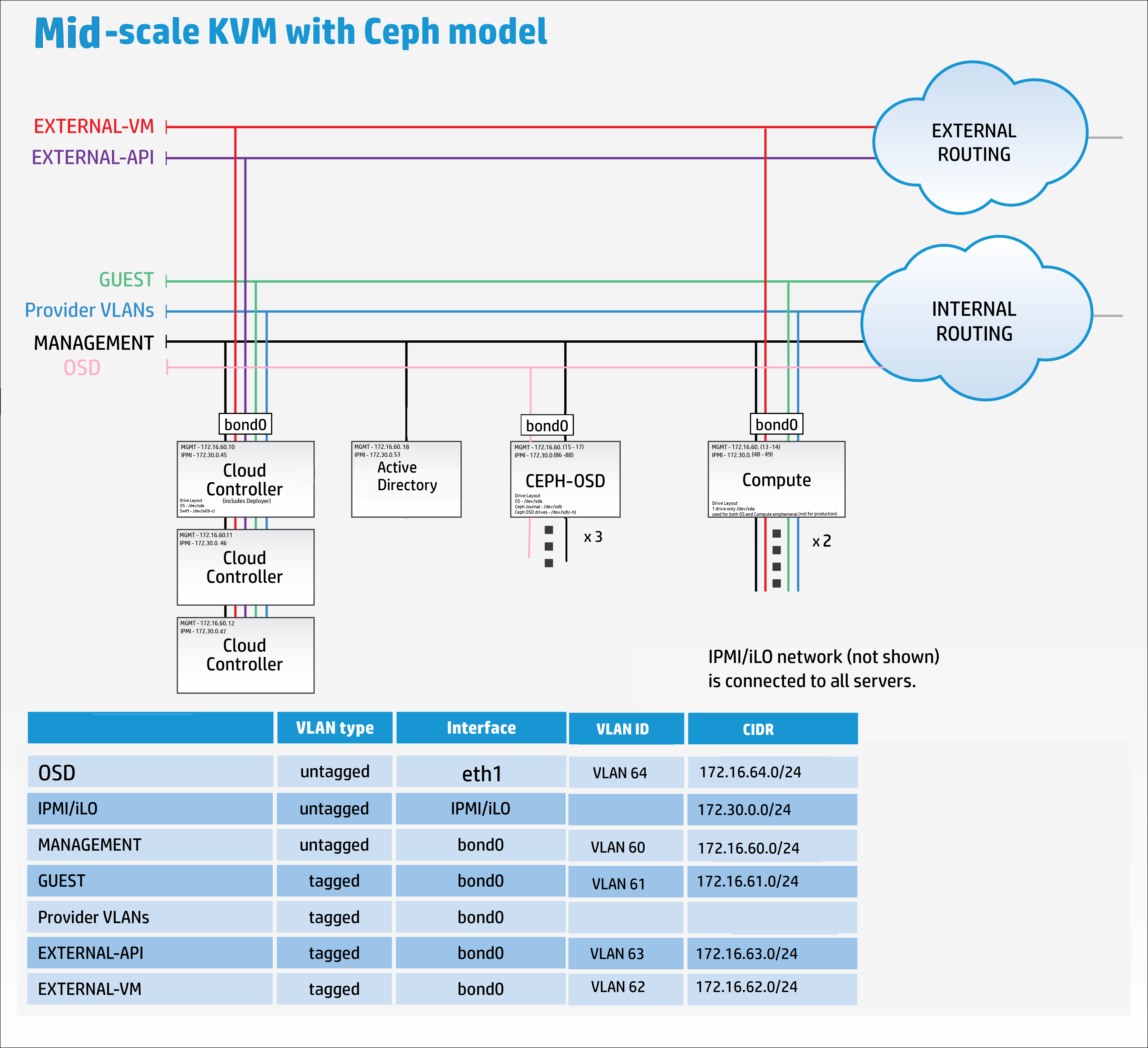
これらの設定ファイルは以下のモデルを表しています:
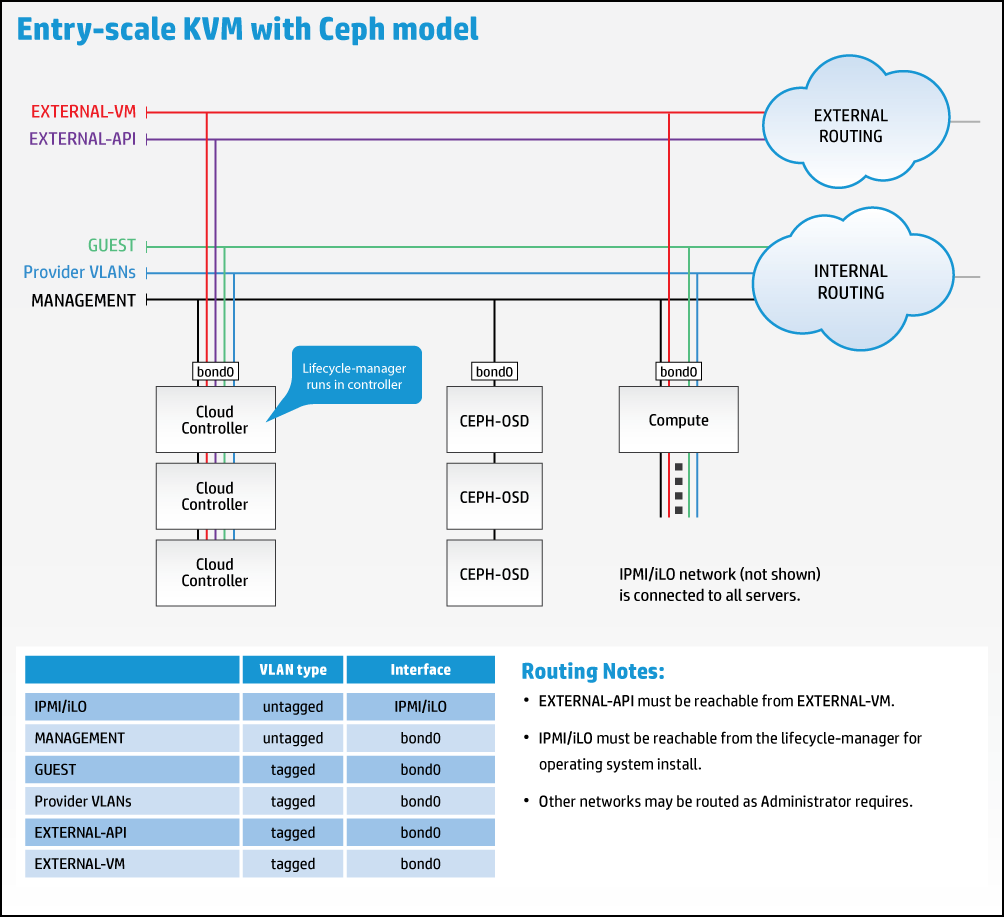
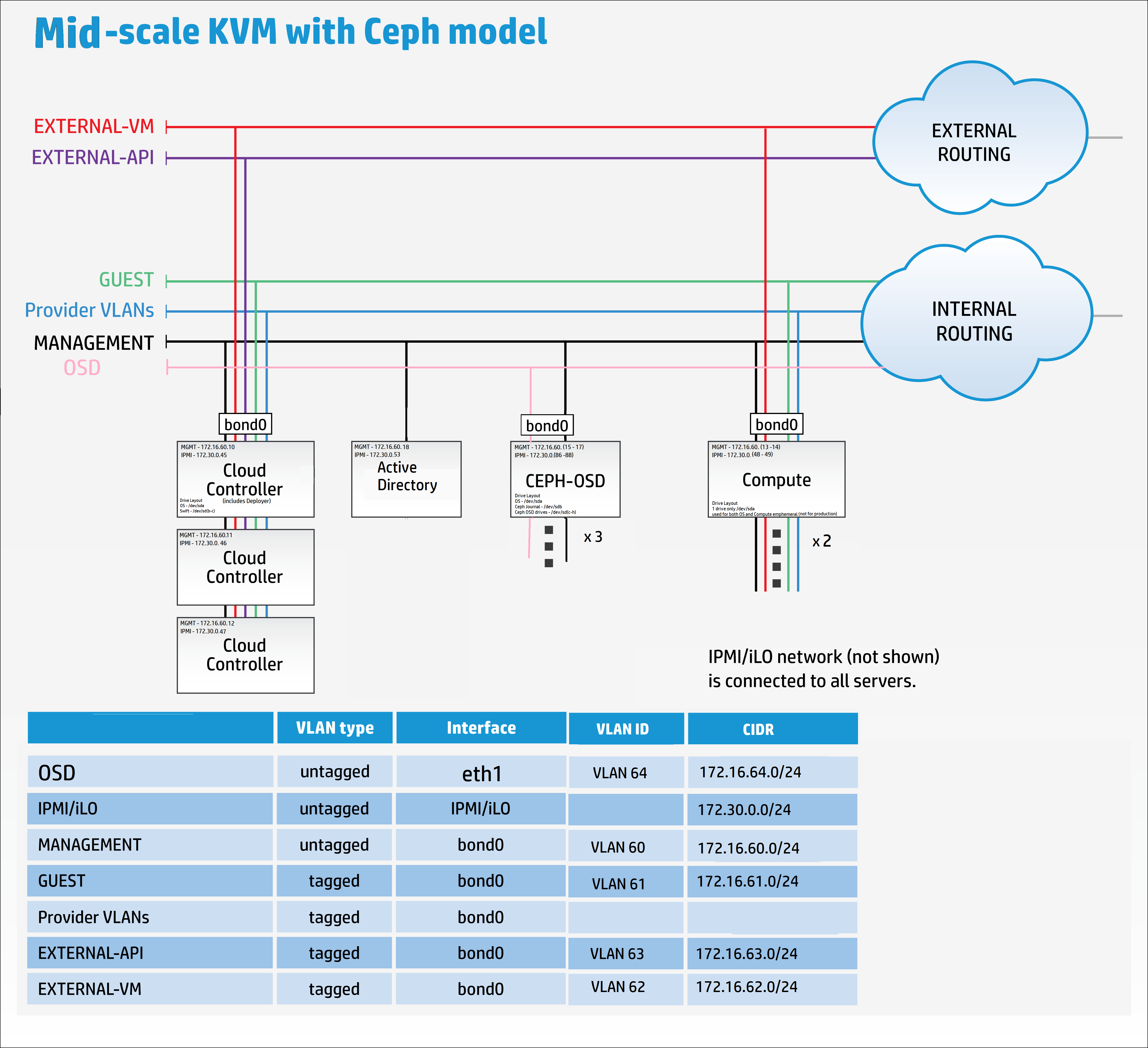
しかし、新しいレプリケーションネットワークに対応するために、以下に示すようにモデルを修正する必要があります:
これで、好みのエディタ(私の場合はKomodo)にジャンプして、例のテンプレートファイルを私の要件に合わせて再構築し始めるときが来ました。
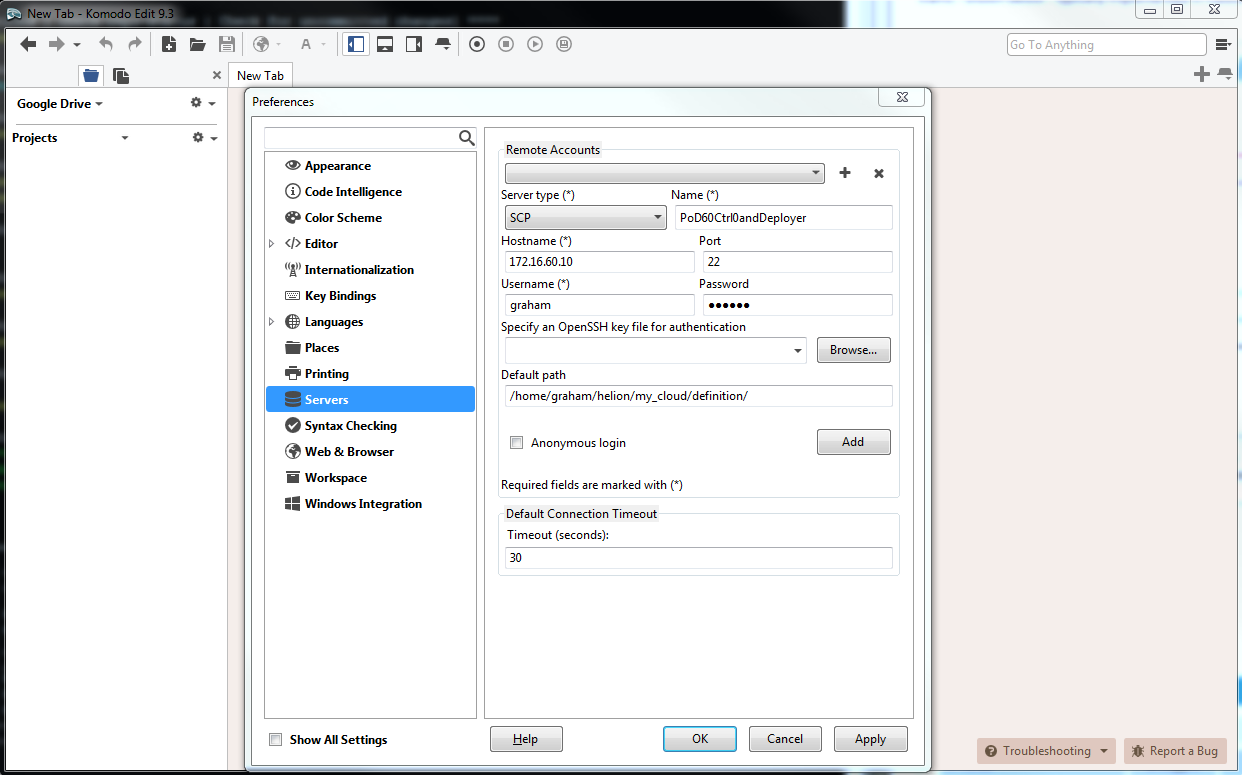
エディタにHelion Lifecycle Manager(controller0)へのリモート接続を追加します。
ファイルはあなたにとって都合の良い順序で編集できます。
クラウドプラットフォームの設定に使用されるすべてのyamlファイルの詳細な説明を提供する広範なオンラインドキュメントをお読みください こちら。
cloudConfig.ym
私は最も簡単なものから始めるのが好きです、cloudConfig.yml
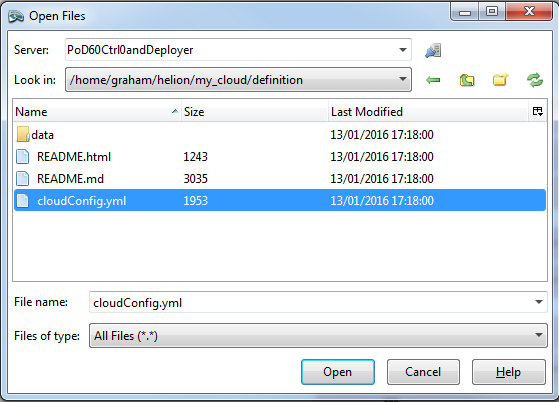
このファイルには、クラウド名、ホスト名プレフィックス、ntpサーバーの詳細、dnsサーバーの詳細、smtp設定、およびいくつかの一般的なファイアウォール設定の設定が見つかります。
デフォルトから変更された値は次のとおりです:
クラウド名 : allthingscloud
ntp : 172.16.1.5
dns : 172.16.1.5
注: NTPとDNSのIPアドレスの両方を引用符で囲むことを確認してください。例のファイルにはDNSネームサーバーに引用符がありません。
#
# (c) Copyright 2015 Hewlett Packard Enterprise Development Company LP
#
# Licensed under the Apache License, Version 2.0 (the "License"); you may
# not use this file except in compliance with the License. You may obtain
# a copy of the License at
#
# http://www.apache.org/licenses/LICENSE-2.0
#
# Unless required by applicable law or agreed to in writing, software
# distributed under the License is distributed on an "AS IS" BASIS, WITHOUT
# WARRANTIES OR CONDITIONS OF ANY KIND, either express or implied. See the
# License for the specific language governing permissions and limitations
# under the License.
#
---
product:
version: 2

cloud:
name: allthingscloud

# The following values are used when
# building hostnames
hostname-data:
host-prefix: helion
member-prefix: -m

# List of ntp servers for your site
ntp-servers:
- "172.16.1.5"
# - "ntp-server2"

# dns resolving configuration for your site
# refer to resolv.conf for details on each option
dns-settings:
nameservers:
- "172.16.1.5"
# - name-server2
# - name-server3
#
# domain: sub1.example.net
#
# search:
# - sub1.example.net
# - sub2.example.net
#
# sortlist:
# - 192.168.160.0/255.255.240.0
# - 192.168.0.0
#
# # option flags are ':' to enable, remove to unset
# # options with values are ':' to set
#
# options:
# debug:
# ndots: 2
# timeout: 30
# attempts: 5
# rotate:
# no-check-names:
# inet6:
smtp-settings:
# server: mailserver.examplecloud.com
# port: 25
# timeout: 15
# These are only needed if your server requires authentication
# user:
# password:

# Generate firewall rules
firewall-settings:
enable: true
# log dropped packets
logging: true
Control_plane.yml
このファイルは、すべての障害ゾーン、クラスター、サービスコンポーネント、およびリソースを定義します。このファイルを素早く検査すると、'lifecycle-manager'サービスコンポーネントがCONTROLLER-ROLEの下にあることがわかります。つまり、Controller/Deployerモデルを結合しています。
このyamlファイルで変更した唯一のパラメータは、0から2への計算リソースのmin-countです。ビルド時に2つの計算ノードをデプロイします。
#
# (c) Copyright 2015 Hewlett Packard Enterprise Development Company LP
#
# Licensed under the Apache License, Version 2.0 (the "License"); you may
# not use this file except in compliance with the License. You may obtain
# a copy of the License at
#
# http://www.apache.org/licenses/LICENSE-2.0
#
# Unless required by applicable law or agreed to in writing, software
# distributed under the License is distributed on an "AS IS" BASIS, WITHOUT
# WARRANTIES OR CONDITIONS OF ANY KIND, either express or implied. See the
# License for the specific language governing permissions and limitations
# under the License.
#
---
product:
version: 2

control-planes:
- name: control-plane-1
control-plane-prefix: cp1
region-name: region1
failure-zones:
- AZ1
- AZ2
- AZ3
common-service-components:
- logging-producer
- monasca-agent
- freezer-agent
- stunnel
- lifecycle-manager-target
clusters:
- name: cluster1
cluster-prefix: c1
server-role: CONTROLLER-ROLE
member-count: 3
allocation-policy: strict
service-components:
- lifecycle-manager
- ntp-server
- swift-ring-builder
- mysql
- ip-cluster
- apache2
- keystone-api
- keystone-client
- rabbitmq
- glance-api
- glance-registry
- glance-client
- cinder-api
- cinder-scheduler
- cinder-volume
- cinder-backup
- cinder-client
- nova-api
- nova-scheduler
- nova-conductor
- nova-console-auth
- nova-novncproxy
- nova-client
- neutron-server
- neutron-ml2-plugin
- neutron-vpn-agent
- neutron-dhcp-agent
- neutron-metadata-agent
- neutron-openvswitch-agent
- neutron-client
- horizon
- sherpa-api
- swift-proxy
- memcached
- swift-account
- swift-container
- swift-object
- swift-client
- heat-api
- heat-api-cfn
- heat-api-cloudwatch
- heat-engine
- heat-client
- openstack-client
- ceilometer-api
- ceilometer-collector
- ceilometer-agent-central
- ceilometer-agent-notification
- ceilometer-expirer
- ceilometer-common
- ceilometer-client
- zookeeper
- kafka
- vertica
- storm
- monasca-api
- monasca-persister
- monasca-notifier
- monasca-threshold
- monasca-client
- logging-server
- ops-console-web
- ops-console-monitor
- cmc-service
- freezer-api
- ceph-monitor

resources:
- name: compute
resource-prefix: comp
server-role: COMPUTE-ROLE
allocation-policy: any
min-count: 2
service-components:
- ntp-client
- nova-compute
- nova-compute-kvm
- neutron-l3-agent
- neutron-metadata-agent
- neutron-openvswitch-agent
- neutron-lbaasv2-agent

- name: osd
resource-prefix: ceph
server-role: OSD-ROLE
allocation-policy: strict
min-count: 3
service-components:
- ntp-client
- ceph-osd
servers.yml
このファイルには、デプロイメント中に使用される物理サーバーのすべての詳細が必要です。
- このデプロイメントでのbaremetalサブネットは管理ネットワークでもあります : 172.16.60.10/24
- idは各サーバーごとに一意である必要があります
- roleはサーバーの役割に関連し、サーバー上にデプロイされるコンポーネントとサービスを決定します –> server_roles.yml ファイルにリンクされています
- ip-addrは、サーバーがMANAGEMENTネットワーク上で持つことを希望するアドレスです。Controller1にはすでにこのIPアドレスが割り当てられています。これは、このシナリオではデプロイヤーノード(Helion Lifecycle Manager)でもあるためです
- server-groupは、物理的なサーバーのレイアウトにマッピングして、障害ハードウェアドメインを定義するために使用できます –> server_groups.yml ファイルにリンクされています
- nic-mappingsは、物理NICのハードウェアアドレスマッピングを定義します –> nic_mappings.yml ファイルにリンクされています。過去10年間Linuxネットワーク作業に従事した人なら、このファイルの目的を理解してもらえるでしょう。Linuxには、再起動時に物理NICがランダムな異なるソフトウェアインターフェース(例:eth0、eth1、em59など)にマッピングされる可能性がある「機能」があります。このファイルは、一貫したOS再起動体験のために、物理からソフトウェアインターフェースのマッピングを「ハードワイヤ」します
- ilo-ipは、物理サーバー上のIPMIインターフェースのアドレスです
- ilo-password – このパラメータの説明が必要な場合は、今すぐSTOPしてAZUREに戻ってください
- ilo-user – 上記参照
- mac-addressはPXEインターフェースのMACアドレスです。このデプロイメントでは、MANAGEMENTネットワーク経由でPXEブートします。注: これはiLOインターフェースのMACアドレスではありません
#
# (c) Copyright 2015 Hewlett Packard Enterprise Development Company LP
#
# Licensed under the Apache License, Version 2.0 (the "License"); you may
# not use this file except in compliance with the License. You may obtain
# a copy of the License at
#
# http://www.apache.org/licenses/LICENSE-2.0
#
# Unless required by applicable law or agreed to in writing, software
# distributed under the License is distributed on an "AS IS" BASIS, WITHOUT
# WARRANTIES OR CONDITIONS OF ANY KIND, either express or implied. See the
# License for the specific language governing permissions and limitations
# under the License.
#
---
product:
version: 2

baremetal:
# NOTE: These values need to be changed to match your environment.
# Define the network range that contains the ip-addr values for
# the individual servers listed below.
subnet: 172.16.60.0
netmask: 255.255.255.0

servers:
# NOTE: Addresses of servers need to be changed to match your environment.
#
# Add additional servers as required
#

# Controllers
- id: controller1
ip-addr: 172.16.60.10
role: CONTROLLER-ROLE
server-group: RACK1
nic-mapping: HP-SL230-4PORT
ilo-ip: 172.30.0.45
ilo-password: "bananas"
ilo-user: Administrator
mac-addr: 8c:dc:d4:b5:cc:d0

- id: controller2
ip-addr: 172.16.60.11
role: CONTROLLER-ROLE
server-group: RACK2
nic-mapping: HP-SL230-4PORT
ilo-ip: 172.30.0.46
ilo-password: "bananas"
ilo-user: Administrator
mac-addr: 8c:dc:d4:b5:c6:40

- id: controller3
ip-addr: 172.16.60.12
role: CONTROLLER-ROLE
server-group: RACK3
nic-mapping: HP-SL230-4PORT
ilo-ip: 172.30.0.47
ilo-password: "bananas"
ilo-user: Administrator
mac-addr: 8c:dc:d4:b5:c9:74

# Compute Nodes
- id: compute1
ip-addr: 172.16.60.13
role: COMPUTE-ROLE
server-group: RACK1
nic-mapping: HP-SL230-4PORT
ilo-ip: 172.30.0.48
ilo-password: "bananas"
ilo-user: Administrator
mac-addr: 8c:dc:d4:b5:c9:00

- id: compute2
ip-addr: 172.16.60.14
role: COMPUTE-ROLE
server-group: RACK2
nic-mapping: HP-SL230-4PORT
ilo-ip: 172.30.0.49
ilo-password: "bananas"
ilo-user: Administrator
mac-addr: 8c:dc:d4:b5:ce:80

# Ceph OSD Nodes
- id: osd1
ip-addr: 172.16.60.15
role: OSD-ROLE
server-group: RACK1
nic-mapping: HP-DL360-8PORT
ilo-ip: 172.30.0.86
ilo-password: "bananas"
ilo-user: Administrator
mac-addr: 5c:b9:01:8d:6b:68

- id: osd2
ip-addr: 172.16.60.16
role: OSD-ROLE
server-group: RACK2
nic-mapping: HP-DL360-8PORT
ilo-ip: 172.30.0.87
ilo-password: "bananas"
ilo-user: Administrator
mac-addr: 5c:b9:01:8d:70:0c

- id: osd3
ip-addr: 172.16.60.17
role: OSD-ROLE
server-group: RACK3
nic-mapping: HP-DL360-8PORT
ilo-ip: 172.30.0.88
ilo-password: "bananas"
ilo-user: Administrator
mac-addr: 5c:b9:01:8d:73:dc
server_roles.yml
このファイルは、servers.ymlファイルのサーバーを、ネットワークインターフェースおよびディスクレイアウトファイルの両方にリンクします。別のデプロイヤーノードを使用する場合、その役割はここで定義されます。
#
# (c) Copyright 2015 Hewlett Packard Enterprise Development Company LP
#
# Licensed under the Apache License, Version 2.0 (the "License"); you may
# not use this file except in compliance with the License. You may obtain
# a copy of the License at
#
# http://www.apache.org/licenses/LICENSE-2.0
#
# Unless required by applicable law or agreed to in writing, software
# distributed under the License is distributed on an "AS IS" BASIS, WITHOUT
# WARRANTIES OR CONDITIONS OF ANY KIND, either express or implied. See the
# License for the specific language governing permissions and limitations
# under the License.
#
---
product:
version: 2

server-roles:

- name: CONTROLLER-ROLE
interface-model: CONTROLLER-INTERFACES
disk-model: CONTROLLER-DISKS

- name: COMPUTE-ROLE
interface-model: COMPUTE-INTERFACES
disk-model: COMPUTE-DISKS

- name: OSD-ROLE
interface-model: OSD-INTERFACES
disk-model: OSD-DISKS
server_groups.yml
サーバーの物理レイアウトをアベイラビリティゾーンにマッピングします。すべてのネットワークへの参照が含まれています。
注: ここで例のモデルに対して最初の重要な変更を行いました。OSD-NETという新しいネットワークへの参照を追加しました。
#
# (c) Copyright 2015 Hewlett Packard Enterprise Development Company LP
#
# Licensed under the Apache License, Version 2.0 (the "License"); you may
# not use this file except in compliance with the License. You may obtain
# a copy of the License at
#
# http://www.apache.org/licenses/LICENSE-2.0
#
# Unless required by applicable law or agreed to in writing, software
# distributed under the License is distributed on an "AS IS" BASIS, WITHOUT
# WARRANTIES OR CONDITIONS OF ANY KIND, either express or implied. See the
# License for the specific language governing permissions and limitations
# under the License.
#
---
product:
version: 2

server-groups:

#
# Server Groups provide a mechanism for organizing servers
# into a hierarchy that reflected the physical topology.
#
# When allocating a server the configuration processor
# will search down the hierarchy from the list of server
# groups identified as the failure-zones for the control
# plane until it finds an available server of the requested
# role. If the allocation policy is "strict" servers are
# allocated from different failure-zones.
#
# When determining which network from a network group to
# associate with a server the configuration processor will
# search up the hierarchy from the server group containing the
# server until it finds a network in the required network
# group.
#

#
# In this example there is only one network in each network
# group and so we put all networks in the top level server
# group. Below this we create server groups for three
# failure zones, within which servers are grouped by racks.
#
# Note: the association of servers to server groups is part
# of the server definition (servers.yml)
#

#
# At the top of the tree we have a server groups for
# networks that can reach all servers
#
- name: CLOUD
server-groups:
- AZ1
- AZ2
- AZ3
networks:
- EXTERNAL-API-NET
- EXTERNAL-VM-NET
- GUEST-NET
- MANAGEMENT-NET
- OSD-NET

#
# Create a group for each failure zone
#
- name: AZ1
server-groups:
- RACK1

- name: AZ2
server-groups:
- RACK2

- name: AZ3
server-groups:
- RACK3

#
# Create a group for each rack
#
- name: RACK1

- name: RACK2

- name: RACK3
nic_mappings.yml
前述したように、このファイルには、使用されているさまざまなハードウェアサーバーモデルの「lspci」ハードウェアネットワークインターフェースマッピングがすべて含まれています。このデプロイメントでは、コントローラーと計算ノードにHP SL230sを、OSDノードにHP DL360sを使用しています。
残念ながら、ここには少し鶏と卵のシナリオがあります。クラウドを完成させるためにこのファイルの詳細を取得するには、サーバーにオペレーティングシステム(OS)が必要であり、サーバーにOSを取得するには、このファイルが完成している必要があります。解決策は、インストールメディアに戻り、使用されている各モデルのサーバーに一時的にhLinuxをドロップ(インストール)することです。次に、ログインして次のコマンドを実行し、ファイル用の出力をキャプチャします:
sudo dmidecode | grep -A3 '^System Information'
lspci | grep -i eth
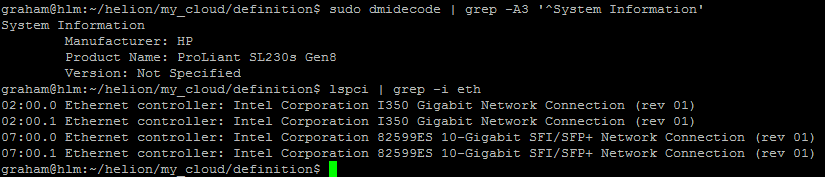
[注: DL360の例は含めていませんが、これは使用されているすべての異なるモデルと構成に対して繰り返す必要があります。例えば、異なるタイプまたは数のインターフェースを持つDL360がある場合、各サーバーに専用のプロファイルが必要です。]
#
# (c) Copyright 2015 Hewlett Packard Enterprise Development Company LP
#
# Licensed under the Apache License, Version 2.0 (the "License"); you may
# not use this file except in compliance with the License. You may obtain
# a copy of the License at
#
# http://www.apache.org/licenses/LICENSE-2.0
#
# Unless required by applicable law or agreed to in writing, software
# distributed under the License is distributed on an "AS IS" BASIS, WITHOUT
# WARRANTIES OR CONDITIONS OF ANY KIND, either express or implied. See the
# License for the specific language governing permissions and limitations
# under the License.
#
---
product:
version: 2

# nic-mappings are used to ensure that the device name used by the
# operating system always maps to the same physical device.
# A nic-mapping is associated to a server in the server definition.
# The logical-name specified here can be used as a device name in
# the network interface-models definitions.
#
# - name user-defined name for each mapping
# physical-ports list of ports for this mapping
# - logical-name device name to be used by the operating system
# type physical port type
# bus-address bus address of the physical device
#
# Notes:
# - The PCI bus addresses are examples. You will need to determine
# the values pertinent to your servers. These can be found with the
# the `lspci` command or from the server BIOS
# - enclose the bus address in quotation marks so yaml does not
# misinterpret the embedded colon (:) characters
# - simple-port is the only currently supported port type
# - choosing a new device name prefix (e.g. 'eth' -> 'hed') will
# help prevent remapping errors

nic-mappings:

- name: HP-SL230-4PORT
physical-ports:
- logical-name: hed0
type: simple-port
bus-address: "0000:07:00.0"

- logical-name: hed1
type: simple-port
bus-address: "0000:07:00.1"

- logical-name: hed2
type: simple-port
bus-address: "0000:02:00.0"

- logical-name: hed3
type: simple-port
bus-address: "0000:02:00.1"

- name: HP-DL360-2PORT
physical-ports:
- logical-name: hed0
type: simple-port
bus-address: "0000:04:00.0"

- logical-name: hed1
type: simple-port
bus-address: "0000:04:00.1"
サーバーディスクレイアウト
以下のファイルは、disk-models->nameがserver_roles.ymlファイルに参照されています。リンクはファイル名自体ではなく、ファイル内のコンテンツへのものです。理論的には、これらを正しいディレクトリに配置した後、これらのファイルに有効なymlファイル名を任意に付けることができます。Ansibleは単にディレクトリ内のすべてのファイルを読み取り、キーと値のペアのプールを生成します。そう記述したばかりなので、ディスクモデル名は使用されるすべてのファイル間で一意である必要があります。そうでないと、デバッグが非常に興味深いものになるでしょうと推測します。
disks_controller.yml
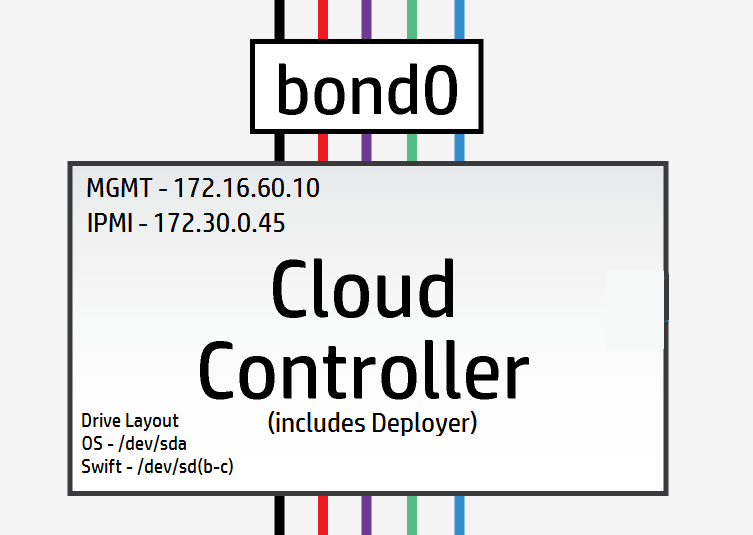
コントローラーノードには3つの論理ドライブがあり、1つはOS /dev/sdaに使用され、残りの2つはSwiftリング /dev/sdb & /dev/sdcに使用されます。
[注: ラボおよびテストシナリオでは、単一の物理ドライブを使用し、lvmマウントポイントを使用して論理ドライブを提供することが可能です – パフォーマンスは課題となる可能性があります。]
私のコントローラーはすべて3つの物理ドライブを持っており、3つの論理ドライブとして提示されます – なので、ここではデフォルト設定を使用できます。
#
# (c) Copyright 2015 Hewlett Packard Enterprise Development Company LP
#
# Licensed under the Apache License, Version 2.0 (the "License"); you may
# not use this file except in compliance with the License. You may obtain
# a copy of the License at
#
# http://www.apache.org/licenses/LICENSE-2.0
#
# Unless required by applicable law or agreed to in writing, software
# distributed under the License is distributed on an "AS IS" BASIS, WITHOUT
# WARRANTIES OR CONDITIONS OF ANY KIND, either express or implied. See the
# License for the specific language governing permissions and limitations
# under the License.
#
---
product:
version: 2

disk-models:
- name: CONTROLLER-DISKS

# This example is based on using a single 500GB disk for a volume
# group that contains all file systems on a controller with 64GB
# of memory.
#
# Additional disks can be added to the 'physical-volumes' section.
#
# If the available capacity of your servers is more that 500GB you
# should consider using the "CONTROLLER-1TB-DISKS" disk-model
# in disks_controller_1TB.yml instead. To use this alternative model
# you need to edit the CONTROLLER-ROLE sections of server_roles.yml
#

volume-groups:
- name: hlm-vg
physical-volumes:

# NOTE: 'sda_root' is a templated value. This value is checked in
# os-config and replaced by the partition actually used on sda
#e.g. sda1 or sda5
- /dev/sda_root

# Add any additional disks for the volume group here
# -/dev/sdx
# -/dev/sdy

logical-volumes:
# The policy is not to consume 100% of the space of each volume group.
# 5% should be left free for snapshots and to allow for some flexibility.

- name: root
size: 10%
fstype: ext4
mount: /

# Reserved space for kernel crash dumps
# Should evaluate to a value that is slightly larger that
# the memory size of your server
- name: crash
size: 13%
mount: /var/crash
fstype: ext4
mkfs-opts: -O large_file

# Local Log files.
- name: log
size: 13%
mount: /var/log
fstype: ext4
mkfs-opts: -O large_file

# Mysql Database. All persistent state from OpenStack services
# is saved here. Although the individual objects are small the
# accumulated data can grow over time
- name: mysql
size: 10%
mount: /var/lib/mysql
fstype: ext4
mkfs-opts: -O large_file
consumer:
name: mysql

# Rabbitmq works mostly in memory, but needs to be able to persist
# messages to disc under high load. This area should evaluate to a value
# that is slightly larger than the memory size of your server
- name: rabbitmq
size: 13%
mount: /var/lib/rabbitmq
fstype: ext4
mkfs-opts: -O large_file
consumer:
name: rabbitmq
rabbitmq_env: home

# Database storage for event monitoring (Monasca). Events are generally
# small data objects.
- name: vertica
size: 3%
mount: /var/vertica
fstype: ext4
mkfs-opts: -O large_file
consumer:
name: vertica

# Messaging system for monitoring.
- name: kafka
size: 2%
mount: /var/kafka
fstype: ext4
mkfs-opts: -O large_file
consumer:
name: kafka

# Data storage for centralized logging. This holds log entries from all
# servers in the cloud and hence can require a lot of disk space.
- name: elasticsearch
size: 30%
mount: /var/lib/elasticsearch
fstype: ext4

# Zookeeper is used to provide cluster co-ordination in the monitoring
# system. Although not a high user of disc space we have seen issues
# with zookeeper snapshots filling up filesystems so we keep it in its
# own space for stability.
- name: zookeeper
size: 1%
mount: /var/lib/zookeeper
fstype: ext4

consumer:
name: os

# Additional disk group defined for Swift
device-groups:
- name: swiftobj
devices:
- name: /dev/sdb
- name: /dev/sdc
# Add any additional disks for swift here
# -name: /dev/sdd
# -name: /dev/sde
consumer:
name: swift
attrs:
rings:
- account
- container
- object-0
[ボーナスマテリアル : 以下のコントローラーファイルは、すべてのものを単一のドライブコントローラーに押し込めた場合のレイアウトがどのように見えるかの比較用です]
単一ドライブコントローラーディスクレイアウト例 [本番用ではない]
swiftドライブが論理ボリューム上にあることに注目してください。
#
# (c) Copyright 2015 Hewlett Packard Enterprise Development Company LP
#
# Licensed under the Apache License, Version 2.0 (the "License"); you may
# not use this file except in compliance with the License. You may obtain
# a copy of the License at
#
# http://www.apache.org/licenses/LICENSE-2.0
#
# Unless required by applicable law or agreed to in writing, software
# distributed under the License is distributed on an "AS IS" BASIS, WITHOUT
# WARRANTIES OR CONDITIONS OF ANY KIND, either express or implied. See the
# License for the specific language governing permissions and limitations
# under the License.
#
---
product:
version: 2

disk-models:
- name: CONTROLLER-1TB-DISKS

# This example is based on using a single 1TB disk for a volume
# group that contains all file systems on a controller with 64GB
# of memory.
#
# Additional disks can be added to the 'physical-volumes' section.
#
#

volume-groups:
- name: hlm-vg
physical-volumes:

# NOTE: 'sda_root' is a templated value. This value is checked in
# os-config and replaced by the partition actually used on sda
#e.g. sda1 or sda5
- /dev/sda_root

# Add any additional disks for the volume group here
# -/dev/sdx
# -/dev/sdy

logical-volumes:
# The policy is not to consume 100% of the space of each volume group.
# 5% should be left free for snapshots and to allow for some flexibility.

- name: root
size: 5%
fstype: ext4
mount: /

# Reserved space for kernel crash dumps
# Should evaluate to a value that is slightly larger that
# the memory size of your server
- name: crash
size: 8%
mount: /var/crash
fstype: ext4
mkfs-opts: -O large_file

# Local Log files.
- name: log
size: 10%
mount: /var/log
fstype: ext4
mkfs-opts: -O large_file

# Mysql Database. All persistent state from OpenStack services
# is saved here. Although the individual objects are small the
# accumulated data can grow over time
- name: mysql
size: 8%
mount: /var/lib/mysql
fstype: ext4
mkfs-opts: -O large_file
consumer:
name: mysql

# Rabbitmq works mostly in memory, but needs to be able to persist
# messages to disc under high load. This area should evaluate to a value
# that is slightly larger than the memory size of your server
- name: rabbitmq
size: 8%
mount: /var/lib/rabbitmq
fstype: ext4
mkfs-opts: -O large_file
consumer:
name: rabbitmq
rabbitmq_env: home

# Database storage for event monitoring (Monasca). Events are generally
# small data objects.
- name: vertica
size: 5%
mount: /var/vertica
fstype: ext4
mkfs-opts: -O large_file
consumer:
name: vertica

# Messaging system for monitoring.
- name: kafka
size: 2%
mount: /var/kafka
fstype: ext4
mkfs-opts: -O large_file
consumer:
name: kafka

# Data storage for centralized logging. This holds log entries from all
# servers in the cloud and hence can require a lot of disk space.
- name: elasticsearch
size: 20%
mount: /var/lib/elasticsearch
fstype: ext4

# Zookeeper is used to provide cluster co-ordination in the monitoring
# system. Although not a high user of disc space we have seen issues
# with zookeeper snapshots filling up filesystems so we keep it in its
# own space for stability.
- name: zookeeper
size: 1%
mount: /var/lib/zookeeper
fstype: ext4

- name: LV_SWFPAC
size: 25%
fstype: xfs
consumer:
name: swift
attrs:
rings:
- name: account
- name: container
- name: object-0

consumer:
name: os
disks_compute.yml
例の設定ファイルは、以下に示すように2つの物理ドライブ /dev/sdaおよび/dev/sdbを期待しています
#
# (c) Copyright 2015 Hewlett Packard Enterprise Development Company LP
#
# Licensed under the Apache License, Version 2.0 (the "License"); you may
# not use this file except in compliance with the License. You may obtain
# a copy of the License at
#
# http://www.apache.org/licenses/LICENSE-2.0
#
# Unless required by applicable law or agreed to in writing, software
# distributed under the License is distributed on an "AS IS" BASIS, WITHOUT
# WARRANTIES OR CONDITIONS OF ANY KIND, either express or implied. See the
# License for the specific language governing permissions and limitations
# under the License.
#
---
product:
version: 2

disk-models:
- name: COMPUTE-DISKS
# Disk model to be used for compute nodes
# /dev/sda_root is used as a volume group for /, /var/log and /var/crash
# sda_root is a templated value to align with whatever partition is really used
# This value is checked in os config and replaced by the partition actually used
# on sda e.g. sda1 or sda5
# /dev/sdb is used as a volume group for /var/lib (for VM storage)
# Additional discs can be added to either volume group

volume-groups:
- name: hlm-vg
physical-volumes:
- /dev/sda_root

logical-volumes:
# The policy is not to consume 100% of the space of each volume group.
# 5% should be left free for snapshots and to allow for some flexibility.
- name: root
size: 35%
fstype: ext4
mount: /
- name: log
size: 50%
mount: /var/log
fstype: ext4
mkfs-opts: -O large_file
- name: crash
size: 10%
mount: /var/crash
fstype: ext4
mkfs-opts: -O large_file

- name: vg-comp
# this VG is dedicated to Nova Compute to keep VM IOPS off the OS disk
physical-volumes:
- /dev/sdb
logical-volumes:
- name: compute
size: 95%
mount: /var/lib/nova
fstype: ext4
mkfs-opts: -O large_file
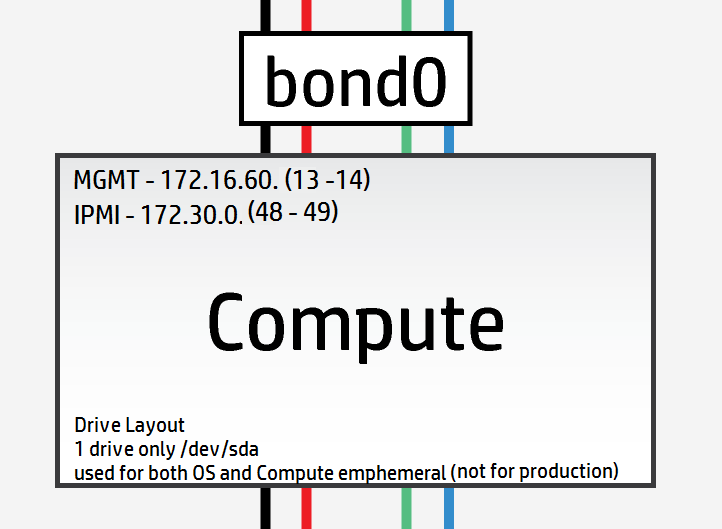
しかし、私のラボには単一ディスクの計算ノードしかないので、以下のようにレイアウトを変更する必要があります
#
# (c) Copyright 2015 Hewlett Packard Enterprise Development Company LP
#
# Licensed under the Apache License, Version 2.0 (the "License"); you may
# not use this file except in compliance with the License. You may obtain
# a copy of the License at
#
# http://www.apache.org/licenses/LICENSE-2.0
#
# Unless required by applicable law or agreed to in writing, software
# distributed under the License is distributed on an "AS IS" BASIS, WITHOUT
# WARRANTIES OR CONDITIONS OF ANY KIND, either express or implied. See the
# License for the specific language governing permissions and limitations
# under the License.
#
---
product:
version: 2

disk-models:
- name: COMPUTE-DISKS
# Disk model to be used for compute nodes
# /dev/sda_root is used as a volume group for /, /var/log and /var/crash
# sda_root is a templated value to align with whatever partition is really used
# This value is checked in os config and replaced by the partition actually used
# on sda e.g. sda1 or sda5
# /dev/sdb is used as a volume group for /var/lib (for VM storage)
# Additional discs can be added to either volume group

volume-groups:
- name: hlm-vg
physical-volumes:
- /dev/sda_root

logical-volumes:
# The policy is not to consume 100% of the space of each volume group.
# 5% should be left free for snapshots and to allow for some flexibility.
- name: root
size: 35%
fstype: ext4
mount: /
- name: log
size: 20%
mount: /var/log
fstype: ext4
mkfs-opts: -O large_file
- name: crash
size: 10%
mount: /var/crash
fstype: ext4
mkfs-opts: -O large_file
- name: compute
size: 30%
mount: /var/lib/nova
fstype: ext4
mkfs-opts: -O large_file
disks_osd.yml
OSDサーバーには8つの物理ドライブが利用可能です。これらのドライブはSSDではないため、ジャーナリングする価値はほとんどありません。最も最適な構成は、OS用に単一のドライブのみを使用し、残りのドライブをOSDとして使用することです:
#
# (c) Copyright 2015 Hewlett Packard Enterprise Development Company LP
#
# Licensed under the Apache License, Version 2.0 (the "License"); you may
# not use this file except in compliance with the License. You may obtain
# a copy of the License at
#
# http://www.apache.org/licenses/LICENSE-2.0
#
# Unless required by applicable law or agreed to in writing, software
# distributed under the License is distributed on an "AS IS" BASIS, WITHOUT
# WARRANTIES OR CONDITIONS OF ANY KIND, either express or implied. See the
# License for the specific language governing permissions and limitations
# under the License.
#
---
product:
version: 2

disk-models:
- name: OSD-DISKS
# Disk model to be used for Ceph OSD nodes
# /dev/sda_root is used as a volume group for /, /var/log and /var/crash
# sda_root is a templated value to align with whatever partition is really used
# This value is checked in os config and replaced by the partition actually used
# on sda e.g. sda1 or sda5

volume-groups:
- name: hlm-vg
physical-volumes:
- /dev/sda_root

logical-volumes:
# The policy is not to consume 100% of the space of each volume group.
# 5% should be left free for snapshots and to allow for some flexibility.
- name: root
size: 30%
fstype: ext4
mount: /
- name: log
size: 45%
mount: /var/log
fstype: ext4
mkfs-opts: -O large_file
- name: crash
size: 20%
mount: /var/crash
fstype: ext4
mkfs-opts: -O large_file
consumer:
name: os

# Disks to be used by Ceph
# Additional disks can be added if available
device-groups:
- name: ceph-osd-data0
devices:
- name: /dev/sdb
consumer:
name: ceph
attrs:
usage: data
- name: ceph-osd-data1
devices:
- name: /dev/sdc
consumer:
name: ceph
attrs:
usage: data
- name: ceph-osd-data2
devices:
- name: /dev/sdd
consumer:
name: ceph
attrs:
usage: data
- name: ceph-osd-data3
devices:
- name: /dev/sde
consumer:
name: ceph
attrs:
usage: data
- name: ceph-osd-data4
devices:
- name: /dev/sdf
consumer:
name: ceph
attrs:
usage: data
- name: ceph-osd-data5
devices:
- name: /dev/sdg
consumer:
name: ceph
attrs:
usage: data
- name: ceph-osd-data6
devices:
- name: /dev/sdh
consumer:
name: ceph
attrs:
usage: data
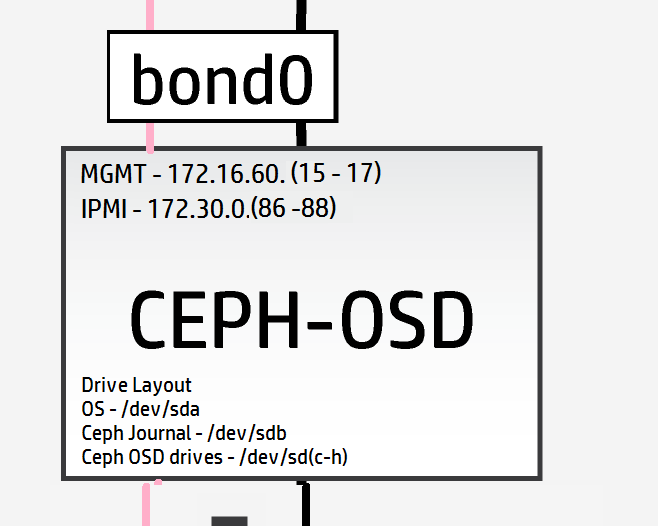
再び、高性能なSSDの欠如にもかかわらず、Cephジャーナリング機能のメカニクスをテストしたいので、標準ドライブを1つジャーナルとして使用します。これにより、ジャーナル対OSDの比率は1:6になります(この比率はほとんど意味がありません)。構成は現在次のようになります
#
# (c) Copyright 2015 Hewlett Packard Enterprise Development Company LP
#
# Licensed under the Apache License, Version 2.0 (the "License"); you may
# not use this file except in compliance with the License. You may obtain
# a copy of the License at
#
# http://www.apache.org/licenses/LICENSE-2.0
#
# Unless required by applicable law or agreed to in writing, software
# distributed under the License is distributed on an "AS IS" BASIS, WITHOUT
# WARRANTIES OR CONDITIONS OF ANY KIND, either express or implied. See the
# License for the specific language governing permissions and limitations
# under the License.
#
---
product:
version: 2

disk-models:
- name: OSD-DISKS
# Disk model to be used for Ceph OSD nodes
# /dev/sda_root is used as a volume group for /, /var/log and /var/crash
# sda_root is a templated value to align with whatever partition is really used
# This value is checked in os config and replaced by the partition actually used
# on sda e.g. sda1 or sda5

volume-groups:
- name: hlm-vg
physical-volumes:
- /dev/sda_root

logical-volumes:
# The policy is not to consume 100% of the space of each volume group.
# 5% should be left free for snapshots and to allow for some flexibility.
- name: root
size: 30%
fstype: ext4
mount: /
- name: log
size: 45%
mount: /var/log
fstype: ext4
mkfs-opts: -O large_file
- name: crash
size: 20%
mount: /var/crash
fstype: ext4
mkfs-opts: -O large_file
consumer:
name: os

# Disks to be used by Ceph
# Additional disks can be added if available
device-groups:
- name: ceph-osd-data-and-shared-journal-set-1
devices:
- name: /dev/sdc
consumer:
name: ceph
attrs:
usage: data
journal_disk: /dev/sdb
- name: ceph-osd-data-and-shared-journal-set-2
devices:
- name: /dev/sdd
consumer:
name: ceph
attrs:
usage: data
journal_disk: /dev/sdb
- name: ceph-osd-data-and-shared-journal-set-3
devices:
- name: /dev/sde
consumer:
name: ceph
attrs:
usage: data
journal_disk: /dev/sdb
- name: ceph-osd-data-and-shared-journal-set-4
devices:
- name: /dev/sdf
consumer:
name: ceph
attrs:
usage: data
journal_disk: /dev/sdb
- name: ceph-osd-data-and-shared-journal-set-5
devices:
- name: /dev/sdg
consumer:
name: ceph
attrs:
usage: data
journal_disk: /dev/sdb
- name: ceph-osd-data-and-shared-journal-set-6
devices:
- name: /dev/sdh
consumer:
name: ceph
attrs:
usage: data
journal_disk: /dev/sdb
サーバーディスクレイアウトが完了したので、実際のデプロイメント開始までネットワーク設定ファイルが残っています。
ページを戻ったり戻ったりするのを避けるために、ネットワークレイアウトを以下に再掲します(サーバーの詳細をより多く見るにはズームインしてください)
net_interfaces.yml
ここでは、新しいOSDレプリケーションネットワークの詳細を追加することを忘れないでください。明確さのために、中規模から大規模なCeph本番デプロイメントでは、OSDレプリケーションネットワークは独自の物理ネットワークインターフェースカード上にあるはずです。
私はこれを行うための十分なケーブルとハードウェアを持っていないので、デモンストレーション目的のみでbond0にトランクします。
デバイス名を以前にキャプチャしたnicマッピングに合わせてすべて変更します。
#
# (c) Copyright 2015 Hewlett Packard Enterprise Development Company LP
#
# Licensed under the Apache License, Version 2.0 (the "License"); you may
# not use this file except in compliance with the License. You may obtain
# a copy of the License at
#
# http://www.apache.org/licenses/LICENSE-2.0
#
# Unless required by applicable law or agreed to in writing, software
# distributed under the License is distributed on an "AS IS" BASIS, WITHOUT
# WARRANTIES OR CONDITIONS OF ANY KIND, either express or implied. See the
# License for the specific language governing permissions and limitations
# under the License.
#
---
product:
version: 2

interface-models:
# These examples uses hed3 and hed4 as a bonded
# pair for all networks on all three server roles
#
# Edit the device names and bond options
# to match your environment
#
- name: CONTROLLER-INTERFACES
network-interfaces:
- name: BOND0
device:
name: bond0
bond-data:
options:
mode: active-backup
miimon: 200
primary: hed0
provider: linux
devices:
- name: hed0
- name: hed1
network-groups:
- EXTERNAL-API
- EXTERNAL-VM
- GUEST
- MANAGEMENT

- name: COMPUTE-INTERFACES
network-interfaces:
- name: BOND0
device:
name: bond0
bond-data:
options:
mode: active-backup
miimon: 200
primary: hed0
provider: linux
devices:
- name: hed0
- name: hed1
network-groups:
- EXTERNAL-VM
- GUEST
- MANAGEMENT

- name: OSD-INTERFACES
network-interfaces:
- name: BOND0
device:
name: bond0
bond-data:
options:
mode: active-backup
miimon: 200
primary: hed0
provider: linux
devices:
- name: hed0
- name: hed1
network-groups:
- MANAGEMENT
- OSD
networks.yml
このファイルを、パラメータ内のネットワーク設定に合わせて構成します。
#
# (c) Copyright 2015 Hewlett Packard Enterprise Development Company LP
#
# Licensed under the Apache License, Version 2.0 (the "License"); you may
# not use this file except in compliance with the License. You may obtain
# a copy of the License at
#
# http://www.apache.org/licenses/LICENSE-2.0
#
# Unless required by applicable law or agreed to in writing, software
# distributed under the License is distributed on an "AS IS" BASIS, WITHOUT
# WARRANTIES OR CONDITIONS OF ANY KIND, either express or implied. See the
# License for the specific language governing permissions and limitations
# under the License.
#
---
product:
version: 2

networks:
#
# This example uses the following networks
#
# Network CIDR VLAN
# ------- ---- ----
# External API 10.0.1.0/24 101 (tagged)
# External VM see note 1 102 (tagged)
# Guest 10.1.1.0/24 103 (tagged)
# Management 192.168.10.0/24 100 (untagged)
#
# Notes:
# 1. Defined as part of Neutron configuration
#
# Modify these values to match your environment
#
- name: EXTERNAL-API-NET
vlanid: 61
tagged-vlan: true
cidr: 172.16.61.0/24
gateway-ip: 172.16.61.1
network-group: EXTERNAL-API

- name: EXTERNAL-VM-NET
vlanid: 62
tagged-vlan: true
network-group: EXTERNAL-VM

- name: GUEST-NET
vlanid: 63
tagged-vlan: true
cidr: 172.16.63.0/24
gateway-ip: 172.16.63.1
network-group: GUEST

- name: MANAGEMENT-NET
vlanid: 60
tagged-vlan: false
cidr: 172.16.60.0/24
gateway-ip: 172.16.60.1
network-group: MANAGEMENT

- name: OSD-NET
vlanid: 64
tagged-vlan: true
cidr: 172.16.64.0/24
gateway-ip: 172.16.64.1
network-group: OSD
これで、新しいOSDネットワークを含めるためにネットワークグループファイルを修正する必要があります
network_groups.yml
#
# (c) Copyright 2015 Hewlett Packard Enterprise Development Company LP
#
# Licensed under the Apache License, Version 2.0 (the "License"); you may
# not use this file except in compliance with the License. You may obtain
# a copy of the License at
#
# http://www.apache.org/licenses/LICENSE-2.0
#
# Unless required by applicable law or agreed to in writing, software
# distributed under the License is distributed on an "AS IS" BASIS, WITHOUT
# WARRANTIES OR CONDITIONS OF ANY KIND, either express or implied. See the
# License for the specific language governing permissions and limitations
# under the License.
#
---
product:
version: 2

network-groups:

#
# External API
#
# This is the network group that users will use to
# access the public API endpoints of your cloud
#
- name: EXTERNAL-API
hostname-suffix: extapi

load-balancers:
- provider: ip-cluster
name: extlb
# If external-name is set then public urls in keystone
# will use this name instead of the IP address
#You must either set this to a name that can be resolved in your network
# or comment out this line to use IP addresses
external-name:

roles:
- public
tls-components:
- default
cert-file: my-public-cert
# This is the name of the certificate that will be used on load balancer.
# Replace this with name of file in "~helion/my_cloud/config/tls/certs/".
# This is the certificate that matches your setting for external-name
#
# Note that it is also possible to have per service certificates:
#
# cert-file:
# default: my-public-cert
# horizon: my-horizon-cert
# nova-api: my-nova-cert
#
#

# External VM
#
# This is the network group that will be used to provide
# external access to VMs (via floating IP Addresses)
#
- name: EXTERNAL-VM
tags:
- neutron.l3_agent.external_network_bridge

#
# GUEST
#
# This is the network group that will be used to provide
# private networks to VMs
#
- name: GUEST
hostname-suffix: guest
tags:
- neutron.networks.vxlan

#
# Management
#
# This is the network group that will be used to for
# management traffic within the cloud.
#
# The interface used by this group will be presented
# to Neutron as physnet1, and used by provider VLANS
#
- name: MANAGEMENT
hostname-suffix: mgmt
hostname: true

component-endpoints:
- default

routes:
- default

load-balancers:
- provider: ip-cluster
name: lb
components:
- default
roles:
- internal
- admin

tags:
- neutron.networks.vlan:
provider-physical-network: physnet1

#
# OSD
#
#
# This network group will be used to carry the to carry the internal Ceph
# cluster replication traffic
#
- name: OSD
hostanme-suffix: osd

component-endpoints:
- ceph-osd-internal
おっと、すみません、ほぼ完了だと言いましたが、Cephの基本設定について言及し忘れました。
Ceph構成の最小限として、~/helion/my_cloud/config/ceph/settings.ymlのFSIDパラメータに一意のクラスターIDを追加することを推奨します
ラボデプロイメントの場合、デフォルトでも機能します。
注: オンラインドキュメントは「uuidgen」を使用して新しい一意のIDを作成することを推奨していますが、このアプリケーションは最初にインストールする必要があります。
sudo apt-get install uuid-runtime
uuidgen
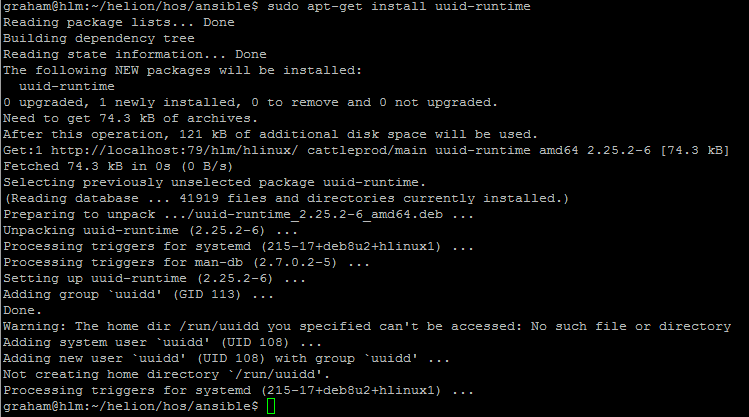
クラスターFSIDには5e23fd0c-b449-43e3-a34e-fa0952c30e81を使用しました

#
# (c) Copyright 2015 Hewlett Packard Enterprise Development Company LP
#
# Licensed under the Apache License, Version 2.0 (the "License"); you may
# not use this file except in compliance with the License. You may obtain
# a copy of the License at
#
# http://www.apache.org/licenses/LICENSE-2.0
#
# Unless required by applicable law or agreed to in writing, software
# distributed under the License is distributed on an "AS IS" BASIS, WITHOUT
# WARRANTIES OR CONDITIONS OF ANY KIND, either express or implied. See the
# License for the specific language governing permissions and limitations
# under the License.
#
---

# Variables specific to all ceph services
fsid: 5e23fd0c-b449-43e3-a34e-fa0952c30e81
ceph_user: root
ceph_group: root
ceph_cluster: ceph
ceph_release: firefly
osd_pool_default_size: 3
osd_pool_default_pg_num: 128

# Variables specific to OSD
fstype: xfs
zap_data_disk: True
persist_mountpoint: fstab
osd_settle_time: 10
osd_journal_size: 5120
data_disk_poll_attempts: 5
data_disk_poll_interval: 12

# Variables specific to MON
mon_default_dir: /var/lib/ceph/mon/{{ ceph_cluster }}

# Additional parameters of ceph configuration can be injected via below section
# extra:
# section1:
# key1: value
# key2: value
# section2:
# key1: value
# key2: value
また、Cephクライアントには、~/helion/my_cloud/config/ceph/user_model.ymlに一意のsecret_idを提供します
私の場合、secret_idには7d4304a4-a4d2-4cea-ba3c-bbbdc8d11bd4を使用します

#
# (c) Copyright 2015 Hewlett Packard Enterprise Development Company LP
#
# Licensed under the Apache License, Version 2.0 (the "License"); you may
# not use this file except in compliance with the License. You may obtain
# a copy of the License at
#
# http://www.apache.org/licenses/LICENSE-2.0
#
# Unless required by applicable law or agreed to in writing, software
# distributed under the License is distributed on an "AS IS" BASIS, WITHOUT
# WARRANTIES OR CONDITIONS OF ANY KIND, either express or implied. See the
# License for the specific language governing permissions and limitations
# under the License.
#
---

product:
version: 2

ceph_user_models:
- user:
name: cinder
type: openstack
secret_id: 7d4304a4-a4d2-4cea-ba3c-bbbdc8d11bd4
pools:
- name: volumes
attrs:
creation_policy: eager
type: replicated
replica_size: 3
permission: rwx
pg: 100
usage:
consumer: cinder-volume
- name: vms
attrs:
creation_policy: eager
type: replicated
replica_size: 3
permission: rwx
pg: 100
usage:
consumer: nova
- name: images
attrs:
creation_policy: lazy
permission: rx
- user:
name: glance
type: openstack
pools:
- name: images
attrs:
creation_policy: eager
type: replicated
replica_size: 3
permission: rwx
pg: 128
usage:
consumer: glance-datastore
- user:
name: cinder-backup
type: openstack
pools:
- name: backups
attrs:
creation_policy: eager
type: replicated
replica_size: 3
permission: rwx
pg: 128
usage:
consumer: cinder-backup
最後に、新しいOSDネットワークをファイアウォールに追加する必要があります
#
# (c) Copyright 2015 Hewlett Packard Enterprise Development Company LP
#
# Licensed under the Apache License, Version 2.0 (the "License"); you may
# not use this file except in compliance with the License. You may obtain
# a copy of the License at
#
# http://www.apache.org/licenses/LICENSE-2.0
#
# Unless required by applicable law or agreed to in writing, software
# distributed under the License is distributed on an "AS IS" BASIS, WITHOUT
# WARRANTIES OR CONDITIONS OF ANY KIND, either express or implied. See the
# License for the specific language governing permissions and limitations
# under the License.
#
---
product:
version: 2

#
# HOS will create firewall rules to enable the required access for
# all of the deployed services. Use this section to define any
# additional access.
#
# Each group of rules can be applied to one or more network groups
# Examples are given for ping and ssh
#
# Names of rules, (e.g. "PING") are arbitrary and have no special significance
#

firewall-rules:

# - name: SSH
# # network-groups is a list of all the network group names
# # that the rules apply to
# network-groups:
# - MANAGEMENT
# rules:
# - type: allow
# # range of remote addresses in CIDR format that this
# # rule applies to
# remote-ip-prefix: 0.0.0.0/0
# port-range-min: 22
# port-range-max: 22
# # protocol must be one of: null, tcp, udp or icmp
# protocol: tcp

- name: PING
network-groups:
- MANAGEMENT
- GUEST
- EXTERNAL-API
- OSD
rules:
# open ICMP echo request (ping)
- type: allow
remote-ip-prefix: 0.0.0.0/0
# icmp type
port-range-min: 8
# icmp code
port-range-max: 0
protocol: icmp
okay、更新するファイルがもう1つあり、3週間後にはあなたがそれをやったことを感謝するでしょう…予想はつきますか?そうです、README.MDファイルです。私たちは皆ドキュメントが好きですよね?[ここでアイロニーが見えているよ]
README.MD
README.MD

##Helion Entry Scale Cloud with Ceph and Separate OSD Replication Network##

## Updated - 15/01/16
## Author - Grazzer
## Site - http://allthingscloud.eu
## Twitter - @allthingsclowd

The input files in this example deploy a cloud that has the following characteristics:

### Control Planes ###

- A single control plane consisting of three servers that co-host all of the required services. In addition, each hosts Ceph monitor service as well.

###Resource Pools###

- Two compute Node

- Three Ceph OSD Nodes

*Additional resource nodes can be added to the configuration.*

*Minimal Swift Resources are provided by the control plane*

###Deployer Node###

This configuration runs the lifecycle-manager (formerly referred to as the deployer) on a control plane node.
You need to include this node address in your servers.yml definition. This function does not need a dedicated network.

*The minimum server count for this example is therefore 7 servers (Control Plane (x3) + Compute (x1) + OSD (x3))*

An example set of servers are defined in ***data/servers.yml***. You will need to modify this file to reflect your specific environment.

###Networking###

The example requires the following networks:

IPMI/iLO network, connected to the deployer and the IPMI/iLO ports of all servers

A pair of bonded NICs which are used by the following networks:

- External API - This is the network that users will use to make requests to the cloud
- External VM - This is the network that will be used to provide access to VMs (via floating IP addresses)
- Guest - This is the network that will carry traffic between VMs on private networks within the cloud
- Cloud Management - This is the network that will be used for all internal traffic between the cloud services, This network is also
used to install and configure the nodes. This network needs to be on an untagged VLAN
- OSD - This is the network that is used to carry all the Ceph OSD replication traffic

Note that the EXTERNAL\_API network must be reachable from the EXTERNAL\_VM network if you want VMs to be able to make API calls to the cloud.

An example set of networks are defined in ***data/networks.yml***. You will need to modify this file to reflect your environment.

The example uses the devices hed3 & hed4 as a bonded network for all services. If you need to modify these
for your environment they are defined in ***data/net_interfaces.yml*** The network devices eth3 & eth4 are renamed to devices hed4 & hed5 using the PCI bus mappings secified in ***data/nic_mappings.yml***. You may need to modify the PCI bus addresses to match your system.

###Local Storage###

All servers should present a single OS disk, protected by a RAID controller. This disk needs to be at least 512GB in capacity. In addition the example configures one additional disk depending on the role of the server:

- Controllers: /dev/sdb & /dev/sdc is configured to be used by Swift
- Compute Severs: /dev/sda is configured as both OS and VM storage (not production grade)
- OSD Servers: /dev/sdc, /dev/sdd, /dev/sde, /dev/sdf, /dev/sdg and /dev/sdh are configured for OSD data and /dev/sdb for journal storage

Additional discs can be configured for any of these roles by editing the corresponding ***data/disks_*.yml*** file
これで、クラウドモデルの設定が完了しました。
注: HELION DEVELOPMENT PLATFORMを使用する場合は、サービスネットワークも追加する必要があります こちら参照。