

本稿では、K5 プラットフォームが実装する拡張ネットワークコネクタを用いて、プロジェクト内のサブネットをアベイラビリティゾーン間でリンクするためのシンプルな Heat スタックの実装方法について解説します。
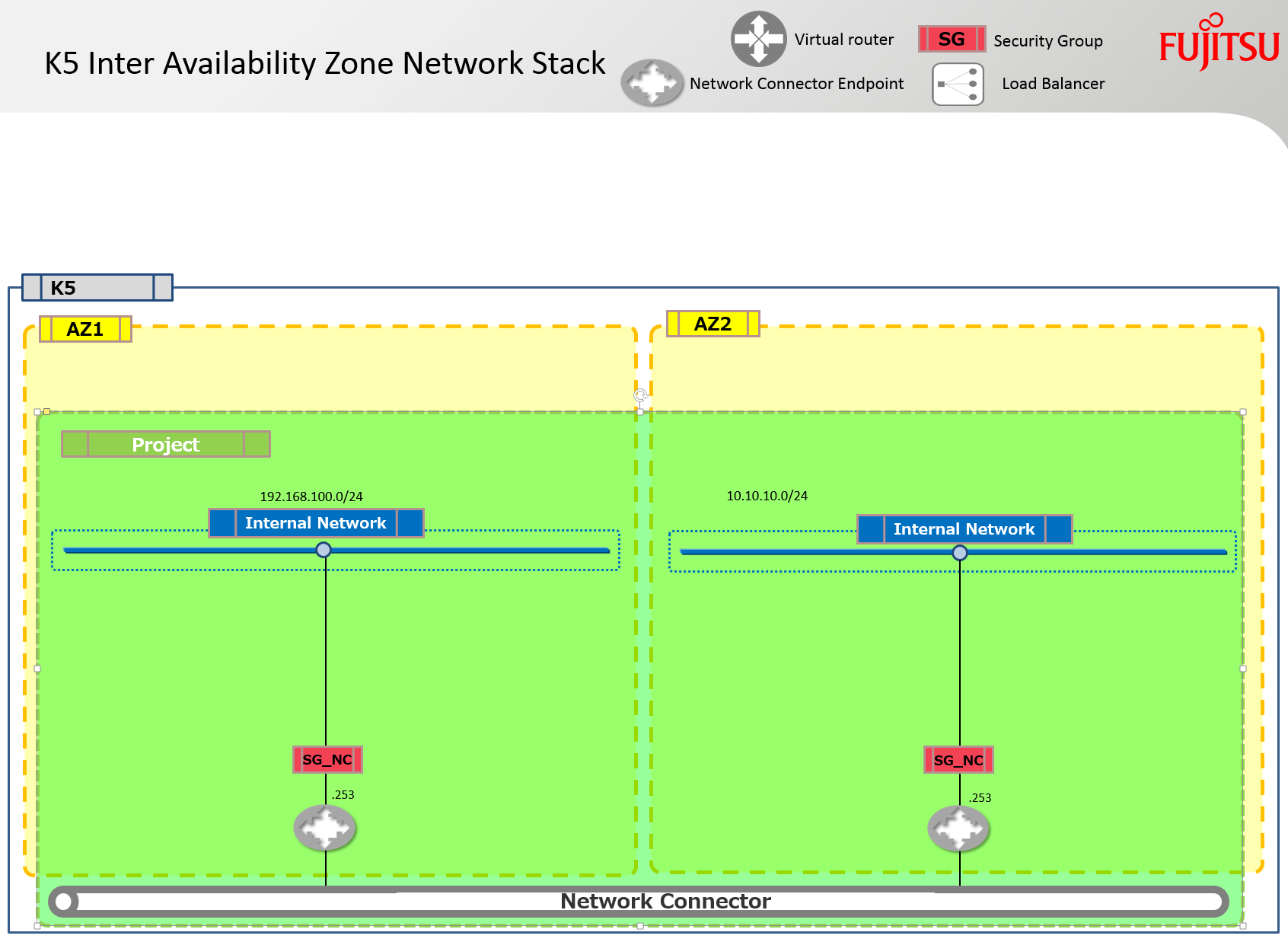
Fujitsu のエンジニアリングチームは現在、OpenStack プロジェクトへのコミット行数で世界第5位にランクされています(おめでとうございます)。このチームは、K5 プラットフォームにおいて Neutron を強化し、現在 Nova プロジェクトで提供されているのと同じハードウェア障害ドメインの機能を実現しました。これにより、Neutron サービスをアベイラビリティゾーン間で分割することが可能になり、結果としてアベイラビリティゾーンをリモートデータセンター間で分割しやすくなります。
技術的な詳細については、以下の動画(14分あたりから)をご覧ください。
この強化の結果、私たちは「ネットワークコネクタ」と呼ばれる新しい K5 Neutron コンポーネントを開発しました。これは、同じプロジェクト内にありながら別々のアベイラビリティゾーンにあるネットワークをリンクするために使用されます。これらのネットワークは異なるサブネット CIDR を持つ必要があります。
以下の Heat スタックテンプレートは、2つのプライベートネットワーク(それぞれアベイラビリティゾーンに1つずつ)を作成し、新しいネットワークコネクタとそのエンドポイントコンポーネントを使用してそれらを結合します。
テストしたい場合は、このテンプレートですぐに環境を構築できます。
このファイルには、以下に表示されている内容とは異なる解釈やコンパイルが行われる可能性がある、隠された双方向 Unicode 文字が含まれています。確認するには、隠された Unicode 文字を表示するエディタでファイルを開いてください。
双方向 Unicode 文字について詳しく見る
| heat_template_version: 2013-05-23 | |
| # Author: Graham Land | |
| # Date: 21/10/2016 | |
| # Purpose: Create two subnets, one in each availability zone, within the same project and then join these subnets | |
| # using a network connector. The subnets also get configured with the new routes. | |
| # | |
| # Twitter: @allthingsclowd | |
| # Blog: https://allthingscloud.eu | |
| description: Example of how to create and join two networks across AZs within the same project on Fujitsu K5 IaaS | |
| # Input parameters | |
| parameters: | |
| az1: | |
| type: string | |
| label: Availability Zone | |
| description: Region AZ to use | |
| default: "uk-1a" | |
| az1_net_name: | |
| type: string | |
| label: Network name | |
| description: Network name | |
| default: "demo_net_az1" | |
| az1_subnet_name: | |
| type: string | |
| label: Subnet name | |
| description: Subnet name | |
| default: "demo_subnet_az1" | |
| az1_subnet_CIDR: | |
| type: string | |
| label: Subnet CIDR | |
| description: Subnet CIDR | |
| default: "192.168.100.0/24" | |
| az1_subnet_DHCP_Start_Address: | |
| type: string | |
| label: Subnet DHCP Pool start address | |
| description: Subnet DHCP Pool start address | |
| default: "192.168.100.100" | |
| az1_subnet_DHCP_End_Address: | |
| type: string | |
| label: Subnet DHCP Pool end address | |
| description: Subnet DHCP Pool end address | |
| default: "192.168.100.150" | |
| az1_subnet_DNS: | |
| type: string | |
| label: Subnet DNS | |
| description: Subnet DNS | |
| default: | |
| – "62.60.39.9" | |
| – "62.60.39.10" | |
| az1_subnet_Routes: | |
| type: string | |
| label: Subnet Host Routes | |
| description: Subnet Host Routes | |
| default: | |
| – "nexthop": "192.168.100.253" | |
| "destination": "10.10.10.0/24" | |
| az1_subnet_Gateway: | |
| type: string | |
| label: Subnet gateway address | |
| description: Subnet gateway address | |
| default: "192.168.100.254" | |
| az1_EndPoint_ip: | |
| type: string | |
| label: Subnet endpoint address | |
| description: Subnet endpoint address | |
| default: "192.168.100.253" | |
| az2: | |
| type: string | |
| label: Availability Zone | |
| description: Region AZ to use | |
| default: "uk-1b" | |
| az2_net_name: | |
| type: string | |
| label: Network name | |
| description: Network name | |
| default: "demo_net_az2" | |
| az2_subnet_name: | |
| type: string | |
| label: Subnet name | |
| description: Subnet name | |
| default: "demo_subnet_az2" | |
| az2_subnet_CIDR: | |
| type: string | |
| label: Subnet CIDR | |
| description: Subnet CIDR | |
| default: "10.10.10.0/24" | |
| az2_subnet_DHCP_Start_Address: | |
| type: string | |
| label: Subnet DHCP Pool start address | |
| description: Subnet DHCP Pool start address | |
| default: "10.10.10.100" | |
| az2_subnet_DHCP_End_Address: | |
| type: string | |
| label: Subnet DHCP Pool end address | |
| description: Subnet DHCP Pool end address | |
| default: "10.10.10.150" | |
| az2_subnet_DNS: | |
| type: string | |
| label: Subnet DNS | |
| description: Subnet DNS | |
| default: | |
| – "62.60.42.9" | |
| – "62.60.42.10" | |
| az2_subnet_Routes: | |
| type: string | |
| label: Subnet Host Routes | |
| description: Subnet Host Routes | |
| default: | |
| – "nexthop": "10.10.10.253" | |
| "destination": "192.168.100.0/24" | |
| az2_subnet_Gateway: | |
| type: string | |
| label: Subnet gateway address | |
| description: Subnet gateway address | |
| default: "10.10.10.254" | |
| az2_EndPoint_ip: | |
| type: string | |
| label: Subnet endpoint address | |
| description: Subnet endpoint address | |
| default: "10.10.10.253" | |
| # K5 Infrastructure resources to be built | |
| resources: | |
| # Create a private network in availability zone 1 | |
| private_net_az1: | |
| type: OS::Neutron::Net | |
| properties: | |
| availability_zone: { get_param: az1 } | |
| name: { get_param: az1_net_name } | |
| # Create a new subnet on the private network | |
| private_subnet_az1: | |
| type: OS::Neutron::Subnet | |
| depends_on: private_net_az1 | |
| properties: | |
| availability_zone: { get_param: az1 } | |
| name: { get_param: az1_subnet_name } | |
| network_id: { get_resource: private_net_az1 } | |
| cidr: { get_param: az1_subnet_CIDR } | |
| gateway_ip: { get_param: az1_subnet_Gateway } | |
| allocation_pools: | |
| – start: { get_param: az1_subnet_DHCP_Start_Address } | |
| end: { get_param: az1_subnet_DHCP_End_Address } | |
| dns_nameservers: { get_param: az1_subnet_DNS } | |
| host_routes: { get_param: az1_subnet_Routes } | |
| # Create a private network in availability zone 1 | |
| private_net_az2: | |
| type: OS::Neutron::Net | |
| properties: | |
| availability_zone: { get_param: az2 } | |
| name: { get_param: az2_net_name } | |
| # Create a new subnet on the private network | |
| private_subnet_az2: | |
| type: OS::Neutron::Subnet | |
| depends_on: private_net_az2 | |
| properties: | |
| availability_zone: { get_param: az2 } | |
| name: { get_param: az2_subnet_name } | |
| network_id: { get_resource: private_net_az2 } | |
| cidr: { get_param: az2_subnet_CIDR } | |
| gateway_ip: { get_param: az2_subnet_Gateway } | |
| allocation_pools: | |
| – start: { get_param: az2_subnet_DHCP_Start_Address } | |
| end: { get_param: az2_subnet_DHCP_End_Address } | |
| dns_nameservers: { get_param: az2_subnet_DNS } | |
| host_routes: { get_param: az2_subnet_Routes } | |
| # Create a security group | |
| server_security_group1: | |
| type: OS::Neutron::SecurityGroup | |
| properties: | |
| description: Add security group rules for server | |
| name: NetworkConnector | |
| rules: | |
| – remote_ip_prefix: 0.0.0.0/0 | |
| protocol: tcp | |
| port_range_min: 1 | |
| port_range_max: 65535 | |
| – remote_ip_prefix: 0.0.0.0/0 | |
| protocol: udp | |
| port_range_min: 1 | |
| port_range_max: 65535 | |
| – remote_ip_prefix: 0.0.0.0/0 | |
| protocol: icmp | |
| ############################### AZ Interconnect ########################################################### | |
| az1_nc_port: | |
| type: OS::Neutron::Port | |
| depends_on: [ server_security_group1 ] | |
| properties: | |
| availability_zone: { get_param: az1 } | |
| network_id: { get_resource: private_net_az1 } | |
| security_groups: [{ get_resource: server_security_group1 }] | |
| fixed_ips: | |
| – subnet_id: { get_resource: private_subnet_az1 } | |
| ip_address: { get_param: az1_EndPoint_ip } | |
| az2_nc_port: | |
| type: OS::Neutron::Port | |
| depends_on: [ server_security_group1 ] | |
| properties: | |
| availability_zone: { get_param: az2 } | |
| network_id: { get_resource: private_net_az2 } | |
| security_groups: [{ get_resource: server_security_group1 }] | |
| fixed_ips: | |
| – subnet_id: { get_resource: private_subnet_az2 } | |
| ip_address: { get_param: az2_EndPoint_ip } | |
| az1_network_connector: | |
| type: FCX::Neutron::NetworkConnector | |
| depends_on: [ az1_nc_port,az2_nc_port ] | |
| properties: | |
| name: "Demo_AZ_Network_Connector" | |
| az1_nc_endpoint: | |
| type: FCX::Neutron::NetworkConnectorEndpoint | |
| depends_on: [ az1_nc_port,az2_nc_port ] | |
| properties: | |
| endpoint_type: "availability_zone" | |
| name: "AZ1-NC-EP" | |
| network_connector_id: { get_resource: az1_network_connector } | |
| location: { get_param: az1 } | |
| az2_nc_endpoint: | |
| type: FCX::Neutron::NetworkConnectorEndpoint | |
| depends_on: [ az1_nc_port,az2_nc_port ] | |
| properties: | |
| endpoint_type: "availability_zone" | |
| name: "AZ2-NC-EP" | |
| network_connector_id: { get_resource: az1_network_connector } | |
| location: { get_param: az2 } | |
| az1_endpoint_connection: | |
| type: FCX::Neutron::NetworkConnectorEndpointConnection | |
| depends_on: [ az1_nc_port,az2_nc_port ] | |
| properties: | |
| port_id: { get_resource: az1_nc_port } | |
| network_connector_endpoint_id: { get_resource: az1_nc_endpoint } | |
| az2_endpoint_connection: | |
| type: FCX::Neutron::NetworkConnectorEndpointConnection | |
| depends_on: [ az1_nc_port,az2_nc_port ] | |
| properties: | |
| port_id: { get_resource: az2_nc_port } | |
| network_connector_endpoint_id: { get_resource: az2_nc_endpoint } | |
| Contact GitHub API Training Shop Blog About | |
| © 2016 GitHub, Inc. Terms Priv |
raw を表示
K5NetworkConnectorDemo.yml
hosted with ❤ by GitHub
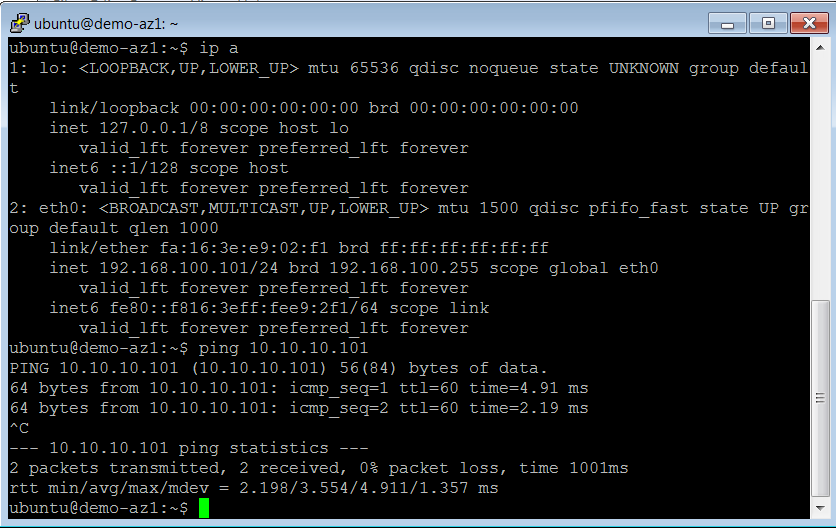
あとは、各サブネットにインスタンスを起動するだけです。インスタンス間で Layer 3 の接続性が確立されていることが確認できるはずです。
Happy Stacking!