

ようやく、Fujitsu K5 OpenStack Publicクラウドプラットフォーム向けのHeatスタックを公開できます。ここ数週間は非常に忙しく、ブログを書く時間がほとんどありませんでした。
HeatはOpenStackのオーケストレーションプロジェクトであり、OpenStack K5 IaaSクラウド、あるいは他のOpenStackクラウドにおいて、インフラストラクチャパターン(テンプレート)を迅速かつ一貫して構築する必要がある場合に一般的に使用されるべきものです。この利点は、以下に示すように、テンプレートがGithubに保存したYAMLファイルで記述されている点にあります。これにより、アプリケーションコードと同様にインフラストラクチャのバージョン管理が可能になり、テスト済みのIaC(Infrastructure as Code)バージョンのデプロイ時の予期せぬ事態が少なくなるはずです。これは、継続的インテグレーションと継続的デプロイメントの運用モデルへの移行を目指している場合に必須の要件です。
以下の最初の例は、こちらでも利用可能で、以下のインフラストラクチャを「自動的」に構築します:
- 2つのL2ネットワーク
- 2つのサブネット
- 注:サブネットには追加ルートが追加されていますが、これはこの投稿では必要ありません
- Windowsサーバー 1台
- 追加のブロックストレージ
- 新しいドライブを'D:\'として構成およびマウントするためのinitスクリプト
- DHCPによるIPアドレス割り当て
- 管理者ユーザーをk5userに設定
- 管理ネットワークに接続
- Linuxサーバー 1台
- 追加のブロックストレージ
- デプロイ時に新しいドライブを構成およびマウントするためのinitスクリプト
- 固定IPアドレス割り当て
- 管理者ユーザーをK5userに設定
- 共有サービスネットワークに接続
- セキュリティグループ(SG) 2つ
- 警告:これらのSGは完全に開放されています。環境に合わせて適切に構成してください。
例 – プロジェクト1スタック
このファイルには、以下に表示される内容とは異なって解釈またはコンパイルされる可能性のある、隠されたまたは双方向のUnicode文字が含まれています。確認するには、隠されたUnicode文字を表示するエディタでファイルを開いてください。
双方向のUnicode文字について詳しく見る
| heat_template_version: 2013-05-23 | |
| # Author: Graham Land | |
| # Date: 25/09/2016 | |
| # Purpose: Project 1 Demo HOT Infrastructure Template | |
| # Twitter: @allthingsclowd | |
| # Blog : https://allthingscloud.eu | |
| description: K5 template to build an environment within a Project | |
| # Input parameters | |
| parameters: | |
| red_image: | |
| type: string | |
| label: Image name or ID | |
| description: Redhat 7.2 image to be used for compute instance | |
| default: "Red Hat Enterprise Linux 7.2 64bit (English) 01" | |
| win_image: | |
| type: string | |
| label: Image name or ID | |
| description: Windows Server 2012 R2 SE image to be used for compute instance | |
| default: "Windows Server 2012 R2 SE 64bit (English) 01" | |
| az: | |
| type: string | |
| label: Availability Zone | |
| description: Region AZ to use | |
| default: "uk-1b" | |
| default-sshkey: | |
| type: string | |
| label: ssh key injected into linux systems | |
| description: ssh key for linux builds | |
| default: "demostack" | |
| # K5 Infrastructure resources to be built | |
| resources: | |
| # Create a new private network | |
| management_net: | |
| type: OS::Neutron::Net | |
| properties: | |
| availability_zone: { get_param: az } | |
| name: "Management" | |
| # Create a new subnet on the private network | |
| management_subnet: | |
| type: OS::Neutron::Subnet | |
| depends_on: management_net | |
| properties: | |
| availability_zone: { get_param: az } | |
| name: "Management_Subnet" | |
| network_id: { get_resource: management_net } | |
| cidr: "172.24.201.0/26" | |
| allocation_pools: | |
| – start: "172.24.201.1" | |
| end: "172.24.201.15" | |
| gateway_ip: "172.24.201.62" | |
| host_routes: [{"nexthop": "172.24.200.81", "destination": "172.24.202.0/23"}] | |
| # Create a new private network | |
| shared_services_net: | |
| type: OS::Neutron::Net | |
| properties: | |
| availability_zone: { get_param: az } | |
| name: "Shared_Services" | |
| # Create a new subnet on the private network | |
| shared_services_subnet: | |
| type: OS::Neutron::Subnet | |
| depends_on: shared_services_net | |
| properties: | |
| availability_zone: { get_param: az } | |
| name: "Shared_Services_Subnet" | |
| network_id: { get_resource: shared_services_net } | |
| cidr: "172.24.201.64/26" | |
| gateway_ip: "172.24.201.126" | |
| allocation_pools: | |
| – start: "172.24.201.90" | |
| end: "172.24.201.105" | |
| host_routes: [{"nexthop": "172.24.200.81", "destination": "172.24.202.0/23"}] | |
| # Create a new router | |
| project1_router: | |
| type: OS::Neutron::Router | |
| properties: | |
| availability_zone: { get_param: az } | |
| name: "Project2_Router" | |
| # Connect an interface on the private network's subnet to the router | |
| project1_router_interface1: | |
| type: OS::Neutron::RouterInterface | |
| depends_on: project1_router | |
| properties: | |
| router_id: { get_resource: project1_router } | |
| subnet_id: { get_resource: management_subnet } | |
| # Connect an interface on the private network's subnet to the router | |
| project1_router_interface2: | |
| type: OS::Neutron::RouterInterface | |
| depends_on: project1_router | |
| properties: | |
| router_id: { get_resource: project1_router } | |
| subnet_id: { get_resource: shared_services_subnet } | |
| # Create a security group | |
| server_security_group1: | |
| type: OS::Neutron::SecurityGroup | |
| properties: | |
| description: Add security group rules for server | |
| name: "Windows_SG" | |
| rules: | |
| – remote_ip_prefix: 0.0.0.0/0 | |
| protocol: udp | |
| – remote_ip_prefix: 0.0.0.0/0 | |
| protocol: tcp | |
| – remote_ip_prefix: 0.0.0.0/0 | |
| protocol: icmp | |
| # Create a security group | |
| server_security_group2: | |
| type: OS::Neutron::SecurityGroup | |
| properties: | |
| description: Add security group rules for server | |
| name: "Linux_SG" | |
| rules: | |
| – remote_ip_prefix: 0.0.0.0/0 | |
| protocol: udp | |
| – remote_ip_prefix: 0.0.0.0/0 | |
| protocol: tcp | |
| – remote_ip_prefix: 0.0.0.0/0 | |
| protocol: icmp | |
| ################################ Adding a Server Start ############################## | |
| # Create a data volume for use with the server | |
| data_vol_server1: | |
| type: OS::Cinder::Volume | |
| properties: | |
| availability_zone: { get_param: az } | |
| description: Data volume | |
| name: "data-vol" | |
| size: 50 | |
| volume_type: "M1" | |
| # Create a system volume for use with the server | |
| sys-vol_server1: | |
| type: OS::Cinder::Volume | |
| properties: | |
| availability_zone: { get_param: az } | |
| name: "boot-vol" | |
| size: 80 | |
| volume_type: "M1" | |
| image : { get_param: win_image } | |
| # Build a server using the system volume defined above | |
| server1: | |
| type: OS::Nova::Server | |
| properties: | |
| key_name: { get_param: default-sshkey } | |
| image: { get_param: win_image } | |
| flavor: "S-4" | |
| admin_user: "k5user" | |
| metadata: { "admin_pass": Password12345 } | |
| block_device_mapping: [{"volume_size": "80", "volume_id": {get_resource: sys-vol_server1}, "delete_on_termination": True, "device_name": "/dev/vda"}] | |
| name: "Hello_Windows_P1" | |
| user_data: | |
| #ps1 | |
| $d = Get-Disk | |
| $d | |
| $d | |
| $p = $d | |
| $p | |
| user_data_format: RAW | |
| networks: ["uuid": {get_resource: management_net} ] | |
| # Attach previously defined data-vol to the server | |
| attach_vol1: | |
| type: OS::Cinder::VolumeAttachment | |
| depends_on: [ data_vol_server1, server1 ] | |
| properties: | |
| instance_uuid: {get_resource: server1} | |
| mountpoint: "/dev/vdb" | |
| volume_id: {get_resource: data_vol_server1} | |
| ################################ Adding a Server End ################################ | |
| ################################ Adding a Server Start ############################## | |
| # Create a new port for the server interface, assign an ip address and security group | |
| server2_port: | |
| type: OS::Neutron::Port | |
| depends_on: [ project1_router_interface2,server_security_group2 ] | |
| properties: | |
| availability_zone: { get_param: az } | |
| network_id: { get_resource: shared_services_net } | |
| security_groups: [{ get_resource: server_security_group2 }] | |
| fixed_ips: | |
| – subnet_id: { get_resource: shared_services_subnet } | |
| ip_address: '172.24.201.66' | |
| # Create a data volume for use with the server | |
| data_vol_server2: | |
| type: OS::Cinder::Volume | |
| properties: | |
| availability_zone: { get_param: az } | |
| description: Data volume | |
| name: "data-vol" | |
| size: 40 | |
| volume_type: "M1" | |
| # Create a system volume for use with the server | |
| sys-vol_server2: | |
| type: OS::Cinder::Volume | |
| properties: | |
| availability_zone: { get_param: az } | |
| name: "boot-vol" | |
| size: 40 | |
| volume_type: "M1" | |
| image : { get_param: red_image } | |
| # Build a server using the system volume defined above | |
| server2: | |
| type: OS::Nova::Server | |
| depends_on: [ server2_port ] | |
| properties: | |
| key_name: { get_param: default-sshkey } | |
| image: { get_param: red_image } | |
| flavor: "S-2" | |
| block_device_mapping: [{"volume_size": "40", "volume_id": {get_resource: sys-vol_server2}, "delete_on_termination": True, "device_name": "/dev/vda"}] | |
| name: "Hello_Linux_P1" | |
| admin_user: "k5user" | |
| user_data: | |
| str_replace: | |
| template: | |
| #cloud-config | |
| write_files: | |
| – content: | |
| #!/bin/bash | |
| voldata_id=%voldata_id% | |
| voldata_dev="/dev/disk/by-id/virtio-$(echo ${voldata_id} | |
| mkfs.ext4 ${voldata_dev} | |
| mkdir -pv /mnt/appdata | |
| echo "${voldata_dev} /mnt/appdata ext4 defaults 1 2" >> /etc/fstab | |
| mount /mnt/appdata | |
| chmod 0777 /mnt/appdata | |
| path: /tmp/format-disks | |
| permissions: '0700' | |
| runcmd: | |
| – /tmp/format-disks | |
| params: | |
| "%voldata_id%": { get_resource: data_vol_server2 } | |
| user_data_format: RAW | |
| networks: ["uuid": {get_resource: shared_services_net} ] | |
| # Attach previously defined data-vol to the server | |
| attach_vol2: | |
| type: OS::Cinder::VolumeAttachment | |
| depends_on: [ data_vol_server2, server2 ] | |
| properties: | |
| instance_uuid: {get_resource: server2} | |
| mountpoint: "/dev/vdb" | |
| volume_id: {get_resource: data_vol_server2} | |
| ################################ Adding a Server End ################################ | |
rawを表示
Fujitsu-K5-Example-Heat-Stack-Project1.YAML
hosted with ❤ by GitHub
K5 IaaS GUIのStackオプションを使用して、以下のようにHeatテンプレートをアップロードします:
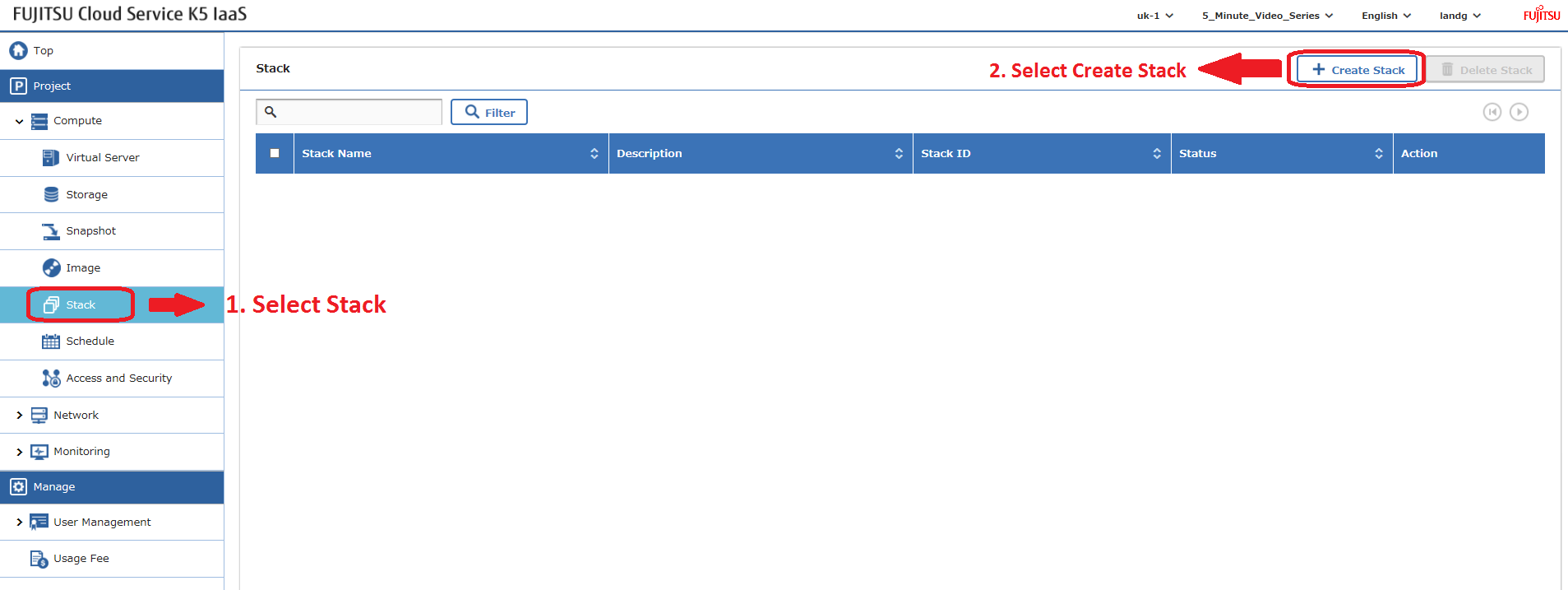
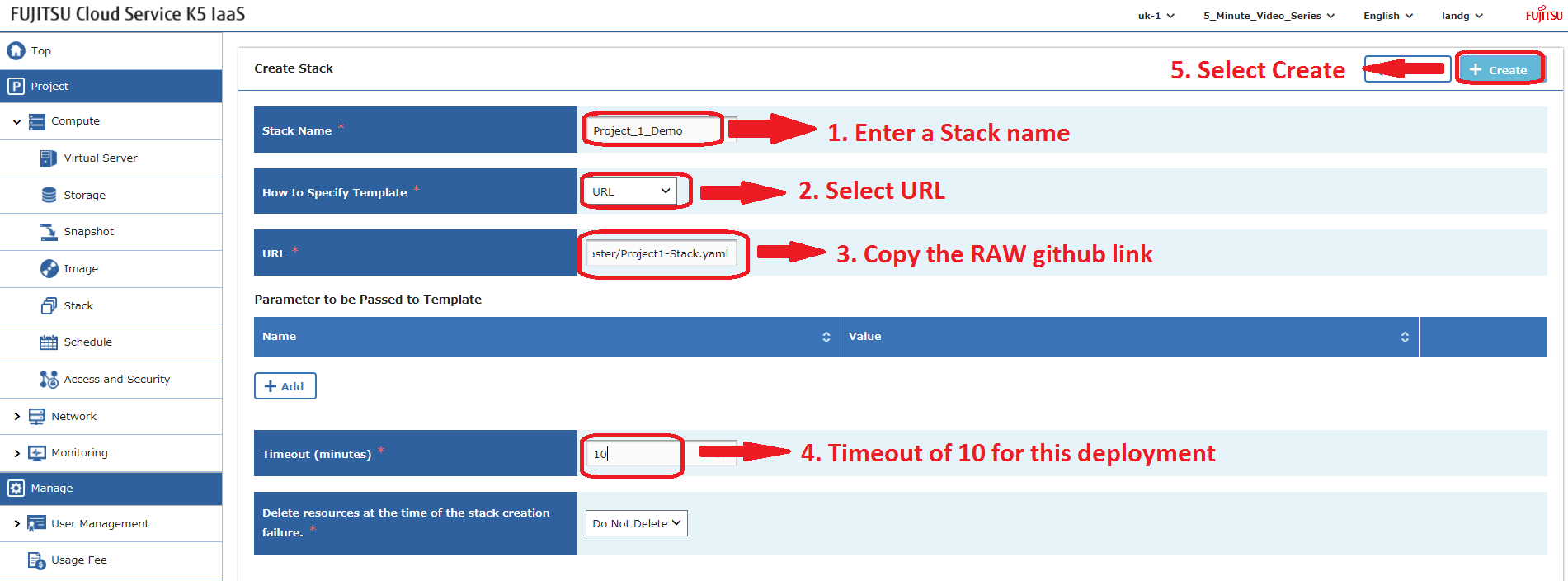
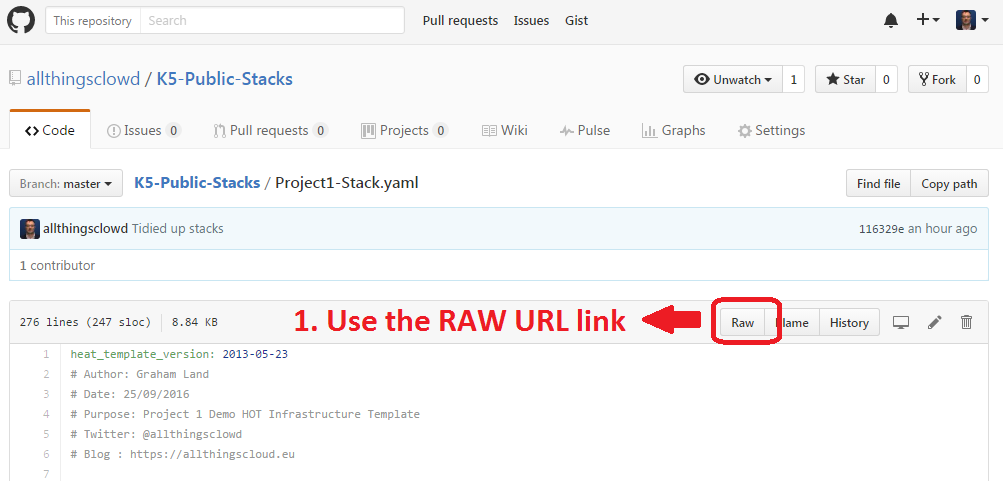
HeatスタックはAPIを使用してデプロイすることもできます – 今後のブログ記事で解説します。
例 – プロジェクト2スタック
このファイルには、以下に表示される内容とは異なって解釈またはコンパイルされる可能性のある、隠されたまたは双方向のUnicode文字が含まれています。確認するには、隠されたUnicode文字を表示するエディタでファイルを開いてください。
双方向のUnicode文字について詳しく見る
| heat_template_version: 2013-05-23 | |
| # Author: Graham Land | |
| # Purpose: Demo Project 2 with Inter-Project-Routing | |
| # Date: 25/09/2016 | |
| # Twitter: @allthingsclowd | |
| # Blog : https://allthingscloud.eu | |
| description: Fujitsu K5 demo heat template to build an environment within a Project | |
| # Input parameters | |
| parameters: | |
| red_image: | |
| type: string | |
| label: Image name or ID | |
| description: Redhat 7.2 image to be used for compute instance | |
| default: "Red Hat Enterprise Linux 7.2 64bit (English) 01" | |
| win_image: | |
| type: string | |
| label: Image name or ID | |
| description: Windows Server 2012 R2 SE image to be used for compute instance | |
| default: "Windows Server 2012 R2 SE 64bit (English) 01" | |
| az: | |
| type: string | |
| label: Availability Zone | |
| description: Region AZ to use | |
| default: "uk-1b" | |
| default-sshkey: | |
| type: string | |
| label: ssh key injected into linux systems | |
| description: ssh key for linux builds | |
| default: "demostack" | |
| # K5 Infrastructure resources to be built | |
| resources: | |
| # Create a new private network | |
| Application_Network_net: | |
| type: OS::Neutron::Net | |
| properties: | |
| availability_zone: { get_param: az } | |
| name: "Application_Network" | |
| # Create a new subnet on the private network | |
| Application_Network_subnet: | |
| type: OS::Neutron::Subnet | |
| depends_on: Application_Network_net | |
| properties: | |
| availability_zone: { get_param: az } | |
| name: "Application_Subnet" | |
| network_id: { get_resource: Application_Network_net } | |
| cidr: "172.24.202.0/23" | |
| gateway_ip: "172.24.203.254" | |
| allocation_pools: | |
| – start: "172.24.203.200" | |
| end: "172.24.203.220" | |
| host_routes: [{"nexthop": "172.24.200.81", "destination": "172.24.201.0/26"}, {"nexthop": "172.24.200.81", "destination": "172.24.201.64/26"}] | |
| # Create a new private network | |
| inter_project_transit_net: | |
| type: OS::Neutron::Net | |
| properties: | |
| availability_zone: { get_param: az } | |
| name: "Inter_Project_Transit" | |
| # Create a new subnet on the private network | |
| inter_project_transit_subnet: | |
| type: OS::Neutron::Subnet | |
| depends_on: inter_project_transit_net | |
| properties: | |
| availability_zone: { get_param: az } | |
| name: "P2_Inter_Project_Transit_Subnet" | |
| network_id: { get_resource: inter_project_transit_net } | |
| cidr: "172.24.200.80/28" | |
| gateway_ip: "172.24.200.82" | |
| allocation_pools: | |
| – start: "172.24.200.85" | |
| end: "172.24.200.90" | |
| # Create a new router | |
| project2_router: | |
| type: OS::Neutron::Router | |
| properties: | |
| availability_zone: { get_param: az } | |
| name: "Project2_Router" | |
| # Create a new port for the interproject router interface links, assign an ip address | |
| project2_inter_project_transit_port: | |
| type: OS::Neutron::Port | |
| depends_on: [ project2_router ] | |
| properties: | |
| availability_zone: { get_param: az } | |
| network_id: { get_resource: inter_project_transit_net } | |
| fixed_ips: | |
| – subnet_id: { get_resource: inter_project_transit_subnet } | |
| ip_address: '172.24.200.81' | |
| # Connect an interface on the private network's subnet to the router | |
| project2_router_interface1: | |
| type: OS::Neutron::RouterInterface | |
| depends_on: [project2_router,inter_project_transit_subnet] | |
| properties: | |
| router_id: { get_resource: project2_router } | |
| subnet_id: { get_resource: inter_project_transit_subnet } | |
| # Connect an interface on the private network's subnet to the router | |
| project2_router_interface2: | |
| type: OS::Neutron::RouterInterface | |
| depends_on: project2_router | |
| properties: | |
| router_id: { get_resource: project2_router } | |
| subnet_id: { get_resource: Application_Network_subnet } | |
| # Create a security group | |
| server_security_group1: | |
| type: OS::Neutron::SecurityGroup | |
| properties: | |
| description: Add security group rules for server | |
| name: "Windows_SG" | |
| rules: | |
| – remote_ip_prefix: 0.0.0.0/0 | |
| protocol: udp | |
| – remote_ip_prefix: 0.0.0.0/0 | |
| protocol: tcp | |
| – remote_ip_prefix: 0.0.0.0/0 | |
| protocol: icmp | |
| # Create a security group | |
| server_security_group2: | |
| type: OS::Neutron::SecurityGroup | |
| properties: | |
| description: Add security group rules for server | |
| name: "Linux_SG" | |
| rules: | |
| – remote_ip_prefix: 0.0.0.0/0 | |
| protocol: udp | |
| – remote_ip_prefix: 0.0.0.0/0 | |
| protocol: tcp | |
| – remote_ip_prefix: 0.0.0.0/0 | |
| protocol: icmp | |
| # Create a security group | |
| server_security_group3: | |
| type: OS::Neutron::SecurityGroup | |
| properties: | |
| description: Add security group rules for server | |
| name: "InterProject_SG" | |
| rules: | |
| – remote_ip_prefix: 0.0.0.0/0 | |
| protocol: udp | |
| – remote_ip_prefix: 0.0.0.0/0 | |
| protocol: tcp | |
| – remote_ip_prefix: 0.0.0.0/0 | |
| protocol: icmp | |
| ################################ Adding a Server Start ############################## | |
| # Create a new port for the server interface, assign an ip address and security group | |
| server1_port: | |
| type: OS::Neutron::Port | |
| depends_on: [ project2_router,server_security_group1 ] | |
| properties: | |
| availability_zone: { get_param: az } | |
| network_id: { get_resource: Application_Network_net } | |
| security_groups: [{ get_resource: server_security_group1 }] | |
| fixed_ips: | |
| – subnet_id: { get_resource: Application_Network_subnet } | |
| ip_address: '172.24.203.2' | |
| # Create a data volume for use with the server | |
| data_vol_server1: | |
| type: OS::Cinder::Volume | |
| properties: | |
| availability_zone: { get_param: az } | |
| description: Data volume | |
| name: "data-vol" | |
| size: 50 | |
| volume_type: "M1" | |
| # Create a system volume for use with the server | |
| sys-vol_server1: | |
| type: OS::Cinder::Volume | |
| properties: | |
| availability_zone: { get_param: az } | |
| name: "boot-vol" | |
| size: 40 | |
| volume_type: "M1" | |
| image : { get_param: red_image } | |
| # Build a server using the system volume defined above | |
| server1: | |
| type: OS::Nova::Server | |
| depends_on: [ server1_port ] | |
| properties: | |
| key_name: { get_param: default-sshkey } | |
| image: { get_param: red_image } | |
| flavor: "S-2" | |
| block_device_mapping: [{"volume_size": "40", "volume_id": {get_resource: sys-vol_server1}, "delete_on_termination": True, "device_name": "/dev/vda"}] | |
| name: "Hello_Linux_P2" | |
| admin_user: "k5user" | |
| user_data: | |
| str_replace: | |
| template: | |
| #cloud-config | |
| write_files: | |
| – content: | |
| #!/bin/bash | |
| voldata_id=%voldata_id% | |
| voldata_dev="/dev/disk/by-id/virtio-$(echo ${voldata_id} | |
| mkfs.ext4 ${voldata_dev} | |
| mkdir -pv /mnt/appdata | |
| echo "${voldata_dev} /mnt/appdata ext4 defaults 1 2" >> /etc/fstab | |
| mount /mnt/appdata | |
| chmod 0777 /mnt/appdata | |
| path: /tmp/format-disks | |
| permissions: '0700' | |
| runcmd: | |
| – /tmp/format-disks | |
| params: | |
| "%voldata_id%": { get_resource: data_vol_server1 } | |
| user_data_format: RAW | |
| networks: | |
| – port: { get_resource: server1_port } | |
| # Attach previously defined data-vol to the server | |
| attach_vol1: | |
| type: OS::Cinder::VolumeAttachment | |
| depends_on: [ data_vol_server1, server1 ] | |
| properties: | |
| instance_uuid: {get_resource: server1} | |
| mountpoint: "/dev/vdb" | |
| volume_id: {get_resource: data_vol_server1} | |
| ################################ Adding a Server End ################################ | |
| ################################ Adding a Server Start ############################## | |
| # Create a new port for the server interface, assign an ip address and security group | |
| server2_port: | |
| type: OS::Neutron::Port | |
| depends_on: [ project2_router,server_security_group1 ] | |
| properties: | |
| availability_zone: { get_param: az } | |
| network_id: { get_resource: Application_Network_net } | |
| security_groups: [{ get_resource: server_security_group1 }] | |
| fixed_ips: | |
| – subnet_id: { get_resource: Application_Network_subnet } | |
| ip_address: '172.24.203.3' | |
| # Create a data volume for use with the server | |
| data_vol_server2: | |
| type: OS::Cinder::Volume | |
| properties: | |
| availability_zone: { get_param: az } | |
| description: Data volume | |
| name: "data-vol" | |
| size: 50 | |
| volume_type: "M1" | |
| # Create a system volume for use with the server | |
| sys-vol_server2: | |
| type: OS::Cinder::Volume | |
| properties: | |
| availability_zone: { get_param: az } | |
| name: "boot-vol" | |
| size: 80 | |
| volume_type: "M1" | |
| image : { get_param: win_image } | |
| # Build a server using the system volume defined above | |
| server2: | |
| type: OS::Nova::Server | |
| depends_on: [ server1,server2_port ] | |
| properties: | |
| key_name: { get_param: default-sshkey } | |
| image: { get_param: win_image } | |
| flavor: "S-4" | |
| admin_user: "k5user" | |
| metadata: { "admin_pass": Password12345 } | |
| block_device_mapping: [{"volume_size": "80", "volume_id": {get_resource: sys-vol_server2}, "delete_on_termination": True, "device_name": "/dev/vda"}] | |
| name: "Hello_Windows_P2" | |
| user_data: | |
| #ps1 | |
| $d = Get-Disk | |
| $d | |
| $d | |
| $p = $d | |
| $p | |
| user_data_format: RAW | |
| networks: | |
| – port: { get_resource: server2_port } | |
| # Attach previously defined data-vol to the server | |
| attach_vol2: | |
| type: OS::Cinder::VolumeAttachment | |
| depends_on: [ data_vol_server2, server2 ] | |
| properties: | |
| instance_uuid: {get_resource: server2} | |
| mountpoint: "/dev/vdb" | |
| volume_id: {get_resource: data_vol_server2} | |
| ################################ Adding a Server End ################################ |
rawを表示
K5_Project2.yml
hosted with ❤ by GitHub
Happy Stacking!