

Di recente ho avuto un'installazione di Helion OpenStack 2.X in cui il cliente ha richiesto che le password iLO fossero crittografate. Questa è stata la prima volta che ho utilizzato lo script di crittografia HOS fornito con Helion OpenStack, hosencrypt.py.
Si è rivelato un processo laborioso di ottenimento manuale di ciascuna password e di fornitura dello stesso allo script di crittografia. Ogni risultato è stato quindi copiato nuovamente nel file servers.yml.
Con dimensioni di installazione in continuo aumento, oltre 60 server, non ho intenzione di dover ripetere questo processo manuale – non vengo pagato per gli straordinari 😉
Lo script seguente, hosencryptfile.py, prenderà il file servers.yml come input e produrrà una versione crittografata o decrittografata. Si prega di leggere i commenti all'interno dello script per maggiori dettagli.
#!/usr/bin/env python
#
# A utility to encrypt passwords for auxiliary HOS systems like IPMI.
#
# (c) Copyright 2015 Hewlett Packard Enterprise Development Company LP
#
# Licensed under the Apache License, Version 2.0 (the "License"); you may
# not use this file except in compliance with the License. You may obtain
# a copy of the License at
#
# http://www.apache.org/licenses/LICENSE-2.0
#
# Unless required by applicable law or agreed to in writing, software
# distributed under the License is distributed on an "AS IS" BASIS, WITHOUT
# WARRANTIES OR CONDITIONS OF ANY KIND, either express or implied. See the
# License for the specific language governing permissions and limitations
# under the License.
#
# Author: Graham J Land
# Date: 16/01/2016
# Modification: Hacked this file by adding a new function file_decrypt_encrypt(switch,infile,outfile="temp")
#               to automagically encrypt or decrypt the ilo-passwords in a servers.yml file
# Name: hosencryptfile.py
#
# PREREQUISITES
# This script expects an environment variable HOS_USER_PASSWORD_ENCRYPT_KEY which should hold the encryption key
# For example enter the following command before running the script:
#
# export HOS_USER_PASSWORD_ENCRYPT_KEY=EnterASecretKeyHere
#
# COMMANDLINE PARAMETERS
# switch:   2nd commandline parameter [optional]
#           "" no comandline parameters then you'll be prompted to enter a password to encrypt
#           "-d" you'll be prompted for a password to decrypt
#           "-fe" will cause the following servers.yml file to have it's ilo-passwords encrypted
#           "-fd" (or anything else for that matter) will cause the supplied servers.yml file to have it's passwords decrypted
#
# infile:   3rd commandline parameter [optional]
#           the input servers.yml file that is to be processed
#
# outfile:  4th commandline parameter [optional]
#           the new servers.yml file with the encrypted/decrypted passwords
#           if this file is left blank then the input file will be overwritten
#
# EXAMPLE
#  ~/helion/hos/ansible/hosencryptfile.py -fe ~/helion/hos/ansible/myfile.yml ~/helion/hos/ansible/my_file9.yml
#
# WARNING
# I'm not a programmer, this is the first time I've looked at python - please backup all files before use and test in labs
# No error checking included - if you enter an invalid file name IT WILL CRASH - as I get more familiar with python I'll stick in the try/catch error controls

from subprocess import PIPE, Popen

encryption_env = 'HOS_USER_PASSWORD_ENCRYPT_KEY'

class aes256:
    prefix = '@hos_aes256@'
    def __init__(self, key):
        pass

    def encrypt(self, raw):
        return ""

    def decrypt(self, cooked):
        return ""

class openssl:
    prefix = '@hos@'

    def __init__(self, key=None):
        pass

    def delegate(self, cmd, value):
        # Note that I'm passing the environment variable's name to the subprocess, not its value.
        argv = ('/usr/bin/openssl', 'aes-256-cbc', '-a', cmd, '-pass', 'env:%s' % encryption_env)
        p = Popen(argv, close_fds=True, stdin=PIPE, stdout=PIPE, stderr=PIPE)
        result = p.communicate(input=value)
        if p.returncode != 0:
            errmsg = result[1].strip()
            if errmsg.startswith('bad decrypt'):
                errmsg = 'incorrect encryption key'
            elif errmsg.startswith('error reading input file') or errmsg.startswith('bad magic number'):
                errmsg = 'bad input data'
            raise OSError('openssl: %s' % errmsg)
        return result[0].strip()

    def encrypt(self, raw):
        return self.delegate('-salt', raw)

    def decrypt(self, cooked):
        # openssl expects a newline at the end of the string.
        if cooked[-1] != '\n':
            cooked += '\n'
        return self.delegate('-d', cooked)

def main():
    import getpass
    import sys
    import yaml

    def file_decrypt_encrypt(switch,infile,outfile="temp"):
        if outfile == "temp":
            outfile = infile

        with open(infile) as f:
            list_doc = yaml.load(f)

        for servers in list_doc['servers']:
            value = servers["ilo-password"]
            if switch == '-fe':
                x = obj.prefix + obj.encrypt(value)
            else:
                if value.startswith(obj.prefix):
                    value = value[len(obj.prefix):]
                x = obj.decrypt(value)

            servers["ilo-password"] = x
               #print x
        f.close

        with open(outfile, "w") as f:
            yaml.dump(list_doc, f, default_flow_style=False)
        f.close

        return


    obj = openssl()

    # encrypt or decrypt one file to a new file
    if len(sys.argv) == 4:
        file_decrypt_encrypt(sys.argv[1],sys.argv[2],sys.argv[3])
    # encrypt  or decrypt the file inplace
    elif len(sys.argv) == 3 and sys.argv[1] != '-d':
        file_decrypt_encrypt(sys.argv[1],sys.argv[2])
    # prompt user for value to decrypt
    elif len(sys.argv) > 1 and sys.argv[1] == '-d':
        value = getpass.getpass('encrypted value? ')
        if value.startswith(obj.prefix):
            value = value[len(obj.prefix):]
        x = obj.decrypt(value)
        print x
    # prompt user for value to encrypt
    else:
        value = getpass.getpass('unencrypted value? ')
        x = obj.encrypt(value)
        print obj.prefix + x

if __name__ == '__main__':
    main()
Di seguito è riportato un esempio di come utilizzare il file.
Nota: L'output modifica la formattazione del file yaml e rimuove i commenti, ma dovrebbe comunque essere un file valido per l'elaborazione – non l'ho ancora testato.
FILE DI INPUT exampleServers.yml
#
# (c) Copyright 2015 Hewlett Packard Enterprise Development Company LP
#
# Licensed under the Apache License, Version 2.0 (the "License"); you may
# not use this file except in compliance with the License. You may obtain
# a copy of the License at
#
# http://www.apache.org/licenses/LICENSE-2.0
#
# Unless required by applicable law or agreed to in writing, software
# distributed under the License is distributed on an "AS IS" BASIS, WITHOUT
# WARRANTIES OR CONDITIONS OF ANY KIND, either express or implied. See the
# License for the specific language governing permissions and limitations
# under the License.
#
---
  product:
    version: 2

  baremetal:
    # NOTE: These values need to be changed to match your environment.
    # Define the network range that contains the ip-addr values for
    # the individual servers listed below.
    subnet: 172.16.60.0
    netmask: 255.255.255.0

  servers:
    # NOTE: Addresses of servers need to be changed to match your environment.
    #
    #       Add additional servers as required
    #

    # Controllers
    - id: controller1
      ip-addr: 172.16.60.3
      role: CONTROLLER-ROLE
      server-group: RACK1
      nic-mapping: HP-SL230-4PORT
      ilo-ip: 172.30.0.45
      ilo-password: "Guinness";
      ilo-user: Administrator
      mac-addr: 8c:dc:d4:b5:cc:d0

    - id: controller2
      ip-addr: 172.16.60.4
      role: CONTROLLER-ROLE
      server-group: RACK2
      nic-mapping: HP-SL230-4PORT
      ilo-ip: 172.30.0.46
      ilo-password: "Smithwicks";
      ilo-user: Administrator
      mac-addr: 8c:dc:d4:b5:c6:40

    - id: controller3
      ip-addr: 172.16.60.5
      role: CONTROLLER-ROLE
      server-group: RACK3
      nic-mapping: HP-SL230-4PORT
      ilo-ip: 172.30.0.47
      ilo-password: "Blackthorn";
      ilo-user: Administrator
      mac-addr: 8c:dc:d4:b5:c9:74

    # Compute Nodes
    - id: compute1
      ip-addr: 172.16.60.6
      role: COMPUTE-ROLE
      server-group: RACK1
      nic-mapping: HP-SL230-4PORT
      ilo-ip: 172.30.0.48
      ilo-password: "Budweiser";
      ilo-user: Administrator
      mac-addr: 8c:dc:d4:b5:c9:00

    - id: compute2
      ip-addr: 172.16.60.7
      role: COMPUTE-ROLE
      server-group: RACK2
      nic-mapping: HP-SL230-4PORT
      ilo-ip: 172.30.0.49
      ilo-password: "Magners"
      ilo-user: Administrator
      mac-addr: 8c:dc:d4:b5:ce:80

    - id: compute3
      ip-addr: 172.16.60.8
      role: COMPUTE-ROLE
      server-group: RACK1
      nic-mapping: HP-SL230-4PORT
      ilo-ip: 172.30.0.50
      ilo-password: "Bulmers"
      ilo-user: Administrator
      mac-addr: 8c:dc:d4:b5:cd:3c

    - id: compute4
      ip-addr: 172.16.60.12
      role: COMPUTE-ROLE
      server-group: RACK2
      nic-mapping: HP-SL230-4PORT
      ilo-ip: 172.30.0.51
      ilo-password: "Heineken"
      ilo-user: Administrator
      mac-addr: 8c:dc:d4:b5:c4:e8

    # Ceph OSD Nodes
    - id: osd1
      ip-addr: 172.16.60.9
      role: OSD-ROLE
      server-group: RACK1
      nic-mapping: HP-DL360-8PORT
      ilo-ip: 172.30.0.86
      ilo-password: "Harp"
      ilo-user: Administrator
      mac-addr: 5c:b9:01:8d:6b:68

    - id: osd2
      ip-addr: 172.16.60.10
      role: OSD-ROLE
      server-group: RACK2
      nic-mapping: HP-DL360-8PORT
      ilo-ip: 172.30.0.87
      ilo-password: "Kronenburg"
      ilo-user: Administrator
      mac-addr: 5c:b9:01:8d:70:0c

    - id: osd3
      ip-addr: 172.16.60.11
      role: OSD-ROLE
      server-group: RACK3
      nic-mapping: HP-DL360-8PORT
      ilo-ip: 172.30.0.88
      ilo-password: "Carlsberg"
      ilo-user: Administrator
      mac-addr: 5c:b9:01:8d:73:dc
Eseguire il comando seguente per crittografare la password nel file sopra indicato.
export HOS_USER_PASSWORD_ENCRYPT_KEY=EnterASecretKeyHere
hosencryptfile.py -fe exampleServers.yml encryptedServers.yml
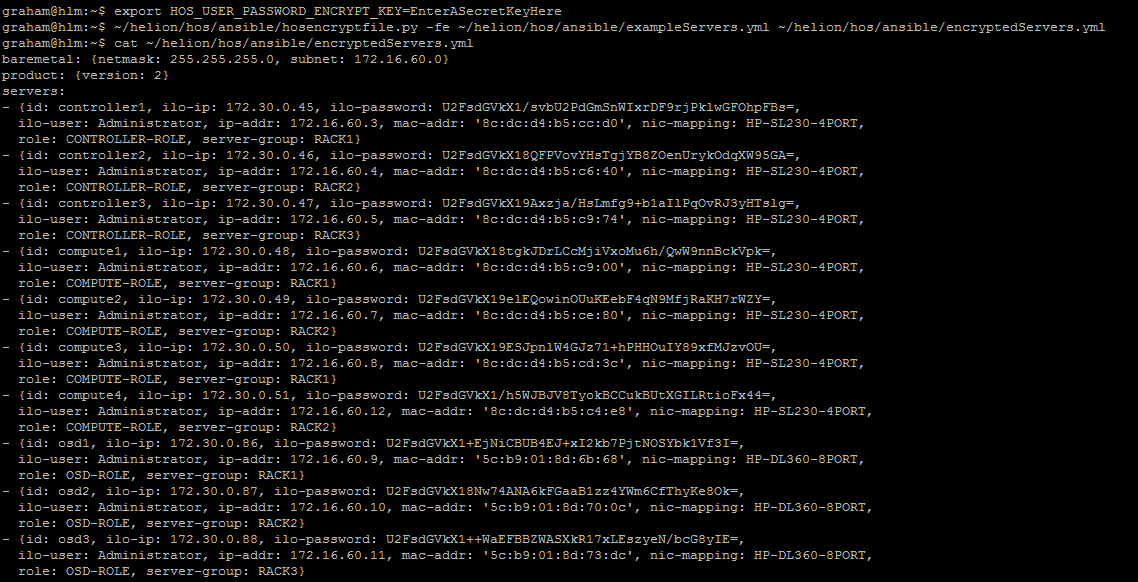
FILE DI OUTPUT encryptedServers.yml
baremetal: {netmask: 255.255.255.0, subnet: 172.16.60.0}
product: {version: 2}
servers:
- {id: controller1, ilo-ip: 172.30.0.45, ilo-password: U2FsdGVkX1/svbU2PdGmSnWIxrDF9rjPklwGFOhpFBs=,
  ilo-user: Administrator, ip-addr: 172.16.60.3, mac-addr: '8c:dc:d4:b5:cc:d0', nic-mapping: HP-SL230-4PORT,
  role: CONTROLLER-ROLE, server-group: RACK1}
- {id: controller2, ilo-ip: 172.30.0.46, ilo-password: U2FsdGVkX18QFPVovYHsTgjYB8ZOenUrykOdqXW95GA=,
  ilo-user: Administrator, ip-addr: 172.16.60.4, mac-addr: '8c:dc:d4:b5:c6:40', nic-mapping: HP-SL230-4PORT,
  role: CONTROLLER-ROLE, server-group: RACK2}
- {id: controller3, ilo-ip: 172.30.0.47, ilo-password: U2FsdGVkX19Axzja/HsLmfg9+b1aIlPqOvRJ3yHTslg=,
  ilo-user: Administrator, ip-addr: 172.16.60.5, mac-addr: '8c:dc:d4:b5:c9:74', nic-mapping: HP-SL230-4PORT,
  role: CONTROLLER-ROLE, server-group: RACK3}
- {id: compute1, ilo-ip: 172.30.0.48, ilo-password: U2FsdGVkX18tgkJDrLCcMjiVxoMu6h/QwW9nnBckVpk=,
  ilo-user: Administrator, ip-addr: 172.16.60.6, mac-addr: '8c:dc:d4:b5:c9:00', nic-mapping: HP-SL230-4PORT,
  role: COMPUTE-ROLE, server-group: RACK1}
- {id: compute2, ilo-ip: 172.30.0.49, ilo-password: U2FsdGVkX19elEQowinOUuKEebF4qN9MfjRaKH7rWZY=,
  ilo-user: Administrator, ip-addr: 172.16.60.7, mac-addr: '8c:dc:d4:b5:ce:80', nic-mapping: HP-SL230-4PORT,
  role: COMPUTE-ROLE, server-group: RACK2}
- {id: compute3, ilo-ip: 172.30.0.50, ilo-password: U2FsdGVkX19ESJpnlW4GJz71+hPHHOuIY89xfMJzvOU=,
  ilo-user: Administrator, ip-addr: 172.16.60.8, mac-addr: '8c:dc:d4:b5:cd:3c', nic-mapping: HP-SL230-4PORT,
  role: COMPUTE-ROLE, server-group: RACK1}
- {id: compute4, ilo-ip: 172.30.0.51, ilo-password: U2FsdGVkX1/h5WJBJV8TyokBCCukBUtXGILRtioFx44=,
  ilo-user: Administrator, ip-addr: 172.16.60.12, mac-addr: '8c:dc:d4:b5:c4:e8', nic-mapping: HP-SL230-4PORT,
  role: COMPUTE-ROLE, server-group: RACK2}
- {id: osd1, ilo-ip: 172.30.0.86, ilo-password: U2FsdGVkX1+EjNiCBUB4EJ+xI2kb7PjtNOSYbk1Vf3I=,
  ilo-user: Administrator, ip-addr: 172.16.60.9, mac-addr: '5c:b9:01:8d:6b:68', nic-mapping: HP-DL360-8PORT,
  role: OSD-ROLE, server-group: RACK1}
- {id: osd2, ilo-ip: 172.30.0.87, ilo-password: U2FsdGVkX18Nw74ANA6kFGaaB1zz4YWm6CfThyKe8Ok=,
  ilo-user: Administrator, ip-addr: 172.16.60.10, mac-addr: '5c:b9:01:8d:70:0c', nic-mapping: HP-DL360-8PORT,
  role: OSD-ROLE, server-group: RACK2}
- {id: osd3, ilo-ip: 172.30.0.88, ilo-password: U2FsdGVkX1++WaEFBBZWASXkR17xLEszyeN/bcG8yIE=,
  ilo-user: Administrator, ip-addr: 172.16.60.11, mac-addr: '5c:b9:01:8d:73:dc', nic-mapping: HP-DL360-8PORT,
  role: OSD-ROLE, server-group: RACK3}
Ora, per invertire il processo, è sufficiente eseguire quanto segue (o ripristinare dal backup)
export HOS_USER_PASSWORD_ENCRYPT_KEY=EnterASecretKeyHere
hosencryptfile.py -fd encryptedServers.yml decryptedServers.yml
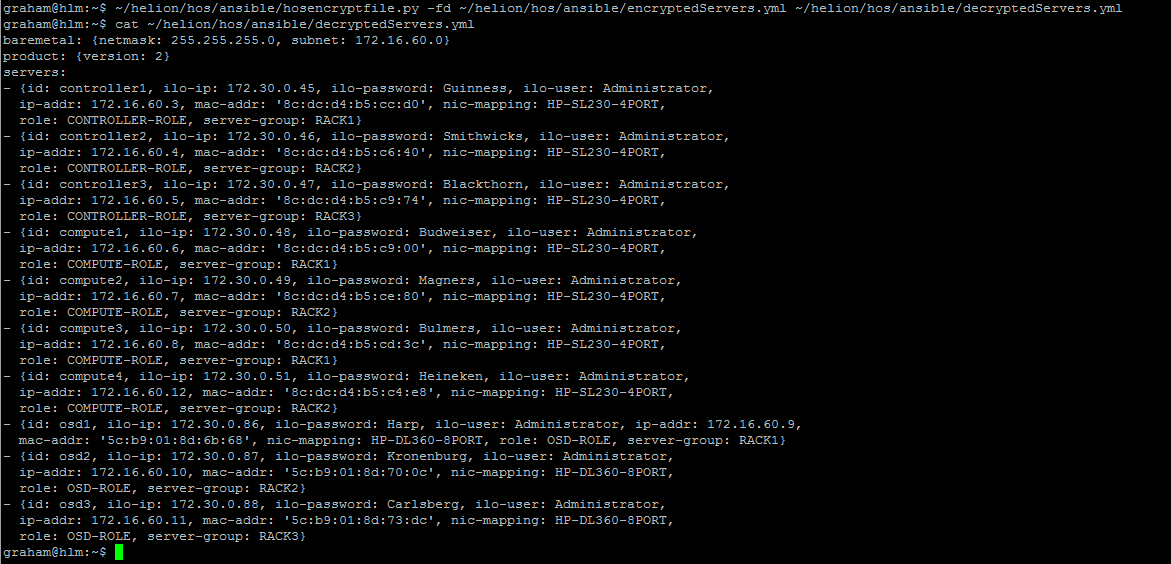
FILE DI OUTPUT decryptedServers.yml
baremetal: {netmask: 255.255.255.0, subnet: 172.16.60.0}
product: {version: 2}
servers:
- {id: controller1, ilo-ip: 172.30.0.45, ilo-password: Guinness, ilo-user: Administrator,
  ip-addr: 172.16.60.3, mac-addr: '8c:dc:d4:b5:cc:d0', nic-mapping: HP-SL230-4PORT,
  role: CONTROLLER-ROLE, server-group: RACK1}
- {id: controller2, ilo-ip: 172.30.0.46, ilo-password: Smithwicks, ilo-user: Administrator,
  ip-addr: 172.16.60.4, mac-addr: '8c:dc:d4:b5:c6:40', nic-mapping: HP-SL230-4PORT,
  role: CONTROLLER-ROLE, server-group: RACK2}
- {id: controller3, ilo-ip: 172.30.0.47, ilo-password: Blackthorn, ilo-user: Administrator,
  ip-addr: 172.16.60.5, mac-addr: '8c:dc:d4:b5:c9:74', nic-mapping: HP-SL230-4PORT,
  role: CONTROLLER-ROLE, server-group: RACK3}
- {id: compute1, ilo-ip: 172.30.0.48, ilo-password: Budweiser, ilo-user: Administrator,
  ip-addr: 172.16.60.6, mac-addr: '8c:dc:d4:b5:c9:00', nic-mapping: HP-SL230-4PORT,
  role: COMPUTE-ROLE, server-group: RACK1}
- {id: compute2, ilo-ip: 172.30.0.49, ilo-password: Magners, ilo-user: Administrator,
  ip-addr: 172.16.60.7, mac-addr: '8c:dc:d4:b5:ce:80', nic-mapping: HP-SL230-4PORT,
  role: COMPUTE-ROLE, server-group: RACK2}
- {id: compute3, ilo-ip: 172.30.0.50, ilo-password: Bulmers, ilo-user: Administrator,
  ip-addr: 172.16.60.8, mac-addr: '8c:dc:d4:b5:cd:3c', nic-mapping: HP-SL230-4PORT,
  role: COMPUTE-ROLE, server-group: RACK1}
- {id: compute4, ilo-ip: 172.30.0.51, ilo-password: Heineken, ilo-user: Administrator,
  ip-addr: 172.16.60.12, mac-addr: '8c:dc:d4:b5:c4:e8', nic-mapping: HP-SL230-4PORT,
  role: COMPUTE-ROLE, server-group: RACK2}
- {id: osd1, ilo-ip: 172.30.0.86, ilo-password: Harp, ilo-user: Administrator, ip-addr: 172.16.60.9,
  mac-addr: '5c:b9:01:8d:6b:68', nic-mapping: HP-DL360-8PORT, role: OSD-ROLE, server-group: RACK1}
- {id: osd2, ilo-ip: 172.30.0.87, ilo-password: Kronenburg, ilo-user: Administrator,
  ip-addr: 172.16.60.10, mac-addr: '5c:b9:01:8d:70:0c', nic-mapping: HP-DL360-8PORT,
  role: OSD-ROLE, server-group: RACK2}
- {id: osd3, ilo-ip: 172.30.0.88, ilo-password: Carlsberg, ilo-user: Administrator,
  ip-addr: 172.16.60.11, mac-addr: '5c:b9:01:8d:73:dc', nic-mapping: HP-DL360-8PORT,
  role: OSD-ROLE, server-group: RACK3}
ATTENZIONE
Non sono un programmatore, questa è la prima volta che guardo Python – si prega di eseguire il backup di tutti i file prima dell'uso e di testare in un laboratorio. Non è inclusa alcuna verifica degli errori – se si inserisce un nome di file non valido LO SCRIPT ANDRÀ IN CRASH – man mano che divento più familiare con Python inserirò i controlli degli errori try/catch – se avrò tempo.
AGGIORNAMENTO: Ho modificato il codice per includere il prefisso richiesto all'inizio della chiave crittografata. Ho anche riformattato il file di output per renderlo più coerente con il file di input.