Oggi stavo lavorando a un'installazione che utilizzava schede di interfaccia di rete in bonding su tutti i server. Le interfacce di rete dual port da 10 Gb erano in bonding utilizzando LACP sugli switch HP59XX come segue:
[GJL-HP5900-1-Bridge-Aggregation2]display link-aggregation verbose Bridge-Aggregation2
Loadsharing Type: Shar -- Loadsharing, NonS -- Non-Loadsharing
Port Status: S -- Selected, U -- Unselected, I -- Individual
Flags:  A -- LACP_Activity, B -- LACP_Timeout, C -- Aggregation,
        D -- Synchronization, E -- Collecting, F -- Distributing,
        G -- Defaulted, H -- Expired

Aggregate Interface: Bridge-Aggregation2
Aggregation Mode: Dynamic
Loadsharing Type: Shar
System ID: 0x8000, aaaa-bbbb-cccc
Local:
  Port             Status  Priority Oper-Key  Flag
--------------------------------------------------------------------------------
  XGE1/0/3         S       32768    2         {ACDEFG}
  XGE1/0/4         U       32768    2         {ACG}
Remote:
  Actor            Partner Priority Oper-Key  SystemID               Flag
--------------------------------------------------------------------------------
  XGE1/0/3         0       32768    0         0x8000, 0000-0000-0000 {DEF}
  XGE1/0/4         0       32768    0         0x8000, 0000-0000-0000 {EF}
Tuttavia, tutti i server non riuscivano ad avviare il PXE.
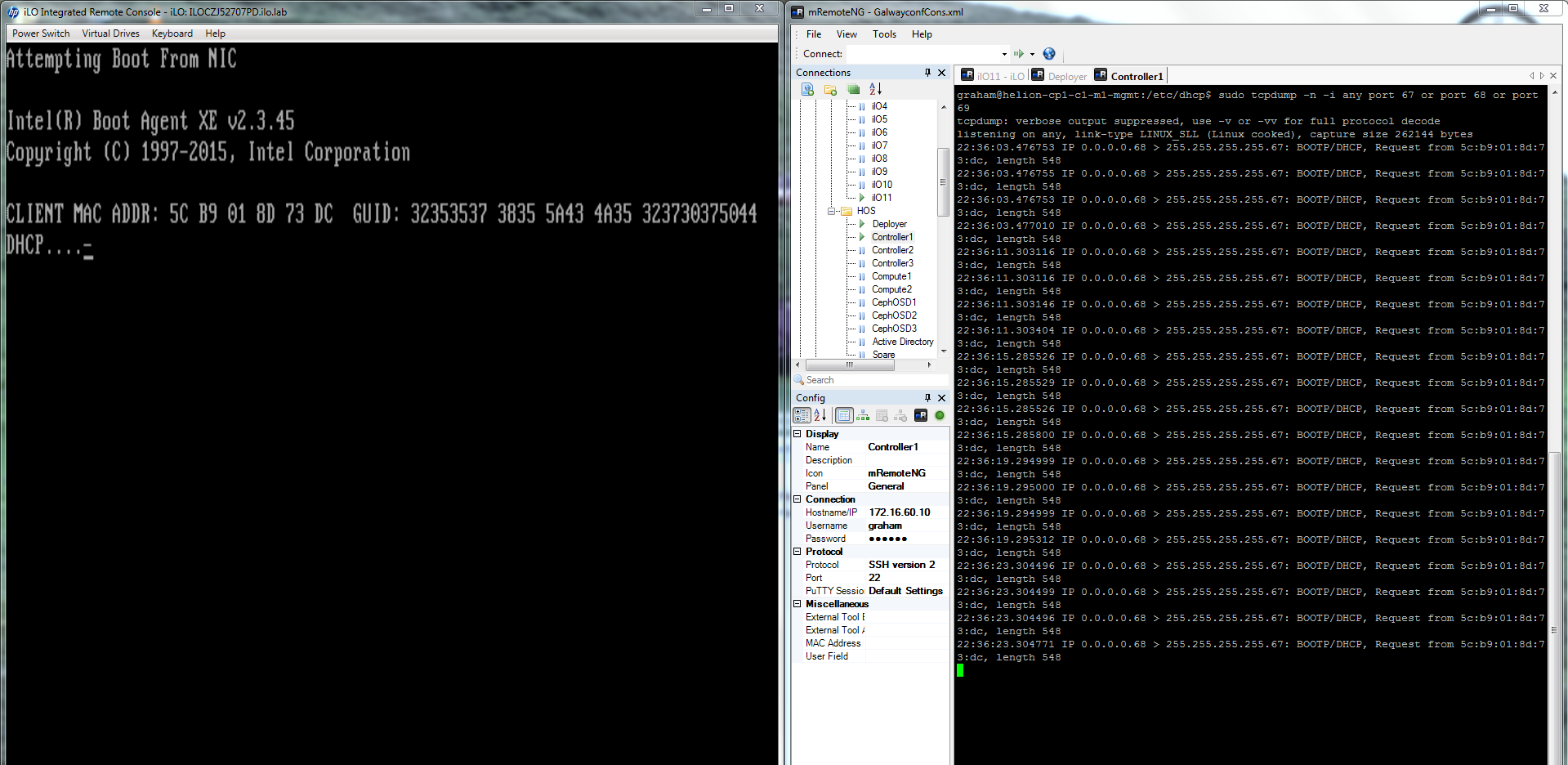
L'esame della console dei server ha rivelato che stavano tentando di avviare il PXE ma non sembravano ricevere una risposta dal deployer.
Un rapido controllo della configurazione su Helion Lifecycle Manager mostra che tutto è configurato correttamente.
- Verificare che i dettagli MAC corretti del server siano stati configurati in /etc/dhcp/dhcpd.conf
graham@helion-cp1-c1-m1-mgmt:/etc/dhcp$ cat dhcpd.conf | more
# ******************************************************************
# Cobbler managed dhcpd.conf file
# generated from cobbler dhcp.conf template (Mon Jan 18 14:32:10 2016)
# Do NOT make changes to /etc/dhcpd.conf. Instead, make your changes
# in /etc/cobbler/dhcp.template, as /etc/dhcpd.conf will be
# overwritten.
# ******************************************************************

ddns-update-style interim;

allow booting;
allow bootp;

ignore client-updates;
set vendorclass = option vendor-class-identifier;

option pxe-system-type code 93 = unsigned integer 16;

subnet 172.16.60.0 netmask 255.255.255.0 {
     option routers             172.16.60.10;
     option domain-name-servers 172.16.60.10;
     option subnet-mask         255.255.255.0;
     deny unknown-clients;
     default-lease-time         21600;
     max-lease-time             43200;
     next-server                172.16.60.10;
     class "pxeclients" {
          match if substring (option vendor-class-identifier, 0, 9) = "PXEClient";
          if option pxe-system-type = 00:02 {
                  filename "ia64/elilo.efi";
          } else if option pxe-system-type = 00:06 {
                  filename "grub/grub-x86.efi";
          } else if option pxe-system-type = 00:07 {
                  filename "grub/grub-x86_64.efi";
          } else {
                  filename "pxelinux.0";
          }
     }

}

# group for Cobbler DHCP tag: default
group {
    host generic7 {
        hardware ethernet 8c:dc:d4:b5:ce:80;
        fixed-address 172.16.60.14;
        option host-name "compute2";
        option routers 172.16.60.10;
        next-server 172.16.60.10;
    }
    host generic5 {
        hardware ethernet 8c:dc:d4:b5:c9:74;
        fixed-address 172.16.60.12;
        option host-name "controller3";
        option routers 172.16.60.10;
        next-server 172.16.60.10;
    }
    host generic1 {
        hardware ethernet 8c:dc:d4:b5:c9:00;
        fixed-address 172.16.60.13;
        option host-name "compute1";
        option routers 172.16.60.10;
        next-server 172.16.60.10;
    }
    host generic6 {
        hardware ethernet 8c:dc:d4:b5:c6:40;
        fixed-address 172.16.60.11;
        option host-name "controller2";
        option routers 172.16.60.10;
        next-server 172.16.60.10;
    }
    host generic4 {
        hardware ethernet 5c:b9:01:8d:6b:68;
        fixed-address 172.16.60.15;
        option host-name "osd1";
        option routers 172.16.60.10;
        next-server 172.16.60.10;
    }
    host generic3 {
        hardware ethernet 5c:b9:01:8d:73:dc;
        fixed-address 172.16.60.17;
        option host-name "osd3";
        option routers 172.16.60.10;
        next-server 172.16.60.10;
    }
    host generic2 {
        hardware ethernet 5c:b9:01:8d:70:0c;
        fixed-address 172.16.60.16;
        option host-name "osd2";
        option routers 172.16.60.10;
        next-server 172.16.60.10;
    }
}
- Verificare che il servizio DHCP sul nodo deployer HLM sia in ascolto sulla porta 67
$ netstat -an | fgrep -w 67
udp        0      0 0.0.0.0:67              0.0.0.0:*

- Verificare che il servizio TFTP sia in ascolto sulla porta 68
netstat -an | fgrep -w 69
udp        0      0 0.0.0.0:69              0.0.0.0:*

- Esaminare il file syslog per le Richieste di Scoperta DHCP
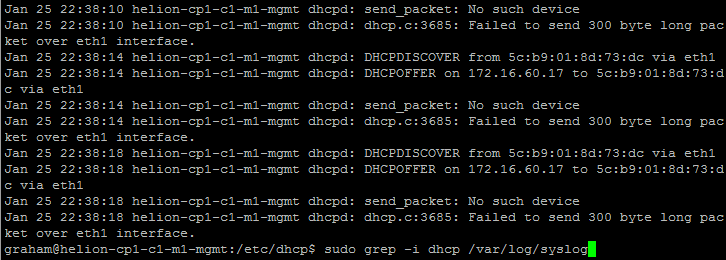
sudo grep -i dhcp /var/log/syslog
- Utilizzare TCPDUMP per esaminare il traffico DHCP che attraversa le interfacce sul deployer HLM
tcpdump -n -i any port 67 or port 68 or port 69
Questi controlli hanno mostrato che i servizi del nodo deployer sono operativi, ma nessuna richiesta DHCPDISCOVER raggiunge le sue interfacce.
Questo indica un problema fondamentale con il dominio di broadcast della rete di gestione. Le richieste di broadcast PXE lasciano i server ma non raggiungono il nodo HLM sulla stessa rete.
La configurazione di base dello switch è stata rivista per assicurarsi che la vlan di gestione fosse la vlan nativa e che tutte le porte fossero configurate correttamente. Tutto sembrava corretto.
Successivamente abbiamo rimosso la configurazione LACP e il processo di avvio PXE è ripreso. Il TCPDUMP ha mostrato che le richieste DHCPDISCOVER in arrivo venivano ora ricevute.
Una rapida ricerca su Google per i problemi PXE su HP5900 con LACP ha rivelato la causa radice del problema, che può essere trovata qui – grazie a Peter Debruyne.
SOLUZIONE : Quando si utilizza LACP su nodi che inizialmente avviano come schede di interfaccia di rete individuali – come quando si tenta di avviare il PXE – è necessario configurare il tipo LACP come "edge-port" come segue:
[GJL-HP5900-1-Bridge-Aggregation2]lacp edge-port
[GJL-HP5900-1-Bridge-Aggregation2]display link-aggregation verbose Bridge-Aggregation2
Loadsharing Type: Shar -- Loadsharing, NonS -- Non-Loadsharing
Port Status: S -- Selected, U -- Unselected, I -- Individual
Flags:  A -- LACP_Activity, B -- LACP_Timeout, C -- Aggregation,
        D -- Synchronization, E -- Collecting, F -- Distributing,
        G -- Defaulted, H -- Expired

Aggregate Interface: Bridge-Aggregation2
Aggregation Mode: Dynamic
Loadsharing Type: Shar
System ID: 0x8000, aaaa-bbbb-cccc
Local:
  Port             Status  Priority Oper-Key  Flag
--------------------------------------------------------------------------------
  XGE1/0/3         I       32768    2         {AG}
  XGE1/0/4         I       32768    2         {AG}
Remote:
  Actor            Partner Priority Oper-Key  SystemID               Flag
--------------------------------------------------------------------------------
  XGE1/0/3         0       32768    0         0x8000, 0000-0000-0000 {DEF}
  XGE1/0/4         0       32768    0         0x8000, 0000-0000-0000 {EF}
[NEO-HP5900-1-Bridge-Aggregation2]
Le porte LACP appena configurate ora funzionano come interfacce di rete individuali durante l'avvio PXE.
Le immagini seguenti mostrano come dovrebbe apparire un sistema correttamente configurato durante l'avvio PXE-