

Installazione e configurazione del modello cloud
La prima cosa da fare è copiare uno dei modelli di cloud di esempio da utilizzare come punto di partenza. Se il tuo modello di distribuzione corrisponde esattamente all'esempio, avrai solo pochi file da modificare prima di costruire il tuo cloud.
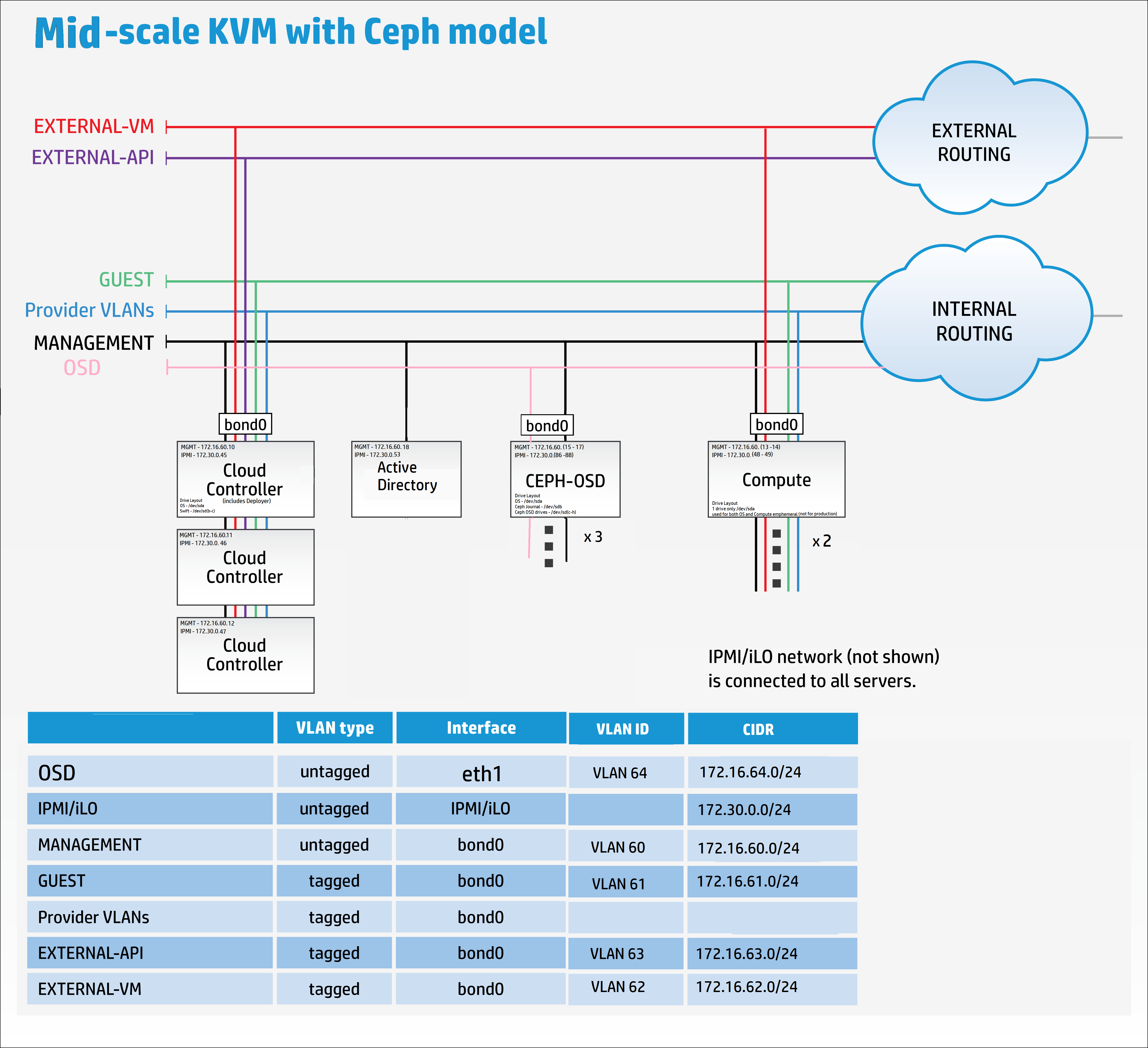
Tuttavia, nell'interesse di mostrare come si potrebbe modificare significativamente il modello, ho deciso di aggiungere un'altra rete e la useremo per fornire una separazione per il traffico di replicazione di Ceph OSD.
Copia i file di configurazione di esempio di ceph nella directory my_cloud per la modifica.
cp -r ~/helion/examples/entry-scale-kvm-ceph/* ~/helion/my_cloud/definition/
Questi file di configurazione rappresentano il seguente modello:
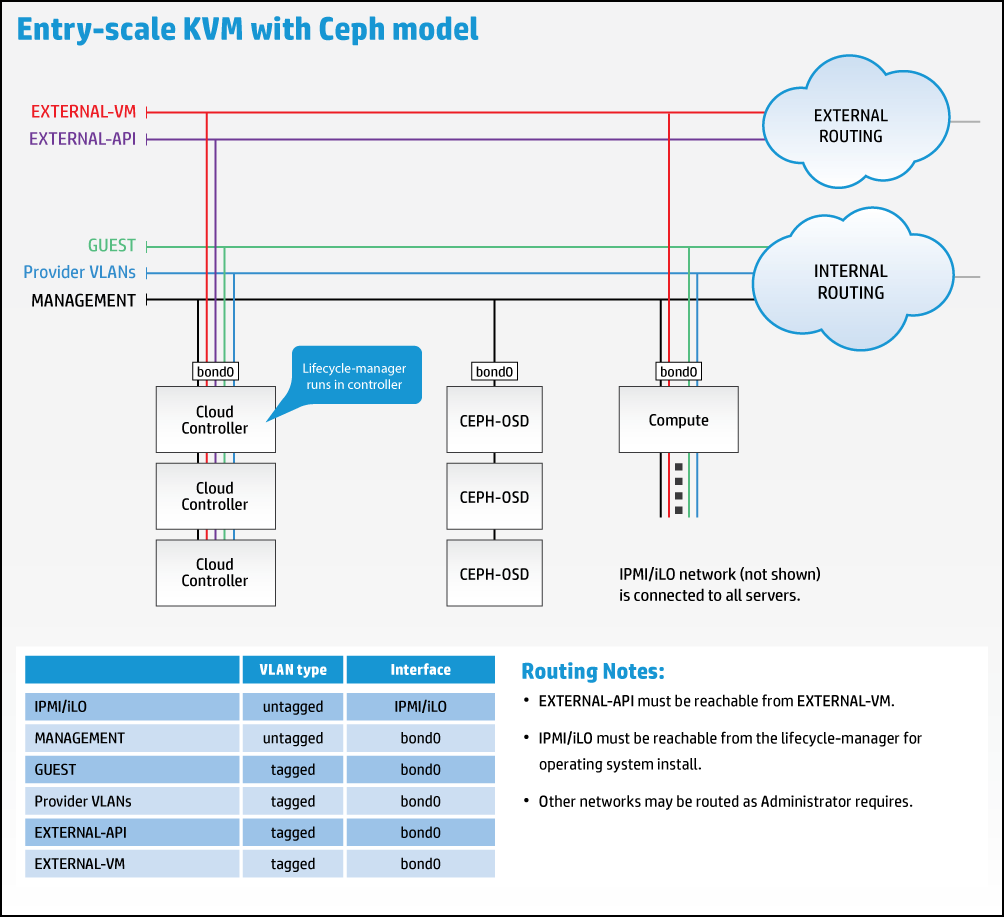
Tuttavia, dobbiamo modificare il modello per accommodare la nuova rete di replicazione come mostrato di seguito:
È ora il momento di passare al tuo editor di scelta, Komodo nel mio caso, per iniziare a rimodellare i file di esempio per adattarli ai miei requisiti.
Aggiungi una connessione remota nell'editor a Helion Lifecycle Manager (controller0).
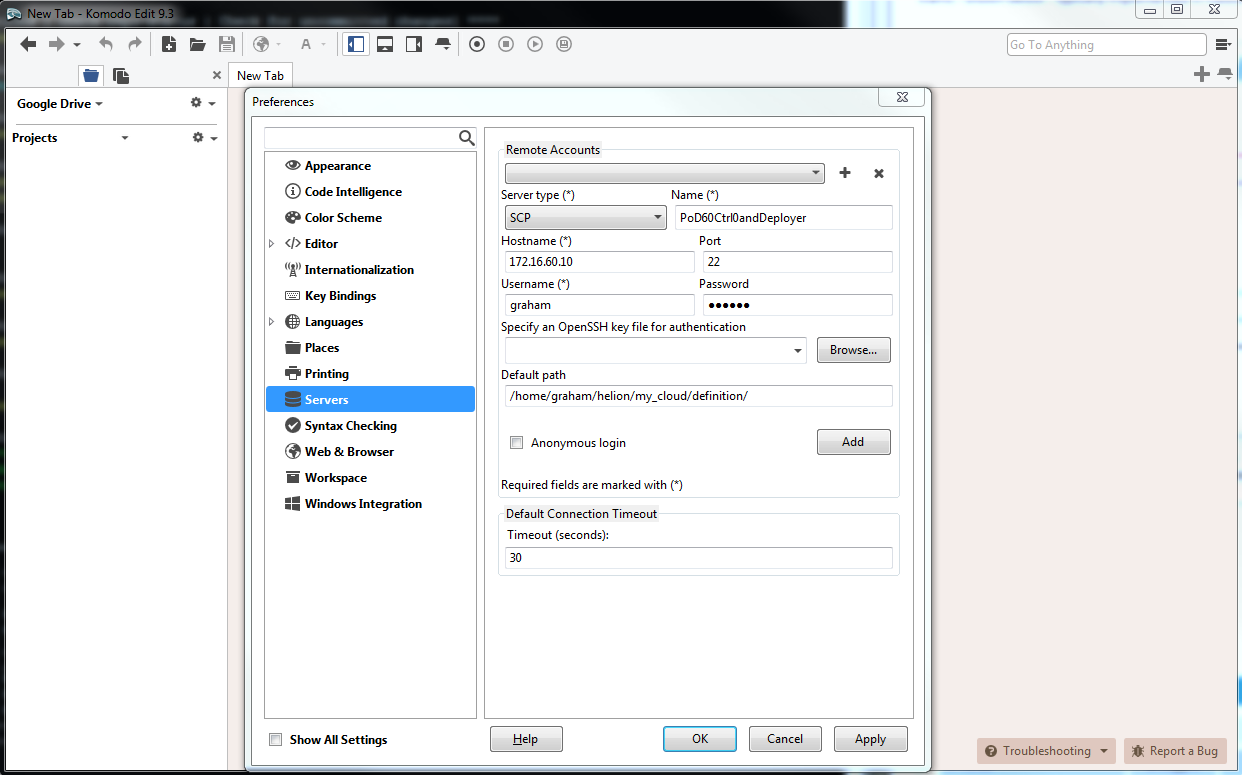
Puoi modificare i file in qualsiasi sequenza ti sia più conveniente.
Si prega di leggere l'estesa documentazione online che fornisce una spiegazione dettagliata di tutti i file yaml utilizzati per configurare la piattaforma cloud qui.
cloudConfig.yml
Preferisco iniziare con quello più semplice, cloudConfig.yml
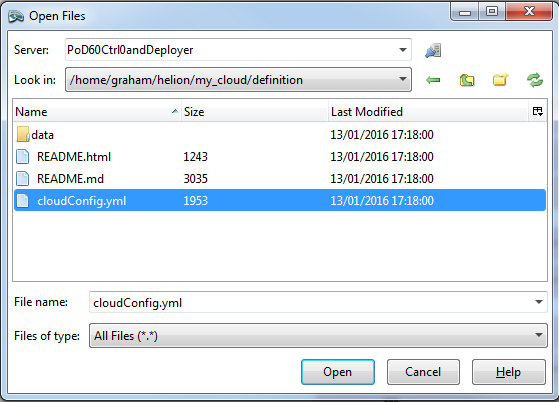
In questo file troviamo le impostazioni per il nome del cloud, i prefissi degli hostname, i dettagli del server ntp, i dettagli del server dns, le impostazioni smtp e alcune impostazioni generali del firewall.
I seguenti valori sono stati modificati rispetto ai valori predefiniti:
nome cloud : allthingscloud
ntp : 172.16.1.5
dns : 172.16.1.5
Nota: Assicurati di racchiudere tra virgolette sia gli indirizzi IP NTP che DNS. Il file di esempio non ha virgolette sui nameserver DNS.
#
# (c) Copyright 2015 Hewlett Packard Enterprise Development Company LP
#
# Licensed under the Apache License, Version 2.0 (the "License"); you may
# not use this file except in compliance with the License. You may obtain
# a copy of the License at
#
# http://www.apache.org/licenses/LICENSE-2.0
#
# Unless required by applicable law or agreed to in writing, software
# distributed under the License is distributed on an "AS IS" BASIS, WITHOUT
# WARRANTIES OR CONDITIONS OF ANY KIND, either express or implied. See the
# License for the specific language governing permissions and limitations
# under the License.
#
---
product:
version: 2

cloud:
name: allthingscloud

# The following values are used when
# building hostnames
hostname-data:
host-prefix: helion
member-prefix: -m

# List of ntp servers for your site
ntp-servers:
- "172.16.1.5"
# - "ntp-server2"

# dns resolving configuration for your site
# refer to resolv.conf for details on each option
dns-settings:
nameservers:
- "172.16.1.5"
# - name-server2
# - name-server3
#
# domain: sub1.example.net
#
# search:
# - sub1.example.net
# - sub2.example.net
#
# sortlist:
# - 192.168.160.0/255.255.240.0
# - 192.168.0.0
#
# # option flags are ':' to enable, remove to unset
# # options with values are ':' to set
#
# options:
# debug:
# ndots: 2
# timeout: 30
# attempts: 5
# rotate:
# no-check-names:
# inet6:
smtp-settings:
# server: mailserver.examplecloud.com
# port: 25
# timeout: 15
# These are only needed if your server requires authentication
# user:
# password:

# Generate firewall rules
firewall-settings:
enable: true
# log dropped packets
logging: true
Control_plane.yml
Questo file definisce tutte le zone di failure, i cluster, i componenti del servizio e le risorse. Un'ispezione rapida di questo file rivela che il componente del servizio 'lifecycle-manager' è sotto il CONTROLLER-ROLE – in altre parole, abbiamo combinato il modello Controller/Deployer.
L'unico parametro che ho modificato in questo file yaml è il min-count per le risorse di calcolo da 0 a 2. Stò per distribuire 2 nodi di calcolo al momento della build.
#
# (c) Copyright 2015 Hewlett Packard Enterprise Development Company LP
#
# Licensed under the Apache License, Version 2.0 (the "License"); you may
# not use this file except in compliance with the License. You may obtain
# a copy of the License at
#
# http://www.apache.org/licenses/LICENSE-2.0
#
# Unless required by applicable law or agreed to in writing, software
# distributed under the License is distributed on an "AS IS" BASIS, WITHOUT
# WARRANTIES OR CONDITIONS OF ANY KIND, either express or implied. See the
# License for the specific language governing permissions and limitations
# under the License.
#
---
product:
version: 2

control-planes:
- name: control-plane-1
control-plane-prefix: cp1
region-name: region1
failure-zones:
- AZ1
- AZ2
- AZ3
common-service-components:
- logging-producer
- monasca-agent
- freezer-agent
- stunnel
- lifecycle-manager-target
clusters:
- name: cluster1
cluster-prefix: c1
server-role: CONTROLLER-ROLE
member-count: 3
allocation-policy: strict
service-components:
- lifecycle-manager
- ntp-server
- swift-ring-builder
- mysql
- ip-cluster
- apache2
- keystone-api
- keystone-client
- rabbitmq
- glance-api
- glance-registry
- glance-client
- cinder-api
- cinder-scheduler
- cinder-volume
- cinder-backup
- cinder-client
- nova-api
- nova-scheduler
- nova-conductor
- nova-console-auth
- nova-novncproxy
- nova-client
- neutron-server
- neutron-ml2-plugin
- neutron-vpn-agent
- neutron-dhcp-agent
- neutron-metadata-agent
- neutron-openvswitch-agent
- neutron-client
- horizon
- sherpa-api
- swift-proxy
- memcached
- swift-account
- swift-container
- swift-object
- swift-client
- heat-api
- heat-api-cfn
- heat-api-cloudwatch
- heat-engine
- heat-client
- openstack-client
- ceilometer-api
- ceilometer-collector
- ceilometer-agent-central
- ceilometer-agent-notification
- ceilometer-expirer
- ceilometer-common
- ceilometer-client
- zookeeper
- kafka
- vertica
- storm
- monasca-api
- monasca-persister
- monasca-notifier
- monasca-threshold
- monasca-client
- logging-server
- ops-console-web
- ops-console-monitor
- cmc-service
- freezer-api
- ceph-monitor

resources:
- name: compute
resource-prefix: comp
server-role: COMPUTE-ROLE
allocation-policy: any
min-count: 2
service-components:
- ntp-client
- nova-compute
- nova-compute-kvm
- neutron-l3-agent
- neutron-metadata-agent
- neutron-openvswitch-agent
- neutron-lbaasv2-agent

- name: osd
resource-prefix: ceph
server-role: OSD-ROLE
allocation-policy: strict
min-count: 3
service-components:
- ntp-client
- ceph-osd
servers.yml
Questo file deve contenere tutti i dettagli dei server fisici che verranno utilizzati durante la distribuzione.
- la sottorete baremetal in questa distribuzione è anche la rete di gestione : 172.16.60.10/24
- l'id deve essere univoco per ogni server
- il ruolo si riferisce al ruolo del server e determina quali componenti e servizi verranno distribuiti sul server –> collegato al file server_roles.yml
- ip-addr è l'indirizzo che desideri che il server abbia sulla rete di MANAGEMENT. Controller1 aveva già questo indirizzo IP assegnato poiché è anche il nodo deployer (Helion Lifecycle Manager) in questo scenario
- server-group può essere utilizzato per mappare il layout fisico dei server per definire domini di failure hardware –> collegato al file server_groups.yml
- nic-mappings definisce la mappatura degli indirizzi hardware delle nic fisiche -> collegato al file nic_mappings.yml. Chiunque abbia lavorato con il networking Linux negli ultimi dieci anni apprezzerà lo scopo di questo file. Linux ha una "funzionalità" che può causare l'assegnazione delle nic fisiche a interfacce software diverse e casuali (ad es. eth0, eth1, em59, ecc.) al riavvio. Questo file 'cabla' le mappature tra interfaccia fisica e software per un'esperienza di riavvio del sistema operativo coerente
- ilo-ip è l'indirizzo dell'interfaccia IPMI sul server fisico
- ilo-password – FERMATI ora e torna su AZURE se hai bisogno di una spiegazione per questo parametro
- ilo-user – vedi sopra
- mac-address è l'indirizzo MAC dell'interfaccia PXE. In questa distribuzione avvieremo il PXE tramite la rete di MANAGEMENT. NOTA: QUESTO NON È L'INDIRIZZO MAC DELL'INTERFACCIA iLO
#
# (c) Copyright 2015 Hewlett Packard Enterprise Development Company LP
#
# Licensed under the Apache License, Version 2.0 (the "License"); you may
# not use this file except in compliance with the License. You may obtain
# a copy of the License at
#
# http://www.apache.org/licenses/LICENSE-2.0
#
# Unless required by applicable law or agreed to in writing, software
# distributed under the License is distributed on an "AS IS" BASIS, WITHOUT
# WARRANTIES OR CONDITIONS OF ANY KIND, either express or implied. See the
# License for the specific language governing permissions and limitations
# under the License.
#
---
product:
version: 2

baremetal:
# NOTE: These values need to be changed to match your environment.
# Define the network range that contains the ip-addr values for
# the individual servers listed below.
subnet: 172.16.60.0
netmask: 255.255.255.0

servers:
# NOTE: Addresses of servers need to be changed to match your environment.
#
# Add additional servers as required
#

# Controllers
- id: controller1
ip-addr: 172.16.60.10
role: CONTROLLER-ROLE
server-group: RACK1
nic-mapping: HP-SL230-4PORT
ilo-ip: 172.30.0.45
ilo-password: "bananas"
ilo-user: Administrator
mac-addr: 8c:dc:d4:b5:cc:d0

- id: controller2
ip-addr: 172.16.60.11
role: CONTROLLER-ROLE
server-group: RACK2
nic-mapping: HP-SL230-4PORT
ilo-ip: 172.30.0.46
ilo-password: "bananas"
ilo-user: Administrator
mac-addr: 8c:dc:d4:b5:c6:40

- id: controller3
ip-addr: 172.16.60.12
role: CONTROLLER-ROLE
server-group: RACK3
nic-mapping: HP-SL230-4PORT
ilo-ip: 172.30.0.47
ilo-password: "bananas"
ilo-user: Administrator
mac-addr: 8c:dc:d4:b5:c9:74

# Compute Nodes
- id: compute1
ip-addr: 172.16.60.13
role: COMPUTE-ROLE
server-group: RACK1
nic-mapping: HP-SL230-4PORT
ilo-ip: 172.30.0.48
ilo-password: "bananas"
ilo-user: Administrator
mac-addr: 8c:dc:d4:b5:c9:00

- id: compute2
ip-addr: 172.16.60.14
role: COMPUTE-ROLE
server-group: RACK2
nic-mapping: HP-SL230-4PORT
ilo-ip: 172.30.0.49
ilo-password: "bananas"
ilo-user: Administrator
mac-addr: 8c:dc:d4:b5:ce:80

# Ceph OSD Nodes
- id: osd1
ip-addr: 172.16.60.15
role: OSD-ROLE
server-group: RACK1
nic-mapping: HP-DL360-8PORT
ilo-ip: 172.30.0.86
ilo-password: "bananas"
ilo-user: Administrator
mac-addr: 5c:b9:01:8d:6b:68

- id: osd2
ip-addr: 172.16.60.16
role: OSD-ROLE
server-group: RACK2
nic-mapping: HP-DL360-8PORT
ilo-ip: 172.30.0.87
ilo-password: "bananas"
ilo-user: Administrator
mac-addr: 5c:b9:01:8d:70:0c

- id: osd3
ip-addr: 172.16.60.17
role: OSD-ROLE
server-group: RACK3
nic-mapping: HP-DL360-8PORT
ilo-ip: 172.30.0.88
ilo-password: "bananas"
ilo-user: Administrator
mac-addr: 5c:b9:01:8d:73:dc
server_roles.yml
Questo file collega i server nel file servers.yml sia con i file di layout delle interfacce di rete che con quelli dei dischi. Quando si utilizza un nodo deployer separato, il suo ruolo verrebbe definito qui.
#
# (c) Copyright 2015 Hewlett Packard Enterprise Development Company LP
#
# Licensed under the Apache License, Version 2.0 (the "License"); you may
# not use this file except in compliance with the License. You may obtain
# a copy of the License at
#
# http://www.apache.org/licenses/LICENSE-2.0
#
# Unless required by applicable law or agreed to in writing, software
# distributed under the License is distributed on an "AS IS" BASIS, WITHOUT
# WARRANTIES OR CONDITIONS OF ANY KIND, either express or implied. See the
# License for the specific language governing permissions and limitations
# under the License.
#
---
product:
version: 2

server-roles:

- name: CONTROLLER-ROLE
interface-model: CONTROLLER-INTERFACES
disk-model: CONTROLLER-DISKS

- name: COMPUTE-ROLE
interface-model: COMPUTE-INTERFACES
disk-model: COMPUTE-DISKS

- name: OSD-ROLE
interface-model: OSD-INTERFACES
disk-model: OSD-DISKS
server_groups.yml
Mappa il layout fisico dei server alle zone di disponibilità. Include un riferimento a tutte le reti.
NOTA: È qui che ho apportato la prima modifica significativa al modello di esempio – ho aggiunto un riferimento alla nuova rete che stiamo aggiungendo chiamata OSD-NET.
#
# (c) Copyright 2015 Hewlett Packard Enterprise Development Company LP
#
# Licensed under the Apache License, Version 2.0 (the "License"); you may
# not use this file except in compliance with the License. You may obtain
# a copy of the License at
#
# http://www.apache.org/licenses/LICENSE-2.0
#
# Unless required by applicable law or agreed to in writing, software
# distributed under the License is distributed on an "AS IS" BASIS, WITHOUT
# WARRANTIES OR CONDITIONS OF ANY KIND, either express or implied. See the
# License for the specific language governing permissions and limitations
# under the License.
#
---
product:
version: 2

server-groups:

#
# Server Groups provide a mechanism for organizing servers
# into a hierarchy that reflected the physical topology.
#
# When allocating a server the configuration processor
# will search down the hierarchy from the list of server
# groups identified as the failure-zones for the control
# plane until it finds an available server of the requested
# role. If the allocation policy is "strict" servers are
# allocated from different failure-zones.
#
# When determining which network from a network group to
# associate with a server the configuration processor will
# search up the hierarchy from the server group containing the
# server until it finds a network in the required network
# group.
#

#
# In this example there is only one network in each network
# group and so we put all networks in the top level server
# group. Below this we create server groups for three
# failure zones, within which servers are grouped by racks.
#
# Note: the association of servers to server groups is part
# of the server definition (servers.yml)
#

#
# At the top of the tree we have a server groups for
# networks that can reach all servers
#
- name: CLOUD
server-groups:
- AZ1
- AZ2
- AZ3
networks:
- EXTERNAL-API-NET
- EXTERNAL-VM-NET
- GUEST-NET
- MANAGEMENT-NET
- OSD-NET

#
# Create a group for each failure zone
#
- name: AZ1
server-groups:
- RACK1

- name: AZ2
server-groups:
- RACK2

- name: AZ3
server-groups:
- RACK3

#
# Create a group for each rack
#
- name: RACK1

- name: RACK2

- name: RACK3
nic_mappings.yml
Come evidenziato in precedenza, questo file contiene tutte le mappature delle interfacce di rete hardware "lspci" sui vari modelli di server hardware utilizzati. In questa distribuzione sto utilizzando HP SL230 per i nodi controller e di calcolo e HP DL360 per i nodi OSD.
Purtroppo c'è un piccolo scenario del pollo e dell'uovo qui – per ottenere i dettagli per questo file e completare il cloud, i server devono avere un sistema operativo (OS) installato, per ottenere un OS sui server abbiamo bisogno che questo file sia completato. La soluzione è tornare al supporto di installazione e installare temporaneamente hLinux su OGNI MODELLO di server che viene utilizzato. Quindi basta effettuare il login ed emettere il seguente comando catturando l'output per il tuo file:
sudo dmidecode | grep -A3 '^System Information'
lspci | grep -i eth
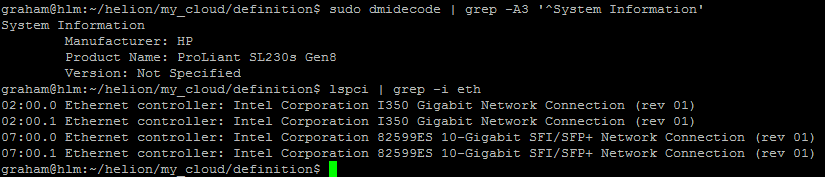
[Nota: Non ho incluso un esempio per il DL360 ma questo deve essere ripetuto per tutti i diversi modelli e configurazioni utilizzati. Ad esempio, se hai DL360 con tipi o numeri diversi di interfacce, ogni server avrà bisogno di un profilo dedicato.]
#
# (c) Copyright 2015 Hewlett Packard Enterprise Development Company LP
#
# Licensed under the Apache License, Version 2.0 (the "License"); you may
# not use this file except in compliance with the License. You may obtain
# a copy of the License at
#
# http://www.apache.org/licenses/LICENSE-2.0
#
# Unless required by applicable law or agreed to in writing, software
# distributed under the License is distributed on an "AS IS" BASIS, WITHOUT
# WARRANTIES OR CONDITIONS OF ANY KIND, either express or implied. See the
# License for the specific language governing permissions and limitations
# under the License.
#
---
product:
version: 2

# nic-mappings are used to ensure that the device name used by the
# operating system always maps to the same physical device.
# A nic-mapping is associated to a server in the server definition.
# The logical-name specified here can be used as a device name in
# the network interface-models definitions.
#
# - name user-defined name for each mapping
# physical-ports list of ports for this mapping
# - logical-name device name to be used by the operating system
# type physical port type
# bus-address bus address of the physical device
#
# Notes:
# - The PCI bus addresses are examples. You will need to determine
# the values pertinent to your servers. These can be found with the
# the `lspci` command or from the server BIOS
# - enclose the bus address in quotation marks so yaml does not
# misinterpret the embedded colon (:) characters
# - simple-port is the only currently supported port type
# - choosing a new device name prefix (e.g. 'eth' -> 'hed') will
# help prevent remapping errors

nic-mappings:

- name: HP-SL230-4PORT
physical-ports:
- logical-name: hed0
type: simple-port
bus-address: "0000:07:00.0"

- logical-name: hed1
type: simple-port
bus-address: "0000:07:00.1"

- logical-name: hed2
type: simple-port
bus-address: "0000:02:00.0"

- logical-name: hed3
type: simple-port
bus-address: "0000:02:00.1"

- name: HP-DL360-2PORT
physical-ports:
- logical-name: hed0
type: simple-port
bus-address: "0000:04:00.0"

- logical-name: hed1
type: simple-port
bus-address: "0000:04:00.1"
Layout dei dischi dei server
I file seguenti hanno i loro disk-models->name referenziati al file server_roles.yml. Il collegamento non è ai nomi dei file stessi ma ai contenuti all'interno dei file. In teoria potresti dare a questi file qualsiasi nome yml valido una volta che sono stati posizionati nella directory corretta. Ansible legge semplicemente tutti i file nella directory e genera un pool di coppie chiave-valore. Avendo appena scritto questo, immagino che i nomi dei disk-model devono essere univoci tra tutti i file utilizzati altrimenti il debugging diventerà molto interessante.
disks_controller.yml
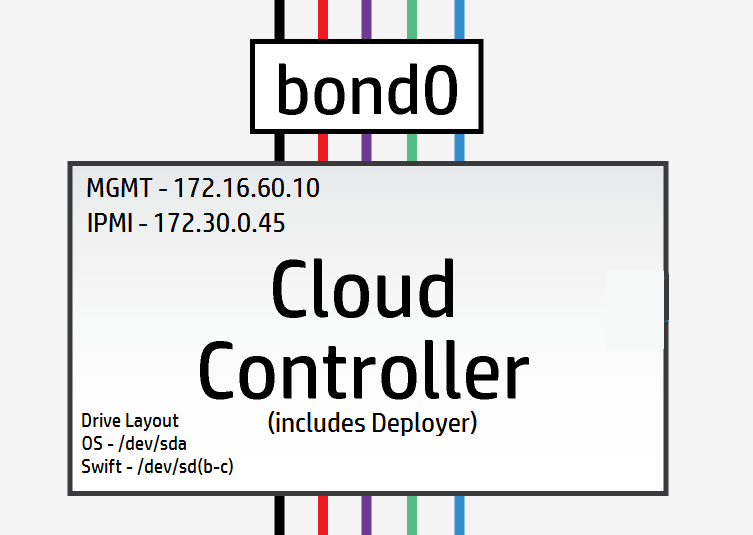
I nodi controller hanno 3 unità logiche, 1 è utilizzata per il OS /dev/sda e le restanti 2 sono utilizzate per gli anelli di Swift /dev/sdb & /dev/sdc.
[Nota: In scenari di laboratorio e test è possibile utilizzare un'unica unità fisica e utilizzare i punti di montaggio lvm per fornire le unità logiche – le prestazioni potrebbero essere problematiche.]
I miei controller hanno tutti 3 unità fisiche che verranno presentate come 3 unità logiche – quindi posso utilizzare le impostazioni predefinite qui.
#
# (c) Copyright 2015 Hewlett Packard Enterprise Development Company LP
#
# Licensed under the Apache License, Version 2.0 (the "License"); you may
# not use this file except in compliance with the License. You may obtain
# a copy of the License at
#
# http://www.apache.org/licenses/LICENSE-2.0
#
# Unless required by applicable law or agreed to in writing, software
# distributed under the License is distributed on an "AS IS" BASIS, WITHOUT
# WARRANTIES OR CONDITIONS OF ANY KIND, either express or implied. See the
# License for the specific language governing permissions and limitations
# under the License.
#
---
product:
version: 2

disk-models:
- name: CONTROLLER-DISKS

# This example is based on using a single 500GB disk for a volume
# group that contains all file systems on a controller with 64GB
# of memory.
#
# Additional disks can be added to the 'physical-volumes' section.
#
# If the available capacity of your servers is more that 500GB you
# should consider using the "CONTROLLER-1TB-DISKS" disk-model
# in disks_controller_1TB.yml instead. To use this alternative model
# you need to edit the CONTROLLER-ROLE sections of server_roles.yml
#

volume-groups:
- name: hlm-vg
physical-volumes:

# NOTE: 'sda_root' is a templated value. This value is checked in
# os-config and replaced by the partition actually used on sda
#e.g. sda1 or sda5
- /dev/sda_root

# Add any additional disks for the volume group here
# -/dev/sdx
# -/dev/sdy

logical-volumes:
# The policy is not to consume 100% of the space of each volume group.
# 5% should be left free for snapshots and to allow for some flexibility.

- name: root
size: 10%
fstype: ext4
mount: /

# Reserved space for kernel crash dumps
# Should evaluate to a value that is slightly larger that
# the memory size of your server
- name: crash
size: 13%
mount: /var/crash
fstype: ext4
mkfs-opts: -O large_file

# Local Log files.
- name: log
size: 13%
mount: /var/log
fstype: ext4
mkfs-opts: -O large_file

# Mysql Database. All persistent state from OpenStack services
# is saved here. Although the individual objects are small the
# accumulated data can grow over time
- name: mysql
size: 10%
mount: /var/lib/mysql
fstype: ext4
mkfs-opts: -O large_file
consumer:
name: mysql

# Rabbitmq works mostly in memory, but needs to be able to persist
# messages to disc under high load. This area should evaluate to a value
# that is slightly larger than the memory size of your server
- name: rabbitmq
size: 13%
mount: /var/lib/rabbitmq
fstype: ext4
mkfs-opts: -O large_file
consumer:
name: rabbitmq
rabbitmq_env: home

# Database storage for event monitoring (Monasca). Events are generally
# small data objects.
- name: vertica
size: 3%
mount: /var/vertica
fstype: ext4
mkfs-opts: -O large_file
consumer:
name: vertica

# Messaging system for monitoring.
- name: kafka
size: 2%
mount: /var/kafka
fstype: ext4
mkfs-opts: -O large_file
consumer:
name: kafka

# Data storage for centralized logging. This holds log entries from all
# servers in the cloud and hence can require a lot of disk space.
- name: elasticsearch
size: 30%
mount: /var/lib/elasticsearch
fstype: ext4

# Zookeeper is used to provide cluster co-ordination in the monitoring
# system. Although not a high user of disc space we have seen issues
# with zookeeper snapshots filling up filesystems so we keep it in its
# own space for stability.
- name: zookeeper
size: 1%
mount: /var/lib/zookeeper
fstype: ext4

consumer:
name: os

# Additional disk group defined for Swift
device-groups:
- name: swiftobj
devices:
- name: /dev/sdb
- name: /dev/sdc
# Add any additional disks for swift here
# -name: /dev/sdd
# -name: /dev/sde
consumer:
name: swift
attrs:
rings:
- account
- container
- object-0
[Materiale extra : Il file controller seguente è solo per confronto di come apparirebbe il layout quando si comprime tutto su un controller a disco singolo]
Layout del disco del controller a disco singolo [Non per la produzione]
Notare come le unità swift ora si trovano su un volume logico.
#
# (c) Copyright 2015 Hewlett Packard Enterprise Development Company LP
#
# Licensed under the Apache License, Version 2.0 (the "License"); you may
# not use this file except in compliance with the License. You may obtain
# a copy of the License at
#
# http://www.apache.org/licenses/LICENSE-2.0
#
# Unless required by applicable law or agreed to in writing, software
# distributed under the License is distributed on an "AS IS" BASIS, WITHOUT
# WARRANTIES OR CONDITIONS OF ANY KIND, either express or implied. See the
# License for the specific language governing permissions and limitations
# under the License.
#
---
product:
version: 2

disk-models:
- name: CONTROLLER-1TB-DISKS

# This example is based on using a single 1TB disk for a volume
# group that contains all file systems on a controller with 64GB
# of memory.
#
# Additional disks can be added to the 'physical-volumes' section.
#
#

volume-groups:
- name: hlm-vg
physical-volumes:

# NOTE: 'sda_root' is a templated value. This value is checked in
# os-config and replaced by the partition actually used on sda
#e.g. sda1 or sda5
- /dev/sda_root

# Add any additional disks for the volume group here
# -/dev/sdx
# -/dev/sdy

logical-volumes:
# The policy is not to consume 100% of the space of each volume group.
# 5% should be left free for snapshots and to allow for some flexibility.

- name: root
size: 5%
fstype: ext4
mount: /

# Reserved space for kernel crash dumps
# Should evaluate to a value that is slightly larger that
# the memory size of your server
- name: crash
size: 8%
mount: /var/crash
fstype: ext4
mkfs-opts: -O large_file

# Local Log files.
- name: log
size: 10%
mount: /var/log
fstype: ext4
mkfs-opts: -O large_file

# Mysql Database. All persistent state from OpenStack services
# is saved here. Although the individual objects are small the
# accumulated data can grow over time
- name: mysql
size: 8%
mount: /var/lib/mysql
fstype: ext4
mkfs-opts: -O large_file
consumer:
name: mysql

# Rabbitmq works mostly in memory, but needs to be able to persist
# messages to disc under high load. This area should evaluate to a value
# that is slightly larger than the memory size of your server
- name: rabbitmq
size: 8%
mount: /var/lib/rabbitmq
fstype: ext4
mkfs-opts: -O large_file
consumer:
name: rabbitmq
rabbitmq_env: home

# Database storage for event monitoring (Monasca). Events are generally
# small data objects.
- name: vertica
size: 5%
mount: /var/vertica
fstype: ext4
mkfs-opts: -O large_file
consumer:
name: vertica

# Messaging system for monitoring.
- name: kafka
size: 2%
mount: /var/kafka
fstype: ext4
mkfs-opts: -O large_file
consumer:
name: kafka

# Data storage for centralized logging. This holds log entries from all
# servers in the cloud and hence can require a lot of disk space.
- name: elasticsearch
size: 20%
mount: /var/lib/elasticsearch
fstype: ext4

# Zookeeper is used to provide cluster co-ordination in the monitoring
# system. Although not a high user of disc space we have seen issues
# with zookeeper snapshots filling up filesystems so we keep it in its
# own space for stability.
- name: zookeeper
size: 1%
mount: /var/lib/zookeeper
fstype: ext4

- name: LV_SWFPAC
size: 25%
fstype: xfs
consumer:
name: swift
attrs:
rings:
- name: account
- name: container
- name: object-0

consumer:
name: os
disks_compute.yml
Il file di configurazione di esempio si aspetta due unità fisiche /dev/sda e /dev/sdb come mostrato di seguito
#
# (c) Copyright 2015 Hewlett Packard Enterprise Development Company LP
#
# Licensed under the Apache License, Version 2.0 (the "License"); you may
# not use this file except in compliance with the License. You may obtain
# a copy of the License at
#
# http://www.apache.org/licenses/LICENSE-2.0
#
# Unless required by applicable law or agreed to in writing, software
# distributed under the License is distributed on an "AS IS" BASIS, WITHOUT
# WARRANTIES OR CONDITIONS OF ANY KIND, either express or implied. See the
# License for the specific language governing permissions and limitations
# under the License.
#
---
product:
version: 2

disk-models:
- name: COMPUTE-DISKS
# Disk model to be used for compute nodes
# /dev/sda_root is used as a volume group for /, /var/log and /var/crash
# sda_root is a templated value to align with whatever partition is really used
# This value is checked in os config and replaced by the partition actually used
# on sda e.g. sda1 or sda5
# /dev/sdb is used as a volume group for /var/lib (for VM storage)
# Additional discs can be added to either volume group

volume-groups:
- name: hlm-vg
physical-volumes:
- /dev/sda_root

logical-volumes:
# The policy is not to consume 100% of the space of each volume group.
# 5% should be left free for snapshots and to allow for some flexibility.
- name: root
size: 35%
fstype: ext4
mount: /
- name: log
size: 50%
mount: /var/log
fstype: ext4
mkfs-opts: -O large_file
- name: crash
size: 10%
mount: /var/crash
fstype: ext4
mkfs-opts: -O large_file

- name: vg-comp
# this VG is dedicated to Nova Compute to keep VM IOPS off the OS disk
physical-volumes:
- /dev/sdb
logical-volumes:
- name: compute
size: 95%
mount: /var/lib/nova
fstype: ext4
mkfs-opts: -O large_file
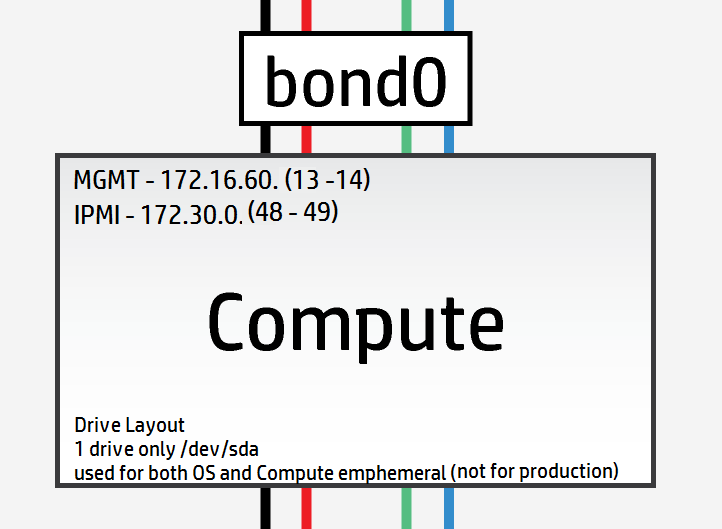
Tuttavia, il mio laboratorio ha solo nodi di calcolo a disco singolo, quindi ho dovuto modificare il layout per adattarlo come segue
#
# (c) Copyright 2015 Hewlett Packard Enterprise Development Company LP
#
# Licensed under the Apache License, Version 2.0 (the "License"); you may
# not use this file except in compliance with the License. You may obtain
# a copy of the License at
#
# http://www.apache.org/licenses/LICENSE-2.0
#
# Unless required by applicable law or agreed to in writing, software
# distributed under the License is distributed on an "AS IS" BASIS, WITHOUT
# WARRANTIES OR CONDITIONS OF ANY KIND, either express or implied. See the
# License for the specific language governing permissions and limitations
# under the License.
#
---
product:
version: 2

disk-models:
- name: COMPUTE-DISKS
# Disk model to be used for compute nodes
# /dev/sda_root is used as a volume group for /, /var/log and /var/crash
# sda_root is a templated value to align with whatever partition is really used
# This value is checked in os config and replaced by the partition actually used
# on sda e.g. sda1 or sda5
# /dev/sdb is used as a volume group for /var/lib (for VM storage)
# Additional discs can be added to either volume group

volume-groups:
- name: hlm-vg
physical-volumes:
- /dev/sda_root

logical-volumes:
# The policy is not to consume 100% of the space of each volume group.
# 5% should be left free for snapshots and to allow for some flexibility.
- name: root
size: 35%
fstype: ext4
mount: /
- name: log
size: 20%
mount: /var/log
fstype: ext4
mkfs-opts: -O large_file
- name: crash
size: 10%
mount: /var/crash
fstype: ext4
mkfs-opts: -O large_file
- name: compute
size: 30%
mount: /var/lib/nova
fstype: ext4
mkfs-opts: -O large_file
disks_osd.yml
Ci sono 8 unità fisiche disponibili nei server OSD. Nessuna di queste unità è SSD, quindi c'è molto poco senso nel journaling come lo intendo. La configurazione più ottimale sarebbe la seguente utilizzando solo un'unità per il OS e le unità rimanenti come OSD:
#
# (c) Copyright 2015 Hewlett Packard Enterprise Development Company LP
#
# Licensed under the Apache License, Version 2.0 (the "License"); you may
# not use this file except in compliance with the License. You may obtain
# a copy of the License at
#
# http://www.apache.org/licenses/LICENSE-2.0
#
# Unless required by applicable law or agreed to in writing, software
# distributed under the License is distributed on an "AS IS" BASIS, WITHOUT
# WARRANTIES OR CONDITIONS OF ANY KIND, either express or implied. See the
# License for the specific language governing permissions and limitations
# under the License.
#
---
product:
version: 2

disk-models:
- name: OSD-DISKS
# Disk model to be used for Ceph OSD nodes
# /dev/sda_root is used as a volume group for /, /var/log and /var/crash
# sda_root is a templated value to align with whatever partition is really used
# This value is checked in os config and replaced by the partition actually used
# on sda e.g. sda1 or sda5

volume-groups:
- name: hlm-vg
physical-volumes:
- /dev/sda_root

logical-volumes:
# The policy is not to consume 100% of the space of each volume group.
# 5% should be left free for snapshots and to allow for some flexibility.
- name: root
size: 30%
fstype: ext4
mount: /
- name: log
size: 45%
mount: /var/log
fstype: ext4
mkfs-opts: -O large_file
- name: crash
size: 20%
mount: /var/crash
fstype: ext4
mkfs-opts: -O large_file
consumer:
name: os

# Disks to be used by Ceph
# Additional disks can be added if available
device-groups:
- name: ceph-osd-data0
devices:
- name: /dev/sdb
consumer:
name: ceph
attrs:
usage: data
- name: ceph-osd-data1
devices:
- name: /dev/sdc
consumer:
name: ceph
attrs:
usage: data
- name: ceph-osd-data2
devices:
- name: /dev/sdd
consumer:
name: ceph
attrs:
usage: data
- name: ceph-osd-data3
devices:
- name: /dev/sde
consumer:
name: ceph
attrs:
usage: data
- name: ceph-osd-data4
devices:
- name: /dev/sdf
consumer:
name: ceph
attrs:
usage: data
- name: ceph-osd-data5
devices:
- name: /dev/sdg
consumer:
name: ceph
attrs:
usage: data
- name: ceph-osd-data6
devices:
- name: /dev/sdh
consumer:
name: ceph
attrs:
usage: data
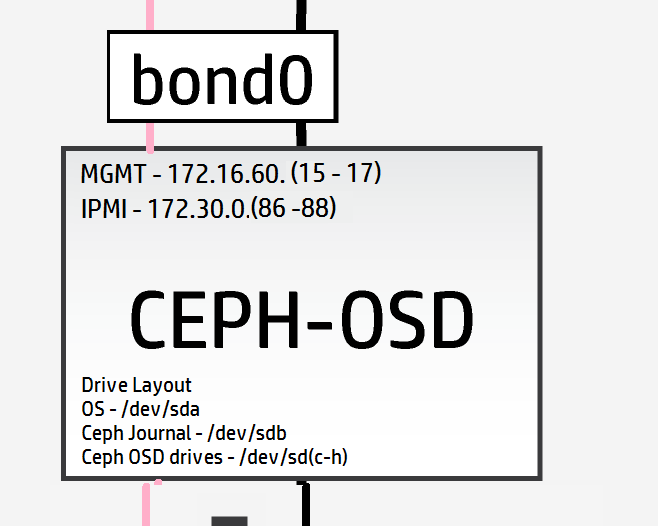
Di nuovo, nonostante la mancanza di SSD ad alte prestazioni, vorrei testare la meccanica della capacità di journaling di Ceph, quindi userò un'unità standard come journal. Questo dà un rapporto journal:osd di 1:6 (questo rapporto è piuttosto privo di significato). La configurazione ora diventa
#
# (c) Copyright 2015 Hewlett Packard Enterprise Development Company LP
#
# Licensed under the Apache License, Version 2.0 (the "License"); you may
# not use this file except in compliance with the License. You may obtain
# a copy of the License at
#
# http://www.apache.org/licenses/LICENSE-2.0
#
# Unless required by applicable law or agreed to in writing, software
# distributed under the License is distributed on an "AS IS" BASIS, WITHOUT
# WARRANTIES OR CONDITIONS OF ANY KIND, either express or implied. See the
# License for the specific language governing permissions and limitations
# under the License.
#
---
product:
version: 2

disk-models:
- name: OSD-DISKS
# Disk model to be used for Ceph OSD nodes
# /dev/sda_root is used as a volume group for /, /var/log and /var/crash
# sda_root is a templated value to align with whatever partition is really used
# This value is checked in os config and replaced by the partition actually used
# on sda e.g. sda1 or sda5

volume-groups:
- name: hlm-vg
physical-volumes:
- /dev/sda_root

logical-volumes:
# The policy is not to consume 100% of the space of each volume group.
# 5% should be left free for snapshots and to allow for some flexibility.
- name: root
size: 30%
fstype: ext4
mount: /
- name: log
size: 45%
mount: /var/log
fstype: ext4
mkfs-opts: -O large_file
- name: crash
size: 20%
mount: /var/crash
fstype: ext4
mkfs-opts: -O large_file
consumer:
name: os

# Disks to be used by Ceph
# Additional disks can be added if available
device-groups:
- name: ceph-osd-data-and-shared-journal-set-1
devices:
- name: /dev/sdc
consumer:
name: ceph
attrs:
usage: data
journal_disk: /dev/sdb
- name: ceph-osd-data-and-shared-journal-set-2
devices:
- name: /dev/sdd
consumer:
name: ceph
attrs:
usage: data
journal_disk: /dev/sdb
- name: ceph-osd-data-and-shared-journal-set-3
devices:
- name: /dev/sde
consumer:
name: ceph
attrs:
usage: data
journal_disk: /dev/sdb
- name: ceph-osd-data-and-shared-journal-set-4
devices:
- name: /dev/sdf
consumer:
name: ceph
attrs:
usage: data
journal_disk: /dev/sdb
- name: ceph-osd-data-and-shared-journal-set-5
devices:
- name: /dev/sdg
consumer:
name: ceph
attrs:
usage: data
journal_disk: /dev/sdb
- name: ceph-osd-data-and-shared-journal-set-6
devices:
- name: /dev/sdh
consumer:
name: ceph
attrs:
usage: data
journal_disk: /dev/sdb
Con i layout dei dischi dei server completati, non ci restano che i file di configurazione di rete tra noi e l'inizio effettivo della distribuzione.
Ecco di nuovo il layout di rete per risparmiare lo scorrere avanti e indietro (zoom per vedere più dettagli sui server)
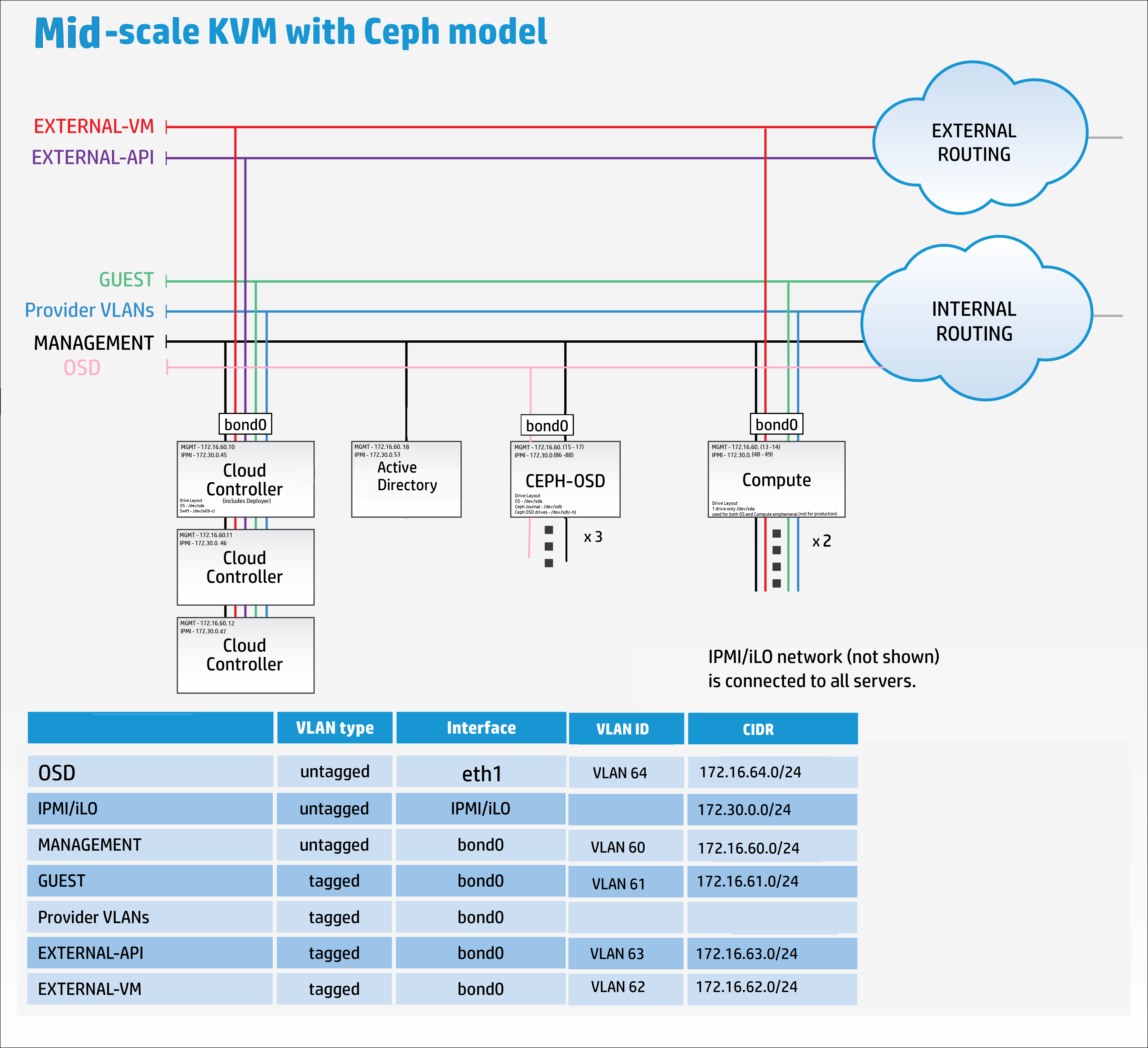
net_interfaces.yml
Qui dobbiamo ricordare di aggiungere i dettagli della nuova rete di replicazione OSD. Di nuovo per chiarezza, in una distribuzione di produzione Ceph di media o grande dimensione, la rete di replicazione OSD sarebbe sulla propria scheda di interfaccia di rete fisica.
Non ho cavi e hardware sufficienti per farlo, quindi lo trunkerò su bond0 solo a scopo dimostrativo.
Modifica tutti i nomi dei dispositivi per corrispondere alle mappature nic catturate in precedenza.
#
# (c) Copyright 2015 Hewlett Packard Enterprise Development Company LP
#
# Licensed under the Apache License, Version 2.0 (the "License"); you may
# not use this file except in compliance with the License. You may obtain
# a copy of the License at
#
# http://www.apache.org/licenses/LICENSE-2.0
#
# Unless required by applicable law or agreed to in writing, software
# distributed under the License is distributed on an "AS IS" BASIS, WITHOUT
# WARRANTIES OR CONDITIONS OF ANY KIND, either express or implied. See the
# License for the specific language governing permissions and limitations
# under the License.
#
---
product:
version: 2

interface-models:
# These examples uses hed3 and hed4 as a bonded
# pair for all networks on all three server roles
#
# Edit the device names and bond options
# to match your environment
#
- name: CONTROLLER-INTERFACES
network-interfaces:
- name: BOND0
device:
name: bond0
bond-data:
options:
mode: active-backup
miimon: 200
primary: hed0
provider: linux
devices:
- name: hed0
- name: hed1
network-groups:
- EXTERNAL-API
- EXTERNAL-VM
- GUEST
- MANAGEMENT

- name: COMPUTE-INTERFACES
network-interfaces:
- name: BOND0
device:
name: bond0
bond-data:
options:
mode: active-backup
miimon: 200
primary: hed0
provider: linux
devices:
- name: hed0
- name: hed1
network-groups:
- EXTERNAL-VM
- GUEST
- MANAGEMENT

- name: OSD-INTERFACES
network-interfaces:
- name: BOND0
device:
name: bond0
bond-data:
options:
mode: active-backup
miimon: 200
primary: hed0
provider: linux
devices:
- name: hed0
- name: hed1
network-groups:
- MANAGEMENT
- OSD
Riferimento alle modalità di bonding per i curiosi
networks.yml
Configura questo file per corrispondere alle impostazioni di rete nei tuoi parametri.
#
# (c) Copyright 2015 Hewlett Packard Enterprise Development Company LP
#
# Licensed under the Apache License, Version 2.0 (the "License"); you may
# not use this file except in compliance with the License. You may obtain
# a copy of the License at
#
# http://www.apache.org/licenses/LICENSE-2.0
#
# Unless required by applicable law or agreed to in writing, software
# distributed under the License is distributed on an "AS IS" BASIS, WITHOUT
# WARRANTIES OR CONDITIONS OF ANY KIND, either express or implied. See the
# License for the specific language governing permissions and limitations
# under the License.
#
---
product:
version: 2

networks:
#
# This example uses the following networks
#
# Network CIDR VLAN
# ------- ---- ----
# External API 10.0.1.0/24 101 (tagged)
# External VM see note 1 102 (tagged)
# Guest 10.1.1.0/24 103 (tagged)
# Management 192.168.10.0/24 100 (untagged)
#
# Notes:
# 1. Defined as part of Neutron configuration
#
# Modify these values to match your environment
#
- name: EXTERNAL-API-NET
vlanid: 61
tagged-vlan: true
cidr: 172.16.61.0/24
gateway-ip: 172.16.61.1
network-group: EXTERNAL-API

- name: EXTERNAL-VM-NET
vlanid: 62
tagged-vlan: true
network-group: EXTERNAL-VM

- name: GUEST-NET
vlanid: 63
tagged-vlan: true
cidr: 172.16.63.0/24
gateway-ip: 172.16.63.1
network-group: GUEST

- name: MANAGEMENT-NET
vlanid: 60
tagged-vlan: false
cidr: 172.16.60.0/24
gateway-ip: 172.16.60.1
network-group: MANAGEMENT

- name: OSD-NET
vlanid: 64
tagged-vlan: true
cidr: 172.16.64.0/24
gateway-ip: 172.16.64.1
network-group: OSD
Ora dobbiamo modificare il file dei gruppi di rete per includere la nuova rete OSD
network_groups.yml
#
# (c) Copyright 2015 Hewlett Packard Enterprise Development Company LP
#
# Licensed under the Apache License, Version 2.0 (the "License"); you may
# not use this file except in compliance with the License. You may obtain
# a copy of the License at
#
# http://www.apache.org/licenses/LICENSE-2.0
#
# Unless required by applicable law or agreed to in writing, software
# distributed under the License is distributed on an "AS IS" BASIS, WITHOUT
# WARRANTIES OR CONDITIONS OF ANY KIND, either express or implied. See the
# License for the specific language governing permissions and limitations
# under the License.
#
---
product:
version: 2

network-groups:

#
# External API
#
# This is the network group that users will use to
# access the public API endpoints of your cloud
#
- name: EXTERNAL-API
hostname-suffix: extapi

load-balancers:
- provider: ip-cluster
name: extlb
# If external-name is set then public urls in keystone
# will use this name instead of the IP address
#You must either set this to a name that can be resolved in your network
# or comment out this line to use IP addresses
external-name:

roles:
- public
tls-components:
- default
cert-file: my-public-cert
# This is the name of the certificate that will be used on load balancer.
# Replace this with name of file in "~helion/my_cloud/config/tls/certs/".
# This is the certificate that matches your setting for external-name
#
# Note that it is also possible to have per service certificates:
#
# cert-file:
# default: my-public-cert
# horizon: my-horizon-cert
# nova-api: my-nova-cert
#
#

# External VM
#
# This is the network group that will be used to provide
# external access to VMs (via floating IP Addresses)
#
- name: EXTERNAL-VM
tags:
- neutron.l3_agent.external_network_bridge

#
# GUEST
#
# This is the network group that will be used to provide
# private networks to VMs
#
- name: GUEST
hostname-suffix: guest
tags:
- neutron.networks.vxlan

#
# Management
#
# This is the network group that will be used to for
# management traffic within the cloud.
#
# The interface used by this group will be presented
# to Neutron as physnet1, and used by provider VLANS
#
- name: MANAGEMENT
hostname-suffix: mgmt
hostname: true

component-endpoints:
- default

routes:
- default

load-balancers:
- provider: ip-cluster
name: lb
components:
- default
roles:
- internal
- admin

tags:
- neutron.networks.vlan:
provider-physical-network: physnet1

#
# OSD
#
#
# This network group will be used to carry the to carry the internal Ceph
# cluster replication traffic
#
- name: OSD
hostanme-suffix: osd

component-endpoints:
- ceph-osd-internal
Ops, scusa, ho detto che eravamo quasi finiti – ho dimenticato di menzionare le configurazioni di base di Ceph.
Per la configurazione di Ceph, come minimo, si consiglia di aggiungere un cluster id univoco al parametro FSID in ~/helion/my_cloud/config/ceph/settings.yml
I valori predefiniti funzioneranno comunque per una distribuzione di laboratorio.
Nota: La documentazione online consiglia di utilizzare "uuidgen" per creare un nuovo id univoco ma questa applicazione deve essere installata prima.
sudo apt-get install uuid-runtime
uuidgen
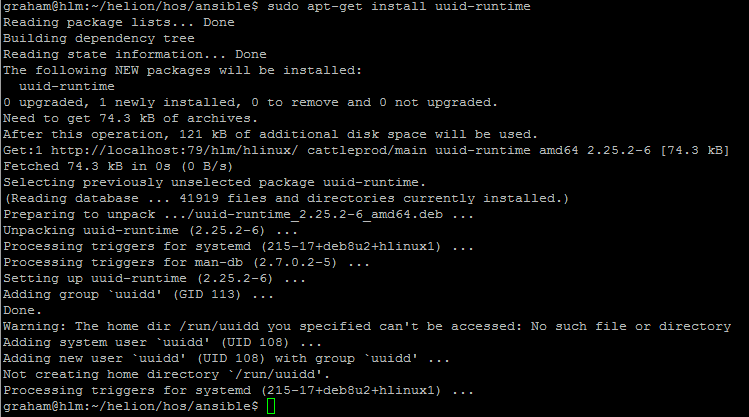
Ho usato 5e23fd0c-b449-43e3-a34e-fa0952c30e81 per il cluster FSID

#
# (c) Copyright 2015 Hewlett Packard Enterprise Development Company LP
#
# Licensed under the Apache License, Version 2.0 (the "License"); you may
# not use this file except in compliance with the License. You may obtain
# a copy of the License at
#
# http://www.apache.org/licenses/LICENSE-2.0
#
# Unless required by applicable law or agreed to in writing, software
# distributed under the License is distributed on an "AS IS" BASIS, WITHOUT
# WARRANTIES OR CONDITIONS OF ANY KIND, either express or implied. See the
# License for the specific language governing permissions and limitations
# under the License.
#
---

# Variables specific to all ceph services
fsid: 5e23fd0c-b449-43e3-a34e-fa0952c30e81
ceph_user: root
ceph_group: root
ceph_cluster: ceph
ceph_release: firefly
osd_pool_default_size: 3
osd_pool_default_pg_num: 128

# Variables specific to OSD
fstype: xfs
zap_data_disk: True
persist_mountpoint: fstab
osd_settle_time: 10
osd_journal_size: 5120
data_disk_poll_attempts: 5
data_disk_poll_interval: 12

# Variables specific to MON
mon_default_dir: /var/lib/ceph/mon/{{ ceph_cluster }}

# Additional parameters of ceph configuration can be injected via below section
# extra:
# section1:
# key1: value
# key2: value
# section2:
# key1: value
# key2: value
Inoltre, per il client Ceph, fornisci un secret_id univoco in ~/helion/my_cloud/config/ceph/user_model.yml
Nel mio caso userò 7d4304a4-a4d2-4cea-ba3c-bbbdc8d11bd4 per il secret_id

#
# (c) Copyright 2015 Hewlett Packard Enterprise Development Company LP
#
# Licensed under the Apache License, Version 2.0 (the "License"); you may
# not use this file except in compliance with the License. You may obtain
# a copy of the License at
#
# http://www.apache.org/licenses/LICENSE-2.0
#
# Unless required by applicable law or agreed to in writing, software
# distributed under the License is distributed on an "AS IS" BASIS, WITHOUT
# WARRANTIES OR CONDITIONS OF ANY KIND, either express or implied. See the
# License for the specific language governing permissions and limitations
# under the License.
#
---

product:
version: 2

ceph_user_models:
- user:
name: cinder
type: openstack
secret_id: 7d4304a4-a4d2-4cea-ba3c-bbbdc8d11bd4
pools:
- name: volumes
attrs:
creation_policy: eager
type: replicated
replica_size: 3
permission: rwx
pg: 100
usage:
consumer: cinder-volume
- name: vms
attrs:
creation_policy: eager
type: replicated
replica_size: 3
permission: rwx
pg: 100
usage:
consumer: nova
- name: images
attrs:
creation_policy: lazy
permission: rx
- user:
name: glance
type: openstack
pools:
- name: images
attrs:
creation_policy: eager
type: replicated
replica_size: 3
permission: rwx
pg: 128
usage:
consumer: glance-datastore
- user:
name: cinder-backup
type: openstack
pools:
- name: backups
attrs:
creation_policy: eager
type: replicated
replica_size: 3
permission: rwx
pg: 128
usage:
consumer: cinder-backup
Infine, ma non per ultimo, dobbiamo aggiungere la nuova rete OSD al firewall
#
# (c) Copyright 2015 Hewlett Packard Enterprise Development Company LP
#
# Licensed under the Apache License, Version 2.0 (the "License"); you may
# not use this file except in compliance with the License. You may obtain
# a copy of the License at
#
# http://www.apache.org/licenses/LICENSE-2.0
#
# Unless required by applicable law or agreed to in writing, software
# distributed under the License is distributed on an "AS IS" BASIS, WITHOUT
# WARRANTIES OR CONDITIONS OF ANY KIND, either express or implied. See the
# License for the specific language governing permissions and limitations
# under the License.
#
---
product:
version: 2

#
# HOS will create firewall rules to enable the required access for
# all of the deployed services. Use this section to define any
# additional access.
#
# Each group of rules can be applied to one or more network groups
# Examples are given for ping and ssh
#
# Names of rules, (e.g. "PING") are arbitrary and have no special significance
#

firewall-rules:

# - name: SSH
# # network-groups is a list of all the network group names
# # that the rules apply to
# network-groups:
# - MANAGEMENT
# rules:
# - type: allow
# # range of remote addresses in CIDR format that this
# # rule applies to
# remote-ip-prefix: 0.0.0.0/0
# port-range-min: 22
# port-range-max: 22
# # protocol must be one of: null, tcp, udp or icmp
# protocol: tcp

- name: PING
network-groups:
- MANAGEMENT
- GUEST
- EXTERNAL-API
- OSD
rules:
# open ICMP echo request (ping)
- type: allow
remote-ip-prefix: 0.0.0.0/0
# icmp type
port-range-min: 8
# icmp code
port-range-max: 0
protocol: icmp
Ok, quindi c'è un altro file da aggiornare e tra 3 settimane sarai grato di averlo fatto...indovinelli, sì, esatto, il file ReadMe.MD. Amiamo tutti la documentazione, vero? [Sì, vedo l'ironia qui]
README.MD
README.MD

##Helion Entry Scale Cloud with Ceph and Separate OSD Replication Network##

## Updated - 15/01/16
## Author - Grazzer
## Site - http://allthingscloud.eu
## Twitter - @allthingsclowd

The input files in this example deploy a cloud that has the following characteristics:

### Control Planes ###

- A single control plane consisting of three servers that co-host all of the required services. In addition, each hosts Ceph monitor service as well.

###Resource Pools###

- Two compute Node

- Three Ceph OSD Nodes

*Additional resource nodes can be added to the configuration.*

*Minimal Swift Resources are provided by the control plane*

###Deployer Node###

This configuration runs the lifecycle-manager (formerly referred to as the deployer) on a control plane node.
You need to include this node address in your servers.yml definition. This function does not need a dedicated network.

*The minimum server count for this example is therefore 7 servers (Control Plane (x3) + Compute (x1) + OSD (x3))*

An example set of servers are defined in ***data/servers.yml***. You will need to modify this file to reflect your specific environment.

###Networking###

The example requires the following networks:

IPMI/iLO network, connected to the deployer and the IPMI/iLO ports of all servers

A pair of bonded NICs which are used by the following networks:

- External API - This is the network that users will use to make requests to the cloud
- External VM - This is the network that will be used to provide access to VMs (via floating IP addresses)
- Guest - This is the network that will carry traffic between VMs on private networks within the cloud
- Cloud Management - This is the network that will be used for all internal traffic between the cloud services, This network is also
used to install and configure the nodes. This network needs to be on an untagged VLAN
- OSD - This is the network that is used to carry all the Ceph OSD replication traffic

Note that the EXTERNAL\_API network must be reachable from the EXTERNAL\_VM network if you want VMs to be able to make API calls to the cloud.

An example set of networks are defined in ***data/networks.yml***. You will need to modify this file to reflect your environment.

The example uses the devices hed3 & hed4 as a bonded network for all services. If you need to modify these
for your environment they are defined in ***data/net_interfaces.yml*** The network devices eth3 & eth4 are renamed to devices hed4 & hed5 using the PCI bus mappings secified in ***data/nic_mappings.yml***. You may need to modify the PCI bus addresses to match your system.

###Local Storage###

All servers should present a single OS disk, protected by a RAID controller. This disk needs to be at least 512GB in capacity. In addition the example configures one additional disk depending on the role of the server:

- Controllers: /dev/sdb & /dev/sdc is configured to be used by Swift
- Compute Severs: /dev/sda is configured as both OS and VM storage (not production grade)
- OSD Servers: /dev/sdc, /dev/sdd, /dev/sde, /dev/sdf, /dev/sdg and /dev/sdh are configured for OSD data and /dev/sdb for journal storage

Additional discs can be configured for any of these roles by editing the corresponding ***data/disks_*.yml*** file
Abbiamo ora completato la configurazione del nostro modello cloud.
Nota: SE SI USA HELION DEVELOPMENT PLATFORM ALLORA DOVREBBE ANCHE ESSERE AGGIUNTA UNA RETE DI SERVIZIO ORA vedi qui.