

Finalmente riesco a pubblicare alcuni heat stack per la piattaforma cloud pubblica Fujitsu K5 OpenStack. Le ultime settimane sono state frenetiche e ho avuto molto poco tempo per scrivere sul blog.
Heat è il progetto di orchestrazione di OpenStack ed è generalmente ciò che dovrebbe essere utilizzato quando si ha la necessità di creare rapidamente e in modo coerente uno schema di infrastruttura (modello) nel proprio cloud IaaS OpenStack K5, o in qualsiasi altro cloud OpenStack, a dire il vero. Il vantaggio di questo approccio è che, come si può vedere di seguito, il modello è codificato in un file YAML che ho archiviato su Github. Ora ho la possibilità di controllare la versione della mia infrastruttura così come quella del codice della mia applicazione, il che dovrebbe comportare meno sorprese durante le distribuzioni di versioni testate di IaC (Infrastructure as Code). Questo è un requisito se si spera di passare a un modello operativo di Continuous Integration e Continuous Deployment.
Il primo esempio di seguito, disponibile anche qui, crea "automagicamente" la seguente infrastruttura:
- 2 x reti L2
- 2 x Subnet
- Nota: sono state aggiunte rotte aggiuntive alle subnet – non sono necessarie per questo post
- 1 x server Windows
- con un'unità a blocchi aggiuntiva
- script di inizializzazione per configurare e montare la nuova unità come 'D:\'
- indirizzo IP assegnato tramite DHCP
- utente amministratore impostato su k5user
- connesso alla rete di gestione
- 1 x server Linux
- con un'unità a blocchi aggiuntiva
- script di inizializzazione per configurare e montare la nuova unità al momento della distribuzione
- assegnazione dell'indirizzo IP fisso
- utente amministratore impostato su K5user
- connesso alla rete dei servizi condivisi
- 2 x Gruppi di Sicurezza (SG)
- Avviso: Questi SG sono completamente aperti – Assicurarsi di configurare questi SG in modo appropriato per il proprio ambiente.
Esempio – Stack Progetto 1
Questo file contiene caratteri Unicode nascosti o bidirezionali che potrebbero essere interpretati o compilati in modo diverso da quanto appare di seguito. Per rivederli, aprire il file in un editor che riveli i caratteri Unicode nascosti.
Maggiori informazioni sui caratteri Unicode bidirezionali
| heat_template_version: 2013-05-23 | |
| # Author: Graham Land | |
| # Date: 25/09/2016 | |
| # Purpose: Project 1 Demo HOT Infrastructure Template | |
| # Twitter: @allthingsclowd | |
| # Blog : https://allthingscloud.eu | |
| description: K5 template to build an environment within a Project | |
| # Input parameters | |
| parameters: | |
| red_image: | |
| type: string | |
| label: Image name or ID | |
| description: Redhat 7.2 image to be used for compute instance | |
| default: "Red Hat Enterprise Linux 7.2 64bit (English) 01" | |
| win_image: | |
| type: string | |
| label: Image name or ID | |
| description: Windows Server 2012 R2 SE image to be used for compute instance | |
| default: "Windows Server 2012 R2 SE 64bit (English) 01" | |
| az: | |
| type: string | |
| label: Availability Zone | |
| description: Region AZ to use | |
| default: "uk-1b" | |
| default-sshkey: | |
| type: string | |
| label: ssh key injected into linux systems | |
| description: ssh key for linux builds | |
| default: "demostack" | |
| # K5 Infrastructure resources to be built | |
| resources: | |
| # Create a new private network | |
| management_net: | |
| type: OS::Neutron::Net | |
| properties: | |
| availability_zone: { get_param: az } | |
| name: "Management" | |
| # Create a new subnet on the private network | |
| management_subnet: | |
| type: OS::Neutron::Subnet | |
| depends_on: management_net | |
| properties: | |
| availability_zone: { get_param: az } | |
| name: "Management_Subnet" | |
| network_id: { get_resource: management_net } | |
| cidr: "172.24.201.0/26" | |
| allocation_pools: | |
| – start: "172.24.201.1" | |
| end: "172.24.201.15" | |
| gateway_ip: "172.24.201.62" | |
| host_routes: [{"nexthop": "172.24.200.81", "destination": "172.24.202.0/23"}] | |
| # Create a new private network | |
| shared_services_net: | |
| type: OS::Neutron::Net | |
| properties: | |
| availability_zone: { get_param: az } | |
| name: "Shared_Services" | |
| # Create a new subnet on the private network | |
| shared_services_subnet: | |
| type: OS::Neutron::Subnet | |
| depends_on: shared_services_net | |
| properties: | |
| availability_zone: { get_param: az } | |
| name: "Shared_Services_Subnet" | |
| network_id: { get_resource: shared_services_net } | |
| cidr: "172.24.201.64/26" | |
| gateway_ip: "172.24.201.126" | |
| allocation_pools: | |
| – start: "172.24.201.90" | |
| end: "172.24.201.105" | |
| host_routes: [{"nexthop": "172.24.200.81", "destination": "172.24.202.0/23"}] | |
| # Create a new router | |
| project1_router: | |
| type: OS::Neutron::Router | |
| properties: | |
| availability_zone: { get_param: az } | |
| name: "Project2_Router" | |
| # Connect an interface on the private network's subnet to the router | |
| project1_router_interface1: | |
| type: OS::Neutron::RouterInterface | |
| depends_on: project1_router | |
| properties: | |
| router_id: { get_resource: project1_router } | |
| subnet_id: { get_resource: management_subnet } | |
| # Connect an interface on the private network's subnet to the router | |
| project1_router_interface2: | |
| type: OS::Neutron::RouterInterface | |
| depends_on: project1_router | |
| properties: | |
| router_id: { get_resource: project1_router } | |
| subnet_id: { get_resource: shared_services_subnet } | |
| # Create a security group | |
| server_security_group1: | |
| type: OS::Neutron::SecurityGroup | |
| properties: | |
| description: Add security group rules for server | |
| name: "Windows_SG" | |
| rules: | |
| – remote_ip_prefix: 0.0.0.0/0 | |
| protocol: udp | |
| – remote_ip_prefix: 0.0.0.0/0 | |
| protocol: tcp | |
| – remote_ip_prefix: 0.0.0.0/0 | |
| protocol: icmp | |
| # Create a security group | |
| server_security_group2: | |
| type: OS::Neutron::SecurityGroup | |
| properties: | |
| description: Add security group rules for server | |
| name: "Linux_SG" | |
| rules: | |
| – remote_ip_prefix: 0.0.0.0/0 | |
| protocol: udp | |
| – remote_ip_prefix: 0.0.0.0/0 | |
| protocol: tcp | |
| – remote_ip_prefix: 0.0.0.0/0 | |
| protocol: icmp | |
| ################################ Adding a Server Start ############################## | |
| # Create a data volume for use with the server | |
| data_vol_server1: | |
| type: OS::Cinder::Volume | |
| properties: | |
| availability_zone: { get_param: az } | |
| description: Data volume | |
| name: "data-vol" | |
| size: 50 | |
| volume_type: "M1" | |
| # Create a system volume for use with the server | |
| sys-vol_server1: | |
| type: OS::Cinder::Volume | |
| properties: | |
| availability_zone: { get_param: az } | |
| name: "boot-vol" | |
| size: 80 | |
| volume_type: "M1" | |
| image : { get_param: win_image } | |
| # Build a server using the system volume defined above | |
| server1: | |
| type: OS::Nova::Server | |
| properties: | |
| key_name: { get_param: default-sshkey } | |
| image: { get_param: win_image } | |
| flavor: "S-4" | |
| admin_user: "k5user" | |
| metadata: { "admin_pass": Password12345 } | |
| block_device_mapping: [{"volume_size": "80", "volume_id": {get_resource: sys-vol_server1}, "delete_on_termination": True, "device_name": "/dev/vda"}] | |
| name: "Hello_Windows_P1" | |
| user_data: | |
| #ps1 | |
| $d = Get-Disk | |
| $d | |
| $d | |
| $p = $d | |
| $p | |
| user_data_format: RAW | |
| networks: ["uuid": {get_resource: management_net} ] | |
| # Attach previously defined data-vol to the server | |
| attach_vol1: | |
| type: OS::Cinder::VolumeAttachment | |
| depends_on: [ data_vol_server1, server1 ] | |
| properties: | |
| instance_uuid: {get_resource: server1} | |
| mountpoint: "/dev/vdb" | |
| volume_id: {get_resource: data_vol_server1} | |
| ################################ Adding a Server End ################################ | |
| ################################ Adding a Server Start ############################## | |
| # Create a new port for the server interface, assign an ip address and security group | |
| server2_port: | |
| type: OS::Neutron::Port | |
| depends_on: [ project1_router_interface2,server_security_group2 ] | |
| properties: | |
| availability_zone: { get_param: az } | |
| network_id: { get_resource: shared_services_net } | |
| security_groups: [{ get_resource: server_security_group2 }] | |
| fixed_ips: | |
| – subnet_id: { get_resource: shared_services_subnet } | |
| ip_address: '172.24.201.66' | |
| # Create a data volume for use with the server | |
| data_vol_server2: | |
| type: OS::Cinder::Volume | |
| properties: | |
| availability_zone: { get_param: az } | |
| description: Data volume | |
| name: "data-vol" | |
| size: 40 | |
| volume_type: "M1" | |
| # Create a system volume for use with the server | |
| sys-vol_server2: | |
| type: OS::Cinder::Volume | |
| properties: | |
| availability_zone: { get_param: az } | |
| name: "boot-vol" | |
| size: 40 | |
| volume_type: "M1" | |
| image : { get_param: red_image } | |
| # Build a server using the system volume defined above | |
| server2: | |
| type: OS::Nova::Server | |
| depends_on: [ server2_port ] | |
| properties: | |
| key_name: { get_param: default-sshkey } | |
| image: { get_param: red_image } | |
| flavor: "S-2" | |
| block_device_mapping: [{"volume_size": "40", "volume_id": {get_resource: sys-vol_server2}, "delete_on_termination": True, "device_name": "/dev/vda"}] | |
| name: "Hello_Linux_P1" | |
| admin_user: "k5user" | |
| user_data: | |
| str_replace: | |
| template: | |
| #cloud-config | |
| write_files: | |
| – content: | |
| #!/bin/bash | |
| voldata_id=%voldata_id% | |
| voldata_dev="/dev/disk/by-id/virtio-$(echo ${voldata_id} | |
| mkfs.ext4 ${voldata_dev} | |
| mkdir -pv /mnt/appdata | |
| echo "${voldata_dev} /mnt/appdata ext4 defaults 1 2" >> /etc/fstab | |
| mount /mnt/appdata | |
| chmod 0777 /mnt/appdata | |
| path: /tmp/format-disks | |
| permissions: '0700' | |
| runcmd: | |
| – /tmp/format-disks | |
| params: | |
| "%voldata_id%": { get_resource: data_vol_server2 } | |
| user_data_format: RAW | |
| networks: ["uuid": {get_resource: shared_services_net} ] | |
| # Attach previously defined data-vol to the server | |
| attach_vol2: | |
| type: OS::Cinder::VolumeAttachment | |
| depends_on: [ data_vol_server2, server2 ] | |
| properties: | |
| instance_uuid: {get_resource: server2} | |
| mountpoint: "/dev/vdb" | |
| volume_id: {get_resource: data_vol_server2} | |
| ################################ Adding a Server End ################################ | |
view raw
Fujitsu-K5-Example-Heat-Stack-Project1.YAML
hosted with ❤ by GitHub
Caricare il modello heat tramite l'opzione Stack nella GUI di K5 IaaS come segue:
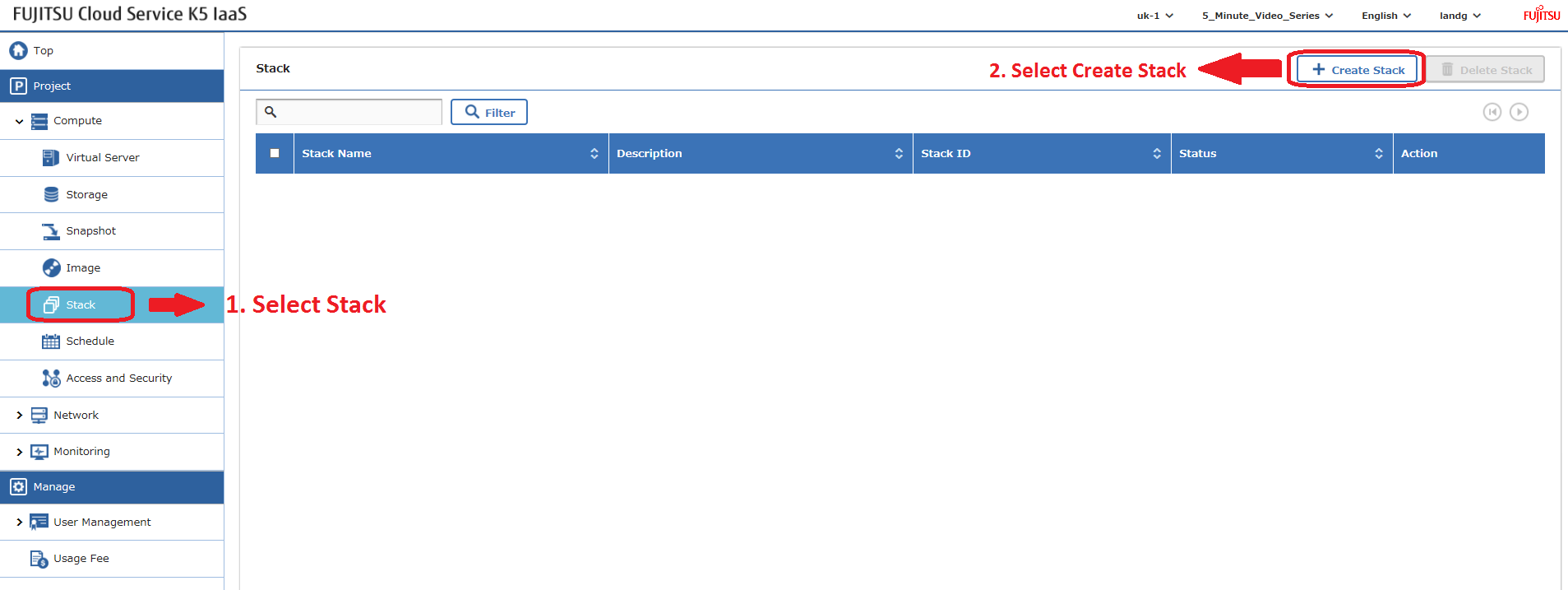
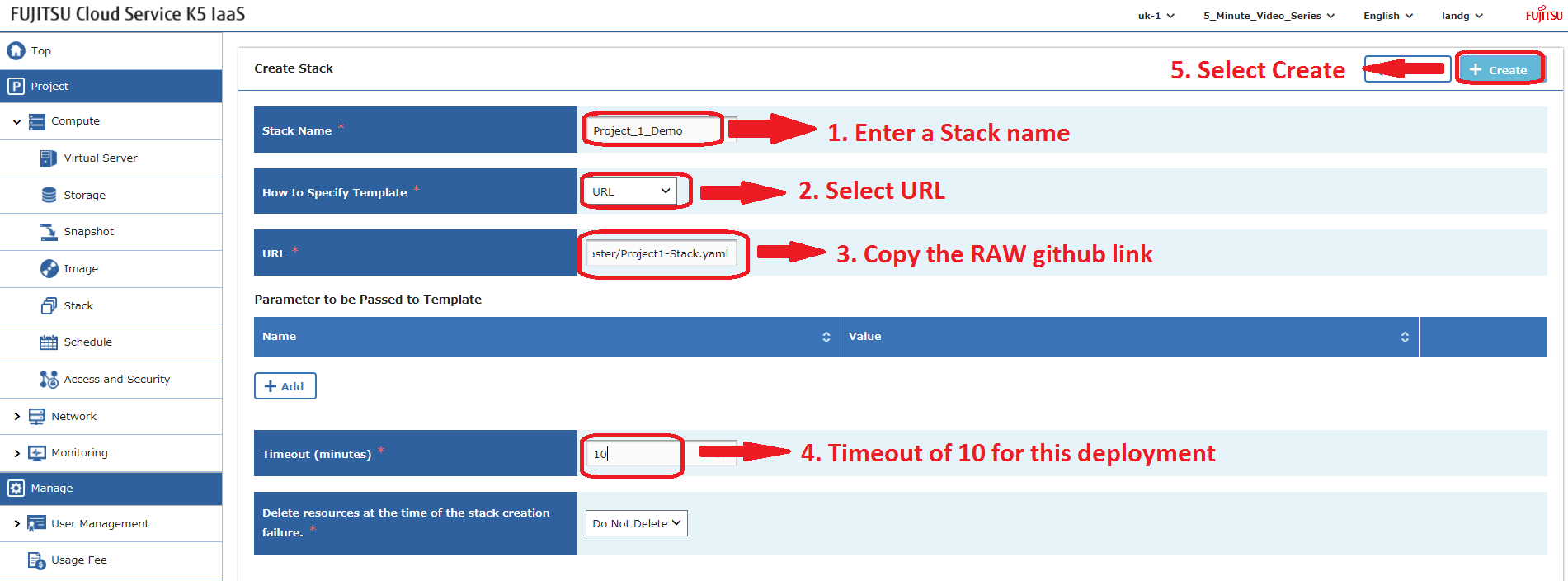
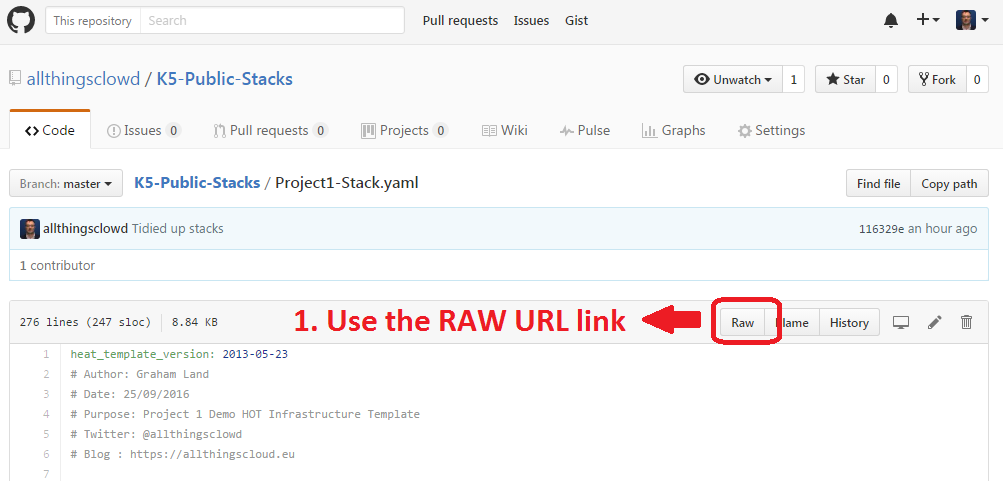
Gli stack Heat possono anche essere distribuiti utilizzando l'API – un post a seguire.
Esempio – Stack Progetto 2
Questo file contiene caratteri Unicode nascosti o bidirezionali che potrebbero essere interpretati o compilati in modo diverso da quanto appare di seguito. Per rivederli, aprire il file in un editor che riveli i caratteri Unicode nascosti.
Maggiori informazioni sui caratteri Unicode bidirezionali
| heat_template_version: 2013-05-23 | |
| # Author: Graham Land | |
| # Purpose: Demo Project 2 with Inter-Project-Routing | |
| # Date: 25/09/2016 | |
| # Twitter: @allthingsclowd | |
| # Blog : https://allthingscloud.eu | |
| description: Fujitsu K5 demo heat template to build an environment within a Project | |
| # Input parameters | |
| parameters: | |
| red_image: | |
| type: string | |
| label: Image name or ID | |
| description: Redhat 7.2 image to be used for compute instance | |
| default: "Red Hat Enterprise Linux 7.2 64bit (English) 01" | |
| win_image: | |
| type: string | |
| label: Image name or ID | |
| description: Windows Server 2012 R2 SE image to be used for compute instance | |
| default: "Windows Server 2012 R2 SE 64bit (English) 01" | |
| az: | |
| type: string | |
| label: Availability Zone | |
| description: Region AZ to use | |
| default: "uk-1b" | |
| default-sshkey: | |
| type: string | |
| label: ssh key injected into linux systems | |
| description: ssh key for linux builds | |
| default: "demostack" | |
| # K5 Infrastructure resources to be built | |
| resources: | |
| # Create a new private network | |
| Application_Network_net: | |
| type: OS::Neutron::Net | |
| properties: | |
| availability_zone: { get_param: az } | |
| name: "Application_Network" | |
| # Create a new subnet on the private network | |
| Application_Network_subnet: | |
| type: OS::Neutron::Subnet | |
| depends_on: Application_Network_net | |
| properties: | |
| availability_zone: { get_param: az } | |
| name: "Application_Subnet" | |
| network_id: { get_resource: Application_Network_net } | |
| cidr: "172.24.202.0/23" | |
| gateway_ip: "172.24.203.254" | |
| allocation_pools: | |
| – start: "172.24.203.200" | |
| end: "172.24.203.220" | |
| host_routes: [{"nexthop": "172.24.200.81", "destination": "172.24.201.0/26"}, {"nexthop": "172.24.200.81", "destination": "172.24.201.64/26"}] | |
| # Create a new private network | |
| inter_project_transit_net: | |
| type: OS::Neutron::Net | |
| properties: | |
| availability_zone: { get_param: az } | |
| name: "Inter_Project_Transit" | |
| # Create a new subnet on the private network | |
| inter_project_transit_subnet: | |
| type: OS::Neutron::Subnet | |
| depends_on: inter_project_transit_net | |
| properties: | |
| availability_zone: { get_param: az } | |
| name: "P2_Inter_Project_Transit_Subnet" | |
| network_id: { get_resource: inter_project_transit_net } | |
| cidr: "172.24.200.80/28" | |
| gateway_ip: "172.24.200.82" | |
| allocation_pools: | |
| – start: "172.24.200.85" | |
| end: "172.24.200.90" | |
| # Create a new router | |
| project2_router: | |
| type: OS::Neutron::Router | |
| properties: | |
| availability_zone: { get_param: az } | |
| name: "Project2_Router" | |
| # Create a new port for the interproject router interface links, assign an ip address | |
| project2_inter_project_transit_port: | |
| type: OS::Neutron::Port | |
| depends_on: [ project2_router ] | |
| properties: | |
| availability_zone: { get_param: az } | |
| network_id: { get_resource: inter_project_transit_net } | |
| fixed_ips: | |
| – subnet_id: { get_resource: inter_project_transit_subnet } | |
| ip_address: '172.24.200.81' | |
| # Connect an interface on the private network's subnet to the router | |
| project2_router_interface1: | |
| type: OS::Neutron::RouterInterface | |
| depends_on: [project2_router,inter_project_transit_subnet] | |
| properties: | |
| router_id: { get_resource: project2_router } | |
| subnet_id: { get_resource: inter_project_transit_subnet } | |
| # Connect an interface on the private network's subnet to the router | |
| project2_router_interface2: | |
| type: OS::Neutron::RouterInterface | |
| depends_on: project2_router | |
| properties: | |
| router_id: { get_resource: project2_router } | |
| subnet_id: { get_resource: Application_Network_subnet } | |
| # Create a security group | |
| server_security_group1: | |
| type: OS::Neutron::SecurityGroup | |
| properties: | |
| description: Add security group rules for server | |
| name: "Windows_SG" | |
| rules: | |
| – remote_ip_prefix: 0.0.0.0/0 | |
| protocol: udp | |
| – remote_ip_prefix: 0.0.0.0/0 | |
| protocol: tcp | |
| – remote_ip_prefix: 0.0.0.0/0 | |
| protocol: icmp | |
| # Create a security group | |
| server_security_group2: | |
| type: OS::Neutron::SecurityGroup | |
| properties: | |
| description: Add security group rules for server | |
| name: "Linux_SG" | |
| rules: | |
| – remote_ip_prefix: 0.0.0.0/0 | |
| protocol: udp | |
| – remote_ip_prefix: 0.0.0.0/0 | |
| protocol: tcp | |
| – remote_ip_prefix: 0.0.0.0/0 | |
| protocol: icmp | |
| # Create a security group | |
| server_security_group3: | |
| type: OS::Neutron::SecurityGroup | |
| properties: | |
| description: Add security group rules for server | |
| name: "InterProject_SG" | |
| rules: | |
| – remote_ip_prefix: 0.0.0.0/0 | |
| protocol: udp | |
| – remote_ip_prefix: 0.0.0.0/0 | |
| protocol: tcp | |
| – remote_ip_prefix: 0.0.0.0/0 | |
| protocol: icmp | |
| ################################ Adding a Server Start ############################## | |
| # Create a new port for the server interface, assign an ip address and security group | |
| server1_port: | |
| type: OS::Neutron::Port | |
| depends_on: [ project2_router,server_security_group1 ] | |
| properties: | |
| availability_zone: { get_param: az } | |
| network_id: { get_resource: Application_Network_net } | |
| security_groups: [{ get_resource: server_security_group1 }] | |
| fixed_ips: | |
| – subnet_id: { get_resource: Application_Network_subnet } | |
| ip_address: '172.24.203.2' | |
| # Create a data volume for use with the server | |
| data_vol_server1: | |
| type: OS::Cinder::Volume | |
| properties: | |
| availability_zone: { get_param: az } | |
| description: Data volume | |
| name: "data-vol" | |
| size: 50 | |
| volume_type: "M1" | |
| # Create a system volume for use with the server | |
| sys-vol_server1: | |
| type: OS::Cinder::Volume | |
| properties: | |
| availability_zone: { get_param: az } | |
| name: "boot-vol" | |
| size: 40 | |
| volume_type: "M1" | |
| image : { get_param: red_image } | |
| # Build a server using the system volume defined above | |
| server1: | |
| type: OS::Nova::Server | |
| depends_on: [ server1_port ] | |
| properties: | |
| key_name: { get_param: default-sshkey } | |
| image: { get_param: red_image } | |
| flavor: "S-2" | |
| block_device_mapping: [{"volume_size": "40", "volume_id": {get_resource: sys-vol_server1}, "delete_on_termination": True, "device_name": "/dev/vda"}] | |
| name: "Hello_Linux_P2" | |
| admin_user: "k5user" | |
| user_data: | |
| str_replace: | |
| template: | |
| #cloud-config | |
| write_files: | |
| – content: | |
| #!/bin/bash | |
| voldata_id=%voldata_id% | |
| voldata_dev="/dev/disk/by-id/virtio-$(echo ${voldata_id} | |
| mkfs.ext4 ${voldata_dev} | |
| mkdir -pv /mnt/appdata | |
| echo "${voldata_dev} /mnt/appdata ext4 defaults 1 2" >> /etc/fstab | |
| mount /mnt/appdata | |
| chmod 0777 /mnt/appdata | |
| path: /tmp/format-disks | |
| permissions: '0700' | |
| runcmd: | |
| – /tmp/format-disks | |
| params: | |
| "%voldata_id%": { get_resource: data_vol_server1 } | |
| user_data_format: RAW | |
| networks: | |
| – port: { get_resource: server1_port } | |
| # Attach previously defined data-vol to the server | |
| attach_vol1: | |
| type: OS::Cinder::VolumeAttachment | |
| depends_on: [ data_vol_server1, server1 ] | |
| properties: | |
| instance_uuid: {get_resource: server1} | |
| mountpoint: "/dev/vdb" | |
| volume_id: {get_resource: data_vol_server1} | |
| ################################ Adding a Server End ################################ | |
| ################################ Adding a Server Start ############################## | |
| # Create a new port for the server interface, assign an ip address and security group | |
| server2_port: | |
| type: OS::Neutron::Port | |
| depends_on: [ project2_router,server_security_group1 ] | |
| properties: | |
| availability_zone: { get_param: az } | |
| network_id: { get_resource: Application_Network_net } | |
| security_groups: [{ get_resource: server_security_group1 }] | |
| fixed_ips: | |
| – subnet_id: { get_resource: Application_Network_subnet } | |
| ip_address: '172.24.203.3' | |
| # Create a data volume for use with the server | |
| data_vol_server2: | |
| type: OS::Cinder::Volume | |
| properties: | |
| availability_zone: { get_param: az } | |
| description: Data volume | |
| name: "data-vol" | |
| size: 50 | |
| volume_type: "M1" | |
| # Create a system volume for use with the server | |
| sys-vol_server2: | |
| type: OS::Cinder::Volume | |
| properties: | |
| availability_zone: { get_param: az } | |
| name: "boot-vol" | |
| size: 80 | |
| volume_type: "M1" | |
| image : { get_param: win_image } | |
| # Build a server using the system volume defined above | |
| server2: | |
| type: OS::Nova::Server | |
| depends_on: [ server1,server2_port ] | |
| properties: | |
| key_name: { get_param: default-sshkey } | |
| image: { get_param: win_image } | |
| flavor: "S-4" | |
| admin_user: "k5user" | |
| metadata: { "admin_pass": Password12345 } | |
| block_device_mapping: [{"volume_size": "80", "volume_id": {get_resource: sys-vol_server2}, "delete_on_termination": True, "device_name": "/dev/vda"}] | |
| name: "Hello_Windows_P2" | |
| user_data: | |
| #ps1 | |
| $d = Get-Disk | |
| $d | |
| $d | |
| $p = $d | |
| $p | |
| user_data_format: RAW | |
| networks: | |
| – port: { get_resource: server2_port } | |
| # Attach previously defined data-vol to the server | |
| attach_vol2: | |
| type: OS::Cinder::VolumeAttachment | |
| depends_on: [ data_vol_server2, server2 ] | |
| properties: | |
| instance_uuid: {get_resource: server2} | |
| mountpoint: "/dev/vdb" | |
| volume_id: {get_resource: data_vol_server2} | |
| ################################ Adding a Server End ################################ |
view raw
K5_Project2.yml
hosted with ❤ by GitHub
Happy Stacking!