

J'ai récemment effectué une installation de Helion OpenStack 2.X où le client a demandé que les mots de passe iLO soient chiffrés. C'était la première fois que je travaillais avec le script de chiffrement HOS fourni avec Helion OpenStack, hosencrypt.py.
Il s'est avéré que c'était un processus laborieux consistant à récupérer manuellement chaque mot de passe et à le fournir au script de chiffrement. Chaque résultat devait ensuite être copié dans le fichier servers.yml.
Avec des tailles d'installation qui ne cessent de croître, plus de 60 serveurs, je n'ai pas envie de répéter ce processus manuel – je ne suis pas payé en heures supplémentaires 😉
Le script suivant, hosencryptfile.py, prendra le fichier servers.yml en entrée et produira une version chiffrée ou déchiffrée. Veuillez lire les commentaires dans le script pour plus de détails.
#!/usr/bin/env python
#
# A utility to encrypt passwords for auxiliary HOS systems like IPMI.
#
# (c) Copyright 2015 Hewlett Packard Enterprise Development Company LP
#
# Licensed under the Apache License, Version 2.0 (the "License"); you may
# not use this file except in compliance with the License. You may obtain
# a copy of the License at
#
# http://www.apache.org/licenses/LICENSE-2.0
#
# Unless required by applicable law or agreed to in writing, software
# distributed under the License is distributed on an "AS IS" BASIS, WITHOUT
# WARRANTIES OR CONDITIONS OF ANY KIND, either express or implied. See the
# License for the specific language governing permissions and limitations
# under the License.
#
# Author: Graham J Land
# Date: 16/01/2016
# Modification: Hacked this file by adding a new function file_decrypt_encrypt(switch,infile,outfile="temp")
#               to automagically encrypt or decrypt the ilo-passwords in a servers.yml file
# Name: hosencryptfile.py
#
# PREREQUISITES
# This script expects an environment variable HOS_USER_PASSWORD_ENCRYPT_KEY which should hold the encryption key
# For example enter the following command before running the script:
#
# export HOS_USER_PASSWORD_ENCRYPT_KEY=EnterASecretKeyHere
#
# COMMANDLINE PARAMETERS
# switch:   2nd commandline parameter [optional]
#           "" no comandline parameters then you'll be prompted to enter a password to encrypt
#           "-d" you'll be prompted for a password to decrypt
#           "-fe" will cause the following servers.yml file to have it's ilo-passwords encrypted
#           "-fd" (or anything else for that matter) will cause the supplied servers.yml file to have it's passwords decrypted
#
# infile:   3rd commandline parameter [optional]
#           the input servers.yml file that is to be processed
#
# outfile:  4th commandline parameter [optional]
#           the new servers.yml file with the encrypted/decrypted passwords
#           if this file is left blank then the input file will be overwritten
#
# EXAMPLE
#  ~/helion/hos/ansible/hosencryptfile.py -fe ~/helion/hos/ansible/myfile.yml ~/helion/hos/ansible/my_file9.yml
#
# WARNING
# I'm not a programmer, this is the first time I've looked at python - please backup all files before use and test in labs
# No error checking included - if you enter an invalid file name IT WILL CRASH - as I get more familiar with python I'll stick in the try/catch error controls

from subprocess import PIPE, Popen

encryption_env = 'HOS_USER_PASSWORD_ENCRYPT_KEY'

class aes256:
    prefix = '@hos_aes256@'
    def __init__(self, key):
        pass

    def encrypt(self, raw):
        return ""

    def decrypt(self, cooked):
        return ""

class openssl:
    prefix = '@hos@'

    def __init__(self, key=None):
        pass

    def delegate(self, cmd, value):
        # Note that I'm passing the environment variable's name to the subprocess, not its value.
        argv = ('/usr/bin/openssl', 'aes-256-cbc', '-a', cmd, '-pass', 'env:%s' % encryption_env)
        p = Popen(argv, close_fds=True, stdin=PIPE, stdout=PIPE, stderr=PIPE)
        result = p.communicate(input=value)
        if p.returncode != 0:
            errmsg = result[1].strip()
            if errmsg.startswith('bad decrypt'):
                errmsg = 'incorrect encryption key'
            elif errmsg.startswith('error reading input file') or errmsg.startswith('bad magic number'):
                errmsg = 'bad input data'
            raise OSError('openssl: %s' % errmsg)
        return result[0].strip()

    def encrypt(self, raw):
        return self.delegate('-salt', raw)

    def decrypt(self, cooked):
        # openssl expects a newline at the end of the string.
        if cooked[-1] != '\n':
            cooked += '\n'
        return self.delegate('-d', cooked)

def main():
    import getpass
    import sys
    import yaml

    def file_decrypt_encrypt(switch,infile,outfile="temp"):
        if outfile == "temp":
            outfile = infile

        with open(infile) as f:
            list_doc = yaml.load(f)

        for servers in list_doc['servers']:
            value = servers["ilo-password"]
            if switch == '-fe':
                x = obj.prefix + obj.encrypt(value)
            else:
                if value.startswith(obj.prefix):
                    value = value[len(obj.prefix):]
                x = obj.decrypt(value)

            servers["ilo-password"] = x
               #print x
        f.close

        with open(outfile, "w") as f:
            yaml.dump(list_doc, f, default_flow_style=False)
        f.close

        return


    obj = openssl()

    # encrypt or decrypt one file to a new file
    if len(sys.argv) == 4:
        file_decrypt_encrypt(sys.argv[1],sys.argv[2],sys.argv[3])
    # encrypt  or decrypt the file inplace
    elif len(sys.argv) == 3 and sys.argv[1] != '-d':
        file_decrypt_encrypt(sys.argv[1],sys.argv[2])
    # prompt user for value to decrypt
    elif len(sys.argv) > 1 and sys.argv[1] == '-d':
        value = getpass.getpass('encrypted value? ')
        if value.startswith(obj.prefix):
            value = value[len(obj.prefix):]
        x = obj.decrypt(value)
        print x
    # prompt user for value to encrypt
    else:
        value = getpass.getpass('unencrypted value? ')
        x = obj.encrypt(value)
        print obj.prefix + x

if __name__ == '__main__':
    main()
Voici un exemple d'utilisation du fichier.
Remarque : La sortie modifie le formatage du fichier yaml et supprime les commentaires, mais il devrait toujours s'agir d'un fichier valide pour le traitement – je ne l'ai pas encore testé.
FICHIER D'ENTRÉE exampleServers.yml
#
# (c) Copyright 2015 Hewlett Packard Enterprise Development Company LP
#
# Licensed under the Apache License, Version 2.0 (the "License"); you may
# not use this file except in compliance with the License. You may obtain
# a copy of the License at
#
# http://www.apache.org/licenses/LICENSE-2.0
#
# Unless required by applicable law or agreed to in writing, software
# distributed under the License is distributed on an "AS IS" BASIS, WITHOUT
# WARRANTIES OR CONDITIONS OF ANY KIND, either express or implied. See the
# License for the specific language governing permissions and limitations
# under the License.
#
---
  product:
    version: 2

  baremetal:
    # NOTE: These values need to be changed to match your environment.
    # Define the network range that contains the ip-addr values for
    # the individual servers listed below.
    subnet: 172.16.60.0
    netmask: 255.255.255.0

  servers:
    # NOTE: Addresses of servers need to be changed to match your environment.
    #
    #       Add additional servers as required
    #

    # Controllers
    - id: controller1
      ip-addr: 172.16.60.3
      role: CONTROLLER-ROLE
      server-group: RACK1
      nic-mapping: HP-SL230-4PORT
      ilo-ip: 172.30.0.45
      ilo-password: "Guinness";
      ilo-user: Administrator
      mac-addr: 8c:dc:d4:b5:cc:d0

    - id: controller2
      ip-addr: 172.16.60.4
      role: CONTROLLER-ROLE
      server-group: RACK2
      nic-mapping: HP-SL230-4PORT
      ilo-ip: 172.30.0.46
      ilo-password: "Smithwicks";
      ilo-user: Administrator
      mac-addr: 8c:dc:d4:b5:c6:40

    - id: controller3
      ip-addr: 172.16.60.5
      role: CONTROLLER-ROLE
      server-group: RACK3
      nic-mapping: HP-SL230-4PORT
      ilo-ip: 172.30.0.47
      ilo-password: "Blackthorn";
      ilo-user: Administrator
      mac-addr: 8c:dc:d4:b5:c9:74

    # Compute Nodes
    - id: compute1
      ip-addr: 172.16.60.6
      role: COMPUTE-ROLE
      server-group: RACK1
      nic-mapping: HP-SL230-4PORT
      ilo-ip: 172.30.0.48
      ilo-password: "Budweiser";
      ilo-user: Administrator
      mac-addr: 8c:dc:d4:b5:c9:00

    - id: compute2
      ip-addr: 172.16.60.7
      role: COMPUTE-ROLE
      server-group: RACK2
      nic-mapping: HP-SL230-4PORT
      ilo-ip: 172.30.0.49
      ilo-password: "Magners"
      ilo-user: Administrator
      mac-addr: 8c:dc:d4:b5:ce:80

    - id: compute3
      ip-addr: 172.16.60.8
      role: COMPUTE-ROLE
      server-group: RACK1
      nic-mapping: HP-SL230-4PORT
      ilo-ip: 172.30.0.50
      ilo-password: "Bulmers"
      ilo-user: Administrator
      mac-addr: 8c:dc:d4:b5:cd:3c

    - id: compute4
      ip-addr: 172.16.60.12
      role: COMPUTE-ROLE
      server-group: RACK2
      nic-mapping: HP-SL230-4PORT
      ilo-ip: 172.30.0.51
      ilo-password: "Heineken"
      ilo-user: Administrator
      mac-addr: 8c:dc:d4:b5:c4:e8

    # Ceph OSD Nodes
    - id: osd1
      ip-addr: 172.16.60.9
      role: OSD-ROLE
      server-group: RACK1
      nic-mapping: HP-DL360-8PORT
      ilo-ip: 172.30.0.86
      ilo-password: "Harp"
      ilo-user: Administrator
      mac-addr: 5c:b9:01:8d:6b:68

    - id: osd2
      ip-addr: 172.16.60.10
      role: OSD-ROLE
      server-group: RACK2
      nic-mapping: HP-DL360-8PORT
      ilo-ip: 172.30.0.87
      ilo-password: "Kronenburg"
      ilo-user: Administrator
      mac-addr: 5c:b9:01:8d:70:0c

    - id: osd3
      ip-addr: 172.16.60.11
      role: OSD-ROLE
      server-group: RACK3
      nic-mapping: HP-DL360-8PORT
      ilo-ip: 172.30.0.88
      ilo-password: "Carlsberg"
      ilo-user: Administrator
      mac-addr: 5c:b9:01:8d:73:dc
Exécutez la commande suivante pour chiffrer le mot de passe dans le fichier ci-dessus.
export HOS_USER_PASSWORD_ENCRYPT_KEY=EnterASecretKeyHere
hosencryptfile.py -fe exampleServers.yml encryptedServers.yml
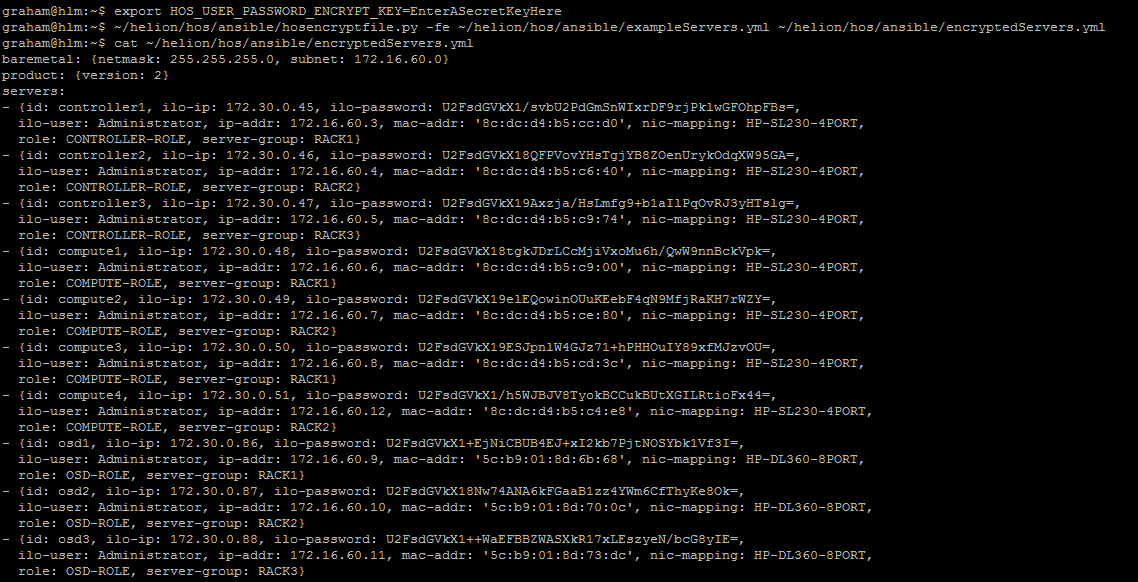
FICHIER DE SORTIE encryptedServers.yml
baremetal: {netmask: 255.255.255.0, subnet: 172.16.60.0}
product: {version: 2}
servers:
- {id: controller1, ilo-ip: 172.30.0.45, ilo-password: U2FsdGVkX1/svbU2PdGmSnWIxrDF9rjPklwGFOhpFBs=,
  ilo-user: Administrator, ip-addr: 172.16.60.3, mac-addr: '8c:dc:d4:b5:cc:d0', nic-mapping: HP-SL230-4PORT,
  role: CONTROLLER-ROLE, server-group: RACK1}
- {id: controller2, ilo-ip: 172.30.0.46, ilo-password: U2FsdGVkX18QFPVovYHsTgjYB8ZOenUrykOdqXW95GA=,
  ilo-user: Administrator, ip-addr: 172.16.60.4, mac-addr: '8c:dc:d4:b5:c6:40', nic-mapping: HP-SL230-4PORT,
  role: CONTROLLER-ROLE, server-group: RACK2}
- {id: controller3, ilo-ip: 172.30.0.47, ilo-password: U2FsdGVkX19Axzja/HsLmfg9+b1aIlPqOvRJ3yHTslg=,
  ilo-user: Administrator, ip-addr: 172.16.60.5, mac-addr: '8c:dc:d4:b5:c9:74', nic-mapping: HP-SL230-4PORT,
  role: CONTROLLER-ROLE, server-group: RACK3}
- {id: compute1, ilo-ip: 172.30.0.48, ilo-password: U2FsdGVkX18tgkJDrLCcMjiVxoMu6h/QwW9nnBckVpk=,
  ilo-user: Administrator, ip-addr: 172.16.60.6, mac-addr: '8c:dc:d4:b5:c9:00', nic-mapping: HP-SL230-4PORT,
  role: COMPUTE-ROLE, server-group: RACK1}
- {id: compute2, ilo-ip: 172.30.0.49, ilo-password: U2FsdGVkX19elEQowinOUuKEebF4qN9MfjRaKH7rWZY=,
  ilo-user: Administrator, ip-addr: 172.16.60.7, mac-addr: '8c:dc:d4:b5:ce:80', nic-mapping: HP-SL230-4PORT,
  role: COMPUTE-ROLE, server-group: RACK2}
- {id: compute3, ilo-ip: 172.30.0.50, ilo-password: U2FsdGVkX19ESJpnlW4GJz71+hPHHOuIY89xfMJzvOU=,
  ilo-user: Administrator, ip-addr: 172.16.60.8, mac-addr: '8c:dc:d4:b5:cd:3c', nic-mapping: HP-SL230-4PORT,
  role: COMPUTE-ROLE, server-group: RACK1}
- {id: compute4, ilo-ip: 172.30.0.51, ilo-password: U2FsdGVkX1/h5WJBJV8TyokBCCukBUtXGILRtioFx44=,
  ilo-user: Administrator, ip-addr: 172.16.60.12, mac-addr: '8c:dc:d4:b5:c4:e8', nic-mapping: HP-SL230-4PORT,
  role: COMPUTE-ROLE, server-group: RACK2}
- {id: osd1, ilo-ip: 172.30.0.86, ilo-password: U2FsdGVkX1+EjNiCBUB4EJ+xI2kb7PjtNOSYbk1Vf3I=,
  ilo-user: Administrator, ip-addr: 172.16.60.9, mac-addr: '5c:b9:01:8d:6b:68', nic-mapping: HP-DL360-8PORT,
  role: OSD-ROLE, server-group: RACK1}
- {id: osd2, ilo-ip: 172.30.0.87, ilo-password: U2FsdGVkX18Nw74ANA6kFGaaB1zz4YWm6CfThyKe8Ok=,
  ilo-user: Administrator, ip-addr: 172.16.60.10, mac-addr: '5c:b9:01:8d:70:0c', nic-mapping: HP-DL360-8PORT,
  role: OSD-ROLE, server-group: RACK2}
- {id: osd3, ilo-ip: 172.30.0.88, ilo-password: U2FsdGVkX1++WaEFBBZWASXkR17xLEszyeN/bcG8yIE=,
  ilo-user: Administrator, ip-addr: 172.16.60.11, mac-addr: '5c:b9:01:8d:73:dc', nic-mapping: HP-DL360-8PORT,
  role: OSD-ROLE, server-group: RACK3}
Maintenant, pour inverser le processus, il suffit de faire ce qui suit (ou de restaurer à partir d'une sauvegarde)
export HOS_USER_PASSWORD_ENCRYPT_KEY=EnterASecretKeyHere
hosencryptfile.py -fd encryptedServers.yml decryptedServers.yml
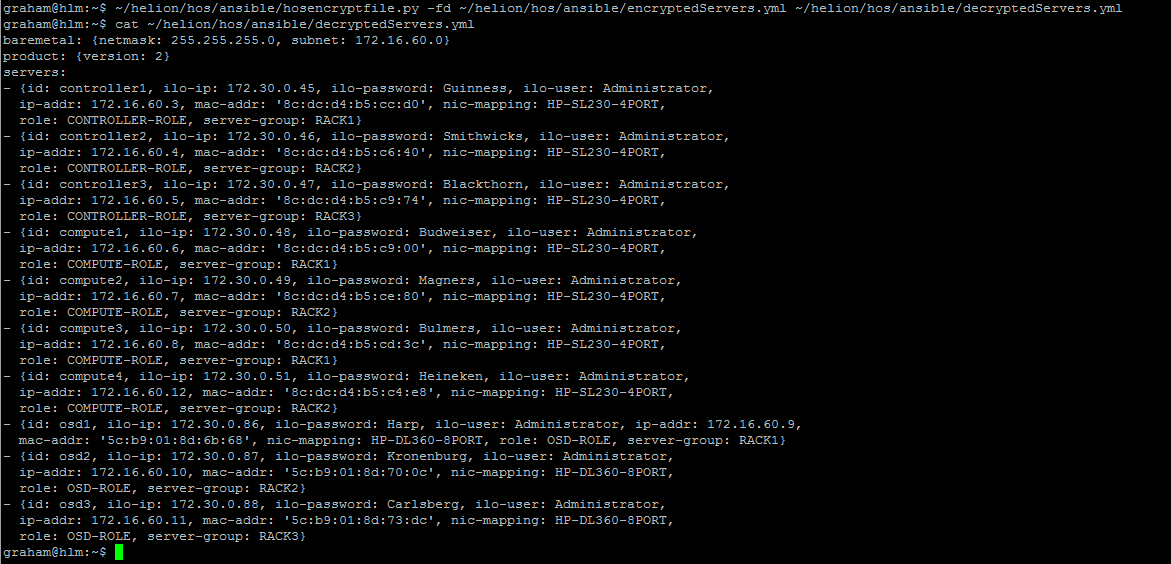
FICHIER DE SORTIE decryptedServers.yml
baremetal: {netmask: 255.255.255.0, subnet: 172.16.60.0}
product: {version: 2}
servers:
- {id: controller1, ilo-ip: 172.30.0.45, ilo-password: Guinness, ilo-user: Administrator,
  ip-addr: 172.16.60.3, mac-addr: '8c:dc:d4:b5:cc:d0', nic-mapping: HP-SL230-4PORT,
  role: CONTROLLER-ROLE, server-group: RACK1}
- {id: controller2, ilo-ip: 172.30.0.46, ilo-password: Smithwicks, ilo-user: Administrator,
  ip-addr: 172.16.60.4, mac-addr: '8c:dc:d4:b5:c6:40', nic-mapping: HP-SL230-4PORT,
  role: CONTROLLER-ROLE, server-group: RACK2}
- {id: controller3, ilo-ip: 172.30.0.47, ilo-password: Blackthorn, ilo-user: Administrator,
  ip-addr: 172.16.60.5, mac-addr: '8c:dc:d4:b5:c9:74', nic-mapping: HP-SL230-4PORT,
  role: CONTROLLER-ROLE, server-group: RACK3}
- {id: compute1, ilo-ip: 172.30.0.48, ilo-password: Budweiser, ilo-user: Administrator,
  ip-addr: 172.16.60.6, mac-addr: '8c:dc:d4:b5:c9:00', nic-mapping: HP-SL230-4PORT,
  role: COMPUTE-ROLE, server-group: RACK1}
- {id: compute2, ilo-ip: 172.30.0.49, ilo-password: Magners, ilo-user: Administrator,
  ip-addr: 172.16.60.7, mac-addr: '8c:dc:d4:b5:ce:80', nic-mapping: HP-SL230-4PORT,
  role: COMPUTE-ROLE, server-group: RACK2}
- {id: compute3, ilo-ip: 172.30.0.50, ilo-password: Bulmers, ilo-user: Administrator,
  ip-addr: 172.16.60.8, mac-addr: '8c:dc:d4:b5:cd:3c', nic-mapping: HP-SL230-4PORT,
  role: COMPUTE-ROLE, server-group: RACK1}
- {id: compute4, ilo-ip: 172.30.0.51, ilo-password: Heineken, ilo-user: Administrator,
  ip-addr: 172.16.60.12, mac-addr: '8c:dc:d4:b5:c4:e8', nic-mapping: HP-SL230-4PORT,
  role: COMPUTE-ROLE, server-group: RACK2}
- {id: osd1, ilo-ip: 172.30.0.86, ilo-password: Harp, ilo-user: Administrator, ip-addr: 172.16.60.9,
  mac-addr: '5c:b9:01:8d:6b:68', nic-mapping: HP-DL360-8PORT, role: OSD-ROLE, server-group: RACK1}
- {id: osd2, ilo-ip: 172.30.0.87, ilo-password: Kronenburg, ilo-user: Administrator,
  ip-addr: 172.16.60.10, mac-addr: '5c:b9:01:8d:70:0c', nic-mapping: HP-DL360-8PORT,
  role: OSD-ROLE, server-group: RACK2}
- {id: osd3, ilo-ip: 172.30.0.88, ilo-password: Carlsberg, ilo-user: Administrator,
  ip-addr: 172.16.60.11, mac-addr: '5c:b9:01:8d:73:dc', nic-mapping: HP-DL360-8PORT,
  role: OSD-ROLE, server-group: RACK3}
AVERTISSEMENT
Je ne suis pas programmeur, c'est la première fois que je regarde du code Python – veuillez sauvegarder tous les fichiers avant utilisation et tester dans un laboratoire. Aucune vérification d'erreur n'est incluse – si vous entrez un nom de fichier invalide, LE SCRIPT PLANTE – à mesure que je deviens plus familier avec Python, j'ajouterai des contrôles d'erreur try/catch – si j'ai le temps.
MISE À JOUR : J'ai modifié le code pour inclure le préfixe requis au début de la clé chiffrée. J'ai également reformatté le fichier de sortie pour qu'il soit plus cohérent avec le fichier d'entrée.