

Installation et configuration du modèle de cloud
La première chose à faire est de copier l'un des modèles de cloud d'exemple pour l'utiliser comme point de départ. Si votre modèle de déploiement correspond exactement à l'exemple, vous n'aurez que quelques fichiers à modifier avant de construire votre cloud.
Cependant, dans un souci de montrer comment on pourrait modifier significativement le modèle, j'ai décidé d'ajouter un autre réseau et nous l'utiliserons pour assurer la séparation du trafic de réplication Ceph OSD.
Copiez les fichiers de configuration d'exemple de Ceph dans le répertoire my_cloud pour les modifier.
cp -r ~/helion/examples/entry-scale-kvm-ceph/* ~/helion/my_cloud/definition/
Ces fichiers de configuration représentent le modèle suivant :
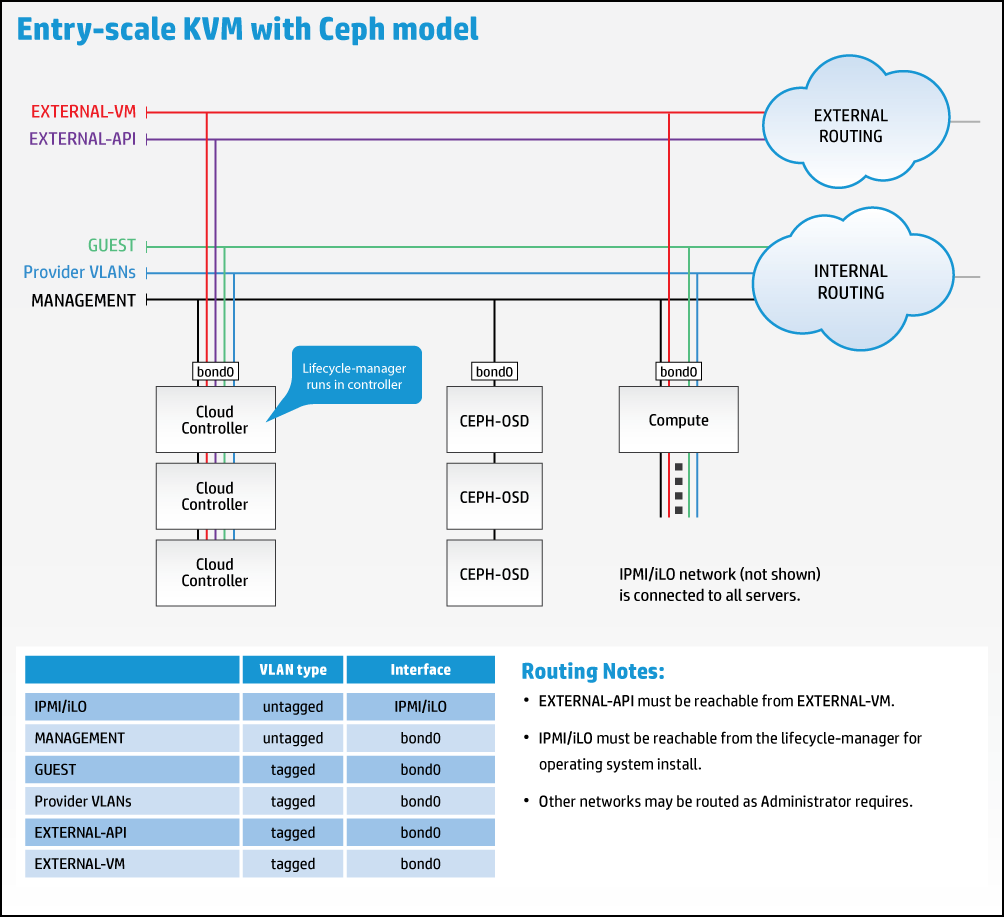
Cependant, nous devons modifier le modèle pour prendre en compte le nouveau réseau de réplication, comme illustré ci-dessous :
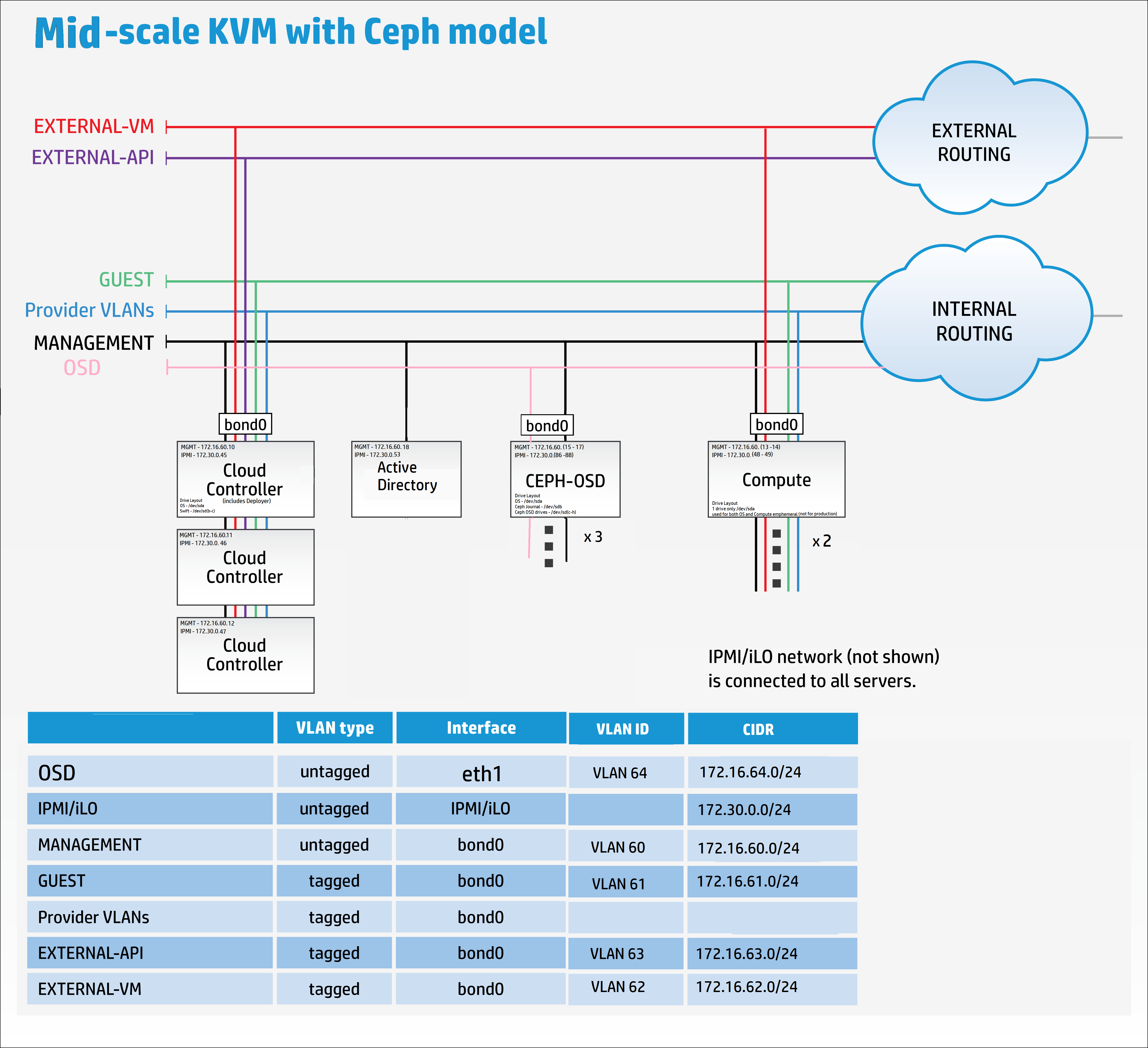
Il est maintenant temps de passer à votre éditeur de choix, Komodo dans mon cas, pour commencer à remodeler les fichiers de modèle d'exemple afin qu'ils correspondent à mes exigences.
Ajoutez une connexion distante dans l'éditeur vers Helion Lifecycle Manager (controller0).
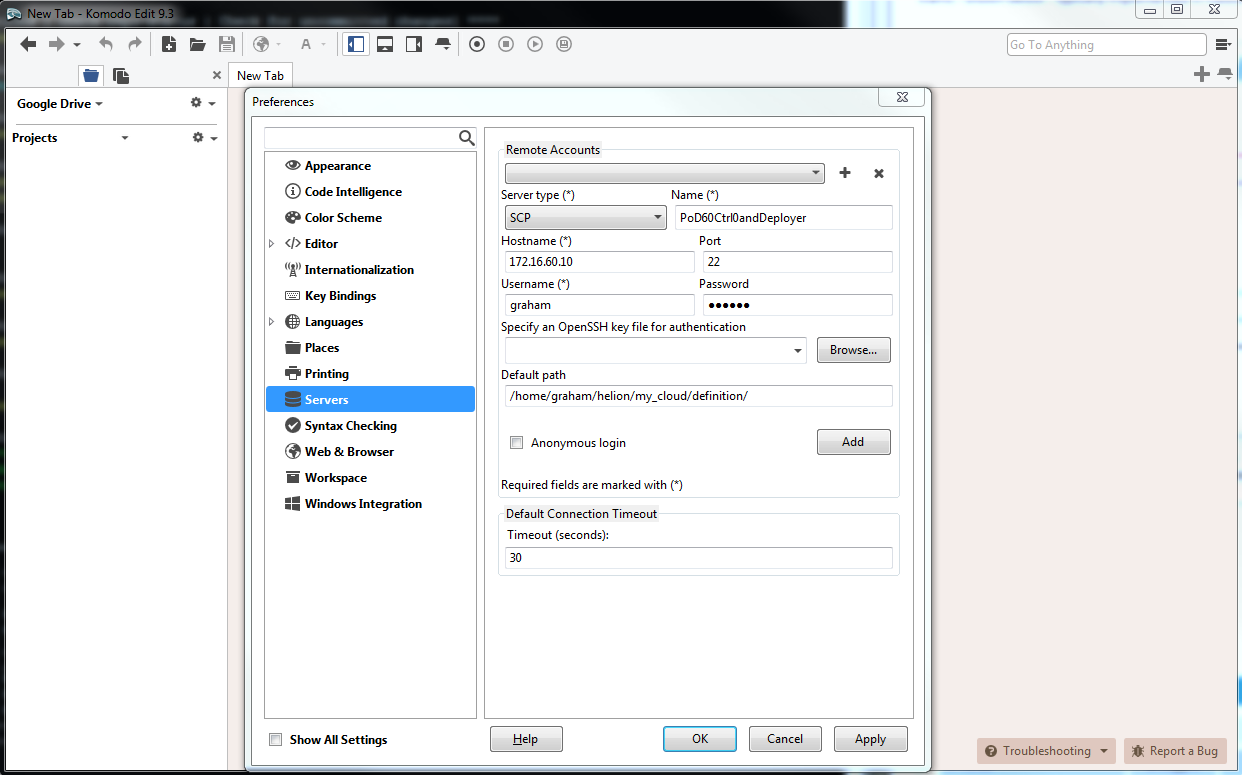
Vous pouvez modifier les fichiers dans n'importe quel ordre qui vous convient.
Veuillez lire la documentation en ligne détaillée qui fournit une explication complète de tous les fichiers yaml utilisés pour configurer la plateforme cloud ici.
cloudConfig.yml
J'aime commencer par le plus simple, cloudConfig.yml
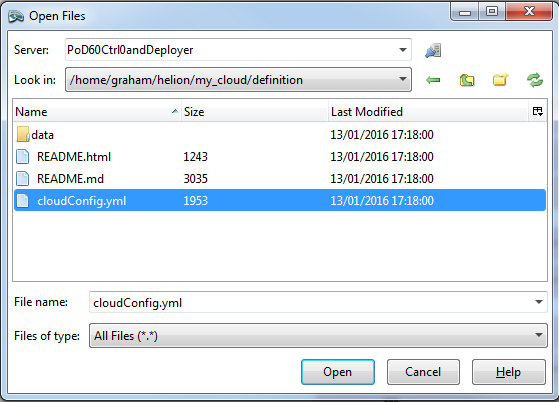
Dans ce fichier, nous trouvons les paramètres pour le nom du cloud, les préfixes d'hôte, les détails du serveur NTP, les détails du serveur DNS, les paramètres SMTP et quelques paramètres généraux de pare-feu.
Les valeurs suivantes ont été modifiées par rapport aux valeurs par défaut :
nom du cloud : allthingscloud
ntp : 172.16.1.5
dns : 172.16.1.5
Remarque : Assurez-vous de mettre entre guillemets les adresses IP NTP et DNS. Le fichier d'exemple ne met pas les noms de serveurs DNS entre guillemets.
#
# (c) Copyright 2015 Hewlett Packard Enterprise Development Company LP
#
# Licensed under the Apache License, Version 2.0 (the "License"); you may
# not use this file except in compliance with the License. You may obtain
# a copy of the License at
#
# http://www.apache.org/licenses/LICENSE-2.0
#
# Unless required by applicable law or agreed to in writing, software
# distributed under the License is distributed on an "AS IS" BASIS, WITHOUT
# WARRANTIES OR CONDITIONS OF ANY KIND, either express or implied. See the
# License for the specific language governing permissions and limitations
# under the License.
#
---
product:
version: 2

cloud:
name: allthingscloud

# The following values are used when
# building hostnames
hostname-data:
host-prefix: helion
member-prefix: -m

# List of ntp servers for your site
ntp-servers:
- "172.16.1.5"
# - "ntp-server2"

# dns resolving configuration for your site
# refer to resolv.conf for details on each option
dns-settings:
nameservers:
- "172.16.1.5"
# - name-server2
# - name-server3
#
# domain: sub1.example.net
#
# search:
# - sub1.example.net
# - sub2.example.net
#
# sortlist:
# - 192.168.160.0/255.255.240.0
# - 192.168.0.0
#
# # option flags are ':' to enable, remove to unset
# # options with values are ':' to set
#
# options:
# debug:
# ndots: 2
# timeout: 30
# attempts: 5
# rotate:
# no-check-names:
# inet6:
smtp-settings:
# server: mailserver.examplecloud.com
# port: 25
# timeout: 15
# These are only needed if your server requires authentication
# user:
# password:

# Generate firewall rules
firewall-settings:
enable: true
# log dropped packets
logging: true
Control_plane.yml
Ce fichier définit toutes les zones de défaillance, les clusters, les composants de service et les ressources. Un rapide examen de ce fichier révèle que le composant de service 'lifecycle-manager' est sous le rôle CONTROLLER-ROLE – en d'autres termes, nous avons combiné le modèle Contrôleur/Déploiteur.
Le seul paramètre que j'ai modifié dans ce fichier yaml est le min-count pour les ressources de calcul, passant de 0 à 2. Je vais déployer 2 nœuds de calcul au moment de la construction.
#
# (c) Copyright 2015 Hewlett Packard Enterprise Development Company LP
#
# Licensed under the Apache License, Version 2.0 (the "License"); you may
# not use this file except in compliance with the License. You may obtain
# a copy of the License at
#
# http://www.apache.org/licenses/LICENSE-2.0
#
# Unless required by applicable law or agreed to in writing, software
# distributed under the License is distributed on an "AS IS" BASIS, WITHOUT
# WARRANTIES OR CONDITIONS OF ANY KIND, either express or implied. See the
# License for the specific language governing permissions and limitations
# under the License.
#
---
product:
version: 2

control-planes:
- name: control-plane-1
control-plane-prefix: cp1
region-name: region1
failure-zones:
- AZ1
- AZ2
- AZ3
common-service-components:
- logging-producer
- monasca-agent
- freezer-agent
- stunnel
- lifecycle-manager-target
clusters:
- name: cluster1
cluster-prefix: c1
server-role: CONTROLLER-ROLE
member-count: 3
allocation-policy: strict
service-components:
- lifecycle-manager
- ntp-server
- swift-ring-builder
- mysql
- ip-cluster
- apache2
- keystone-api
- keystone-client
- rabbitmq
- glance-api
- glance-registry
- glance-client
- cinder-api
- cinder-scheduler
- cinder-volume
- cinder-backup
- cinder-client
- nova-api
- nova-scheduler
- nova-conductor
- nova-console-auth
- nova-novncproxy
- nova-client
- neutron-server
- neutron-ml2-plugin
- neutron-vpn-agent
- neutron-dhcp-agent
- neutron-metadata-agent
- neutron-openvswitch-agent
- neutron-client
- horizon
- sherpa-api
- swift-proxy
- memcached
- swift-account
- swift-container
- swift-object
- swift-client
- heat-api
- heat-api-cfn
- heat-api-cloudwatch
- heat-engine
- heat-client
- openstack-client
- ceilometer-api
- ceilometer-collector
- ceilometer-agent-central
- ceilometer-agent-notification
- ceilometer-expirer
- ceilometer-common
- ceilometer-client
- zookeeper
- kafka
- vertica
- storm
- monasca-api
- monasca-persister
- monasca-notifier
- monasca-threshold
- monasca-client
- logging-server
- ops-console-web
- ops-console-monitor
- cmc-service
- freezer-api
- ceph-monitor

resources:
- name: compute
resource-prefix: comp
server-role: COMPUTE-ROLE
allocation-policy: any
min-count: 2
service-components:
- ntp-client
- nova-compute
- nova-compute-kvm
- neutron-l3-agent
- neutron-metadata-agent
- neutron-openvswitch-agent
- neutron-lbaasv2-agent

- name: osd
resource-prefix: ceph
server-role: OSD-ROLE
allocation-policy: strict
min-count: 3
service-components:
- ntp-client
- ceph-osd
servers.yml
Ce fichier doit contenir tous les détails des serveurs physiques qui seront utilisés lors du déploiement.
- le sous-réseau baremetal dans ce déploiement est également le réseau de gestion : 172.16.60.10/24
- l'identifiant doit être unique pour chaque serveur
- le rôle correspond au rôle du serveur et détermine quels composants et services seront déployés sur le serveur –> lié au fichier server_roles.yml
- ip-addr est l'adresse que vous souhaitez que le serveur ait sur le réseau DE GESTION. Controller1 avait déjà cette adresse IP attribuée car c'est aussi le nœud de déploiement (Helion Lifecycle Manager) dans ce scénario
- server-group peut être utilisé pour mapper la disposition physique des serveurs afin de définir des domaines de défaillance matérielle –> lié au fichier server_groups.yml
- nic-mappings définit le mappage des adresses matérielles des cartes réseau physiques –> lié au fichier nic_mappings.yml. Quiconque a travaillé avec le réseau Linux au cours de la dernière décennie appréciera l'utilité de ce fichier. Linux possède une « fonctionnalité » qui peut entraîner le mappage des cartes réseau physiques sur différentes interfaces logicielles aléatoires (par exemple eth0, eth1, em59, etc.) au redémarrage. Ce fichier « câblage en dur » les mappages de l'interface physique vers l'interface logicielle pour une expérience de redémarrage OS cohérente
- ilo-ip est l'adresse de l'interface IPMI sur le serveur physique
- ilo-password – ARRÊTEZ-VOUS MAINTENANT et retournez sous AZURE si vous avez besoin d'une explication pour ce paramètre
- ilo-user – voir ci-dessus
- mac-address est l'adresse MAC de l'interface PXE. Dans ce déploiement, nous amorcerons via PXE sur le réseau DE GESTION. REMARQUE : CE N'EST PAS L'ADRESSE MAC DE L'INTERFACE iLO
#
# (c) Copyright 2015 Hewlett Packard Enterprise Development Company LP
#
# Licensed under the Apache License, Version 2.0 (the "License"); you may
# not use this file except in compliance with the License. You may obtain
# a copy of the License at
#
# http://www.apache.org/licenses/LICENSE-2.0
#
# Unless required by applicable law or agreed to in writing, software
# distributed under the License is distributed on an "AS IS" BASIS, WITHOUT
# WARRANTIES OR CONDITIONS OF ANY KIND, either express or implied. See the
# License for the specific language governing permissions and limitations
# under the License.
#
---
product:
version: 2

baremetal:
# NOTE: These values need to be changed to match your environment.
# Define the network range that contains the ip-addr values for
# the individual servers listed below.
subnet: 172.16.60.0
netmask: 255.255.255.0

servers:
# NOTE: Addresses of servers need to be changed to match your environment.
#
# Add additional servers as required
#

# Controllers
- id: controller1
ip-addr: 172.16.60.10
role: CONTROLLER-ROLE
server-group: RACK1
nic-mapping: HP-SL230-4PORT
ilo-ip: 172.30.0.45
ilo-password: "bananas"
ilo-user: Administrator
mac-addr: 8c:dc:d4:b5:cc:d0

- id: controller2
ip-addr: 172.16.60.11
role: CONTROLLER-ROLE
server-group: RACK2
nic-mapping: HP-SL230-4PORT
ilo-ip: 172.30.0.46
ilo-password: "bananas"
ilo-user: Administrator
mac-addr: 8c:dc:d4:b5:c6:40

- id: controller3
ip-addr: 172.16.60.12
role: CONTROLLER-ROLE
server-group: RACK3
nic-mapping: HP-SL230-4PORT
ilo-ip: 172.30.0.47
ilo-password: "bananas"
ilo-user: Administrator
mac-addr: 8c:dc:d4:b5:c9:74

# Compute Nodes
- id: compute1
ip-addr: 172.16.60.13
role: COMPUTE-ROLE
server-group: RACK1
nic-mapping: HP-SL230-4PORT
ilo-ip: 172.30.0.48
ilo-password: "bananas"
ilo-user: Administrator
mac-addr: 8c:dc:d4:b5:c9:00

- id: compute2
ip-addr: 172.16.60.14
role: COMPUTE-ROLE
server-group: RACK2
nic-mapping: HP-SL230-4PORT
ilo-ip: 172.30.0.49
ilo-password: "bananas"
ilo-user: Administrator
mac-addr: 8c:dc:d4:b5:ce:80

# Ceph OSD Nodes
- id: osd1
ip-addr: 172.16.60.15
role: OSD-ROLE
server-group: RACK1
nic-mapping: HP-DL360-8PORT
ilo-ip: 172.30.0.86
ilo-password: "bananas"
ilo-user: Administrator
mac-addr: 5c:b9:01:8d:6b:68

- id: osd2
ip-addr: 172.16.60.16
role: OSD-ROLE
server-group: RACK2
nic-mapping: HP-DL360-8PORT
ilo-ip: 172.30.0.87
ilo-password: "bananas"
ilo-user: Administrator
mac-addr: 5c:b9:01:8d:70:0c

- id: osd3
ip-addr: 172.16.60.17
role: OSD-ROLE
server-group: RACK3
nic-mapping: HP-DL360-8PORT
ilo-ip: 172.30.0.88
ilo-password: "bananas"
ilo-user: Administrator
mac-addr: 5c:b9:01:8d:73:dc
server_roles.yml
Ce fichier relie les serveurs du fichier servers.yml aux fichiers de disposition des interfaces réseau et des disques. Lors de l'utilisation d'un nœud de déploiement séparé, son rôle serait défini ici.
#
# (c) Copyright 2015 Hewlett Packard Enterprise Development Company LP
#
# Licensed under the Apache License, Version 2.0 (the "License"); you may
# not use this file except in compliance with the License. You may obtain
# a copy of the License at
#
# http://www.apache.org/licenses/LICENSE-2.0
#
# Unless required by applicable law or agreed to in writing, software
# distributed under the License is distributed on an "AS IS" BASIS, WITHOUT
# WARRANTIES OR CONDITIONS OF ANY KIND, either express or implied. See the
# License for the specific language governing permissions and limitations
# under the License.
#
---
product:
version: 2

server-roles:

- name: CONTROLLER-ROLE
interface-model: CONTROLLER-INTERFACES
disk-model: CONTROLLER-DISKS

- name: COMPUTE-ROLE
interface-model: COMPUTE-INTERFACES
disk-model: COMPUTE-DISKS

- name: OSD-ROLE
interface-model: OSD-INTERFACES
disk-model: OSD-DISKS
server_groups.yml
Mappe la disposition physique des serveurs aux zones de disponibilité. Il inclut une référence à tous les réseaux.
REMARQUE : C'est ici que j'ai apporté le premier changement significatif au modèle d'exemple – j'ai ajouté une référence au nouveau réseau que nous ajoutons, appelé OSD-NET.
#
# (c) Copyright 2015 Hewlett Packard Enterprise Development Company LP
#
# Licensed under the Apache License, Version 2.0 (the "License"); you may
# not use this file except in compliance with the License. You may obtain
# a copy of the License at
#
# http://www.apache.org/licenses/LICENSE-2.0
#
# Unless required by applicable law or agreed to in writing, software
# distributed under the License is distributed on an "AS IS" BASIS, WITHOUT
# WARRANTIES OR CONDITIONS OF ANY KIND, either express or implied. See the
# License for the specific language governing permissions and limitations
# under the License.
#
---
product:
version: 2

server-groups:

#
# Server Groups provide a mechanism for organizing servers
# into a hierarchy that reflected the physical topology.
#
# When allocating a server the configuration processor
# will search down the hierarchy from the list of server
# groups identified as the failure-zones for the control
# plane until it finds an available server of the requested
# role. If the allocation policy is "strict" servers are
# allocated from different failure-zones.
#
# When determining which network from a network group to
# associate with a server the configuration processor will
# search up the hierarchy from the server group containing the
# server until it finds a network in the required network
# group.
#

#
# In this example there is only one network in each network
# group and so we put all networks in the top level server
# group. Below this we create server groups for three
# failure zones, within which servers are grouped by racks.
#
# Note: the association of servers to server groups is part
# of the server definition (servers.yml)
#

#
# At the top of the tree we have a server groups for
# networks that can reach all servers
#
- name: CLOUD
server-groups:
- AZ1
- AZ2
- AZ3
networks:
- EXTERNAL-API-NET
- EXTERNAL-VM-NET
- GUEST-NET
- MANAGEMENT-NET
- OSD-NET

#
# Create a group for each failure zone
#
- name: AZ1
server-groups:
- RACK1

- name: AZ2
server-groups:
- RACK2

- name: AZ3
server-groups:
- RACK3

#
# Create a group for each rack
#
- name: RACK1

- name: RACK2

- name: RACK3
nic_mappings.yml
Comme souligné précédemment, ce fichier contient tous les mappages d'interfaces réseau matériels « lspci » sur les différents modèles de serveurs matériels utilisés. Dans ce déploiement, j'utilise des HP SL230 pour les nœuds de contrôleur et de calcul, et des HP DL360 pour les nœuds OSD.
Malheureusement, il y a ici un petit scénario de l'œuf et la poule – afin d'obtenir les détails pour ce fichier afin de compléter le cloud, les serveurs doivent avoir un système d'exploitation (OS) installé, et pour obtenir un OS sur les serveurs, nous devons compléter ce fichier. La solution est de revenir au support d'installation et d'installer temporairement hLinux sur CHAQUE MODÈLE de serveur utilisé. Ensuite, connectez-vous simplement et exécutez la commande suivante en capturant la sortie pour votre fichier :
sudo dmidecode | grep -A3 '^System Information'
lspci | grep -i eth
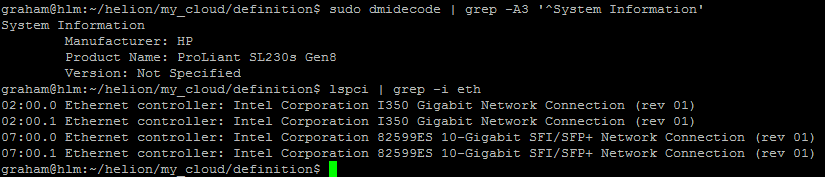
[Remarque : Je n'ai pas inclus d'exemple pour le DL360, mais cela doit être répété pour tous les modèles et configurations utilisés. Par exemple, si vous avez des DL360 avec différents types ou nombres d'interfaces, chaque serveur aura besoin d'un profil dédié.]
#
# (c) Copyright 2015 Hewlett Packard Enterprise Development Company LP
#
# Licensed under the Apache License, Version 2.0 (the "License"); you may
# not use this file except in compliance with the License. You may obtain
# a copy of the License at
#
# http://www.apache.org/licenses/LICENSE-2.0
#
# Unless required by applicable law or agreed to in writing, software
# distributed under the License is distributed on an "AS IS" BASIS, WITHOUT
# WARRANTIES OR CONDITIONS OF ANY KIND, either express or implied. See the
# License for the specific language governing permissions and limitations
# under the License.
#
---
product:
version: 2

# nic-mappings are used to ensure that the device name used by the
# operating system always maps to the same physical device.
# A nic-mapping is associated to a server in the server definition.
# The logical-name specified here can be used as a device name in
# the network interface-models definitions.
#
# - name user-defined name for each mapping
# physical-ports list of ports for this mapping
# - logical-name device name to be used by the operating system
# type physical port type
# bus-address bus address of the physical device
#
# Notes:
# - The PCI bus addresses are examples. You will need to determine
# the values pertinent to your servers. These can be found with the
# the `lspci` command or from the server BIOS
# - enclose the bus address in quotation marks so yaml does not
# misinterpret the embedded colon (:) characters
# - simple-port is the only currently supported port type
# - choosing a new device name prefix (e.g. 'eth' -> 'hed') will
# help prevent remapping errors

nic-mappings:

- name: HP-SL230-4PORT
physical-ports:
- logical-name: hed0
type: simple-port
bus-address: "0000:07:00.0"

- logical-name: hed1
type: simple-port
bus-address: "0000:07:00.1"

- logical-name: hed2
type: simple-port
bus-address: "0000:02:00.0"

- logical-name: hed3
type: simple-port
bus-address: "0000:02:00.1"

- name: HP-DL360-2PORT
physical-ports:
- logical-name: hed0
type: simple-port
bus-address: "0000:04:00.0"

- logical-name: hed1
type: simple-port
bus-address: "0000:04:00.1"
Dispositions des disques des serveurs
Les fichiers suivants ont leurs modèles de disque->name référencés dans le fichier server_roles.yml. Le lien ne porte pas sur les noms de fichiers eux-mêmes, mais sur le contenu des fichiers. En théorie, vous pourriez donner à ces fichiers n'importe quel nom de fichier yml valide une fois qu'ils sont placés dans le répertoire correct. Ansible lit simplement tous les fichiers du répertoire et génère un pool de paires clé-valeur. Après avoir écrit cela, je suppose que les noms de modèle de disque doivent être uniques dans tous les fichiers utilisés, sinon le débogage deviendra très intéressant.
disks_controller.yml
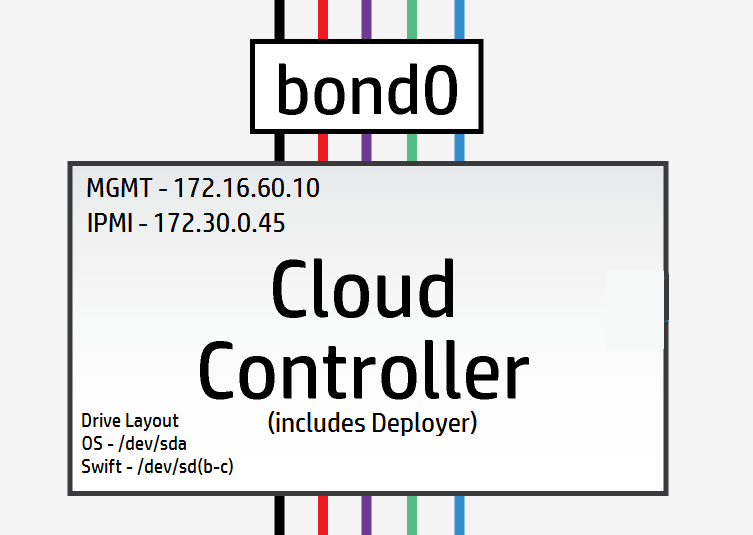
Les nœuds de contrôleur ont 3 lecteurs logiques, 1 est utilisé pour le système d'exploitation /dev/sda et les 2 restantes sont utilisées pour les anneaux Swift /dev/sdb & /dev/sdc.
[Remarque : Dans les scénarios de laboratoire et de test, il est possible d'utiliser un seul lecteur physique et d'utiliser des points de montage LVM pour fournir les lecteurs logiques – les performances peuvent être difficiles à obtenir.]
Mes contrôleurs ont tous 3 lecteurs physiques qui seront présentés comme 3 lecteurs logiques – je peux donc utiliser les paramètres par défaut ici.
#
# (c) Copyright 2015 Hewlett Packard Enterprise Development Company LP
#
# Licensed under the Apache License, Version 2.0 (the "License"); you may
# not use this file except in compliance with the License. You may obtain
# a copy of the License at
#
# http://www.apache.org/licenses/LICENSE-2.0
#
# Unless required by applicable law or agreed to in writing, software
# distributed under the License is distributed on an "AS IS" BASIS, WITHOUT
# WARRANTIES OR CONDITIONS OF ANY KIND, either express or implied. See the
# License for the specific language governing permissions and limitations
# under the License.
#
---
product:
version: 2

disk-models:
- name: CONTROLLER-DISKS

# This example is based on using a single 500GB disk for a volume
# group that contains all file systems on a controller with 64GB
# of memory.
#
# Additional disks can be added to the 'physical-volumes' section.
#
# If the available capacity of your servers is more that 500GB you
# should consider using the "CONTROLLER-1TB-DISKS" disk-model
# in disks_controller_1TB.yml instead. To use this alternative model
# you need to edit the CONTROLLER-ROLE sections of server_roles.yml
#

volume-groups:
- name: hlm-vg
physical-volumes:

# NOTE: 'sda_root' is a templated value. This value is checked in
# os-config and replaced by the partition actually used on sda
#e.g. sda1 or sda5
- /dev/sda_root

# Add any additional disks for the volume group here
# -/dev/sdx
# -/dev/sdy

logical-volumes:
# The policy is not to consume 100% of the space of each volume group.
# 5% should be left free for snapshots and to allow for some flexibility.

- name: root
size: 10%
fstype: ext4
mount: /

# Reserved space for kernel crash dumps
# Should evaluate to a value that is slightly larger that
# the memory size of your server
- name: crash
size: 13%
mount: /var/crash
fstype: ext4
mkfs-opts: -O large_file

# Local Log files.
- name: log
size: 13%
mount: /var/log
fstype: ext4
mkfs-opts: -O large_file

# Mysql Database. All persistent state from OpenStack services
# is saved here. Although the individual objects are small the
# accumulated data can grow over time
- name: mysql
size: 10%
mount: /var/lib/mysql
fstype: ext4
mkfs-opts: -O large_file
consumer:
name: mysql

# Rabbitmq works mostly in memory, but needs to be able to persist
# messages to disc under high load. This area should evaluate to a value
# that is slightly larger than the memory size of your server
- name: rabbitmq
size: 13%
mount: /var/lib/rabbitmq
fstype: ext4
mkfs-opts: -O large_file
consumer:
name: rabbitmq
rabbitmq_env: home

# Database storage for event monitoring (Monasca). Events are generally
# small data objects.
- name: vertica
size: 3%
mount: /var/vertica
fstype: ext4
mkfs-opts: -O large_file
consumer:
name: vertica

# Messaging system for monitoring.
- name: kafka
size: 2%
mount: /var/kafka
fstype: ext4
mkfs-opts: -O large_file
consumer:
name: kafka

# Data storage for centralized logging. This holds log entries from all
# servers in the cloud and hence can require a lot of disk space.
- name: elasticsearch
size: 30%
mount: /var/lib/elasticsearch
fstype: ext4

# Zookeeper is used to provide cluster co-ordination in the monitoring
# system. Although not a high user of disc space we have seen issues
# with zookeeper snapshots filling up filesystems so we keep it in its
# own space for stability.
- name: zookeeper
size: 1%
mount: /var/lib/zookeeper
fstype: ext4

consumer:
name: os

# Additional disk group defined for Swift
device-groups:
- name: swiftobj
devices:
- name: /dev/sdb
- name: /dev/sdc
# Add any additional disks for swift here
# -name: /dev/sdd
# -name: /dev/sde
consumer:
name: swift
attrs:
rings:
- account
- container
- object-0
[Matériel bonus : Le fichier de contrôleur suivant est juste pour comparer à quoi ressemblerait la disposition lorsque vous serrez tout sur un contrôleur à lecteur unique]
Exemple de disposition de disque de contrôleur à lecteur unique [Pas pour la production]
Remarquez comment les lecteurs Swift sont maintenant sur un volume logique.
#
# (c) Copyright 2015 Hewlett Packard Enterprise Development Company LP
#
# Licensed under the Apache License, Version 2.0 (the "License"); you may
# not use this file except in compliance with the License. You may obtain
# a copy of the License at
#
# http://www.apache.org/licenses/LICENSE-2.0
#
# Unless required by applicable law or agreed to in writing, software
# distributed under the License is distributed on an "AS IS" BASIS, WITHOUT
# WARRANTIES OR CONDITIONS OF ANY KIND, either express or implied. See the
# License for the specific language governing permissions and limitations
# under the License.
#
---
product:
version: 2

disk-models:
- name: CONTROLLER-1TB-DISKS

# This example is based on using a single 1TB disk for a volume
# group that contains all file systems on a controller with 64GB
# of memory.
#
# Additional disks can be added to the 'physical-volumes' section.
#
#

volume-groups:
- name: hlm-vg
physical-volumes:

# NOTE: 'sda_root' is a templated value. This value is checked in
# os-config and replaced by the partition actually used on sda
#e.g. sda1 or sda5
- /dev/sda_root

# Add any additional disks for the volume group here
# -/dev/sdx
# -/dev/sdy

logical-volumes:
# The policy is not to consume 100% of the space of each volume group.
# 5% should be left free for snapshots and to allow for some flexibility.

- name: root
size: 5%
fstype: ext4
mount: /

# Reserved space for kernel crash dumps
# Should evaluate to a value that is slightly larger that
# the memory size of your server
- name: crash
size: 8%
mount: /var/crash
fstype: ext4
mkfs-opts: -O large_file

# Local Log files.
- name: log
size: 10%
mount: /var/log
fstype: ext4
mkfs-opts: -O large_file

# Mysql Database. All persistent state from OpenStack services
# is saved here. Although the individual objects are small the
# accumulated data can grow over time
- name: mysql
size: 8%
mount: /var/lib/mysql
fstype: ext4
mkfs-opts: -O large_file
consumer:
name: mysql

# Rabbitmq works mostly in memory, but needs to be able to persist
# messages to disc under high load. This area should evaluate to a value
# that is slightly larger than the memory size of your server
- name: rabbitmq
size: 8%
mount: /var/lib/rabbitmq
fstype: ext4
mkfs-opts: -O large_file
consumer:
name: rabbitmq
rabbitmq_env: home

# Database storage for event monitoring (Monasca). Events are generally
# small data objects.
- name: vertica
size: 5%
mount: /var/vertica
fstype: ext4
mkfs-opts: -O large_file
consumer:
name: vertica

# Messaging system for monitoring.
- name: kafka
size: 2%
mount: /var/kafka
fstype: ext4
mkfs-opts: -O large_file
consumer:
name: kafka

# Data storage for centralized logging. This holds log entries from all
# servers in the cloud and hence can require a lot of disk space.
- name: elasticsearch
size: 20%
mount: /var/lib/elasticsearch
fstype: ext4

# Zookeeper is used to provide cluster co-ordination in the monitoring
# system. Although not a high user of disc space we have seen issues
# with zookeeper snapshots filling up filesystems so we keep it in its
# own space for stability.
- name: zookeeper
size: 1%
mount: /var/lib/zookeeper
fstype: ext4

- name: LV_SWFPAC
size: 25%
fstype: xfs
consumer:
name: swift
attrs:
rings:
- name: account
- name: container
- name: object-0

consumer:
name: os
disks_compute.yml
Le fichier de configuration d'exemple s'attend à deux lecteurs physiques /dev/sda et /dev/sdb, comme illustré ci-dessous
#
# (c) Copyright 2015 Hewlett Packard Enterprise Development Company LP
#
# Licensed under the Apache License, Version 2.0 (the "License"); you may
# not use this file except in compliance with the License. You may obtain
# a copy of the License at
#
# http://www.apache.org/licenses/LICENSE-2.0
#
# Unless required by applicable law or agreed to in writing, software
# distributed under the License is distributed on an "AS IS" BASIS, WITHOUT
# WARRANTIES OR CONDITIONS OF ANY KIND, either express or implied. See the
# License for the specific language governing permissions and limitations
# under the License.
#
---
product:
version: 2

disk-models:
- name: COMPUTE-DISKS
# Disk model to be used for compute nodes
# /dev/sda_root is used as a volume group for /, /var/log and /var/crash
# sda_root is a templated value to align with whatever partition is really used
# This value is checked in os config and replaced by the partition actually used
# on sda e.g. sda1 or sda5
# /dev/sdb is used as a volume group for /var/lib (for VM storage)
# Additional discs can be added to either volume group

volume-groups:
- name: hlm-vg
physical-volumes:
- /dev/sda_root

logical-volumes:
# The policy is not to consume 100% of the space of each volume group.
# 5% should be left free for snapshots and to allow for some flexibility.
- name: root
size: 35%
fstype: ext4
mount: /
- name: log
size: 50%
mount: /var/log
fstype: ext4
mkfs-opts: -O large_file
- name: crash
size: 10%
mount: /var/crash
fstype: ext4
mkfs-opts: -O large_file

- name: vg-comp
# this VG is dedicated to Nova Compute to keep VM IOPS off the OS disk
physical-volumes:
- /dev/sdb
logical-volumes:
- name: compute
size: 95%
mount: /var/lib/nova
fstype: ext4
mkfs-opts: -O large_file
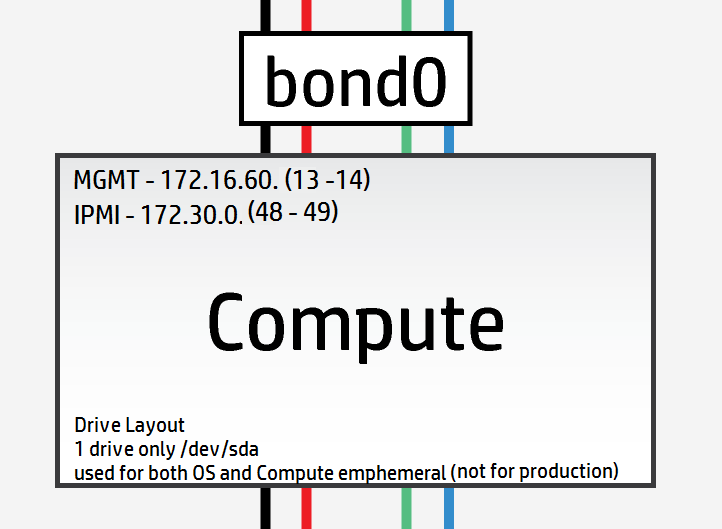
Cependant, mon laboratoire ne dispose que de nœuds de calcul à disque unique, j'ai donc dû modifier la disposition pour qu'elle corresponde comme suit
#
# (c) Copyright 2015 Hewlett Packard Enterprise Development Company LP
#
# Licensed under the Apache License, Version 2.0 (the "License"); you may
# not use this file except in compliance with the License. You may obtain
# a copy of the License at
#
# http://www.apache.org/licenses/LICENSE-2.0
#
# Unless required by applicable law or agreed to in writing, software
# distributed under the License is distributed on an "AS IS" BASIS, WITHOUT
# WARRANTIES OR CONDITIONS OF ANY KIND, either express or implied. See the
# License for the specific language governing permissions and limitations
# under the License.
#
---
product:
version: 2

disk-models:
- name: COMPUTE-DISKS
# Disk model to be used for compute nodes
# /dev/sda_root is used as a volume group for /, /var/log and /var/crash
# sda_root is a templated value to align with whatever partition is really used
# This value is checked in os config and replaced by the partition actually used
# on sda e.g. sda1 or sda5
# /dev/sdb is used as a volume group for /var/lib (for VM storage)
# Additional discs can be added to either volume group

volume-groups:
- name: hlm-vg
physical-volumes:
- /dev/sda_root

logical-volumes:
# The policy is not to consume 100% of the space of each volume group.
# 5% should be left free for snapshots and to allow for some flexibility.
- name: root
size: 35%
fstype: ext4
mount: /
- name: log
size: 20%
mount: /var/log
fstype: ext4
mkfs-opts: -O large_file
- name: crash
size: 10%
mount: /var/crash
fstype: ext4
mkfs-opts: -O large_file
- name: compute
size: 30%
mount: /var/lib/nova
fstype: ext4
mkfs-opts: -O large_file
disks_osd.yml
Il y a 8 lecteurs physiques disponibles sur les serveurs OSD. Aucun de ces lecteurs n'est un SSD, donc très peu d'intérêt à journaliser comme je le comprends. La configuration la plus optimale serait la suivante en utilisant un seul lecteur pour le système d'exploitation et les lecteurs restants comme OSD :
#
# (c) Copyright 2015 Hewlett Packard Enterprise Development Company LP
#
# Licensed under the Apache License, Version 2.0 (the "License"); you may
# not use this file except in compliance with the License. You may obtain
# a copy of the License at
#
# http://www.apache.org/licenses/LICENSE-2.0
#
# Unless required by applicable law or agreed to in writing, software
# distributed under the License is distributed on an "AS IS" BASIS, WITHOUT
# WARRANTIES OR CONDITIONS OF ANY KIND, either express or implied. See the
# License for the specific language governing permissions and limitations
# under the License.
#
---
product:
version: 2

disk-models:
- name: OSD-DISKS
# Disk model to be used for Ceph OSD nodes
# /dev/sda_root is used as a volume group for /, /var/log and /var/crash
# sda_root is a templated value to align with whatever partition is really used
# This value is checked in os config and replaced by the partition actually used
# on sda e.g. sda1 or sda5

volume-groups:
- name: hlm-vg
physical-volumes:
- /dev/sda_root

logical-volumes:
# The policy is not to consume 100% of the space of each volume group.
# 5% should be left free for snapshots and to allow for some flexibility.
- name: root
size: 30%
fstype: ext4
mount: /
- name: log
size: 45%
mount: /var/log
fstype: ext4
mkfs-opts: -O large_file
- name: crash
size: 20%
mount: /var/crash
fstype: ext4
mkfs-opts: -O large_file
consumer:
name: os

# Disks to be used by Ceph
# Additional disks can be added if available
device-groups:
- name: ceph-osd-data0
devices:
- name: /dev/sdb
consumer:
name: ceph
attrs:
usage: data
- name: ceph-osd-data1
devices:
- name: /dev/sdc
consumer:
name: ceph
attrs:
usage: data
- name: ceph-osd-data2
devices:
- name: /dev/sdd
consumer:
name: ceph
attrs:
usage: data
- name: ceph-osd-data3
devices:
- name: /dev/sde
consumer:
name: ceph
attrs:
usage: data
- name: ceph-osd-data4
devices:
- name: /dev/sdf
consumer:
name: ceph
attrs:
usage: data
- name: ceph-osd-data5
devices:
- name: /dev/sdg
consumer:
name: ceph
attrs:
usage: data
- name: ceph-osd-data6
devices:
- name: /dev/sdh
consumer:
name: ceph
attrs:
usage: data
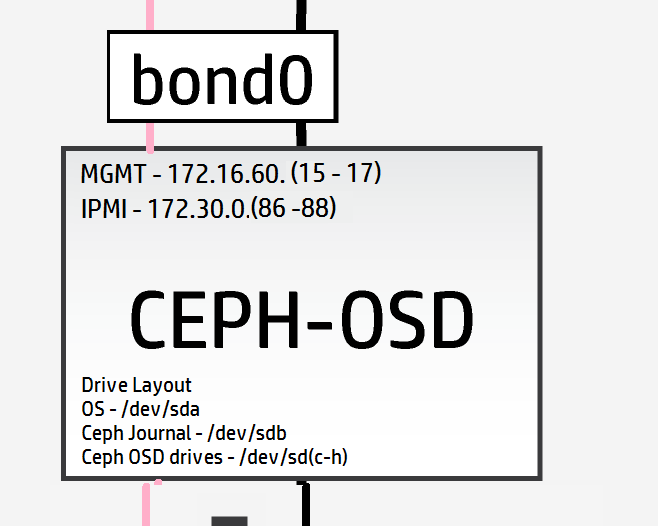
Encore une fois, malgré l'absence de SSD haute performance, j'aimerais tester le mécanisme de la fonctionnalité de journalisation de Ceph, donc j'utiliserai un lecteur standard comme journal. Cela donne un ratio journal/OSD de 1:6 (ce ratio est assez insignifiant). La configuration devient maintenant
#
# (c) Copyright 2015 Hewlett Packard Enterprise Development Company LP
#
# Licensed under the Apache License, Version 2.0 (the "License"); you may
# not use this file except in compliance with the License. You may obtain
# a copy of the License at
#
# http://www.apache.org/licenses/LICENSE-2.0
#
# Unless required by applicable law or agreed to in writing, software
# distributed under the License is distributed on an "AS IS" BASIS, WITHOUT
# WARRANTIES OR CONDITIONS OF ANY KIND, either express or implied. See the
# License for the specific language governing permissions and limitations
# under the License.
#
---
product:
version: 2

disk-models:
- name: OSD-DISKS
# Disk model to be used for Ceph OSD nodes
# /dev/sda_root is used as a volume group for /, /var/log and /var/crash
# sda_root is a templated value to align with whatever partition is really used
# This value is checked in os config and replaced by the partition actually used
# on sda e.g. sda1 or sda5

volume-groups:
- name: hlm-vg
physical-volumes:
- /dev/sda_root

logical-volumes:
# The policy is not to consume 100% of the space of each volume group.
# 5% should be left free for snapshots and to allow for some flexibility.
- name: root
size: 30%
fstype: ext4
mount: /
- name: log
size: 45%
mount: /var/log
fstype: ext4
mkfs-opts: -O large_file
- name: crash
size: 20%
mount: /var/crash
fstype: ext4
mkfs-opts: -O large_file
consumer:
name: os

# Disks to be used by Ceph
# Additional disks can be added if available
device-groups:
- name: ceph-osd-data-and-shared-journal-set-1
devices:
- name: /dev/sdc
consumer:
name: ceph
attrs:
usage: data
journal_disk: /dev/sdb
- name: ceph-osd-data-and-shared-journal-set-2
devices:
- name: /dev/sdd
consumer:
name: ceph
attrs:
usage: data
journal_disk: /dev/sdb
- name: ceph-osd-data-and-shared-journal-set-3
devices:
- name: /dev/sde
consumer:
name: ceph
attrs:
usage: data
journal_disk: /dev/sdb
- name: ceph-osd-data-and-shared-journal-set-4
devices:
- name: /dev/sdf
consumer:
name: ceph
attrs:
usage: data
journal_disk: /dev/sdb
- name: ceph-osd-data-and-shared-journal-set-5
devices:
- name: /dev/sdg
consumer:
name: ceph
attrs:
usage: data
journal_disk: /dev/sdb
- name: ceph-osd-data-and-shared-journal-set-6
devices:
- name: /dev/sdh
consumer:
name: ceph
attrs:
usage: data
journal_disk: /dev/sdb
Avec les dispositions des disques des serveurs terminées, il ne nous reste plus que les fichiers de configuration réseau entre nous et le début effectif du déploiement.
Voici à nouveau la disposition réseau pour éviter de naviguer de l'avant à l'arrière (zoomez pour voir plus de détails sur les serveurs)
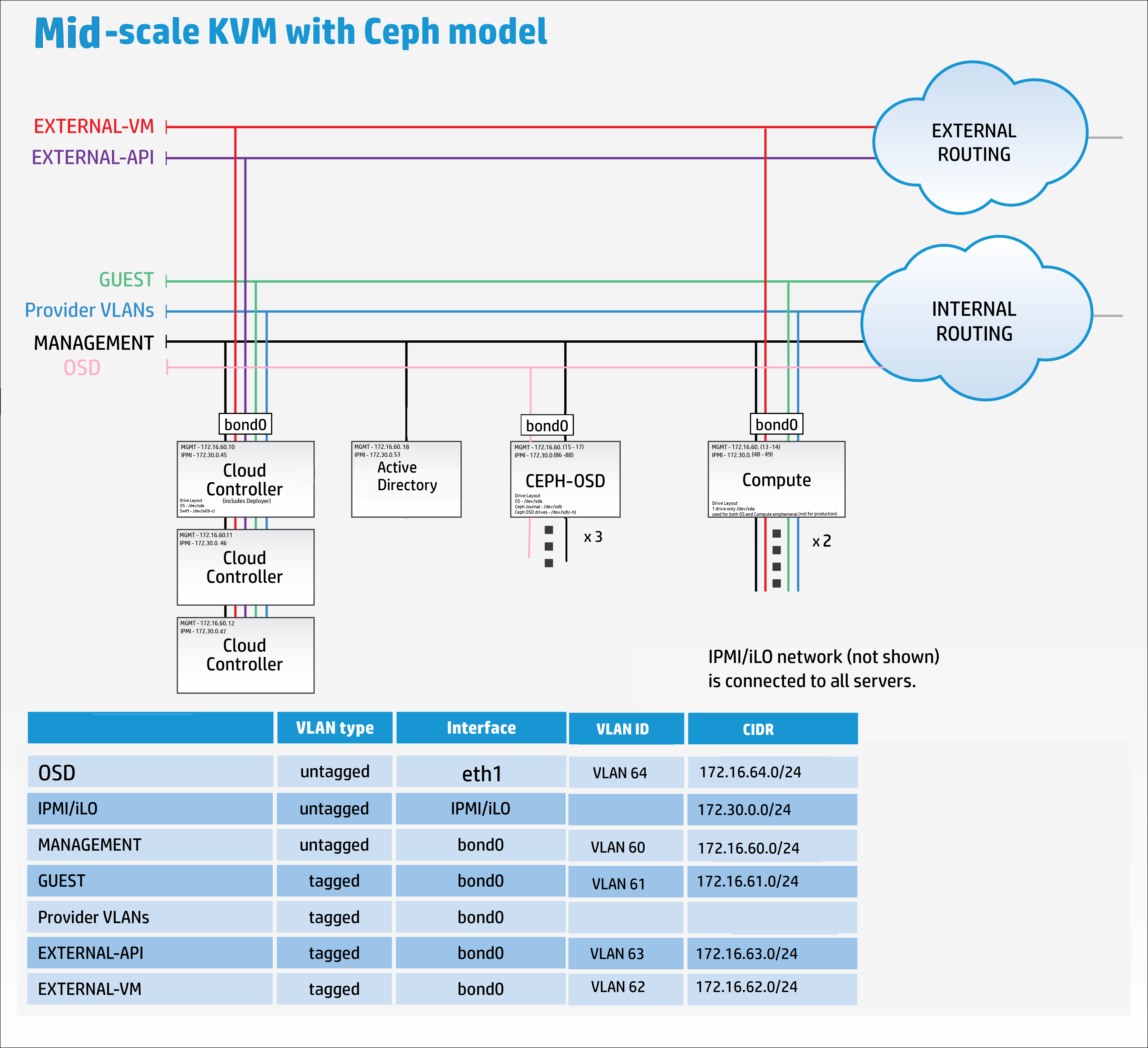
net_interfaces.yml
Ici, nous devons nous souvenir d'ajouter les détails du nouveau réseau de réplication OSD. Encore une fois, pour plus de clarté, dans un déploiement de production Ceph de taille moyenne à grande, le réseau de réplication OSD serait sur ses propres cartes réseau physiques.
Je n'ai pas suffisamment de câblage et de matériel pour faire cela, donc je vais le regrouper dans bond0 uniquement à des fins de démonstration.
Modifiez tous les noms de périphérique pour correspondre aux mappages nic capturés précédemment.
#
# (c) Copyright 2015 Hewlett Packard Enterprise Development Company LP
#
# Licensed under the Apache License, Version 2.0 (the "License"); you may
# not use this file except in compliance with the License. You may obtain
# a copy of the License at
#
# http://www.apache.org/licenses/LICENSE-2.0
#
# Unless required by applicable law or agreed to in writing, software
# distributed under the License is distributed on an "AS IS" BASIS, WITHOUT
# WARRANTIES OR CONDITIONS OF ANY KIND, either express or implied. See the
# License for the specific language governing permissions and limitations
# under the License.
#
---
product:
version: 2

interface-models:
# These examples uses hed3 and hed4 as a bonded
# pair for all networks on all three server roles
#
# Edit the device names and bond options
# to match your environment
#
- name: CONTROLLER-INTERFACES
network-interfaces:
- name: BOND0
device:
name: bond0
bond-data:
options:
mode: active-backup
miimon: 200
primary: hed0
provider: linux
devices:
- name: hed0
- name: hed1
network-groups:
- EXTERNAL-API
- EXTERNAL-VM
- GUEST
- MANAGEMENT

- name: COMPUTE-INTERFACES
network-interfaces:
- name: BOND0
device:
name: bond0
bond-data:
options:
mode: active-backup
miimon: 200
primary: hed0
provider: linux
devices:
- name: hed0
- name: hed1
network-groups:
- EXTERNAL-VM
- GUEST
- MANAGEMENT

- name: OSD-INTERFACES
network-interfaces:
- name: BOND0
device:
name: bond0
bond-data:
options:
mode: active-backup
miimon: 200
primary: hed0
provider: linux
devices:
- name: hed0
- name: hed1
network-groups:
- MANAGEMENT
- OSD
Référence des modes de liaison pour les curieux
networks.yml
Configurez ce fichier pour correspondre aux paramètres réseau de vos paramètres.
#
# (c) Copyright 2015 Hewlett Packard Enterprise Development Company LP
#
# Licensed under the Apache License, Version 2.0 (the "License"); you may
# not use this file except in compliance with the License. You may obtain
# a copy of the License at
#
# http://www.apache.org/licenses/LICENSE-2.0
#
# Unless required by applicable law or agreed to in writing, software
# distributed under the License is distributed on an "AS IS" BASIS, WITHOUT
# WARRANTIES OR CONDITIONS OF ANY KIND, either express or implied. See the
# License for the specific language governing permissions and limitations
# under the License.
#
---
product:
version: 2

networks:
#
# This example uses the following networks
#
# Network CIDR VLAN
# ------- ---- ----
# External API 10.0.1.0/24 101 (tagged)
# External VM see note 1 102 (tagged)
# Guest 10.1.1.0/24 103 (tagged)
# Management 192.168.10.0/24 100 (untagged)
#
# Notes:
# 1. Defined as part of Neutron configuration
#
# Modify these values to match your environment
#
- name: EXTERNAL-API-NET
vlanid: 61
tagged-vlan: true
cidr: 172.16.61.0/24
gateway-ip: 172.16.61.1
network-group: EXTERNAL-API

- name: EXTERNAL-VM-NET
vlanid: 62
tagged-vlan: true
network-group: EXTERNAL-VM

- name: GUEST-NET
vlanid: 63
tagged-vlan: true
cidr: 172.16.63.0/24
gateway-ip: 172.16.63.1
network-group: GUEST

- name: MANAGEMENT-NET
vlanid: 60
tagged-vlan: false
cidr: 172.16.60.0/24
gateway-ip: 172.16.60.1
network-group: MANAGEMENT

- name: OSD-NET
vlanid: 64
tagged-vlan: true
cidr: 172.16.64.0/24
gateway-ip: 172.16.64.1
network-group: OSD
Maintenant, nous devons modifier le fichier de groupes de réseau pour inclure le nouveau réseau OSD
network_groups.yml
#
# (c) Copyright 2015 Hewlett Packard Enterprise Development Company LP
#
# Licensed under the Apache License, Version 2.0 (the "License"); you may
# not use this file except in compliance with the License. You may obtain
# a copy of the License at
#
# http://www.apache.org/licenses/LICENSE-2.0
#
# Unless required by applicable law or agreed to in writing, software
# distributed under the License is distributed on an "AS IS" BASIS, WITHOUT
# WARRANTIES OR CONDITIONS OF ANY KIND, either express or implied. See the
# License for the specific language governing permissions and limitations
# under the License.
#
---
product:
version: 2

network-groups:

#
# External API
#
# This is the network group that users will use to
# access the public API endpoints of your cloud
#
- name: EXTERNAL-API
hostname-suffix: extapi

load-balancers:
- provider: ip-cluster
name: extlb
# If external-name is set then public urls in keystone
# will use this name instead of the IP address
#You must either set this to a name that can be resolved in your network
# or comment out this line to use IP addresses
external-name:

roles:
- public
tls-components:
- default
cert-file: my-public-cert
# This is the name of the certificate that will be used on load balancer.
# Replace this with name of file in "~helion/my_cloud/config/tls/certs/".
# This is the certificate that matches your setting for external-name
#
# Note that it is also possible to have per service certificates:
#
# cert-file:
# default: my-public-cert
# horizon: my-horizon-cert
# nova-api: my-nova-cert
#
#

# External VM
#
# This is the network group that will be used to provide
# external access to VMs (via floating IP Addresses)
#
- name: EXTERNAL-VM
tags:
- neutron.l3_agent.external_network_bridge

#
# GUEST
#
# This is the network group that will be used to provide
# private networks to VMs
#
- name: GUEST
hostname-suffix: guest
tags:
- neutron.networks.vxlan

#
# Management
#
# This is the network group that will be used to for
# management traffic within the cloud.
#
# The interface used by this group will be presented
# to Neutron as physnet1, and used by provider VLANS
#
- name: MANAGEMENT
hostname-suffix: mgmt
hostname: true

component-endpoints:
- default

routes:
- default

load-balancers:
- provider: ip-cluster
name: lb
components:
- default
roles:
- internal
- admin

tags:
- neutron.networks.vlan:
provider-physical-network: physnet1

#
# OSD
#
#
# This network group will be used to carry the to carry the internal Ceph
# cluster replication traffic
#
- name: OSD
hostanme-suffix: osd

component-endpoints:
- ceph-osd-internal
Oups, désolé, ai-je dit que nous étions presque terminés – j'ai oublié de mentionner les configurations de base de Ceph.
En tant que minimum pour la configuration de Ceph, il est recommandé d'ajouter un identifiant de cluster unique au paramètre FSID dans ~/helion/my_cloud/config/ceph/settings.yml
Les valeurs par défaut fonctionneront cependant pour un déploiement de laboratoire.
Remarque : La documentation en ligne recommande d'utiliser « uuidgen » pour créer un nouvel identifiant unique, mais cette application doit être installée en premier.
sudo apt-get install uuid-runtime
uuidgen
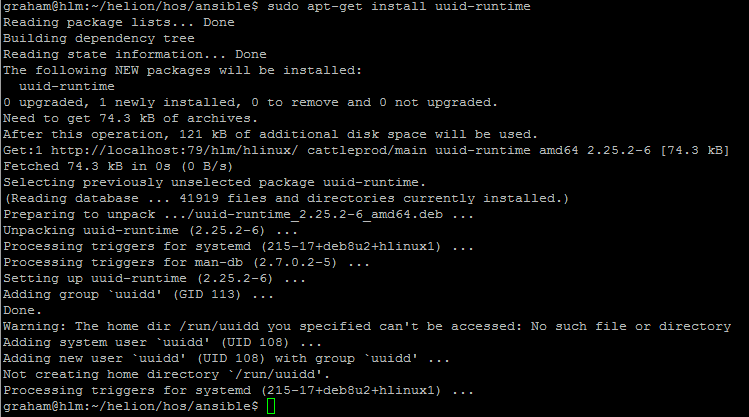
J'ai utilisé 5e23fd0c-b449-43e3-a34e-fa0952c30e81 pour le FSID du cluster

#
# (c) Copyright 2015 Hewlett Packard Enterprise Development Company LP
#
# Licensed under the Apache License, Version 2.0 (the "License"); you may
# not use this file except in compliance with the License. You may obtain
# a copy of the License at
#
# http://www.apache.org/licenses/LICENSE-2.0
#
# Unless required by applicable law or agreed to in writing, software
# distributed under the License is distributed on an "AS IS" BASIS, WITHOUT
# WARRANTIES OR CONDITIONS OF ANY KIND, either express or implied. See the
# License for the specific language governing permissions and limitations
# under the License.
#
---

# Variables specific to all ceph services
fsid: 5e23fd0c-b449-43e3-a34e-fa0952c30e81
ceph_user: root
ceph_group: root
ceph_cluster: ceph
ceph_release: firefly
osd_pool_default_size: 3
osd_pool_default_pg_num: 128

# Variables specific to OSD
fstype: xfs
zap_data_disk: True
persist_mountpoint: fstab
osd_settle_time: 10
osd_journal_size: 5120
data_disk_poll_attempts: 5
data_disk_poll_interval: 12

# Variables specific to MON
mon_default_dir: /var/lib/ceph/mon/{{ ceph_cluster }}

# Additional parameters of ceph configuration can be injected via below section
# extra:
# section1:
# key1: value
# key2: value
# section2:
# key1: value
# key2: value
Aussi, pour le client Ceph, fournissez un secret_id unique dans ~/helion/my_cloud/config/ceph/user_model.yml
Dans mon cas, j'utiliserai 7d4304a4-a4d2-4cea-ba3c-bbbdc8d11bd4 pour le secret_id

#
# (c) Copyright 2015 Hewlett Packard Enterprise Development Company LP
#
# Licensed under the Apache License, Version 2.0 (the "License"); you may
# not use this file except in compliance with the License. You may obtain
# a copy of the License at
#
# http://www.apache.org/licenses/LICENSE-2.0
#
# Unless required by applicable law or agreed to in writing, software
# distributed under the License is distributed on an "AS IS" BASIS, WITHOUT
# WARRANTIES OR CONDITIONS OF ANY KIND, either express or implied. See the
# License for the specific language governing permissions and limitations
# under the License.
#
---

product:
version: 2

ceph_user_models:
- user:
name: cinder
type: openstack
secret_id: 7d4304a4-a4d2-4cea-ba3c-bbbdc8d11bd4
pools:
- name: volumes
attrs:
creation_policy: eager
type: replicated
replica_size: 3
permission: rwx
pg: 100
usage:
consumer: cinder-volume
- name: vms
attrs:
creation_policy: eager
type: replicated
replica_size: 3
permission: rwx
pg: 100
usage:
consumer: nova
- name: images
attrs:
creation_policy: lazy
permission: rx
- user:
name: glance
type: openstack
pools:
- name: images
attrs:
creation_policy: eager
type: replicated
replica_size: 3
permission: rwx
pg: 128
usage:
consumer: glance-datastore
- user:
name: cinder-backup
type: openstack
pools:
- name: backups
attrs:
creation_policy: eager
type: replicated
replica_size: 3
permission: rwx
pg: 128
usage:
consumer: cinder-backup
Dernier point, mais non des moindres, nous devons ajouter le nouveau réseau OSD au pare-feu
#
# (c) Copyright 2015 Hewlett Packard Enterprise Development Company LP
#
# Licensed under the Apache License, Version 2.0 (the "License"); you may
# not use this file except in compliance with the License. You may obtain
# a copy of the License at
#
# http://www.apache.org/licenses/LICENSE-2.0
#
# Unless required by applicable law or agreed to in writing, software
# distributed under the License is distributed on an "AS IS" BASIS, WITHOUT
# WARRANTIES OR CONDITIONS OF ANY KIND, either express or implied. See the
# License for the specific language governing permissions and limitations
# under the License.
#
---
product:
version: 2

#
# HOS will create firewall rules to enable the required access for
# all of the deployed services. Use this section to define any
# additional access.
#
# Each group of rules can be applied to one or more network groups
# Examples are given for ping and ssh
#
# Names of rules, (e.g. "PING") are arbitrary and have no special significance
#

firewall-rules:

# - name: SSH
# # network-groups is a list of all the network group names
# # that the rules apply to
# network-groups:
# - MANAGEMENT
# rules:
# - type: allow
# # range of remote addresses in CIDR format that this
# # rule applies to
# remote-ip-prefix: 0.0.0.0/0
# port-range-min: 22
# port-range-max: 22
# # protocol must be one of: null, tcp, udp or icmp
# protocol: tcp

- name: PING
network-groups:
- MANAGEMENT
- GUEST
- EXTERNAL-API
- OSD
rules:
# open ICMP echo request (ping)
- type: allow
remote-ip-prefix: 0.0.0.0/0
# icmp type
port-range-min: 8
# icmp code
port-range-max: 0
protocol: icmp
Ok, il y a donc un fichier de plus à mettre à jour et dans 3 semaines, vous serez reconnaissant de l'avoir fait…des devinettes, oui, c'est bien ça, le fichier ReadMe.MD. Nous aimons tous la documentation, n'est-ce pas ? [Oui, je vois l'ironie ici]
README.MD
README.MD

##Helion Entry Scale Cloud with Ceph and Separate OSD Replication Network##

## Updated - 15/01/16
## Author - Grazzer
## Site - http://allthingscloud.eu
## Twitter - @allthingsclowd

The input files in this example deploy a cloud that has the following characteristics:

### Control Planes ###

- A single control plane consisting of three servers that co-host all of the required services. In addition, each hosts Ceph monitor service as well.

###Resource Pools###

- Two compute Node

- Three Ceph OSD Nodes

*Additional resource nodes can be added to the configuration.*

*Minimal Swift Resources are provided by the control plane*

###Deployer Node###

This configuration runs the lifecycle-manager (formerly referred to as the deployer) on a control plane node.
You need to include this node address in your servers.yml definition. This function does not need a dedicated network.

*The minimum server count for this example is therefore 7 servers (Control Plane (x3) + Compute (x1) + OSD (x3))*

An example set of servers are defined in ***data/servers.yml***. You will need to modify this file to reflect your specific environment.

###Networking###

The example requires the following networks:

IPMI/iLO network, connected to the deployer and the IPMI/iLO ports of all servers

A pair of bonded NICs which are used by the following networks:

- External API - This is the network that users will use to make requests to the cloud
- External VM - This is the network that will be used to provide access to VMs (via floating IP addresses)
- Guest - This is the network that will carry traffic between VMs on private networks within the cloud
- Cloud Management - This is the network that will be used for all internal traffic between the cloud services, This network is also
used to install and configure the nodes. This network needs to be on an untagged VLAN
- OSD - This is the network that is used to carry all the Ceph OSD replication traffic

Note that the EXTERNAL\_API network must be reachable from the EXTERNAL\_VM network if you want VMs to be able to make API calls to the cloud.

An example set of networks are defined in ***data/networks.yml***. You will need to modify this file to reflect your environment.

The example uses the devices hed3 & hed4 as a bonded network for all services. If you need to modify these
for your environment they are defined in ***data/net_interfaces.yml*** The network devices eth3 & eth4 are renamed to devices hed4 & hed5 using the PCI bus mappings secified in ***data/nic_mappings.yml***. You may need to modify the PCI bus addresses to match your system.

###Local Storage###

All servers should present a single OS disk, protected by a RAID controller. This disk needs to be at least 512GB in capacity. In addition the example configures one additional disk depending on the role of the server:

- Controllers: /dev/sdb & /dev/sdc is configured to be used by Swift
- Compute Severs: /dev/sda is configured as both OS and VM storage (not production grade)
- OSD Servers: /dev/sdc, /dev/sdd, /dev/sde, /dev/sdf, /dev/sdg and /dev/sdh are configured for OSD data and /dev/sdb for journal storage

Additional discs can be configured for any of these roles by editing the corresponding ***data/disks_*.yml*** file
Nous avons maintenant terminé la configuration de notre modèle de cloud.
Remarque : SI VOUS UTILISEZ HELION DEVELOPMENT PLATFORM, UN RÉSEAU DE SERVICE DOIT ÉGALEMENT ÊTRE AJOUTÉ MAINTENANT voir ici.