

Ich hatte kürzlich eine Helion OpenStack 2.X-Installation, bei der der Kunde die Verschlüsselung der iLO-Passwörter anforderte. Dies war das erste Mal, dass ich mit dem Verschlüsselungsskript von Helion OpenStack, hosencrypt.py, gearbeitet habe.
Es stellte sich als mühsamer Prozess heraus, bei dem jedes Passwort manuell beschafft und dem Verschlüsselungsskript übergeben werden musste. Jedes Ergebnis wurde anschließend wieder in die Datei servers.yml kopiert.
Da die Installationsgrößen nur noch größer werden (60+ Server), habe ich keine Lust, diesen manuellen Prozess erneut durchlaufen zu müssen – ich werde nicht für Überstunden bezahlt 😉
Das folgende Skript, hosencryptfile.py, nimmt die Datei servers.yml als Eingabe und erzeugt eine verschlüsselte oder entschlüsselte Version. Bitte lesen Sie die Kommentare innerhalb des Skripts für weitere Details.
#!/usr/bin/env python
#
# A utility to encrypt passwords for auxiliary HOS systems like IPMI.
#
# (c) Copyright 2015 Hewlett Packard Enterprise Development Company LP
#
# Licensed under the Apache License, Version 2.0 (the "License"); you may
# not use this file except in compliance with the License. You may obtain
# a copy of the License at
#
# http://www.apache.org/licenses/LICENSE-2.0
#
# Unless required by applicable law or agreed to in writing, software
# distributed under the License is distributed on an "AS IS" BASIS, WITHOUT
# WARRANTIES OR CONDITIONS OF ANY KIND, either express or implied. See the
# License for the specific language governing permissions and limitations
# under the License.
#
# Author: Graham J Land
# Date: 16/01/2016
# Modification: Hacked this file by adding a new function file_decrypt_encrypt(switch,infile,outfile="temp")
#               to automagically encrypt or decrypt the ilo-passwords in a servers.yml file
# Name: hosencryptfile.py
#
# PREREQUISITES
# This script expects an environment variable HOS_USER_PASSWORD_ENCRYPT_KEY which should hold the encryption key
# For example enter the following command before running the script:
#
# export HOS_USER_PASSWORD_ENCRYPT_KEY=EnterASecretKeyHere
#
# COMMANDLINE PARAMETERS
# switch:   2nd commandline parameter [optional]
#           "" no comandline parameters then you'll be prompted to enter a password to encrypt
#           "-d" you'll be prompted for a password to decrypt
#           "-fe" will cause the following servers.yml file to have it's ilo-passwords encrypted
#           "-fd" (or anything else for that matter) will cause the supplied servers.yml file to have it's passwords decrypted
#
# infile:   3rd commandline parameter [optional]
#           the input servers.yml file that is to be processed
#
# outfile:  4th commandline parameter [optional]
#           the new servers.yml file with the encrypted/decrypted passwords
#           if this file is left blank then the input file will be overwritten
#
# EXAMPLE
#  ~/helion/hos/ansible/hosencryptfile.py -fe ~/helion/hos/ansible/myfile.yml ~/helion/hos/ansible/my_file9.yml
#
# WARNING
# I'm not a programmer, this is the first time I've looked at python - please backup all files before use and test in labs
# No error checking included - if you enter an invalid file name IT WILL CRASH - as I get more familiar with python I'll stick in the try/catch error controls

from subprocess import PIPE, Popen

encryption_env = 'HOS_USER_PASSWORD_ENCRYPT_KEY'

class aes256:
    prefix = '@hos_aes256@'
    def __init__(self, key):
        pass

    def encrypt(self, raw):
        return ""

    def decrypt(self, cooked):
        return ""

class openssl:
    prefix = '@hos@'

    def __init__(self, key=None):
        pass

    def delegate(self, cmd, value):
        # Note that I'm passing the environment variable's name to the subprocess, not its value.
        argv = ('/usr/bin/openssl', 'aes-256-cbc', '-a', cmd, '-pass', 'env:%s' % encryption_env)
        p = Popen(argv, close_fds=True, stdin=PIPE, stdout=PIPE, stderr=PIPE)
        result = p.communicate(input=value)
        if p.returncode != 0:
            errmsg = result[1].strip()
            if errmsg.startswith('bad decrypt'):
                errmsg = 'incorrect encryption key'
            elif errmsg.startswith('error reading input file') or errmsg.startswith('bad magic number'):
                errmsg = 'bad input data'
            raise OSError('openssl: %s' % errmsg)
        return result[0].strip()

    def encrypt(self, raw):
        return self.delegate('-salt', raw)

    def decrypt(self, cooked):
        # openssl expects a newline at the end of the string.
        if cooked[-1] != '\n':
            cooked += '\n'
        return self.delegate('-d', cooked)

def main():
    import getpass
    import sys
    import yaml

    def file_decrypt_encrypt(switch,infile,outfile="temp"):
        if outfile == "temp":
            outfile = infile

        with open(infile) as f:
            list_doc = yaml.load(f)

        for servers in list_doc['servers']:
            value = servers["ilo-password"]
            if switch == '-fe':
                x = obj.prefix + obj.encrypt(value)
            else:
                if value.startswith(obj.prefix):
                    value = value[len(obj.prefix):]
                x = obj.decrypt(value)

            servers["ilo-password"] = x
               #print x
        f.close

        with open(outfile, "w") as f:
            yaml.dump(list_doc, f, default_flow_style=False)
        f.close

        return


    obj = openssl()

    # encrypt or decrypt one file to a new file
    if len(sys.argv) == 4:
        file_decrypt_encrypt(sys.argv[1],sys.argv[2],sys.argv[3])
    # encrypt  or decrypt the file inplace
    elif len(sys.argv) == 3 and sys.argv[1] != '-d':
        file_decrypt_encrypt(sys.argv[1],sys.argv[2])
    # prompt user for value to decrypt
    elif len(sys.argv) > 1 and sys.argv[1] == '-d':
        value = getpass.getpass('encrypted value? ')
        if value.startswith(obj.prefix):
            value = value[len(obj.prefix):]
        x = obj.decrypt(value)
        print x
    # prompt user for value to encrypt
    else:
        value = getpass.getpass('unencrypted value? ')
        x = obj.encrypt(value)
        print obj.prefix + x

if __name__ == '__main__':
    main()
Im Folgenden finden Sie ein Beispiel für die Verwendung der Datei.
Hinweis: Die Ausgabe ändert die Formatierung der YAML-Datei und entfernt die Kommentare, sollte aber weiterhin eine gültige Datei zur Verarbeitung sein – ich habe sie jedoch noch nicht getestet.
EINGABEDATEI exampleServers.yml
#
# (c) Copyright 2015 Hewlett Packard Enterprise Development Company LP
#
# Licensed under the Apache License, Version 2.0 (the "License"); you may
# not use this file except in compliance with the License. You may obtain
# a copy of the License at
#
# http://www.apache.org/licenses/LICENSE-2.0
#
# Unless required by applicable law or agreed to in writing, software
# distributed under the License is distributed on an "AS IS" BASIS, WITHOUT
# WARRANTIES OR CONDITIONS OF ANY KIND, either express or implied. See the
# License for the specific language governing permissions and limitations
# under the License.
#
---
  product:
    version: 2

  baremetal:
    # NOTE: These values need to be changed to match your environment.
    # Define the network range that contains the ip-addr values for
    # the individual servers listed below.
    subnet: 172.16.60.0
    netmask: 255.255.255.0

  servers:
    # NOTE: Addresses of servers need to be changed to match your environment.
    #
    #       Add additional servers as required
    #

    # Controllers
    - id: controller1
      ip-addr: 172.16.60.3
      role: CONTROLLER-ROLE
      server-group: RACK1
      nic-mapping: HP-SL230-4PORT
      ilo-ip: 172.30.0.45
      ilo-password: "Guinness";
      ilo-user: Administrator
      mac-addr: 8c:dc:d4:b5:cc:d0

    - id: controller2
      ip-addr: 172.16.60.4
      role: CONTROLLER-ROLE
      server-group: RACK2
      nic-mapping: HP-SL230-4PORT
      ilo-ip: 172.30.0.46
      ilo-password: "Smithwicks";
      ilo-user: Administrator
      mac-addr: 8c:dc:d4:b5:c6:40

    - id: controller3
      ip-addr: 172.16.60.5
      role: CONTROLLER-ROLE
      server-group: RACK3
      nic-mapping: HP-SL230-4PORT
      ilo-ip: 172.30.0.47
      ilo-password: "Blackthorn";
      ilo-user: Administrator
      mac-addr: 8c:dc:d4:b5:c9:74

    # Compute Nodes
    - id: compute1
      ip-addr: 172.16.60.6
      role: COMPUTE-ROLE
      server-group: RACK1
      nic-mapping: HP-SL230-4PORT
      ilo-ip: 172.30.0.48
      ilo-password: "Budweiser";
      ilo-user: Administrator
      mac-addr: 8c:dc:d4:b5:c9:00

    - id: compute2
      ip-addr: 172.16.60.7
      role: COMPUTE-ROLE
      server-group: RACK2
      nic-mapping: HP-SL230-4PORT
      ilo-ip: 172.30.0.49
      ilo-password: "Magners"
      ilo-user: Administrator
      mac-addr: 8c:dc:d4:b5:ce:80

    - id: compute3
      ip-addr: 172.16.60.8
      role: COMPUTE-ROLE
      server-group: RACK1
      nic-mapping: HP-SL230-4PORT
      ilo-ip: 172.30.0.50
      ilo-password: "Bulmers"
      ilo-user: Administrator
      mac-addr: 8c:dc:d4:b5:cd:3c

    - id: compute4
      ip-addr: 172.16.60.12
      role: COMPUTE-ROLE
      server-group: RACK2
      nic-mapping: HP-SL230-4PORT
      ilo-ip: 172.30.0.51
      ilo-password: "Heineken"
      ilo-user: Administrator
      mac-addr: 8c:dc:d4:b5:c4:e8

    # Ceph OSD Nodes
    - id: osd1
      ip-addr: 172.16.60.9
      role: OSD-ROLE
      server-group: RACK1
      nic-mapping: HP-DL360-8PORT
      ilo-ip: 172.30.0.86
      ilo-password: "Harp"
      ilo-user: Administrator
      mac-addr: 5c:b9:01:8d:6b:68

    - id: osd2
      ip-addr: 172.16.60.10
      role: OSD-ROLE
      server-group: RACK2
      nic-mapping: HP-DL360-8PORT
      ilo-ip: 172.30.0.87
      ilo-password: "Kronenburg"
      ilo-user: Administrator
      mac-addr: 5c:b9:01:8d:70:0c

    - id: osd3
      ip-addr: 172.16.60.11
      role: OSD-ROLE
      server-group: RACK3
      nic-mapping: HP-DL360-8PORT
      ilo-ip: 172.30.0.88
      ilo-password: "Carlsberg"
      ilo-user: Administrator
      mac-addr: 5c:b9:01:8d:73:dc
Führen Sie den folgenden Befehl aus, um das Passwort in der obigen Datei zu verschlüsseln.
export HOS_USER_PASSWORD_ENCRYPT_KEY=EnterASecretKeyHere
hosencryptfile.py -fe exampleServers.yml encryptedServers.yml
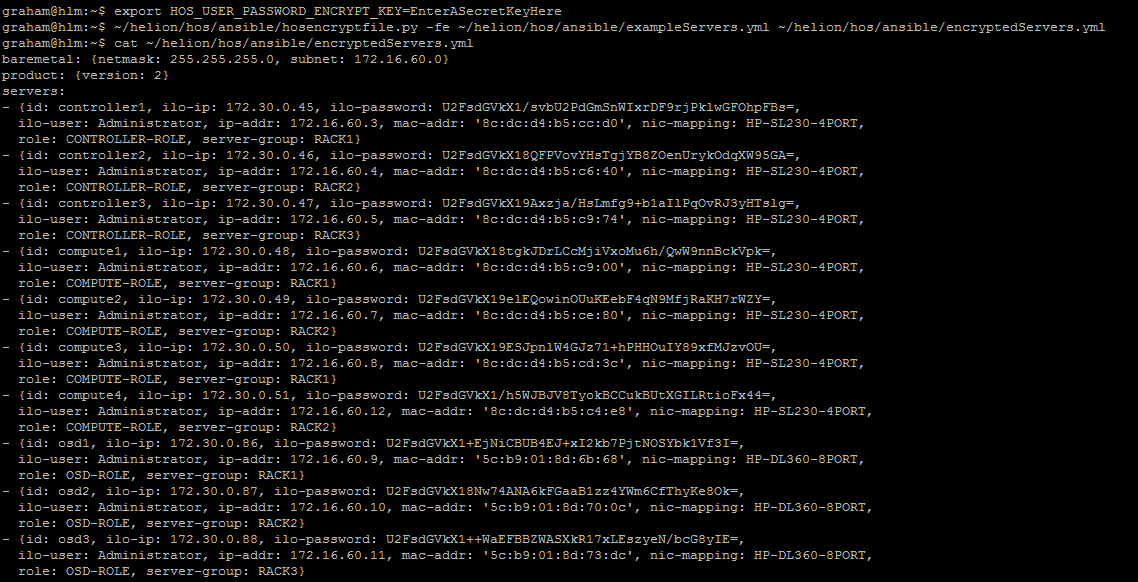
AUSGABEDATEI encryptedServers.yml
baremetal: {netmask: 255.255.255.0, subnet: 172.16.60.0}
product: {version: 2}
servers:
- {id: controller1, ilo-ip: 172.30.0.45, ilo-password: U2FsdGVkX1/svbU2PdGmSnWIxrDF9rjPklwGFOhpFBs=,
  ilo-user: Administrator, ip-addr: 172.16.60.3, mac-addr: '8c:dc:d4:b5:cc:d0', nic-mapping: HP-SL230-4PORT,
  role: CONTROLLER-ROLE, server-group: RACK1}
- {id: controller2, ilo-ip: 172.30.0.46, ilo-password: U2FsdGVkX18QFPVovYHsTgjYB8ZOenUrykOdqXW95GA=,
  ilo-user: Administrator, ip-addr: 172.16.60.4, mac-addr: '8c:dc:d4:b5:c6:40', nic-mapping: HP-SL230-4PORT,
  role: CONTROLLER-ROLE, server-group: RACK2}
- {id: controller3, ilo-ip: 172.30.0.47, ilo-password: U2FsdGVkX19Axzja/HsLmfg9+b1aIlPqOvRJ3yHTslg=,
  ilo-user: Administrator, ip-addr: 172.16.60.5, mac-addr: '8c:dc:d4:b5:c9:74', nic-mapping: HP-SL230-4PORT,
  role: CONTROLLER-ROLE, server-group: RACK3}
- {id: compute1, ilo-ip: 172.30.0.48, ilo-password: U2FsdGVkX18tgkJDrLCcMjiVxoMu6h/QwW9nnBckVpk=,
  ilo-user: Administrator, ip-addr: 172.16.60.6, mac-addr: '8c:dc:d4:b5:c9:00', nic-mapping: HP-SL230-4PORT,
  role: COMPUTE-ROLE, server-group: RACK1}
- {id: compute2, ilo-ip: 172.30.0.49, ilo-password: U2FsdGVkX19elEQowinOUuKEebF4qN9MfjRaKH7rWZY=,
  ilo-user: Administrator, ip-addr: 172.16.60.7, mac-addr: '8c:dc:d4:b5:ce:80', nic-mapping: HP-SL230-4PORT,
  role: COMPUTE-ROLE, server-group: RACK2}
- {id: compute3, ilo-ip: 172.30.0.50, ilo-password: U2FsdGVkX19ESJpnlW4GJz71+hPHHOuIY89xfMJzvOU=,
  ilo-user: Administrator, ip-addr: 172.16.60.8, mac-addr: '8c:dc:d4:b5:cd:3c', nic-mapping: HP-SL230-4PORT,
  role: COMPUTE-ROLE, server-group: RACK1}
- {id: compute4, ilo-ip: 172.30.0.51, ilo-password: U2FsdGVkX1/h5WJBJV8TyokBCCukBUtXGILRtioFx44=,
  ilo-user: Administrator, ip-addr: 172.16.60.12, mac-addr: '8c:dc:d4:b5:c4:e8', nic-mapping: HP-SL230-4PORT,
  role: COMPUTE-ROLE, server-group: RACK2}
- {id: osd1, ilo-ip: 172.30.0.86, ilo-password: U2FsdGVkX1+EjNiCBUB4EJ+xI2kb7PjtNOSYbk1Vf3I=,
  ilo-user: Administrator, ip-addr: 172.16.60.9, mac-addr: '5c:b9:01:8d:6b:68', nic-mapping: HP-DL360-8PORT,
  role: OSD-ROLE, server-group: RACK1}
- {id: osd2, ilo-ip: 172.30.0.87, ilo-password: U2FsdGVkX18Nw74ANA6kFGaaB1zz4YWm6CfThyKe8Ok=,
  ilo-user: Administrator, ip-addr: 172.16.60.10, mac-addr: '5c:b9:01:8d:70:0c', nic-mapping: HP-DL360-8PORT,
  role: OSD-ROLE, server-group: RACK2}
- {id: osd3, ilo-ip: 172.30.0.88, ilo-password: U2FsdGVkX1++WaEFBBZWASXkR17xLEszyeN/bcG8yIE=,
  ilo-user: Administrator, ip-addr: 172.16.60.11, mac-addr: '5c:b9:01:8d:73:dc', nic-mapping: HP-DL360-8PORT,
  role: OSD-ROLE, server-group: RACK3}
Um den Vorgang rückgängig zu machen, führen Sie einfach Folgendes aus (oder stellen Sie eine Sicherungskopie wieder her).
export HOS_USER_PASSWORD_ENCRYPT_KEY=EnterASecretKeyHere
hosencryptfile.py -fd encryptedServers.yml decryptedServers.yml
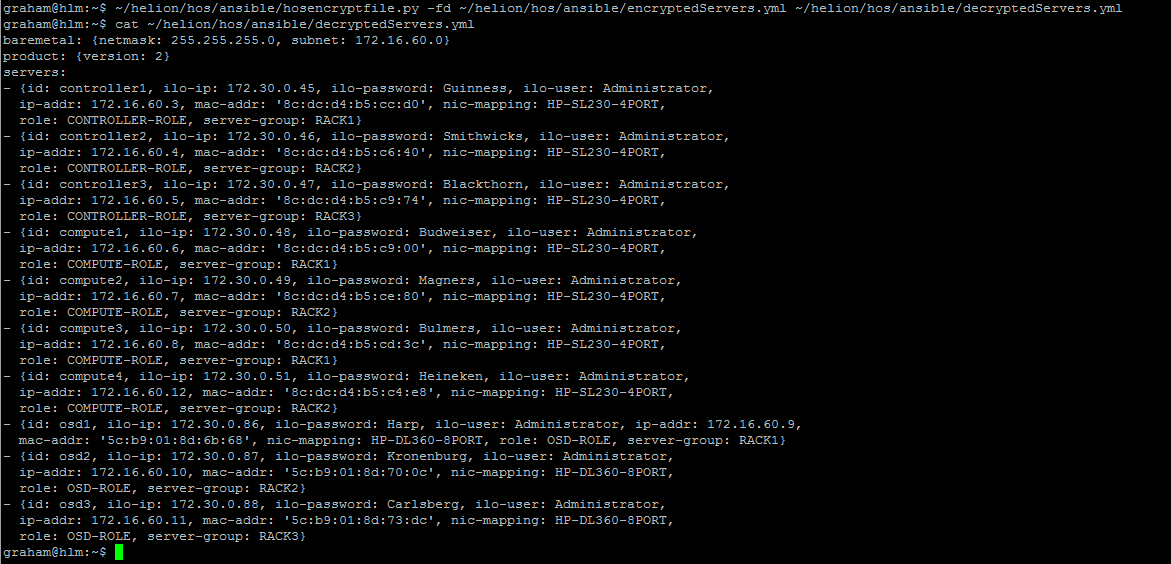
AUSGABEDATEI decryptedServers.yml
baremetal: {netmask: 255.255.255.0, subnet: 172.16.60.0}
product: {version: 2}
servers:
- {id: controller1, ilo-ip: 172.30.0.45, ilo-password: Guinness, ilo-user: Administrator,
  ip-addr: 172.16.60.3, mac-addr: '8c:dc:d4:b5:cc:d0', nic-mapping: HP-SL230-4PORT,
  role: CONTROLLER-ROLE, server-group: RACK1}
- {id: controller2, ilo-ip: 172.30.0.46, ilo-password: Smithwicks, ilo-user: Administrator,
  ip-addr: 172.16.60.4, mac-addr: '8c:dc:d4:b5:c6:40', nic-mapping: HP-SL230-4PORT,
  role: CONTROLLER-ROLE, server-group: RACK2}
- {id: controller3, ilo-ip: 172.30.0.47, ilo-password: Blackthorn, ilo-user: Administrator,
  ip-addr: 172.16.60.5, mac-addr: '8c:dc:d4:b5:c9:74', nic-mapping: HP-SL230-4PORT,
  role: CONTROLLER-ROLE, server-group: RACK3}
- {id: compute1, ilo-ip: 172.30.0.48, ilo-password: Budweiser, ilo-user: Administrator,
  ip-addr: 172.16.60.6, mac-addr: '8c:dc:d4:b5:c9:00', nic-mapping: HP-SL230-4PORT,
  role: COMPUTE-ROLE, server-group: RACK1}
- {id: compute2, ilo-ip: 172.30.0.49, ilo-password: Magners, ilo-user: Administrator,
  ip-addr: 172.16.60.7, mac-addr: '8c:dc:d4:b5:ce:80', nic-mapping: HP-SL230-4PORT,
  role: COMPUTE-ROLE, server-group: RACK2}
- {id: compute3, ilo-ip: 172.30.0.50, ilo-password: Bulmers, ilo-user: Administrator,
  ip-addr: 172.16.60.8, mac-addr: '8c:dc:d4:b5:cd:3c', nic-mapping: HP-SL230-4PORT,
  role: COMPUTE-ROLE, server-group: RACK1}
- {id: compute4, ilo-ip: 172.30.0.51, ilo-password: Heineken, ilo-user: Administrator,
  ip-addr: 172.16.60.12, mac-addr: '8c:dc:d4:b5:c4:e8', nic-mapping: HP-SL230-4PORT,
  role: COMPUTE-ROLE, server-group: RACK2}
- {id: osd1, ilo-ip: 172.30.0.86, ilo-password: Harp, ilo-user: Administrator, ip-addr: 172.16.60.9,
  mac-addr: '5c:b9:01:8d:6b:68', nic-mapping: HP-DL360-8PORT, role: OSD-ROLE, server-group: RACK1}
- {id: osd2, ilo-ip: 172.30.0.87, ilo-password: Kronenburg, ilo-user: Administrator,
  ip-addr: 172.16.60.10, mac-addr: '5c:b9:01:8d:70:0c', nic-mapping: HP-DL360-8PORT,
  role: OSD-ROLE, server-group: RACK2}
- {id: osd3, ilo-ip: 172.30.0.88, ilo-password: Carlsberg, ilo-user: Administrator,
  ip-addr: 172.16.60.11, mac-addr: '5c:b9:01:8d:73:dc', nic-mapping: HP-DL360-8PORT,
  role: OSD-ROLE, server-group: RACK3}
WARNUNG
Ich bin kein Programmierer, dies ist das erste Mal, dass ich mir Python angesehen habe – bitte sichern Sie alle Dateien vor der Verwendung und testen Sie sie in einem Labor. Keine Fehlerprüfung enthalten – wenn Sie einen ungültigen Dateinamen eingeben, WIRD DAS SKRIPT ABSTÜRZEN – da ich mit Python vertrauter werde, werde ich die try/catch-Fehlerkontrollen einfügen – wenn ich Zeit habe.
AKTUALISIERUNG: Ich habe den Code so modifiziert, dass er das erforderliche Präfix am Anfang des verschlüsselten Schlüssels enthält. Ich habe die Ausgabedatei auch neu formatiert, um sie konsistenter mit der Eingabedatei zu machen.