

Installation und Konfiguration des Cloud-Modells
Als Erstes müssen wir eine der Beispiel-Cloud-Vorlagen kopieren, um sie als Ausgangspunkt zu verwenden. Wenn Ihr Bereitstellungsmodell genau mit dem Beispiel übereinstimmt, müssen Sie nur wenige Dateien ändern, bevor Sie Ihre Cloud erstellen.
Um jedoch zu zeigen, wie man das Modell erheblich ändern kann, habe ich beschlossen, ein weiteres Netzwerk hinzuzufügen, das wir zur Trennung des Ceph OSD-Replikationsverkehrs verwenden werden.
Kopieren Sie die Ceph-Beispielkonfigurationsdateien in das Verzeichnis my_cloud zum Bearbeiten.
cp -r ~/helion/examples/entry-scale-kvm-ceph/* ~/helion/my_cloud/definition/
Diese Konfigurationsdateien repräsentieren das folgende Modell:
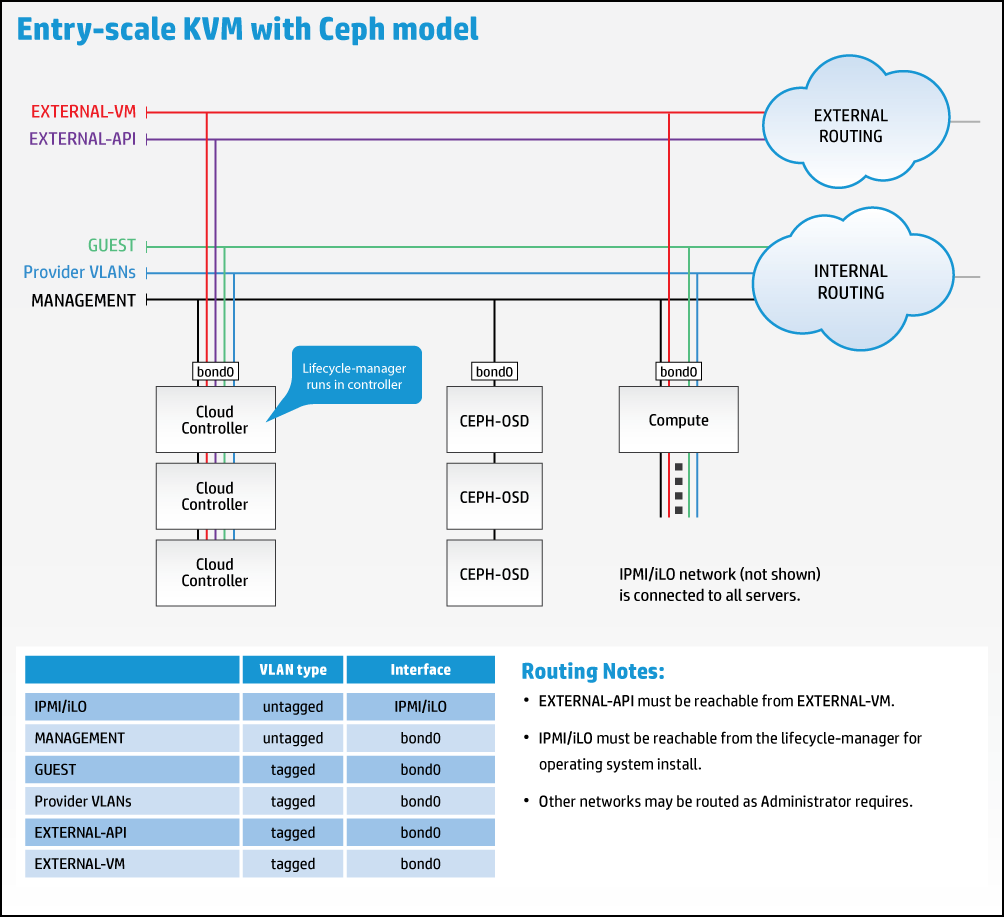
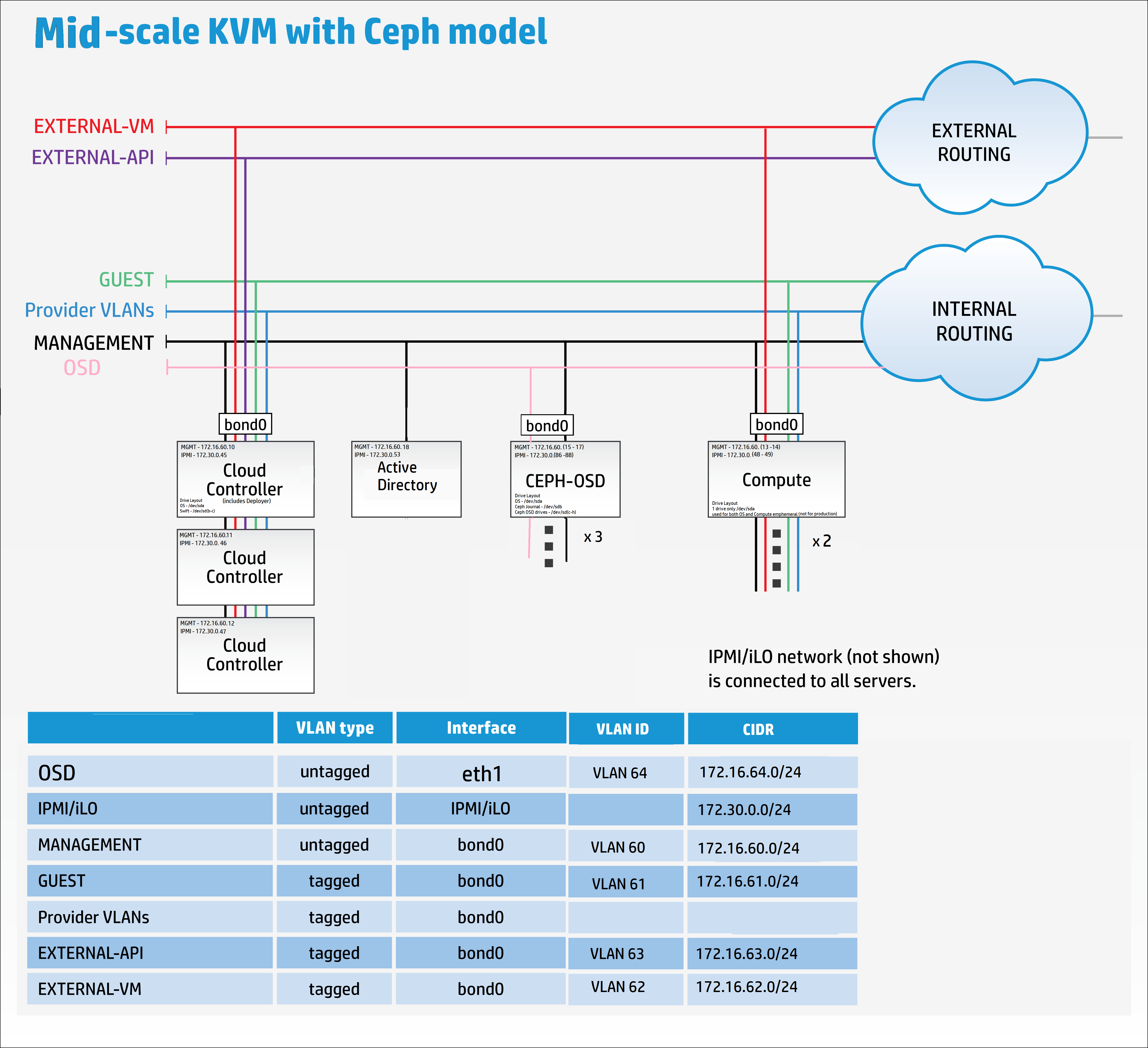
Wir müssen das Modell jedoch anpassen, um das neue Replikationsnetzwerk wie unten gezeigt aufzunehmen:
Es ist jetzt an der Zeit, zu Ihrem bevorzugten Editor zu springen, in meinem Fall Komodo, um die Beispiel-Vorlagendateien neu zu modellieren, um sie an meine Anforderungen anzupassen.
Fügen Sie im Editor eine Remote-Verbindung zum Helion Lifecycle Manager (controller0) hinzu.
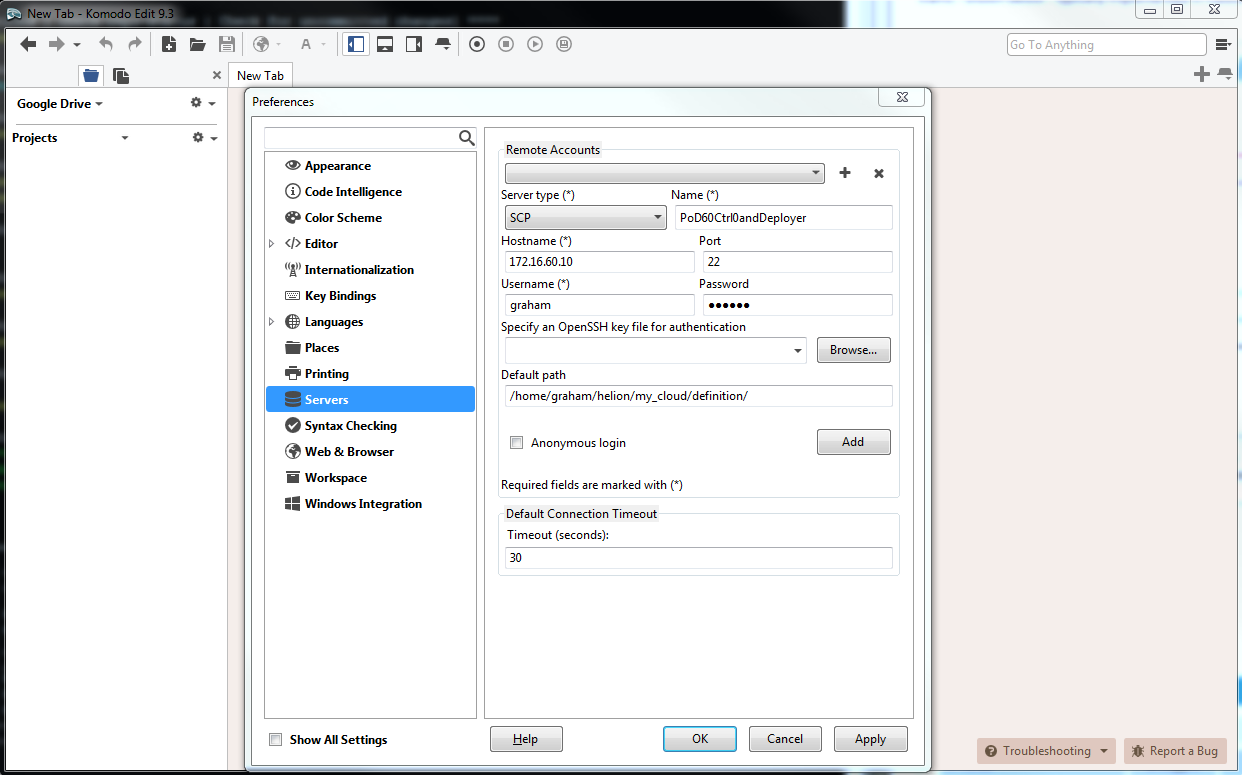
Sie können die Dateien in beliebiger Reihenfolge bearbeiten, die für Sie bequem ist.
Bitte lesen Sie die umfangreiche Online-Dokumentation, die eine detaillierte Erklärung aller zur Konfiguration der Cloud-Plattform verwendeten YAML-Dateien enthält hier.
cloudConfig.yml
Ich beginne gerne mit der einfachsten Datei, cloudConfig.yml
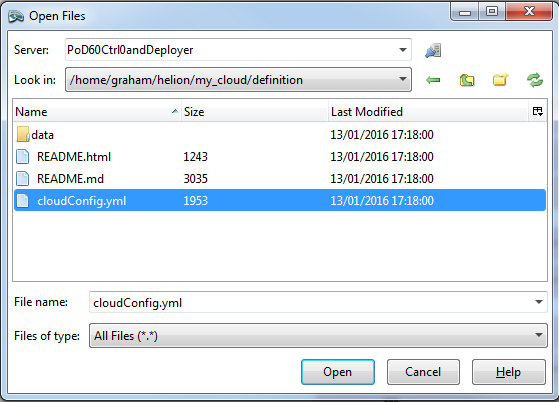
In dieser Datei finden wir die Einstellungen für den Cloud-Namen, Hostname-Präfixe, NTP-Server-Details, DNS-Server-Details, SMTP-Einstellungen und einige allgemeine Firewall-Einstellungen.
Die folgenden Werte wurden von den Standardwerten geändert:
Cloud-Name : allthingscloud
NTP : 172.16.1.5
DNS : 172.16.1.5
Hinweis: Stellen Sie sicher, dass sowohl die NTP- als auch die DNS-IP-Adressen in Anführungszeichen gesetzt sind. Die Beispieldatei hat keine Anführungszeichen bei den DNS-Namensservern.
#
# (c) Copyright 2015 Hewlett Packard Enterprise Development Company LP
#
# Licensed under the Apache License, Version 2.0 (the "License"); you may
# not use this file except in compliance with the License. You may obtain
# a copy of the License at
#
# http://www.apache.org/licenses/LICENSE-2.0
#
# Unless required by applicable law or agreed to in writing, software
# distributed under the License is distributed on an "AS IS" BASIS, WITHOUT
# WARRANTIES OR CONDITIONS OF ANY KIND, either express or implied. See the
# License for the specific language governing permissions and limitations
# under the License.
#
---
product:
version: 2

cloud:
name: allthingscloud

# The following values are used when
# building hostnames
hostname-data:
host-prefix: helion
member-prefix: -m

# List of ntp servers for your site
ntp-servers:
- "172.16.1.5"
# - "ntp-server2"

# dns resolving configuration for your site
# refer to resolv.conf for details on each option
dns-settings:
nameservers:
- "172.16.1.5"
# - name-server2
# - name-server3
#
# domain: sub1.example.net
#
# search:
# - sub1.example.net
# - sub2.example.net
#
# sortlist:
# - 192.168.160.0/255.255.240.0
# - 192.168.0.0
#
# # option flags are ':' to enable, remove to unset
# # options with values are ':' to set
#
# options:
# debug:
# ndots: 2
# timeout: 30
# attempts: 5
# rotate:
# no-check-names:
# inet6:
smtp-settings:
# server: mailserver.examplecloud.com
# port: 25
# timeout: 15
# These are only needed if your server requires authentication
# user:
# password:

# Generate firewall rules
firewall-settings:
enable: true
# log dropped packets
logging: true
Control_plane.yml
Diese Datei definiert alle Ausfallzonen, Cluster, Service-Komponenten und Ressourcen. Ein kurzer Blick auf diese Datei zeigt, dass die Service-Komponente ‚lifecycle-manager‘ unter der CONTROLLER-ROLE steht – mit anderen Worten, wir haben ein Controller/Deployer-Modell kombiniert.
Der einzige Parameter, den ich in dieser YAML-Datei geändert habe, ist der min-count für die Compute-Ressourcen von 0 auf 2. Ich werde zum Erstellungszeitpunkt 2 Compute-Knoten bereitstellen.
#
# (c) Copyright 2015 Hewlett Packard Enterprise Development Company LP
#
# Licensed under the Apache License, Version 2.0 (the "License"); you may
# not use this file except in compliance with the License. You may obtain
# a copy of the License at
#
# http://www.apache.org/licenses/LICENSE-2.0
#
# Unless required by applicable law or agreed to in writing, software
# distributed under the License is distributed on an "AS IS" BASIS, WITHOUT
# WARRANTIES OR CONDITIONS OF ANY KIND, either express or implied. See the
# License for the specific language governing permissions and limitations
# under the License.
#
---
product:
version: 2

control-planes:
- name: control-plane-1
control-plane-prefix: cp1
region-name: region1
failure-zones:
- AZ1
- AZ2
- AZ3
common-service-components:
- logging-producer
- monasca-agent
- freezer-agent
- stunnel
- lifecycle-manager-target
clusters:
- name: cluster1
cluster-prefix: c1
server-role: CONTROLLER-ROLE
member-count: 3
allocation-policy: strict
service-components:
- lifecycle-manager
- ntp-server
- swift-ring-builder
- mysql
- ip-cluster
- apache2
- keystone-api
- keystone-client
- rabbitmq
- glance-api
- glance-registry
- glance-client
- cinder-api
- cinder-scheduler
- cinder-volume
- cinder-backup
- cinder-client
- nova-api
- nova-scheduler
- nova-conductor
- nova-console-auth
- nova-novncproxy
- nova-client
- neutron-server
- neutron-ml2-plugin
- neutron-vpn-agent
- neutron-dhcp-agent
- neutron-metadata-agent
- neutron-openvswitch-agent
- neutron-client
- horizon
- sherpa-api
- swift-proxy
- memcached
- swift-account
- swift-container
- swift-object
- swift-client
- heat-api
- heat-api-cfn
- heat-api-cloudwatch
- heat-engine
- heat-client
- openstack-client
- ceilometer-api
- ceilometer-collector
- ceilometer-agent-central
- ceilometer-agent-notification
- ceilometer-expirer
- ceilometer-common
- ceilometer-client
- zookeeper
- kafka
- vertica
- storm
- monasca-api
- monasca-persister
- monasca-notifier
- monasca-threshold
- monasca-client
- logging-server
- ops-console-web
- ops-console-monitor
- cmc-service
- freezer-api
- ceph-monitor

resources:
- name: compute
resource-prefix: comp
server-role: COMPUTE-ROLE
allocation-policy: any
min-count: 2
service-components:
- ntp-client
- nova-compute
- nova-compute-kvm
- neutron-l3-agent
- neutron-metadata-agent
- neutron-openvswitch-agent
- neutron-lbaasv2-agent

- name: osd
resource-prefix: ceph
server-role: OSD-ROLE
allocation-policy: strict
min-count: 3
service-components:
- ntp-client
- ceph-osd
servers.yml
Diese Datei benötigt alle Details der physischen Server, die während der Bereitstellung verwendet werden.
- Das Bare-Metal-Subnetz ist in dieser Bereitstellung auch das Management-Netzwerk: 172.16.60.10/24
- id muss für jeden Server eindeutig sein
- role bezieht sich auf die Serverrolle und bestimmt, welche Komponenten und Dienste auf dem Server bereitgestellt werden –> verknüpft mit der Datei server_roles.yml
- ip-addr ist die Adresse, die der Server im MANAGEMENT-Netzwerk haben soll. Controller1 hatte diese IP-Adresse bereits zugewiesen, da es in diesem Szenario auch der Deployer-Knoten (Helion Lifecycle Manager) ist
- server-group kann verwendet werden, um die physische Anordnung der Server abzubilden, um Ausfall-Hardware-Domänen zu definieren –> verknüpft mit der Datei server_groups.yml
- nic-mappings definiert die Hardware-Adresszuordnung der physischen Netzwerkkarten –> verknüpft mit der Datei nic_mappings.yml. Jeder, der in den letzten zehn Jahren mit Linux-Netzwerken gearbeitet hat, wird den Zweck dieser Datei zu schätzen wissen. Linux hat ein „Feature“, das dazu führen kann, dass physische Netzwerkkarten nach einem Neustart zufällig verschiedenen Software-Schnittstellen zugeordnet werden (z. B. eth0, eth1, em59 usw.). Diese Datei „verdrahtet“ die Zuordnungen von physisch zu Software-Schnittstelle für ein konsistentes OS-Neustart-Erlebnis
- ilo-ip ist die Adresse der IPMI-Schnittstelle auf dem physischen Server
- ilo-password – STOPPEN Sie jetzt und gehen Sie zurück zu AZURE, wenn Sie eine Erklärung für diesen Parameter benötigen
- ilo-user – siehe oben
- mac-address ist die MAC-Adresse der PXE-Schnittstelle. In dieser Bereitstellung werden wir über das MANAGEMENT-Netzwerk per PXE booten. HINWEIS: DIESE IST NICHT DIE MAC-ADRESSE DER iLO-SCHNITTSTELLE
#
# (c) Copyright 2015 Hewlett Packard Enterprise Development Company LP
#
# Licensed under the Apache License, Version 2.0 (the "License"); you may
# not use this file except in compliance with the License. You may obtain
# a copy of the License at
#
# http://www.apache.org/licenses/LICENSE-2.0
#
# Unless required by applicable law or agreed to in writing, software
# distributed under the License is distributed on an "AS IS" BASIS, WITHOUT
# WARRANTIES OR CONDITIONS OF ANY KIND, either express or implied. See the
# License for the specific language governing permissions and limitations
# under the License.
#
---
product:
version: 2

baremetal:
# NOTE: These values need to be changed to match your environment.
# Define the network range that contains the ip-addr values for
# the individual servers listed below.
subnet: 172.16.60.0
netmask: 255.255.255.0

servers:
# NOTE: Addresses of servers need to be changed to match your environment.
#
# Add additional servers as required
#

# Controllers
- id: controller1
ip-addr: 172.16.60.10
role: CONTROLLER-ROLE
server-group: RACK1
nic-mapping: HP-SL230-4PORT
ilo-ip: 172.30.0.45
ilo-password: "bananas"
ilo-user: Administrator
mac-addr: 8c:dc:d4:b5:cc:d0

- id: controller2
ip-addr: 172.16.60.11
role: CONTROLLER-ROLE
server-group: RACK2
nic-mapping: HP-SL230-4PORT
ilo-ip: 172.30.0.46
ilo-password: "bananas"
ilo-user: Administrator
mac-addr: 8c:dc:d4:b5:c6:40

- id: controller3
ip-addr: 172.16.60.12
role: CONTROLLER-ROLE
server-group: RACK3
nic-mapping: HP-SL230-4PORT
ilo-ip: 172.30.0.47
ilo-password: "bananas"
ilo-user: Administrator
mac-addr: 8c:dc:d4:b5:c9:74

# Compute Nodes
- id: compute1
ip-addr: 172.16.60.13
role: COMPUTE-ROLE
server-group: RACK1
nic-mapping: HP-SL230-4PORT
ilo-ip: 172.30.0.48
ilo-password: "bananas"
ilo-user: Administrator
mac-addr: 8c:dc:d4:b5:c9:00

- id: compute2
ip-addr: 172.16.60.14
role: COMPUTE-ROLE
server-group: RACK2
nic-mapping: HP-SL230-4PORT
ilo-ip: 172.30.0.49
ilo-password: "bananas"
ilo-user: Administrator
mac-addr: 8c:dc:d4:b5:ce:80

# Ceph OSD Nodes
- id: osd1
ip-addr: 172.16.60.15
role: OSD-ROLE
server-group: RACK1
nic-mapping: HP-DL360-8PORT
ilo-ip: 172.30.0.86
ilo-password: "bananas"
ilo-user: Administrator
mac-addr: 5c:b9:01:8d:6b:68

- id: osd2
ip-addr: 172.16.60.16
role: OSD-ROLE
server-group: RACK2
nic-mapping: HP-DL360-8PORT
ilo-ip: 172.30.0.87
ilo-password: "bananas"
ilo-user: Administrator
mac-addr: 5c:b9:01:8d:70:0c

- id: osd3
ip-addr: 172.16.60.17
role: OSD-ROLE
server-group: RACK3
nic-mapping: HP-DL360-8PORT
ilo-ip: 172.30.0.88
ilo-password: "bananas"
ilo-user: Administrator
mac-addr: 5c:b9:01:8d:73:dc
server_roles.yml
Diese Datei verknüpft die Server in der servers.yml-Datei mit den Dateien für Netzwerkschnittstellen und Festplattenlayout. Bei Verwendung eines separaten Deployer-Knotens würde seine Rolle hier definiert sein.
#
# (c) Copyright 2015 Hewlett Packard Enterprise Development Company LP
#
# Licensed under the Apache License, Version 2.0 (the "License"); you may
# not use this file except in compliance with the License. You may obtain
# a copy of the License at
#
# http://www.apache.org/licenses/LICENSE-2.0
#
# Unless required by applicable law or agreed to in writing, software
# distributed under the License is distributed on an "AS IS" BASIS, WITHOUT
# WARRANTIES OR CONDITIONS OF ANY KIND, either express or implied. See the
# License for the specific language governing permissions and limitations
# under the License.
#
---
product:
version: 2

server-roles:

- name: CONTROLLER-ROLE
interface-model: CONTROLLER-INTERFACES
disk-model: CONTROLLER-DISKS

- name: COMPUTE-ROLE
interface-model: COMPUTE-INTERFACES
disk-model: COMPUTE-DISKS

- name: OSD-ROLE
interface-model: OSD-INTERFACES
disk-model: OSD-DISKS
server_groups.yml
Abbilden der physischen Anordnung der Server auf Verfügbarkeitszonen. Es enthält einen Verweis auf alle Netzwerke.
HINWEIS: Hier habe ich die erste signifikante Änderung am Beispielmodell vorgenommen – ich habe einen Verweis auf das neue Netzwerk hinzugefügt, das wir hinzufügen, namens OSD-NET.
#
# (c) Copyright 2015 Hewlett Packard Enterprise Development Company LP
#
# Licensed under the Apache License, Version 2.0 (the "License"); you may
# not use this file except in compliance with the License. You may obtain
# a copy of the License at
#
# http://www.apache.org/licenses/LICENSE-2.0
#
# Unless required by applicable law or agreed to in writing, software
# distributed under the License is distributed on an "AS IS" BASIS, WITHOUT
# WARRANTIES OR CONDITIONS OF ANY KIND, either express or implied. See the
# License for the specific language governing permissions and limitations
# under the License.
#
---
product:
version: 2

server-groups:

#
# Server Groups provide a mechanism for organizing servers
# into a hierarchy that reflected the physical topology.
#
# When allocating a server the configuration processor
# will search down the hierarchy from the list of server
# groups identified as the failure-zones for the control
# plane until it finds an available server of the requested
# role. If the allocation policy is "strict" servers are
# allocated from different failure-zones.
#
# When determining which network from a network group to
# associate with a server the configuration processor will
# search up the hierarchy from the server group containing the
# server until it finds a network in the required network
# group.
#

#
# In this example there is only one network in each network
# group and so we put all networks in the top level server
# group. Below this we create server groups for three
# failure zones, within which servers are grouped by racks.
#
# Note: the association of servers to server groups is part
# of the server definition (servers.yml)
#

#
# At the top of the tree we have a server groups for
# networks that can reach all servers
#
- name: CLOUD
server-groups:
- AZ1
- AZ2
- AZ3
networks:
- EXTERNAL-API-NET
- EXTERNAL-VM-NET
- GUEST-NET
- MANAGEMENT-NET
- OSD-NET

#
# Create a group for each failure zone
#
- name: AZ1
server-groups:
- RACK1

- name: AZ2
server-groups:
- RACK2

- name: AZ3
server-groups:
- RACK3

#
# Create a group for each rack
#
- name: RACK1

- name: RACK2

- name: RACK3
nic_mappings.yml
Wie zuvor hervorgehoben, enthält diese Datei alle „lspci“-Hardware-Netzwerkschnittstellenzuordnungen auf den verschiedenen verwendeten Hardware-Servermodellen. In dieser Bereitstellung verwende ich HP SL230s für die Controller- und Compute-Knoten und HP DL360s für die OSD-Knoten.
Leider gibt es hier ein kleines Henne-Ei-Szenario – um die Details für diese Datei zu erhalten, um die Cloud abzuschließen, benötigen die Server ein Betriebssystem (OS). Um ein OS auf den Servern zu erhalten, müssen wir diese Datei abgeschlossen haben. Die Lösung besteht darin, zur Installationsmedien zurückzukehren und vorübergehend hLinux auf JEDES MODUL des Servers zu installieren, der verwendet wird. Melden Sie sich dann einfach an und geben Sie den folgenden Befehl ein, um die Ausgabe für Ihre Datei zu erfassen:
sudo dmidecode | grep -A3 '^System Information'
lspci | grep -i eth
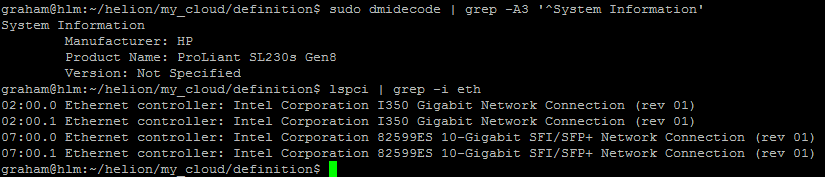
[Hinweis: Ich habe kein Beispiel für den DL360 aufgenommen, aber dies muss für alle verwendeten verschiedenen Modelle und Konfigurationen wiederholt werden. Wenn Sie beispielsweise DL360s mit verschiedenen Typen oder Anzahl von Schnittstellen haben, benötigt jeder Server ein dediziertes Profil.]
#
# (c) Copyright 2015 Hewlett Packard Enterprise Development Company LP
#
# Licensed under the Apache License, Version 2.0 (the "License"); you may
# not use this file except in compliance with the License. You may obtain
# a copy of the License at
#
# http://www.apache.org/licenses/LICENSE-2.0
#
# Unless required by applicable law or agreed to in writing, software
# distributed under the License is distributed on an "AS IS" BASIS, WITHOUT
# WARRANTIES OR CONDITIONS OF ANY KIND, either express or implied. See the
# License for the specific language governing permissions and limitations
# under the License.
#
---
product:
version: 2

# nic-mappings are used to ensure that the device name used by the
# operating system always maps to the same physical device.
# A nic-mapping is associated to a server in the server definition.
# The logical-name specified here can be used as a device name in
# the network interface-models definitions.
#
# - name user-defined name for each mapping
# physical-ports list of ports for this mapping
# - logical-name device name to be used by the operating system
# type physical port type
# bus-address bus address of the physical device
#
# Notes:
# - The PCI bus addresses are examples. You will need to determine
# the values pertinent to your servers. These can be found with the
# the `lspci` command or from the server BIOS
# - enclose the bus address in quotation marks so yaml does not
# misinterpret the embedded colon (:) characters
# - simple-port is the only currently supported port type
# - choosing a new device name prefix (e.g. 'eth' -> 'hed') will
# help prevent remapping errors

nic-mappings:

- name: HP-SL230-4PORT
physical-ports:
- logical-name: hed0
type: simple-port
bus-address: "0000:07:00.0"

- logical-name: hed1
type: simple-port
bus-address: "0000:07:00.1"

- logical-name: hed2
type: simple-port
bus-address: "0000:02:00.0"

- logical-name: hed3
type: simple-port
bus-address: "0000:02:00.1"

- name: HP-DL360-2PORT
physical-ports:
- logical-name: hed0
type: simple-port
bus-address: "0000:04:00.0"

- logical-name: hed1
type: simple-port
bus-address: "0000:04:00.1"
Server-Festplattenlayouts
Die folgenden Dateien haben ihre disk-models->name-Referenz auf die server_roles.yml-Datei. Der Link bezieht sich nicht auf die Dateinamen selbst, sondern auf den Inhalt innerhalb der Dateien. Theoretisch könnten Sie diesen Dateien beliebige gültige YAML-Dateinamen geben, sobald sie im richtigen Verzeichnis platziert sind. Ansible liest einfach alle Dateien im Verzeichnis und generiert einen Pool von Schlüssel-Wert-Paaren. Nachdem ich das gerade geschrieben habe, vermute ich, dass die disk-model-Namen über alle verwendeten Dateien hinweg eindeutig sein müssen, da das Debugging sonst sehr interessant wird.
disks_controller.yml
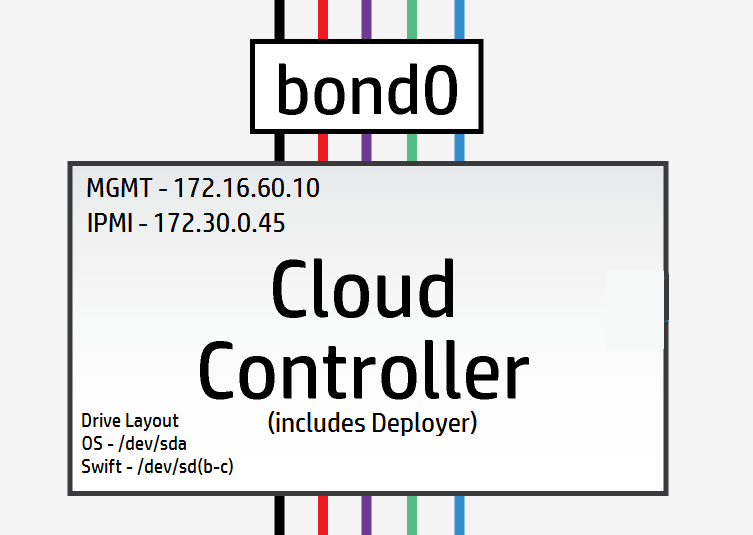
Die Controller-Knoten haben 3 logische Laufwerke, 1 wird für das OS /dev/sda verwendet und die verbleibenden 2 werden für Swift-Ringe /dev/sdb & /dev/sdc verwendet.
[Hinweis: In Labor- und Testszenarien ist es möglich, ein einzelnes physisches Laufwerk zu verwenden und LVM-Mountpoints zu verwenden, um die logischen Laufwerke bereitzustellen – die Leistung kann herausfordernd sein.]
Meine Controller haben alle 3 physische Laufwerke, die als 3 logische Laufwerke präsentiert werden – also kann ich die Standardeinstellungen hier verwenden.
#
# (c) Copyright 2015 Hewlett Packard Enterprise Development Company LP
#
# Licensed under the Apache License, Version 2.0 (the "License"); you may
# not use this file except in compliance with the License. You may obtain
# a copy of the License at
#
# http://www.apache.org/licenses/LICENSE-2.0
#
# Unless required by applicable law or agreed to in writing, software
# distributed under the License is distributed on an "AS IS" BASIS, WITHOUT
# WARRANTIES OR CONDITIONS OF ANY KIND, either express or implied. See the
# License for the specific language governing permissions and limitations
# under the License.
#
---
product:
version: 2

disk-models:
- name: CONTROLLER-DISKS

# This example is based on using a single 500GB disk for a volume
# group that contains all file systems on a controller with 64GB
# of memory.
#
# Additional disks can be added to the 'physical-volumes' section.
#
# If the available capacity of your servers is more that 500GB you
# should consider using the "CONTROLLER-1TB-DISKS" disk-model
# in disks_controller_1TB.yml instead. To use this alternative model
# you need to edit the CONTROLLER-ROLE sections of server_roles.yml
#

volume-groups:
- name: hlm-vg
physical-volumes:

# NOTE: 'sda_root' is a templated value. This value is checked in
# os-config and replaced by the partition actually used on sda
#e.g. sda1 or sda5
- /dev/sda_root

# Add any additional disks for the volume group here
# -/dev/sdx
# -/dev/sdy

logical-volumes:
# The policy is not to consume 100% of the space of each volume group.
# 5% should be left free for snapshots and to allow for some flexibility.

- name: root
size: 10%
fstype: ext4
mount: /

# Reserved space for kernel crash dumps
# Should evaluate to a value that is slightly larger that
# the memory size of your server
- name: crash
size: 13%
mount: /var/crash
fstype: ext4
mkfs-opts: -O large_file

# Local Log files.
- name: log
size: 13%
mount: /var/log
fstype: ext4
mkfs-opts: -O large_file

# Mysql Database. All persistent state from OpenStack services
# is saved here. Although the individual objects are small the
# accumulated data can grow over time
- name: mysql
size: 10%
mount: /var/lib/mysql
fstype: ext4
mkfs-opts: -O large_file
consumer:
name: mysql

# Rabbitmq works mostly in memory, but needs to be able to persist
# messages to disc under high load. This area should evaluate to a value
# that is slightly larger than the memory size of your server
- name: rabbitmq
size: 13%
mount: /var/lib/rabbitmq
fstype: ext4
mkfs-opts: -O large_file
consumer:
name: rabbitmq
rabbitmq_env: home

# Database storage for event monitoring (Monasca). Events are generally
# small data objects.
- name: vertica
size: 3%
mount: /var/vertica
fstype: ext4
mkfs-opts: -O large_file
consumer:
name: vertica

# Messaging system for monitoring.
- name: kafka
size: 2%
mount: /var/kafka
fstype: ext4
mkfs-opts: -O large_file
consumer:
name: kafka

# Data storage for centralized logging. This holds log entries from all
# servers in the cloud and hence can require a lot of disk space.
- name: elasticsearch
size: 30%
mount: /var/lib/elasticsearch
fstype: ext4

# Zookeeper is used to provide cluster co-ordination in the monitoring
# system. Although not a high user of disc space we have seen issues
# with zookeeper snapshots filling up filesystems so we keep it in its
# own space for stability.
- name: zookeeper
size: 1%
mount: /var/lib/zookeeper
fstype: ext4

consumer:
name: os

# Additional disk group defined for Swift
device-groups:
- name: swiftobj
devices:
- name: /dev/sdb
- name: /dev/sdc
# Add any additional disks for swift here
# -name: /dev/sdd
# -name: /dev/sde
consumer:
name: swift
attrs:
rings:
- account
- container
- object-0
[Bonus-Material : Die folgende Controller-Datei dient nur zum Vergleich, wie das Layout aussehen würde, wenn Sie alles auf einen einzelnen Laufwerk-Controller quetschen]
Einzelner Laufwerk-Controller-Festplattenlayout-Beispiel [Nicht für die Produktion]
Bemerken Sie, wie die Swift-Laufwerke jetzt auf einem logischen Volume sind.
#
# (c) Copyright 2015 Hewlett Packard Enterprise Development Company LP
#
# Licensed under the Apache License, Version 2.0 (the "License"); you may
# not use this file except in compliance with the License. You may obtain
# a copy of the License at
#
# http://www.apache.org/licenses/LICENSE-2.0
#
# Unless required by applicable law or agreed to in writing, software
# distributed under the License is distributed on an "AS IS" BASIS, WITHOUT
# WARRANTIES OR CONDITIONS OF ANY KIND, either express or implied. See the
# License for the specific language governing permissions and limitations
# under the License.
#
---
product:
version: 2

disk-models:
- name: CONTROLLER-1TB-DISKS

# This example is based on using a single 1TB disk for a volume
# group that contains all file systems on a controller with 64GB
# of memory.
#
# Additional disks can be added to the 'physical-volumes' section.
#
#

volume-groups:
- name: hlm-vg
physical-volumes:

# NOTE: 'sda_root' is a templated value. This value is checked in
# os-config and replaced by the partition actually used on sda
#e.g. sda1 or sda5
- /dev/sda_root

# Add any additional disks for the volume group here
# -/dev/sdx
# -/dev/sdy

logical-volumes:
# The policy is not to consume 100% of the space of each volume group.
# 5% should be left free for snapshots and to allow for some flexibility.

- name: root
size: 5%
fstype: ext4
mount: /

# Reserved space for kernel crash dumps
# Should evaluate to a value that is slightly larger that
# the memory size of your server
- name: crash
size: 8%
mount: /var/crash
fstype: ext4
mkfs-opts: -O large_file

# Local Log files.
- name: log
size: 10%
mount: /var/log
fstype: ext4
mkfs-opts: -O large_file

# Mysql Database. All persistent state from OpenStack services
# is saved here. Although the individual objects are small the
# accumulated data can grow over time
- name: mysql
size: 8%
mount: /var/lib/mysql
fstype: ext4
mkfs-opts: -O large_file
consumer:
name: mysql

# Rabbitmq works mostly in memory, but needs to be able to persist
# messages to disc under high load. This area should evaluate to a value
# that is slightly larger than the memory size of your server
- name: rabbitmq
size: 8%
mount: /var/lib/rabbitmq
fstype: ext4
mkfs-opts: -O large_file
consumer:
name: rabbitmq
rabbitmq_env: home

# Database storage for event monitoring (Monasca). Events are generally
# small data objects.
- name: vertica
size: 5%
mount: /var/vertica
fstype: ext4
mkfs-opts: -O large_file
consumer:
name: vertica

# Messaging system for monitoring.
- name: kafka
size: 2%
mount: /var/kafka
fstype: ext4
mkfs-opts: -O large_file
consumer:
name: kafka

# Data storage for centralized logging. This holds log entries from all
# servers in the cloud and hence can require a lot of disk space.
- name: elasticsearch
size: 20%
mount: /var/lib/elasticsearch
fstype: ext4

# Zookeeper is used to provide cluster co-ordination in the monitoring
# system. Although not a high user of disc space we have seen issues
# with zookeeper snapshots filling up filesystems so we keep it in its
# own space for stability.
- name: zookeeper
size: 1%
mount: /var/lib/zookeeper
fstype: ext4

- name: LV_SWFPAC
size: 25%
fstype: xfs
consumer:
name: swift
attrs:
rings:
- name: account
- name: container
- name: object-0

consumer:
name: os
disks_compute.yml
Die Beispielkonfigurationsdatei erwartet zwei physische Laufwerke /dev/sda und /dev/sdb, wie unten gezeigt
#
# (c) Copyright 2015 Hewlett Packard Enterprise Development Company LP
#
# Licensed under the Apache License, Version 2.0 (the "License"); you may
# not use this file except in compliance with the License. You may obtain
# a copy of the License at
#
# http://www.apache.org/licenses/LICENSE-2.0
#
# Unless required by applicable law or agreed to in writing, software
# distributed under the License is distributed on an "AS IS" BASIS, WITHOUT
# WARRANTIES OR CONDITIONS OF ANY KIND, either express or implied. See the
# License for the specific language governing permissions and limitations
# under the License.
#
---
product:
version: 2

disk-models:
- name: COMPUTE-DISKS
# Disk model to be used for compute nodes
# /dev/sda_root is used as a volume group for /, /var/log and /var/crash
# sda_root is a templated value to align with whatever partition is really used
# This value is checked in os config and replaced by the partition actually used
# on sda e.g. sda1 or sda5
# /dev/sdb is used as a volume group for /var/lib (for VM storage)
# Additional discs can be added to either volume group

volume-groups:
- name: hlm-vg
physical-volumes:
- /dev/sda_root

logical-volumes:
# The policy is not to consume 100% of the space of each volume group.
# 5% should be left free for snapshots and to allow for some flexibility.
- name: root
size: 35%
fstype: ext4
mount: /
- name: log
size: 50%
mount: /var/log
fstype: ext4
mkfs-opts: -O large_file
- name: crash
size: 10%
mount: /var/crash
fstype: ext4
mkfs-opts: -O large_file

- name: vg-comp
# this VG is dedicated to Nova Compute to keep VM IOPS off the OS disk
physical-volumes:
- /dev/sdb
logical-volumes:
- name: compute
size: 95%
mount: /var/lib/nova
fstype: ext4
mkfs-opts: -O large_file
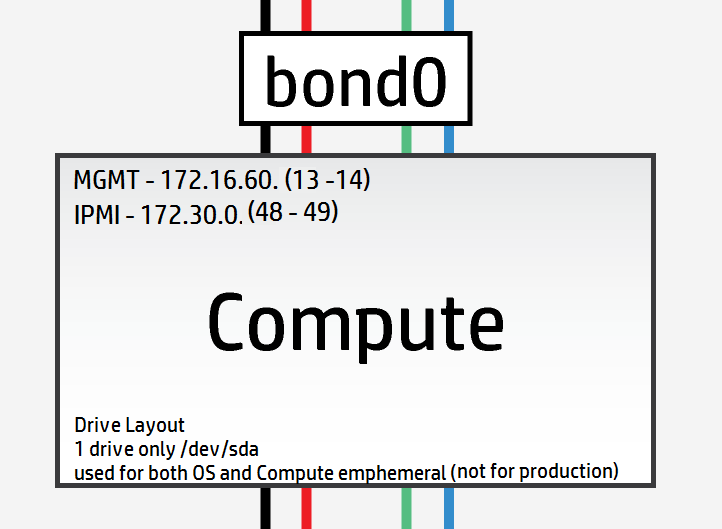
Mein Labor hat jedoch nur Compute-Knoten mit einem einzelnen Laufwerk, daher musste ich das Layout wie folgt ändern, um es anzupassen
#
# (c) Copyright 2015 Hewlett Packard Enterprise Development Company LP
#
# Licensed under the Apache License, Version 2.0 (the "License"); you may
# not use this file except in compliance with the License. You may obtain
# a copy of the License at
#
# http://www.apache.org/licenses/LICENSE-2.0
#
# Unless required by applicable law or agreed to in writing, software
# distributed under the License is distributed on an "AS IS" BASIS, WITHOUT
# WARRANTIES OR CONDITIONS OF ANY KIND, either express or implied. See the
# License for the specific language governing permissions and limitations
# under the License.
#
---
product:
version: 2

disk-models:
- name: COMPUTE-DISKS
# Disk model to be used for compute nodes
# /dev/sda_root is used as a volume group for /, /var/log and /var/crash
# sda_root is a templated value to align with whatever partition is really used
# This value is checked in os config and replaced by the partition actually used
# on sda e.g. sda1 or sda5
# /dev/sdb is used as a volume group for /var/lib (for VM storage)
# Additional discs can be added to either volume group

volume-groups:
- name: hlm-vg
physical-volumes:
- /dev/sda_root

logical-volumes:
# The policy is not to consume 100% of the space of each volume group.
# 5% should be left free for snapshots and to allow for some flexibility.
- name: root
size: 35%
fstype: ext4
mount: /
- name: log
size: 20%
mount: /var/log
fstype: ext4
mkfs-opts: -O large_file
- name: crash
size: 10%
mount: /var/crash
fstype: ext4
mkfs-opts: -O large_file
- name: compute
size: 30%
mount: /var/lib/nova
fstype: ext4
mkfs-opts: -O large_file
disks_osd.yml
In den OSD-Servern sind 8 physische Laufwerke verfügbar. Keines dieser Laufwerke ist eine SSD, daher gibt es sehr wenig Sinn in der Journalisierung, wie ich es verstehe. Die optimalste Konfiguration wäre wie folgt unter Verwendung nur eines einzelnen Laufwerks für das OS und der verbleibenden Laufwerke als OSDs:
#
# (c) Copyright 2015 Hewlett Packard Enterprise Development Company LP
#
# Licensed under the Apache License, Version 2.0 (the "License"); you may
# not use this file except in compliance with the License. You may obtain
# a copy of the License at
#
# http://www.apache.org/licenses/LICENSE-2.0
#
# Unless required by applicable law or agreed to in writing, software
# distributed under the License is distributed on an "AS IS" BASIS, WITHOUT
# WARRANTIES OR CONDITIONS OF ANY KIND, either express or implied. See the
# License for the specific language governing permissions and limitations
# under the License.
#
---
product:
version: 2

disk-models:
- name: OSD-DISKS
# Disk model to be used for Ceph OSD nodes
# /dev/sda_root is used as a volume group for /, /var/log and /var/crash
# sda_root is a templated value to align with whatever partition is really used
# This value is checked in os config and replaced by the partition actually used
# on sda e.g. sda1 or sda5

volume-groups:
- name: hlm-vg
physical-volumes:
- /dev/sda_root

logical-volumes:
# The policy is not to consume 100% of the space of each volume group.
# 5% should be left free for snapshots and to allow for some flexibility.
- name: root
size: 30%
fstype: ext4
mount: /
- name: log
size: 45%
mount: /var/log
fstype: ext4
mkfs-opts: -O large_file
- name: crash
size: 20%
mount: /var/crash
fstype: ext4
mkfs-opts: -O large_file
consumer:
name: os

# Disks to be used by Ceph
# Additional disks can be added if available
device-groups:
- name: ceph-osd-data0
devices:
- name: /dev/sdb
consumer:
name: ceph
attrs:
usage: data
- name: ceph-osd-data1
devices:
- name: /dev/sdc
consumer:
name: ceph
attrs:
usage: data
- name: ceph-osd-data2
devices:
- name: /dev/sdd
consumer:
name: ceph
attrs:
usage: data
- name: ceph-osd-data3
devices:
- name: /dev/sde
consumer:
name: ceph
attrs:
usage: data
- name: ceph-osd-data4
devices:
- name: /dev/sdf
consumer:
name: ceph
attrs:
usage: data
- name: ceph-osd-data5
devices:
- name: /dev/sdg
consumer:
name: ceph
attrs:
usage: data
- name: ceph-osd-data6
devices:
- name: /dev/sdh
consumer:
name: ceph
attrs:
usage: data
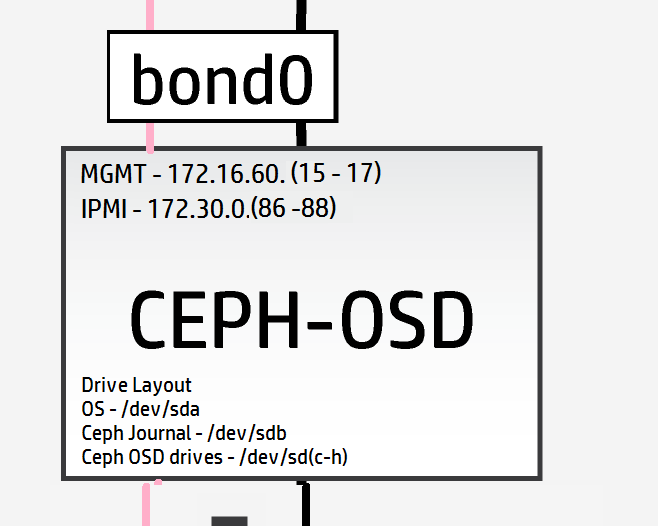
Wieder einmal möchte ich, trotz des Mangels an hochleistungsfähigen SSDs, die Mechanik der Ceph-Journalisierungsfunktion testen, also werde ich ein Standardlaufwerk als Journal verwenden. Dies ergibt ein Verhältnis von Journal zu OSD von 1:6 (dieses Verhältnis ist ziemlich bedeutungslos). Die Konfiguration wird nun zu
#
# (c) Copyright 2015 Hewlett Packard Enterprise Development Company LP
#
# Licensed under the Apache License, Version 2.0 (the "License"); you may
# not use this file except in compliance with the License. You may obtain
# a copy of the License at
#
# http://www.apache.org/licenses/LICENSE-2.0
#
# Unless required by applicable law or agreed to in writing, software
# distributed under the License is distributed on an "AS IS" BASIS, WITHOUT
# WARRANTIES OR CONDITIONS OF ANY KIND, either express or implied. See the
# License for the specific language governing permissions and limitations
# under the License.
#
---
product:
version: 2

disk-models:
- name: OSD-DISKS
# Disk model to be used for Ceph OSD nodes
# /dev/sda_root is used as a volume group for /, /var/log and /var/crash
# sda_root is a templated value to align with whatever partition is really used
# This value is checked in os config and replaced by the partition actually used
# on sda e.g. sda1 or sda5

volume-groups:
- name: hlm-vg
physical-volumes:
- /dev/sda_root

logical-volumes:
# The policy is not to consume 100% of the space of each volume group.
# 5% should be left free for snapshots and to allow for some flexibility.
- name: root
size: 30%
fstype: ext4
mount: /
- name: log
size: 45%
mount: /var/log
fstype: ext4
mkfs-opts: -O large_file
- name: crash
size: 20%
mount: /var/crash
fstype: ext4
mkfs-opts: -O large_file
consumer:
name: os

# Disks to be used by Ceph
# Additional disks can be added if available
device-groups:
- name: ceph-osd-data-and-shared-journal-set-1
devices:
- name: /dev/sdc
consumer:
name: ceph
attrs:
usage: data
journal_disk: /dev/sdb
- name: ceph-osd-data-and-shared-journal-set-2
devices:
- name: /dev/sdd
consumer:
name: ceph
attrs:
usage: data
journal_disk: /dev/sdb
- name: ceph-osd-data-and-shared-journal-set-3
devices:
- name: /dev/sde
consumer:
name: ceph
attrs:
usage: data
journal_disk: /dev/sdb
- name: ceph-osd-data-and-shared-journal-set-4
devices:
- name: /dev/sdf
consumer:
name: ceph
attrs:
usage: data
journal_disk: /dev/sdb
- name: ceph-osd-data-and-shared-journal-set-5
devices:
- name: /dev/sdg
consumer:
name: ceph
attrs:
usage: data
journal_disk: /dev/sdb
- name: ceph-osd-data-and-shared-journal-set-6
devices:
- name: /dev/sdh
consumer:
name: ceph
attrs:
usage: data
journal_disk: /dev/sdb
Mit den abgeschlossenen Server-Festplattenlayouts bleibt uns nur noch die Netzwerkkonfigurationsdatei zwischen uns und dem tatsächlichen Bereitstellungsstart.
Hier ist das Netzwerklayout erneut, um das Hin- und Herblättern zu sparen (zoomen, um mehr Details auf den Servern zu sehen)
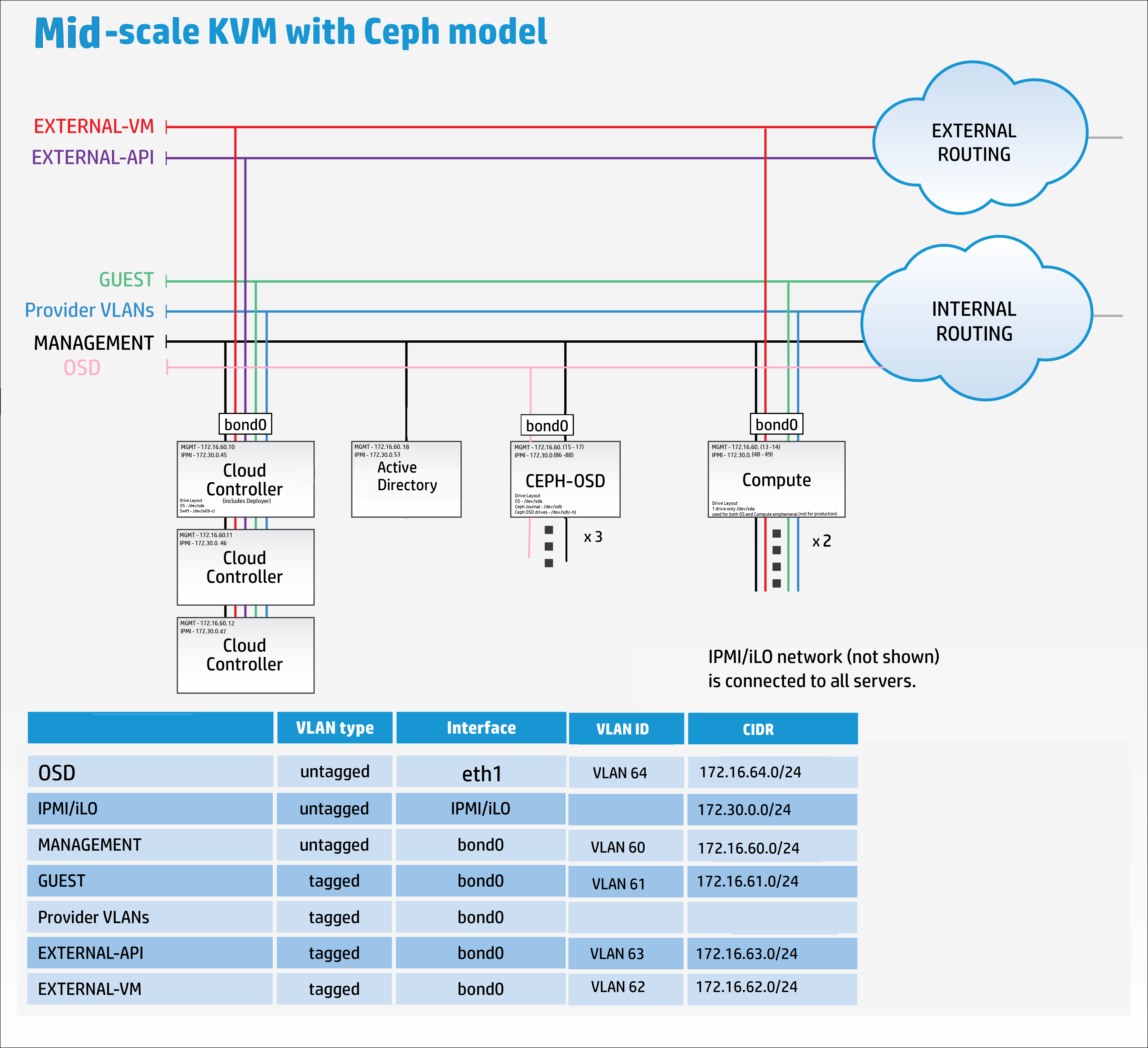
net_interfaces.yml
Hier müssen wir daran denken, die Details des neuen OSD-Replikationsnetzwerks hinzuzufügen. Noch einmal zur Klarstellung: In einer mittelgroßen bis großen Ceph-Produktionsbereitstellung würde das OSD-Replikationsnetzwerk auf eigenen physischen Netzwerkkarten liegen.
Ich habe nicht genügend Verkabelung und Hardware, um dies zu tun, also werde ich es zu Demonstrationszwecken nur in bond0 trunken.
Ändern Sie alle Gerätenamen, um den zuvor erfassten NIC-Zuordnungen zu entsprechen.
#
# (c) Copyright 2015 Hewlett Packard Enterprise Development Company LP
#
# Licensed under the Apache License, Version 2.0 (the "License"); you may
# not use this file except in compliance with the License. You may obtain
# a copy of the License at
#
# http://www.apache.org/licenses/LICENSE-2.0
#
# Unless required by applicable law or agreed to in writing, software
# distributed under the License is distributed on an "AS IS" BASIS, WITHOUT
# WARRANTIES OR CONDITIONS OF ANY KIND, either express or implied. See the
# License for the specific language governing permissions and limitations
# under the License.
#
---
product:
version: 2

interface-models:
# These examples uses hed3 and hed4 as a bonded
# pair for all networks on all three server roles
#
# Edit the device names and bond options
# to match your environment
#
- name: CONTROLLER-INTERFACES
network-interfaces:
- name: BOND0
device:
name: bond0
bond-data:
options:
mode: active-backup
miimon: 200
primary: hed0
provider: linux
devices:
- name: hed0
- name: hed1
network-groups:
- EXTERNAL-API
- EXTERNAL-VM
- GUEST
- MANAGEMENT

- name: COMPUTE-INTERFACES
network-interfaces:
- name: BOND0
device:
name: bond0
bond-data:
options:
mode: active-backup
miimon: 200
primary: hed0
provider: linux
devices:
- name: hed0
- name: hed1
network-groups:
- EXTERNAL-VM
- GUEST
- MANAGEMENT

- name: OSD-INTERFACES
network-interfaces:
- name: BOND0
device:
name: bond0
bond-data:
options:
mode: active-backup
miimon: 200
primary: hed0
provider: linux
devices:
- name: hed0
- name: hed1
network-groups:
- MANAGEMENT
- OSD
Referenz zu Bonding-Modi für die Neugierigen
networks.yml
Konfigurieren Sie diese Datei, um den Netzwerkeinstellungen in Ihren Parametern zu entsprechen.
#
# (c) Copyright 2015 Hewlett Packard Enterprise Development Company LP
#
# Licensed under the Apache License, Version 2.0 (the "License"); you may
# not use this file except in compliance with the License. You may obtain
# a copy of the License at
#
# http://www.apache.org/licenses/LICENSE-2.0
#
# Unless required by applicable law or agreed to in writing, software
# distributed under the License is distributed on an "AS IS" BASIS, WITHOUT
# WARRANTIES OR CONDITIONS OF ANY KIND, either express or implied. See the
# License for the specific language governing permissions and limitations
# under the License.
#
---
product:
version: 2

networks:
#
# This example uses the following networks
#
# Network CIDR VLAN
# ------- ---- ----
# External API 10.0.1.0/24 101 (tagged)
# External VM see note 1 102 (tagged)
# Guest 10.1.1.0/24 103 (tagged)
# Management 192.168.10.0/24 100 (untagged)
#
# Notes:
# 1. Defined as part of Neutron configuration
#
# Modify these values to match your environment
#
- name: EXTERNAL-API-NET
vlanid: 61
tagged-vlan: true
cidr: 172.16.61.0/24
gateway-ip: 172.16.61.1
network-group: EXTERNAL-API

- name: EXTERNAL-VM-NET
vlanid: 62
tagged-vlan: true
network-group: EXTERNAL-VM

- name: GUEST-NET
vlanid: 63
tagged-vlan: true
cidr: 172.16.63.0/24
gateway-ip: 172.16.63.1
network-group: GUEST

- name: MANAGEMENT-NET
vlanid: 60
tagged-vlan: false
cidr: 172.16.60.0/24
gateway-ip: 172.16.60.1
network-group: MANAGEMENT

- name: OSD-NET
vlanid: 64
tagged-vlan: true
cidr: 172.16.64.0/24
gateway-ip: 172.16.64.1
network-group: OSD
Nun müssen wir die Netzwerkgruppen-Datei ändern, um das neue OSD-Netzwerk aufzunehmen
network_groups.yml
#
# (c) Copyright 2015 Hewlett Packard Enterprise Development Company LP
#
# Licensed under the Apache License, Version 2.0 (the "License"); you may
# not use this file except in compliance with the License. You may obtain
# a copy of the License at
#
# http://www.apache.org/licenses/LICENSE-2.0
#
# Unless required by applicable law or agreed to in writing, software
# distributed under the License is distributed on an "AS IS" BASIS, WITHOUT
# WARRANTIES OR CONDITIONS OF ANY KIND, either express or implied. See the
# License for the specific language governing permissions and limitations
# under the License.
#
---
product:
version: 2

network-groups:

#
# External API
#
# This is the network group that users will use to
# access the public API endpoints of your cloud
#
- name: EXTERNAL-API
hostname-suffix: extapi

load-balancers:
- provider: ip-cluster
name: extlb
# If external-name is set then public urls in keystone
# will use this name instead of the IP address
#You must either set this to a name that can be resolved in your network
# or comment out this line to use IP addresses
external-name:

roles:
- public
tls-components:
- default
cert-file: my-public-cert
# This is the name of the certificate that will be used on load balancer.
# Replace this with name of file in "~helion/my_cloud/config/tls/certs/".
# This is the certificate that matches your setting for external-name
#
# Note that it is also possible to have per service certificates:
#
# cert-file:
# default: my-public-cert
# horizon: my-horizon-cert
# nova-api: my-nova-cert
#
#

# External VM
#
# This is the network group that will be used to provide
# external access to VMs (via floating IP Addresses)
#
- name: EXTERNAL-VM
tags:
- neutron.l3_agent.external_network_bridge

#
# GUEST
#
# This is the network group that will be used to provide
# private networks to VMs
#
- name: GUEST
hostname-suffix: guest
tags:
- neutron.networks.vxlan

#
# Management
#
# This is the network group that will be used to for
# management traffic within the cloud.
#
# The interface used by this group will be presented
# to Neutron as physnet1, and used by provider VLANS
#
- name: MANAGEMENT
hostname-suffix: mgmt
hostname: true

component-endpoints:
- default

routes:
- default

load-balancers:
- provider: ip-cluster
name: lb
components:
- default
roles:
- internal
- admin

tags:
- neutron.networks.vlan:
provider-physical-network: physnet1

#
# OSD
#
#
# This network group will be used to carry the to carry the internal Ceph
# cluster replication traffic
#
- name: OSD
hostanme-suffix: osd

component-endpoints:
- ceph-osd-internal
Ups, Entschuldigung, habe ich gesagt, wir wären fast fertig – ich habe vergessen, die Ceph-Basis-Konfigurationen zu erwähnen.
Als Minimum für die Ceph-Konfiguration wird empfohlen, eine eindeutige Cluster-ID zum FSID-Parameter in ~/helion/my_cloud/config/ceph/settings.yml hinzuzufügen
Die Standardwerte werden jedoch für eine Lab-Bereitstellung funktionieren.
Hinweis: Die Online-Dokumentation empfiehlt die Verwendung von „uuidgen“, um eine neue eindeutige ID zu erstellen, aber diese Anwendung muss zuerst installiert werden.
sudo apt-get install uuid-runtime
uuidgen
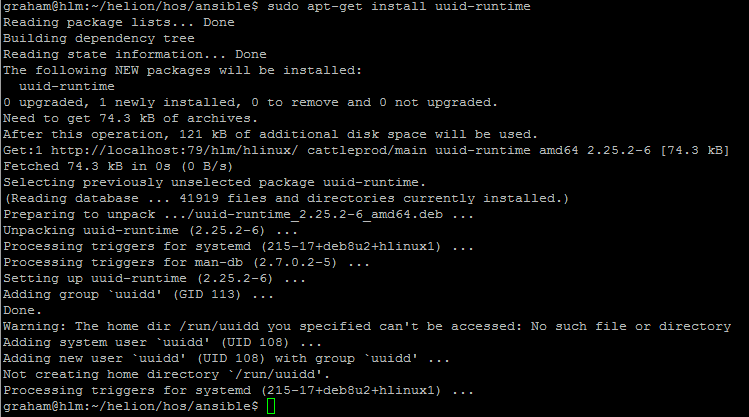
Ich habe 5e23fd0c-b449-43e3-a34e-fa0952c30e81 für die Cluster-FSID verwendet

#
# (c) Copyright 2015 Hewlett Packard Enterprise Development Company LP
#
# Licensed under the Apache License, Version 2.0 (the "License"); you may
# not use this file except in compliance with the License. You may obtain
# a copy of the License at
#
# http://www.apache.org/licenses/LICENSE-2.0
#
# Unless required by applicable law or agreed to in writing, software
# distributed under the License is distributed on an "AS IS" BASIS, WITHOUT
# WARRANTIES OR CONDITIONS OF ANY KIND, either express or implied. See the
# License for the specific language governing permissions and limitations
# under the License.
#
---

# Variables specific to all ceph services
fsid: 5e23fd0c-b449-43e3-a34e-fa0952c30e81
ceph_user: root
ceph_group: root
ceph_cluster: ceph
ceph_release: firefly
osd_pool_default_size: 3
osd_pool_default_pg_num: 128

# Variables specific to OSD
fstype: xfs
zap_data_disk: True
persist_mountpoint: fstab
osd_settle_time: 10
osd_journal_size: 5120
data_disk_poll_attempts: 5
data_disk_poll_interval: 12

# Variables specific to MON
mon_default_dir: /var/lib/ceph/mon/{{ ceph_cluster }}

# Additional parameters of ceph configuration can be injected via below section
# extra:
# section1:
# key1: value
# key2: value
# section2:
# key1: value
# key2: value
Auch für den Ceph-Clienten geben Sie eine eindeutige secret_id in ~/helion/my_cloud/config/ceph/user_model.yml an
In meinem Fall werde ich 7d4304a4-a4d2-4cea-ba3c-bbbdc8d11bd4 für die secret_id verwenden

#
# (c) Copyright 2015 Hewlett Packard Enterprise Development Company LP
#
# Licensed under the Apache License, Version 2.0 (the "License"); you may
# not use this file except in compliance with the License. You may obtain
# a copy of the License at
#
# http://www.apache.org/licenses/LICENSE-2.0
#
# Unless required by applicable law or agreed to in writing, software
# distributed under the License is distributed on an "AS IS" BASIS, WITHOUT
# WARRANTIES OR CONDITIONS OF ANY KIND, either express or implied. See the
# License for the specific language governing permissions and limitations
# under the License.
#
---

product:
version: 2

ceph_user_models:
- user:
name: cinder
type: openstack
secret_id: 7d4304a4-a4d2-4cea-ba3c-bbbdc8d11bd4
pools:
- name: volumes
attrs:
creation_policy: eager
type: replicated
replica_size: 3
permission: rwx
pg: 100
usage:
consumer: cinder-volume
- name: vms
attrs:
creation_policy: eager
type: replicated
replica_size: 3
permission: rwx
pg: 100
usage:
consumer: nova
- name: images
attrs:
creation_policy: lazy
permission: rx
- user:
name: glance
type: openstack
pools:
- name: images
attrs:
creation_policy: eager
type: replicated
replica_size: 3
permission: rwx
pg: 128
usage:
consumer: glance-datastore
- user:
name: cinder-backup
type: openstack
pools:
- name: backups
attrs:
creation_policy: eager
type: replicated
replica_size: 3
permission: rwx
pg: 128
usage:
consumer: cinder-backup
#
# (c) Copyright 2015 Hewlett Packard Enterprise Development Company LP
#
# Licensed under the Apache License, Version 2.0 (the "License"); you may
# not use this file except in compliance with the License. You may obtain
# a copy of the License at
#
# http://www.apache.org/licenses/LICENSE-2.0
#
# Unless required by applicable law or agreed to in writing, software
# distributed under the License is distributed on an "AS IS" BASIS, WITHOUT
# WARRANTIES OR CONDITIONS OF ANY KIND, either express or implied. See the
# License for the specific language governing permissions and limitations
# under the License.
#
---
product:
version: 2

#
# HOS will create firewall rules to enable the required access for
# all of the deployed services. Use this section to define any
# additional access.
#
# Each group of rules can be applied to one or more network groups
# Examples are given for ping and ssh
#
# Names of rules, (e.g. "PING") are arbitrary and have no special significance
#

firewall-rules:

# - name: SSH
# # network-groups is a list of all the network group names
# # that the rules apply to
# network-groups:
# - MANAGEMENT
# rules:
# - type: allow
# # range of remote addresses in CIDR format that this
# # rule applies to
# remote-ip-prefix: 0.0.0.0/0
# port-range-min: 22
# port-range-max: 22
# # protocol must be one of: null, tcp, udp or icmp
# protocol: tcp

- name: PING
network-groups:
- MANAGEMENT
- GUEST
- EXTERNAL-API
- OSD
rules:
# open ICMP echo request (ping)
- type: allow
remote-ip-prefix: 0.0.0.0/0
# icmp type
port-range-min: 8
# icmp code
port-range-max: 0
protocol: icmp
Okay, es gibt also noch eine weitere Datei, die aktualisiert werden muss, und in 3 Wochen werden Sie dankbar sein, dass Sie es getan haben…Vermutungen? Ja, genau, die ReadMe.MD-Datei. Wir alle lieben Dokumentation, oder? [Ja, ich sehe die Ironie hier]
README.MD
README.MD

##Helion Entry Scale Cloud with Ceph and Separate OSD Replication Network##

## Updated - 15/01/16
## Author - Grazzer
## Site - http://allthingscloud.eu
## Twitter - @allthingsclowd

The input files in this example deploy a cloud that has the following characteristics:

### Control Planes ###

- A single control plane consisting of three servers that co-host all of the required services. In addition, each hosts Ceph monitor service as well.

###Resource Pools###

- Two compute Node

- Three Ceph OSD Nodes

*Additional resource nodes can be added to the configuration.*

*Minimal Swift Resources are provided by the control plane*

###Deployer Node###

This configuration runs the lifecycle-manager (formerly referred to as the deployer) on a control plane node.
You need to include this node address in your servers.yml definition. This function does not need a dedicated network.

*The minimum server count for this example is therefore 7 servers (Control Plane (x3) + Compute (x1) + OSD (x3))*

An example set of servers are defined in ***data/servers.yml***. You will need to modify this file to reflect your specific environment.

###Networking###

The example requires the following networks:

IPMI/iLO network, connected to the deployer and the IPMI/iLO ports of all servers

A pair of bonded NICs which are used by the following networks:

- External API - This is the network that users will use to make requests to the cloud
- External VM - This is the network that will be used to provide access to VMs (via floating IP addresses)
- Guest - This is the network that will carry traffic between VMs on private networks within the cloud
- Cloud Management - This is the network that will be used for all internal traffic between the cloud services, This network is also
used to install and configure the nodes. This network needs to be on an untagged VLAN
- OSD - This is the network that is used to carry all the Ceph OSD replication traffic

Note that the EXTERNAL\_API network must be reachable from the EXTERNAL\_VM network if you want VMs to be able to make API calls to the cloud.

An example set of networks are defined in ***data/networks.yml***. You will need to modify this file to reflect your environment.

The example uses the devices hed3 & hed4 as a bonded network for all services. If you need to modify these
for your environment they are defined in ***data/net_interfaces.yml*** The network devices eth3 & eth4 are renamed to devices hed4 & hed5 using the PCI bus mappings secified in ***data/nic_mappings.yml***. You may need to modify the PCI bus addresses to match your system.

###Local Storage###

All servers should present a single OS disk, protected by a RAID controller. This disk needs to be at least 512GB in capacity. In addition the example configures one additional disk depending on the role of the server:

- Controllers: /dev/sdb & /dev/sdc is configured to be used by Swift
- Compute Severs: /dev/sda is configured as both OS and VM storage (not production grade)
- OSD Servers: /dev/sdc, /dev/sdd, /dev/sde, /dev/sdf, /dev/sdg and /dev/sdh are configured for OSD data and /dev/sdb for journal storage

Additional discs can be configured for any of these roles by editing the corresponding ***data/disks_*.yml*** file
Wir haben nun die Konfiguration unseres Cloud-Modells abgeschlossen.
Hinweis: WENN SIE DIE HELION DEVELOPMENT PLATFORM VERWENDEN WOLLEN, SOLLTE AUCH EIN SERVICE-NETZWERK JETZT HINZUGEFÜGT WERDEN siehe hier.