

Schließlich kann ich einige Heat-Stacks für die Fujitsu K5 OpenStack Public Cloud-Plattform veröffentlichen. Die letzten Wochen waren sehr geschäftig, sodass ich kaum Zeit zum Bloggen hatte.
Heat ist das Orchestrierungsprojekt von OpenStack und wird im Allgemeinen verwendet, wenn Sie die Anforderung haben, ein Infrastruktur-Muster (Template) schnell und konsistent in Ihrem OpenStack K5 IaaS-Cloud oder jeder anderen OpenStack-Cloud aufzubauen. Der Vorteil dabei ist, dass, wie unten zu sehen, das Template in einer YAML-Datei codiert ist, die ich in Github gespeichert habe. Nun habe ich die Möglichkeit, meine Infrastruktur ebenso wie meinen Anwendungscode unter Versionskontrolle zu stellen, was zu weniger Überraschungen bei der Bereitstellung getesteter IaC (Infrastructure as Code) Versionen führen sollte. Dies ist eine Voraussetzung, wenn Sie ein operatives Modell für Continuous Integration und Continuous Deployment anstreben.
Das erste Beispiel unten, das auch hier verfügbar ist, baut die folgende Infrastruktur „automagisch“ auf:
- 2 x L2-Netzwerke
- 2 x Subnetze
- Hinweis: Zusätzliche Routen wurden den Subnetzen hinzugefügt – diese sind für diesen Beitrag nicht erforderlich
- 1 x Windows-Server
- mit einer zusätzlichen Block-Speicherplatte
- Init-Skript zum Konfigurieren und Einbinden der neuen Platte als „D:\“
- DHCP-zugewiesene IP-Adresse
- Admin-Benutzer auf k5user festgelegt
- angeschlossen an das Management-Netzwerk
- 1 x Linux-Server
- mit einer zusätzlichen Block-Speicherplatte
- Init-Skript zum Konfigurieren und Einbinden der neuen Platte zum Bereitstellungszeitpunkt
- feste IP-Adresszuweisung
- Admin-Benutzer auf K5user festgelegt
- angeschlossen an das Shared-Services-Netzwerk
- 2 x Sicherheitsgruppen (SGs)
- Warnung: Diese SGs sind WIT OFFEN – Bitte stellen Sie sicher, dass Sie diese SGs entsprechend für Ihre Umgebung konfigurieren.
Beispiel – Projekt 1 Stack
Diese Datei enthält versteckte oder bidirektionale Unicode-Zeichen, die anders interpretiert oder kompiliert werden können, als es unten erscheint. Um sie zu überprüfen, öffnen Sie die Datei in einem Editor, der versteckte Unicode-Zeichen anzeigt.
Mehr über bidirektionale Unicode-Zeichen erfahren
| heat_template_version: 2013-05-23 | |
| # Author: Graham Land | |
| # Date: 25/09/2016 | |
| # Purpose: Project 1 Demo HOT Infrastructure Template | |
| # Twitter: @allthingsclowd | |
| # Blog : https://allthingscloud.eu | |
| description: K5 template to build an environment within a Project | |
| # Input parameters | |
| parameters: | |
| red_image: | |
| type: string | |
| label: Image name or ID | |
| description: Redhat 7.2 image to be used for compute instance | |
| default: "Red Hat Enterprise Linux 7.2 64bit (English) 01" | |
| win_image: | |
| type: string | |
| label: Image name or ID | |
| description: Windows Server 2012 R2 SE image to be used for compute instance | |
| default: "Windows Server 2012 R2 SE 64bit (English) 01" | |
| az: | |
| type: string | |
| label: Availability Zone | |
| description: Region AZ to use | |
| default: "uk-1b" | |
| default-sshkey: | |
| type: string | |
| label: ssh key injected into linux systems | |
| description: ssh key for linux builds | |
| default: "demostack" | |
| # K5 Infrastructure resources to be built | |
| resources: | |
| # Create a new private network | |
| management_net: | |
| type: OS::Neutron::Net | |
| properties: | |
| availability_zone: { get_param: az } | |
| name: "Management" | |
| # Create a new subnet on the private network | |
| management_subnet: | |
| type: OS::Neutron::Subnet | |
| depends_on: management_net | |
| properties: | |
| availability_zone: { get_param: az } | |
| name: "Management_Subnet" | |
| network_id: { get_resource: management_net } | |
| cidr: "172.24.201.0/26" | |
| allocation_pools: | |
| – start: "172.24.201.1" | |
| end: "172.24.201.15" | |
| gateway_ip: "172.24.201.62" | |
| host_routes: [{"nexthop": "172.24.200.81", "destination": "172.24.202.0/23"}] | |
| # Create a new private network | |
| shared_services_net: | |
| type: OS::Neutron::Net | |
| properties: | |
| availability_zone: { get_param: az } | |
| name: "Shared_Services" | |
| # Create a new subnet on the private network | |
| shared_services_subnet: | |
| type: OS::Neutron::Subnet | |
| depends_on: shared_services_net | |
| properties: | |
| availability_zone: { get_param: az } | |
| name: "Shared_Services_Subnet" | |
| network_id: { get_resource: shared_services_net } | |
| cidr: "172.24.201.64/26" | |
| gateway_ip: "172.24.201.126" | |
| allocation_pools: | |
| – start: "172.24.201.90" | |
| end: "172.24.201.105" | |
| host_routes: [{"nexthop": "172.24.200.81", "destination": "172.24.202.0/23"}] | |
| # Create a new router | |
| project1_router: | |
| type: OS::Neutron::Router | |
| properties: | |
| availability_zone: { get_param: az } | |
| name: "Project2_Router" | |
| # Connect an interface on the private network's subnet to the router | |
| project1_router_interface1: | |
| type: OS::Neutron::RouterInterface | |
| depends_on: project1_router | |
| properties: | |
| router_id: { get_resource: project1_router } | |
| subnet_id: { get_resource: management_subnet } | |
| # Connect an interface on the private network's subnet to the router | |
| project1_router_interface2: | |
| type: OS::Neutron::RouterInterface | |
| depends_on: project1_router | |
| properties: | |
| router_id: { get_resource: project1_router } | |
| subnet_id: { get_resource: shared_services_subnet } | |
| # Create a security group | |
| server_security_group1: | |
| type: OS::Neutron::SecurityGroup | |
| properties: | |
| description: Add security group rules for server | |
| name: "Windows_SG" | |
| rules: | |
| – remote_ip_prefix: 0.0.0.0/0 | |
| protocol: udp | |
| – remote_ip_prefix: 0.0.0.0/0 | |
| protocol: tcp | |
| – remote_ip_prefix: 0.0.0.0/0 | |
| protocol: icmp | |
| # Create a security group | |
| server_security_group2: | |
| type: OS::Neutron::SecurityGroup | |
| properties: | |
| description: Add security group rules for server | |
| name: "Linux_SG" | |
| rules: | |
| – remote_ip_prefix: 0.0.0.0/0 | |
| protocol: udp | |
| – remote_ip_prefix: 0.0.0.0/0 | |
| protocol: tcp | |
| – remote_ip_prefix: 0.0.0.0/0 | |
| protocol: icmp | |
| ################################ Adding a Server Start ############################## | |
| # Create a data volume for use with the server | |
| data_vol_server1: | |
| type: OS::Cinder::Volume | |
| properties: | |
| availability_zone: { get_param: az } | |
| description: Data volume | |
| name: "data-vol" | |
| size: 50 | |
| volume_type: "M1" | |
| # Create a system volume for use with the server | |
| sys-vol_server1: | |
| type: OS::Cinder::Volume | |
| properties: | |
| availability_zone: { get_param: az } | |
| name: "boot-vol" | |
| size: 80 | |
| volume_type: "M1" | |
| image : { get_param: win_image } | |
| # Build a server using the system volume defined above | |
| server1: | |
| type: OS::Nova::Server | |
| properties: | |
| key_name: { get_param: default-sshkey } | |
| image: { get_param: win_image } | |
| flavor: "S-4" | |
| admin_user: "k5user" | |
| metadata: { "admin_pass": Password12345 } | |
| block_device_mapping: [{"volume_size": "80", "volume_id": {get_resource: sys-vol_server1}, "delete_on_termination": True, "device_name": "/dev/vda"}] | |
| name: "Hello_Windows_P1" | |
| user_data: | |
| #ps1 | |
| $d = Get-Disk | |
| $d | |
| $d | |
| $p = $d | |
| $p | |
| user_data_format: RAW | |
| networks: ["uuid": {get_resource: management_net} ] | |
| # Attach previously defined data-vol to the server | |
| attach_vol1: | |
| type: OS::Cinder::VolumeAttachment | |
| depends_on: [ data_vol_server1, server1 ] | |
| properties: | |
| instance_uuid: {get_resource: server1} | |
| mountpoint: "/dev/vdb" | |
| volume_id: {get_resource: data_vol_server1} | |
| ################################ Adding a Server End ################################ | |
| ################################ Adding a Server Start ############################## | |
| # Create a new port for the server interface, assign an ip address and security group | |
| server2_port: | |
| type: OS::Neutron::Port | |
| depends_on: [ project1_router_interface2,server_security_group2 ] | |
| properties: | |
| availability_zone: { get_param: az } | |
| network_id: { get_resource: shared_services_net } | |
| security_groups: [{ get_resource: server_security_group2 }] | |
| fixed_ips: | |
| – subnet_id: { get_resource: shared_services_subnet } | |
| ip_address: '172.24.201.66' | |
| # Create a data volume for use with the server | |
| data_vol_server2: | |
| type: OS::Cinder::Volume | |
| properties: | |
| availability_zone: { get_param: az } | |
| description: Data volume | |
| name: "data-vol" | |
| size: 40 | |
| volume_type: "M1" | |
| # Create a system volume for use with the server | |
| sys-vol_server2: | |
| type: OS::Cinder::Volume | |
| properties: | |
| availability_zone: { get_param: az } | |
| name: "boot-vol" | |
| size: 40 | |
| volume_type: "M1" | |
| image : { get_param: red_image } | |
| # Build a server using the system volume defined above | |
| server2: | |
| type: OS::Nova::Server | |
| depends_on: [ server2_port ] | |
| properties: | |
| key_name: { get_param: default-sshkey } | |
| image: { get_param: red_image } | |
| flavor: "S-2" | |
| block_device_mapping: [{"volume_size": "40", "volume_id": {get_resource: sys-vol_server2}, "delete_on_termination": True, "device_name": "/dev/vda"}] | |
| name: "Hello_Linux_P1" | |
| admin_user: "k5user" | |
| user_data: | |
| str_replace: | |
| template: | |
| #cloud-config | |
| write_files: | |
| – content: | |
| #!/bin/bash | |
| voldata_id=%voldata_id% | |
| voldata_dev="/dev/disk/by-id/virtio-$(echo ${voldata_id} | |
| mkfs.ext4 ${voldata_dev} | |
| mkdir -pv /mnt/appdata | |
| echo "${voldata_dev} /mnt/appdata ext4 defaults 1 2" >> /etc/fstab | |
| mount /mnt/appdata | |
| chmod 0777 /mnt/appdata | |
| path: /tmp/format-disks | |
| permissions: '0700' | |
| runcmd: | |
| – /tmp/format-disks | |
| params: | |
| "%voldata_id%": { get_resource: data_vol_server2 } | |
| user_data_format: RAW | |
| networks: ["uuid": {get_resource: shared_services_net} ] | |
| # Attach previously defined data-vol to the server | |
| attach_vol2: | |
| type: OS::Cinder::VolumeAttachment | |
| depends_on: [ data_vol_server2, server2 ] | |
| properties: | |
| instance_uuid: {get_resource: server2} | |
| mountpoint: "/dev/vdb" | |
| volume_id: {get_resource: data_vol_server2} | |
| ################################ Adding a Server End ################################ | |
view raw
Fujitsu-K5-Example-Heat-Stack-Project1.YAML
hosted with ❤ by GitHub
Laden Sie das Heat-Template über die Stack-Option in der K5 IaaS-GUI wie folgt hoch:
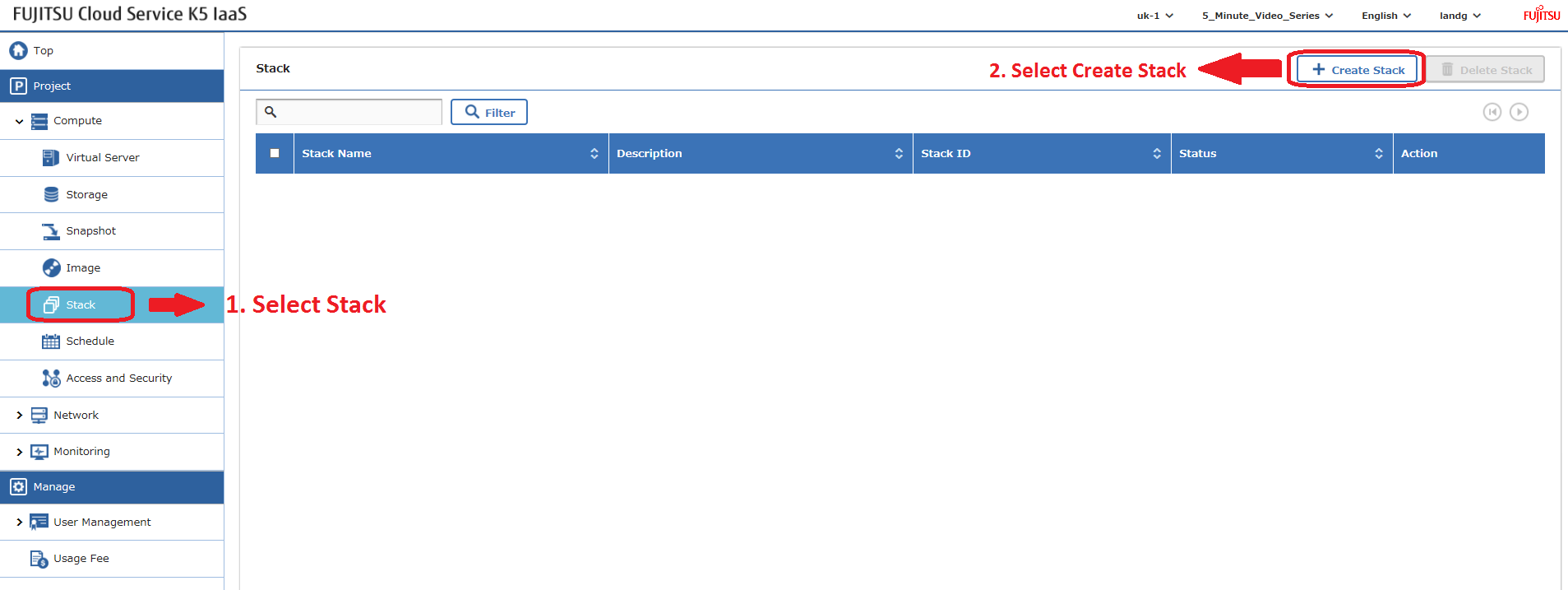
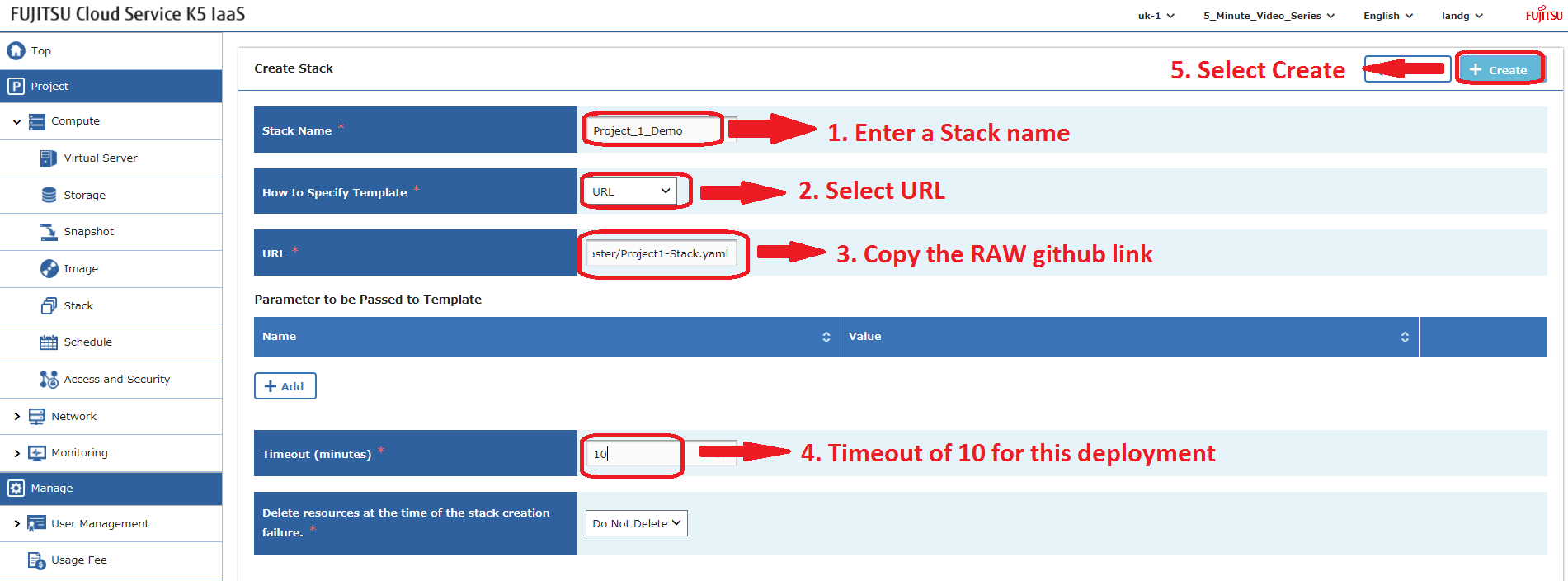
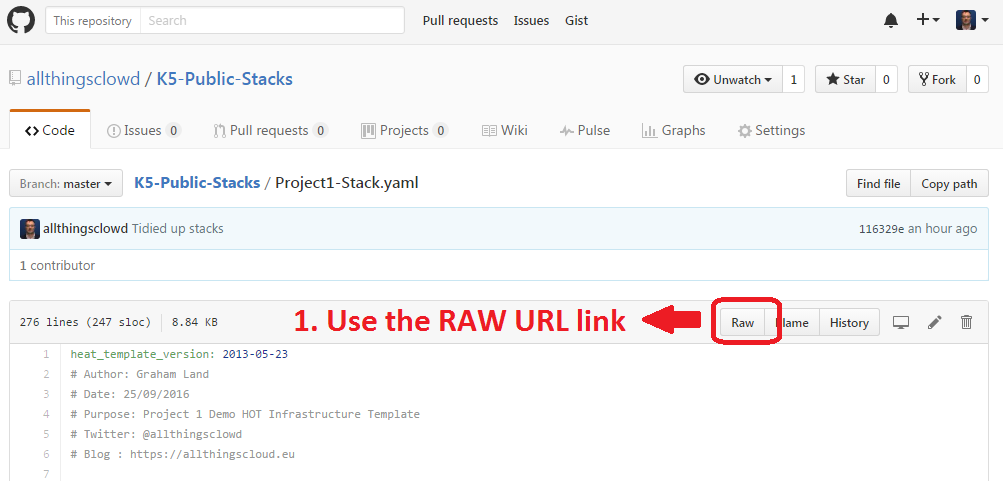
Heat-Stacks können auch über die API bereitgestellt werden – ein Blogbeitrag dazu folgt.
Beispiel – Projekt 2 Stack
Diese Datei enthält versteckte oder bidirektionale Unicode-Zeichen, die anders interpretiert oder kompiliert werden können, als es unten erscheint. Um sie zu überprüfen, öffnen Sie die Datei in einem Editor, der versteckte Unicode-Zeichen anzeigt.
Mehr über bidirektionale Unicode-Zeichen erfahren
| heat_template_version: 2013-05-23 | |
| # Author: Graham Land | |
| # Purpose: Demo Project 2 with Inter-Project-Routing | |
| # Date: 25/09/2016 | |
| # Twitter: @allthingsclowd | |
| # Blog : https://allthingscloud.eu | |
| description: Fujitsu K5 demo heat template to build an environment within a Project | |
| # Input parameters | |
| parameters: | |
| red_image: | |
| type: string | |
| label: Image name or ID | |
| description: Redhat 7.2 image to be used for compute instance | |
| default: "Red Hat Enterprise Linux 7.2 64bit (English) 01" | |
| win_image: | |
| type: string | |
| label: Image name or ID | |
| description: Windows Server 2012 R2 SE image to be used for compute instance | |
| default: "Windows Server 2012 R2 SE 64bit (English) 01" | |
| az: | |
| type: string | |
| label: Availability Zone | |
| description: Region AZ to use | |
| default: "uk-1b" | |
| default-sshkey: | |
| type: string | |
| label: ssh key injected into linux systems | |
| description: ssh key for linux builds | |
| default: "demostack" | |
| # K5 Infrastructure resources to be built | |
| resources: | |
| # Create a new private network | |
| Application_Network_net: | |
| type: OS::Neutron::Net | |
| properties: | |
| availability_zone: { get_param: az } | |
| name: "Application_Network" | |
| # Create a new subnet on the private network | |
| Application_Network_subnet: | |
| type: OS::Neutron::Subnet | |
| depends_on: Application_Network_net | |
| properties: | |
| availability_zone: { get_param: az } | |
| name: "Application_Subnet" | |
| network_id: { get_resource: Application_Network_net } | |
| cidr: "172.24.202.0/23" | |
| gateway_ip: "172.24.203.254" | |
| allocation_pools: | |
| – start: "172.24.203.200" | |
| end: "172.24.203.220" | |
| host_routes: [{"nexthop": "172.24.200.81", "destination": "172.24.201.0/26"}, {"nexthop": "172.24.200.81", "destination": "172.24.201.64/26"}] | |
| # Create a new private network | |
| inter_project_transit_net: | |
| type: OS::Neutron::Net | |
| properties: | |
| availability_zone: { get_param: az } | |
| name: "Inter_Project_Transit" | |
| # Create a new subnet on the private network | |
| inter_project_transit_subnet: | |
| type: OS::Neutron::Subnet | |
| depends_on: inter_project_transit_net | |
| properties: | |
| availability_zone: { get_param: az } | |
| name: "P2_Inter_Project_Transit_Subnet" | |
| network_id: { get_resource: inter_project_transit_net } | |
| cidr: "172.24.200.80/28" | |
| gateway_ip: "172.24.200.82" | |
| allocation_pools: | |
| – start: "172.24.200.85" | |
| end: "172.24.200.90" | |
| # Create a new router | |
| project2_router: | |
| type: OS::Neutron::Router | |
| properties: | |
| availability_zone: { get_param: az } | |
| name: "Project2_Router" | |
| # Create a new port for the interproject router interface links, assign an ip address | |
| project2_inter_project_transit_port: | |
| type: OS::Neutron::Port | |
| depends_on: [ project2_router ] | |
| properties: | |
| availability_zone: { get_param: az } | |
| network_id: { get_resource: inter_project_transit_net } | |
| fixed_ips: | |
| – subnet_id: { get_resource: inter_project_transit_subnet } | |
| ip_address: '172.24.200.81' | |
| # Connect an interface on the private network's subnet to the router | |
| project2_router_interface1: | |
| type: OS::Neutron::RouterInterface | |
| depends_on: [project2_router,inter_project_transit_subnet] | |
| properties: | |
| router_id: { get_resource: project2_router } | |
| subnet_id: { get_resource: inter_project_transit_subnet } | |
| # Connect an interface on the private network's subnet to the router | |
| project2_router_interface2: | |
| type: OS::Neutron::RouterInterface | |
| depends_on: project2_router | |
| properties: | |
| router_id: { get_resource: project2_router } | |
| subnet_id: { get_resource: Application_Network_subnet } | |
| # Create a security group | |
| server_security_group1: | |
| type: OS::Neutron::SecurityGroup | |
| properties: | |
| description: Add security group rules for server | |
| name: "Windows_SG" | |
| rules: | |
| – remote_ip_prefix: 0.0.0.0/0 | |
| protocol: udp | |
| – remote_ip_prefix: 0.0.0.0/0 | |
| protocol: tcp | |
| – remote_ip_prefix: 0.0.0.0/0 | |
| protocol: icmp | |
| # Create a security group | |
| server_security_group2: | |
| type: OS::Neutron::SecurityGroup | |
| properties: | |
| description: Add security group rules for server | |
| name: "Linux_SG" | |
| rules: | |
| – remote_ip_prefix: 0.0.0.0/0 | |
| protocol: udp | |
| – remote_ip_prefix: 0.0.0.0/0 | |
| protocol: tcp | |
| – remote_ip_prefix: 0.0.0.0/0 | |
| protocol: icmp | |
| # Create a security group | |
| server_security_group3: | |
| type: OS::Neutron::SecurityGroup | |
| properties: | |
| description: Add security group rules for server | |
| name: "InterProject_SG" | |
| rules: | |
| – remote_ip_prefix: 0.0.0.0/0 | |
| protocol: udp | |
| – remote_ip_prefix: 0.0.0.0/0 | |
| protocol: tcp | |
| – remote_ip_prefix: 0.0.0.0/0 | |
| protocol: icmp | |
| ################################ Adding a Server Start ############################## | |
| # Create a new port for the server interface, assign an ip address and security group | |
| server1_port: | |
| type: OS::Neutron::Port | |
| depends_on: [ project2_router,server_security_group1 ] | |
| properties: | |
| availability_zone: { get_param: az } | |
| network_id: { get_resource: Application_Network_net } | |
| security_groups: [{ get_resource: server_security_group1 }] | |
| fixed_ips: | |
| – subnet_id: { get_resource: Application_Network_subnet } | |
| ip_address: '172.24.203.2' | |
| # Create a data volume for use with the server | |
| data_vol_server1: | |
| type: OS::Cinder::Volume | |
| properties: | |
| availability_zone: { get_param: az } | |
| description: Data volume | |
| name: "data-vol" | |
| size: 50 | |
| volume_type: "M1" | |
| # Create a system volume for use with the server | |
| sys-vol_server1: | |
| type: OS::Cinder::Volume | |
| properties: | |
| availability_zone: { get_param: az } | |
| name: "boot-vol" | |
| size: 40 | |
| volume_type: "M1" | |
| image : { get_param: red_image } | |
| # Build a server using the system volume defined above | |
| server1: | |
| type: OS::Nova::Server | |
| depends_on: [ server1_port ] | |
| properties: | |
| key_name: { get_param: default-sshkey } | |
| image: { get_param: red_image } | |
| flavor: "S-2" | |
| block_device_mapping: [{"volume_size": "40", "volume_id": {get_resource: sys-vol_server1}, "delete_on_termination": True, "device_name": "/dev/vda"}] | |
| name: "Hello_Linux_P2" | |
| admin_user: "k5user" | |
| user_data: | |
| str_replace: | |
| template: | |
| #cloud-config | |
| write_files: | |
| – content: | |
| #!/bin/bash | |
| voldata_id=%voldata_id% | |
| voldata_dev="/dev/disk/by-id/virtio-$(echo ${voldata_id} | |
| mkfs.ext4 ${voldata_dev} | |
| mkdir -pv /mnt/appdata | |
| echo "${voldata_dev} /mnt/appdata ext4 defaults 1 2" >> /etc/fstab | |
| mount /mnt/appdata | |
| chmod 0777 /mnt/appdata | |
| path: /tmp/format-disks | |
| permissions: '0700' | |
| runcmd: | |
| – /tmp/format-disks | |
| params: | |
| "%voldata_id%": { get_resource: data_vol_server1 } | |
| user_data_format: RAW | |
| networks: | |
| – port: { get_resource: server1_port } | |
| # Attach previously defined data-vol to the server | |
| attach_vol1: | |
| type: OS::Cinder::VolumeAttachment | |
| depends_on: [ data_vol_server1, server1 ] | |
| properties: | |
| instance_uuid: {get_resource: server1} | |
| mountpoint: "/dev/vdb" | |
| volume_id: {get_resource: data_vol_server1} | |
| ################################ Adding a Server End ################################ | |
| ################################ Adding a Server Start ############################## | |
| # Create a new port for the server interface, assign an ip address and security group | |
| server2_port: | |
| type: OS::Neutron::Port | |
| depends_on: [ project2_router,server_security_group1 ] | |
| properties: | |
| availability_zone: { get_param: az } | |
| network_id: { get_resource: Application_Network_net } | |
| security_groups: [{ get_resource: server_security_group1 }] | |
| fixed_ips: | |
| – subnet_id: { get_resource: Application_Network_subnet } | |
| ip_address: '172.24.203.3' | |
| # Create a data volume for use with the server | |
| data_vol_server2: | |
| type: OS::Cinder::Volume | |
| properties: | |
| availability_zone: { get_param: az } | |
| description: Data volume | |
| name: "data-vol" | |
| size: 50 | |
| volume_type: "M1" | |
| # Create a system volume for use with the server | |
| sys-vol_server2: | |
| type: OS::Cinder::Volume | |
| properties: | |
| availability_zone: { get_param: az } | |
| name: "boot-vol" | |
| size: 80 | |
| volume_type: "M1" | |
| image : { get_param: win_image } | |
| # Build a server using the system volume defined above | |
| server2: | |
| type: OS::Nova::Server | |
| depends_on: [ server1,server2_port ] | |
| properties: | |
| key_name: { get_param: default-sshkey } | |
| image: { get_param: win_image } | |
| flavor: "S-4" | |
| admin_user: "k5user" | |
| metadata: { "admin_pass": Password12345 } | |
| block_device_mapping: [{"volume_size": "80", "volume_id": {get_resource: sys-vol_server2}, "delete_on_termination": True, "device_name": "/dev/vda"}] | |
| name: "Hello_Windows_P2" | |
| user_data: | |
| #ps1 | |
| $d = Get-Disk | |
| $d | |
| $d | |
| $p = $d | |
| $p | |
| user_data_format: RAW | |
| networks: | |
| – port: { get_resource: server2_port } | |
| # Attach previously defined data-vol to the server | |
| attach_vol2: | |
| type: OS::Cinder::VolumeAttachment | |
| depends_on: [ data_vol_server2, server2 ] | |
| properties: | |
| instance_uuid: {get_resource: server2} | |
| mountpoint: "/dev/vdb" | |
| volume_id: {get_resource: data_vol_server2} | |
| ################################ Adding a Server End ################################ |
view raw
K5_Project2.yml
hosted with ❤ by GitHub
Viel Spaß beim Stacking!