

Any developers out there that have moved their front-end app development from a production environment where you’re within the one domain e.g. https://allthingscloud.eu to a local ‘desktop’ where you’re now making requests from http://localhost will be familiar with this error:
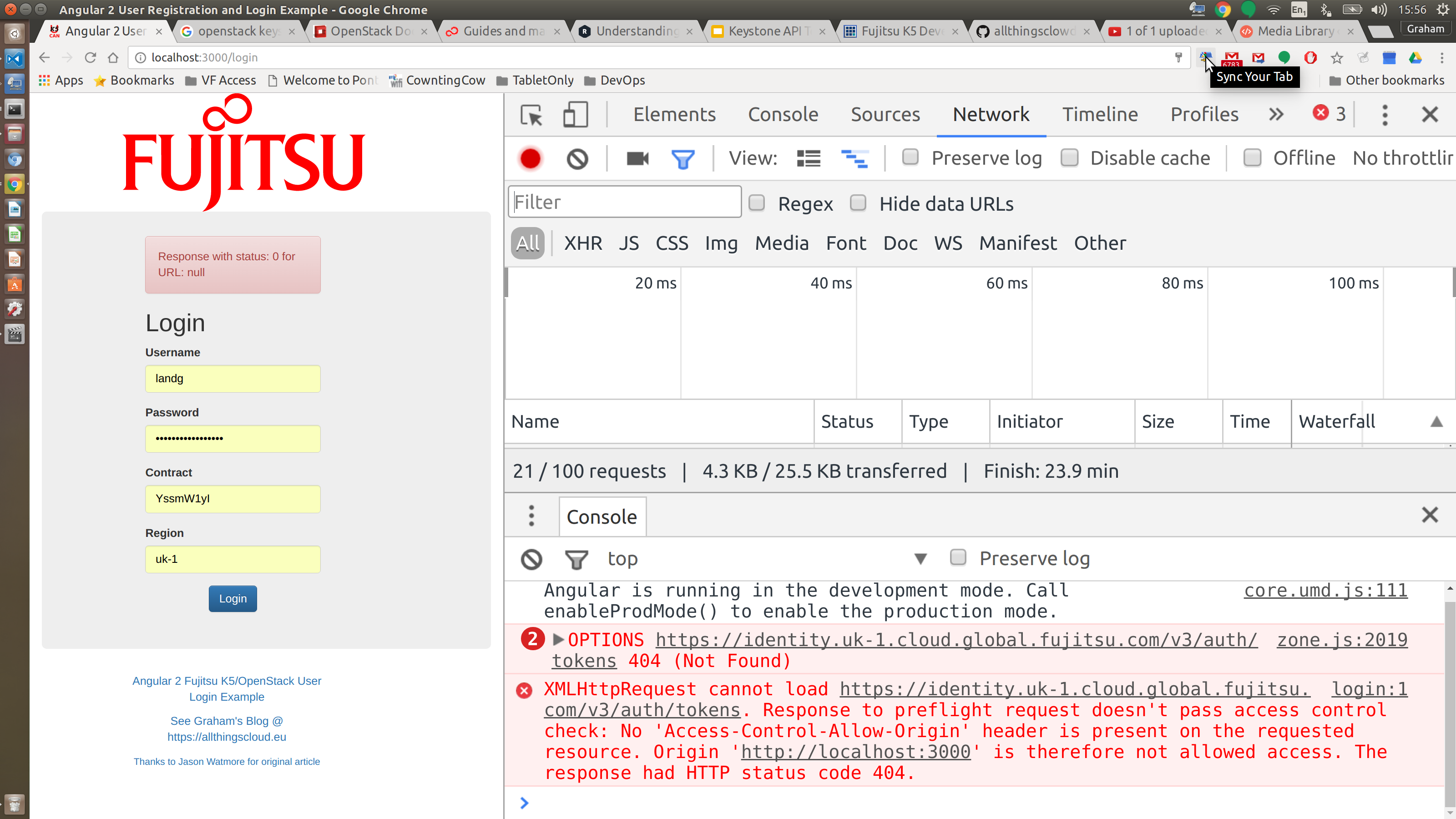
It’s a security mechanism built into almost all modern web browsers designed to prevent malicious attacks such as cross-site-scripting.
The are two ways to address this challenge provided that you have a legitimate need to work across different domains:
-
Enable CORS support on your target server – if you own, or have access to the webserver in question then you can enable CORS on the webserver via a few basic HEADERs. There’s a great blog here that covers the header requirements, please ensure not to mix your client and server headers or you’ll be in for a long night of debug! However, if the target server doesn’t support CORS or you don’t have permission to make the changes you’ll need another work-around such as….
-
CORS Proxy Server – this is a simple server that listens for your web browser requests and then merely relays the same request as a server rather than a browser thus bypassing the CORS challenge altogether. It’s a man-in-the-middle approach but for good rather than bad 🙂
Fujitsu’s K5 API endpoints do not support CORS at present so a CORS Proxy is what I opted for during my recent development challenge. This is a lot easier than it sounds especially if you like working with NodeJS. There are many NPM modules available that require only a single line or two of code to implement a CORS proxy server. For example corsproxy and corsproxy-https. However, after some testing I decided upon the cors-anywhere module as this module forwards both the http response body AND the response headers…something not all proxies bother to do.
The simple proxy server looks like this:
This file contains hidden or bidirectional Unicode text that may be interpreted or compiled differently than what appears below. To review, open the file in an editor that reveals hidden Unicode characters.
Learn more about bidirectional Unicode characters
| // Heroku defines the environment variable PORT, and requires the binding address to be 0.0.0.0 | |
| var host = process.env.PORT ? '0.0.0.0' : '127.0.0.1'; | |
| var port = process.env.PORT | |
| var cors_proxy = require('cors-anywhere'); | |
| cors_proxy.createServer({ | |
| originWhitelist: [], // Allow all origins | |
| //requireHeader: ['origin', 'x-subject-token'], | |
| }).listen(port, host, function() { | |
| console.log('Running CORS Anywhere on ' + host + ':' + port); | |
| }); |
view raw
cors_proxy_service.js
hosted with ❤ by GitHub
The Angular 2 application where I used it can be downloaded here – https://github.com/allthingsclowd/K5_Angular_2_Example_Login
Happy Stacking!